Billable Hours Recovery for CPA Firms: How AI Captures What You're Missing
Most CPA firms are unknowingly writing off 15-20% of their billable time every year — not because they work less, but because memory-based time tracking misses hours that were never logged. This guide exposes the hidden revenue leak, walks through exactly how AI captures time automatically, and…
Billable hours recovery is one of the most underappreciated levers in a CPA firm's revenue model — and one of the most neglected. Industry research consistently shows that accounting professionals lose between 15% and 20% of their billable time to a single culprit: reconstruction from memory. At the end of a long day, no one remembers the 12-minute call that clarified a depreciation question, the 20 minutes spent reviewing a K-1 packet before a client meeting, or the three email threads that turned a routine 1040 into a multi-state compliance exercise.
This isn't a discipline problem. It's a systems problem. Traditional time tracking asks professionals to stop what they're doing, open a timer, select a client, pick a task code, and log hours — a workflow that competes directly with the focus-intensive work of tax preparation. The result is predictable: hours get estimated rather than measured, estimates skew low, and the gap between work performed and work billed quietly compounds into tens of thousands of dollars of annual revenue that never appears on an invoice. Solving this requires a structural approach to billable hours recovery, not more reminders to log time.
The good news is that the same AI infrastructure now transforming document processing and tax research is equally capable of closing this gap automatically. This guide explains exactly how that works, where the biggest leaks typically occur, and how to run a self-audit so you can put a real dollar figure on what your firm is leaving on the table. Billable hours recovery, when automated through AI, removes the manual friction entirely and captures work as it happens.
The Hidden Revenue Leak: Why Time Goes Unrecorded
The Bureau of Labor Statistics estimates the average accountant's fully-loaded hourly cost — wages plus overhead — exceeds $75 per hour for mid-size firms. When you layer in billing rates, even modest under-capture becomes significant. A four-person firm where each staff member under-logs just 30 minutes per day loses more than $130,000 in annual billable revenue at a $150 average rate. Most managing partners would be alarmed by that number. Most have no idea it's happening. For firms evaluating their billable hours recovery approach, this trade-off compounds over time.
The mechanism is well-documented in practice management research. Professionals who log time retrospectively — at end-of-day or end-of-week — systematically underestimate duration. Context switching is the main culprit: a tax preparer might toggle between a return, an email exchange with the client, a quick IRS.gov lookup, and a document review in the space of 40 minutes. Each micro-task feels minor in isolation. Cumulatively, they represent real service delivery that clients would willingly pay for if it were presented accurately. Each of these factors directly shapes how billable hours recovery plays out in practice.
Several categories of work are chronically under-captured across accounting firms. Client email correspondence — especially the back-and-forth required to resolve a missing document or clarify a carryforward — rarely makes it onto a timesheet. Research time, including IRS guidance lookups and state tax authority reviews, is often rounded down or omitted entirely. Document review prior to a client meeting gets absorbed into vague 'meeting prep' blocks. Internal review cycles on complex returns are logged by the reviewer but not by the preparer who responds to review notes. Each of these gaps is invisible at the individual transaction level but devastating at scale. Understanding billable hours recovery in this context is what separates firms that scale from those that stall.
For a deeper look at how lost billable hours accounting firm problems interact with write-off patterns, the glossary entry on billing write-offs is worth reviewing alongside this audit framework. This is precisely where a deliberate billable hours recovery strategy pays off.
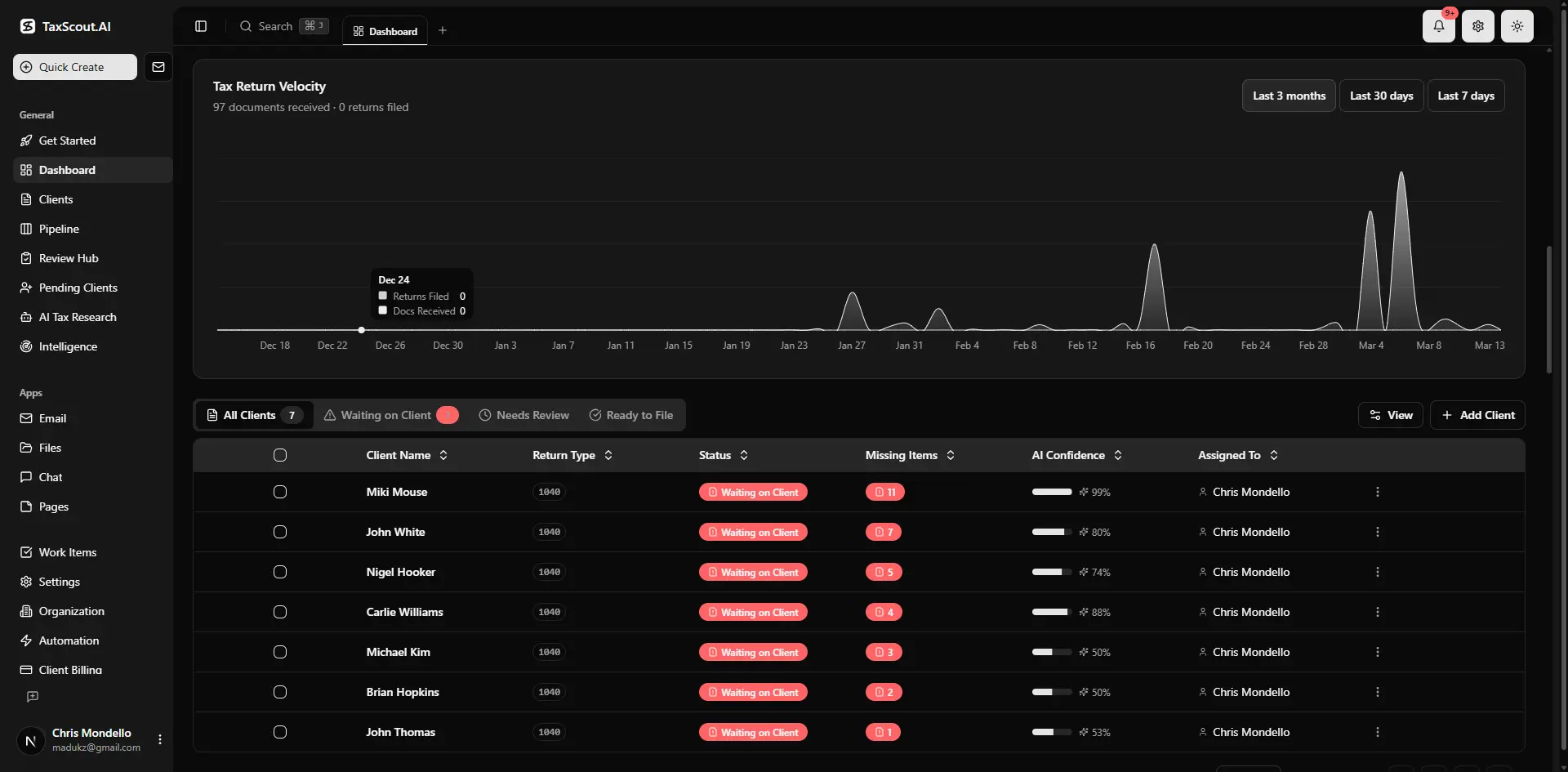
Real-time dashboard showing returns in progress, revenue, and upcoming deadlines
Self-Audit Checklist: Calculate Your Annual Revenue Loss
Before investing in any solution, it is worth establishing a baseline for your specific firm. The following checklist is designed to surface the most common under-capture categories. Work through each item honestly — the output is a dollar figure you can use to justify any tooling investment. Billable hours recovery sits at the center of this decision — get it wrong and the rest unravels.
Step 1 — Establish your effective billing rate. Take total billings for the last 12 months and divide by total logged hours. This is your realized rate, not your stated rate. A significant gap between the two often signals under-capture rather than scope creep. When firms revisit their billable hours recovery priorities, the gaps usually surface here.
Step 2 — Count your email threads per client per month. Pull a sample of 10 active clients and count the email exchanges logged as billable versus the actual thread count in your inbox. The ratio is typically eye-opening. Our guide on shared inbox management for accounting firms documents how email correspondence routinely disappears from timesheets.
Step 3 — Review your research time entries. For any return that required a tax research memo or IRS guidance citation, compare the research hours logged to the complexity of the issue. Straightforward returns with complex positions rarely show more than 15-20 minutes of research time logged, even when the actual research took an hour or more. This is one of the most consistent billable hours recovery failures across firms of every size.
Step 4 — Audit your document review time. For each client folder, note how many documents were processed — W-2s, 1099s, K-1s, 1098s — and compare against logged review time. If a client submitted 22 documents and review time shows 0.3 hours, the log almost certainly doesn't reflect reality.
Step 5 — Compute the gap. Apply the industry benchmark: multiply your total logged hours by 0.15 (conservative) to 0.20 (typical). Multiply that hour gap by your effective billing rate. That is your annual revenue leak estimate. For a firm billing 4,000 hours at $175/hour, the range is $105,000 to $140,000 per year — every year. Firms that treat billable hours recovery as a quarterly priority rather than a one-time fix consistently outperform that benchmark.
Step 6 — Check your utilization rate. Divide billable hours logged by total available hours. Rates below 65% for staff preparers and below 55% for managers often indicate a tracking problem rather than a capacity problem. If your team is busy but utilization looks low, time is disappearing before it reaches the system.
This checklist is not just diagnostic — it is the business case for every conversation you will have internally about changing your time capture workflow. Write the number down. It rarely fails to generate urgency.
Tired of estimating how much billable time your firm loses every month?
TaxScout's AI activity tracking connects email parsing, document timestamps, and pipeline events into a complete billing record — automatically.
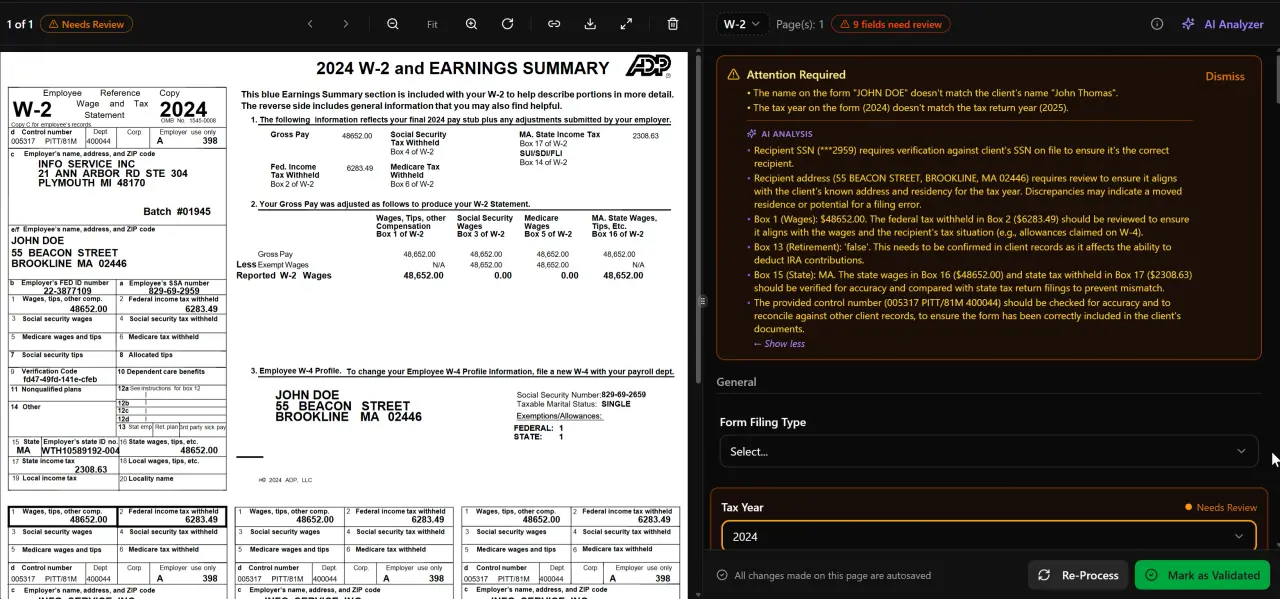
AI classifies, extracts, and validates every document automatically

Click any extracted field to see its source highlighted on the original PDF
How AI Time Capture Works: The Three Core Mechanisms
AI-driven billable hours recovery works by replacing the human memory step entirely. Instead of asking a preparer to reconstruct what happened at 2:15 PM on Tuesday, the system observes and timestamps every client-facing and client-related activity as it occurs, then surfaces a suggested time entry that can be reviewed and approved in seconds. Three mechanisms do the heavy lifting.
Email parsing is the highest-value capture point for most firms. An AI layer connected to your email client — via Gmail OAuth, Outlook Graph API, or IMAP/SMTP — reads each inbound and outbound message, identifies the associated client from the sender address or subject line, classifies the nature of the communication (document request, tax question, scheduling, etc.), and logs a timestamped event against that client's record. The AI does not just detect that an email occurred — it estimates time based on message length, thread depth, and attachment count. The result is a pre-populated time entry that the professional confirms rather than constructs. TaxScout's communication hub handles exactly this pattern, integrating email classification directly into the client record.
Document timestamps are the second mechanism. Every time a document is uploaded, viewed, annotated, or transmitted, the platform captures a timestamped event. A preparer who opens a 24-page partnership return, reviews it for 35 minutes, and sends a follow-up question to the client generates three separate timestamped events — upload receipt, review session, and outbound communication — all tied to the client and matter. Because TaxScout's AI document extraction processes documents through a 5-layer validation pipeline including OCR cross-verification and confidence scoring, every document interaction is already instrumented. Time capture piggybacks on the same event stream.
Pipeline and workflow events provide the third mechanism. Every stage transition in a pipeline management system — intake complete, documents received, preparation in progress, review, delivery — carries a timestamp. The delta between stage entry and stage exit is a proxy for work performed. For tasks like e-signature follow-up, invoice issuance, or portal communications, the platform knows exactly when those events occurred and who performed them. The AI intake workflow, for example, generates a timestamped record from the moment a client begins their organizer to the moment a preparer reviews the completed intake — capturing effort that would otherwise be entirely invisible. Together, these three mechanisms make billable hours recovery systematic rather than aspirational.
Together, these three mechanisms construct a near-complete picture of work performed without requiring a single manual timer start. The professional's role shifts from logging to approving, which takes a fraction of the time and produces dramatically more accurate records.
Why Passive Capture Outperforms Timer-Based Logging
Traditional timer-based logging has a structural flaw: it requires the professional to maintain awareness of billing while performing the work. That dual-track cognitive load is incompatible with deep focus work — the kind of thinking required to analyze a complex K-1, research a cost basis question, or review a multi-state apportionment schedule. Studies from cognitive psychology confirm that task-switching requests of this kind reduce efficiency by as much as 40%, which means timer-based logging doesn't just fail to capture time — it actively destroys the time it was meant to measure.
Passive capture has no such cost. The system observes in the background, generates a suggested entry, and asks for a single approval action. In practice, most firms report that approval workflows take 5-10 minutes at end-of-day versus 30-45 minutes for manual logging — while recovering significantly more hours. That time savings compounds across every member of your team, every day of the year.
For context on how accounting firm time tracking has evolved and what the terminology means in a practice management context, the glossary entry on time tracking provides useful background.
The Research Time Problem and AI Research Agents
Research time is where the most sophisticated under-capture occurs — and where the most valuable billable hours recovery is possible. When a staff preparer encounters an ambiguous position on a 1099-K, a QBI limitation question, or a state nexus issue for a client who recently expanded operations, they typically spend 30-90 minutes reading IRS guidance, checking law.cornell.edu for IRC citations, and reviewing Treasury regulations before arriving at a conclusion. That research is real professional service. It is often never logged.
The reason is partly psychological — research feels like 'figuring it out,' not billable work — and partly structural: most time systems require a task code for research, and many firms don't have a clean code that covers 'IRC lookup and memo.' The result is that research time gets absorbed into the preparation time entry, often at a fraction of its actual duration.
TaxScout's 9 specialized AI research agents address this directly. Each agent performs real-time searches across IRS.gov, Treasury, Cornell's Legal Information Institute, SSA, and Congressional sources, returning cited answers with source links. Every research query and its response is logged as a client event with a timestamp and the identity of the professional who ran it. This means that every time a preparer asks a research question — even a quick one — there is an automatic record of the event, the topic, and the approximate time consumed.
This matters beyond time capture. The research log also creates a defensible audit trail: if a client or regulator ever questions a position, the firm can show exactly what guidance was consulted, when, and by whom. For firms moving toward advisory services or value-based engagements, the research log is also evidence of the expertise being delivered — which supports higher billing rates and better client retention. See our AI accounting productivity guide for more on how research automation compounds across your team.
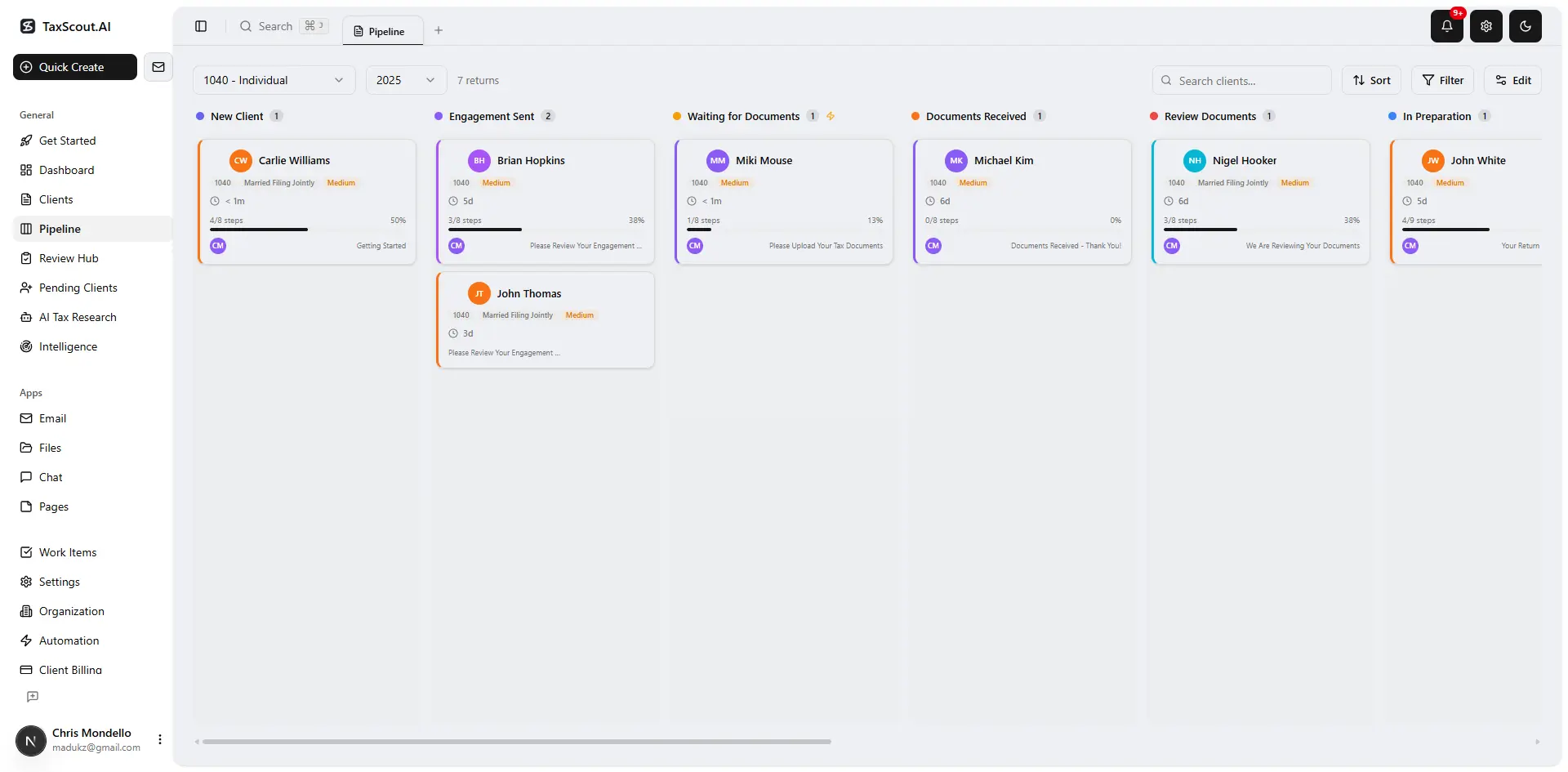
Track every return from intake to filed with drag-and-drop pipeline management

Your clients see your brand — OTP login, document upload, and real-time status
Connecting Time Capture to Invoicing Without Manual Steps
Capturing time accurately is only half the equation. The other half is translating that captured time into invoices without introducing a new manual bottleneck. Many firms that improve time capture still lose revenue at the invoicing stage because the process of pulling time records, assembling an invoice, and collecting payment introduces enough friction that billing cycles stretch out — or entries get dropped.
TaxScout's invoicing module, powered by Stripe Connect Express, connects directly to the client record and its associated time events. When a matter reaches the delivery stage, the system can pre-populate an invoice with all captured time entries, apply the appropriate rate, and route it to the client portal for review and payment — all without the preparer manually re-entering any data. The client receives the invoice via their branded portal with OTP login, can review the detail, and pays online. The entire cycle from work completion to payment can be compressed from weeks to days.
For firms that have already moved toward flat-fee or value-based models, the captured time data serves a different purpose: it becomes the input for profitability analysis. When you know exactly how many hours a particular return type actually consumes — including email correspondence, research, document review, and review cycles — you can price that service accurately. The flat fee billing guide for CPAs explains how to use time data to set fees that protect margin without underpricing your expertise. See also the automate recurring invoicing guide for the billing automation layer that sits on top of this workflow.
For additional resources across practice management, productivity, and tax season operations, our complete blog resource library covers the full range of topics CPA firms are navigating right now.
Billable Time Capture: TaxScout vs. Traditional Approaches vs. Karbon
| Capability | Manual Timer Logging | Karbon Time Suggestions | TaxScout AI Capture |
|---|---|---|---|
| Email correspondence capture | Manual — rarely logged | Partial — suggests from email activity | Automatic — full Gmail/Outlook/IMAP parsing with AI classification |
| Document review timestamps | None — preparer estimates | None documented | Automatic — every document open, review, and transmission logged |
| Research time tracking | Minimal — absorbed into prep time | Not addressed | Automatic — AI research agent queries logged per client per session |
| Pipeline event timestamps | None | Workflow stage tracking | Full 12-stage pipeline with entry/exit timestamps per team member |
| Invoice connection | Manual export required | Requires additional billing module | Direct — Stripe Connect invoice pre-populated from time events |
| Pricing model | Varies | ~$59/user/month | TaxScout Firm: $149/month flat, unlimited team members |
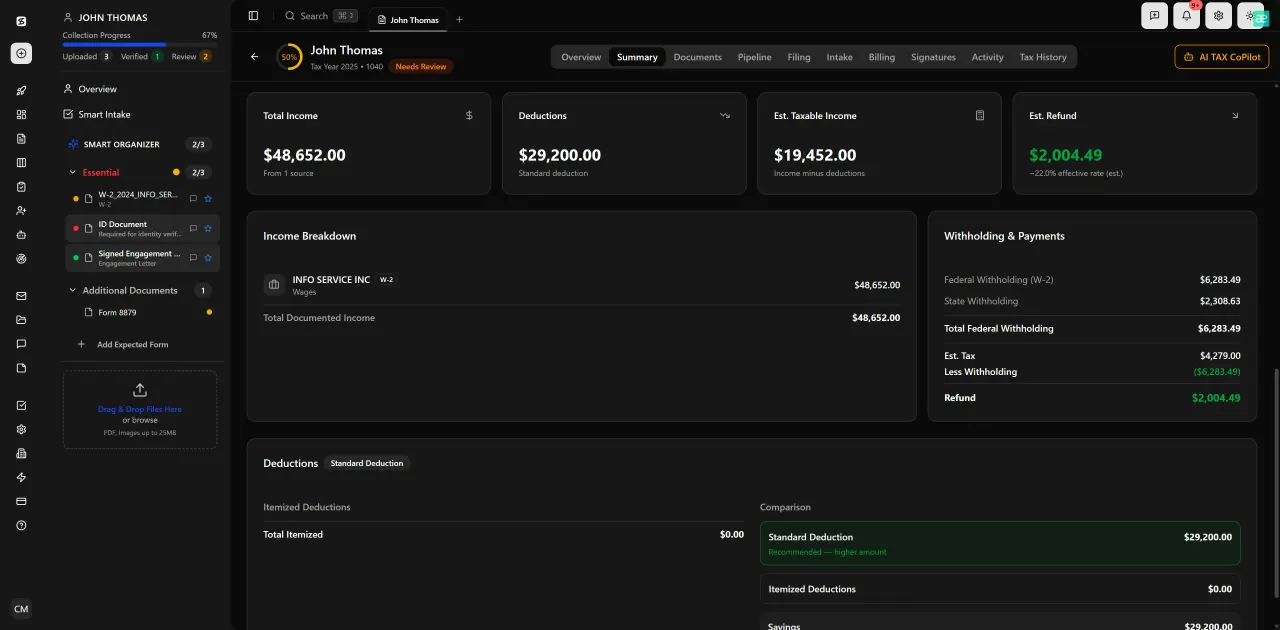
Review with AI assist — 9 agents answer questions with full client context
Accounting Firm Time Tracking: Implementation in Three Phases
Switching to AI-assisted time capture doesn't require a rip-and-replace of your existing workflow. The most effective implementations follow a three-phase approach that minimizes disruption while generating visible ROI within the first billing cycle.
Phase 1 — Connect your communication channels. Start by connecting your email accounts through Gmail OAuth or Outlook Graph integration. The AI classification layer begins building a capture log immediately, even before you've changed any internal processes. Within the first two weeks, you'll have a baseline dataset showing how much email correspondence is being generated per client — data that most firms have never seen in aggregate. This phase requires no change to preparer behavior.
Phase 2 — Migrate document workflows to the platform. Move client document collection and review into TaxScout's document management environment. As documents are uploaded through the client portal and processed through the AI document extraction pipeline, every interaction is timestamped automatically. The split-screen PDF viewer with click-to-source field highlighting creates a natural review environment that staff adapt to quickly — and every review session is logged without any timer interaction.
Phase 3 — Activate the approval workflow. Once the system has been capturing events for a full billing cycle, enable end-of-day approval prompts. Each team member sees a pre-populated list of suggested time entries based on the day's activity — emails, document reviews, research queries, portal communications, pipeline transitions. They review, adjust if needed, and approve in a few minutes. Firms that complete all three phases typically report recovering 12-18% more billable hours in their first full quarter compared to the same period in the prior year, making this one of the highest-return investments available for billable hours recovery.
The KPI dashboard for accounting firms article covers how to track utilization rate and realization rate improvements once the new capture system is running — both are leading indicators that the recovery is working.
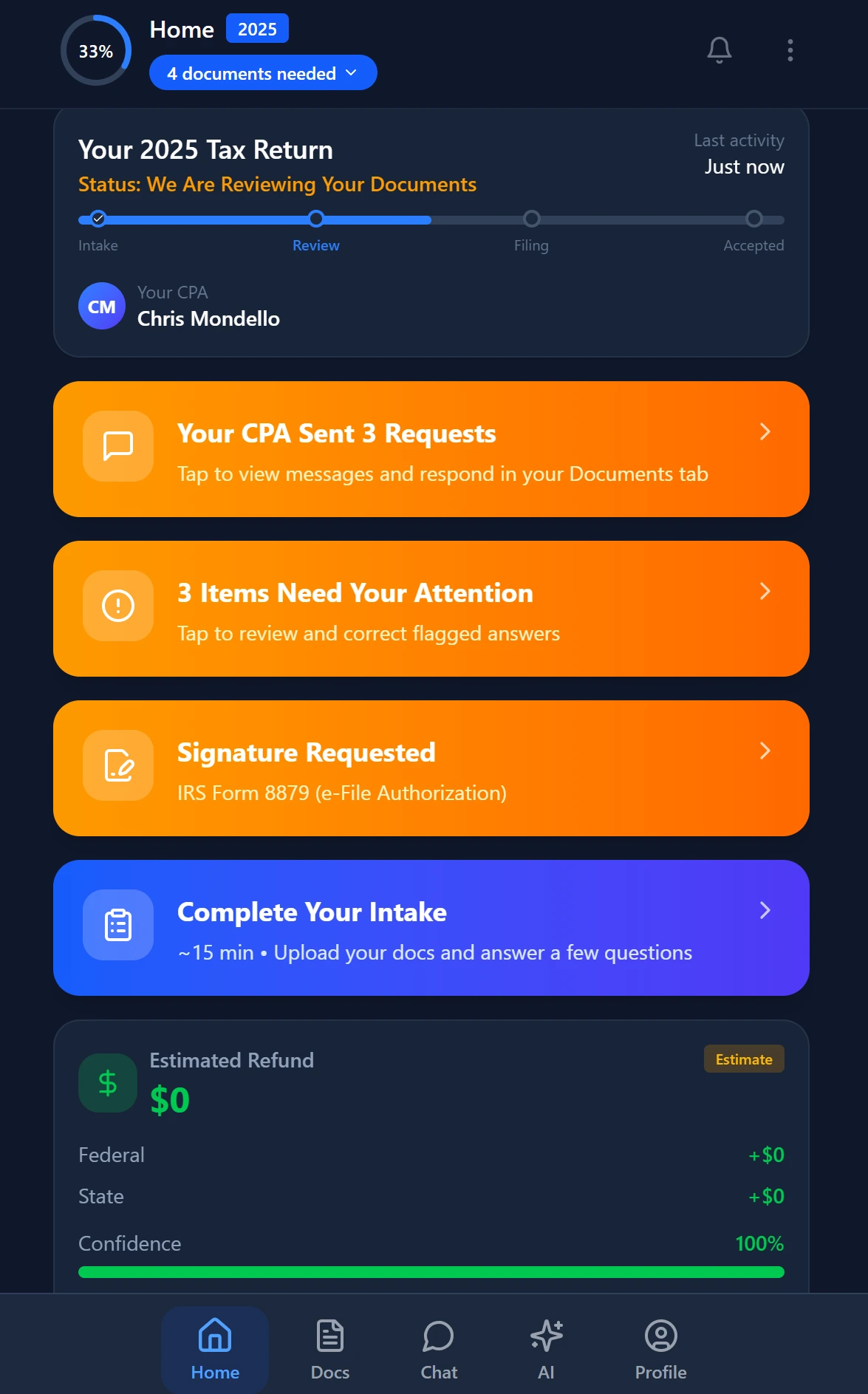
Smart intake auto-fills from uploaded documents and prior-year data
What Billable Hours Recovery Means for Firm Valuation
The revenue impact of improved billable hours recovery extends beyond the immediate billing cycle. Accounting firm valuations are typically expressed as a multiple of annual revenue — commonly 0.8x to 1.2x for smaller practices, according to succession planning data from the AICPA and published by state CPA societies. A firm that recovers $120,000 in previously unbilled annual revenue doesn't just add $120,000 to its top line — it adds $96,000 to $144,000 to its implied valuation, assuming a 0.8-1.2x multiple.
This makes time capture automation a balance sheet investment, not merely an operational improvement. For partners approaching succession, for firms preparing for a merger, or for solo practitioners building toward a sale, the discipline of accurate time capture is one of the highest-return activities available. It also improves the quality of financial reporting used in due diligence — buyers pay more for firms with clean, documented revenue histories than for firms whose billings are based on memory estimates.
The succession planning glossary entry covers how revenue documentation affects firm valuation in more detail. For context on how technology investments fit into the broader growth picture, the firm growth resources at TaxScout are worth reviewing alongside this analysis.
Firms that have implemented comprehensive time capture also report secondary benefits: fewer billing disputes, higher client satisfaction scores (because invoices match the client's own perception of work performed), and better staff retention due to reduced end-of-day administrative burden. Accurate billing is not just a revenue story — it is a professional culture story, and sustained billable hours recovery is the foundation it rests on.
Ready to see exactly how much revenue your firm is leaving uncaptured?
TaxScout combines AI document processing, email parsing, research agent logging, and Stripe-connected invoicing in one flat-rate platform — no per-user fees, unlimited team members.
Frequently Asked Questions
Industry benchmarks suggest accounting professionals lose between 15% and 20% of their billable time when relying on memory-based or manual time logging. For a firm billing 4,000 hours annually at $175/hour, that translates to between $105,000 and $140,000 in unrecovered revenue per year. The gap is largest for email correspondence, research time, and document review — categories that feel minor in the moment but accumulate significantly across a full year.
Keep reading
Amended FBAR Procedures: How CPAs Correct Foreign Account Errors Without Triggering Penalties
Oct 12, 2026 · 1 min read
Transparency in Coverage Final Rules: What CPA Firms Must Do Now
Oct 12, 2026 · 1 min read
Backdoor Roth IRA: How CPAs Execute the Strategy for High-Income Clients
Oct 12, 2026 · 1 min read
Stay up to date
Get the latest tax tech insights delivered to your inbox.