Every Client Conversation. Every Channel. One AI-Powered Inbox.
Email, chat, and SMS unified in a single priority-sorted inbox. AI classifies emails into 6 categories, drafts context-aware replies, scores every thread by urgency, and proactively suggests follow-ups for clients going silent. TaxDome shows you messages. TaxScout tells you who needs attention and what to say.
The Problem: Client Communication Is Scattered Across 4+ Tools
Your client emails you a W-2. Then texts asking if you got it. Your team discusses the return in Slack. The client follows up via chat in your portal. Now the conversation about one return is spread across Gmail, iMessage, Slack, and your portal — with no single view of what happened or what's pending. You miss the follow-up. The client waits. Tax season gets harder.
The Solution: One AI-Powered Inbox That Covers Every Channel
TaxScout unifies email, real-time chat, and SMS into a single priority-sorted inbox. AI scores every thread by urgency — not just recency — so clients with unsigned engagement letters and unpaid invoices float to the top. When you open a thread, AI has already drafted a reply informed by the client's pipeline stage, missing documents, and conversation history. When a client goes silent, Smart Nudges surface them with a pre-written follow-up. When a return enters a new pipeline stage, clients get notified across all channels automatically.
Unified Inbox
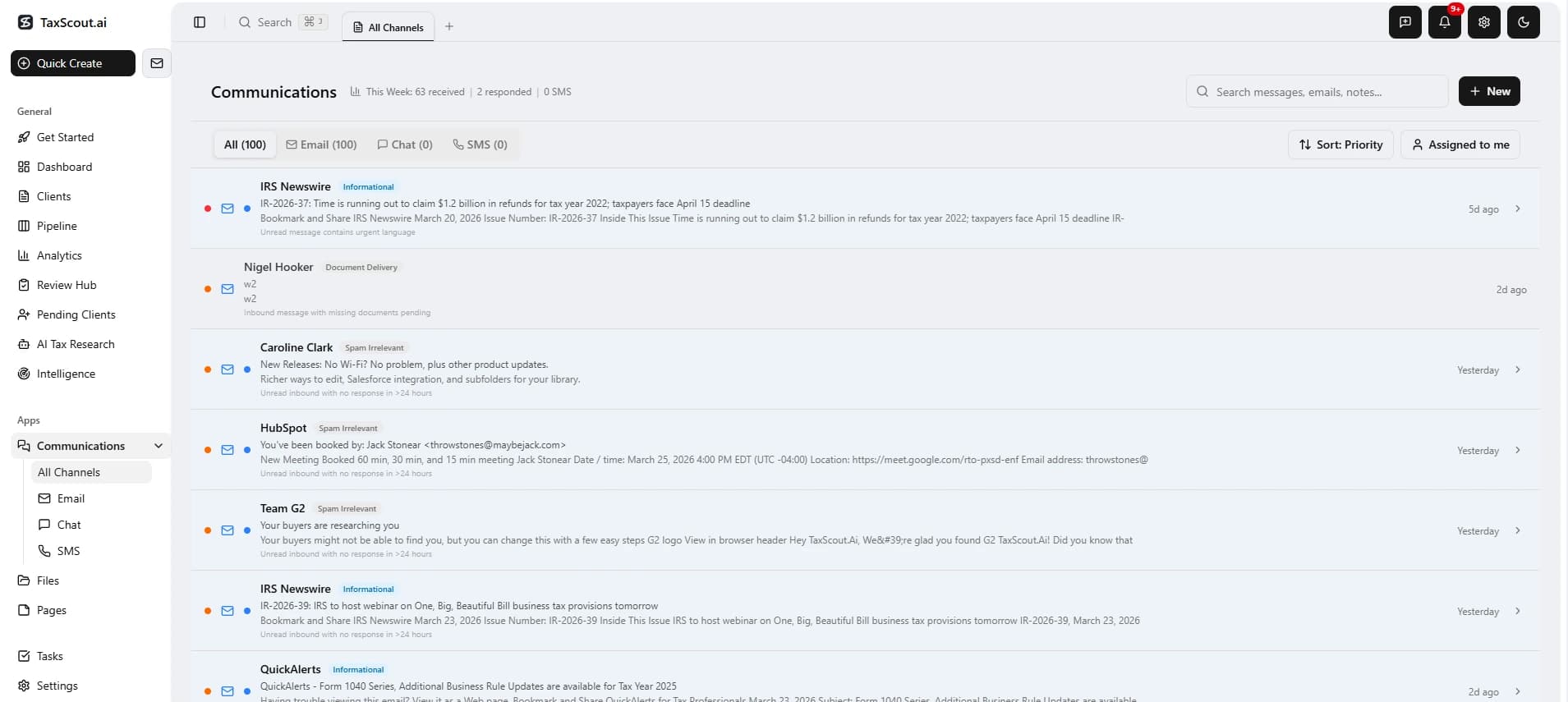
Every channel — email, chat, SMS — in one priority-sorted view. AI scores each thread by urgency so the most critical conversations surface first, not just the most recent.
All Channels, One View
Email threads, chat conversations, and SMS messages in one priority-sorted list. Filter by channel, search across all, or see everything mixed chronologically.
AI Priority Scoring
Every thread gets a 0–100 priority score based on: unread status, AI email category, pipeline stage, days stuck, missing documents, unsigned forms, and unpaid invoices. Critical items float to the top.
Cross-Channel Search
Search "1099" and find results from emails, chat messages, SMS logs, and organizer notes. Click any result to jump to its source.
Thread Assignment
Assign any email or chat thread to a specific team member. "Assigned to me" filter. Bulk-assign multiple threads at once.
Smart Nudges
AI identifies clients stuck in the pipeline with no recent communication and surfaces them at the top with pre-drafted follow-up messages. Dismiss nudges for 7 days.
Combined Unread Badge
Sidebar shows total unread count across all email + chat channels — one number to track.
Email — Full-Featured
Three Providers, One Inbox
All providers support OAuth token encryption (strongly encrypted ), automatic token refresh, and background sync via durable workflows.
Gmail
OAuth 2.0 with offline access
Full sync + incremental via historyId. Labels preserved. Thread grouping via Gmail thread IDs.
Microsoft 365
OAuth 2.0 via Microsoft Graph API
Full sync + delta queries for efficient change tracking. Conversation threading via Microsoft conversation IDs.
IMAP / SMTP
Direct connection to any provider
Connect any email provider. Configurable polling interval (2–15 minutes). Efficient incremental sync.
AI Email Classification
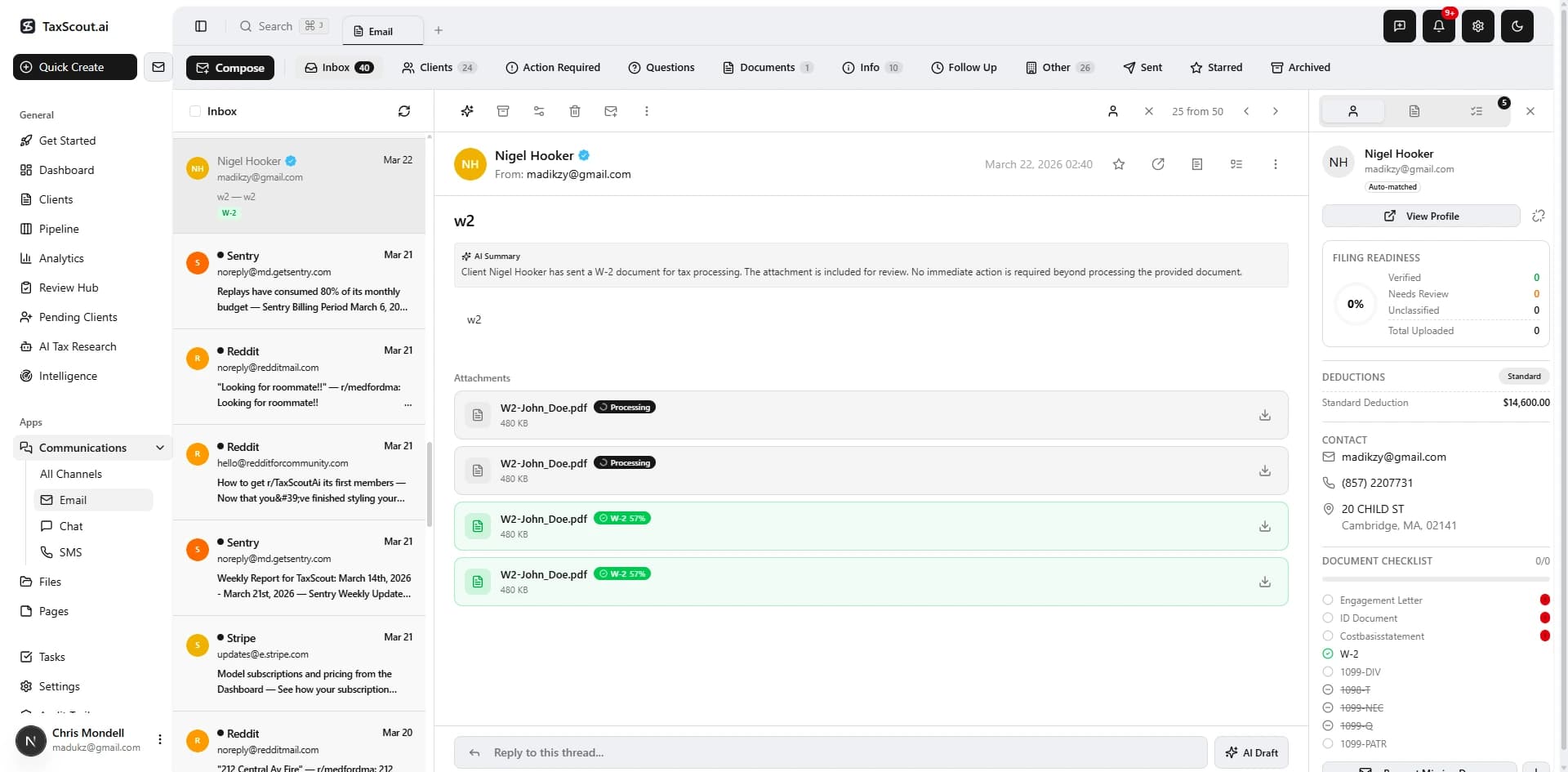
Two-level triage: 100+ vendor domains filtered first, then AI classifies the rest into 6 categories. No rules to configure.
Each thread also receives: intent summary, 2–3 sentence overview, and a suggested reply draft.
Built for Tax Season Email
AI Draft Replies
AI drafts replies informed by client filing status, missing documents, and return progress. One-click 'Use This Reply.'
Auto-Match to Clients
Database trigger matches sender addresses to known clients. Once seen, all future emails auto-link.
Attachment Intelligence
Auto-detect W-2, 1099, ID documents in email attachments. Detection badges show form types in the UI.
Context Sidebar
Client profile, document checklist, and detected attachments alongside every email thread.
Chat — Real-Time with AI
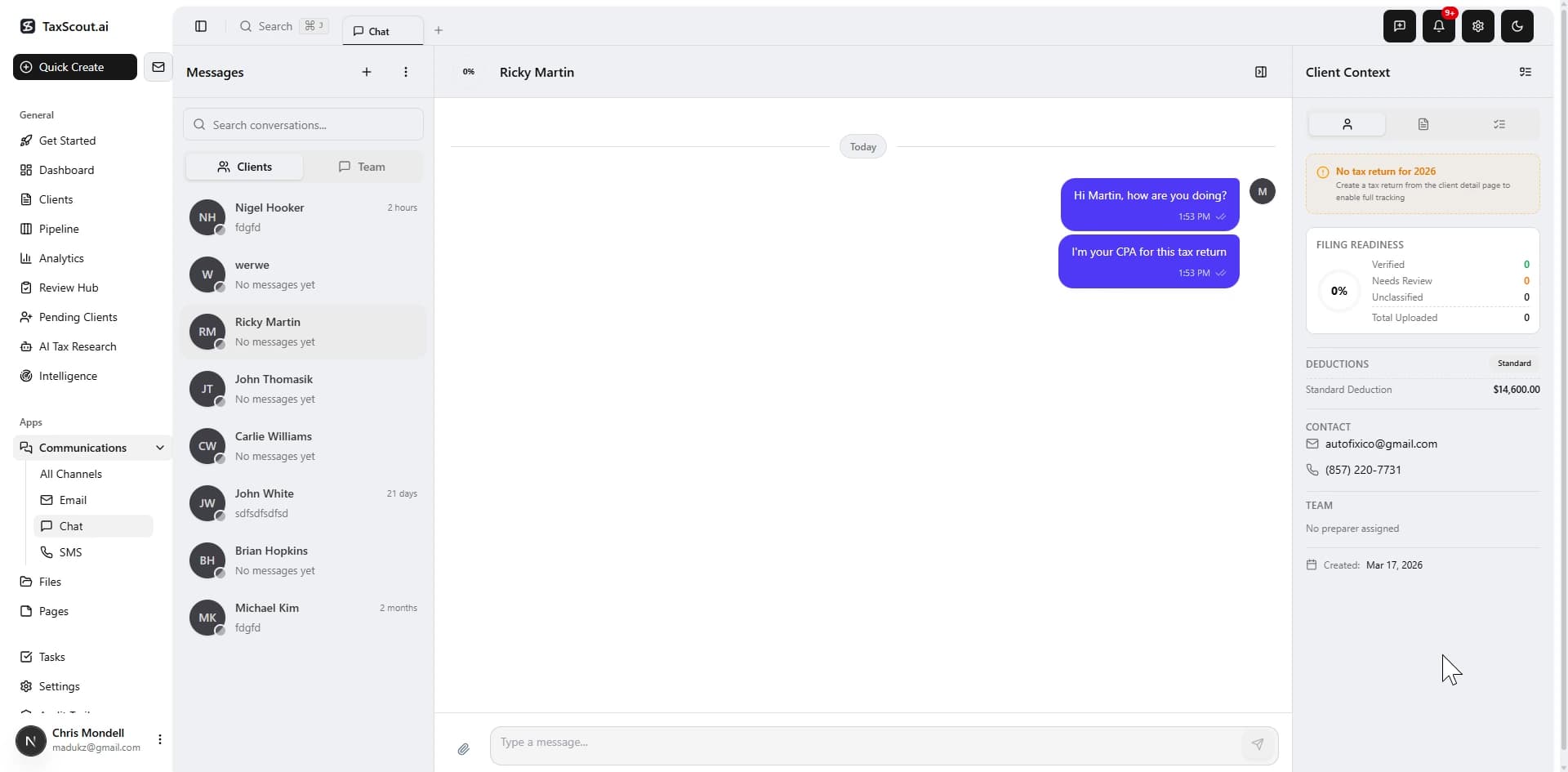
Built-in messaging for clients and your team — no Slack, no Intercom, no separate app. AI summarizes conversations and suggests replies.
Client Support
Client-facing conversations — clients see and reply
Internal Notes
CPA-only notes per client — invisible to clients
Team DMs
Direct messages between team members
Group Channels
Team-wide discussion channels
AI Chat Summary
Open a client conversation and see a 2–3 sentence AI summary of what was discussed, what's pending, and any deadlines mentioned.
AI Suggested Replies
When a client asks a question, AI drafts a professional reply based on conversation history, pipeline stage, and missing documents.
@Mentions
Tag team members in any chat with @Name. They receive an email notification with the message context and a link to reply.
Real-Time Delivery
Messages appear instantly. Online presence indicators, typing indicators, read receipts with delivery checkmarks.
SMS Integration
Reach clients where they actually respond — their phone. TCPA-compliant, two-way, and deeply integrated with your pipeline.
- "Also Send SMS" toggle — in any client chat, toggle it on and the message goes as both a chat message and an SMS. Messages marked with a phone badge.
- Compose standalone SMS — from the Communications page, click New → SMS to text any client with a phone number.
- Pipeline-triggered SMS — when a client enters missing_info, billing, signing, client_review, or client_set stages, SMS fires automatically alongside email and chat.
- Two-way SMS — client SMS replies route into their chat conversation, creating a seamless SMS-to-chat bridge.
- TCPA compliance — opt-in tracking with timestamp, consent IP, and source. Quiet hours (9pm–8am). 2-day dedup per template. One-touch opt-out.
AI Intelligence Layer
AI doesn't just organize your messages — it tells you who needs attention, what to say, and which channel to use.
Auto-Drafted Replies
Expand any unread thread in the unified inbox to see an AI-generated draft reply that references the client's pipeline stage, missing documents, and conversation history.
Smart Channel Selection
AI analyzes client behavior (portal logins, email response times, chat activity) and recommends the optimal channel: "Client inactive 14 days — SMS recommended (98% open rate)."
Escalation Engine
Daily cron finds clients stuck 7+ days with no communication in 5+ days. Auto-creates a high-priority task, emails the CPA owner, and logs the escalation with 7-day dedup.
Weekly Intelligence Report
Monday morning email to CPA: messages received/responded, average response time, unresolved threads, at-risk clients (no response in 5+ days), returns completed.
How It Works
Connect Your Email
Click 'Connect Gmail,' 'Connect Outlook,' or 'Add IMAP Account.' OAuth flow takes 30 seconds. Your existing inbox stays untouched — TaxScout syncs your last 90 days and classifies everything.
See All Channels in One Place
Open the Communications page to see every email, chat, and SMS thread in one priority-sorted list. AI scores each thread 0–100 based on urgency, pipeline stage, and missing items.
AI Drafts Your Replies
Open any thread and see an AI-drafted reply that knows the client's filing status, missing documents, and return progress. Click 'Use This Reply' to send — or edit first.
Chat with Clients & Team
Real-time messaging with clients (they see it in their portal), internal notes visible only to your team, and team DMs — all with AI summaries and @mentions.
SMS When Email Isn't Enough
Toggle 'Also Send SMS' in any chat to reach clients on their phone. Pipeline stage changes trigger SMS automatically. Two-way SMS replies appear in the chat thread.
vs. Competitors
TaxDome has no email integration, no chat, and no SMS. Canopy and Karbon offer email sync but lack AI classification, AI draft replies, SMS, or a unified inbox. TaxScout is the only one we are aware of that unifies email + chat + SMS in one AI-prioritized view with auto-drafted replies, smart channel selection, and an escalation engine that catches clients falling through the cracks.
Frequently Asked Questions
Email (Gmail, Outlook/365, IMAP), real-time chat (client-facing and internal), and SMS (via AWS End User Messaging). All channels appear in one unified inbox sorted by AI priority score, not just recency.
See Communication Hub in Action
Book a 15-minute walkthrough and see how it fits your firm.