Month-End Close Checklist for CPA Firms: How AI Cuts Close Time in Half
Most CPA firms spend 5–8 days on month-end close — not because the work is complex, but because document chasing, manual reconciliation, and status tracking eat hours that AI could reclaim. This guide delivers a practical 12-step month-end close checklist and shows exactly which steps TaxScout…
Every CPA firm that handles bookkeeping or accounting engagements knows the pattern behind a month end close checklist: the last week of the month arrives, inboxes flood with bank statements and receipts, staff race through reconciliations, and the managing partner reviews financials at 9 PM to catch errors before the client call. A complete month-end close checklist should make this process predictable — yet most firms run it from memory, tribal knowledge, or a shared Google Doc that hasn't been updated since 2021.
The gap between a documented month end close checklist and an automated one is where accounting firms are quietly losing competitive ground. According to the IRS Taxpayer Advocate Service's Annual Report to Congress, administrative burden on practitioners continues to grow year over year — and close processes are a primary driver. Firms that invest in structure now will handle 40% more clients per staff member within two years; those that don't will struggle to retain staff and clients alike.
This guide gives you a numbered, step-by-step month-end close checklist covering every task from reconciliations through client deliverables. More importantly, it breaks down which steps AI handles automatically on TaxScout, by how much, and what that means for your team's capacity — no demo required to understand the value. Whether you're building your first month end close checklist or refining an existing one, the steps and time estimates below are drawn from real CPA firm workflows.
Why Most CPA Firms Struggle with Month-End Close
The average accounting close process at a 5–15 person CPA firm spans 5 to 8 business days, with the bulk of that time consumed by three bottlenecks: document collection (clients send statements in PDF, email attachment, or not at all), manual data cross-checking (comparing general ledger balances to bank feeds line by line), and status coordination (who finished which client, what's still outstanding, what's waiting on a response). A well-structured month end close checklist directly addresses each of these bottlenecks by assigning clear ownership and sequencing tasks to eliminate idle time between steps.
Competitors like Karbon market faster month-end close through workflow templates and email-linked task management, but their platform lacks AI document extraction or automated validation — your staff still does the data work, just with better task lists. According to the Bureau of Labor Statistics Occupational Outlook Handbook, demand for accounting and audit work is growing, while the pipeline of new CPAs entering the profession is shrinking. That math means every firm must find ways to do more with the same team. In practice, that means your month end close checklist still depends on staff manually keying in figures — Karbon just makes it easier to track who hasn't done it yet.
The answer is not just better checklists — it's a month-end close accounting firm workflow where AI handles extraction, validation, and status tracking automatically, freeing staff for judgment-intensive review and advisory work. That's the architecture TaxScout was built on. For firms evaluating their month end close checklist approach, this trade-off compounds over time.
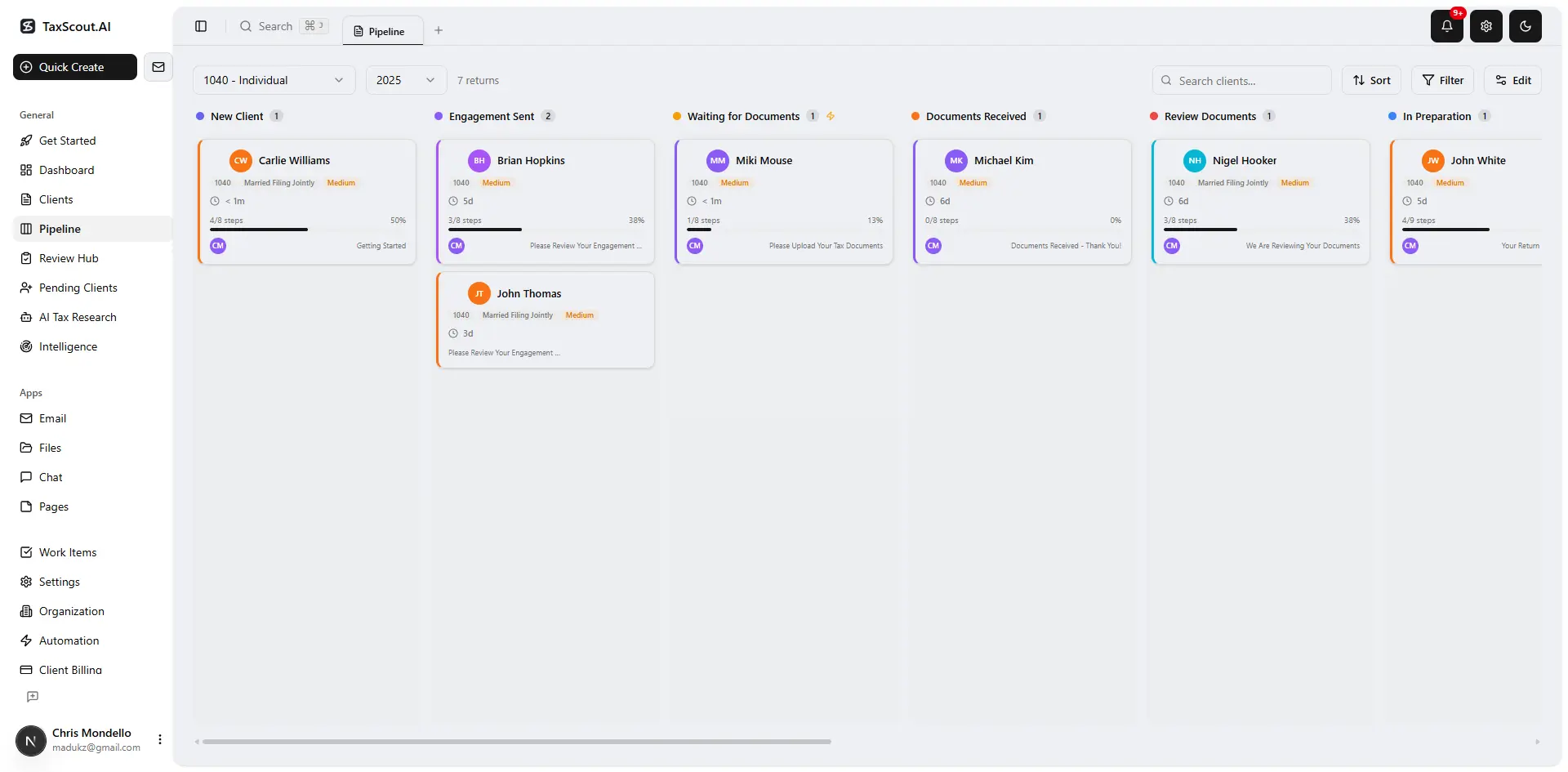
Track every return from intake to filed with drag-and-drop pipeline management
The 12-Step Month-End Close Checklist for CPA Firms
Tired of manual workflows slowing your firm down? See how TaxScout handles this with AI-powered automation. → Book a 15-Min Demo Each of these factors directly shapes how month end close checklist plays out in practice.
Use this checklist as a starting point for every monthly accounting engagement. Steps marked [AI] below are fully or partially automated on TaxScout's platform. The remaining steps require human judgment but benefit from AI-prepared data. Understanding month end close checklist in this context is what separates firms that scale from those that stall.
Work through each step in order. For firms managing 20+ monthly clients, assign each step a pipeline stage in your practice management software so nothing falls through the cracks. This is precisely where a deliberate month end close checklist strategy pays off.
Step 1: Collect and Classify All Source Documents
Request and receive bank statements, credit card statements, payroll reports, loan statements, and any expense receipts from the client. On TaxScout, the branded client portal sends automated document requests tied to the engagement, and clients upload directly — no email attachment hunting required. TaxScout's AI document extraction then classifies every uploaded file across 180+ form types automatically. Month end close checklist sits at the center of this decision — get it wrong and the rest unravels.
AI Impact: Document classification and routing that typically takes 45–90 minutes per client is reduced to under 5 minutes. When firms revisit their month end close checklist priorities, the gaps usually surface here.
Step 2: Run Bank Reconciliation for All Accounts
Match every transaction in the general ledger to the corresponding bank or credit card statement line. Flag uncleared items, deposits in transit, and outstanding checks. TaxScout's 5-layer validation pipeline applies 15 deterministic math rules and cross-document validation to surface discrepancies before your staff opens the file — essentially pre-reconciling the data. For a deeper look at what this validation layer catches, see our guide on AI document extraction for CPAs.
AI Impact: Pre-validation eliminates 60–80% of manual line-item checking on clean bank feeds.
Step 3: Reconcile Accounts Receivable and Accounts Payable
Confirm that all AR invoices issued during the period are recorded, match cash receipts to open invoices, and verify AP balances against vendor statements. TaxScout's invoicing feature via Stripe Connect Express tracks payment status in real time, so AR aging data is always current. Pair this with the accounts receivable aging guide for firms that bill clients on retainer.
AI Impact: Real-time payment sync eliminates manual AR aging assembly — approximately 30 minutes saved per client monthly.
Step 4: Review and Post Recurring Journal Entries
Record prepaid amortization, accrued expenses, depreciation schedules, and any deferred revenue entries. Verify that prior-month accruals reversed correctly. TaxScout's client-context AI memory retains entity structures and prior filing history, so it flags when a recurring entry is missing or inconsistent with the prior period — reducing the risk of omission errors.
AI Impact: Automated consistency checks flag missing or out-of-pattern entries in seconds rather than requiring a staff review pass.
Step 5: Reconcile Payroll Liabilities
Confirm that payroll tax deposits match the payroll register, verify 941 liability accounts are cleared, and reconcile any differences between gross payroll and net deposits. Cross-reference with state withholding remittances. TaxScout's AI extraction handles payroll summary PDFs and 940/941 forms natively as part of its 180+ supported document types.
AI Impact: Payroll document extraction and cross-validation replaces 20–40 minutes of manual data entry per pay period.
Step 6: Reconcile Balance Sheet Accounts
Systematically work through every balance sheet account: cash, prepaid assets, fixed assets, accumulated depreciation, loans payable, and equity accounts. Verify that the equity rollforward from the prior period is correct. The glossary entry on bank reconciliation covers foundational concepts if you need a reference for training newer staff.
AI Impact: AI-prepared trial balance with confidence scores lets senior staff focus on unusual variances rather than routine confirmation.
Step 7: Perform Analytical Review of Income Statement
Compare current-month revenue and expense line items to prior month, prior year, and budget. Investigate variances greater than a materiality threshold (typically 10% or a fixed dollar amount). Flag anything requiring client explanation before the deliverable is assembled. TaxScout's AI research agents can pull IRS guidance on deductibility questions that surface during this review.
AI Impact: Variance pattern detection surfaces anomalies automatically, cutting analytical review time by an estimated 40%.
Step 8: Prepare and Review Adjusting Journal Entries
Post any adjustments identified in steps 2–7. Document the rationale for each adjustment in the workpaper. Have a second reviewer approve material adjustments before finalizing. TaxScout's pipeline management with 12 customizable stages allows you to gate the next step until the reviewing partner marks adjusting entries approved.
AI Impact: Automated gate controls in pipeline stages prevent deliverables from advancing until the review step is signed off — eliminating missed review steps.
Step 9: Assemble Financial Statements
Generate the balance sheet, income statement, statement of cash flows, and any supplementary schedules. Format to match the client's preferred template. TaxScout's Excel 1040 calculator (66 sheets, ~36,000 formulas) supports complex multi-entity rollups, and the PDF tools suite handles merging, page ordering, Bates numbering, and PII masking before delivery.
AI Impact: PDF assembly, page ordering, and PII masking steps that typically take 15–30 minutes are automated in the document finalization workflow.
Step 10: Conduct Partner-Level Financial Statement Review
The managing partner or senior reviewer conducts a final review of the financials for reasonableness, completeness, and compliance with applicable standards. TaxScout's split-screen PDF viewer with click-to-source field highlighting allows the reviewer to trace any figure back to the originating source document in a single click — a critical tool for efficient review without re-pulling files.
AI Impact: Source traceability reduces partner review time by 30–50% by eliminating the need to re-locate supporting documents.
Step 11: Obtain Client Approval and E-Signature
Send the reviewed financials and any management letter to the client for approval. Collect e-signature on engagement deliverables or updated engagement letters as required. TaxScout handles this through Documenso e-signatures covering engagement letters, authorization forms, and financial statement certifications — with OTP-authenticated client portal access, no password required.
AI Impact: Automated delivery and signature collection eliminates email back-and-forth, cutting the approval cycle from 2–5 days to same-day for responsive clients.
Step 12: Archive Workpapers and Update Client File
Store all workpapers, source documents, and the final financial statements in the client's permanent file. Tag documents with the period covered. Confirm that the engagement is marked complete in your practice management system and that any outstanding items carry forward to next month's checklist. TaxScout's file management system with AES-256-GCM encrypted storage and a 7-year retention policy handles archiving automatically when the pipeline stage is marked complete.
AI Impact: Automated archiving and tagging removes 10–20 minutes of manual file organization per engagement close.
Tired of running month-end close from memory and catching errors at 9 PM?
TaxScout automates document collection, validation, and pipeline gating so your team closes faster with fewer mistakes — at $149/month flat for 10 seats.

Click any extracted field to see its source highlighted on the original PDF
Which Steps AI Automates and by How Much
Breaking down the 12 steps above, TaxScout's AI directly accelerates eight of them. The table below summarizes the automation layer and estimated time savings per client engagement. These estimates assume a clean-data client with complete source documents; complex or late-document clients will see proportionally larger gains as AI-assisted exception handling replaces manual follow-up.
Steps 4, 6, and 7 — journal entry review, balance sheet reconciliation, and analytical review — still require professional judgment, but AI-prepared data means staff spend their time evaluating flagged exceptions rather than doing baseline data assembly. The accounting firm capacity planning guide covers how to redeploy that reclaimed time toward higher-margin advisory services.
AI Automation Breakdown: Month-End Close Checklist Steps
| Step | Manual Time (Avg) | With TaxScout AI | Time Saved |
|---|---|---|---|
| 1. Document Collection and Classification | 45–90 min | Under 5 min | ~85 min |
| 2. Bank Reconciliation | 60–120 min | 15–30 min (review only) | ~75 min |
| 3. AR/AP Reconciliation | 30–60 min | 10–20 min | ~35 min |
| 4. Recurring Journal Entries | 20–40 min | 10–20 min (AI flags gaps) | ~20 min |
| 5. Payroll Liability Reconciliation | 30–50 min | 10–15 min | ~30 min |
| 6. Balance Sheet Reconciliation | 45–90 min | 20–40 min | ~45 min |
| 7. Income Statement Analytical Review | 30–60 min | 15–25 min | ~25 min |
| 8. Adjusting Journal Entries | 20–40 min | 10–20 min (gated approval) | ~20 min |
| 9. Financial Statement Assembly | 30–60 min | 10–15 min | ~40 min |
| 10. Partner Review | 45–90 min | 20–40 min (source tracing) | ~40 min |
| 11. Client Approval and E-Signature | 2–5 days cycle | Same-day (auto delivery) | 1–4 days |
| 12. Workpaper Archiving | 15–25 min | Auto on stage complete | ~20 min |
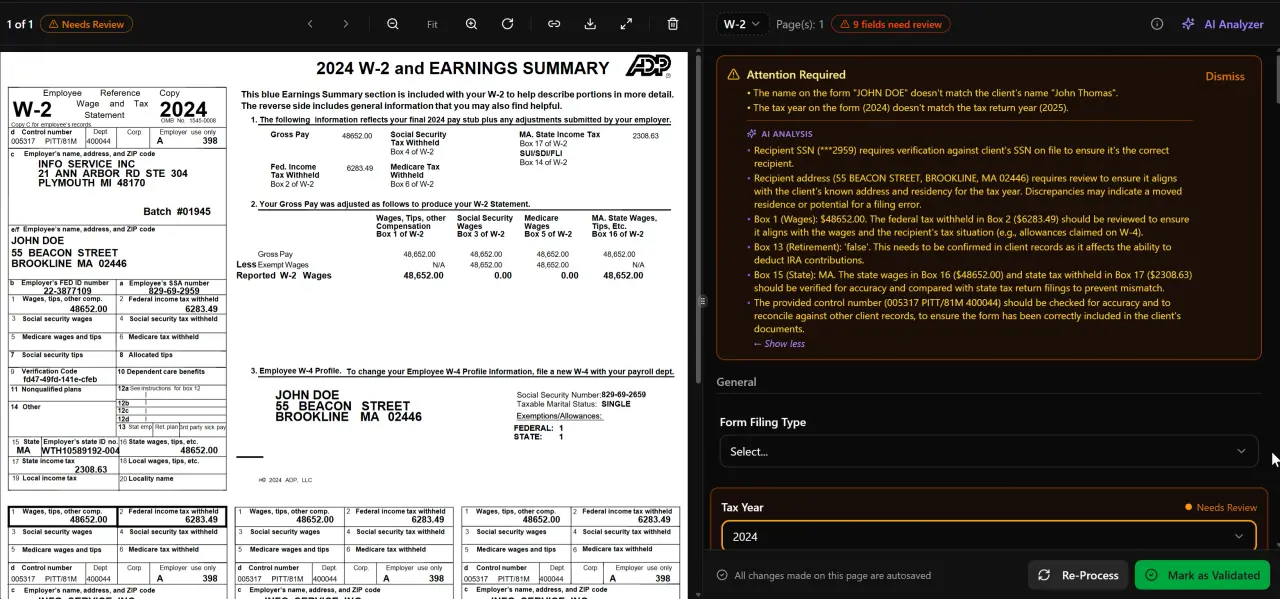
AI classifies, extracts, and validates every document automatically

Your clients see your brand — OTP login, document upload, and real-time status
How TaxScout Compares to Karbon and Other Close Workflow Tools
Karbon is a strong email-centric workflow tool, but its Aider product demo is a promotional video — not a step-by-step close methodology. More critically, Karbon has no AI document extraction, no 5-layer validation pipeline, and no cross-document math checking. Your team still does the data work; Karbon just helps track who is doing it. At approximately $59 per user per month, a 10-person firm pays around $590/month for task management without any document intelligence. See our full Karbon alternative comparison for a side-by-side breakdown.
TaxDome and Canopy take a similar approach — their blog content focuses on onboarding workflows and general automation broadly, with no dedicated month-end close resource and no AI extraction capability. Canopy charges approximately $45 per user per month per module, with Smart Intake costing an additional $11 per client — meaning a 10-person firm with active monthly clients pays roughly $660/month before add-ons. Our Canopy alternative page covers the full pricing comparison.
TaxScout's Prep Pro plan is $149 per month flat — unlimited clients, 10 seats, all 9 AI Research Agents, the full PDF toolbox, and every automation described in this checklist. That's not a per-user charge; it's a practice-wide subscription that scales without penalty. For firms already using Drake, CCH Axcess, UltraTax CS, Lacerte, or ProConnect, TaxScout works alongside your existing tax software rather than replacing it.
The Treasury's Financial Crimes Enforcement Network guidance and Cornell Law School's accounting standards resources both highlight the compliance complexity CPA firms navigate monthly — complexity that argues for platforms with built-in research capability, not just task boards.
Implementing a Month-End Close Process in Your Firm
The fastest way to operationalize this month end close checklist is to map each of the 12 steps to a pipeline stage in your practice management platform. TaxScout's pipeline management feature supports 12 customizable stages with drag-and-drop kanban, so you can configure a dedicated close pipeline that mirrors this checklist exactly. Assign default owners to each stage (staff for steps 1–9, partner for step 10, client for step 11), and TaxScout's automation rules advance cards when conditions are met.
For client communication during the close cycle, TaxScout's communication hub with Gmail OAuth, Outlook Graph, and IMAP/POP3 integration — including AI email classification — ensures that client responses to document requests are automatically routed to the right engagement file. This eliminates the single biggest time sink in month-end close: chasing down the statement or receipt that a client sent to a personal email address three weeks ago.
If your firm is newer to structured close workflows, pair this checklist with our client onboarding checklist guide to ensure that monthly clients are set up with complete document-sharing access from day one. Firms that onboard clients into the portal properly spend 60–70% less time on document collection at month-end. The Journal of Accountancy's practice management research consistently shows that standardized intake and close workflows are the strongest predictor of firm profitability per partner.
Finally, review your close KPIs monthly alongside the financials themselves. Track close cycle time per client, number of adjustment rounds, and partner review hours. TaxScout's KPI dashboard surfaces these metrics automatically so you can identify which clients or staff members are creating bottlenecks — and fix them before they become a pattern.
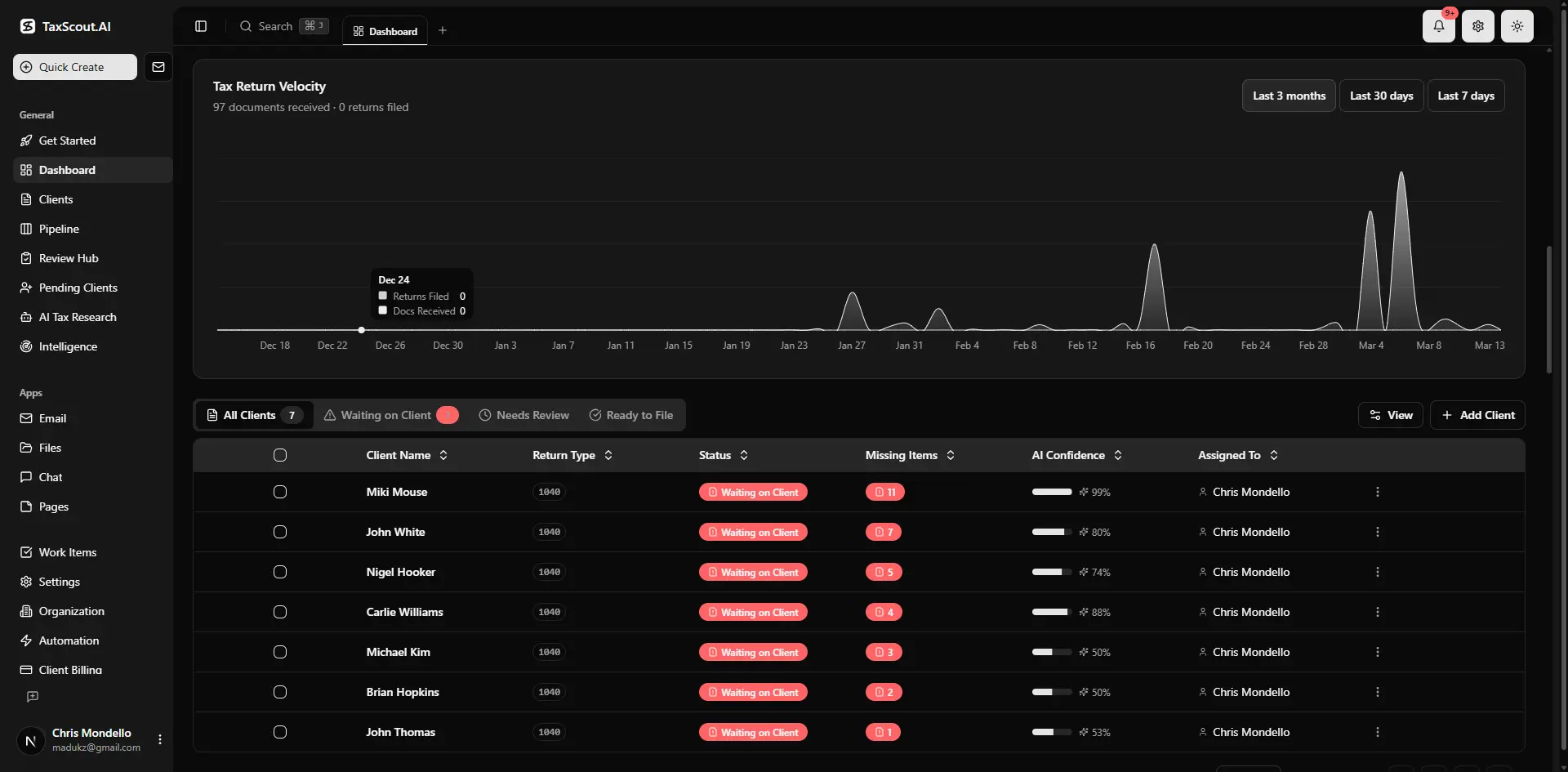
Real-time dashboard showing returns in progress, revenue, and upcoming deadlines
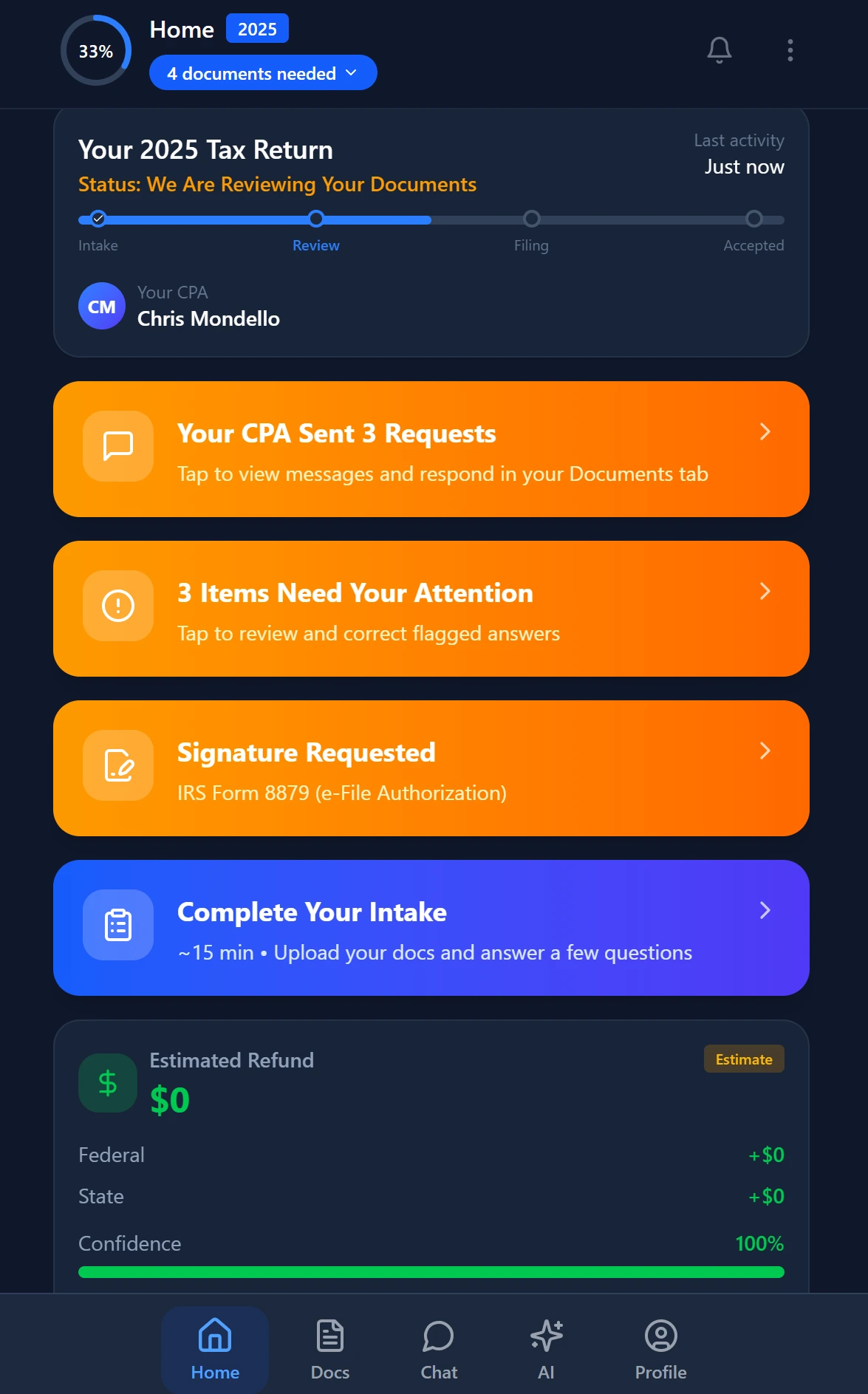
Smart intake auto-fills from uploaded documents and prior-year data
Security and Compliance in the Month-End Close Workflow
Monthly close work involves highly sensitive financial data: bank account numbers, payroll figures, ownership equity details. Any platform in your close workflow must meet the same security standards as your tax preparation software. TaxScout stores all documents with AES-256-GCM encryption, operates a 13-step DSAR anonymization process, enforces 7-role RBAC so staff only see the clients and documents assigned to them, and maintains a read-only Retained Archive plan at $99/year for post-cancellation access — ensuring 7-year document retention compliance.
For firms subject to state-level data protection requirements — California's CCPA, New York's SHIELD Act, and others — TaxScout's security architecture is designed to support these obligations without requiring separate compliance software. Our cybersecurity essentials guide covers the full compliance checklist for accounting firms handling client financial data at this level of sensitivity.
The IRS Publication 4557 (Safeguarding Taxpayer Data) outlines minimum security standards for tax practitioners, several of which map directly to the document-handling steps in this close checklist. TaxScout is designed to satisfy these requirements out of the box.
Ready to turn this checklist into a live, automated workflow your entire team follows every month?
TaxScout gives you AI-powered document extraction, 12-stage pipeline management, e-signatures, and encrypted archiving — all at $149/month flat for 10 seats, no per-user fees.
Frequently Asked Questions
A month-end close checklist is a structured list of accounting tasks that a CPA firm completes at the end of each month to ensure client books are accurate, reconciled, and ready for financial reporting. It typically includes bank reconciliation, AR/AP reconciliation, payroll liability review, journal entry posting, financial statement preparation, partner review, client approval, and workpaper archiving. A well-designed checklist ensures nothing is missed and provides a repeatable, auditable process for every monthly engagement.
Keep reading
Stay up to date
Get the latest tax tech insights delivered to your inbox.