Every Document. Organized. Searchable. Secure.
A CPA-grade file system with entity-level folders, split-screen PDF viewer, workpaper binder generation, AI-powered categorization, real-time client uploads, and CPA review workflows — all in one place. No Dropbox. No SharePoint. No Box.
The Problem: Tax Documents Are Scattered Everywhere
CPAs juggle client documents across email attachments, Dropbox links, USB drives, and shared network folders. During a review, finding a specific 1099-B means digging through 6 different places. Version confusion is constant — is this the latest W-2 or last year's? Client uploads disappear into a generic inbox with no categorization. And when it's time to compile workpapers for filing, you're manually merging PDFs and adding page numbers in Adobe Acrobat.
The Solution: One File System That Organizes Itself
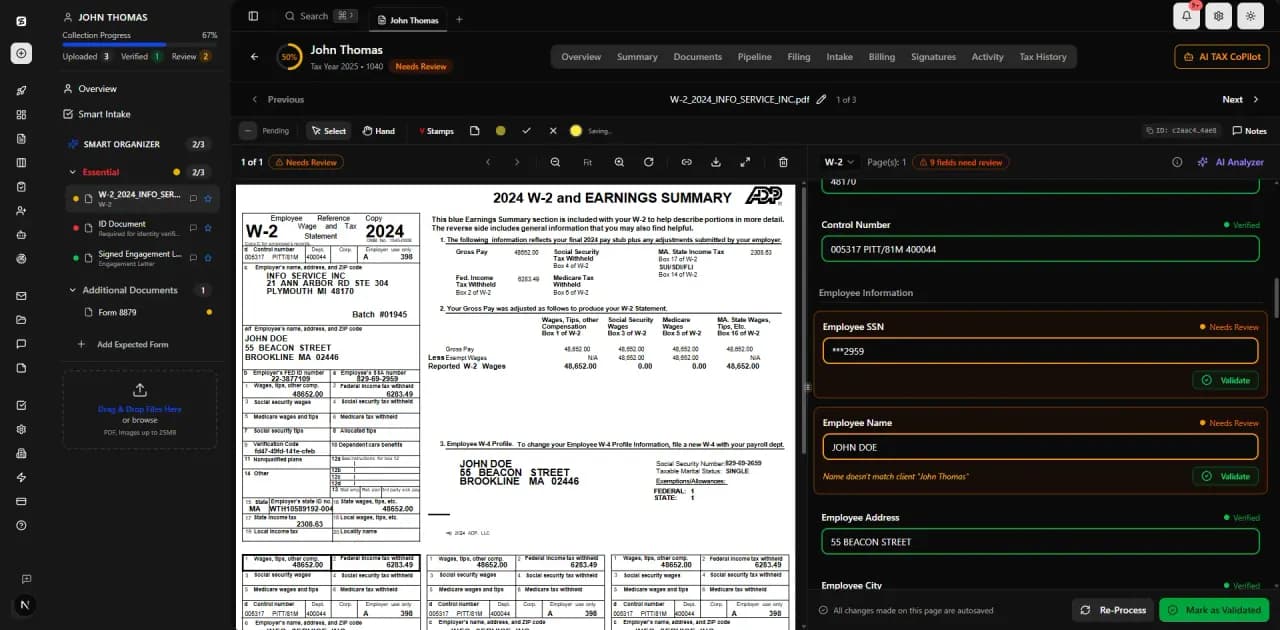
TaxScout gives every client a structured file system that mirrors how CPAs actually think about tax documents. Uploads are AI-categorized on arrival. Entity-level folders keep cross-year documents (IDs, POA, W-9) separate from annual return documents. A split-screen viewer lets you review extracted data alongside the original PDF. And when you're ready to file, generate a professional binder with cover page, table of contents, and Bates numbering — in one click.
Three-Tab File Browser
Full-text search, status filters, tax year filters, and date range filters — finding any document takes seconds.
Client Files
Hierarchical view: Entity → Tax Year → Category → Documents
CPAs reviewing client documents
Internal Files
Firm-wide reference materials, templates, checklists
Team collaboration
My Files
Personal documents and notes
Individual CPAs
CPA-Style Folder Structure
Return-level folders per tax year — nested subfolders, drag-and-drop reorganization, and custom sort order.
Client Folder (Outbox)
Signed engagement letters, filed returns, final packages — organized by year subfolders. Auto-created on entity creation.
Permanent Folder
Cross-year documents: ID, Power of Attorney, W-9, green cards. Auto-created on entity creation.
Built for CPA Workflows
Split-Screen PDF Viewer
Dual-pane view: document tree on the left, full PDF viewer on the right with zoom (0.5x–3x), rotate, page navigation, fullscreen, and text search.
Click-to-Source
Click any extracted data field and the viewer highlights exactly where that number appears on the original PDF — with bounding box coordinates from AI extraction.
Workpaper Binder Generation
One-click professional binder: cover page, table of contents, category dividers, annotations, summary page, and PDF bookmarks.
Binder Annotations
Highlight (customizable colors), sticky notes, freehand drawing, stamps (VERIFIED, REVIEWED, APPROVED, REJECTED), and text boxes — all auto-save.
CPA Review Workflow
Per-document status tracking: Not Started → In Progress → Reviewed → Flagged. Notes panel, status badges, and full audit trail.
AI Categorization on Upload
AI Router classifies 100+ form types on upload with confidence scoring. Multi-form PDFs auto-split. Junk detection filters blank pages and irrelevant uploads.
Real-Time Client Sync
When a client uploads in the portal, it appears instantly in the CPA's file browser via WebSocket — no refresh needed.
strongly encrypted Storage
All documents stored with strongly encrypted encryption on US-based AWS S3. Presigned URLs expire after 1 hour. per-firm isolation ensures multi-tenant isolation.
How It Works
Client Uploads
Client drops documents in the portal (or CPA uploads directly). AI classifies each file and files it to the correct folder automatically.
AI Extracts Data
The document pipeline reads every field, validates through 5 layers, and stores extracted data with bounding box coordinates for click-to-source linking.
CPA Reviews
Open the split-screen viewer to see extracted data alongside the original PDF. Mark documents as Reviewed, Flagged, or add notes for follow-up.
Organize & Annotate
Drag documents between folders. Use the annotation toolkit to highlight, stamp, and add notes directly on workpapers.
Generate Binder
Select documents, click 'Generate Binder,' and get a professional PDF workpaper package with cover page, TOC, dividers, and all your annotations — ready for filing or peer review.
vs. Competitors
TaxDome offers basic PDF viewing with manual tagging — no AI categorization, no split-screen viewer, no binder generation. Canopy has a flat folder system with no entity-level organization or annotations. Karbon has no document management at all. TaxScout's file system is purpose-built for CPA workflows with AI categorization, click-to-source linking, and one-click workpaper binders.
Frequently Asked Questions
Every entity gets a structured folder system. Return-level folders organize documents by category (Income, Deductions, Credits, General, Inbox) with unlimited nesting. Entity-level folders store cross-year documents like IDs, Power of Attorney, and W-9s that don't belong to a single tax year. All folders are auto-created — CPAs never start with an empty file cabinet.
See File Management in Action
Book a 15-minute walkthrough and see how it fits your firm.