CCH ProSystem vs Drake vs ProConnect: How Solo CPAs Choose at 300 Returns
Escalating CCH ProSystem licensing costs and mid-season billing rule changes have solo CPAs at the 300-return threshold questioning whether to stay or switch. This guide breaks down CCH ProSystem vs Drake vs ProConnect across price, workflow, and AI capability so you can make a clear-eyed decision…
If you are a solo CPA doing roughly 300 returns per year and you have been wrestling with the CCH ProSystem vs Drake question, you are not alone. Threads on r/taxpros routinely surface CPAs who opened their renewal invoice, saw an unexpected price increase, and started researching alternatives the same afternoon. The frustration is real: CCH's per-return or per-seat pricing structure can feel punishing at the exact volume where a solo practice is most profitable.
The decision is complicated by the fact that there is no universally correct answer. CCH ProSystem fx (and its cloud sibling CCH Axcess) carries genuine power for complex returns and multi-entity work. Drake Tax has a loyal following because its flat pricing is simple and its forms coverage is comprehensive. Intuit ProConnect Tax has become the obvious choice for firms already living inside QuickBooks Online. Each platform has a credible case to make. When practitioners frame the CCH ProSystem vs Drake debate, they quickly discover that both platforms have earned their reputations for very different reasons.
This article gives you a structured framework — not a vendor pitch — to evaluate the three engines against the specific economics and workflow realities of a 300-return solo or small-team CPA practice. We also explain how a purpose-built practice management layer like TaxScout.ai sits on top of whichever tax engine you choose, so you never have to swap both systems at once. The CCH ProSystem vs Drake comparison is a natural starting point, but the full picture only emerges when you add ProConnect as a cloud-native third option.
The Real Cost Problem at 300 Returns
At 300 returns per year, pricing math is everything. CCH ProSystem fx pricing is not publicly listed, but practitioners consistently report all-in annual costs of $3,000–$6,000+ depending on modules, state packages, and whether you are on the perpetual desktop or CCH Axcess cloud tier. Mid-season billing adjustments — where Wolters Kluwer charges for returns that exceed a bundle threshold — have been a specific source of frustration because the overage appears after the work is already done. The CCH ProSystem vs Drake cost gap can easily exceed $2,000–$3,000 annually at the 300-return volume, making pricing the first filter most solo CPAs apply.
Drake Tax uses a flat-fee model. For the 2025 tax year, Drake's unlimited 1040 bundle runs approximately $1,695/year (Drake Software pricing is published on their site and updated annually). At 300 returns, that is roughly $5.65 per return fully loaded. There are no per-return overages and no mid-season surprises. That predictability has made Drake the default recommendation on practitioner forums for volume-sensitive solos. For firms evaluating their CCH ProSystem vs Drake approach, this trade-off compounds over time.
Intuit ProConnect Tax is per-return, starting around $57.95 per federal return for low volume with discounts for prepaid bundles. At 300 returns that can approach $10,000–$15,000 annually unless you prepay a large block. The model is more favorable if you are billing premium rates and recovering the cost per return, but it is the most expensive of the three at scale without a volume negotiation. Each of these factors directly shapes how CCH ProSystem vs Drake plays out in practice.
The hidden cost that all three vendors share is the overhead of managing documents, intake, e-signatures, and client communication separately from the tax engine. Most solo CPAs at 300 returns are running 3–5 disconnected tools alongside their tax software, and that friction costs more in time than any licensing fee. That is where AI-native practice management changes the calculation. Understanding CCH ProSystem vs Drake in this context is what separates firms that scale from those that stall.

Click any extracted field to see its source highlighted on the original PDF
CCH ProSystem vs Drake: Feature Differences That Actually Matter
The CCH ProSystem vs Drake comparison is not primarily about form coverage — both platforms handle the full 1040, all schedules, all major business returns, and multi-state filings competently. The real differentiators are in workflow integration, diagnostics depth, and the learning curve for staff (or a solo practitioner wearing every hat).
CCH ProSystem fx is deeply integrated with other Wolters Kluwer products: CCH IntelliConnect for research, CCH Axcess Document for storage, and CCH Axcess Workflow for project tracking. If you are already inside that ecosystem, switching has real switching costs beyond the license fee itself. The platform's diagnostics engine is sophisticated, and its K-1 import and multi-entity handling are genuinely strong for practices with complex business clients. This is precisely where a deliberate CCH ProSystem vs Drake strategy pays off.
Drake Tax wins on simplicity and support. The forms-based interface feels dated to some users but maps directly to IRS form structure, which experienced preparers often prefer for auditability. Drake's support is consistently rated highly by independent practitioners, and the software ships with a built-in scheduler, basic document management, and a client portal that is functional if not modern. For a solo CPA handling straightforward 1040 volume, Drake's interface actually reduces errors by keeping preparers close to the underlying form logic. CCH ProSystem vs Drake sits at the center of this decision — get it wrong and the rest unravels.
A meaningful comparison must also account for IRS e-file requirements and how each platform handles amended returns, identity protection PINs, and multi-factor authentication for ERO compliance. Both CCH and Drake meet IRS Publication 1345 requirements for Authorized e-file Providers, so compliance parity is not a differentiator — but the speed of updated forms when the IRS releases late-season changes can vary, and Drake has historically pushed form updates quickly. When firms revisit their CCH ProSystem vs Drake priorities, the gaps usually surface here.
CCH ProSystem Strengths
Complex multi-entity returns (S-corps, partnerships, trusts), deep diagnostics, integration with CCH research tools, and a large installed base at mid-size and regional firms. If your 300 returns skew heavily toward business entities with intricate K-1 flows, ProSystem's entity-linking and consolidated return features can save significant preparation time. However, the [/glossary/k-1] complexity that justifies ProSystem pricing is rarely the norm at the solo CPA level.
Drake Tax Strengths
Flat unlimited pricing, fast form updates, excellent telephone and email support, a loyal practitioner community, and a straightforward interface that minimizes onboarding time for new staff or contractors. Drake also integrates directly with TaxScout.ai's practice management layer, meaning you can keep Drake as your tax engine while adding AI document extraction, intake automation, and client portal capability without rebuilding your workflow from scratch.
ProConnect Tax Strengths
Native QuickBooks Online integration is ProConnect's defining advantage. If your advisory clients are all on QBO, the trial balance import eliminates a significant manual step. ProConnect is also cloud-native with no local installation overhead. The per-return model suits firms with highly variable seasonal volumes better than it suits high-volume solos, but the Intuit ecosystem lock-in is a real switching cost in both directions.
Tired of juggling your tax engine, document storage, e-signatures, and client intake across four separate tools?
TaxScout.ai works with Drake, CCH Axcess, UltraTax, Lacerte, ProConnect, and ProSeries — so you get AI-powered practice management without changing your tax software.
Evaluating a CCH Axcess Migration at 300 Returns
Some CPAs considering a CCH ProSystem vs Drake switch are actually asking a different question: whether to move from ProSystem fx (desktop) to CCH Axcess (cloud) as a path to modernizing their workflow without changing vendors. A CCH Axcess migration eliminates local server maintenance and enables remote access, but it typically increases the annual license cost substantially and does not resolve the per-return overage risk that most solos are trying to escape.
The practical checklist for any cch axcess migration or cross-vendor switch should cover: (1) prior-year return portability — can you open and amend 2022 and 2023 returns in the new platform without maintaining a legacy installation? (2) state forms parity — if you file in 15 states, verify the new vendor's state module coverage before committing. (3) data conversion — client master records, carryforward amounts, and depreciation schedules need to transfer cleanly. CCH offers a migration utility for Axcess, and Drake provides a data conversion service for CCH and Lacerte inputs.
According to law.cornell.edu's overview of tax preparer obligations, preparers must maintain records sufficient to substantiate returns for a minimum period — meaning your archive strategy cannot have gaps during a platform transition. Plan for a parallel-run season or at minimum a shadow archive. TaxScout.ai's Retained Archive plan provides a 7-year read-only archive at $99/year specifically for this transition window, ensuring you never lose access to prior documents even if you cancel the active subscription.
For more guidance on managing software transitions without disrupting client service, see our piece on tax software updates and mid-season changes and other blog resources covering practice operations for solo and small-firm CPAs.
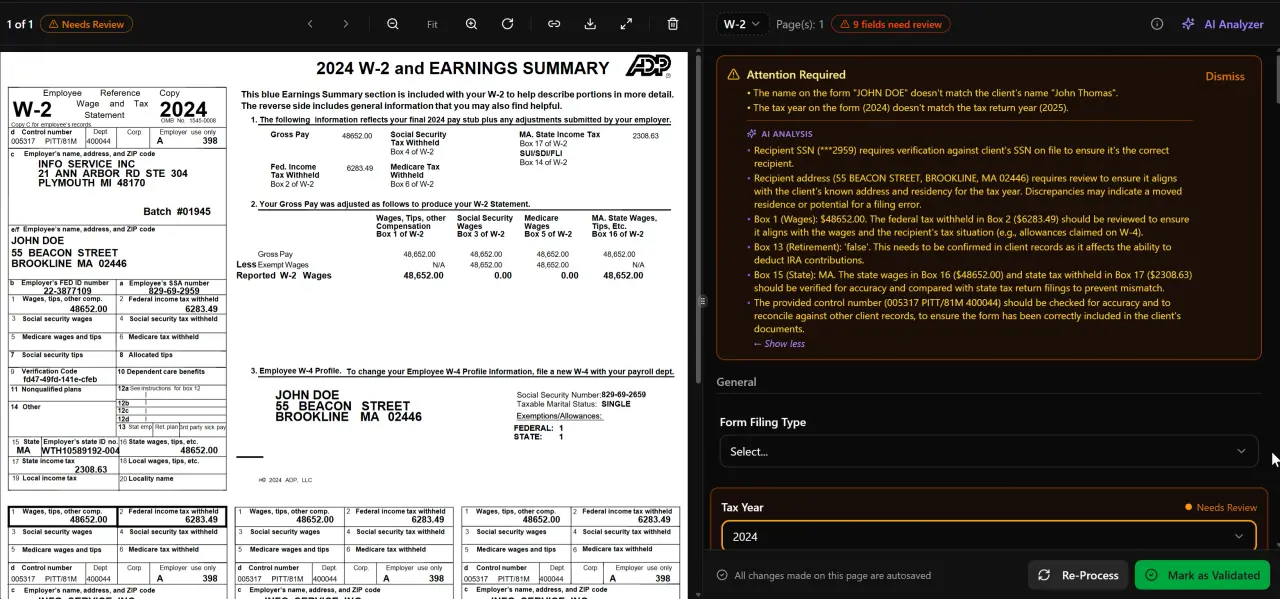
AI classifies, extracts, and validates every document automatically
CCH ProSystem vs Drake vs ProConnect: Solo CPA at 300 Returns (2025–2026 Season)
| Factor | CCH ProSystem fx | Drake Tax | ProConnect Tax |
|---|---|---|---|
| Annual cost (300 returns) | $3,000–$6,000+ est. | ~$1,695 flat unlimited | ~$10,000–$15,000 est. |
| Pricing model | Module + per-return bundles | Flat annual unlimited | Per-return (prepay discounts) |
| Mid-season billing risk | Yes — overage charges | None | Yes — if under-prepaid |
| Cloud-native option | CCH Axcess (extra cost) | Drake Zero (add-on) | Yes (fully cloud) |
| Complex entity / K-1 depth | Excellent | Good | Good |
| Form update speed | Good | Excellent | Good |
| Built-in client portal | Limited (Axcess tier) | Basic | Limited |
| Works with TaxScout.ai | Yes (CCH Axcess) | Yes (native integration) | Yes |
| Learning curve (solo) | Steep | Low–moderate | Moderate |
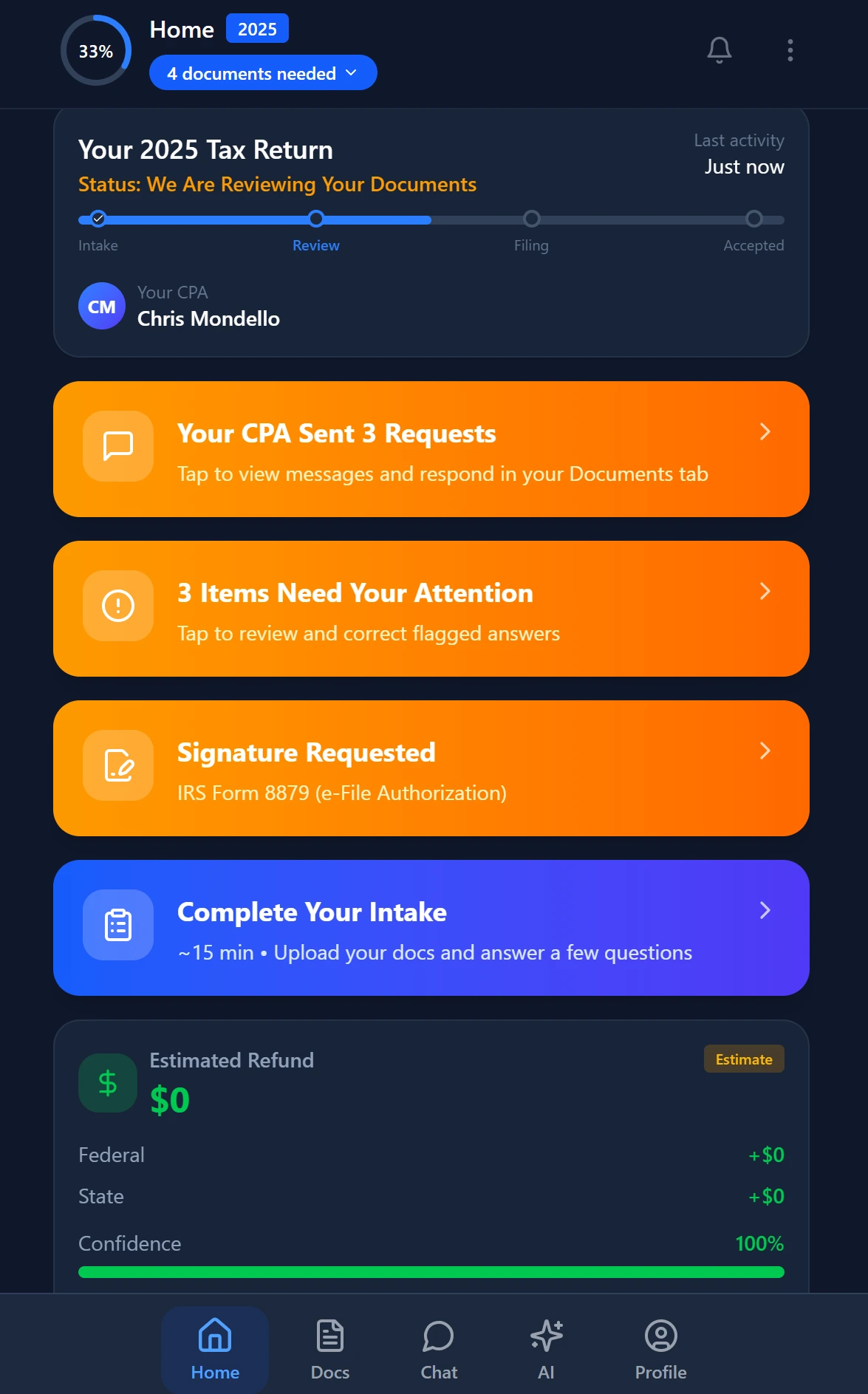
Smart intake auto-fills from uploaded documents and prior-year data
What Tax Software for a Solo CPA Cannot Do Alone
Choosing the best tax software for 300 returns solves the preparation engine problem, but it does not solve the practice management problem. At 300 returns, a solo CPA is simultaneously managing document collection from 300+ clients, answering status questions, chasing missing W-2 and 1099 documents, processing e-signatures on Form 8879 and engagement letters, and sending invoices. Each of those workflows runs outside the tax engine in a disconnected tool — and the aggregate time cost frequently exceeds 15–20 hours per season just in coordination overhead.
This is the gap that AI-native practice management addresses. TaxScout.ai's AI document extraction handles 180+ tax form types — every W-2, all 1099 variants, K-1s, 1098 series, and the full 1040 with schedules — using a 5-layer validation pipeline with confidence scoring and cross-document verification. Documents dropped into the client portal are automatically classified, extracted, and flagged for review before a preparer ever opens the tax engine. That means when you open Drake or ProConnect, the workpaper is already organized.
The smart intake engine, modeled on IRS Form 13614-C, prefills from prior-year data and document extraction so clients answer only what has actually changed. The result for a solo CPA doing 300 returns is fewer incomplete organizers, fewer follow-up emails, and a faster path from document receipt to return completion. Research from the IRS Taxpayer Advocate Service consistently identifies incomplete information at intake as a leading cause of return delays — a problem intake automation directly addresses.
For a deeper look at how AI document extraction works technically and what accuracy benchmarks to expect, see our complete guide.

Track every return from intake to filed with drag-and-drop pipeline management
Prosystem FX Alternative Checklist: Five Questions Before You Switch
If you are actively evaluating a prosystem fx alternative, structure your decision around these five questions before signing any new contract.
1. What is your true all-in annual cost under each option? Get a quote that includes all state modules, e-file fees, support tiers, and any per-return overage exposure. Compare to Drake's published flat rate and ProConnect's prepay bundle price at exactly 300 returns. The Bureau of Labor Statistics pegs median CPA billing at over $40/hour — any software that costs more than 75–100 hours of your time annually warrants scrutiny.
2. How complex is your return mix? If more than 20% of your 300 returns involve multi-entity structures, consolidated filings, or complex partnership K-1 allocations, CCH ProSystem's entity-linking features may justify the premium. If your mix is predominantly 1040 with Schedules C, D, and E, Drake or ProConnect handles it at a fraction of the cost.
3. Can you migrate prior-year data cleanly? Request a test conversion before committing. Missing carryforward depreciation or prior-year NOL schedules discovered mid-season creates professional liability exposure. Review IRS Publication 4557 on safeguarding taxpayer data during system transitions.
4. What does your practice management layer look like today? If you are switching tax engines AND replacing your document management and client communication tools simultaneously, you are taking on significant operational risk in a single season. Consider separating the decisions: keep your current tax engine for one more season while you implement a modern practice management layer on top, then switch the engine the following year from a position of workflow stability.
5. Does your new platform integrate with TaxScout.ai? TaxScout.ai works natively with Drake, CCH Axcess, UltraTax CS, Lacerte, ProConnect, and ProSeries. You do not need to abandon your tax engine to gain AI document extraction, 9 specialized AI research agents, pipeline management, and a branded client portal. See how flat-fee billing and AI-assisted practice management combine to increase revenue per return without increasing hours.
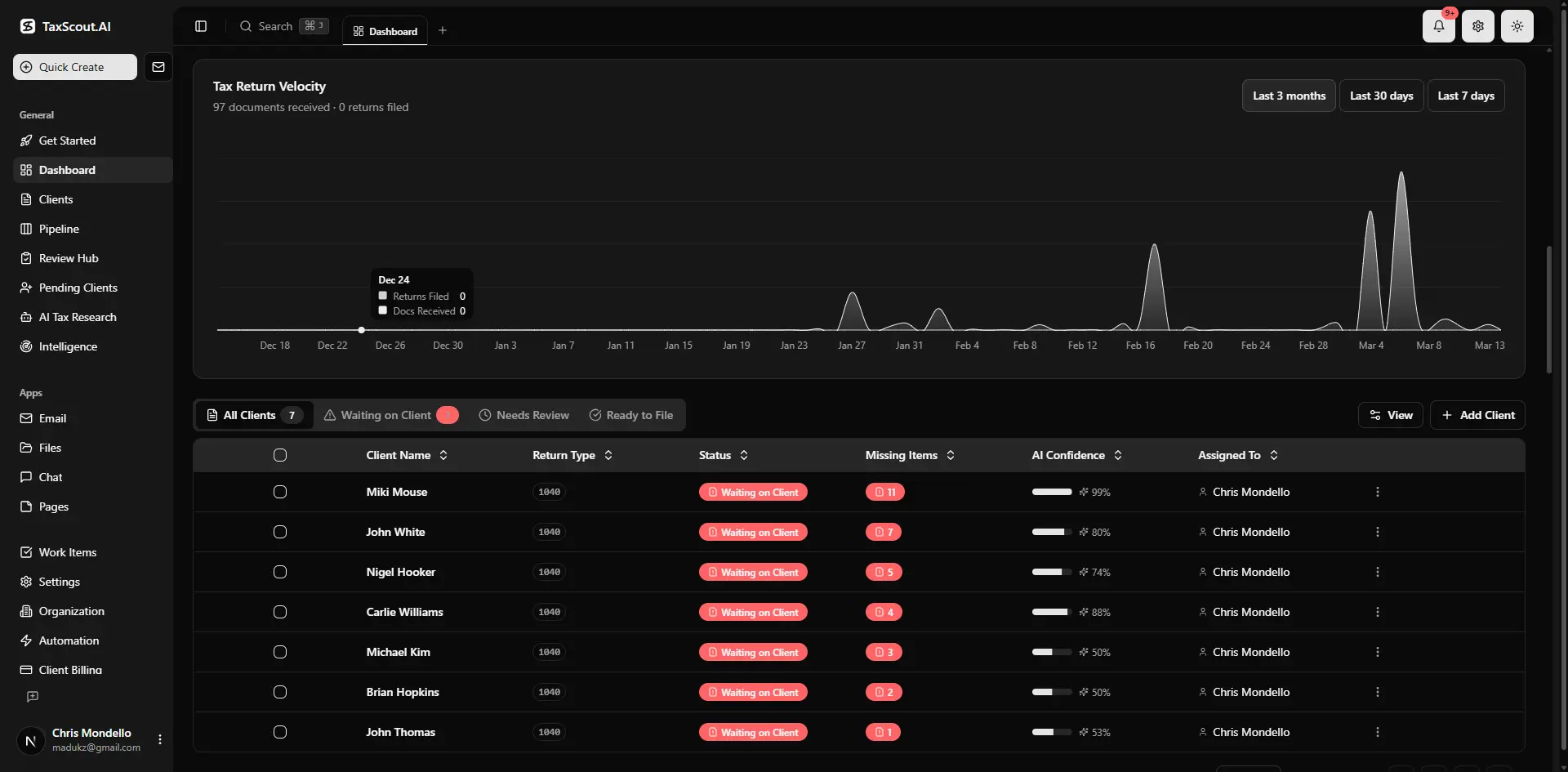
Real-time dashboard showing returns in progress, revenue, and upcoming deadlines
Practice Management Costs That Dwarf the Tax Engine Decision
Solo CPAs evaluating their tax software for 300 returns often fixate on the per-return cost of the preparation engine while underpricing the adjacent tools. TaxDome, a popular practice management platform, charges approximately $100 per user per month — meaning a 3-person shop pays $3,600 per year before adding a tax engine. Canopy charges approximately $45 per user per month per module, with smart intake costing an additional $11 per client. At 300 clients that intake add-on alone runs $3,300/year.
TaxScout.ai's Prep Pro plan is $149/month flat — no per-user fees, no per-client intake charges, unlimited clients — covering 10 seats, 500 returns per year, all 9 AI Research Agents, the full PDF toolbox, and 300 AI Tax Assistant queries per day. For a 3-person firm handling 300 returns, that is $1,788/year for the entire practice management layer. Paired with Drake Tax at $1,695/year, the total stack runs under $3,500 annually versus $6,000+ for CCH ProSystem alone, with significantly more automation built in. Explore the full breakdown at /pricing or compare directly against TaxDome at /compare/taxdome-alternative.
The security architecture matters too, especially for solo practitioners without a dedicated IT function. TaxScout.ai uses AES-256-GCM encryption for the SSN vault, a 13-step DSAR anonymization process, and 7-role RBAC — the same security model firms pay enterprise vendors thousands of dollars to implement separately. For solo CPAs handling sensitive client data without IT staff, having that infrastructure built into the platform is not a luxury; it is a professional requirement. See our cybersecurity guide for accounting firms for a baseline checklist.
Ready to stop paying CCH overage fees and run your entire 300-return practice from one AI-native platform?
TaxScout.ai pairs with Drake, CCH Axcess, or ProConnect to give solo CPAs AI document extraction, smart intake, e-signatures, invoicing, and 9 AI research agents — all at $149/month flat with no per-user fees.

Your clients see your brand — OTP login, document upload, and real-time status
Frequently Asked Questions
Yes. Drake Tax's flat unlimited pricing (approximately $1,695/year for the 2025 season) covers all federal and state forms with no per-return overages, making it the most cost-effective preparation engine for solo CPAs at the 300-return threshold. Its forms-based interface maps directly to IRS return structure, which experienced preparers often prefer for review accuracy. The platform integrates natively with TaxScout.ai's practice management layer, so you can add AI document extraction and client portal capability without replacing the tax engine.
Keep reading
Jetpack Workflow Alternative: Why CPA Firms Are Switching to AI-Native Tools
Aug 23, 2026 · 1 min read
Forensic Accounting Software: What CPAs Need for Litigation and Fraud Engagements
Aug 19, 2026 · 1 min read
Close Automation Software for CPA Firms: Month-End Without the Tab-Switching
Aug 8, 2026 · 1 min read
Stay up to date
Get the latest tax tech insights delivered to your inbox.