Canopy vs Qount: Which Practice Management Platform Is Right for Small CPA Firms
Small CPA firms switching away from legacy systems like PracticeCS are landing on two names: Canopy and Qount. This head-to-head comparison covers workflow, client portals, AI capabilities, and real total cost of ownership — plus a third option worth serious consideration.
The Canopy vs Qount debate is playing out in real time across r/taxpros threads and CPA Facebook groups as small firms reach their breaking point with legacy practice management systems. Both platforms promise to replace the patchwork of spreadsheets, email chains, and aging software that define day-to-day operations at most sub-10-person firms — but they take very different approaches to solving that problem.
Before you commit 12 months of budget and several weeks of migration pain to either platform, you deserve an honest comparison that goes beyond feature checklists. This guide breaks down workflow management, client portal design, document handling, AI capabilities, and the pricing math that actually matters when you're a 3- to 10-person firm billing under $1 million. This canopy vs qount breakdown is designed to give small CPA firms a clear, practical answer before making a costly platform decision.
We'll also introduce a third platform — TaxScout.ai — that many firms discover mid-comparison and find compelling, particularly once they see what AI-native document extraction and flat-rate pricing look like in practice. Many firms start the canopy vs qount conversation expecting a simple two-way decision, only to realize a third option may better fit their needs.
What Canopy Actually Offers CPA Firms
Canopy is a modular practice management platform built specifically for accounting and tax firms. It covers client management, task and workflow management, time and billing, document storage, a client portal, and e-signatures. The platform is well-designed and has earned strong G2 reviews, particularly from firms in the 5-to-20-person range. Understanding what Canopy actually offers is essential context for any canopy vs qount evaluation, since its feature depth sets the baseline for the comparison.
The catch for small firms is Canopy's pricing structure. Canopy charges approximately $45 per user per month, and modules like Smart Intake add roughly $11 per client on top of that. For a 10-person firm, you're looking at $450/month before add-ons — and that base rate does not include AI-powered document extraction or automated intake. Those features cost more. For firms evaluating their canopy vs qount approach, this trade-off compounds over time.
Canopy also lacks native AI document extraction — meaning staff still manually key data from W-2s, 1099s, and K-1s into your tax software. The platform integrates with Drake, UltraTax, and others, but it doesn't read the documents for you. For firms preparing 200-plus returns per season, that manual entry workload is substantial. See our deeper breakdown at /compare/canopy-alternative. Each of these factors directly shapes how canopy vs qount plays out in practice.
Where Canopy shines: its kanban-style workflow boards are mature and customizable, its client portal UI is clean, and its billing module handles both hourly and flat-fee engagements competently. If you're a firm that values workflow polish and doesn't need AI document processing, Canopy is a credible choice — at a price. Understanding canopy vs qount in this context is what separates firms that scale from those that stall.
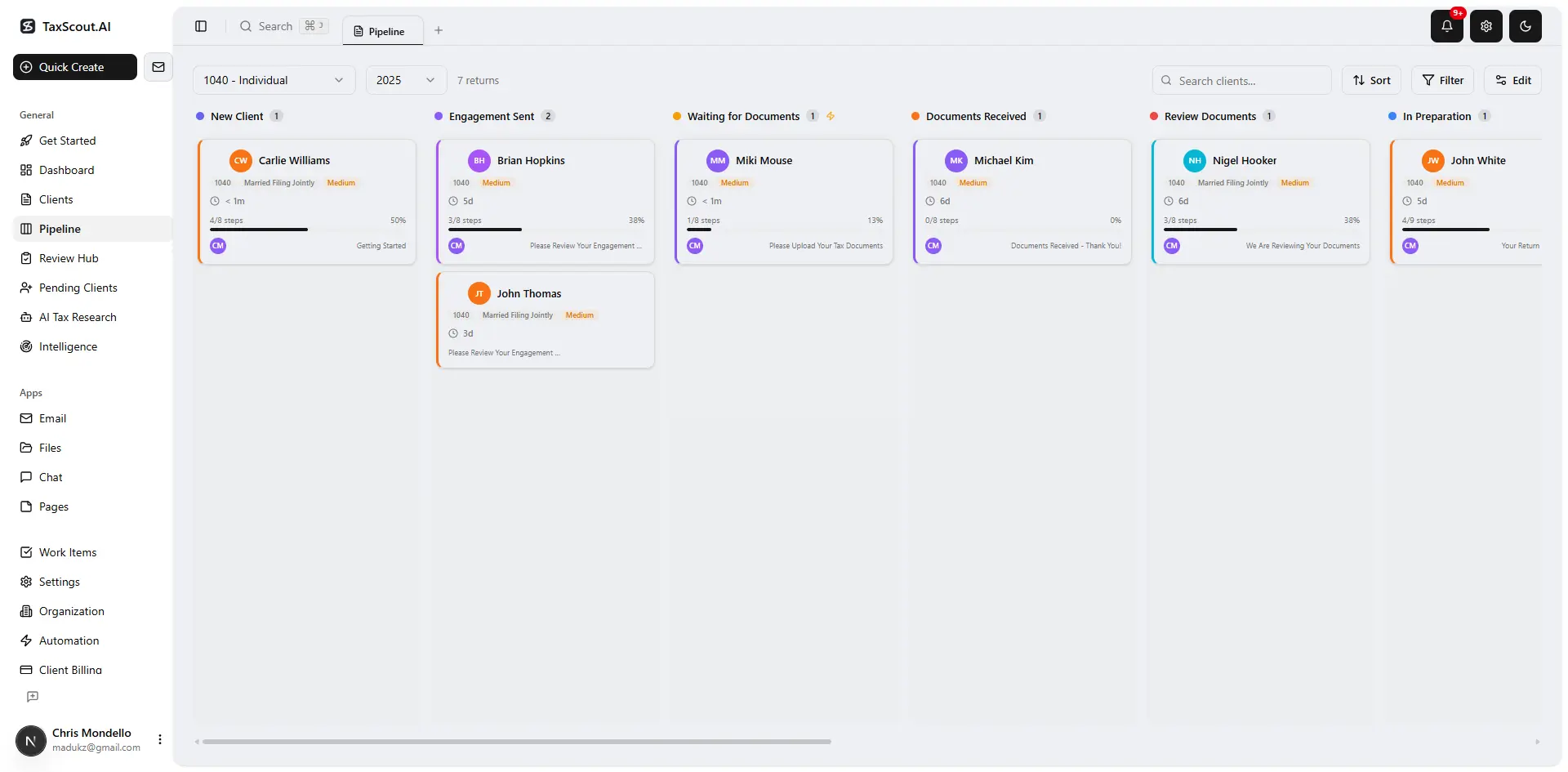
Track every return from intake to filed with drag-and-drop pipeline management
What Qount Offers and Where It Fits
Qount positions itself as an all-in-one platform for bookkeeping and accounting firms, combining practice management with a built-in general ledger and client accounting features. This makes it a distinctly different product from Canopy: Qount is designed for firms that do ongoing bookkeeping and advisory work, not primarily tax preparation. This is precisely where a deliberate canopy vs qount strategy pays off.
From a workflow standpoint, Qount includes task management, client communication tools, and document sharing. Its differentiator is the integrated accounting layer — if your firm bills heavily for monthly bookkeeping and controller services, Qount's unified ledger reduces the need for a separate QuickBooks or Xero subscription per client entity. Canopy vs qount sits at the center of this decision — get it wrong and the rest unravels.
However, Qount has notable limitations for tax-season-heavy firms. Its document management and intake workflows are less mature than Canopy's. It does not offer AI document extraction, dedicated e-signature workflows comparable to IRS Form 8879 processing, or a 5-layer document validation pipeline. Firms that do a high volume of 1040s, S-corps, and partnership returns each spring will find Qount's tax-prep support thin. When firms revisit their canopy vs qount priorities, the gaps usually surface here.
Qount's pricing is also less transparent than competitors — the platform uses custom quotes for most firm sizes, which makes apples-to-apples comparison difficult. Several r/taxpros contributors have noted that onboarding support is limited and that the learning curve is steeper than expected for teams coming from legacy tools like PracticeCS or Lacerte's built-in management features.
Tired of paying per seat just to manage your own client files?
TaxScout.ai is $149/month flat for 10 seats, 500 returns, and AI that actually reads your documents — no per-user fees, no per-client add-ons.

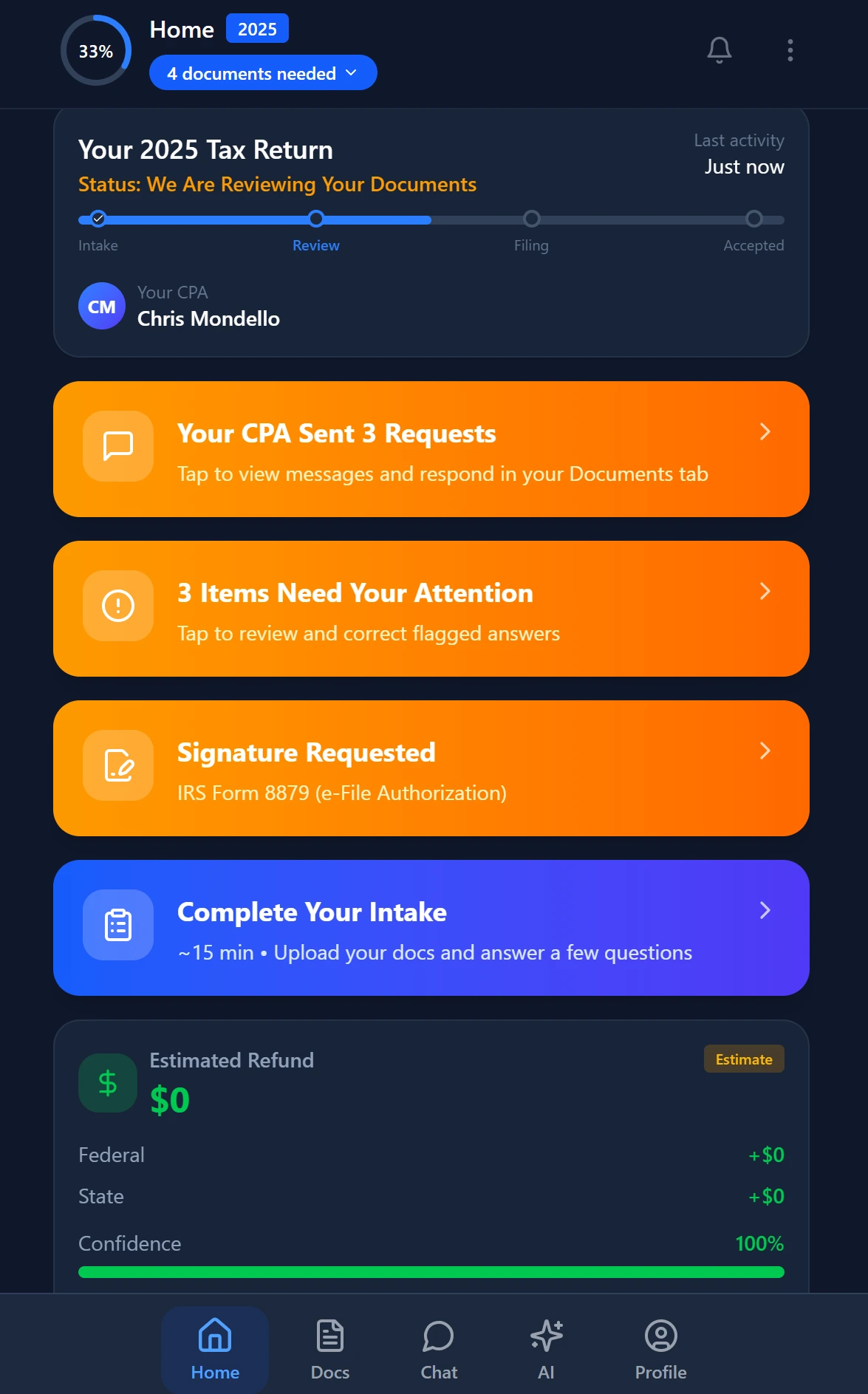
Your clients see your brand — OTP login, document upload, and real-time status
Canopy vs Qount vs TaxScout.ai — Key Features for Small CPA Firms (2026)
| Feature | Canopy | Qount | TaxScout.ai |
|---|---|---|---|
| AI document extraction | No | No | Yes — 180+ form types |
| 5-layer validation pipeline | No | No | Yes |
| Client portal with OTP login | Yes | Yes | Yes — branded, passwordless |
| Smart intake (Form 13614-C style) | $11/client add-on | Basic | Included — 4-layer prefill |
| AI tax research agents | No | No | Yes — 9 specialized agents |
| E-signatures (8879, 4868, FBAR) | Yes | Limited | Yes — via Documenso |
| Pipeline kanban management | Yes | Limited | Yes — 12 customizable stages |
| Integrated bookkeeping/GL | No | Yes | No |
| PDF tools (OCR, PII masking, etc.) | No | No | Yes — 14+ tools |
| Pricing for 10-person firm | ~$450+/mo | Custom quote | $149/mo flat |
| Per-user fees | Yes (~$45/user) | Yes | No — unlimited seats on plan |
| Works with Drake/CCH/Lacerte | Yes | Limited | Yes |
Smart intake auto-fills from uploaded documents and prior-year data
Workflow Management: Head-to-Head
For a small CPA firm, workflow management is the backbone of a productive season. Tasks need to move from intake through preparation, review, and delivery without falling through the cracks.
Canopy's workflow module is its strongest feature. You get customizable stages, task assignments, deadline tracking, and status filters that make it easy to see where every return stands. The kanban board is responsive and the mobile app extends visibility beyond the desk. Firms migrating from spreadsheet-based tracking consistently rate this as Canopy's best-in-class component.
Qount's task management is functional but less tax-specific. It handles recurring task templates and client to-do assignments, but it lacks the pipeline granularity that tax firms need during the March-April crunch. There's no built-in deadline tracker tied to IRS tax deadlines or extension calendars.
TaxScout.ai offers 12 customizable pipeline stages with a drag-and-drop kanban board, a production funnel dashboard, and a built-in deadline tracker. Crucially, the pipeline connects directly to the document extraction layer — when a client uploads their W-2s through the client portal, the AI classifies and extracts them automatically, and the task card updates. That closed loop between document receipt and workflow status is something neither Canopy nor Qount provides natively. See how it compares more broadly at our complete guide to CPA practice management.

Click any extracted field to see its source highlighted on the original PDF
Client Portal and Intake Experience
The client portal is often what seals a firm's choice between platforms — it's the surface clients interact with, and friction there directly impacts document turnaround times.
Canopy's portal is polished and allows clients to upload documents, view invoices, sign forms, and communicate with the firm. It's one of the cleaner portals in this category. The weakness is that Canopy's intake questionnaire (the process equivalent of IRS Form 13614-C) costs an additional $11 per client if you want the Smart Intake module — a meaningful line item when you're onboarding 200+ clients annually.
Qount's portal supports document sharing and client messaging but lacks the structured intake workflow that tax firms rely on. Clients arrive at a general-purpose interface rather than a guided intake experience, which tends to generate more back-and-forth email asking clients for missing documents. This undermines the efficiency gains the platform is supposed to deliver.
TaxScout.ai's branded client portal uses OTP (one-time password) login — no client passwords to reset, no support tickets about forgotten credentials. The intake engine mirrors IRS Form 13614-C and uses 4-layer prefill: it pulls from previously extracted documents, prior-year data, the client profile, and an AI gap analysis that flags what's still missing. Clients get a guided experience that reduces incomplete submissions, and the firm gets documents that are already classified and extracted before a staff member opens the file. Check our guide on running a paperless accounting firm to see how this fits a broader digital workflow.
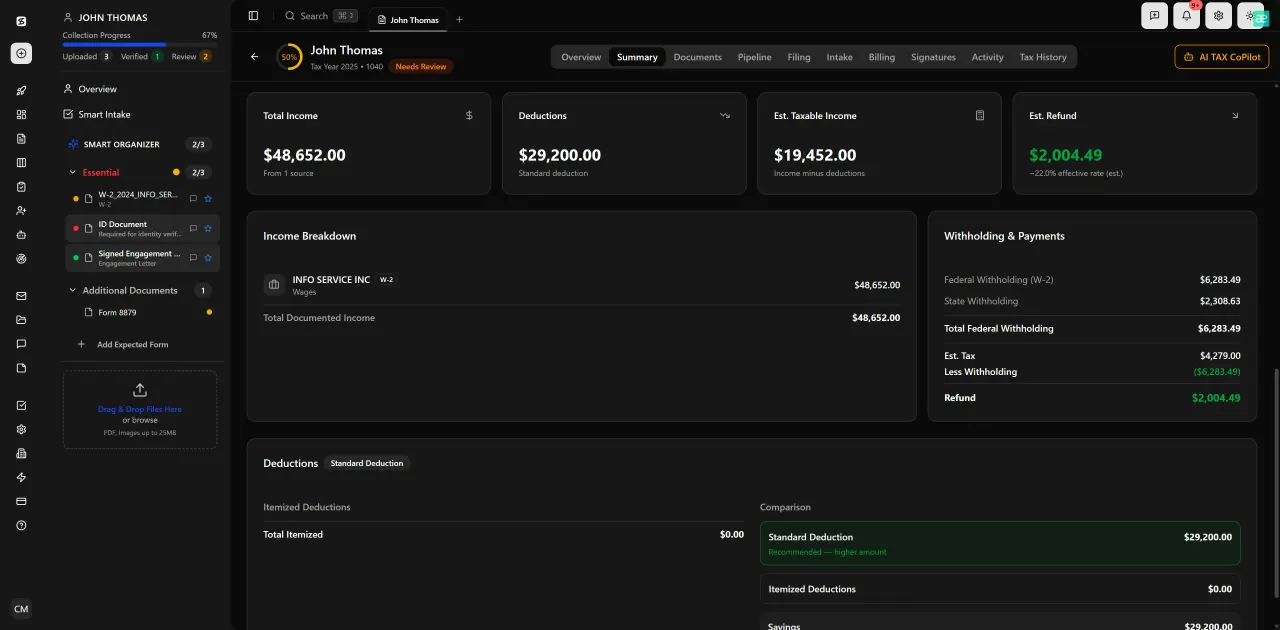
Review with AI assist — 9 agents answer questions with full client context
AI Capabilities: Where the Gap Widens
Neither Canopy nor Qount offers native AI document extraction. Both platforms store and organize documents, but reading them — pulling the numbers off a W-2, identifying a K-1's partnership percentages, cross-checking 1099-INT totals — remains manual work in both systems.
This matters enormously for small firms. According to IRS statistics on individual return filing, the average individual return touches 4-8 source documents. For a firm preparing 400 returns, that's 1,600 to 3,200 documents to process manually. Every hour of manual data entry is an hour not spent on advisory services or capacity growth.
TaxScout.ai's AI document extraction handles 180+ form types — every W-2 variant, all 1099 series, K-1s, 1098s, 1095s, and the full 1040 with schedules — through a 5-layer validation pipeline that includes OCR cross-verification, 15 deterministic math rules, and cross-document validation. The split-screen PDF viewer lets staff click any extracted field and see exactly which line of the source document it came from. This level of auditability is absent from both Canopy and Qount.
Beyond extraction, TaxScout.ai includes 9 specialized AI research agents that search IRS, Treasury, Cornell Law, SSA, and Congress databases in real time. When a client's situation raises a question about self-employment tax treatment or a QBI deduction edge case, the research agent surfaces relevant authority — a capability neither Canopy nor Qount offers at any price tier. For firms building toward an AI-first workflow, see Boost AI Accounting Productivity Without the Overwhelm.
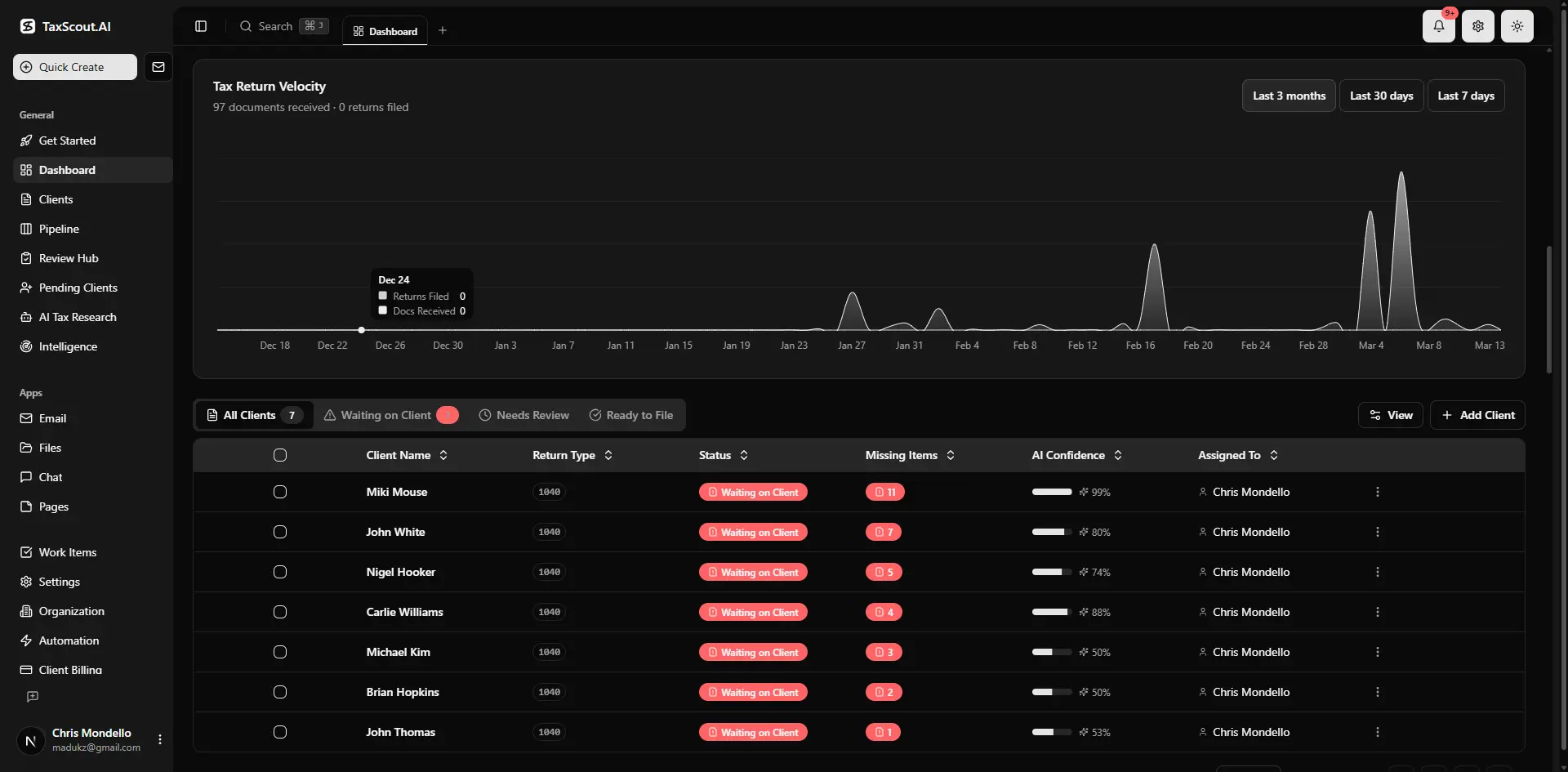
Real-time dashboard showing returns in progress, revenue, and upcoming deadlines
Total Cost of Ownership for a 10-Person Firm
Per-user pricing looks reasonable in a demo but accumulates fast in practice. Here's what the math actually looks like for a 10-person CPA firm at full seat utilization:
Canopy at ~$45/user/month comes to $450/month — and that's before Smart Intake add-ons ($11/client × 200 clients = $2,200 per season), which could push annual cost to roughly $7,600 per year. The per-user pricing model also means that adding a seasonal contractor or a part-time admin bumps your monthly bill immediately.
Qount uses custom pricing, but firms on r/taxpros have reported costs comparable to or exceeding Canopy when accounting for implementation fees and the add-ons required to match a similar feature set. Switching costs from legacy tools like PracticeCS also tend to be underestimated — data migration, staff retraining, and client portal re-enrollment typically consume 2-4 weeks of firm time.
TaxScout.ai's Prep Pro plan is $149/month (or $1,430/year) for 10 seats, 500 returns, all 9 AI research agents, the full PDF toolbox, and unlimited clients. There are no per-user fees, no per-client intake charges, and no module unlocks. The Retained Archive plan at $99/year gives post-cancellation read-only access for the 7-year retention window the IRS recommends. For firms focused on flat-fee billing, TaxScout's flat-rate platform pricing reinforces rather than contradicts that business model.
The SBA's small business cost benchmarking resources note that software overhead is often the fastest-growing operational cost for service businesses — a consideration that makes per-seat model scrutiny worthwhile before signing a 12-month contract.

Every client gets organized documents, status tracking, and a complete history
Security and Compliance Considerations
CPA firms handling sensitive client data are subject to IRS Publication 4557 safeguarding requirements and, increasingly, state-level data protection laws. Your practice management platform is a data custodian, and its security architecture matters.
Canopy uses standard cloud security practices with role-based access controls. Qount similarly offers basic access management. Neither platform publishes detailed information about SSN-specific encryption, anonymization workflows, or formal data subject access request (DSAR) handling.
TaxScout.ai includes an AES-256-GCM encrypted SSN vault, a 13-step DSAR anonymization workflow, and a 7-role RBAC system. For firms serving clients in states with strict data privacy laws — California's CPRA, for example — having documented anonymization procedures is increasingly a client expectation, not just a compliance checkbox. See our cybersecurity guide for accounting firms for a broader treatment of this topic.
Still weighing Canopy vs Qount while your team manually keys in W-2s?
TaxScout.ai extracts 180+ document types automatically, costs less than one Canopy seat for your whole firm, and works alongside Drake, Lacerte, and CCH without replacing your tax software.
Frequently Asked Questions
For tax-return-heavy firms, Canopy is the stronger choice between the two — its workflow boards, e-signature support, and client portal are more mature than Qount's. However, neither platform offers AI document extraction, which means manual data entry remains a bottleneck during tax season. TaxScout.ai addresses this directly with automated extraction across 180+ form types at a flat rate of $149/month for a 10-person firm.
Keep reading
AMT Planning for CPAs: How to Shield Business Clients From the Corporate Alternative Minimum Tax
Oct 19, 2026 · 1 min read
Schedule K-3 Reporting: How CPAs Handle International Pass-Through Items for Domestic Partners
Oct 19, 2026 · 1 min read
Uniform Capitalization Rules: How CPAs Apply UNICAP to Inventory and Self-Constructed Assets
Oct 17, 2026 · 1 min read
Stay up to date
Get the latest tax tech insights delivered to your inbox.