Accounting Firm Communication: How AI Eliminates the Gaps That Cost You Clients
AI is saving accounting professionals nearly an hour a day — yet client satisfaction scores at most firms have barely budged. The reason is that time savings mean nothing when communication workflows are still fragmented across email threads, texts, and sticky notes. This guide shows how an…
Accounting firm communication is the invisible infrastructure beneath every client relationship your firm has built. When it works, clients feel informed, trust your expertise, and refer colleagues without being asked. When it breaks — and it breaks far more often than most managing partners realize — clients quietly disengage, delay sending documents, and eventually leave for a firm that "just seems more on top of things."
The paradox of 2025–2026 is this: AI has genuinely returned time to accounting professionals. Research cited by Karbon found that accountants are saving roughly 60 minutes per day thanks to AI tools. Yet the same research showed that only 18% of accounting professionals report meaningful improvements in wellbeing, and client satisfaction scores have remained stubbornly flat at many firms. How is that possible? Because most firms applied AI to individual tasks — document extraction, data entry, tax research — while leaving the communication layer completely unchanged. The gap between time saved and client satisfaction points to a deeper problem: accounting firm communication has not kept pace with the efficiency gains AI has delivered.
Missed follow-ups still pile up in personal inboxes. Clients still text their preparer's cell phone to ask if their return is done. Status updates still require a staff member to stop actual work, hunt down a file, and compose a reply from scratch. These aren't minor annoyances; they are a measurable revenue leak. This article makes the case that fixing accounting firm communication requires more than best-practice advice — it requires an AI-native platform where every communication channel, client portal, intake reminder, and document workflow is wired together from the start.
Why Client Communication Gaps Are a Revenue Problem, Not Just a Service Problem
Most firm owners think about communication failures as a quality issue — something to address in annual reviews or fix with a new email template. The data suggests the stakes are much higher. According to research from the American Institute of CPAs, the number-one reason clients switch accountants is not price and not competence — it is the perception that their accountant does not communicate proactively. Clients rarely articulate this as "my firm had bad communication software." They say things like, "I just never knew where things stood," or "I always had to chase them." Treating accounting firm communication as a minor operational detail rather than a core business function is where many practices begin losing clients without realizing it.
That churn translates directly into lost revenue. If your average client pays $1,800 per year and you lose even four clients annually to communication-related dissatisfaction, that is $7,200 in recurring revenue gone — plus the cost of replacing them. Scaling that math across a 200-client firm with even a 5% communication-driven churn rate produces a six-figure revenue leak that never shows up on any P&L line labeled "communication failures." When you run the numbers at scale, the financial case for investing in stronger accounting firm communication becomes impossible to ignore.
The compounding effect is worse in referral-driven firms. A client who feels ignored doesn't just leave — they stop referring. The SBA reports that service businesses derive 60–80% of new business from referrals and repeat clients. If your communication gaps are silently eroding the client experience, you are not just losing the client — you are losing every prospect that client would have sent your way. For more on building a referral-ready client experience, see the client onboarding checklist for accounting firms and other blog resources on firm growth. For firms evaluating their accounting firm communication approach, this trade-off compounds over time.
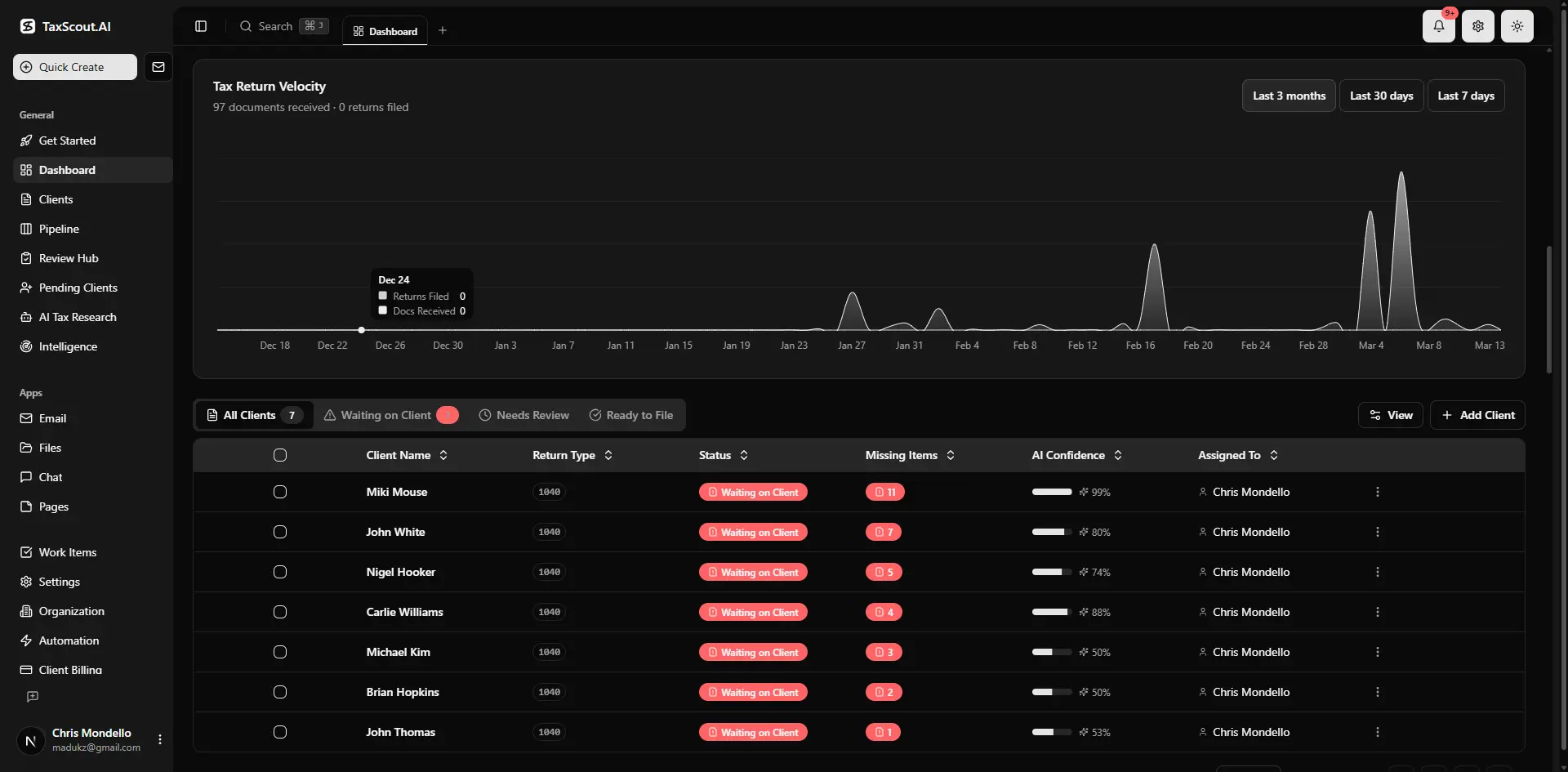
Real-time dashboard showing returns in progress, revenue, and upcoming deadlines
The Five Communication Gaps That Silently Drain CPA Firm Revenue
Before prescribing solutions, it helps to name the specific failure modes that appear repeatedly in accounting practices of every size. Each of these factors directly shapes how accounting firm communication plays out in practice.
Gap 1: Scattered Channels With No Single Record of Truth
Clients email one preparer, text another, call the front desk, and drop documents in a generic Dropbox folder — all for the same engagement. When a question arises about what was communicated and when, nobody can produce a clean audit trail. This creates both malpractice exposure and the kind of "we dropped the ball" moments that erode client trust permanently. A shared inbox built for accounting firms solves the channel fragmentation problem by centralizing every inbound message under one roof with full thread history visible to the whole team. Understanding accounting firm communication in this context is what separates firms that scale from those that stall.
Gap 2: No Proactive Status Updates
When a return moves from "documents received" to "in review" to "ready for signature," most firms rely on a staff member remembering to send an update email. In practice, that email gets skipped during busy season. The client, hearing nothing, assumes nothing is happening and either calls to check in (costing your team 10 minutes) or assumes you have forgotten them (costing you their loyalty). Automated accounting client updates tied to pipeline stage changes eliminate this gap entirely without adding any manual work. This is precisely where a deliberate accounting firm communication strategy pays off.
Gap 3: Document Collection Bottlenecks
The average CPA firm spends an extraordinary amount of time chasing missing documents. IRS Publication 4557 guidelines on data safeguarding highlight why firms cannot simply accept documents through any channel — there are security and recordkeeping requirements at stake. Yet without automated reminders, clients forget to upload W-2s, K-1s, and brokerage statements until the preparer manually follows up. Each manual chase is a double cost: the staff time spent asking, and the delay that pushes the return later in the queue. Accounting firm communication sits at the center of this decision — get it wrong and the rest unravels.
Gap 4: E-Signature and Approval Delays
Getting Form 8879 signed should be a five-minute task. At many firms it takes five days because the document goes out as a PDF attachment to a personal email, the client misses it in their inbox, and nobody on your team has a system for following up. Delays in e-signatures are not just inconvenient — they can push returns past filing deadlines, creating penalty exposure and an uncomfortable conversation that damages the relationship. When firms revisit their accounting firm communication priorities, the gaps usually surface here.
Gap 5: No Centralized Client Context for Your Team
When a client calls with a question and reaches a different staff member than usual, that staff member often has to say "let me look into that and call you back" — not because your team is incompetent, but because the client's history, prior-year notes, and current engagement status are not instantly accessible in a shared system. This experience, repeated several times, convinces clients that your firm is disorganized regardless of how technically excellent your tax work actually is.
Tired of watching client relationships erode because of communication gaps your current software can't fix?
TaxScout's integrated platform connects shared inbox, client portal, automated reminders, and AI document workflows so nothing slips through the cracks — all at a flat rate with no per-user fees.
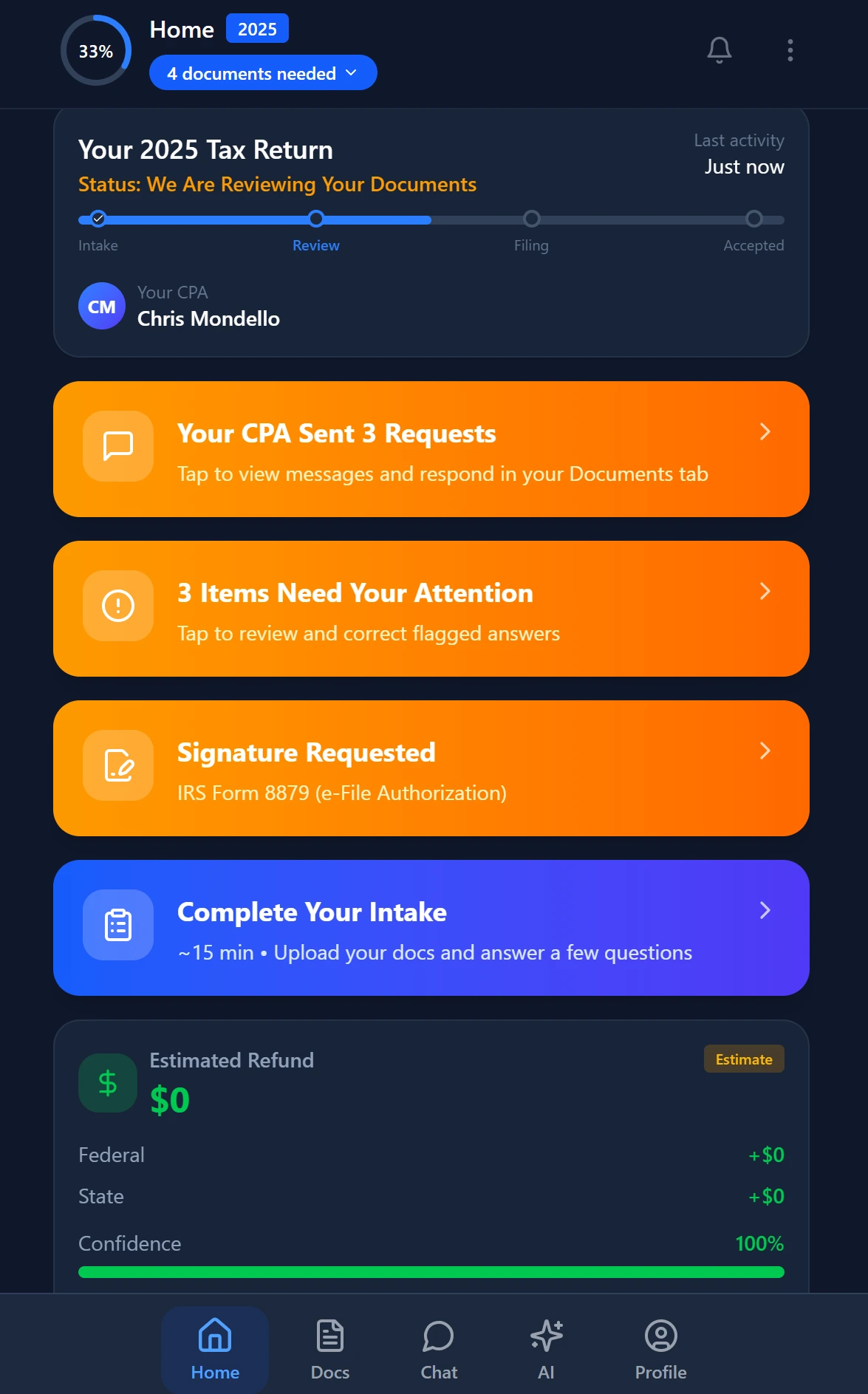
Smart intake auto-fills from uploaded documents and prior-year data

Your clients see your brand — OTP login, document upload, and real-time status
Why Time-Saving AI Alone Does Not Fix Accounting Firm Communication
The accounting technology industry has done an excellent job of marketing AI as the solution to firm inefficiency. And to be clear, AI document extraction, automated tax research, and intelligent intake genuinely do save time. TaxScout's AI document extraction processes 180+ form types through a 5-layer validation pipeline — that is real efficiency. But efficiency in the back office does not automatically translate to a better client experience on the front end.
Consider the typical workflow at a firm that has adopted AI for document processing but not for communication. A client uploads their documents. The AI extracts and validates the data in minutes. The preparer reviews it the same afternoon. The return is ready in 48 hours. And then — nothing. The client hears silence for a week because nobody remembered to send a status update. From the client's perspective, the firm took a week on a simple return. The efficiency gain was entirely invisible.
This is the core argument: AI time savings only translate into client satisfaction when they are paired with an AI-native communication layer. The client needs to see the speed, not just your team. That requires automated notifications when pipeline stages change, a self-serve portal where clients can check status at midnight without calling anyone, and AI-assisted summaries that turn your team's work product into clear client-facing updates. Without those components, you are running a faster back office that your clients cannot perceive.
How TaxScout Closes Every Communication Gap in One Platform
TaxScout was built on the premise that accounting firm communication software cannot be a bolt-on module — it has to be native to the same platform where work actually happens. Here is how each component addresses the specific gaps described above.
Shared Inbox With AI Classification
TaxScout's communication hub connects Gmail OAuth, Outlook Graph, and IMAP/POP3 into a single shared inbox with AI-powered classification. Every inbound message from a client is automatically associated with their record, classified by intent (document submission, question, approval, etc.), and visible to every authorized team member. Nobody falls through the cracks because one preparer is out sick. There is a complete, searchable audit trail for every exchange — critical for both malpractice defense and IRS correspondence management.
Branded Client Portal With OTP Login
The TaxScout client portal gives every client a single place to upload documents, check return status, sign forms, review invoices, and send messages — all under your firm's branding. Login uses one-time passcodes rather than passwords, which dramatically reduces the "I forgot my password" support burden that eats front-desk time. Clients who have a dedicated portal stop texting their preparer's cell phone because they have a better alternative. For a deep dive on portal design that actually drives adoption, see building a client portal clients will actually use.
Automated Reminders Tied to Pipeline Stages
TaxScout's pipeline management uses 12 customizable stages with drag-and-drop kanban. When a return advances from one stage to the next, automated notifications fire to the client without any manual intervention. Clients get proactive accounting client updates at every milestone — documents received, return in review, ready for your signature, filed with the IRS. Your team does not compose these messages; they are triggered by the workflow. The result is that clients perceive a highly communicative firm even during peak season when your team is at full capacity.
Smart Intake That Prevents Document Gaps Before They Start
Most communication failures are really document-collection failures in disguise. TaxScout's AI intake engine is modeled on IRS Form 13614-C and uses a 4-layer prefill process — pulling from extracted documents, prior-year data, client profile, and AI gap analysis — to present clients with a precisely targeted checklist of what is still needed. Instead of a generic "please send your tax documents" email, clients receive a specific, personalized list. Follow-up reminders for missing items are automated. The result is fewer missing-document bottlenecks and fewer emergency calls in the final days before a deadline. You can also review IRS resources on taxpayer data safeguarding to understand why a secure, structured intake process matters beyond just convenience.
AI Research Agents That Power Client-Facing Answers
When a client asks a complex question — "Can I deduct my home office if I also rent a coworking space?" — the quality and speed of your answer is itself a communication event. TaxScout's 9 specialized AI research agents search IRS.gov, Treasury, Cornell Law, SSA, and Congress in real time, with client-context memory so the answer accounts for that client's specific entity structure and filing history. Your team can deliver a substantive, cited answer in minutes rather than days. According to Treasury guidance on taxpayer services, timely and accurate responses to taxpayer inquiries are a cornerstone of trust in the tax system — a standard your firm can now meet consistently.
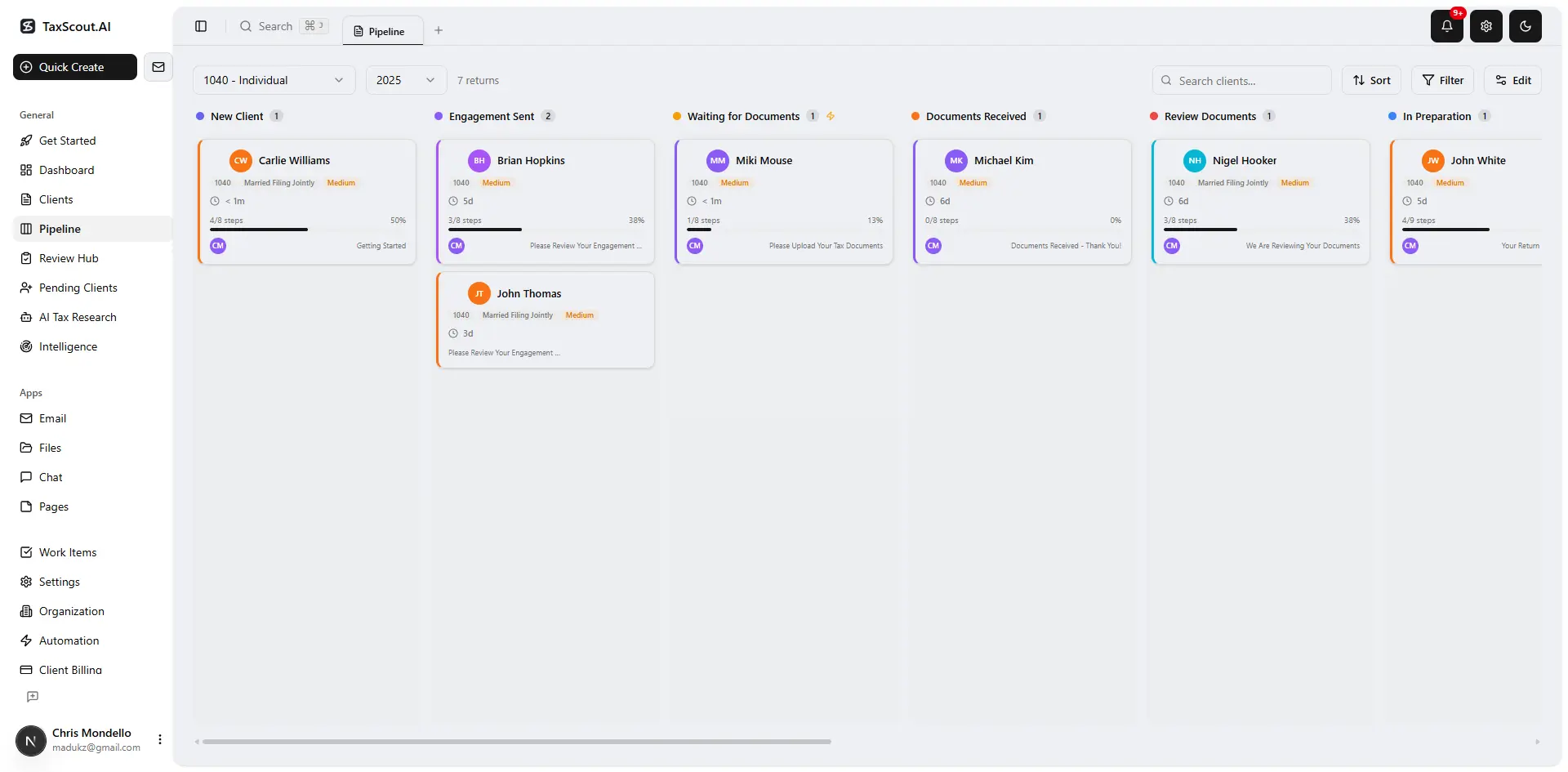
Track every return from intake to filed with drag-and-drop pipeline management

Click any extracted field to see its source highlighted on the original PDF
Accounting Firm Communication Software: What to Look for and What to Avoid
Not all CPA client communication tools are created equal, and the differences matter significantly at the platform level. Here is what to evaluate when assessing any solution.
Avoid Modular Add-On Pricing for Communication Features
Some platforms charge separately for client portals, intake questionnaires, and e-signatures. Canopy, for instance, charges approximately $11 per client for its Smart Intake feature on top of per-user module fees. When communication features carry separate price tags, firms inevitably under-deploy them — skipping the portal for "small" clients or forgoing automated reminders to save on costs. The gaps that remain are exactly the ones that drive churn. TaxScout's flat pricing — $149/month for Prep Pro with unlimited clients and 10 seats — means every communication feature is always on for every client. See the full breakdown on the TaxScout pricing page.
Require a Native Audit Trail, Not a Forwarded Email Thread
Karbon is email-centric, which means its "communication record" is essentially a managed email thread. That works until someone replies from their personal account, BCC's a client, or forwards a chain with a sensitive attachment. A native audit trail — where every message, document upload, signature event, and status change is logged inside the platform against a specific client record — is not just a nice-to-have. It is a professional liability safeguard. See our comparison with Karbon for a detailed feature breakdown.
Insist on E-Signature Integration, Not a Third-Party Workaround
If your practice management platform requires you to export a PDF, upload it to a separate e-signature tool, and then manually import the signed copy back, you have created a workflow with three failure points. TaxScout's e-signature integration via Documenso covers Form 8879, 4868, FBAR, engagement letters, W-9, and state forms — all initiated and tracked inside the platform, with automatic status updates to the client portal when signing is complete. The Bureau of Labor Statistics projects continued growth in demand for accounting services, which means your firm's capacity to handle more clients without adding headcount depends on eliminating exactly these kinds of manual handoffs.
CPA Client Communication Tools: Feature and Pricing Comparison (10-Person Firm)
| Feature | TaxScout Prep Pro | TaxDome | Canopy | Karbon |
|---|---|---|---|---|
| Monthly cost (10 users) | $149 flat | ~$500 ($100/user) | ~$660 (modular) | ~$590 ($59/user) |
| Shared inbox with AI classification | Yes | No | No | Email-centric only |
| Branded client portal (OTP login) | Yes | Yes | Yes | No |
| Automated pipeline stage notifications | Yes | Limited | Limited | No |
| Smart intake with AI gap analysis | Yes | No | Extra $11/client | No |
| AI document extraction (180+ forms) | Yes — 5-layer validation | No | No | No |
| 9 AI research agents (real-time IRS) | Yes | No | No | No |
| Native e-signatures (8879, engagement letters) | Yes | Yes | Yes | No |
| Per-user pricing | No — flat rate | Yes | Yes | Yes |
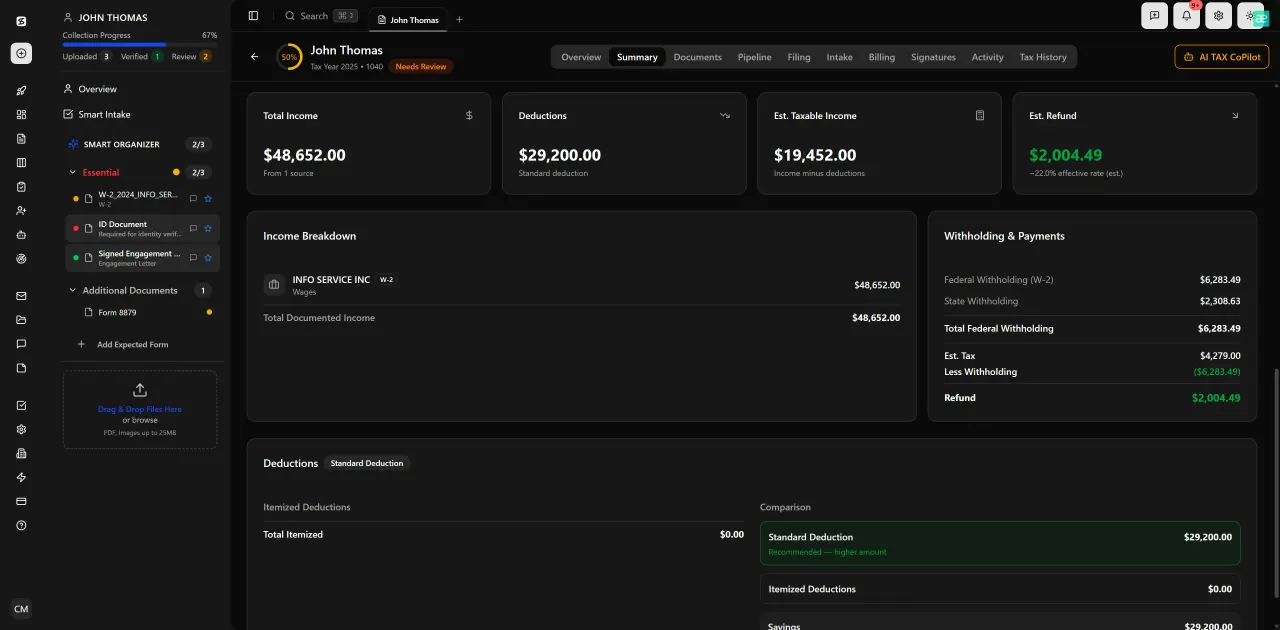
Review with AI assist — 9 agents answer questions with full client context
Building a CPA Firm Communication Strategy That Actually Scales
Technology alone does not fix communication. You also need a deliberate strategy for how and when clients hear from your firm. The good news is that with the right platform, strategy becomes mostly a configuration exercise rather than a training burden.
Start by auditing every client touchpoint in your current engagement lifecycle: initial inquiry, engagement letter, document request, return preparation, review, signature, filing confirmation, and post-filing follow-up. For each touchpoint, ask two questions: Is this currently automated? If a client heard nothing at this stage, would they be worried? Any touchpoint that is both manual and client-anxiety-producing is a priority target for automation.
Next, standardize your channel policy. Define clearly where different types of communication happen — the client portal for document exchange, the shared inbox for general questions, automated notifications for status updates, and scheduled calls or video meetings for advisory discussions. Communicate this policy to every client at onboarding so they know where to look and what to expect. This single step reduces inbound "just checking in" calls by a significant margin at firms that implement it.
Finally, measure the right things. Tracking accounting firm KPIs like average response time, document collection cycle time, and e-signature turnaround gives you the data to identify which communication stages are still underperforming after you automate. TaxScout's analytics dashboard surfaces these metrics automatically so you can iterate on your CPA firm communication strategy based on evidence rather than gut feel. The Journal of Accountancy has consistently reported that firms with documented communication processes report higher client retention than those relying on individual staff initiative.
The Real Cost of Doing Nothing About Communication Fragmentation
It is tempting to treat communication improvements as a Phase 2 project — something to tackle after tax season, after the software migration, after the new hire is up to speed. The problem is that every month of fragmented accounting firm communication is compounding the churn risk in your client base. Clients who feel under-informed are not waiting for you to fix your workflows; they are quietly shopping alternatives.
Replacing a lost client costs roughly five times more than retaining one, according to widely cited service industry research. In accounting, where client acquisition typically involves networking, referrals, and a long trust-building period, the multiplier may be even higher. The firms winning on communication in 2026 are not doing so because they hired better communicators — they built systems that make consistent, proactive communication the path of least resistance for everyone on their team.
If your firm is evaluating a move to an AI-native practice management platform, start by calculating your communication-related churn cost. Take your annual revenue per client, multiply by the number of clients who left or significantly reduced engagement in the past 24 months, and ask honestly how many of those departures were preceded by communication friction. That number is your baseline. The TaxScout demo walks through exactly how the platform's integrated communication layer addresses each stage of that lifecycle — no commitment required.
For a broader look at how AI is reshaping practice management across document handling, workflow, and billing — not just communication — the guide to going paperless in 2026 is a useful companion read.
Ready to turn your firm's communication workflow from a liability into a competitive advantage?
TaxScout integrates shared inbox, branded client portal, automated deadline reminders, AI intake, and e-signatures into one flat-rate platform — so your team communicates consistently without adding any manual work.
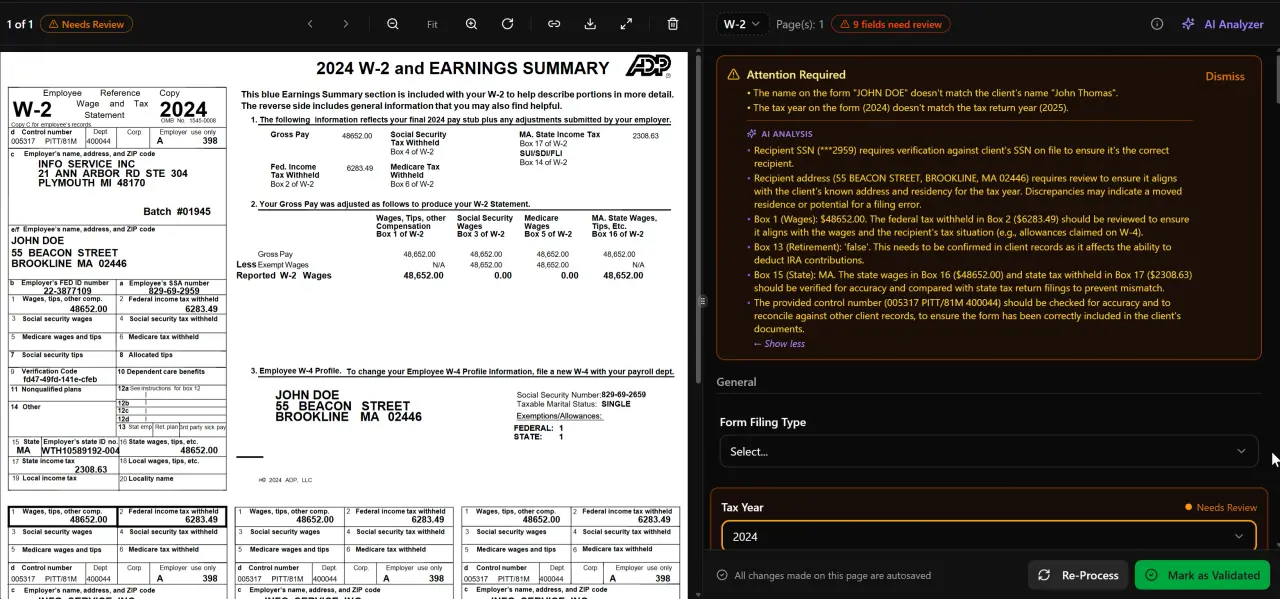
AI classifies, extracts, and validates every document automatically
Keep reading
K-1 Distribution Timing: How CPAs Set Partner Expectations Before Tax Season Ends
Sep 28, 2026 · 1 min read
Client Billing Disputes: How CPAs Resolve Fee Conflicts Without Losing the Relationship
Sep 18, 2026 · 1 min read
Selling Advisory Services to Existing Tax Clients: A Conversion Playbook for CPAs
Aug 19, 2026 · 1 min read
Stay up to date
Get the latest tax tech insights delivered to your inbox.