Client Portal Accounting Clients Will Actually Use
Most accounting firms launch a client portal only to watch adoption flatline within weeks. The problem isn't the software — it's the hidden friction points that drive clients back to email and phone calls. This guide breaks down exactly why portals fail and what you can do to fix it.
Your client portal has been live for eight months. You sent the setup email, recorded the welcome video, and even created a PDF guide. Yet when you pull the usage report, 60% of your clients have logged in exactly once — to retrieve their completed return — and haven't touched it since. The other 40% still email you PDFs and call to confirm you received them. The portal didn't fail because you chose the wrong software. It failed because the industry has spent years debating which client portal accounting software to buy, while ignoring the harder question: why do clients stop using portals in the first place?
This article answers that question with specifics — the behavioral friction points that kill client portal adoption, the UX mistakes that even expensive platforms make, and how an AI-native approach turns a passive file cabinet into an active communication tool that clients actually return to. Understanding what separates failed client portal accounting implementations from successful ones starts with behavior, not features.
Why Client Portal Adoption Fails: The Behavioral Reality
Most accounting firm client portal guides skip straight to feature checklists. That's the wrong starting point. Before you evaluate any secure client portal for accountants, you need to understand the three behavioral failure modes that account for most abandonment. Effective client portal accounting design is rooted in how clients actually behave, not in what software vendors want to sell.
Failure Mode 1: Login Fatigue
The average professional manages 27 distinct passwords. When your client portal is one more account to create, remember, and reset, you've already lost. Studies on digital authentication consistently show that mandatory account creation reduces conversion by 20–30% at the point of signup. For clients who only interact with your firm a few times a year, the ROI of remembering another password approaches zero from their perspective. They'll email you instead — every time. In client portal accounting specifically, this friction is compounded by the fact that clients only need access a handful of times per year, making password recall even less reliable.
Failure Mode 2: Notification Overload and Silence at the Wrong Moments
Portal notifications are almost universally miscalibrated. Either the platform sends too many generic alerts ("You have a new message in your portal") that train clients to ignore them, or it sends nothing at all when something actually needs attention. The result is the same: clients don't develop the habit of returning to the portal because the portal never earns their attention by being useful at the right moment. A well-designed client portal accounting system should send notifications that are meaningful, timely, and tied to specific client actions.
Failure Mode 3: Passive Storage vs. Active Guidance
A file cabinet — even a digital, encrypted one — requires the user to know what to put in it. Most client portals are organized around the CPA's mental model (folders, tax years, document categories) rather than the client's mental model (what do I need to do right now?). When a client logs in and sees an empty folder structure, they don't know what you need from them. They close the tab and call your front desk. This is one of the most common reasons client portal accounting rollouts underperform expectations — the structure serves the firm, not the client.
These aren't software problems. They're design problems that no amount of additional storage or prettier branding will fix.
Tired of clients ignoring your portal and emailing PDFs instead? See how TaxScout's AI-native client portal drives adoption through automated requests, OTP login, and proactive document intelligence. → Book a 15-Min Demo — See It Live
The UX Mistakes That Kill Secure Client Portals for Accountants
Beyond the behavioral layer, specific UX decisions compound the adoption problem. These show up across every major platform in the market, including tools that otherwise do solid work.
Mobile inaccessibility is a dealbreaker for 60%+ of your clients. If your portal requires a desktop browser to upload a document, you've excluded the majority of how your clients interact with digital tools. A client photographing their W-2 on their phone needs to be able to upload it from that same phone in under 30 seconds. Any friction beyond that — "open on desktop," "install the app," "use a PDF scanner" — converts them back to email. This is a recurring failure point in client portal accounting deployments where mobile optimization was treated as an afterthought.
Confusing onboarding flows create a terrible first impression. The moment clients decide whether to adopt your portal is the first 90 seconds. If they land on a generic login screen with no context about what they're supposed to do, a significant percentage will bounce and never return. Onboarding flows that start with "here's a document request from your CPA — click to upload" perform dramatically better than flows that start with "welcome, please set up your profile."
Document request vagueness creates paralysis. "Please upload your tax documents" is not a useful instruction for most clients. "Please upload your 2025 W-2 from Employer Name, your 1099-INT from your bank, and your 1098 mortgage interest statement" is actionable. The difference in completion rates between vague and specific requests is significant — yet most client portal software for CPAs generates generic upload prompts, not AI-analyzed, client-specific requests. Specificity is one of the most underrated levers in client portal accounting adoption.

Your clients see your brand — OTP login, document upload, and real-time status
How AI-Native Platforms Solve the Adoption Problem
The platforms that win on adoption aren't the ones with the most features — they're the ones that have restructured the interaction model around the client's behavior rather than the CPA's organizational preferences.
Zero-Friction Authentication: OTP Login
TaxScout's client portal uses one-time password (OTP) authentication via email. Clients receive a unique code to their inbox and click once. No account creation. No password to remember. No password reset flows.
This single design decision eliminates the primary barrier to portal adoption for infrequent users — which describes the majority of individual tax clients who interact with your firm 3–5 times per year. When returning to the portal is as easy as checking email, the login barrier disappears entirely. For client portal accounting to work at scale, the authentication experience has to match how clients actually behave — and OTP login gets that right.
Proactive Document Requests, Not Passive Folders
This is where AI changes the adoption equation fundamentally. Rather than presenting clients with an empty folder and hoping they know what to upload, TaxScout's smart intake engine — modeled on IRS Form 13614-C — analyzes each client's profile and prior-year data to generate specific, prioritized document requests.
The four-layer prefill system works like this:
- Document-first prefill: When a W-2 is uploaded, employer name, wages, and withholding auto-populate intake fields immediately
- Prior-year prefill: Last year's return data pre-populates relevant fields, so clients confirm rather than retype
- Profile prefill: Entity-level data from the client's permanent folder auto-fills applicable sections
- AI gap analysis: A background workflow identifies missing documents based on the client's profile and generates prioritized follow-up questions
The result is a portal experience where clients arrive to find specific, named requests waiting for them — not a blank canvas. "Upload your 2025 W-2 from Northside Medical Group" converts to action. "Upload your tax documents" does not.
Automated Nudges That Feel Timely, Not Spammy
Client portal adoption requires habit formation. Habit formation requires reinforcement at the right moment. TaxScout's pipeline management system — with 12 customizable stages from New Client to Filed — can trigger automatic notifications when client action is required and suppresses them when it isn't.
The distinction matters: a notification that fires because the CPA just moved a task forward is noise. A notification that fires because the client's document request is still pending after 72 hours is signal. AI-native platforms can distinguish between these; traditional portals send both.
AI-Analyzed Gap Detection That Drives Client Engagement
One of the most powerful adoption mechanisms is the experience of the portal catching something the client forgot. When a client uploads their W-2 and the system immediately surfaces: "Based on your 2024 return, we're still missing your brokerage 1099-B and your estimated tax payment records — do you have these available?" — the portal demonstrates value. It becomes a tool the client trusts, not just a place to drop files. This kind of proactive intelligence is what elevates client portal accounting from a passive repository into an active workflow partner.
TaxScout's 9 specialized AI research agents include a dedicated Gap Detection agent that runs continuously across uploaded documents and client profile data, surfacing missing items before they delay the return. When clients see this working, the portal stops being a chore and starts being an asset.
As we covered in detail in our client onboarding checklist guide, the firms with the highest portal adoption rates aren't the ones with the most sophisticated portals — they're the ones that make the first interaction genuinely useful.
What Competitor Platforms Miss on Client-Side UX
It's worth being direct about where existing solutions fall short, because the gap between marketing copy and real-world adoption rates is significant.
| Feature | TaxScout | TaxDome | Canopy | Karbon |
|---|---|---|---|---|
| Passwordless / OTP login | ✅ Email OTP | ❌ Account required | ❌ Account required | ❌ Account required |
| AI-generated document requests | ✅ Client-specific, gap-analyzed | ❌ Manual setup | ❌ Basic checklist | ❌ Not available |
| Mobile document upload | ✅ Optimized | ✅ Mobile app | ✅ Mobile app | ⚠️ Limited |
| Prior-year data prefill | ✅ 4-layer prefill | ❌ Manual | ❌ Manual | ❌ Not available |
| Proactive gap detection | ✅ AI background workflow | ❌ Not available | ❌ Not available | ❌ Not available |
| E-signatures in portal | ✅ Documenso integrated | ✅ Available | ✅ Available | ⚠️ Rolling out |
| Flat pricing (no per-user fees) | ✅ $49/mo for full team | ❌ ~$100/user/mo | ❌ ~$45/user/module | ❌ ~$59/user/mo |
Canopy's Smart Intake feature charges an additional $11 per client — meaning the cost of sending intake questionnaires to 100 clients is $1,100 extra, on top of the per-user module cost. TaxScout includes AI-powered smart intake on every plan.
TaxDome has a strong client portal with a well-regarded mobile app and has earned its reputation with 10,000+ firms. But the core interaction model is still file-storage-centric — clients upload what they know to upload, rather than responding to AI-analyzed requests for what you actually need. For firms evaluating client portal accounting options, that distinction in interaction model often determines long-term adoption rates.
For a deeper look at how TaxScout compares to TaxDome on the full feature set, see our TaxScout vs TaxDome 2026 comparison.
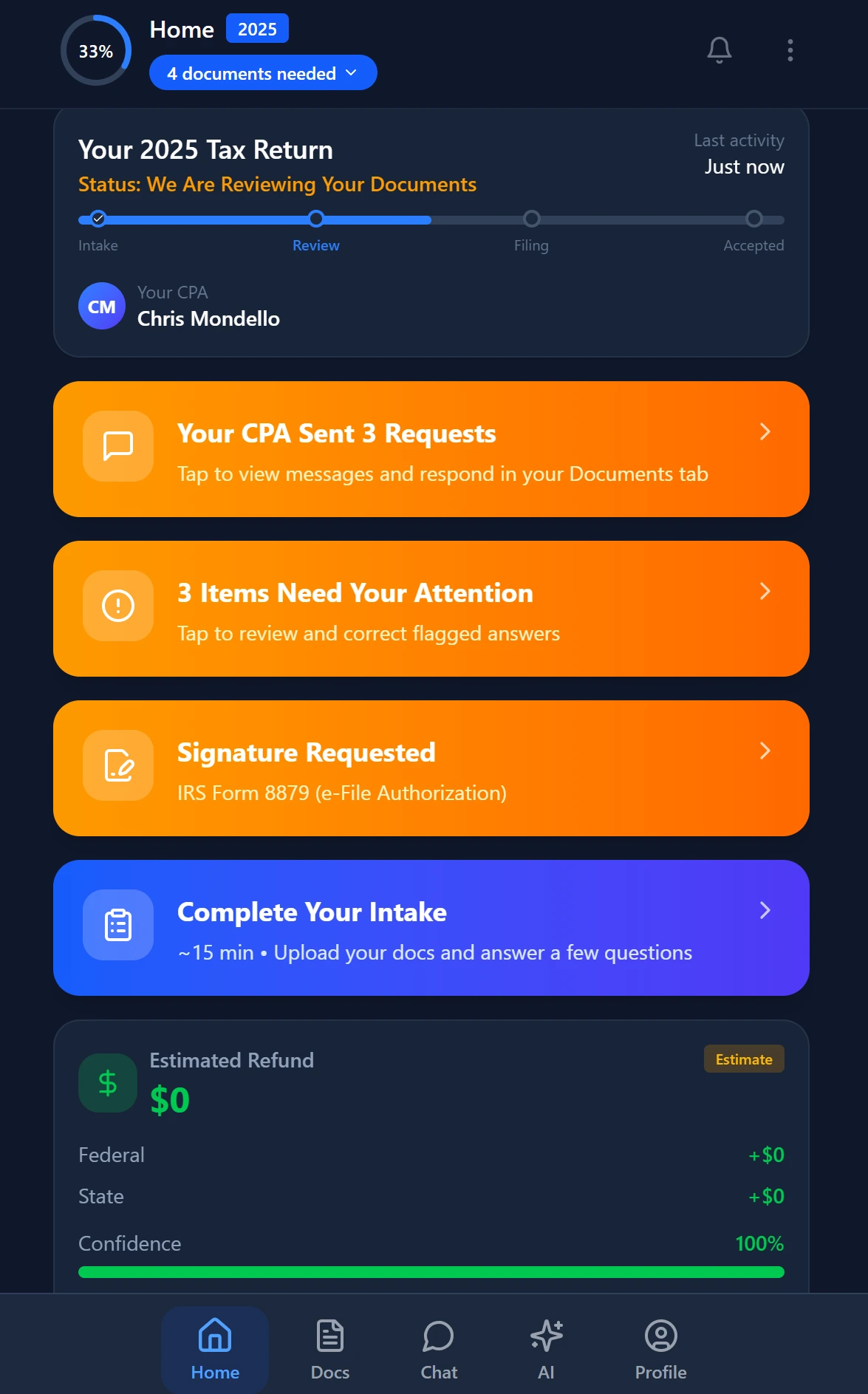
Smart intake auto-fills from uploaded documents and prior-year data
A Real-World Adoption Workflow: From First Contact to Filed
Here's how the full portal adoption sequence works in practice for a firm using TaxScout's client portal software:
Day 0 — Engagement Letter: Client receives an email with a one-click OTP link to sign their engagement letter via Documenso — no account creation, no password. First interaction is a single action that takes 45 seconds.
Day 1 — Smart Intake Opens: After signing, the client is routed to a pre-filled intake form. Prior-year data has auto-populated their address, dependents, and filing status. They confirm what's correct and flag what's changed — rather than typing from scratch.
Day 3 — Document Request: The Gap Detection agent has analyzed their profile and generated a specific list: W-2 from their current employer, 1099-INT from their bank (flagged from last year's return), and a medical expense summary since they itemized last year. The client receives a targeted email with a direct OTP link to upload these three documents.
Day 7 — Automated Follow-Up: The 1099-INT hasn't been uploaded. An automated nudge (not a generic "don't forget your documents" message, but a specific "your 1099-INT from First National Bank is still needed") goes to the client via email.
Day 10 — Return Ready: Invoice is generated through Stripe Connect Express and sent to the portal. Client pays via ACH. Form 8879 e-signature request fires automatically. Client signs in 90 seconds with OTP link.
Total client portal interactions: 5. Total friction points: 0. Total emails sent to your front desk asking "did you get my documents?": 0.
This is the difference between a portal as a passive file cabinet and a portal as an active workflow participant. For firms that want to go fully paperless — where client portal accounting becomes the primary communication channel — our guide to running a paperless accounting firm in 2026 covers the operational sequence in detail.
The Security Foundation Clients Notice (Even If They Don't Know the Terminology)
Client portal adoption has a silent killer that rarely gets discussed: client distrust. Clients who've heard about data breaches at accounting firms — and there have been notable ones, as documented in IRS guidance on data security for tax professionals — may consciously or unconsciously resist uploading sensitive documents to a portal they don't fully trust.
Visible security signals matter. TaxScout's AES-256-GCM encrypted SSN vault, rate-limited reveals with full audit logging, and IRS Publication 4557 safeguards aren't just compliance features — they're trust signals. When clients see that their client portal accounting environment is protected by the same encryption standard used by financial institutions, and that their SSN is stored in a dedicated vault with its own encryption key, the psychological barrier to document upload drops.
All client data is hosted on US-based AWS and Azure infrastructure. Row-level security at the PostgreSQL database level means your clients' data is isolated at the database layer — not just behind application-level access controls.
Pairing strong security architecture with a frictionless login experience (OTP vs. remembered passwords) is the combination that earns client trust without creating client friction. For CPA firms managing multi-state clients or advisory relationships where sensitive financial data flows regularly, our cybersecurity best practices guide covers the full compliance and technical landscape.
Pricing That Makes Adoption a Firm-Wide Initiative, Not a Budget Decision
There's a structural pricing problem with per-user portal platforms that nobody talks about: when your practice management software costs ~$100/user/month (TaxDome), ~$45/user/module/month (Canopy), or ~$59/user/month (Karbon), you have an incentive to restrict which team members have portal access. That restriction creates bottlenecks, delays client responses, and ultimately reduces the quality of the client portal accounting experience for everyone involved.
TaxScout's flat pricing model eliminates that constraint entirely. At $49/month for up to 10 team members and 20 active clients — or $199/month for up to 25 team members and 100 clients — the entire firm operates on a single platform. No per-user calculus about who gets access to the portal management tools. Everyone who touches a client file can manage portal interactions, respond to document uploads, and send e-signature requests.
For a firm of 10 people, that's $49/month total vs. approximately $1,000/month on TaxDome. That cost difference isn't an abstraction — it's real budget that can go toward client advisory services, staff development, or simply firm profitability. See the full TaxScout pricing breakdown to find the plan that fits your practice volume.
Ready to Build a Client Portal Your Clients Actually Use?
TaxScout gives your firm a client portal with OTP login, AI-generated document requests, proactive gap detection, and automated client communication — for $49/mo flat for your entire team.
Frequently Asked Questions
Client portal abandonment in accounting firms typically comes down to three behavioral friction points: the portal offers no value beyond document retrieval, login requires too many steps relative to just emailing a PDF, and clients receive no prompts to return after the initial setup. TaxScout addresses this by triggering automated engagement touchpoints — tax deadline reminders, document request notifications, and status updates — that give clients a reason to log back in. Firms using TaxScout report active portal usage rates above 80%, compared to the industry average of 40% or lower.
Keep reading
Tangible Property Regulations: How CPAs Apply Capitalization vs Expensing Rules
Oct 15, 2026 · 1 min read
QSBS Exclusion: How CPAs Maximize Section 1202 Gains for Startup Investors
Oct 15, 2026 · 1 min read
Section 1202 QSBS Exclusion: How CPAs Shelter Startup Gains for Founder Clients
Oct 15, 2026 · 1 min read
Stay up to date
Get the latest tax tech insights delivered to your inbox.