Pixie vs Karbon vs TaxScout: Which Practice Management Software Wins for CPA Firms?
Most pixie vs karbon comparisons stop at feature checklists — but CPAs shopping in 2026 need to ask a harder question: does the platform think? This three-way comparison breaks down task management, client portals, document workflows, and pricing across Pixie, Karbon, and TaxScout so you can make…
When CPA firms start shopping for practice management software, the pixie vs karbon debate comes up quickly. Pixie is the lightweight, affordable option built for small accounting practices. Karbon is the enterprise-ish platform that wins on email integration and team collaboration. Both have loyal user bases — and both leave meaningful gaps that have become harder to ignore as AI-native competitors enter the market.
This comparison adds a third option to that conversation: TaxScout.ai, a platform built from scratch around AI document extraction, intelligent workflow automation, and flat-rate pricing. The goal isn't to declare one winner for every firm. It's to give you the honest data you need — on task management, client portals, document processing, and cost — to decide which platform fits your practice in 2026. While the pixie vs karbon debate has long dominated conversations among small-to-midsize accounting firms, TaxScout.ai enters as a compelling third option built around AI document extraction, intelligent workflow automation, and flat-rate pricing.
If you've read the existing pixie vs karbon comparisons online, you've probably noticed they all focus on legacy feature checklists: does it have a client portal? Does it have e-signatures? Those questions matter, but they don't address autonomous workflow automation, AI document extraction accuracy, or what happens to your per-seat costs when your team grows from five to twelve. This article covers all of it.
Pixie vs Karbon: What Each Platform Actually Does
Pixie is a UK-founded practice management tool designed for small accounting firms — typically sole practitioners and firms under ten staff. It covers basic job management, client records, task lists, and simple document storage. Its pricing is low and its UI is approachable. The tradeoff is capability ceiling: Pixie doesn't offer AI-powered document extraction, complex workflow automation, or deep integrations with US tax software like Drake, Lacerte, or UltraTax CS. In the pixie vs karbon discussion, Pixie typically appeals to sole practitioners and small firms under ten staff who need an approachable UI and low-cost job management without the complexity of enterprise-grade tools.
Karbon is positioned at the opposite end of the spectrum. It excels at email-centric workflow management — its core differentiator is threading client emails directly into work items so nothing gets lost. Karbon also offers templates, team collaboration timelines, and a client portal. At roughly $59 per user per month, however, Karbon becomes expensive quickly. A ten-person firm pays approximately $590 per month before add-ons. And despite Karbon's roadmap investments in AI (its 'Kai' assistant), the platform still lacks native AI document extraction, a five-layer validation pipeline, or AI research agents tied to live IRS and Treasury data. When firms weigh pixie vs karbon, Karbon consistently stands out for its email-centric workflow management, where client emails are threaded directly into work items, making it the go-to choice for teams that live in their inboxes.
Both platforms belong to a generation of tools built before large language models made autonomous document processing practical. Understanding that context is essential for any honest practice management software CPA comparison — because the category has changed faster in the last two years than in the previous decade. For firms evaluating their pixie vs karbon approach, this trade-off compounds over time.

Track every return from intake to filed with drag-and-drop pipeline management
Head-to-head feature comparison — TaxScout vs Karbon
Task Management and Workflow Automation Compared
Task management is table stakes. Every tool in this comparison offers it. The real differentiator is how much of that task management happens automatically versus how much your team configures and monitors by hand. Each of these factors directly shapes how pixie vs karbon plays out in practice.
Pixie offers simple job-based task lists. You can create recurring jobs, assign them to staff, and track completion. There's no conditional branching — if a client hasn't uploaded their W-2 by day five, the job doesn't automatically nudge the client or reroute to a different stage. Everything is human-initiated. For a two-person firm handling fewer than 100 returns a year, that's workable. For a growing firm managing 400+ returns across multiple states, manual task initiation becomes a capacity problem. See our post on accounting firm capacity planning for a deeper look at how manual workflows stall firm growth. Understanding pixie vs karbon in this context is what separates firms that scale from those that stall.
Karbon's workflow automation is more sophisticated. Work item templates, automated task assignments, and timeline views give larger teams visibility. Its email integration — pulling client replies directly into work items — is genuinely strong. The gap appears in document-level intelligence: Karbon doesn't know what's inside the files your clients upload. A PDF flagged 'taxes' is just a PDF. There's no extraction, no validation, no confidence scoring. This is precisely where a deliberate pixie vs karbon strategy pays off.
TaxScout's pipeline management uses 12 customizable kanban stages with drag-and-drop controls, but the real automation layer sits underneath. When a client uploads documents through the branded client portal, TaxScout's AI classifies the documents, runs a five-layer validation pipeline across 180+ form types, and surfaces confidence scores on every extracted field. If a W-2 is blurry or a 1099 is missing a payer EIN, the system flags it before a preparer ever opens the file. That's the difference between workflow automation and workflow intelligence.
Tired of manually chasing documents that your software can't read?
TaxScout extracts, validates, and cross-checks 180+ tax form types automatically — so your team reviews clean data, not raw PDFs.

Your clients see your brand — OTP login, document upload, and real-time status
Client Portals: Friction, Adoption, and Security
Client portal adoption is the silent killer of otherwise good practice management software. A portal that clients find confusing — or that requires them to remember yet another password — will sit unused, and documents will keep arriving via unencrypted email attachments. The Journal of Accountancy has consistently cited client communication and document exchange as the top pain points CPAs report with their current software stacks.
Pixie includes a basic client portal for document exchange. It's functional but minimal — no smart intake, no pre-fill from prior-year data, no AI gap analysis to identify missing documents before the client submits.
Karbon's client portal is more polished, with request lists and task-based document collection. The friction point is authentication: password-based login creates support overhead, especially for clients who only engage with your firm during tax season. Karbon also charges per user, so every staff member who needs portal access adds to your monthly bill.
TaxScout's client portal uses OTP (one-time passcode) login — no passwords, no password resets, no support tickets from clients who can't remember their credentials. The portal is branded to your firm and connects directly to TaxScout's smart intake engine, which is modeled on IRS Form 13614-C and uses four-layer prefill: document-first, prior-year data, client profile, and AI gap analysis to identify what's still missing. For CPAs who want to understand what makes a client portal clients will actually use, our post on building a client portal clients actually use walks through the full design logic. From a security perspective, TaxScout stores SSNs in an AES-256-GCM encrypted vault with 13-step DSAR anonymization — a capability neither Pixie nor Karbon offers natively.
AI Document Extraction: The Capability Gap That Defines 2026
Neither Pixie nor Karbon offers AI document extraction in any meaningful sense. Pixie has basic document storage. Karbon has file attachments linked to work items. Neither platform reads the documents, validates the math, or cross-references fields across forms.
TaxScout's AI document extraction processes 180+ tax form types — every W-2 variant, all 1099 series including 1099-INT, K-1s, 1098 series, 1095 series, and the full 1040 with all schedules. The extraction pipeline runs five layers of validation: document quality routing, AI extraction with field-level confidence scoring, OCR cross-verification, 15 deterministic math rules, and 18 post-extraction rules plus cross-document validation. Every extracted field is traceable back to its source document in a split-screen PDF viewer with click-to-source highlighting.
For a deeper technical breakdown of how AI extraction works in a tax context, see our guide on AI document extraction for CPAs. The IRS's own guidance on digital tax administration signals that document automation is becoming an expectation, not an edge — which makes the absence of extraction capability in Pixie and Karbon increasingly significant for firms planning their 2026 and 2027 technology stacks.

Click any extracted field to see its source highlighted on the original PDF
AI Research Agents vs Static Knowledge Bases
Research is where the pixie vs karbon accounting conversation has the least to say, because neither platform offers it. When a preparer has a question about passive activity rules, QBI deduction limits, or a K-1 treatment, they leave both Pixie and Karbon entirely and search IRS.gov, law.cornell.edu, or home.treasury.gov in a separate browser.
TaxScout includes 9 specialized AI research agents with real-time search across IRS, Treasury, Cornell Law, SSA, and Congress. These agents operate within the client context — they know the entity structure, filing history, and prior returns of the client you're working on. A question about S-corporation reasonable compensation pulls current IRS guidance and flags relevant revenue rulings in the same interface where you're reviewing the return. This isn't a chatbot bolted onto a filing workflow — it's a research capability integrated into tax intelligence.
For firms moving toward advisory services (see our guide on flat-fee billing for CPAs), having AI research embedded in the practice management platform directly supports the transition from compliance-only work to proactive client advising.
Pixie vs Karbon vs TaxScout: Feature and Pricing Comparison (2026)
| Feature | Pixie | Karbon | TaxScout |
|---|---|---|---|
| AI document extraction (180+ forms) | No | No | Yes — 5-layer validation pipeline |
| Client portal with OTP login | Basic (password) | Yes (password) | Yes — OTP, no passwords |
| Smart intake with AI prefill | No | No | Yes — 4-layer prefill, IRS 13614-C model |
| AI research agents (live IRS/Treasury) | No | No | Yes — 9 specialized agents |
| Pipeline / kanban workflow | Basic jobs | Work items + email | 12-stage kanban, drag-and-drop |
| E-signatures | Limited | Yes | Yes — Form 8879, 4868, FBAR, engagement letters |
| SSN encrypted vault | No | No | Yes — AES-256-GCM |
| Works with Drake / Lacerte / UltraTax | No | No | Yes — all major tax engines |
| Pricing model | Per user | ~$59/user/mo | Flat rate — $149/mo for 10 seats, unlimited clients |
| 10-person firm monthly cost | Variable | ~$590/mo | $149/mo total |
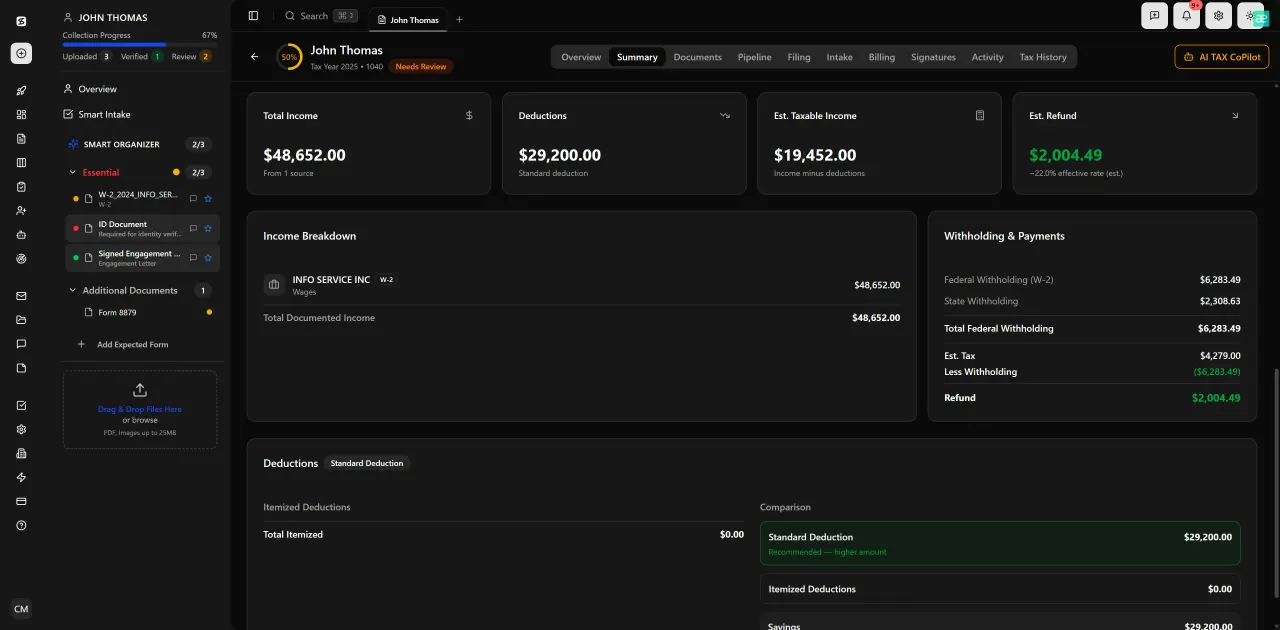
Review with AI assist — 9 agents answer questions with full client context
Pricing Compared: Per-User Costs vs Flat-Rate Architecture
Pricing is where the pixie vs karbon comparison gets uncomfortable for both vendors. Pixie is cheaper than Karbon, but it's priced per user and its low starting price masks the total cost as your firm adds staff or clients. Karbon's per-user model at approximately $59 per seat means a ten-person firm pays roughly $590 per month — before any add-ons or integrations.
TaxScout uses a flat-rate, no-per-user model with unlimited clients. The Prep Pro plan is $149 per month (or $1,430 per year) for up to 10 seats, 500 returns per year, all 9 AI research agents, the full PDF toolbox, and 300 AI Tax Assistant queries per day. That's a savings of roughly $440 per month compared to Karbon for the same ten-person firm. If you're evaluating a karbon alternative, that math alone justifies a closer look.
For firms that want to understand the full per-user pricing cost model before committing, TaxScout's pricing page shows all tiers with no hidden fees. There's also a Retained Archive option at $99 per year for post-cancellation 7-year read-only access — a compliance safeguard that neither Pixie nor Karbon offers as a standalone service.
You can also browse other blog resources covering practice management decisions, billing strategy, and firm growth to build a fuller picture before you switch platforms.
Integrations and Tax Software Compatibility
CPA firms don't replace their tax preparation software when they switch practice management platforms. That integration bridge is non-negotiable. Pixie has limited US tax software integrations — it was built for the UK market and its Drake/Lacerte/UltraTax compatibility is minimal to nonexistent. Karbon integrates with some accounting tools but is not purpose-built for US tax preparation workflows.
TaxScout is designed to work alongside Drake, CCH Axcess, UltraTax CS, Lacerte, ProConnect, and ProSeries — not to replace them. The platform handles document collection, extraction, validation, client communication, e-signatures, and pipeline management, while your existing tax preparation engine handles the final return. This is documented in detail in our post on how TaxScout works with Drake Tax Software.
Email integration is also native: TaxScout connects via Gmail OAuth, Outlook Graph, and IMAP/POP3, with AI classification of incoming messages. If your team currently struggles with email overload around client communications, the shared inbox guide for accounting firms explains how structured email workflows reduce the administrative burden that Karbon's email-threading model only partially solves.
From a compliance and security standpoint, TaxScout's architecture meets the requirements outlined in IRS Publication 4557 for safeguarding taxpayer data, including 7-role RBAC, AES-256-GCM encryption, and a 13-step DSAR anonymization workflow. The SSA's data security standards also inform TaxScout's SSN handling protocols — a level of compliance infrastructure that neither Pixie nor Karbon matches natively.
Ready to move past feature checklists and see what an AI-native platform actually does?
TaxScout replaces Pixie, Karbon, and a stack of disconnected tools — at a flat rate your whole firm shares.
Frequently Asked Questions
Pixie is better suited for sole practitioners or firms under five staff who need basic job tracking and client records at a low price point. Karbon fits larger teams that prioritize email-centric collaboration and work item management. Neither offers AI document extraction or AI research agents, which makes both less competitive against AI-native platforms like TaxScout for firms scaling their tax practice in 2026.
Keep reading
Amended FBAR Procedures: How CPAs Correct Foreign Account Errors Without Triggering Penalties
Oct 12, 2026 · 1 min read
Transparency in Coverage Final Rules: What CPA Firms Must Do Now
Oct 12, 2026 · 1 min read
Backdoor Roth IRA: How CPAs Execute the Strategy for High-Income Clients
Oct 12, 2026 · 1 min read
Stay up to date
Get the latest tax tech insights delivered to your inbox.