All-in-One vs. Best-of-Breed Accounting Software: Which Stack Wins for CPA Firms in 2026
The old all-in-one vs. best-of-breed debate has a new wrinkle in 2026: most all-in-one accounting software platforms have simply bolted AI onto legacy architecture, which defeats the entire unified-data argument. This guide reframes the question, exposes the switching-cost calculus competitors…
Every few years, the accounting technology industry rehashes the same debate: should CPA firms invest in all-in-one accounting software or build a best-of-breed stack stitched together with integrations? Canopy argues all-in-one wins for most firms. Karbon implicitly assumes email-first workflow management is enough. Neither answer is wrong — but in 2026, neither answer is complete, either.
The real fault line has shifted. The question is no longer whether your practice management platform covers billing, documents, and workflow in one roof. The question is whether that platform was architected with AI at its core — meaning every module shares a single data model that AI can reason across — or whether AI was added as a feature layer sitting on top of siloed databases that were never designed to talk to each other. That distinction is the difference between genuine intelligence and a chatbot bolted onto a filing cabinet. For CPA firms evaluating all-in-one accounting software, this architectural distinction matters far more than any feature checklist.
This article does what competitor pieces won't: it fairly describes when best-of-breed still wins, explains the true switching-cost calculus firms face when consolidating tools, and gives you a concrete decision matrix you can apply to your own firm today. If you've been considering a practice management software comparison or thinking about your CPA software stack for 2026, read this before you commit to anything. Whether you're a solo practitioner or a mid-sized firm, understanding what all-in-one accounting software actually delivers in practice is the only way to make a decision you won't regret in 18 months.
What All-in-One Accounting Software Actually Promises
The core promise of all-in-one accounting software for CPA firms is data unification: client records, documents, communications, billing, workflow, and compliance tasks all living in one place. When that promise holds, the advantages are real. Staff stop context-switching between five browser tabs. Client history is always in one place. Reporting draws from one data source rather than requiring manual CSV exports from four separate tools.
The IRS's own guidance on record-keeping and practitioner obligations implies a continuity of information that fragmented stacks struggle to deliver — every document, notice, and deadline tied to a single taxpayer record. An all-in-one platform that executes well gets CPA firms closer to that standard than a patchwork of integrations ever will. For firms evaluating their all-in-one accounting software approach, this trade-off compounds over time.
But the promise breaks down in a specific scenario: when the all-in-one platform was built before AI was a serious capability, and then had AI features retrofitted onto its existing module architecture. In that configuration, the AI can only see the data in the module it was bolted onto. The billing module's AI doesn't know what's happening in the document module. The workflow AI doesn't know what the communication AI already flagged. You still have data silos — they just have a chatbot icon next to each one. Each of these factors directly shapes how all-in-one accounting software plays out in practice.

Click any extracted field to see its source highlighted on the original PDF
The AI-Native Distinction: Why It Changes Everything
An AI-native platform is designed from the ground up with a shared data model that every module reads from and writes to. When a client uploads a W-2, an AI-native system doesn't just extract the numbers — it cross-references that client's prior-year return, flags a discrepancy in reported withholding, updates the pipeline stage, and surfaces that context to whoever opens the AI research interface next. All from a single extraction event touching a single data model. Understanding all-in-one accounting software in this context is what separates firms that scale from those that stall.
TaxScout.ai was built with this architecture. Its AI document extraction handles 180+ tax form types through a 5-layer validation pipeline — document quality routing, AI extraction with confidence scoring, OCR cross-verification, 15 deterministic math rules, and 18 post-extraction rules, plus cross-document validation. That's not a feature added to an existing platform; it's the platform's nervous system. The same client context that informs document extraction also informs the 9 specialized AI research agents, the smart intake engine, and the pipeline management system. This is precisely where a deliberate all-in-one accounting software strategy pays off.
Compare that with a bolt-on approach. When a legacy practice management vendor adds an 'AI assistant' to their document vault, that assistant typically has no awareness of your client's entity structure, filing history, or the email that arrived this morning about a K-1 discrepancy. The unified-data argument that all-in-one vendors make in their marketing only holds if the AI was designed to operate across that unified data — not just adjacent to it. This is the distinction the accounting firm tech stack conversation has been missing. All-in-one accounting software sits at the center of this decision — get it wrong and the rest unravels.
The Treasury Department's ongoing investment in digital modernization for tax administration signals that data-native, integrated systems will become the expected standard — not a differentiator. Firms that build on AI-native infrastructure now are positioning themselves ahead of that curve. When firms revisit their all-in-one accounting software priorities, the gaps usually surface here.
Still managing your CPA firm across five disconnected tools?
TaxScout.ai is the AI-native all-in-one platform built for CPA firms — one data model, every workflow, no per-user pricing.
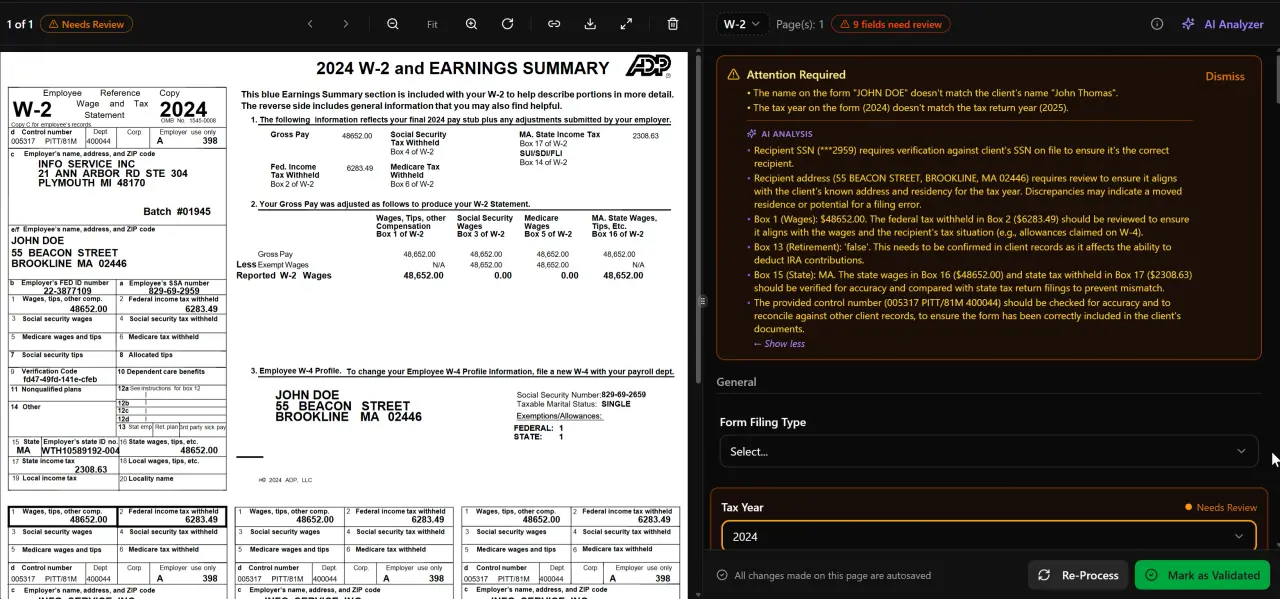
AI classifies, extracts, and validates every document automatically

Your clients see your brand — OTP login, document upload, and real-time status
When Best-of-Breed Accounting Software Still Wins
Canopy's piece on this topic is straightforwardly biased — it concludes that all-in-one wins for nearly every firm without acknowledging the scenarios where best-of-breed remains the superior choice. Here is a fair accounting of those scenarios.
Highly specialized niches often have purpose-built tools that no generalist all-in-one can match. A firm that does exclusively cost segregation studies, for example, may rely on engineering-grade depreciation software that integrates with their tax prep engine. A firm focused on international tax has specific transfer pricing and treaty research requirements that a general AI research suite won't fully satisfy. For these firms, the best path is a focused best-of-breed stack where each tool is genuinely best-in-class for that workflow — and the accounting software integration overhead is worth paying.
Large firms (50+ staff) with deeply embedded legacy systems face a different calculus. When your team has years of workflow muscle memory built around a specific tool, the retraining cost and productivity dip during migration can outweigh the theoretical efficiency gains from consolidation. The U.S. Bureau of Labor Statistics data on accounting and auditing occupations shows that the average accounting firm is already labor-constrained — forcing a full-stack migration during tax season is a genuine operational risk.
Firms with non-negotiable enterprise procurement requirements — SOC 2 Type II mandates, single-vendor security reviews, or BigLaw-style client data governance — may find that certain specialist vendors have already completed the compliance certifications required by their client base, while a newer all-in-one platform is still pursuing those certifications. Always verify security posture before consolidating on any platform.
The Real Switching Cost Calculus Competitors Ignore
Neither Canopy nor Karbon addresses what it actually costs to migrate from a best-of-breed stack to an all-in-one. There are three distinct cost centers that firms consistently underestimate: migration friction, staff retraining, and data portability.
Migration friction is the hidden project management cost. Moving five years of client documents, engagement letters, and billing history from disconnected systems into a single platform requires data mapping, deduplication, and quality checks. Firms routinely budget 40-80 hours of staff time for migrations they later discover take 200+ hours. Before you consolidate, request a detailed data export spec from your current vendors and verify that the all-in-one platform can ingest it. TaxScout's file management and e-signatures modules are designed to accept bulk imports, but no migration is zero-friction.
Staff retraining is the productivity tax. Expect a 3-6 week dip in throughput as staff unlearn old workflows. For firms mid-tax-season, this is a material risk. A phased consolidation — migrating document management and client portal first, then workflow, then billing — typically produces a smoother curve than rip-and-replace. The Cornell Law School's guidance on professional responsibility is a useful reminder that continuity of client communication records isn't just an efficiency goal; it has professional liability dimensions.
Data portability is the long-term consideration most firms overlook at purchase time. When evaluating any all-in-one platform, ask: can I export every client record, document, and communication history in a standard format if I need to leave? Platforms that make exit difficult are implicitly pricing you into lock-in. TaxScout's Retained Archive plan ($99/year) provides a 7-year read-only archive even after cancellation — see /pricing for details. That's the kind of data portability commitment worth demanding from any vendor.
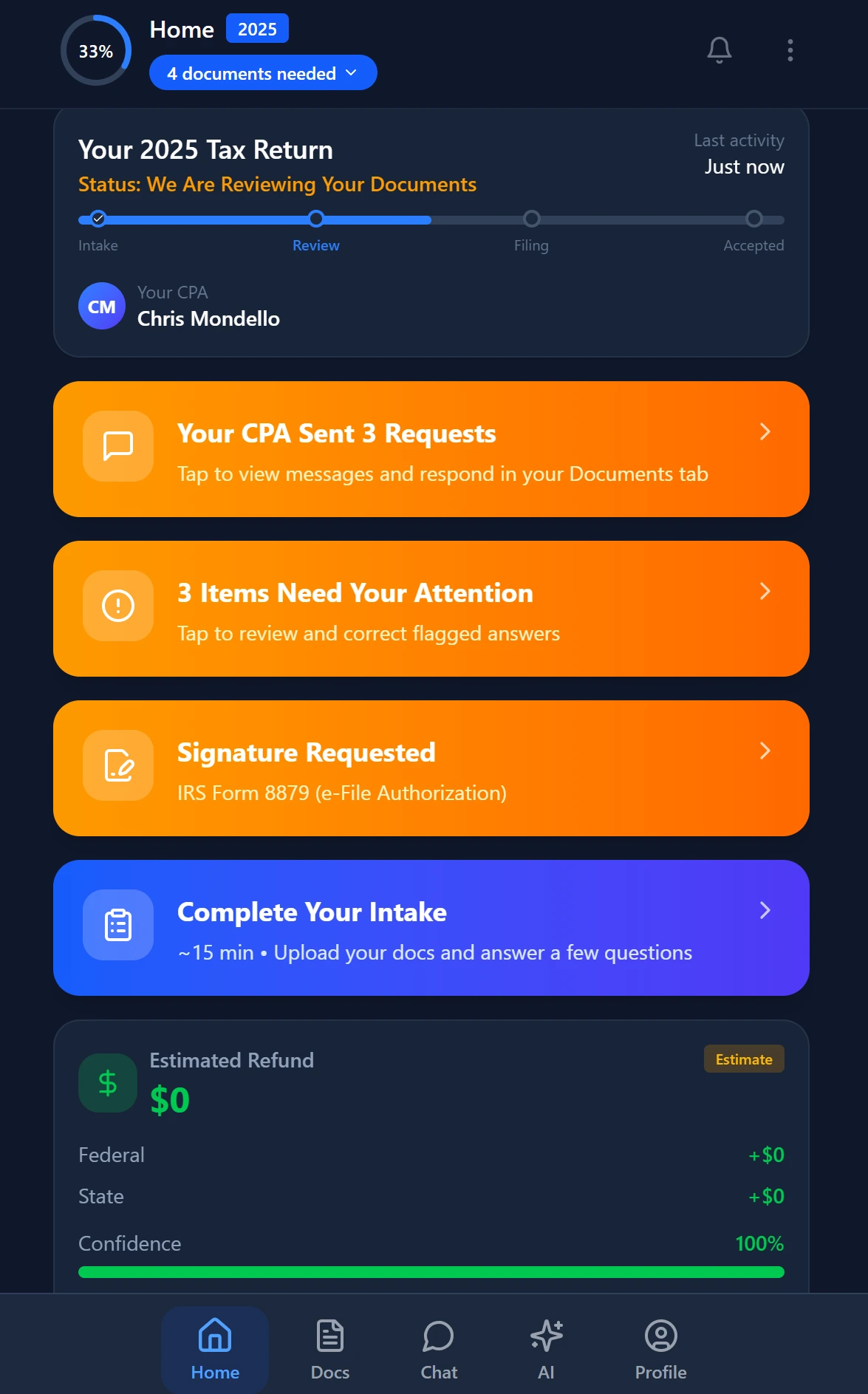
Smart intake auto-fills from uploaded documents and prior-year data
Guidance for the Mid-Transition Firm
The scenario Karbon and Canopy both ignore is the firm that already has 3-4 tools deeply embedded in daily operations and is trying to decide whether to consolidate incrementally or rip and replace. This is the most common situation for firms with 5-25 staff, and it deserves a structured answer.
For firms in mid-transition, the phased consolidation approach almost always wins over rip-and-replace. The sequence that minimizes disruption: (1) migrate client portal and intake first — this is the highest-visibility client-facing change and creates immediate goodwill with clients while generating immediate staff efficiency gains; (2) migrate document management and pipeline management second, since these are the workflow-critical modules; (3) migrate billing and invoicing last, since billing errors have direct revenue consequences and staff need to be fully comfortable before switching.
TaxScout's smart intake engine is modeled on IRS Form 13614-C with 4-layer prefill — document-first, prior-year, profile, and AI gap analysis — which means it can operate alongside your existing tax prep software (Drake, CCH Axcess, UltraTax CS, Lacerte, ProConnect, ProSeries) rather than replacing it. That 'works with' architecture is what makes phased consolidation practical rather than theoretical. You can explore more in our post on how TaxScout works with Drake Tax Software.
The Small Business Administration's guidance on technology adoption for professional services also recommends phased implementations for service firms — not because change is bad, but because professional service continuity is a client trust issue as much as an operational one.
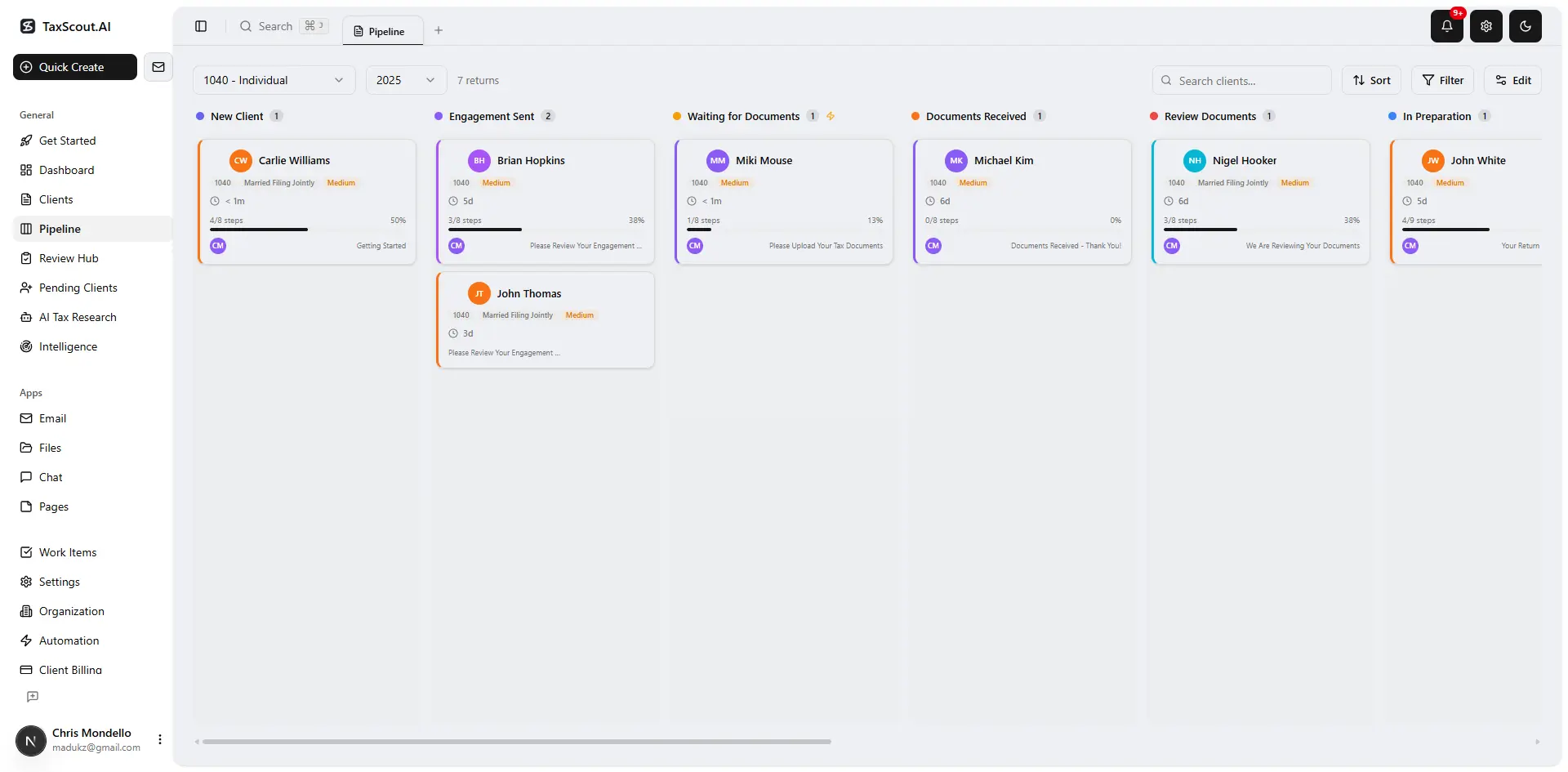
Track every return from intake to filed with drag-and-drop pipeline management
CPA Firm Tech Stack Decision Matrix: AI-Native All-in-One vs. Best-of-Breed vs. Bolt-on AI All-in-One
| Firm Profile | AI-Native All-in-One (e.g., TaxScout) | Bolt-on AI All-in-One (e.g., Canopy, TaxDome) | Best-of-Breed Stack |
|---|---|---|---|
| Solo practitioner or 2-3 person firm | Best fit — low overhead, flat pricing, full AI from day one | Acceptable — simpler use cases don't expose AI gaps | Overkill — integration maintenance consumes hours you don't have |
| 5-15 person generalist firm, mixed tax/advisory | Best fit — unified AI context pays off across workflows | Workable but AI features will feel fragmented | Viable if stack is already mature and staff are power users |
| 15-50 person firm, mid-transition from legacy tools | Strong fit with phased consolidation approach | Risk of paying for AI that doesn't deliver on unification promise | High maintenance burden; consider consolidating non-core tools first |
| Highly specialized niche (international, cost seg, M&A) | Good base platform; supplement with niche tools for specialty workflows | Same — the niche tools likely exist outside any all-in-one | Best fit — specialty tools matter more than platform unification here |
| 50+ person firm with deep legacy system investment | Evaluate carefully; migration cost is real | Same consideration — migration risk applies equally | Status quo is defensible; incremental AI upgrades within existing stack |
Pricing Transparency: What the Per-User Model Really Costs
One dimension of the all-in-one vs. best-of-breed debate that rarely gets honest treatment is the total cost of ownership, particularly for platforms that charge per user per month. For a 10-person firm evaluating accounting software integration options, the numbers are stark: TaxDome runs approximately $100 per user per month ($500/month for five core users, more as you add staff), Canopy's per-module per-user pricing approaches $660/month for a comparable feature set, and Karbon at ~$59/user/month reaches $590/month for ten seats — before you add Canopy's Smart Intake at $11 per client.
TaxScout.ai's Prep Pro plan is $149/month flat — unlimited clients, 10 seats, 500 returns per year, all 9 AI research agents, the full PDF toolbox, and 300 AI assistant queries per day. That's not a promotional rate; it's the standard pricing. You can verify at /pricing. For a 10-person firm doing 300+ returns annually, the difference between $149/month and $590-660/month is roughly $5,400-6,100 per year in recurring savings — before accounting for the productivity gains from AI-native extraction versus manual data entry.
This is why the all-in-one accounting software conversation can't be separated from pricing structure. A best-of-breed stack that costs $200/month total but requires 10 hours/week of integration maintenance may be more expensive in total than an AI-native all-in-one at $149/month flat. Do the math for your specific firm — and factor in staff time at a realistic hourly rate. For more on structuring your firm's pricing and billing, our guide to flat fee billing for CPAs covers the internal math that informs these decisions.
You can also explore our other blog resources for deep-dives into firm efficiency, client management, and AI-native workflows.
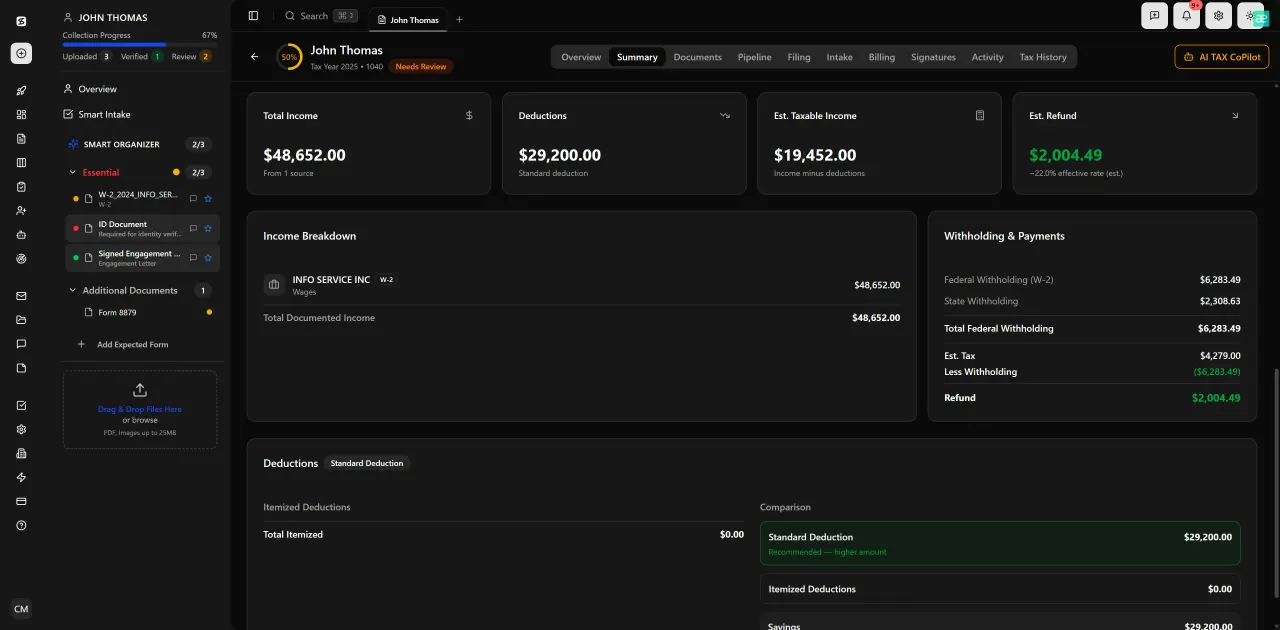
Review with AI assist — 9 agents answer questions with full client context
Security and Compliance Across Stack Configurations
Whether you run an all-in-one or a best-of-breed stack, one variable doesn't change: the security posture of every tool that touches client PII is your professional liability. The IRS Publication 4557 on safeguarding taxpayer data requires a written information security plan (WISP) that covers every system in your stack — not just your tax prep software. A best-of-breed stack with five vendors means five WISP entries, five vendor security reviews, and five breach notification chains.
An all-in-one platform reduces that surface area significantly, provided the platform itself has strong security architecture. TaxScout uses AES-256-GCM encryption for its SSN vault, 13-step DSAR anonymization, and 7-role RBAC — details are at /security. The Journal of Accountancy's guidance on data security for CPA firms consistently recommends reducing the number of systems handling sensitive data as a primary risk-mitigation strategy. For most firms, that's a point in favor of consolidation — but only onto a platform with verifiable security commitments.
For a deeper treatment of what your firm needs in place before any platform migration, see our post on cybersecurity essentials for accounting firms.
Want an AI-native platform that works alongside your existing tax prep software and doesn't charge per user?
TaxScout.ai gives CPA firms AI document extraction, 9 research agents, smart intake, pipeline management, and a branded client portal — all at $149/month flat for 10 seats.

Every client gets organized documents, status tracking, and a complete history
Frequently Asked Questions
AI-native platforms are built from the ground up with a single shared data model that every module — documents, workflow, billing, communications — reads from and writes to. AI can reason across all of that data simultaneously. Bolt-on AI means an existing platform added AI features to individual modules after the fact; each module's AI only sees its own data silo, which defeats the unification advantage all-in-one software is supposed to deliver.
Keep reading
Amended FBAR Procedures: How CPAs Correct Foreign Account Errors Without Triggering Penalties
Oct 12, 2026 · 1 min read
Transparency in Coverage Final Rules: What CPA Firms Must Do Now
Oct 12, 2026 · 1 min read
Backdoor Roth IRA: How CPAs Execute the Strategy for High-Income Clients
Oct 12, 2026 · 1 min read
Stay up to date
Get the latest tax tech insights delivered to your inbox.