Advisory Meeting Prep for CPAs: How to Walk In Ready Every Time
The ten minutes before an advisory meeting can determine whether a client sees you as a trusted advisor or a report reader. This guide gives CPAs a concrete AI-powered pre-meeting checklist — financial snapshot, anomaly flags, agenda draft, and prior context pull — and shows how TaxScout automates…
Advisory meeting prep for CPAs is the highest-leverage ten minutes in any advisor's week — and almost no one treats it that way. Most firms spend those minutes scrolling through last quarter's return, scanning an inbox thread, or worse, opening the client file for the first time as the Zoom call connects. The result is a reactive conversation that confirms numbers instead of building the strategic relationship clients actually pay advisory fees for. Treating advisory meeting prep CPA style — as a structured, repeatable ritual rather than a last-minute scramble — is what separates the firms clients actually trust from the ones they quietly outgrow.
The competitive gap is real. Competitors like Karbon have written broadly about AI and meeting prep, but their content stays at the concept level — there is no step-by-step workflow that shows exactly which data to pull, which anomalies to flag, and how to draft a talking-points agenda before the client sees your face. Canopy and Mango have published nothing on pre-meeting preparation at all. That gap is where this guide lives. A true advisory meeting prep CPA workflow goes far beyond broad concepts, demanding a precise sequence of data pulls, anomaly checks, and agenda drafts that generic content simply never delivers.
What follows is a four-step AI-powered pre-meeting checklist any CPA firm can implement regardless of current tech stack, followed by a look at how TaxScout.ai automates each step natively — so the ten minutes of prep happen almost automatically. Each step in this checklist was designed with the specific demands of advisory meeting prep CPA firms face daily — tight schedules, data scattered across multiple systems, and clients who expect insight, not just recaps.
Why Pre-Meeting Preparation Defines Advisory Value
Advisory services are the fastest-growing revenue category for CPA firms. According to the Journal of Accountancy, firms that formalize advisory offerings consistently command higher realization rates and stronger client retention than pure compliance shops. But advisory revenue only materializes when clients experience you as someone who understands their financial picture deeply — not someone who learned it from the same documents they did. For firms evaluating their advisory meeting prep CPA approach, this trade-off compounds over time, making early investment in structured preparation one of the highest-return decisions a firm can make.
That perception is built entirely in the pre-meeting phase. When you walk in knowing that the client's pass-through entity distributions spiked 40% this quarter, that their estimated tax payments may be underfunded, and that the last meeting ended with an open action item on an S-corp election — you sound like a CFO, not a preparer. When you discover those facts mid-call, you sound like you're catching up. Each of these factors directly shapes how advisory meeting prep CPA plays out in practice, which is why the most successful firms treat it as a non-negotiable discipline rather than an optional warm-up.
The IRS has progressively expanded digital data availability — transcripts, account summaries, balance due notices — meaning advisors who build systematic data-pull routines before meetings have a structural edge over those who rely on memory and manual review. The question is how to make that routine fast enough to execute before every client call, not just the big quarterly reviews. Understanding advisory meeting prep CPA in this context is what separates firms that scale from those that stall.
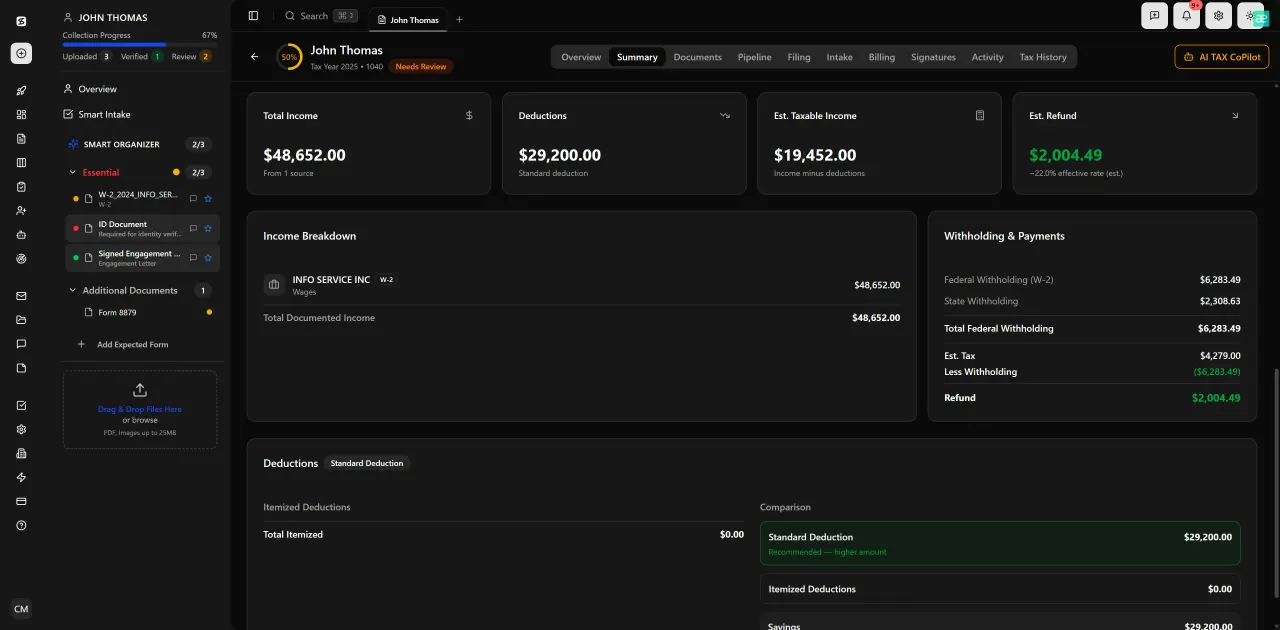
Review with AI assist — 9 agents answer questions with full client context
The Four-Step AI Pre-Meeting Checklist
This checklist is stack-agnostic. You can implement a manual version in any practice management tool today, then automate it as your platform catches up. Each step has a defined output — something you hold in your hand before the client says hello. This is precisely where a deliberate advisory meeting prep CPA strategy pays off, turning what was once a frantic scramble into a confident, structured routine.
Think of it as your pre-flight checklist. Pilots do not skip pre-flight because the previous flight went smoothly. Advisors should not skip meeting prep because last quarter's call was uneventful. The discipline is the product. Advisory meeting prep CPA sits at the center of this decision — get it wrong and the rest unravels.
Step 1: Pull the Client Financial Snapshot
A financial snapshot is a one-page summary of the client's current-year position: income to date, deductions identified, prior-year comparison deltas, estimated tax liability, and any open balances. For business clients it also includes entity-level metrics — revenue, payroll, distributions, and any Schedule K-1 pass-through items. When firms revisit their advisory meeting prep CPA priorities, the gaps usually surface here, often revealing that advisors have been walking into meetings with an incomplete picture of the client's current-year exposure.
Manually, this means opening the prior return, pulling any mid-year documents the client has submitted, and assembling a picture yourself. With AI document extraction, the system reads every uploaded W-2, 1099, K-1, and supporting schedule and surfaces the snapshot automatically — flagging year-over-year changes without you running a single formula.
Step 2: Flag Anomalies Before the Client Does
Anomaly detection is where AI earns its keep. Common pre-meeting flags include: income sources that appeared in prior years but are absent this year, capital gains or losses that change the client's effective bracket, withholding that looks misaligned with projected liability, or K-1 distributions that suggest a reasonable compensation issue for an S-corp owner.
Without a systematic check, these anomalies surface during the meeting — or worse, after filing. With an automated validation layer, they surface during prep, giving you time to research the issue before you need to explain it. The Treasury's guidance on substantive tax positions makes clear that underprepared advisors carry disproportionate professional liability when issues go undetected. This is why advisory meeting prep CPA professionals who invest in anomaly detection workflows consistently outperform peers who rely on in-meeting discovery.
Step 3: Draft the Meeting Agenda from Client Context
A good advisory agenda is not a list of topics — it is a ranked set of decisions the client needs to make before the next filing deadline. Draft it from the anomaly flags (step 2), any open action items from prior meetings, and upcoming IRS deadlines that affect this client specifically.
AI can generate a first-draft agenda in seconds if it has access to client context: entity structure, filing history, prior meeting notes, and current-year document data. The advisor reviews, reorders, and sends — typically in under two minutes. Without AI, drafting a meaningful agenda from scratch takes fifteen to twenty minutes per client. For firms committed to scaling advisory meeting prep CPA capacity without adding headcount, this time savings compounds significantly across a full client roster.
Step 4: Pull Prior Meeting Context and Open Items
The fastest way to lose advisory credibility is to re-ask a question the client already answered. Prior meeting context — what was discussed, what was promised, what was deferred — should be surfaced automatically before every call. This includes engagement letter scope, any amendments to services, and historical correspondence flagged as decision-relevant.
For firms managing dozens of advisory relationships, this context pull is impossible to do manually before every meeting. It requires a system that stores client history in a searchable, AI-readable format and can summarize it on demand. This is the step most practice management tools have not yet built — and the one that separates transactional software from a genuine advisory services platform.
Tired of scrambling through files sixty seconds before a client call?
TaxScout.ai automates your entire pre-meeting checklist — snapshot, anomaly flags, agenda draft, and prior context — so you walk into every advisory meeting already prepared.

Click any extracted field to see its source highlighted on the original PDF
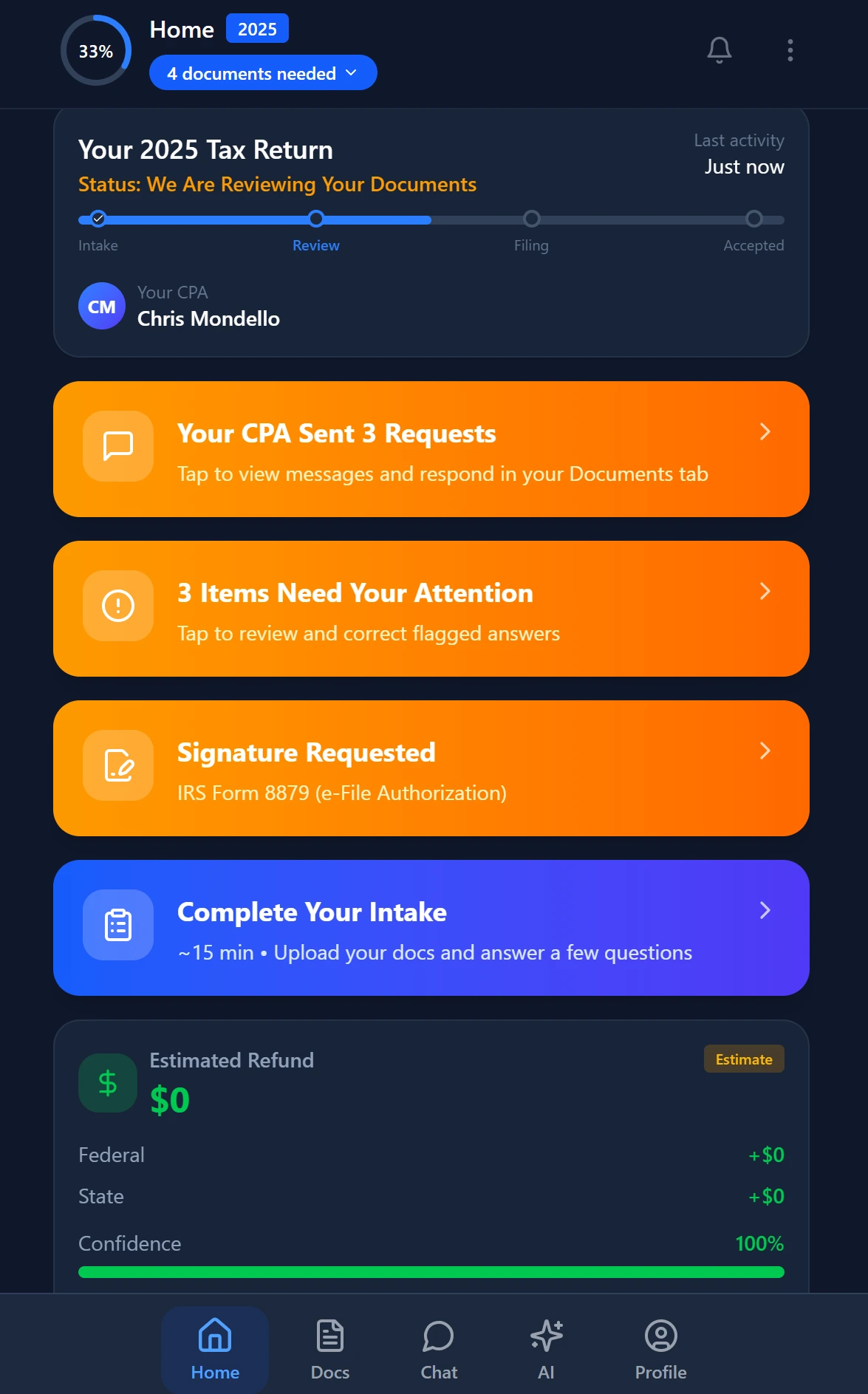
Smart intake auto-fills from uploaded documents and prior-year data
How TaxScout Automates Each Checklist Step Natively
TaxScout was designed around the advisor's workflow, not the preparer's. Each of the four checklist steps maps directly to a platform capability — meaning the prep checklist described above runs automatically inside TaxScout without any third-party integration or manual assembly.
For firms already using Drake, CCH Axcess, UltraTax CS, Lacerte, ProConnect, or ProSeries, TaxScout operates as the client-facing intelligence layer on top of your existing tax software. Nothing changes in how you file — everything changes in how you prepare.
AI Document Extraction Builds the Financial Snapshot Automatically
TaxScout's AI document extraction reads 180+ tax form types — W-2s, all 1099 variants, K-1s, 1098s, and 1095s — and assembles a structured financial snapshot for each client the moment documents are uploaded. A 5-layer validation pipeline catches extraction errors before they reach the advisor, including OCR cross-verification and 15 deterministic math rules that confirm arithmetic consistency across documents.
The split-screen PDF viewer lets you click any extracted field and immediately see the source document region that produced it — so when a client questions a number in the meeting, you can verify it in seconds rather than hunting through a PDF stack. You can read more about the technical architecture in our complete guide to AI document extraction for CPAs.
The 5-Layer Validation Pipeline Surfaces Anomaly Flags
The same validation pipeline that verifies extraction accuracy also powers anomaly detection. Cross-document validation rules compare current-year data against prior-year returns stored in client-context memory — surfacing discrepancies like a missing 1099-INT that appeared in each of the last three years, a QBI deduction that changed materially, or withholding that does not align with projected liability.
These flags appear in the client record before you open the meeting, not during it. For advisors serving business owners with complex entity structures, the system also tracks pass-through entity distributions across K-1s and flags potential reasonable compensation issues automatically — the kind of proactive insight that law.cornell.edu's tax code resources confirm carry real compliance weight.
AI Research Agents Draft Agenda Talking Points
TaxScout includes 9 specialized AI research agents that search IRS, Treasury, Cornell Law, SSA, and Congress sources in real time. Before an advisory meeting, these agents can be queried to generate talking points on any issue flagged during the anomaly review — for example, a client considering an S-corporation election gets an agenda item backed by current IRS guidance on Form 2553 requirements, not a generic bullet point.
The agenda draft integrates directly with TaxScout's pipeline management system, which tracks 12 customizable stages per client engagement. Open action items from prior engagements surface automatically alongside the new agenda items — so nothing falls through the cracks between meetings.
Client-Context Memory Pulls Prior Meeting History
TaxScout's client-context AI memory stores entity structures, filing history, prior returns, and communication history in a format the AI can summarize on demand. Before a meeting, the system surfaces a chronological summary of prior interactions — including any decisions deferred from the last session — without the advisor having to search manually.
This context layer integrates with TaxScout's communication hub, which supports Gmail OAuth, Outlook Graph, and IMAP/POP3 with AI classification. Emails flagged as decision-relevant are automatically attached to the client record, so the prior-meeting context pull includes correspondence the client sent between sessions, not just notes from the last call. For firms dealing with email overload, this alone eliminates a significant manual research burden before every advisory meeting, making advisory meeting prep CPA teams can actually sustain across a full book of business a realistic goal rather than an aspirational one.
Pre-Meeting Prep Capabilities: TaxScout vs. Competitors
| Capability | TaxScout | Karbon | Canopy | TaxDome |
|---|---|---|---|---|
| AI financial snapshot from uploaded docs | Yes — 180+ form types | No | No | No |
| 5-layer anomaly detection and flags | Yes — cross-document validation | No | No | No |
| AI-drafted agenda with research citations | Yes — 9 research agents | Partial (Kai, announced) | No | No |
| Prior meeting context pull from memory | Yes — client-context AI memory | Partial (Kai, announced) | No | No |
| Real-time IRS/Treasury research integration | Yes | No | No | No |
| Works with existing tax software (Drake, CCH, etc.) | Yes | No | No | No |
| Flat per-firm pricing (no per-user fees) | Yes — $149/mo for 10 seats | No — ~$59/user/mo | No — ~$45/user/mo | No — ~$100/user/mo |

Track every return from intake to filed with drag-and-drop pipeline management
Implementing the Checklist Without Disrupting Your Current Stack
The most common objection to AI-powered prep workflows is switching cost — firms worry that adopting a new platform means rebuilding integrations, retraining staff, and disrupting an already-stressed team. TaxScout is designed to avoid exactly that. It runs alongside Drake, CCH Axcess, UltraTax CS, Lacerte, ProConnect, and ProSeries rather than replacing them. You continue filing through the software you know; TaxScout handles client intelligence, document management, and advisory prep.
For firms evaluating alternatives to platforms like Karbon, the advisory workflow gap is significant. Karbon is email-centric and strong on task management, but it lacks AI document extraction, anomaly detection, and the research agent infrastructure that powers an automated pre-meeting checklist. For a ten-person firm, TaxScout's Prep Pro plan costs $149 per month flat — versus approximately $590 per month for a comparable Karbon seat count. You can explore the full breakdown on the TaxScout pricing page.
Rolling out the checklist in phases reduces change management friction. Week one: configure AI document extraction and test the financial snapshot on five active advisory clients. Week two: review the anomaly flags produced and calibrate which rule categories matter most for your client base. Week three: run the research agents on one complex client and use the output to draft a meeting agenda. By week four, the workflow is habitual and the advisory meeting prep CPA routine is under ten minutes per client — fast enough to execute before every call, not just the major quarterly reviews.
Measuring the Impact of Structured Advisory Prep
The return on structured pre-meeting preparation shows up in three metrics: advisory revenue per client, meeting-to-decision rate, and client retention. Firms that systematize prep report higher close rates on advisory upsells because the meeting opens with specific, client-relevant insights rather than generic reviews. The Bureau of Labor Statistics' occupational data for accountants consistently shows that advisory-oriented CPAs earn significantly more than compliance-only practitioners — the prep workflow is the mechanism that makes advisory scalable.
TaxScout's dashboard provides a production funnel and deadline tracker that lets firm leaders monitor which clients have upcoming advisory meetings, which have complete document sets, and which are missing data that would block a complete prep checklist. Combine this with the KPI tracking capabilities built into the platform and you have a closed-loop system: prep quality improves, advisory outcomes improve, and the metrics to prove it are visible in real time.
For firms building out a broader AI accounting productivity strategy, advisory meeting prep is the right place to start. It is high-visibility (clients notice immediately), low-risk (you are not changing how you file), and quantifiable (meeting outcomes are trackable). It is also the step competitors have largely ignored — giving early adopters a meaningful differentiation advantage. You can find additional frameworks and implementation guides across our blog resources for building AI-native workflows at every stage of the client lifecycle.
The Small Business Administration's research on advisory relationships reinforces what experienced CPAs already know: business owner clients make more financial decisions based on trusted advisor input than on any other source. The advisor who shows up to every meeting already knowing the client's position, the open questions, and the decisions that need to be made is the advisor who earns that trust — and the recurring revenue that follows. That outcome starts with taking advisory meeting prep CPA seriously enough to treat it as a system, not an afterthought.
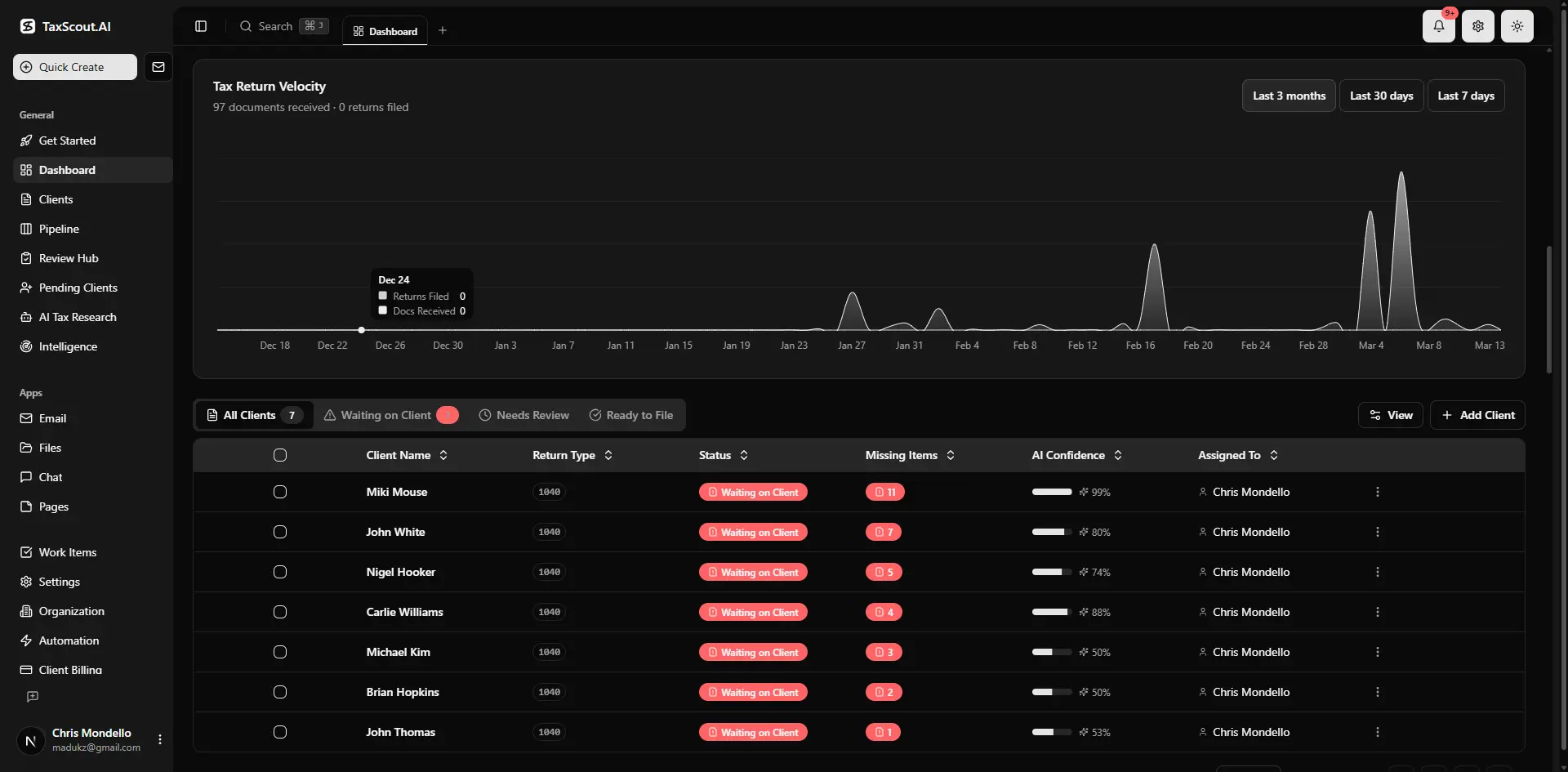
Real-time dashboard showing returns in progress, revenue, and upcoming deadlines
Ready to turn every advisory meeting into a prepared, high-value conversation?
TaxScout's AI-native platform handles your pre-meeting checklist automatically — financial snapshot, anomaly flags, research-backed agenda, and prior context — so you can focus on the advice, not the prep.
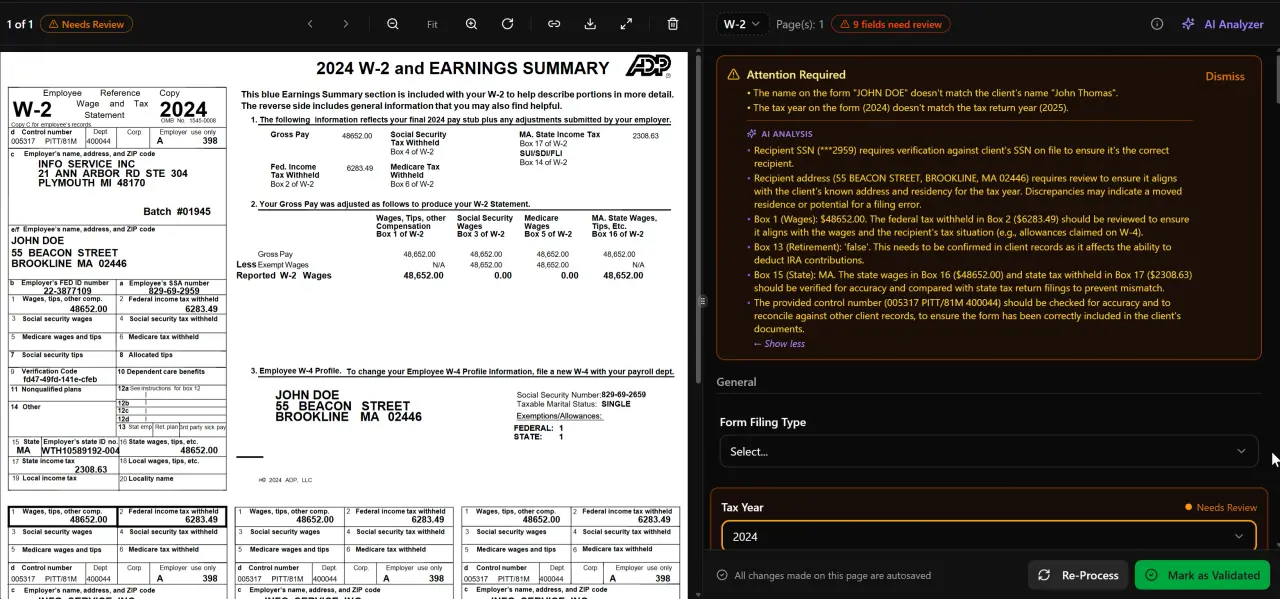
AI classifies, extracts, and validates every document automatically
Frequently Asked Questions
A complete AI pre-meeting checklist includes four outputs: a client financial snapshot assembled from uploaded tax documents, anomaly flags comparing current-year data against prior returns, a draft meeting agenda with research-backed talking points, and a summary of prior meeting context and open action items. TaxScout automates all four steps natively using AI document extraction, a 5-layer validation pipeline, 9 AI research agents, and client-context memory.
Keep reading
Uniform Capitalization Rules: How CPAs Apply UNICAP to Inventory and Self-Constructed Assets
Oct 17, 2026 · 1 min read
Non-Applicability of Section 357(c) to Consolidated Groups: What CPA Firms Must Do Now
Oct 17, 2026 · 1 min read
Reasonable Basis Defense: How CPAs Shield Clients From Accuracy-Related Penalties
Oct 17, 2026 · 1 min read
Stay up to date
Get the latest tax tech insights delivered to your inbox.