New Accounting Client Checklist: What AI-Ready Firms Do Differently
Every CPA firm has some version of a new accounting client checklist — but most stop at document collection. This guide goes further, covering the IRS compliance steps competitors skip, benchmark data from 69,000+ US preparers, and a concrete breakdown of which onboarding tasks AI can handle today…
Search for a new accounting client checklist and you will find dozens of articles listing the same nine items: collect ID, sign an engagement letter, gather prior-year returns, set up software. The lists are accurate. They are also incomplete — and that incompleteness is exactly why so many firms spend tax season trapped in email tag instead of scaling.
What the standard checklist omits falls into three buckets. First, mandatory IRS compliance touchpoints that apply to every new preparer relationship — PTIN and EFIN registration steps that Canopy, Karbon, and similar platforms never mention in their onboarding guides. Second, the operational question of which checklist items can be automated today versus which genuinely require human judgment. Third, real-world context: how onboarding friction actually varies across firm sizes and geographic markets. These are the gaps a comprehensive new accounting client checklist should address but rarely does.
This guide covers all three. It follows the familiar checklist structure so you can use it immediately, but layers in the dimensions that separate firms with a scalable accounting firm onboarding process from those rebuilding it from scratch every January. Think of it as the new accounting client checklist that actually keeps pace with how modern firms operate.
Why the Standard New Accounting Client Checklist Falls Short
According to the TaxScout directory, 69,085 US tax preparers are currently listed and matched against the IRS federal preparer directory. Of those, 32,237 are CPAs and 11,111 are enrolled agents; the remainder hold a PTIN only or another credential. That diversity matters for onboarding because a firm staffed by CPAs has different engagement letter requirements, different state licensing disclosures, and different scope-of-work conversations than one staffed primarily by PTIN-only preparers. For firms evaluating their new accounting client checklist approach, this trade-off compounds over time.
Generic checklists ignore that spectrum. They also ignore geography: a solo practitioner in a low-density rural market spends far more time on initial education — explaining what records to gather, why a prior-year return matters — than a firm in a metro area where clients arrive having already used a Big Four firm. Onboarding friction is not uniform, and a checklist that pretends it is will misallocate your team's time. Each of these factors directly shapes how new accounting client checklist plays out in practice.
For a broader look at how firm size, credential mix, and technology adoption interact, see our complete guide to CPA firm operations, which aggregates research across dozens of practice management topics. Understanding new accounting client checklist in this context is what separates firms that scale from those that stall.
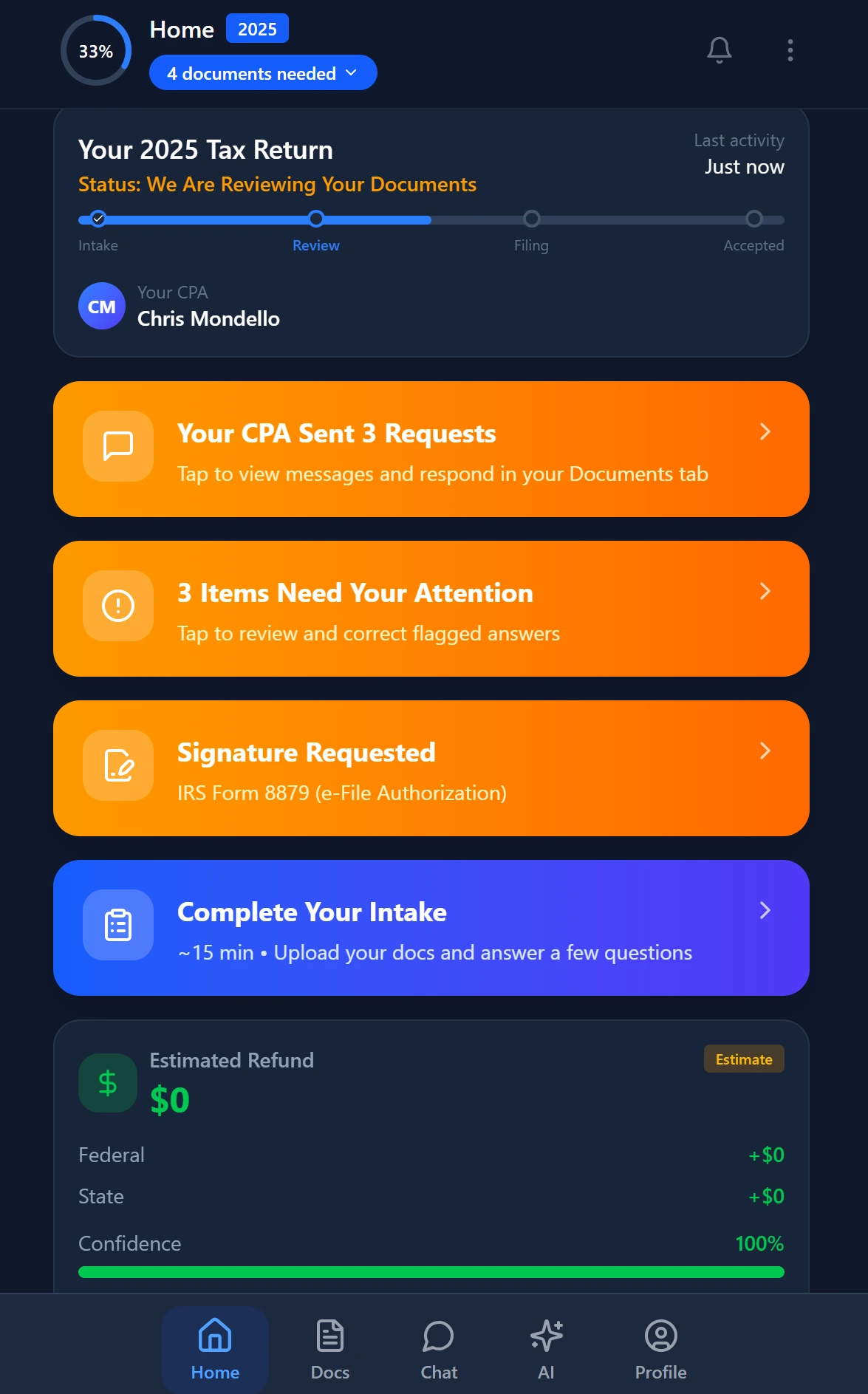
Smart intake auto-fills from uploaded documents and prior-year data
The IRS Compliance Steps Every New Client Relationship Requires
Tired of manual workflows slowing your firm down? See how TaxScout handles this with AI-powered automation. → Book a 15-Min Demo This is precisely where a deliberate new accounting client checklist strategy pays off.
Before a preparer can legally sign a return or represent a client before the IRS, two federal registrations must be in place: a current Preparer Tax Identification Number (PTIN) and, for firms that file electronically, an active Electronic Filing Identification Number (EFIN). PTINs must be renewed annually; EFINs require an IRS suitability check that can take several weeks. Neither Canopy's new client checklist nor Karbon's onboarding template mentions these steps — yet they are mandatory compliance touchpoints for every new preparer relationship. New accounting client checklist sits at the center of this decision — get it wrong and the rest unravels.
For enrolled agents specifically, the IRS EA enrollment and renewal process adds a third layer: the EA must hold an active Circular 230 enrollment in good standing. If a client arrives in January and your EA's enrollment lapsed in November, that EA cannot sign the return. Catching this during onboarding — not mid-preparation — is the difference between a smooth engagement and a compliance crisis. When firms revisit their new accounting client checklist priorities, the gaps usually surface here.
On the client side, the IRS Form 2848 (Power of Attorney) or Form 8821 (Tax Information Authorization) must be executed before you can communicate with the IRS on a client's behalf. Firms that treat these as afterthoughts — something to collect 'if we need it' — routinely discover mid-engagement that they cannot pull transcripts or respond to notices. Add both to your intake packet from day one. TaxScout's e-signatures feature supports Form 8879, 4868, FBAR, and engagement letters through Documenso, making it straightforward to send all authorization documents in a single signing packet.
Tired of rebuilding your onboarding packet from scratch every tax season?
TaxScout's AI intake engine — modeled on IRS Form 13614-C with 4-layer prefill — sends the right questions to the right clients automatically, so your team starts each engagement with documents in hand.
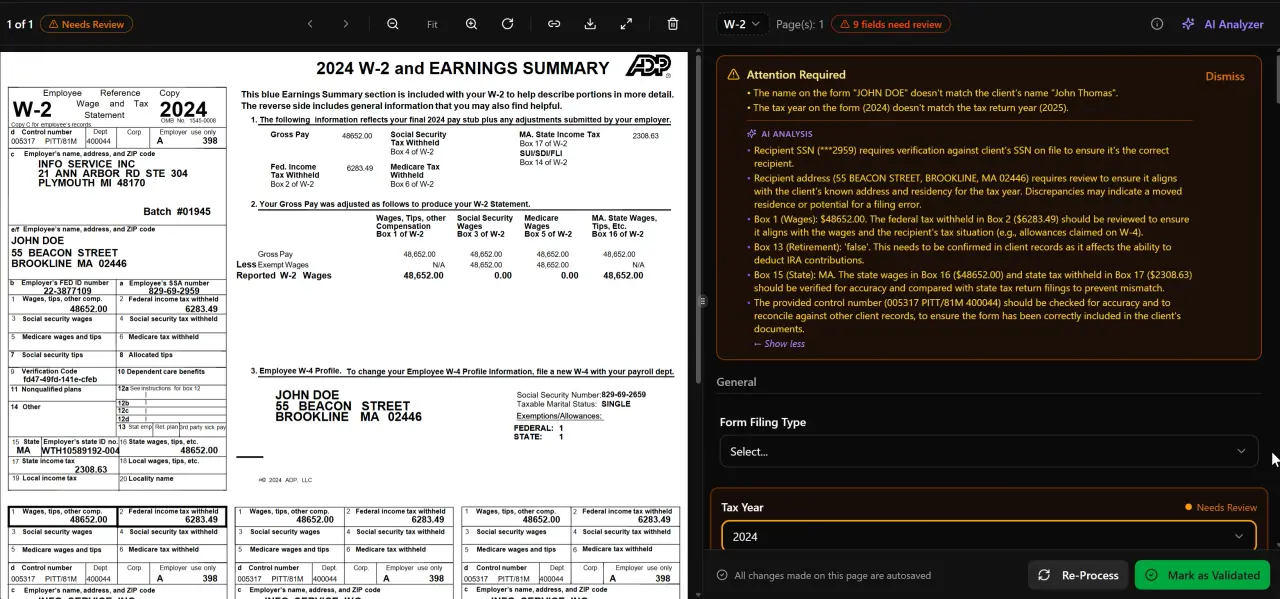
AI classifies, extracts, and validates every document automatically
The Complete New Accounting Client Checklist
What follows is the full checklist your firm should run for every new tax or accounting client. Items marked [AI] can be substantially automated with current technology; items marked [Human] require professional judgment that AI tools are not yet reliable enough to replace.
Step 1: Pre-Engagement Compliance Verification
Confirm active PTIN for every preparer assigned to the engagement. Confirm active EFIN for the filing entity. Verify EA or CPA licensure is current in the client's state of residence if representation is anticipated. Collect signed Form 2848 or Form 8821 before requesting transcripts. [Human] — license lookups can be partially automated, but the verification decision requires a person.
Step 2: Initial Consultation and Scope Definition
Conduct a discovery call to understand why the client is changing preparers or engaging a CPA for the first time. Document entity structure (individual, S-corp, partnership, trust), filing history, and known complexity flags (foreign accounts, rental properties, equity compensation). [AI] — TaxScout's client-context memory retains entity structures, filing history, and prior-return data across sessions, so this information never needs to be re-entered.
Step 3: Engagement Letter and Fee Agreement
Draft and send a signed engagement letter that defines scope, fees, and limitations of liability before any work begins. The AICPA's guidance on engagement letters recommends annual re-execution for continuing clients as well. For new clients, the letter should explicitly list excluded services to avoid scope creep. [AI] — engagement letter drafts can be generated from a scope template using client intake data; a human must review and approve before sending. TaxScout's e-signatures feature sends the letter for signature immediately after approval.
Step 4: Identity Verification and Entity Documentation
Collect government-issued photo ID for all signers. For business entities, collect EIN confirmation letter (IRS CP 575 or 147C), articles of incorporation or organization, and any operating agreements. If the entity has BOI reporting obligations under the Corporate Transparency Act, flag them now — post-filing surprises create client relationship problems. [Human] — ID authenticity review requires a person; document collection can be automated through a client portal.
Step 5: Prior-Year Return Retrieval
Request prior-year returns for a minimum of three years, or five if complexity indicators (NOL carryforwards, basis tracking, depreciation schedules) are present. If the client cannot locate returns, file IRS Form 4506-C to retrieve transcripts directly. [AI] — once prior returns are uploaded, TaxScout's AI document extraction processes W-2s, 1099 series, K-1s, 1098s, 1095s, and all 1040 schedules through a 5-layer validation pipeline covering document quality, AI extraction, OCR cross-verification, 15 deterministic math rules, 18 post-extraction rules, and cross-document validation.
Step 6: Current-Year Document Collection
Send a document request list tailored to the client's known profile — do not blast every client with a 40-item list. For individual filers the core set is: W-2s, 1099 series (DIV, INT, B, R, SSA, MISC, NEC, K), 1098 mortgage interest statement, 1095 health coverage forms, K-1s, and supporting records for deductions claimed in prior years. For business clients add: bank statements, payroll records, depreciation schedules, and loan amortization schedules. [AI] — TaxScout's smart intake engine prefills document requests from prior-year data and flags gaps through AI analysis, reducing the back-and-forth that typically extends collection by one to two weeks. See how the 1099 preparation checklist handles the document side of this step in detail.
Step 7: Fee Estimation and Invoicing Setup
Provide a written fee estimate before work begins, anchored to the scope defined in the engagement letter. Connect the client to your payment method — ACH, credit card via Stripe, or check — and confirm billing timing. [AI] — complexity scoring from document metadata (number of schedules, entity types, foreign account flags) can generate a fee range automatically. TaxScout's invoicing feature connects to Stripe Connect Express for immediate payment collection. For a deeper look at value-based pricing frameworks that go beyond hourly billing, the glossary entry covers the full methodology.
Step 8: Client Portal Activation and Communication Protocols
Provision a branded client portal with OTP login — no passwords to reset, no shared drives. Set expectations for response times, preferred communication channels, and document submission deadlines. [AI] — portal provisioning and welcome messaging can be fully automated on first login. TaxScout's client portal uses OTP authentication and embeds the intake questionnaire, document upload, and e-signature request in a single session, eliminating the multi-email handoff most firms still rely on.
Step 9: Pipeline Entry and Internal Assignment
Create the client record in your practice management system, assign the engagement to a preparer and reviewer, set deadlines, and add the return to your production pipeline. [AI] — TaxScout's pipeline management supports 12 customizable stages with drag-and-drop kanban, so new clients move from intake to in-progress to review without manual status updates. This is the step where most firms lose visibility — a client who submitted documents two weeks ago but was never formally entered into the pipeline falls through the cracks every time.
Step 10: Ongoing Education and Follow-Up
Send a brief onboarding summary to the client: what they submitted, what is still needed, what happens next, and when to expect a draft. Schedule a mid-engagement check-in if the return has unusual complexity. Post-filing, document any planning opportunities surfaced during preparation and schedule a follow-up in Q3. [Human] — planning conversations require professional judgment; scheduling and reminder delivery can be automated.
AI-automatable vs. human-judgment steps in the new accounting client checklist
| Checklist Step | AI Can Handle Today | Still Requires Human |
|---|---|---|
| PTIN/EFIN verification | Partial — lookup automation | Final compliance decision |
| Engagement letter drafting | Template generation from intake data | Review, scope adjustment, approval |
| Document collection and extraction | Full — AI extraction with 5-layer validation | Exception review on low-confidence fields |
| Prior-year return retrieval | AI processes once uploaded | Requesting transcripts via 4506-C |
| Fee estimation | Complexity scoring from document metadata | Final quote and negotiation |
| Identity verification | Document upload routing | Authenticity review |
| Portal provisioning and welcome | Fully automated on signup | — |
| Pipeline entry and status tracking | Automated stage progression | Escalation decisions |
| Planning conversation | Research agent surfaces issues | All client-facing judgment |
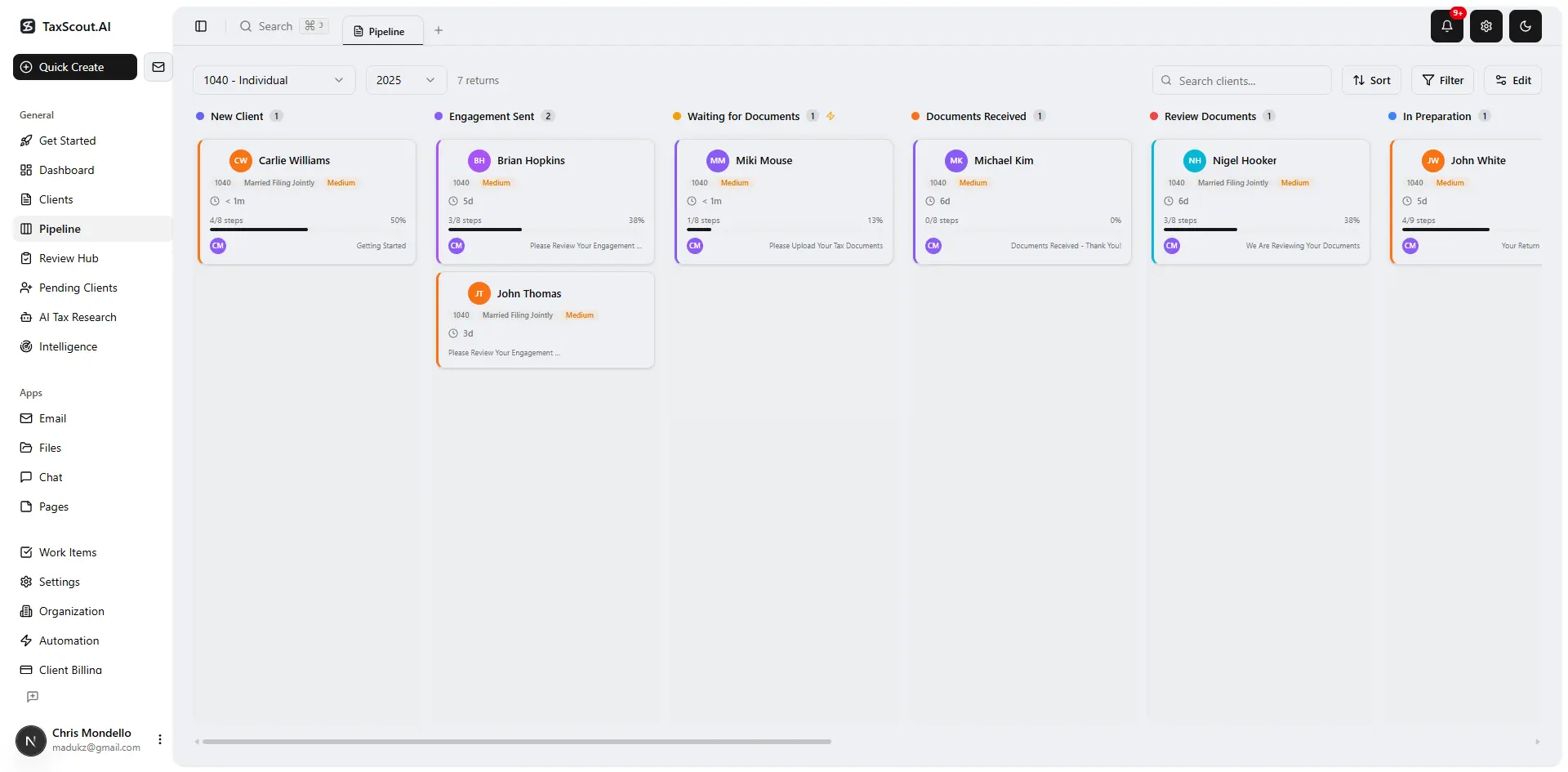
Track every return from intake to filed with drag-and-drop pipeline management

Click any extracted field to see its source highlighted on the original PDF
How Onboarding Friction Varies by Firm Size and Market Density
Not all onboarding friction is the same. Data from the TaxScout directory — which lists 69,085 US tax preparers matched against the IRS federal preparer directory — reveals a credential distribution that maps closely to market density. CPA-heavy metros (New York, Chicago, Los Angeles) tend to serve clients who have prior CPA relationships and arrive with organized records; the onboarding bottleneck is agreement on scope and fees. Markets with a higher proportion of PTIN-only preparers — which account for the majority of the 69,085 preparers listed — tend to serve first-time CPA clients who need more education and hand-holding before documents can even be requested.
Solo practitioners face a structurally different problem: they carry the entire onboarding sequence themselves, so any manual step (sending a portal link, following up on a missing W-2, drafting a fee estimate) competes directly with billable preparation work. For solo practitioner firms, the ROI of automation is highest precisely because the alternative is the owner's time. For multi-preparer firms, the ROI calculation shifts toward consistency — ensuring every new client, regardless of which preparer picked up the phone, moves through the same compliance-verified onboarding sequence.
The accounting busy season guide covers how firms of different sizes approach capacity planning, and many of the same structural observations apply to onboarding design: the systems that hold up in January are the ones built in October, not patched in February.
Which Onboarding Tools Actually Support This Checklist
Most practice management platforms address some of these checklist steps but not all. Karbon lists $59/user/mo billed annually, as of 2026-08-01, and covers workflow and task management well but does not include AI document extraction, e-signatures, or a client portal with OTP authentication. Canopy lists $74/user/mo billed annually, as of 2026-08-01, with tax workflow automation available from $34/client/year as an add-on and KBA at $1.25 each — a per-client cost structure that penalizes volume. Neither platform mentions PTIN/EFIN compliance steps in their published onboarding guides.
TaxScout approaches the same checklist differently. At $49/month with no commitment for Solo (150 return credits per term, unlimited team members) or $149/month for Firm (500 return credits per term, unlimited team members), there are no per-user fees and no per-client add-ons for core onboarding functions. The AI document extraction, client portal, e-signatures, pipeline management, and invoicing features are all included at the same flat rate. TaxScout also works alongside your existing tax software — Drake, CCH Axcess, UltraTax CS, Lacerte, ProConnect, ProSeries — rather than requiring you to replace your preparation workflow.
For a direct feature-by-feature comparison, see the TaxScout vs. Canopy comparison and the TaxScout vs. Karbon comparison.
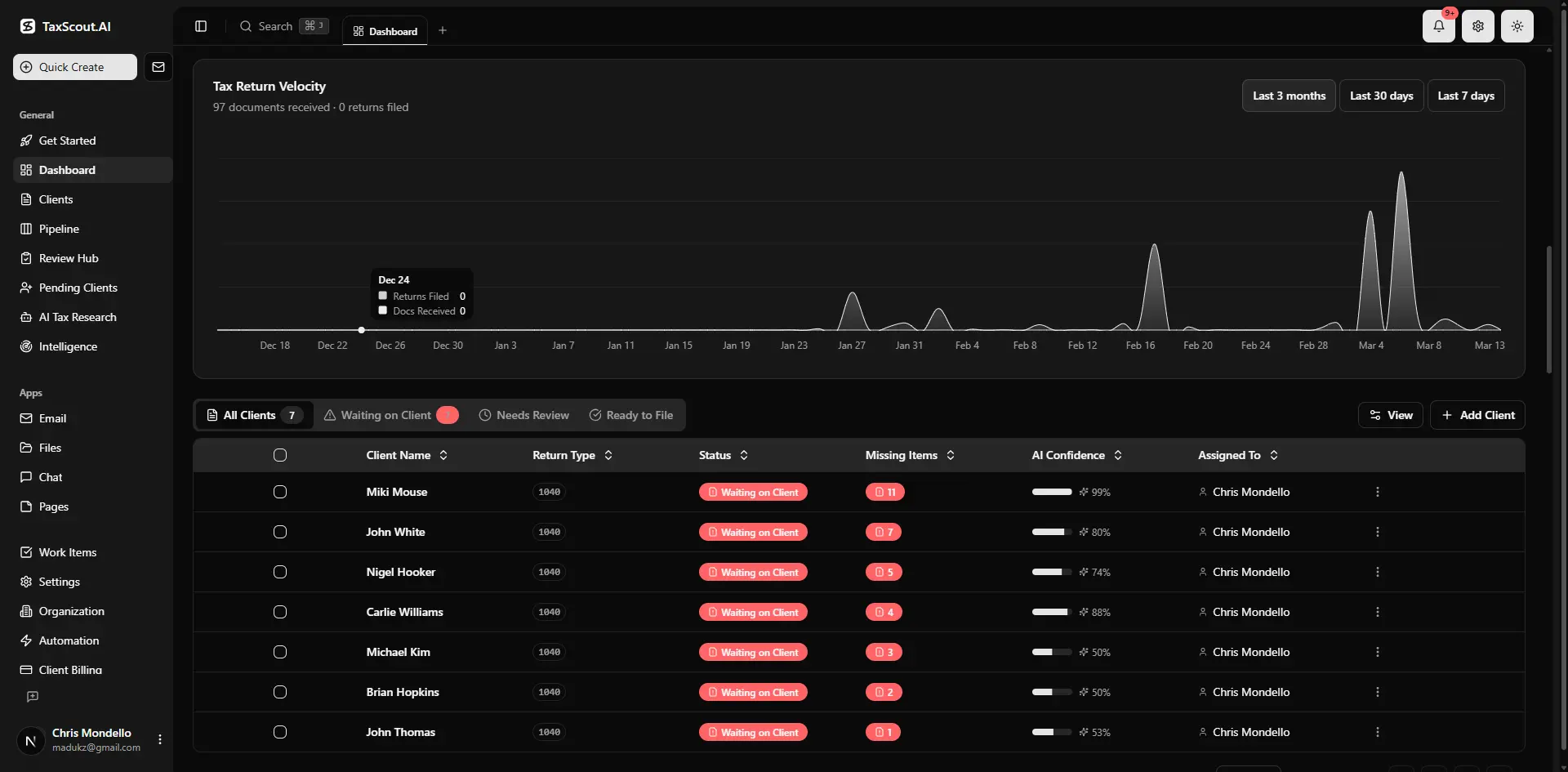
Real-time dashboard showing returns in progress, revenue, and upcoming deadlines
The Downloadable Checklist Template and TaxScout-Specific Prompts
The ten-step checklist above is designed to be used as a live intake template. For firms using TaxScout, each step maps directly to a platform action: Step 1 (compliance verification) maps to the client profile credential fields; Steps 2–3 (scope and engagement letter) map to the AI intake questionnaire and e-signatures workflow; Steps 5–6 (prior-year retrieval and current-year collection) map to AI document extraction; Steps 7–8 (fee estimation and portal activation) map to invoicing and client portal; Step 9 maps to pipeline management.
To request the downloadable PDF version of this checklist — which includes TaxScout-specific prompt language for each step and a column for assigning AI versus human ownership — book a demo and ask for the onboarding template. We send it as part of the demo packet. If you are comparing platforms before committing, the pricing page shows the full plan breakdown with no sales call required.
For firms evaluating whether a full platform switch makes sense versus adding a point solution, the AI adoption guide for CPA firms covers the decision framework in detail, including the hidden switching costs that make incremental automation more practical than a rip-and-replace approach for most firms.
One final resource worth bookmarking: the IRS Tax Pro Account now supports direct business client payment authorizations, which changes the transcript and authorization workflow covered in Step 1 of this checklist. The IRS Tax Pro Account expansion article covers what firms need to update in their onboarding process as a result. And if you are building out your firm's written information security plan — a requirement under the FTC Safeguards Rule — the client intake and document handling steps in this checklist are specifically cited in the WISP template guidance from the IRS Small Business and Self-Employed Tax Center.
Ready to run this entire checklist without a single manual follow-up email?
TaxScout automates intake, document extraction, e-signatures, portal activation, and pipeline entry — all at a flat monthly rate with no per-user or per-client fees.

Your clients see your brand — OTP login, document upload, and real-time status
Frequently Asked Questions
A complete new accounting client checklist covers ten steps: pre-engagement compliance verification (PTIN, EFIN, EA enrollment, Form 2848), initial consultation and scope definition, engagement letter and fee agreement, identity verification and entity documentation, prior-year return retrieval, current-year document collection, fee estimation and invoicing setup, client portal activation and communication protocols, pipeline entry and internal assignment, and ongoing follow-up. Most published checklists omit the IRS compliance verification step, which is mandatory before any return can be signed or filed electronically.
Stay up to date
Get the latest tax tech insights delivered to your inbox.