AI Adoption for CPA Firms: Why Most Firms Stall and How to Break Through
There is a wide gap between watching an AI demo and actually deploying the technology across your firm. This guide diagnoses the five most common stall patterns — from SOP anxiety to data security concerns — and gives CPA firms a concrete unblocking move for each one, plus a decision framework to…
AI adoption for CPA firms follows a familiar arc: a managing partner attends a conference, watches a live demo, and returns to the office energized. Within two weeks the energy fades, nothing changes, and the firm files another season the same way it always has. This pattern is not a failure of imagination — it is the adoption gap, and it affects the majority of practices that evaluate AI tools. For firms evaluating their AI adoption CPA firms approach, this trade-off compounds over time.
The adoption gap sits between the moment a CPA recognizes AI's potential and the moment a team member actually uses it on a live client file. According to the TaxScout directory, which is matched against the IRS federal preparer directory, there are 69,088 US tax preparers currently listed — including 32,239 CPAs and 11,112 enrolled agents. The overwhelming majority of those practices have evaluated at least one AI tool. Very few have deployed one past a pilot of one or two staff members. Each of these factors directly shapes how AI adoption CPA firms plays out in practice.
This article does not cheerleaad the benefits of AI — that content exists everywhere. Instead, it diagnoses the five most common reasons accounting firms stall after the demo and gives each stall pattern a specific, actionable unblocking move. At the end, there is a decision tree CPAs can use to identify which barrier fits their situation and what to do next. Understanding AI adoption CPA firms in this context is what separates firms that scale from those that stall.
The Adoption Gap Is Real and Measurable
The adoption gap is not simply about willingness. Most CPAs who stall are not opposed to AI — they watched the same demo, felt the same excitement, and genuinely want to modernize. The problem is that moving from "this looks impressive" to "my whole team uses this every day" requires solving five separate organizational problems, often simultaneously. This is precisely where a deliberate AI adoption CPA firms strategy pays off.
Competitor vendors rarely address this honestly. Canopy's automation content, for example, assumes firms already have documented standard operating procedures (SOPs) — it skips entirely the question of what to do when you don't, and the stall that creates. Karbon's AI education lives inside gated webinars rather than searchable written guides. Financial Cents covers pre-adoption friction only for small bookkeeping shops, not for mid-sized, tax-focused CPA practices. The result is a content vacuum: firms know AI exists and that they should adopt it, but they have no honest framework for diagnosing why they haven't. AI adoption CPA firms sits at the center of this decision — get it wrong and the rest unravels.
Understanding which specific barrier is blocking your firm is the prerequisite to unblocking it. The five patterns below are not exhaustive, but they account for the vast majority of stalled deployments we observe across practices of all sizes. For a broader look at how AI is reshaping firm operations, see Accounting Automation for CPA Firms: What AI Actually Changes (And What It Doesn't). When firms revisit their AI adoption CPA firms priorities, the gaps usually surface here.
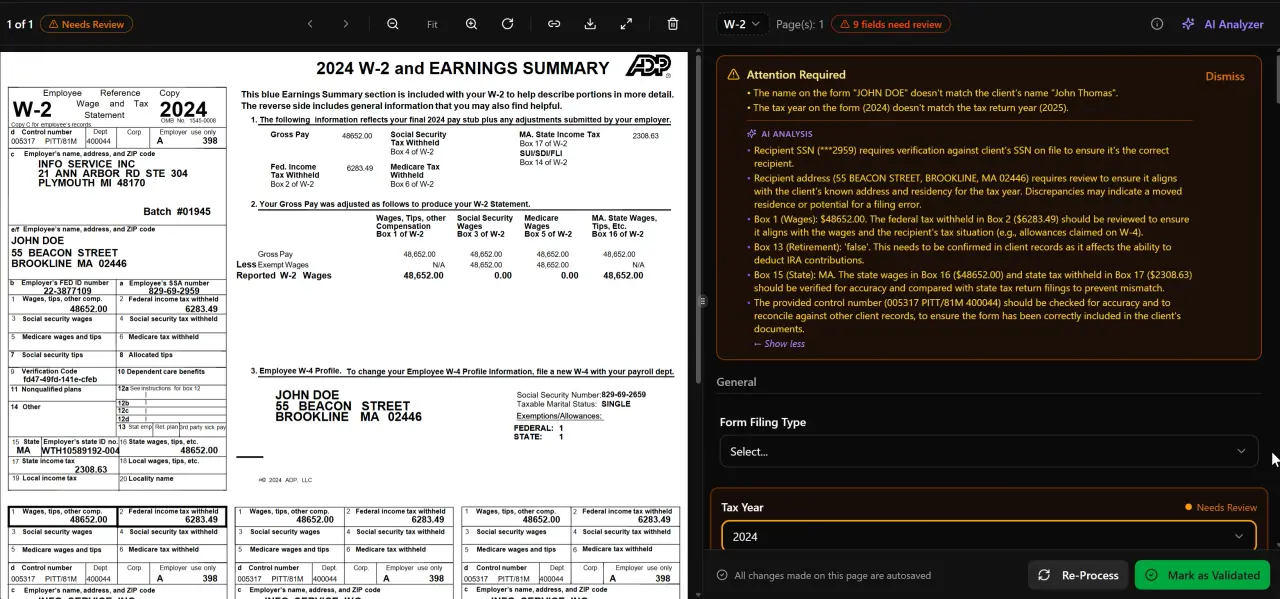
AI classifies, extracts, and validates every document automatically
Tired of watching your AI pilot gather dust in a shared drive?
TaxScout is built for CPA firms that want real deployment, not another demo — start with a free trial and have your first return processed today.
Stall Pattern 1: SOP Anxiety
Many firms stall because they believe they need fully documented SOPs before they can configure an AI workflow. The logic feels sound: "We can't automate a process we haven't defined yet." In practice, this reasoning creates a paralysis loop. Writing SOPs is time-consuming, so it keeps getting deferred to the offseason — which never arrives.
The unblocking move here is to reverse the dependency. Start with one narrow, high-volume task — say, extracting W-2 data from client uploads — and let the AI tool's output reveal your implicit process. When a staff member reviews AI-extracted fields in a split-screen PDF viewer with click-to-source highlighting, they are effectively documenting the firm's review SOP in real time. After three or four returns, the SOP writes itself from observation rather than from a blank page. This is one of the most underappreciated advantages of AI adoption CPA firms can gain by simply starting narrow and iterating.
This approach works regardless of firm size, but it is especially effective for practices in the two-to-ten staff range where no one has the bandwidth to write documentation in the abstract. The IRS Taxpayer First Act already obligates firms handling electronic returns to have security and data-handling policies; building AI SOPs alongside compliance documentation reduces the total documentation burden rather than adding to it.

Click any extracted field to see its source highlighted on the original PDF

Your clients see your brand — OTP login, document upload, and real-time status
Stall Pattern 2: Staff Resistance
Staff resistance is the most emotionally charged barrier and the one managing partners are most reluctant to name directly. It surfaces as "my team isn't ready" or "we tried it and they didn't use it," but the underlying concern is usually one of two things: fear that AI makes individual expertise look replaceable, or simple discomfort with learning new software during peak season.
The unblocking move is to separate the introduction timeline from the busy season. A pilot introduced in October, when volume is lower, gives staff time to build comfort without deadline pressure. More importantly, frame AI as the thing that handles the extraction gruntwork — classifying documents, running confidence scores, flagging math discrepancies — so that the staff member's judgment remains the visible and valued output. Firms that position AI as a first-pass draft tool rather than a replacement decision-maker see adoption rates climb significantly faster. When staff understand that AI adoption CPA firms undertake is about augmenting their expertise rather than replacing it, resistance drops considerably.
The Will AI Replace Accountants? article addresses this question using data from over 70,000 preparer profiles and is worth sharing directly with skeptical team members. The Bureau of Labor Statistics projects continued demand for accountants through 2033, which provides useful grounding for staff worried about job security.
For solo practitioners, staff resistance is a non-issue — but the analog is self-resistance, the tendency to keep doing what already works rather than investing time to learn a new tool. The same October-pilot framing applies.
Stall Pattern 3: Integration Fear
Integration fear is the belief that adding an AI platform will force the firm to abandon its existing tax preparation software. This is an extremely common misconception. CPAs who have used Drake, CCH Axcess, UltraTax CS, Lacerte, ProConnect, or ProSeries for years — sometimes decades — are understandably reluctant to bet the firm on a wholesale switch.
The concrete unblocking move is to verify, before evaluating any AI tool, whether it is explicitly designed to work alongside existing tax software rather than replace it. TaxScout, for example, operates as a front-end intake, extraction, and practice management layer that works with Drake, CCH Axcess, UltraTax CS, Lacerte, ProConnect, and ProSeries. The tax return still gets prepared in the software the team already knows; AI handles the upstream work of organizing documents, extracting field data, running cross-document validation, and managing the client communication cycle. This layered model is exactly how successful AI adoption CPA firms have navigated the integration question without disrupting existing workflows.
The pipeline management and AI document extraction features function independently of whichever preparation software the firm uses. CPAs can also explore the SurePrep Alternatives for CPA Firms guide for context on how AI document tools compare across the market without requiring a full platform switch.
Firms with ten or more staff should also map the data flow explicitly: which inputs come from which systems, where extracted data lands, and who owns each handoff. This map often reveals that the feared integration complexity is smaller than assumed — most AI document tools operate on PDFs and produce structured data exports, not live database connections to tax software.
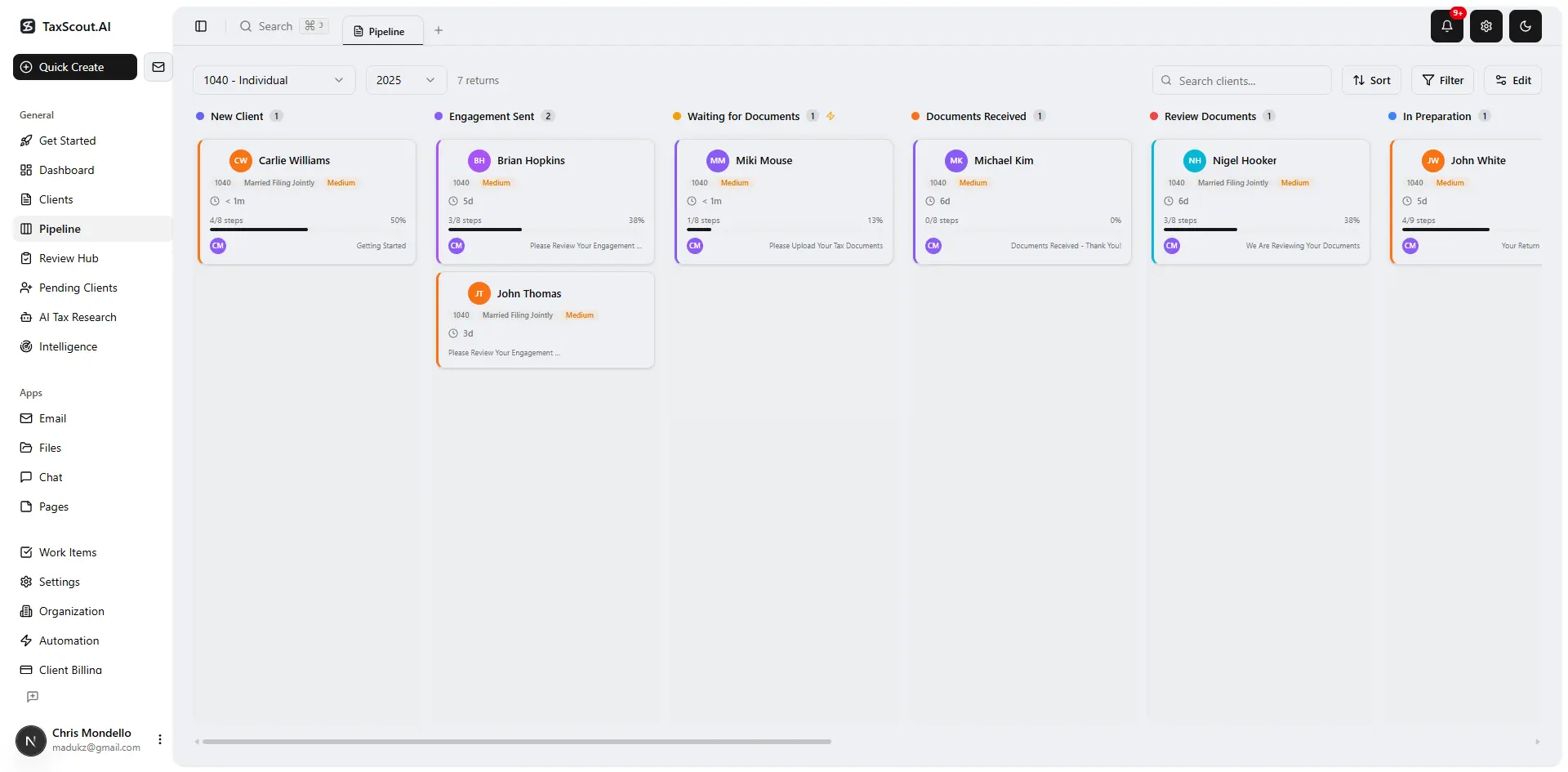
Track every return from intake to filed with drag-and-drop pipeline management
Stall Pattern 4: ROI Uncertainty
ROI uncertainty is not unique to AI — it shows up with every major software purchase. But it is especially acute with AI because the marketing claims are broad ("save hours per return") while the firm's specific cost structure is narrow and well understood. A managing partner who charges $350 per 1040 and knows exactly what that return costs to produce will not be persuaded by a vendor's average figures.
The unblocking move is to anchor ROI to your firm's actual constraint, not a vendor's headline. For most tax-focused CPA practices, the binding constraint during busy season is not marketing, not client relationships, and not advisory quality — it is intake and document processing throughput. If your team spends 25 minutes per return chasing missing documents, categorizing uploads, and keying extracted values, and your AI tool cuts that to 8 minutes, the ROI calculation becomes straightforward: multiply the time delta by your effective hourly rate and the number of returns in your season. Grounding AI adoption CPA firms ROI calculations in firm-specific throughput data, rather than vendor benchmarks, produces projections that hold up under scrutiny.
TaxScout's pricing is flat with no per-user fees — the Solo plan at $49 per month (or $470 prepaid annually) covers 150 return credits with unlimited team members, and the Firm plan at $149 per month (or $1,430 prepaid annually) covers 500 return credits with all nine AI research agents included. That structure makes the ROI math deterministic: the platform cost is fixed regardless of how many team members use it, so efficiency gains translate directly to margin rather than being partially offset by per-seat licensing.
For comparison, Karbon lists $59/user/mo billed annually, as of 2026-08-01. Canopy lists $74/user/mo billed annually, as of 2026-08-01. For a five-person firm, those per-seat structures create ongoing cost exposure that grows with headcount — the opposite of what happens with flat pricing.
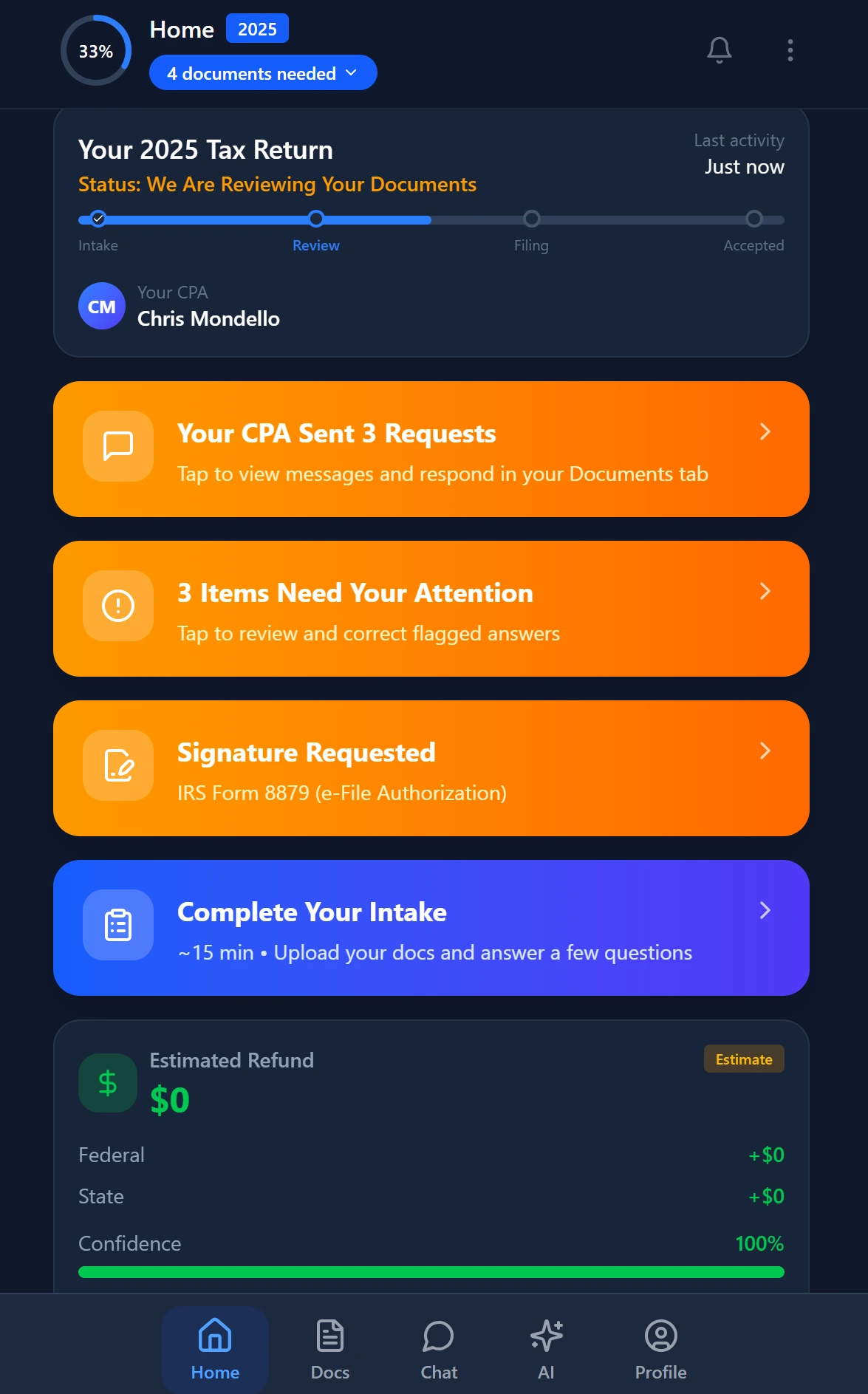
Smart intake auto-fills from uploaded documents and prior-year data
Stall Pattern 5: Data Security Concerns
Data security concerns are the most legitimate barrier on this list, and the one that deserves the most substantive answer rather than reassurance. CPAs are fiduciaries. They hold Social Security numbers, income data, entity structures, and in many cases the financial picture of an entire family for decades. Handing that data to an AI platform is not a trivial decision, and it is one of the most common points where AI adoption CPA firms stalls even after leadership has approved a budget.
The unblocking move starts with a documentation request, not a sales call. Before evaluating any AI tool for sensitive client data, ask the vendor to provide: (1) their encryption posture in transit and at rest, (2) their data retention and deletion policy, (3) whether they have role-based access with MFA, and (4) whether they support data-subject deletion requests under applicable state privacy laws.
TaxScout publishes its security posture at /security, covering encryption in transit and at rest, role-based access with MFA, and data-subject deletion support. The platform also supports Written Information Security Plan (WISP) documentation requirements that the IRS mandates for all tax preparers handling client data electronically.
Firms handling high-net-worth clients or cross-border structures should also confirm whether the AI tool's data processing agreements comply with relevant state privacy frameworks. The Treasury Department's cybersecurity guidance for financial professionals provides a useful baseline checklist independent of any vendor's claims. For firms with existing compliance infrastructure, see the Cornell Legal Information Institute's summary of federal data protection statutes for the statutory grounding behind vendor requirements.
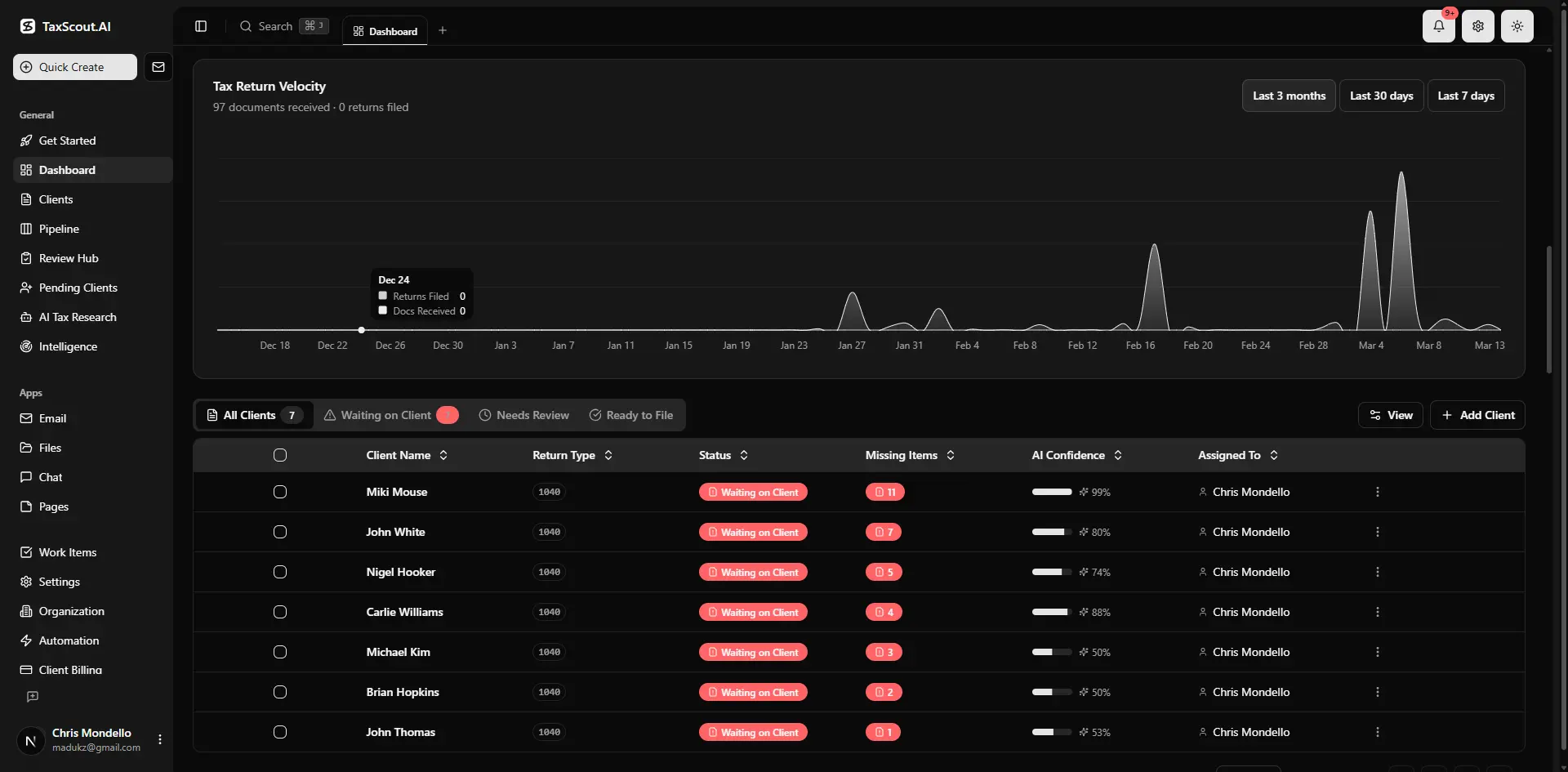
Real-time dashboard showing returns in progress, revenue, and upcoming deadlines
A Decision Tree for Identifying Your Firm's Barrier
The five stall patterns above rarely present in isolation, but one is almost always primary. Use the following decision tree to identify yours before investing more time in vendor evaluations.
Start here: Has your firm ever started using an AI tool and then stopped? If yes, the barrier is almost always staff resistance (Pattern 2) or integration fear (Pattern 3) — the tool was adopted but not embedded. If no, continue: Has your firm evaluated AI tools but not purchased one? If yes, the barrier is most likely ROI uncertainty (Pattern 4) or data security concerns (Pattern 5). If your firm has not seriously evaluated any AI tool, the barrier is SOP anxiety (Pattern 1) — the belief that internal processes need to be ready before external tools can help.
Solo practitioners (1 person): SOP anxiety and ROI uncertainty are the dominant barriers. The best unblocking move is a narrow, time-boxed pilot: one document type, one month, one measurable output. TaxScout Solo at $49/month is specifically priced for this test-without-commitment structure.
Small firms (2–10 staff): Staff resistance and integration fear are the dominant barriers. Address staff resistance first by piloting in October; address integration fear by confirming explicitly that the AI tool layers on top of existing tax software rather than replacing it.
Mid-sized firms (10+ staff): Data security concerns and ROI uncertainty become more prominent as the number of clients and team members grows. Engage your IT or compliance lead in the vendor evaluation from the start, and anchor the ROI calculation to your firm's specific throughput constraint rather than vendor averages.
For additional context on how AI-ready firms approach the full season cycle, the Accounting Busy Season: What AI-Ready Firms Do Differently guide covers workflow sequencing and intake structuring in detail. You can also browse other blog resources on CPA practice management to find topics relevant to your firm's current growth stage.
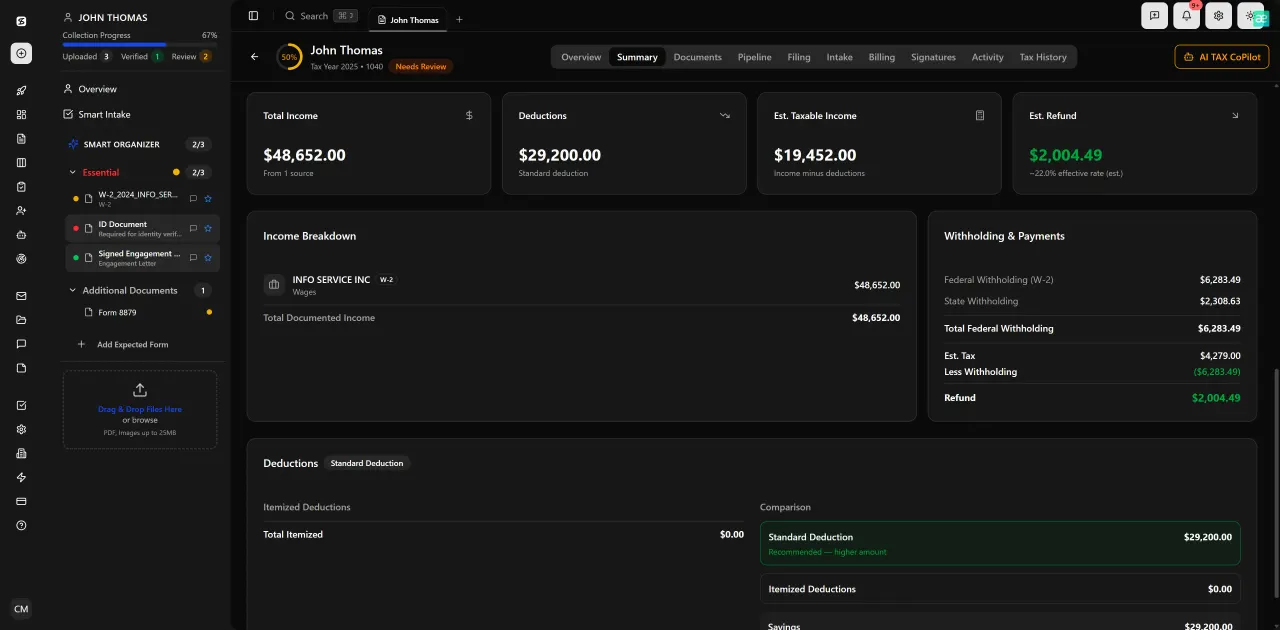
Review with AI assist — 9 agents answer questions with full client context
What AI Adoption Actually Looks Like in the First 90 Days
Understanding the five barriers is useful; having a concrete 90-day picture makes the path tangible. Most successful AI deployments at CPA firms follow a three-phase sequence regardless of firm size.
Phase one (days 1–30) is intake modernization. The firm activates a smart intake engine and a branded client portal with OTP login — no passwords for clients to manage. The goal is not to change how returns are prepared; it is to change how documents arrive. When clients upload directly to a structured portal rather than emailing PDFs, AI classification and extraction can begin immediately upon upload.
Phase two (days 31–60) is extraction and review. Staff begin reviewing AI-extracted fields in the split-screen viewer, confirming confidence scores, and using the five-layer validation pipeline to catch discrepancies before the return reaches the preparer. This phase is where the SOP writes itself from observed behavior.
Phase three (days 61–90) is pipeline and communication. The firm activates pipeline management with its 12 customizable stages and begins routing returns through a consistent kanban workflow. E-signatures via Documenso and invoicing via Stripe Connect Express replace the last remaining paper-and-email handoffs. By day 90, the firm has a documented, repeatable process — not because they wrote SOPs in advance, but because the tool made the implicit process visible and consistent. This 90-day arc is what sustainable AI adoption CPA firms achieve when they focus on embedding rather than evaluating.
The SSA's employer guide on record-keeping obligations is worth reviewing during phase one to confirm that any new document intake workflow meets federal retention requirements for payroll-related records handled on behalf of business clients.
Ready to close the adoption gap before next filing season?
TaxScout gives CPA firms a flat-rate AI platform that layers on top of your existing tax software — no SOP required to start, no per-seat fees as you grow.
Frequently Asked Questions
SOP anxiety is the most common first-stage barrier — the belief that internal processes need to be fully documented before AI can be configured. The practical fix is to reverse the dependency: start with one narrow, high-volume task and let the AI tool's output reveal your implicit process, rather than waiting for a blank-page documentation exercise that never gets done.
Keep reading
AI Implementation Roadmap for CPA Firms: Where to Start and What to Do First
Jun 16, 2026 · 1 min read
AI ROI for Accounting Firms: How to Measure What AI Actually Saves You
May 24, 2026 · 1 min read
Accounting Automation for CPA Firms: What AI Actually Changes (And What It Doesn't)
Nov 14, 2026 · 1 min read
Stay up to date
Get the latest tax tech insights delivered to your inbox.