IRS CP2000 Notice Response: How CPAs Resolve Underreporter Inquiries Fast
A CP2000 notice gives your client — and you — roughly 30 days to respond before the IRS assesses a proposed tax change. This step-by-step playbook covers everything CPAs need: reading the notice, AI-assisted document matching, drafting the response letter, and building automated monitoring so no…
A client forwards an IRS CP2000 notice on Day 1. The response deadline is 30 days out. For most CPA practices handling dozens of clients simultaneously, that window disappears faster than it should — especially when the notice requires pulling prior-year returns, reconciling 1099 data, and coordinating a signed power of attorney before a single line gets written to the IRS. Managing an IRS CP2000 notice response efficiently is not just about tax law; it is an operational problem that exposes gaps in every firm's document management and workflow system.
The IRS Automated Underreporter (AUR) program generates roughly 2 million CP2000 notices every year, comparing income reported on a filed return against third-party information statements like W-2s, 1099-NECs, 1099-DIVs, and 1099-Bs. When a discrepancy appears, the IRS proposes an adjustment — often without considering basis, offsetting deductions, or legitimate explanations the taxpayer could provide. Most competitor content on CP2000s targets the confused taxpayer. This playbook is written for the CPA who is actually going to pick up the phone, pull the file, and draft the response. Understanding this process is the first step toward preparing an accurate IRS CP2000 notice response before the 60-day deadline expires.
Below you will find a six-step operational framework: how to log and assign the notice the moment it arrives, how AI-assisted document matching can cut reconciliation time in half, how to structure a CP2000 response letter that gets accepted on the first submission, and how to wire up proactive monitoring inside your practice management platform so the next CP2000 never catches your firm off-guard. Each phase of this framework is designed to make your IRS CP2000 notice response faster, more accurate, and less likely to require a follow-up correspondence round.
Step 1: Read and Decode the CP2000 Notice
The IRS CP2000 notice is not a bill and not an audit — it is a proposed adjustment from the Automated Underreporter unit. The first page states the tax year under review, the proposed additional tax, interest, and any applicable penalties. Page two shows the specific income items the IRS believes were underreported, with the payer name, EIN, and reported amount. Pages three and four provide the response options and the address for mailing your reply. Recognizing what the notice actually represents — rather than treating it as a final bill — allows CPAs to craft an IRS CP2000 notice response that clearly addresses the specific discrepancy the AUR unit flagged.
Before doing anything else, check three critical fields: (1) the response due date printed on page one — this is typically 60 days from the notice date, though clients often forward the notice weeks late, compressing your actual window to 30 days or fewer; (2) whether the notice is a CP2000 or a CP2501, which is an earlier soft inquiry that precedes a formal CP2000 and allows more time; and (3) whether a Form 2848 Power of Attorney is already on file for the tax year in question, since the IRS AUR unit will not discuss the account with a representative without current authorization. For firms evaluating their IRS CP2000 notice response approach, this trade-off compounds over time.
Log the notice in your practice management system immediately. Record the tax year, proposed adjustment amount, response deadline, and assigned staff member. TaxScout's pipeline management lets you create a dedicated CP2000 stage with a hard deadline field, ensuring the matter surfaces on the firm dashboard before it becomes urgent. Each of these factors directly shapes how IRS CP2000 notice response plays out in practice.

Click any extracted field to see its source highlighted on the original PDF
Step 2: Gather and Match Documents with AI Assistance
The core of every CP2000 defense is document reconciliation. The IRS is asserting that a payer reported income to them that does not appear — or appears at a different amount — on the filed return. Your job is to explain the discrepancy with evidence. That means pulling every information return the client received for the tax year in question: all 1099 variants, W-2 forms, K-1s, 1095 series, and brokerage consolidated statements. Understanding IRS CP2000 notice response in this context is what separates firms that scale from those that stall.
This is exactly where AI-assisted document extraction transforms a 3-hour reconciliation task into a 20-minute review. TaxScout's AI document extraction processes 180+ tax form types — including all 1099 variants and K-1 schedules — and runs a 5-layer validation pipeline that cross-verifies extracted figures against each other. When you upload all the client's information returns for the year, the platform flags discrepancies between what was reported to the IRS and what appears in the client file. You can see exactly why the AUR unit sent the notice and whether the client's return already accounted for the income in a different line item. For a deeper look at how this works technically, see our guide on AI document extraction for CPAs. This is precisely where a deliberate IRS CP2000 notice response strategy pays off.
Common reconciliation scenarios include: (a) 1099-B proceeds reported at gross without cost basis — the IRS sees revenue but not the offsetting cost basis; (b) 1099-MISC or 1099-NEC income that was reported on a Schedule C but at a different gross figure; (c) 1099-R distributions that were rolled over and excluded from income but not properly coded; and (d) K-1 income that was reported on a different schedule than the AUR algorithm expected. Each scenario requires a different document package and a different explanatory argument in the response letter. IRS CP2000 notice response sits at the center of this decision — get it wrong and the rest unravels.
Use TaxScout's split-screen PDF viewer to place the notice side-by-side with the underlying information return. Click-to-source field highlighting shows you exactly where each extracted number originated, making it straightforward to confirm whether the client's original return captured the item or missed it entirely. When firms revisit their IRS CP2000 notice response priorities, the gaps usually surface here.
Tired of manually chasing down 1099s when a CP2000 lands on your desk?
TaxScout's AI extraction matches 180+ form types in minutes — so you can focus on the response strategy, not the document hunt.
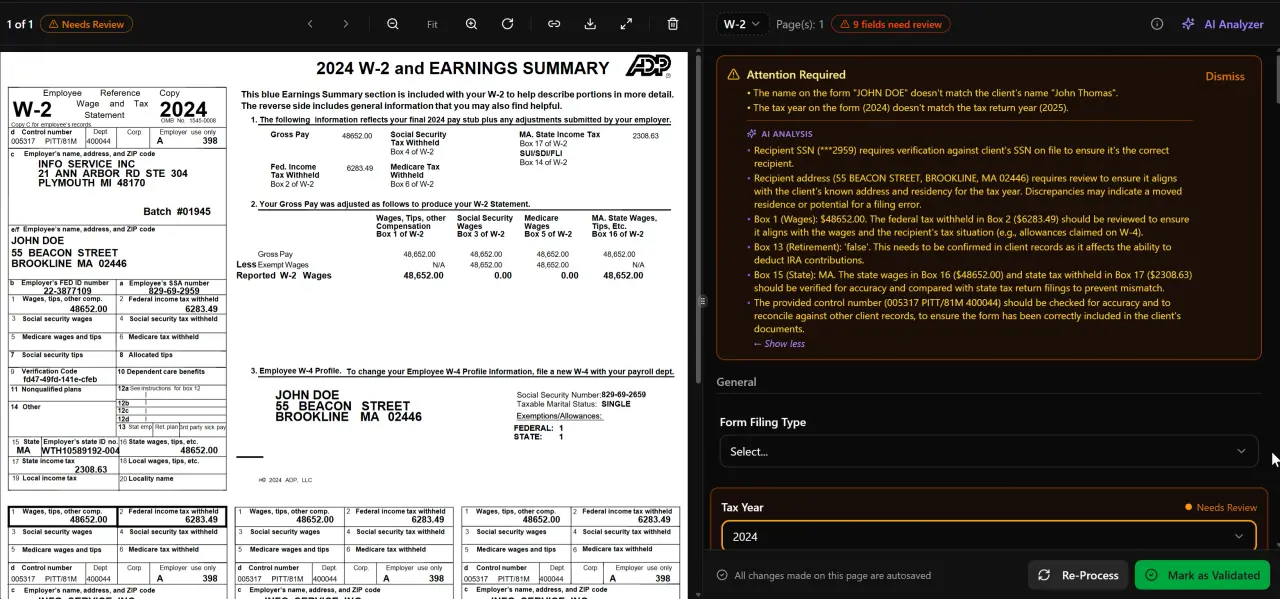
AI classifies, extracts, and validates every document automatically
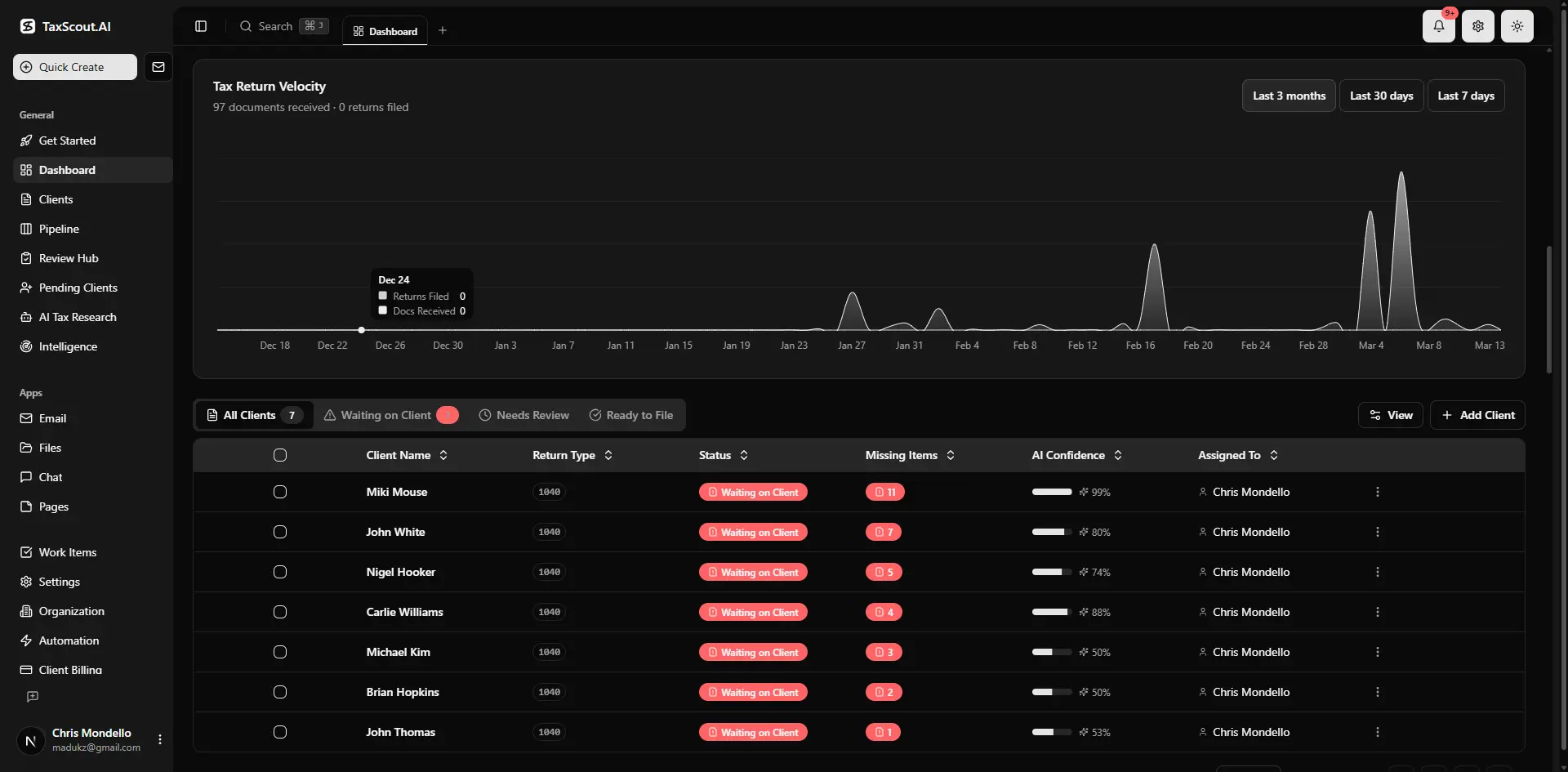
Real-time dashboard showing returns in progress, revenue, and upcoming deadlines
Step 3: Determine the Correct Response Position
Once you have completed document matching, you will fall into one of three response positions: full agreement, partial agreement, or full disagreement. Each requires a different approach.
Full agreement means the client did omit income and owes the proposed tax. In this case, sign and return the agreement form included with the notice, arrange payment or an installment agreement, and advise the client on estimated tax payments going forward to avoid a repeat. Consider whether an amended return is needed to correct related items like adjusted gross income-sensitive deductions that the proposed adjustment would affect.
Partial agreement is the most common scenario. The IRS may be correct about gross income but unaware of cost basis, deductions, or exclusions that reduce or eliminate the net tax. You agree with the income figure but dispute the tax consequence. Your response letter must acknowledge the discrepancy, provide the offsetting documentation, and calculate the revised tax liability.
Full disagreement applies when the income was already reported — perhaps on a different line or consolidated with other items — and the AUR algorithm simply missed it. You need to show the cross-reference clearly: 'The $4,200 reported by XYZ Brokerage on Form 1099-DIV was included in Line 3b of the filed Form 1040 as part of qualified dividends. Please see the attached brokerage statement and return excerpt.' The IRS Taxpayer Bill of Rights guarantees the right to challenge the IRS's position with documentation, so a well-supported full-disagreement response has a strong record of success.
Step 4: Draft the CP2000 Response Letter
A CP2000 response letter is a formal professional document, not a freeform explanation. The IRS AUR unit processes thousands of responses and rewards clarity and structure. Your letter should open by identifying the taxpayer name, SSN (last four digits only in the letter body), tax year, and notice date. State your position in the first paragraph: 'We are writing on behalf of [Client Name] to respond to the CP2000 notice dated [Date] for tax year [Year]. We [agree / partially agree / disagree] with the proposed adjustment for the following reasons.'
Follow with a numbered list of each disputed line item from the notice, your explanation, and the supporting document attached. Label every attachment — 'Exhibit A: Form 1099-B from XYZ Brokerage showing cost basis of $12,400' — and reference each label in the letter body. If you are claiming a deduction or exclusion that reduces the proposed tax, cite the applicable Internal Revenue Code section and Treasury regulation. The AUR unit is not a tax court, but citing authority signals professional representation and often accelerates resolution.
Sign the letter as the authorized representative under Form 2848 and include a copy of the current power of attorney. Mail via certified mail with return receipt to the address printed on the notice — the AUR unit has a specific processing center and misdirected mail restarts your clock. If you are using TaxScout's e-signatures workflow, you can have the client sign the agreement form or authorization documents via Documenso before the package goes out, eliminating a separate courier step.
For firms handling multiple CP2000s per season, maintaining a CP2000 response letter template in your knowledge base with fill-in-the-blank sections for each scenario (full agreement, partial agreement, basis dispute, rollover exclusion) cuts drafting time from 90 minutes to 20 minutes per response. You can find additional IRS notice management guidance in our blog resources for CPA practice operations.

Your clients see your brand — OTP login, document upload, and real-time status
Step 5: Negotiate Adjustments and Follow Up
After mailing, the IRS typically takes 8 to 12 weeks to process a CP2000 response. During that window, your client may receive automated follow-up notices — a CP2000 reminder or, if the original deadline passed, a Statutory Notice of Deficiency (CP3219A). Log each incoming notice in your pipeline immediately. If you receive a CP3219A, the taxpayer has 90 days to petition the U.S. Tax Court before the proposed assessment becomes final — that deadline is jurisdictional and cannot be extended.
If the IRS partially accepts your position but still proposes a reduced adjustment you believe is incorrect, you can request consideration by the Taxpayer Advocate Service if the client is experiencing hardship, or submit a supplemental response with additional documentation. For disputes over $25,000 per year, consider whether Fast Track Settlement through IRS Appeals is appropriate. Document every phone call with the AUR unit — date, agent ID, and summary of discussion — in your practice management notes.
Once the matter is resolved, update the client file and pipeline stage to 'Closed — CP2000.' Generate an invoice for the representation work using TaxScout's invoicing module and send the closing memo to the client through the client portal, creating a clear record that the matter is resolved and no balance is outstanding with the IRS.

Track every return from intake to filed with drag-and-drop pipeline management
CP2000 vs CP2501: Key Differences for CPA Representatives
| Factor | CP2000 | CP2501 |
|---|---|---|
| IRS program stage | Formal proposed adjustment | Early soft inquiry / information request |
| Response deadline | 60 days from notice date | 30 days from notice date |
| Proposed tax assessed? | Yes — specific dollar amount shown | No — IRS seeking explanation only |
| Power of attorney required? | Yes, for representative to act | Yes, for representative to act |
| Risk if ignored | Assessment becomes final after 90-day notice | Escalates to CP2000 or examination |
| Recommended action | Full written response with documentation | Proactive explanation with supporting docs |
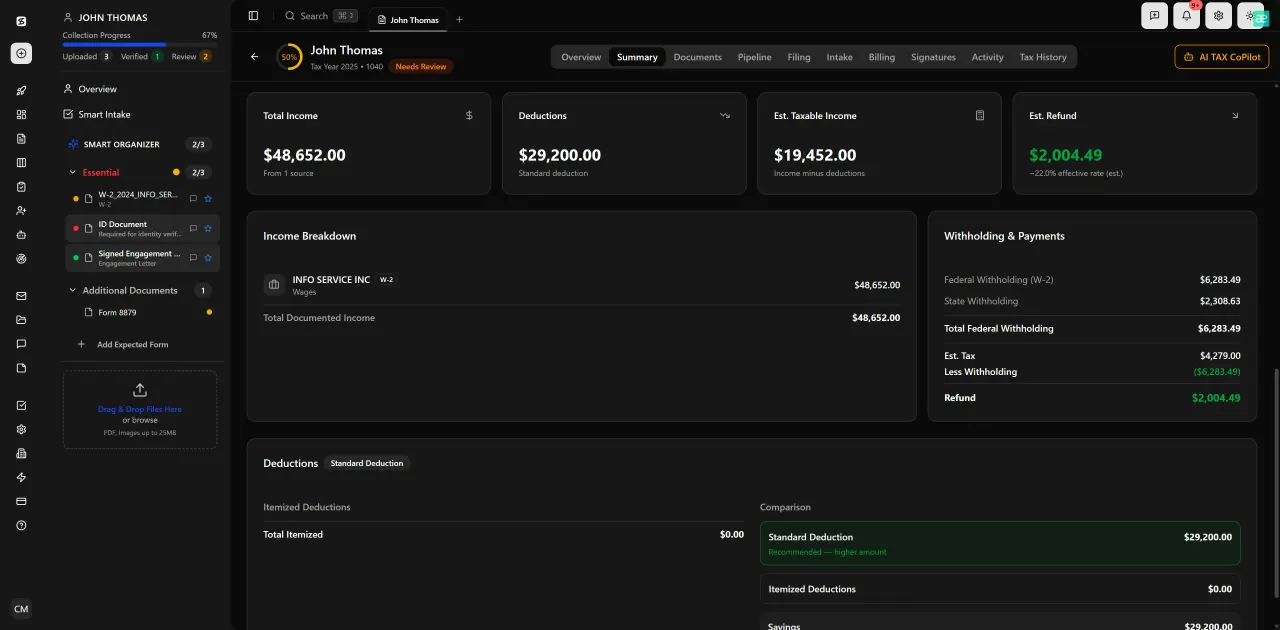
Review with AI assist — 9 agents answer questions with full client context
Step 6: Build Automated CP2000 Monitoring into Annual Client Reviews
The most effective IRS CP2000 notice response is the one you never have to write, because the discrepancy was caught and corrected before the return was filed. CPAs who build a proactive annual review workflow reduce CP2000 exposure dramatically for their client base.
The strategy starts at intake. TaxScout's smart intake engine is modeled on IRS Form 13614-C and uses a 4-layer prefill system — document-first, prior-year data, profile, and AI gap analysis — to flag when expected information returns are missing. If a client received a 1099-DIV in the prior year from a brokerage account they did not mention in the current-year intake, the system surfaces that gap before you close the return. The same logic applies to 1099-R distributions, 1099-INT from banks, and 1099-B from investment accounts. Our IRS tax deadlines guide covers the broader calendar context for building these checkpoints into your year-round workflow.
Second, train your team to cross-reference the prior-year return against the current-year information return package before filing. If a client reported $8,000 in dividend income in the prior year and only $200 appears in the current year, that is a conversation to have — either the account was closed and no 1099-DIV is coming, or the document is missing from the file. TaxScout's AI research agents can query current IRS guidance on reporting thresholds and de minimis rules to confirm when a discrepancy is a legitimate change versus a document gap.
Third, set up a dedicated 'IRS Notices' pipeline stage in your practice management system. Any incoming notice — CP2000, CP2501, CP503, or otherwise — gets logged within 24 hours of receipt, assigned to a staff member, and given a hard deadline. TaxScout's pipeline management supports 12 customizable stages with drag-and-drop kanban, so you can build a notice-response workflow that mirrors your actual process rather than forcing your firm into a generic template. With proper document management practices and automated deadline tracking, no notice should ever reach a critical escalation stage without a response in progress.
Still managing CP2000 deadlines on a spreadsheet?
TaxScout gives CPA firms a complete notice management workflow — AI document matching, pipeline tracking, e-signatures, and client portal delivery — all in one flat-fee platform.
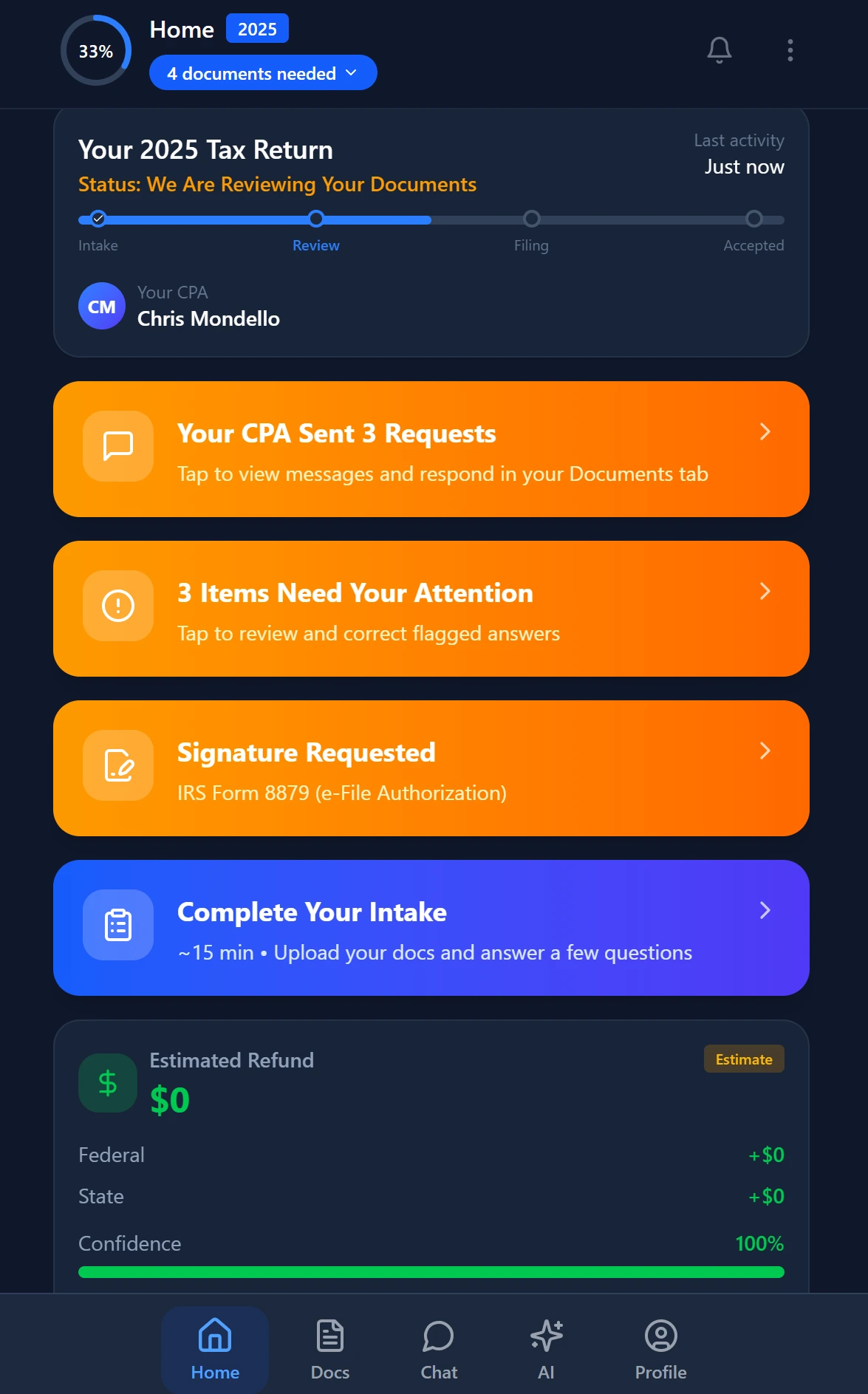
Smart intake auto-fills from uploaded documents and prior-year data
Frequently Asked Questions
The CP2000 notice gives the taxpayer 60 days from the notice date to respond. However, clients frequently forward the notice weeks after receiving it, leaving the CPA 30 days or fewer. If the deadline passes without a response, the IRS issues a Statutory Notice of Deficiency (CP3219A), which starts a 90-day window to petition the U.S. Tax Court. Acting on the CP2000 immediately upon receipt is critical to preserving all response options.
Keep reading
Backdoor Roth IRA: How CPAs Execute the Strategy Without Triggering Pro-Rata Tax
Oct 12, 2026 · 1 min read
Amended FBAR Procedures: How CPAs Correct Foreign Account Errors Without Triggering Penalties
Oct 12, 2026 · 1 min read
Transparency in Coverage Final Rules: What CPA Firms Must Do Now
Oct 12, 2026 · 1 min read
Stay up to date
Get the latest tax tech insights delivered to your inbox.