CAF Number for CPAs: What It Is, How to Get One, and Why It Matters
Your CAF number is more than a one-time IRS registration — it is the foundation of every client authorization your firm will ever file. This guide explains what the centralized authorization file number is, how to obtain it through Form 2848 and IRS e-services, and how growing CPA firms use…
Every CPA who has ever represented a client before the IRS has encountered the CAF number CPA requirement — that nine-digit identifier assigned by the IRS the first time you file a power of attorney on behalf of a taxpayer. Most practitioners treat it as a bureaucratic checkbox: fill out Form 2848, mail or fax it in, wait a few weeks, and move on. That framing undersells what the centralized authorization file number actually does for your practice. Understanding the CAF number CPA practitioners rely on daily is essential for anyone serious about building a sustainable tax representation practice.
The CAF number is the IRS's index to every authorization your firm holds. When you pull a transcript via IRS e-services, when an IRS notice routes to your office instead of a panicked client's mailbox, when you call the Practitioner Priority Service to resolve an account issue — all of that flows through your CAF record. For a solo practitioner with ten clients, this is manageable. For a growing firm carrying fifty or a hundred active IRS representations, the CAF number is only as useful as the systems built around it. For any CAF number CPA professionals depend on, accuracy in maintaining that record directly determines how smoothly client communications and transcript requests flow.
This guide covers the full lifecycle: what the centralized authorization file number is and how it works, the step-by-step process for obtaining one through Form 2848 and IRS e-services, and — critically — how AI-native firms are building repeatable workflows around CAF-based representation so that no notice goes untracked and no authorization lapses without warning. Whether you are applying for the first time or auditing your existing authorizations, knowing how the CAF number CPA workflows intersect with IRS e-services will save your firm significant time.
What Is a CAF Number and How Does It Work
The Centralized Authorization File (CAF) is a database maintained by the IRS that records information about the authority granted by taxpayers to their third-party representatives. When a taxpayer signs Form 2848, Power of Attorney and Declaration of Representative, the IRS processes it and logs the relationship in the CAF system — linking the representative's CAF number to the taxpayer's identification number, the tax matters authorized, and the years covered. For firms evaluating their CAF number CPA approach, this trade-off compounds over time.
Your CAF number is assigned automatically the first time you submit a valid Form 2848 or Form 8821 (Tax Information Authorization). It is permanent — you do not need a new one when you change firms, add staff, or represent different types of taxpayers. The number follows you throughout your career and is tied to your PTIN (Preparer Tax Identification Number), not your employer. Each of these factors directly shapes how CAF number CPA plays out in practice.
Once your CAF record is active, the IRS uses it to route notices and correspondence. Specifically, copies of notices affecting a represented taxpayer are sent to the address on file for your CAF record — which is one reason keeping that address current matters enormously. According to IRS Publication 947, the CAF record also governs what tax periods and matter types a representative can discuss with IRS personnel, so the scope of your Form 2848 directly limits what your CAF authorization covers. Understanding CAF number CPA in this context is what separates firms that scale from those that stall.
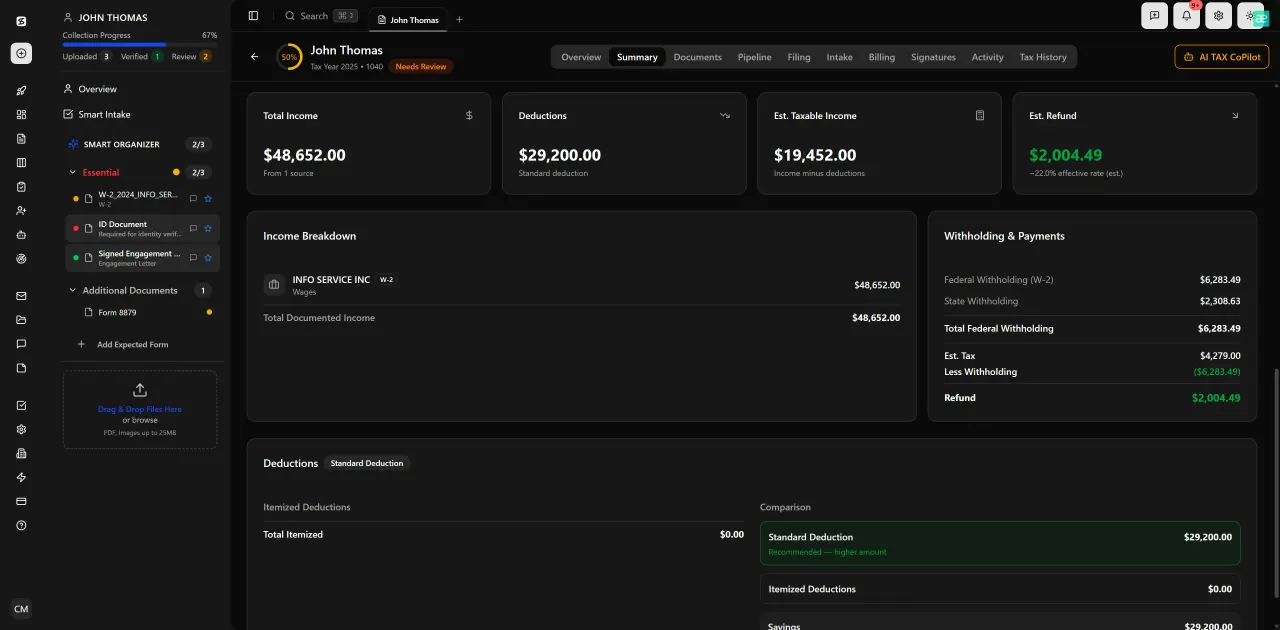
Review with AI assist — 9 agents answer questions with full client context
How to Get a CAF Number: Form 2848 and IRS e-Services
There is no separate application for a CAF number. The IRS assigns one automatically when you file your first Form 2848 or Form 8821. Here is the full process from start to finish. This is precisely where a deliberate CAF number CPA strategy pays off.
Step 1 — Complete Form 2848. Fill in Part I with the taxpayer's information (name, SSN or EIN, address, and the tax matters and years you are authorized to handle). In Part II, enter your own name, PTIN, CAF number field (leave blank if this is your first submission), address, phone, and fax. Sign under penalty of perjury. The taxpayer must sign and date Part I before the form is submitted. CAF number CPA sits at the center of this decision — get it wrong and the rest unravels.
Step 2 — Submit the form. You have three options: fax to the IRS CAF unit (the correct fax number appears in the Form 2848 instructions based on the taxpayer's state), mail to the appropriate IRS campus, or upload electronically through the IRS Tax Pro Account on IRS.gov. The Tax Pro Account method is the fastest — authorizations appear in the system within minutes rather than weeks. When firms revisit their CAF number CPA priorities, the gaps usually surface here.
Step 3 — Receive your CAF number. If this is your first Form 2848, the IRS will mail your assigned CAF number to the address in Part II, typically within four to six weeks for paper submissions. If you used Tax Pro Account, the CAF number appears in your account dashboard. Record it — you will enter this number on every subsequent Form 2848 you file. Every CAF number CPA firms track should be stored in a central system, not just a single employee's email inbox.
Step 4 — Access IRS e-Services. Once you have a CAF number, register for IRS e-Services to use Transcript Delivery System (TDS) and other practitioner tools. These tools let you pull wage and income transcripts, account transcripts, and return transcripts on behalf of authorized clients — all tied to your active CAF authorizations.
For firms with multiple CPAs, each licensed representative needs their own CAF number. An enrolled agent, CPA, or attorney acting as a representative cannot share a CAF number with a colleague, even within the same firm. This is a detail that trips up growing practices when onboarding new staff.
Tired of tracking Form 2848 submissions and IRS notice deadlines in a spreadsheet?
TaxScout.ai gives your firm a centralized authorization dashboard — with AI research agents that monitor IRS updates and a pipeline that flags expiring POAs before they become problems.

Track every return from intake to filed with drag-and-drop pipeline management

Click any extracted field to see its source highlighted on the original PDF
CAF Number Scope: What Your Authorization Actually Covers
Many CPAs discover the limits of their CAF authorization only when the IRS declines to discuss a matter on a call. Form 2848 is granular by design. You must specify the tax form type (e.g., Form 1040, Form 1120S), the specific tax years or periods, and the type of tax (income, payroll, excise). A CAF authorization filed for tax years 2021 through 2023 does not automatically cover 2024 — you need a new Form 2848 or an amendment. This is a scope gap that any CAF number CPA tracking system should flag automatically before year-end.
The IRS Internal Revenue Manual section on CAF processing outlines how the IRS maps each authorized matter to the representative's record. Authorizations with a specific expiration date will lapse automatically. Authorizations without an expiration date remain active until formally revoked by the taxpayer or superseded by a new Form 2848 filing. This creates a sprawling authorization landscape for active firms — hundreds of Form 2848 records, each with different scopes and effective dates.
For firms representing business clients, the scope issue multiplies. An S-corporation client may need separate authorizations for Form 1120S, Form 940, Form 941, and state-level equivalents. If your firm also handles the owner's personal return, that is a separate CAF authorization under the individual's SSN. Without a tracking system, these authorizations become impossible to audit reliably. See how AI document extraction for CPAs can help build the intake layer that captures these scope details automatically when a new engagement begins.
Managing CAF Numbers at Scale Across a Growing Firm
The gap between how most practice management articles treat the CAF number — as a one-time solo practitioner task — and how a firm with forty or sixty active IRS representations actually lives with it is enormous. When a firm grows, several failure modes become common: authorizations filed by a former employee whose CAF record is no longer monitored, expired authorizations that were never renewed before a new audit cycle began, and IRS notices routed to an old office address because no one updated the CAF record after a move.
A modern, scalable approach to tax representation CPA workflows treats CAF authorization as a living dataset, not a filing event. That means tracking, for every active client, which representative holds the POA, what tax matters and years are covered, whether the authorization has an expiration date, and when the last IRS correspondence was received under that authorization. This is exactly the kind of structured client-context data that platforms like TaxScout's client management features are built to maintain across the full client lifecycle. Firms that invest in this infrastructure find that CAF number CPA management becomes a competitive differentiator rather than an administrative burden.
Growing firms should also think about what happens when a client moves from one CPA within the firm to another. A new Form 2848 must be filed under the successor representative's CAF number, and the prior authorization should be formally revoked to prevent confusion. This handoff process, repeated across dozens of client transitions per year, is where disorganized firms lose IRS notices and miss response deadlines. The IRS e-Services Tax Pro Account now supports online revocation of prior authorizations, which speeds up the process considerably — but your firm still needs a workflow to trigger that action reliably.
For a broader view of the systems that support scalable tax representation, our complete guide to firm operations and workflows covers the practice management stack from intake through final delivery.

Your clients see your brand — OTP login, document upload, and real-time status
How AI-Native Firms Use CAF Data in Their Representation Stack
The CAF number is the IRS's hook into your authorization record, but what you do with that hook on your end determines how effective your representation practice becomes. AI-native firms are building workflows where every client authorization is tied to the firm's practice management layer — so that pulling a transcript, receiving a notice, or responding to an IRS inquiry is never dependent on a staff member remembering which Form 2848 was filed and when. This is the foundation on which a durable CAF number CPA system is built.
TaxScout's AI research agents are connected to live IRS, Treasury, and Congressional sources, which means when a notice arrives or a new IRS procedure affects a class of taxpayers you represent, the platform can surface that information against the specific clients whose authorizations are in scope. This is a fundamentally different capability than a generic notification email — it is context-aware intelligence tied to your CAF-based authorization data.
The pipeline management feature in TaxScout uses 12 customizable stages, and firms handling IRS representation work commonly build stages for: Form 2848 submitted, CAF confirmation received, transcript pulled, IRS response pending, and notice resolved. This makes the authorization lifecycle visible across the entire team, not siloed in one partner's inbox. Combined with e-signature workflows for Form 2848 itself — since the taxpayer signature can now be collected electronically using IRS-approved methods — the entire POA process from engagement through authorization becomes trackable and auditable.
For firms comparing practice management options, it is worth noting that platforms like TaxDome charge approximately $100 per user per month and lack built-in AI research agents or authorization tracking logic. For a 10-person firm, TaxScout Prep Pro at $149 per month total represents significant savings alongside meaningfully deeper IRS representation capabilities. See the full TaxDome alternative comparison for a detailed feature-by-feature breakdown.
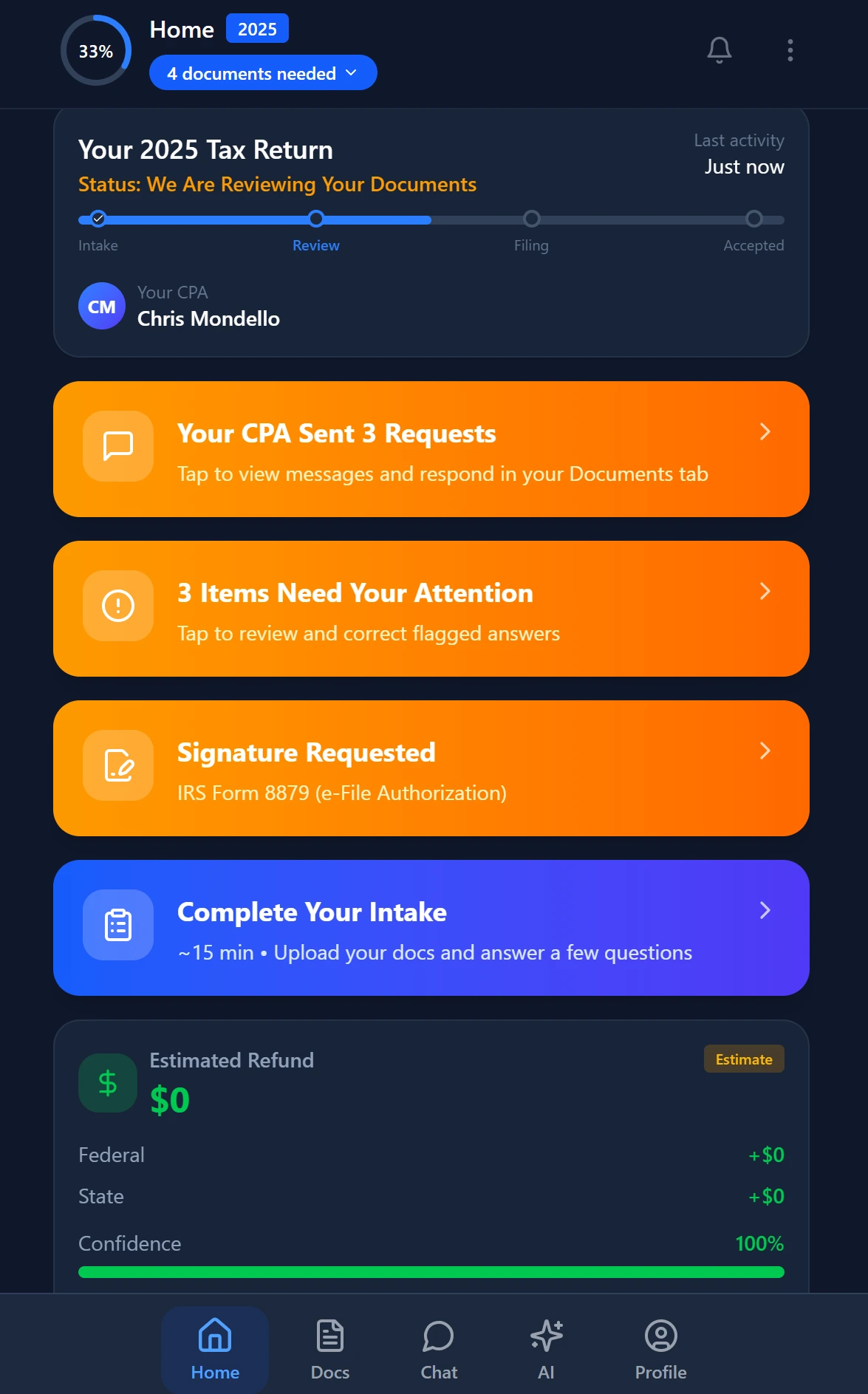
Smart intake auto-fills from uploaded documents and prior-year data
CAF and IRS Representation Capabilities: TaxScout vs. Competing Platforms
| Capability | TaxScout Prep Pro | TaxDome | Canopy |
|---|---|---|---|
| AI research agents (IRS/Treasury search) | 9 specialized agents | None | None |
| Client-context authorization memory | Full entity and filing history | Limited CRM notes | Limited CRM notes |
| Pipeline stages for IRS representation | 12 customizable stages | Basic workflow | Basic workflow |
| E-signatures for Form 2848 and 8879 | Documenso-integrated | Available | Available |
| Per-user pricing for 10-person firm | $149/mo total | ~$500/mo | ~$660/mo |
| AI document extraction for POA intake | 180+ form types, 5-layer validation | None | None |
Common CAF Number Mistakes and How to Avoid Them
Several recurring mistakes cost CPA firms time, client trust, and sometimes penalty exposure. The first is leaving the CAF number field blank on subsequent Form 2848 filings. This causes the IRS to generate a second CAF number for the same practitioner, fragmenting your authorization record across two separate database entries. Always enter your existing CAF number on every new Form 2848 once you have received it.
The second common mistake is failing to update the address on your CAF record when your firm relocates. The IRS routes notice copies to the address associated with your CAF number, not to whatever address appears on your most recent Form 2848 submission. To update your address, you must either submit a new Form 2848 with the corrected address or contact the IRS CAF unit directly. This is documented in IRS Publication 947.
Third, many firms forget to revoke superseded authorizations. When a client hires a new CPA or you reassign a client within your firm, the old Form 2848 remains active in the CAF system unless it is explicitly revoked. The IRS will continue routing notices to the prior representative, which creates confusion and potential liability. The Tax Pro Account portal now enables online revocation, making this process faster than the traditional fax-to-CAF-unit method. Tracking which authorizations are active, pending revocation, or recently superseded is exactly the kind of workflow that benefits from the automation features built into a purpose-built practice management platform.
Finally, authorization scope gaps — particularly failing to add new tax years as they come into scope — leave firms unable to discuss current-year issues with the IRS even for long-standing clients. Building a calendar trigger to review and update Form 2848 filings at the start of each filing season is a basic hygiene practice that AI-native platforms can automate based on the engagement data already in the system. Pairing this with IRS deadline tracking closes the loop on representation calendar management.
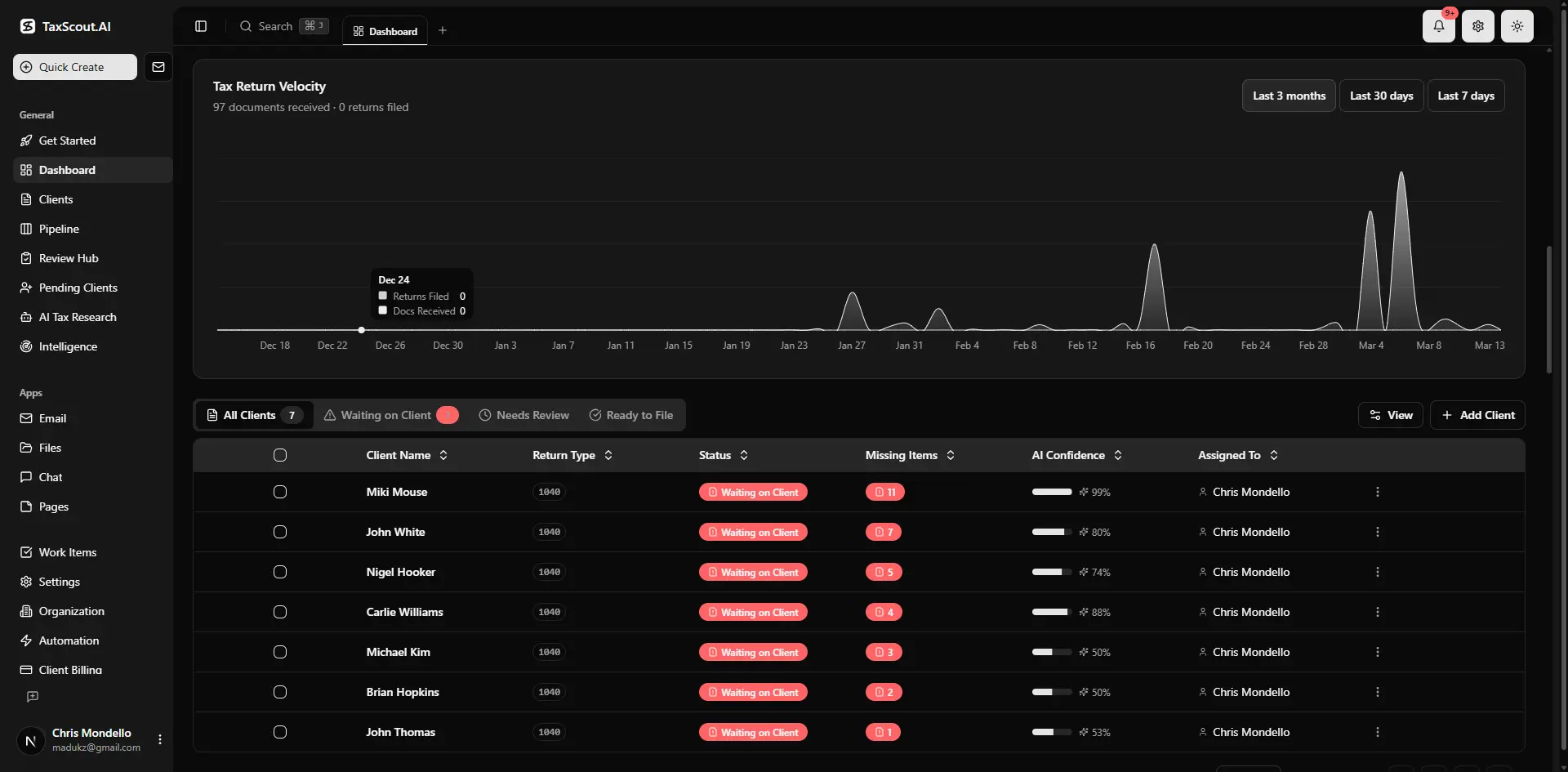
Real-time dashboard showing returns in progress, revenue, and upcoming deadlines

Every client gets organized documents, status tracking, and a complete history
Building a Repeatable IRS Representation Intake Workflow
The most scalable IRS representation practices treat the Form 2848 not as a one-off document but as the first step in a structured engagement workflow. That workflow starts at client intake: capturing the taxpayer's identifying information, the scope of representation needed, any pending IRS matters, and prior representative information (if the client is switching CPAs) before a single form is drafted. A clear CAF number CPA protocol at this stage prevents the downstream errors that cost firms hours of remediation time.
TaxScout's AI intake engine is modeled on IRS Form 13614-C and uses a four-layer prefill approach — pulling from prior-year data, existing client profiles, and AI gap analysis to reduce the manual data entry burden on both staff and clients. For representation engagements, this means the information needed to populate Form 2848 accurately can be pre-populated from the client record, reducing errors and the back-and-forth that delays CAF activation.
The client portal layer matters here too. When a client needs to sign Form 2848, having them log into a branded portal with OTP authentication — rather than printing, signing, and faxing — compresses the authorization timeline and creates a permanent audit trail. Combined with the e-signatures workflow for Form 2848 and engagement letters, a well-configured firm can go from new client contact to active IRS authorization in under 24 hours. For firms expanding their representation practice, this intake infrastructure is what makes handling volume without hiring a proportional headcount actually achievable.
For a complete look at how document workflows feed into IRS representation readiness, the document management guide for CPA firms covers how to structure your firm's document layer so that authorization records, prior returns, and IRS correspondence are always findable and auditable.
Managing 50 active POAs across multiple CPAs — and still tracking authorizations in a spreadsheet?
TaxScout Prep Pro gives your 10-person firm AI research agents, a customizable IRS representation pipeline, and e-signature workflows for Form 2848 — all for $149 per month flat.
Frequently Asked Questions
A CAF number (Centralized Authorization File number) is a nine-digit identifier assigned by the IRS to tax professionals who file Form 2848 or Form 8821 on behalf of clients. Any CPA, enrolled agent, or attorney who represents taxpayers before the IRS needs one. It is assigned automatically on your first valid submission — there is no separate application. CPAs who only prepare returns and never represent clients in IRS matters technically do not need one, but most practicing CPAs will obtain one early in their career.
Keep reading
Partnership Guaranteed Payments: How CPAs Handle SE Tax and Deductibility
Oct 22, 2026 · 1 min read
Guidance Under Section 355 Concerning Device and Active Trade or Business Partial Withdrawal
Oct 22, 2026 · 1 min read
Regulations Regarding Payment of Tax by Commercially Acceptable Means: What CPA Firms Must Do Now
Oct 21, 2026 · 1 min read
Stay up to date
Get the latest tax tech insights delivered to your inbox.