Gusto Payroll Integration for CPA Firms: Automate Client Payroll Workflows
Most CPA firms running Gusto for their clients still manage payroll deadlines, approvals, and client tasks through a patchwork of spreadsheets and calendar reminders. This guide breaks down exactly what a real Gusto payroll integration should look like inside your practice management platform …
Gusto payroll integration is one of the most-requested workflow improvements among CPA firms serving small business clients — and for good reason. Gusto serves more than 300,000 small businesses, and a growing share of them rely on their accountant not just to file taxes, but to manage payroll approvals, quarterly filings, and deadline tracking. Yet the workflow between Gusto and most practice management platforms remains almost entirely manual.
The typical firm today handles Gusto payroll work through a mix of calendar alerts, shared spreadsheet trackers, and ad-hoc Slack messages when a client misses their payroll approval window. Pay schedule deadlines live in Gusto, client task status lives in a project tool, and the connection between the two exists only in the mind of the staff accountant assigned to that client. Without a proper gusto payroll integration, firms are left stitching together manual reminders and disconnected tools just to keep payroll on track.
This guide examines exactly what payroll workflow automation should look like for a CPA firm — from pay schedule syncing and approval tracking to deadline surfacing and client communication — and shows how an AI-native practice management platform like TaxScout is built to handle these workflows without patching together three separate tools. A well-configured gusto payroll integration sits at the heart of this automation, eliminating the manual handoffs that slow firms down and create compliance risk.
Why Payroll Workflows Break Down at Most Accounting Firms
The payroll workflow problem is fundamentally a handoff problem. Gusto knows when payroll is due. Your practice management platform knows what work is assigned to which staff member. Your client portal (if you have one) is where clients upload documents or approve actions. None of these systems talk to each other by default. A true gusto payroll integration solves this by creating a live bridge between pay schedule data, staff assignments, and client-facing deadlines — all in one place.
When a client's bi-weekly payroll is due on Friday, the sequence of events that needs to happen — client receives reminder, approves hours, staff member reviews, payroll submits — requires coordination across at least three separate systems. Miss one step and payroll is late. Late payroll means potential IRS penalties under IRC §6656 for failure to deposit payroll taxes, which can reach 15% of the unpaid amount. For firms evaluating their gusto payroll integration approach, this trade-off compounds over time.
The firms that handle this best today have built custom Zapier automations, assigned a dedicated payroll coordinator, or simply accepted that payroll work takes more administrative time than it should. None of those are scalable solutions as client counts grow. See our CPA firm workflow automation guide for a broader look at where bottlenecks compound across service lines. Each of these factors directly shapes how gusto payroll integration plays out in practice.
What the market has been missing is a practice management platform that treats payroll deadlines as first-class workflow objects — items that automatically generate tasks, route approvals, and surface on dashboards alongside tax filing deadlines without any manual setup per client. Understanding gusto payroll integration in this context is what separates firms that scale from those that stall.

Track every return from intake to filed with drag-and-drop pipeline management
What a Real Gusto Payroll Integration Should Do
Before evaluating any platform's approach to Gusto payroll integration, it helps to define what genuine integration actually means for an accounting firm. A press release announcing a partnership is not the same as a workflow solution. The core functionality that matters for CPAs falls into four areas.
First, pay schedule sync: the integration should pull each client's Gusto pay schedule — weekly, bi-weekly, semi-monthly, or monthly — and automatically create recurring work items in your pipeline with accurate due dates. This eliminates the one-time setup tax that currently falls on whoever manages the client. This is precisely where a deliberate gusto payroll integration strategy pays off.
Second, client task routing: when payroll approval is required from a client, that request should originate from within your practice management system, be delivered through a branded client portal, and be tracked to completion — not sent as a standalone Gusto email that your client ignores or your staff has no visibility into. Gusto payroll integration sits at the center of this decision — get it wrong and the rest unravels.
Third, deadline surfacing: payroll due dates should appear on the same dashboard as Form 941 quarterly deadlines, annual W-2 filing deadlines, and other compliance milestones. Right now, IRS Form 941 due dates and Gusto pay run approvals live in completely separate systems for most firms. That fragmentation is where errors happen. When firms revisit their gusto payroll integration priorities, the gaps usually surface here.
Fourth, status and audit trail: completed payroll runs, approval timestamps, and client confirmations should be logged automatically against the client record — not reconstructed from email threads when a client disputes a late filing.
Still tracking payroll deadlines in a spreadsheet next to your tax calendar?
TaxScout centralizes every client deadline — tax and payroll — into one AI-native pipeline with no per-user fees.
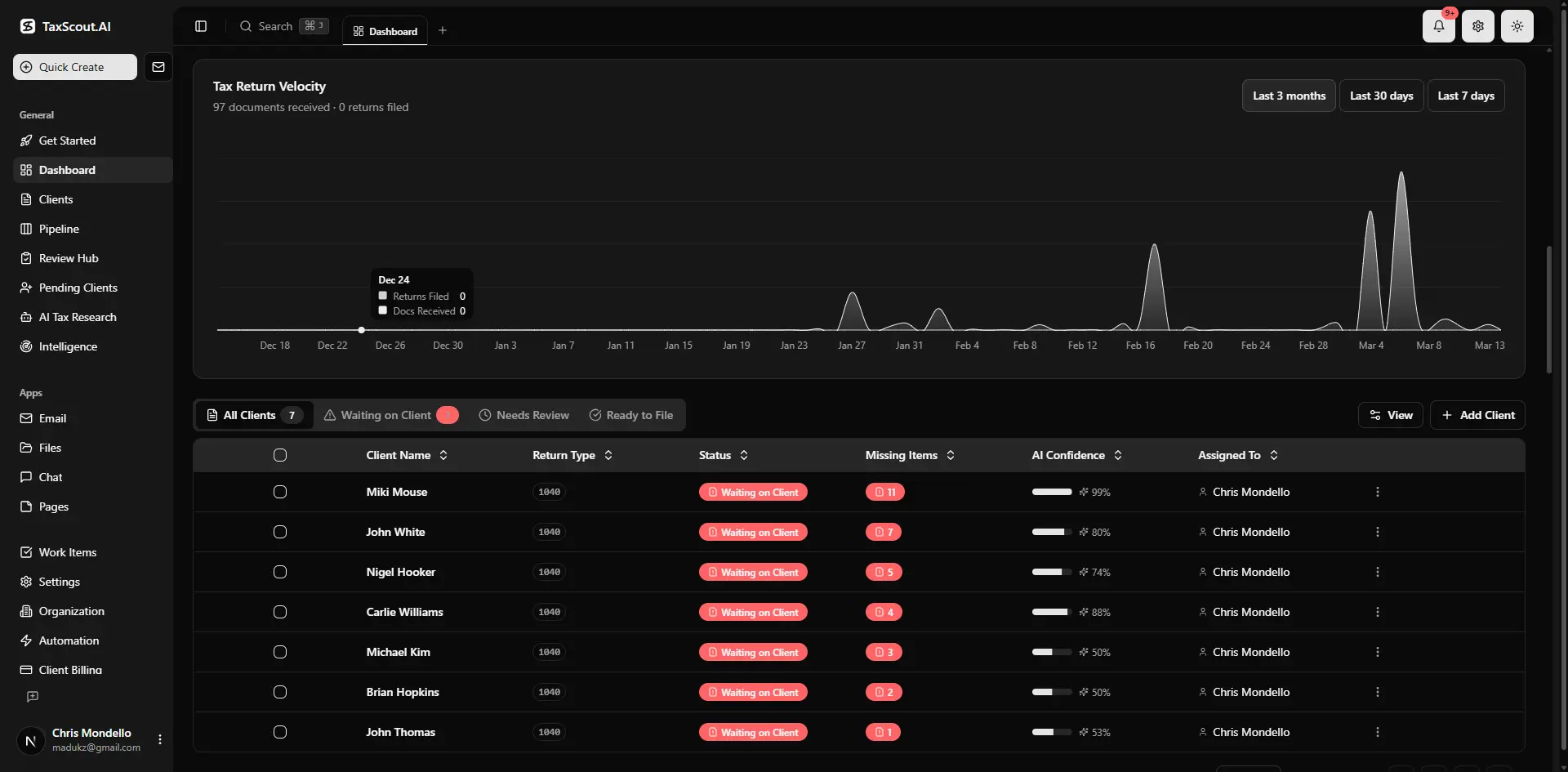
Real-time dashboard showing returns in progress, revenue, and upcoming deadlines

Click any extracted field to see its source highlighted on the original PDF
How TaxScout Handles Payroll Workflow Automation for CPA Firms
TaxScout is built as an AI-native practice management platform that works alongside your existing tax software — Drake, CCH Axcess, UltraTax, Lacerte, ProConnect, or ProSeries — and is designed to serve as the operational layer where payroll workflow, tax workflow, and client communication converge.
The pipeline management system supports 12 fully customizable stages with drag-and-drop kanban. For payroll clients, firms typically configure a dedicated payroll pipeline with stages like Awaiting Client Approval, Under Staff Review, Submitted to Gusto, and Confirmed. Each stage can have automated notifications, due-date triggers, and assignee rules so that nothing advances until the required action is completed.
Payroll deadlines — whether they're Gusto pay run dates, Form 941 quarterly deposits, or annual W-2 distribution deadlines — surface on the same production dashboard as income tax deadlines. Staff accountants see one unified view of everything due this week, not two separate calendars. This is the architecture difference between a true payroll integration practice management system and a project tool that happens to connect to Gusto via webhook.
Client approvals for payroll runs are handled through TaxScout's branded client portal, which uses OTP (one-time passcode) login — no passwords for clients to forget. When a payroll run requires client sign-off, the client receives a notification, logs into the portal, reviews the relevant information, and completes the approval. The status updates automatically in the firm's pipeline. This replaces the current model where firms email clients a Gusto link, wait for a response, and manually update their tracker.
For payroll-adjacent document work — collecting W-9s from new contractors, gathering direct deposit authorizations, or issuing engagement letters for payroll service add-ons — e-signatures via Documenso are built directly into the platform. No switching to DocuSign or sending PDFs back and forth.
Payroll Workflow Automation Compared Across Practice Management Platforms
The competitive landscape for payroll workflow automation among CPA practice management tools has shifted significantly in 2026. Karbon announced a Gusto partnership in beta — described in their press release as auto-creating payroll work items with synced due dates. That is a meaningful step for Karbon, which has historically been email-workflow-centric and has lacked AI document extraction, an SSN vault, and native AI research agents.
However, Karbon's pricing structure creates real constraints for firms doing payroll work at scale. At approximately $59 per user per month, a 10-person firm pays roughly $590 per month for Karbon — before adding any AI features. TaxScout's Prep Pro plan is $149 per month total, unlimited users up to 10 seats, with all nine AI research agents included. For the payroll service line, that cost difference compounds because payroll work often involves junior staff and part-time employees who would each require a Karbon seat.
See the comparison below for a direct feature and cost view across the major platforms. For a deeper look at the Karbon vs TaxScout tradeoffs, see our Karbon alternative comparison.
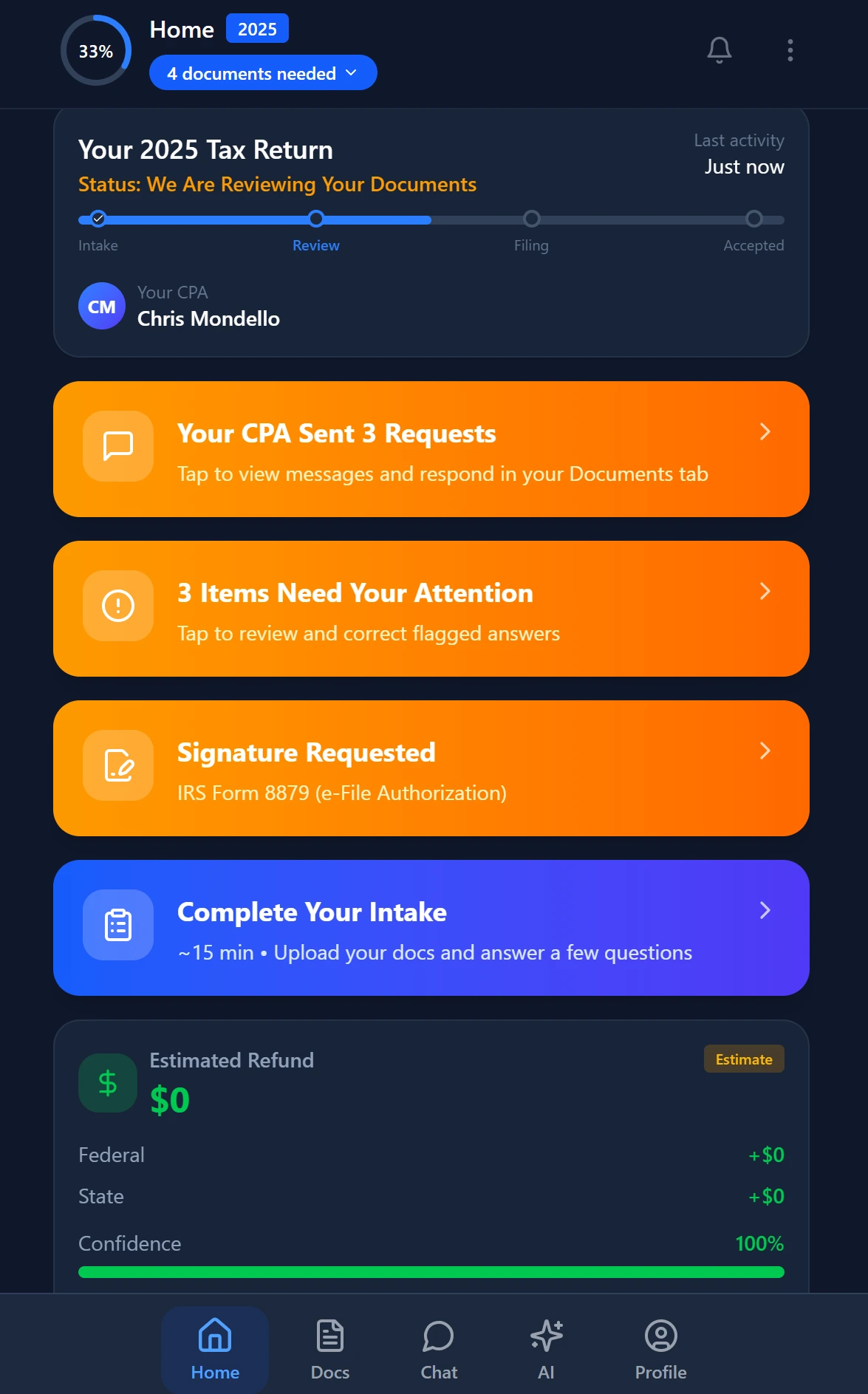
Smart intake auto-fills from uploaded documents and prior-year data
Payroll workflow features and monthly cost for a 10-person CPA firm (verified March 2026)
| Capability | TaxScout Prep Pro | Karbon | Canopy | TaxDome |
|---|---|---|---|---|
| Gusto pay schedule sync | Pipeline-native with deadline surfacing | Beta (press release announced) | Not documented | Not documented |
| Client approval routing | Built-in branded portal with OTP login | Email-based work items | Separate module | Limited |
| AI document extraction | 180+ form types, 5-layer validation | Not available | Not available | Not available |
| Payroll deadline dashboard | Unified with tax calendar | Separate work items | Separate work items | Separate work items |
| AI research agents | 9 agents (IRS, Treasury, SSA, Congress, more) | Not available | Not available | Not available |
| Per-user pricing | No (flat per firm) | ~$59/user/mo | ~$45/user/mo per module | ~$100/user/mo |
| 10-seat monthly cost | $149 total | ~$590 | ~$660 | ~$500 |
Handling Payroll-Linked Tax Compliance Inside One Platform
One area where the payroll-to-tax handoff breaks down hardest is quarterly compliance. Gusto handles the payroll runs, but the CPA firm is typically responsible for reviewing quarterly Form 941 filings, ensuring federal tax deposit schedules are met, and advising clients on their estimated tax payments when owner compensation changes.
In TaxScout, the AI Research Agents include a dedicated IRS agent and a Treasury agent that monitor regulatory updates in real time. When the IRS updates deposit schedules or penalty thresholds, those updates surface automatically inside the platform — eliminating the manual research cycle that currently falls on a senior accountant. This is the difference between reactive compliance and proactive advisory work.
For firms moving payroll clients from hourly billing to value-based pricing or bundled advisory retainers, TaxScout's invoicing via Stripe Connect Express supports recurring billing with automated payment collection. Combined with payroll workflow automation CPA processes already in place, the entire payroll service line — from task creation through client approval through invoicing — runs without manual intervention.
The client onboarding process for new payroll service clients is handled through TaxScout's smart intake engine, modeled on IRS Form 13614-C, with four-layer prefill that pulls from prior documents, prior-year data, client profile, and AI gap analysis. When you onboard a client for payroll services, the system already knows their entity structure, EIN, and existing filing history — so setup is measured in minutes, not hours. See the client onboarding checklist for the full onboarding sequence.
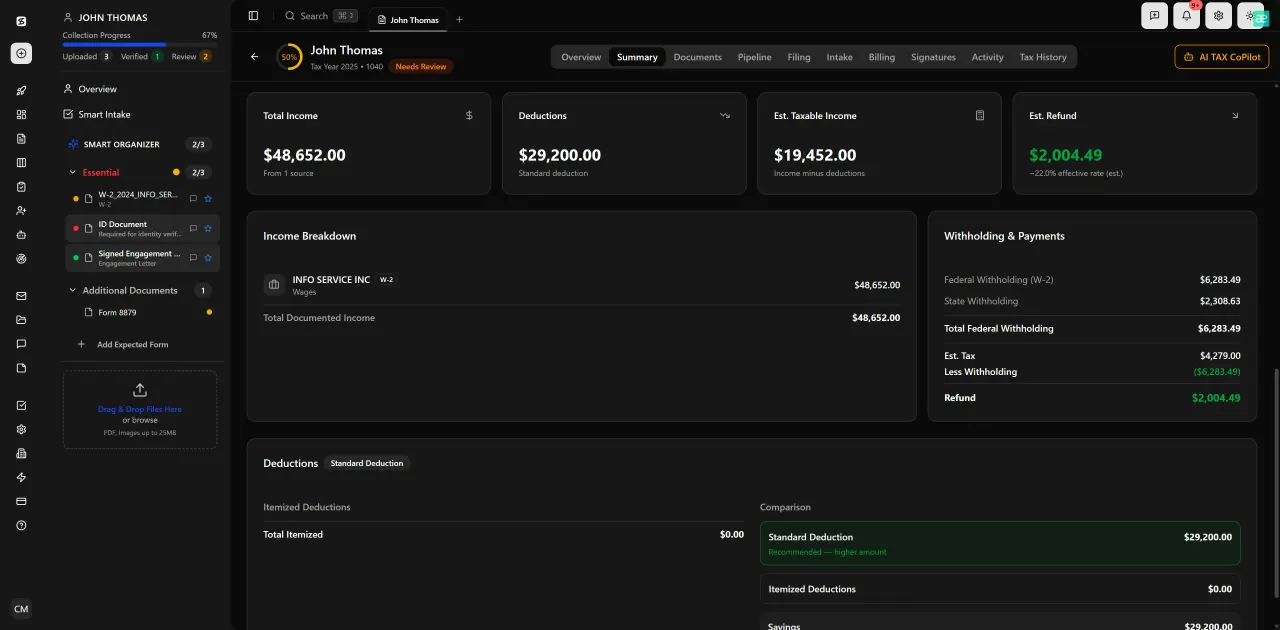
Review with AI assist — 9 agents answer questions with full client context

Your clients see your brand — OTP login, document upload, and real-time status
Security Requirements for Payroll Data in Practice Management
Payroll data is among the most sensitive information a CPA firm handles. Employee SSNs, bank account numbers for direct deposit, and compensation details require the same security posture as tax return data — arguably more, because payroll records are targeted by both identity theft rings and disgruntled employees.
The IRS Written Information Security Plan (WISP) requirement mandates that tax preparers maintain documented safeguards for all personally identifiable information. TaxScout's security architecture includes AES-256-GCM encrypted SSN vault, 7-role role-based access control (RBAC), and a 13-step DSAR anonymization process. When payroll data flows through your practice management platform, these controls apply to every document and every field.
For firms concerned about the broader cybersecurity posture of their technology stack, see cybersecurity essentials for accounting firms for a current threat landscape overview. The security features page covers TaxScout's full compliance architecture in detail.
Building a Payroll Service Line That Scales
The economics of adding Gusto payroll management to your service offering depend almost entirely on whether you can keep per-client labor low enough to justify flat-fee or retainer pricing. If every payroll run requires a staff member to check Gusto, send a reminder email, wait for client approval, and update a tracker manually, the service line will never be profitable above 20-30 payroll clients.
The path to a scalable payroll practice runs through two capabilities: automated client task routing (so approval requests go out and come back without staff intervention) and unified deadline management (so nothing falls through the gap between Gusto and your tax calendar). TaxScout's pipeline management with 12 customizable stages covers both, and the flat pricing model means adding payroll clients does not add per-user costs.
Firms scaling from solo practitioner to multi-partner operations — a trajectory we cover in detail in scaling from solo to multi-partner firm — find that payroll services are a natural capacity expansion because they generate recurring monthly revenue and strengthen the advisory relationship. The key is building the infrastructure first so that adding the 50th payroll client looks operationally identical to the 10th.
According to the Bureau of Labor Statistics, demand for accounting and auditing services continues to grow, with advisory and compliance services driving most of the expansion. Payroll management, when embedded in a broader advisory relationship, is one of the highest-retention service lines a CPA firm can offer — clients who trust you with payroll rarely leave.
Juggling Gusto deadlines, client approvals, and tax filings across three different tools?
TaxScout consolidates your entire firm workflow — payroll, tax, and client communication — into one AI-native platform at a flat monthly price.

Every client gets organized documents, status tracking, and a complete history
Frequently Asked Questions
TaxScout is an AI-native practice management platform designed to serve as the operational layer where payroll deadlines, tax deadlines, and client tasks converge. The pipeline management system supports fully customizable stages for payroll workflows, and payroll due dates — from Gusto pay runs to quarterly Form 941 deposits — surface on the same dashboard as your tax filing deadlines. Direct API integration with Gusto for automated pay schedule import is part of the product roadmap; contact the team via the demo page for current integration status.
Keep reading
Amended FBAR Procedures: How CPAs Correct Foreign Account Errors Without Triggering Penalties
Oct 12, 2026 · 1 min read
Transparency in Coverage Final Rules: What CPA Firms Must Do Now
Oct 12, 2026 · 1 min read
Backdoor Roth IRA: How CPAs Execute the Strategy for High-Income Clients
Oct 12, 2026 · 1 min read
Stay up to date
Get the latest tax tech insights delivered to your inbox.