IRS Practitioner Priority Service Tips: How to Actually Get Through in 2025
IRS Practitioner Priority Service hold times routinely stretch past two hours — and even then, many CPAs get disconnected before speaking to anyone. This guide compiles the most effective tactics tax professionals are using in 2025 to reach the PPS line, survive callbacks, and close out client…
If you have ever blocked off a morning for IRS calls only to spend three hours on hold before getting cut off, you already know the problem. The IRS Practitioner Priority Service line — designed specifically to give licensed tax professionals faster access to IRS representatives — has become notoriously difficult to reach. Understaffing, funding gaps, and a backlog that the IRS National Taxpayer Advocate flagged as a systemic crisis have combined to turn a line meant to save time into one that routinely consumes it. These IRS practitioner priority service tips exist because the official guidance simply is not enough anymore.
Discussions on r/taxpros tell the story clearly. Practitioners report being placed on hold for 90 minutes, then disconnected with no callback. Others describe calling at exactly 7:00 AM Eastern only to hear that the estimated wait is already over two hours. A growing number of CPAs have begun treating PPS calls as a half-day commitment, blocking calendar time and delegating everything else — a workaround that is expensive and unsustainable at scale. These frustrations are exactly why seasoned professionals actively seek out IRS practitioner priority service tips that go beyond the basics.
This guide compiles the most reliable IRS PPS hold time reduction strategies, callback handling tips, and notice resolution workflows that working tax professionals have refined through painful trial and error. Pair these tactics with better client document management and you can significantly reduce how often you need to call in the first place. Consider this your practical resource for IRS practitioner priority service tips drawn from real-world experience rather than official documentation alone.
How the IRS Practitioner Priority Service Actually Works
The Practitioner Priority Service (PPS) line — reachable at 866-860-4259 — is reserved for Circular 230 practitioners: CPAs, enrolled agents, attorneys, and other individuals with a valid CAF (Centralized Authorization File) number. The IRS designed PPS to handle account-level inquiries, transcript requests, penalty abatements, payment plan questions, and notice resolution without routing practitioners through the general taxpayer queue. Understanding who qualifies to use the line is one of the most overlooked IRS practitioner priority service tips, since calling without a valid CAF number wastes everyone's time.
Under normal circumstances, PPS representatives have access to the same IRS master file systems as examination agents, which means a single call can accomplish what would otherwise require written correspondence with a 90-day turnaround. The problem is that 'normal circumstances' describes almost none of 2024 and 2025. IRS staffing reports from the Treasury Inspector General have documented persistent shortfalls in the accounts management division that handles incoming PPS calls, and seasonal spikes during filing season compound the problem dramatically. For firms evaluating their IRS practitioner priority service tips approach, this trade-off compounds over time.
Understanding the mechanics matters because the best IRS practitioner priority service tips are those that work with the system's architecture rather than against it. The queue is first-in, first-out. Callback slots are allocated in real time. And certain inquiry types — like transcript pulls — can be handled through alternative channels entirely, which means you should never be spending PPS time on things you could resolve through the IRS e-Services Transcript Delivery System.
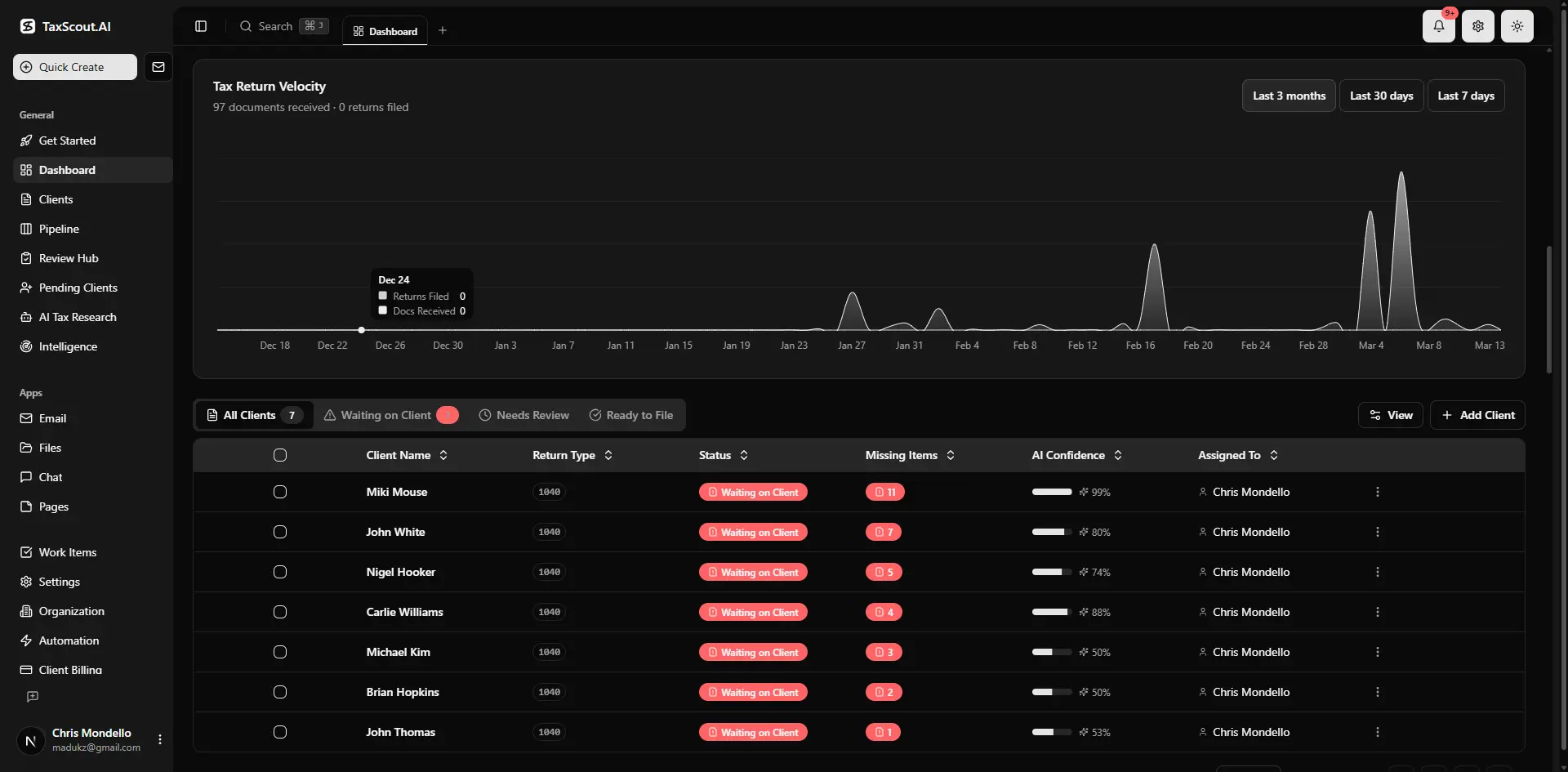
Real-time dashboard showing returns in progress, revenue, and upcoming deadlines
Step 1: Time Your Calls Around the Queue Pattern
The single highest-leverage IRS practitioner priority service tip is also the simplest: call at 7:00 AM Eastern on a Tuesday, Wednesday, or Thursday. Monday mornings carry the weekend backlog. Fridays run lean on staffing. And the first fifteen minutes after the line opens at 7:00 AM represent the narrowest window before the queue fills. Each of these factors directly shapes how IRS practitioner priority service tips plays out in practice.
If 7:00 AM Eastern is not feasible, the next best window is the hour immediately before the 7:00 PM Eastern close. Many practitioners incorrectly assume end-of-day calls are futile — in practice, IRS representatives trying to close their queues often move faster in the final hour, and the volume of new callers drops sharply after 5:00 PM Eastern. Understanding IRS practitioner priority service tips in this context is what separates firms that scale from those that stall.
Avoid the post-notice rush windows. When the IRS releases a large CP2000 or CP2501 batch — typically in February, July, and October — call volume spikes within two weeks of the notice date. Check the IRS mailing date on each notice and try to call either within the first three days or after the two-week surge has passed. Tracking notice dates in your pipeline management tool alongside client deadlines makes this timing discipline much easier to maintain. This is precisely where a deliberate IRS practitioner priority service tips strategy pays off.
One additional pattern worth noting: the Tuesday-through-Thursday advantage is not uniform across all PPS topic codes. Balance-due and installment agreement lines tend to run shorter waits on Wednesdays; examination and audit-related lines tend to be more accessible on Thursdays. If your practice handles a high volume of one type, it is worth testing call outcomes by day of week for a few weeks and logging results. Applying consistent IRS practitioner priority service tips to your call scheduling — and tracking what actually works for your practice mix — turns anecdotal observations into repeatable efficiency gains.

Click any extracted field to see its source highlighted on the original PDF
Step 2: Use the Callback Option Correctly
When PPS offers a callback, accept it — but do so with eyes open. The IRS callback system does not guarantee a call within any specific window, and it does not always use the number you entered at the IRS automated prompt. The callback comes from an IRS 1-800 number that many phone systems flag as spam. Add common IRS callback numbers (800-829-1040, 800-829-4933, and 800-830-5084) to your contacts as 'IRS Callback' so the call surfaces clearly on your screen. When firms revisit their IRS practitioner priority service tips priorities, the gaps usually surface here.
When the callback arrives, you typically have 60 seconds to answer before the system disconnects and requeues you. Practitioners who miss callbacks and try to call back themselves face the full queue again — there is no 'return to your place in line' option. The practical implication: once you have accepted a callback, treat that window as protected time. Step away from client meetings, mute your email notifications, and keep your CAF number, client SSN, POA details, and notice number within arm's reach.
If you are using a VoIP system — common in remote and hybrid CPA firms — confirm that your IRS call back number tips apply to your actual outbound caller ID, not a forwarding number. Some VoIP setups cause the IRS callback to route to a general office line rather than the direct extension that accepted the original hold. Test this once before tax season and fix any routing issues in advance. Treating your callback setup as a foundational piece of your IRS practitioner priority service tips workflow — rather than an afterthought — prevents avoidable missed connections during your busiest periods.
For high-volume firms, some practitioners assign a single direct line as the dedicated IRS callback number and staff it accordingly during peak season. This eliminates the missed-callback problem almost entirely.
How many hours did your team lose to IRS hold times last filing season?
TaxScout.ai keeps your client documents organized, your notices tracked, and your AI research agents ready — so you go into every PPS call with everything you need and fewer reasons to call at all.
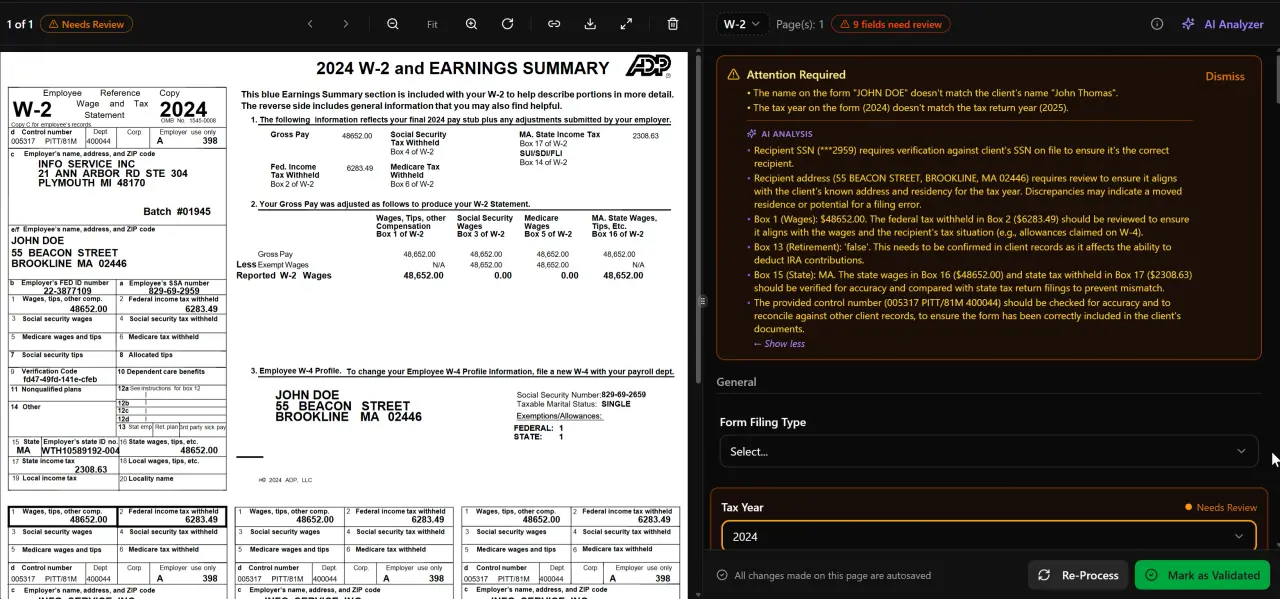
AI classifies, extracts, and validates every document automatically
Step 3: Prepare a Complete Call Brief Before You Dial
The most common reason a PPS call fails to resolve the issue — even when a practitioner gets through — is insufficient preparation. IRS representatives can pull transcripts and account histories quickly, but they cannot act on verbal descriptions. You need specific, document-backed information ready before the automated system even connects you.
A complete PPS call brief should include: the client's full legal name and SSN or EIN; the tax year(s) in question; the notice number and CP or letter code; the notice date and the response deadline; the specific resolution you are requesting (abatement, transcript, payment plan, hold, etc.); and any prior case reference numbers if this is a follow-up call. Pulling prior-year return transcripts through e-Services before the call, rather than asking the representative to read them to you, can cut call time in half. Among all IRS practitioner priority service tips, thorough pre-call preparation consistently delivers the highest return on the time you invest.
If the matter involves a CP2000 or examination-related notice, prepare a concise written summary of the disagreement — one or two sentences the representative can enter into the case notes. IRS representatives enter notes verbatim when practitioners provide clear language, and those notes travel with the case if it escalates. Vague verbal summaries create gaps that require additional calls.
Firms that use AI document extraction to process client documents before filing are often better positioned here because they already have a structured record of every form that went into the return — which means reconstructing what the IRS is questioning takes minutes rather than hours. Accurate document records are one of the most underrated IRS notice resolution accelerators available to a modern CPA practice. You can also check our IRS Tax Deadlines 2026 guide to keep response windows clearly visible alongside your call preparation.

Track every return from intake to filed with drag-and-drop pipeline management
Step 4: Avoid Calls Entirely When Alternatives Exist
The best IRS practitioner priority service trick is not getting better at calling — it is eliminating unnecessary calls. A significant percentage of practitioner PPS calls fall into categories that the IRS has provided non-phone resolution channels for, and using those channels frees up your PPS bandwidth for matters that genuinely require a live agent.
Transcripts: Request account, wage and income, and return transcripts through IRS e-Services TDS rather than calling. TDS is available 24/7, delivers results in minutes, and does not require any hold time. This alone eliminates a large share of routine PPS calls for many firms.
CP notices with clear math errors: Many CP2000 and CP2501 responses can be submitted via fax using the fax number on the notice or through the IRS Taxpayer Digital Communications platform for select notice types. Confirm the notice is eligible, then submit the response in writing rather than calling. Written responses create a paper trail and do not depend on reaching a representative.
Installment agreements: New installment agreements and modifications for balances under $50,000 can often be set up entirely through the IRS Online Payment Agreement tool without any phone contact. Practitioners with client authorization can navigate this tool on behalf of clients.
POA and CAF updates: Form 2848 submissions can go through e-Services rather than fax or mail for faster processing. Keeping POA authorizations current in e-Services eliminates the call where a representative tells you the authorization has not been processed yet — a frustrating and time-consuming dead end that is entirely preventable. Mapping each task type to the right resolution channel is itself one of the most practical IRS practitioner priority service tips a firm can implement, because it reserves your actual PPS calls for the matters that only a live agent can resolve.
Step 5: Handle Disconnections Without Losing Progress
Getting disconnected after a long hold — or mid-conversation — is one of the most reported practitioner frustrations on professional forums and Reddit. The IRS telephone infrastructure has known reliability issues, and the PPS line is not immune. Having a disconnection protocol in place before it happens is the difference between a setback and a catastrophe.
If you are disconnected while on hold and did not yet reach a representative, the fastest path forward is to redial immediately rather than waiting. Early-morning call windows refill quickly, but a redial in the first 30 seconds after disconnection often reaches the same queue position — anecdotally, because the system briefly retains your slot. This is not guaranteed, but practitioners consistently report better outcomes with an immediate redial versus waiting several minutes.
If you are disconnected mid-conversation, ask for a case reference or control number early in every substantive call — ideally within the first two minutes after authentication. A control number allows a subsequent representative to access the exact same case notes without re-explaining the situation from scratch. Representatives are generally willing to provide this when asked directly.
Document every call regardless of outcome: date, time, representative's employee ID (they are required to provide this), what was discussed, and any commitments made. This log is legally useful if a penalty is later assessed despite a representative's verbal promise of a hold, and it supports penalty abatement requests under reasonable cause standards per IRS Policy Statement 20-1. Building this documentation habit into your standard operating procedure is one of the quieter IRS practitioner priority service tips that protects your clients long after the call ends.
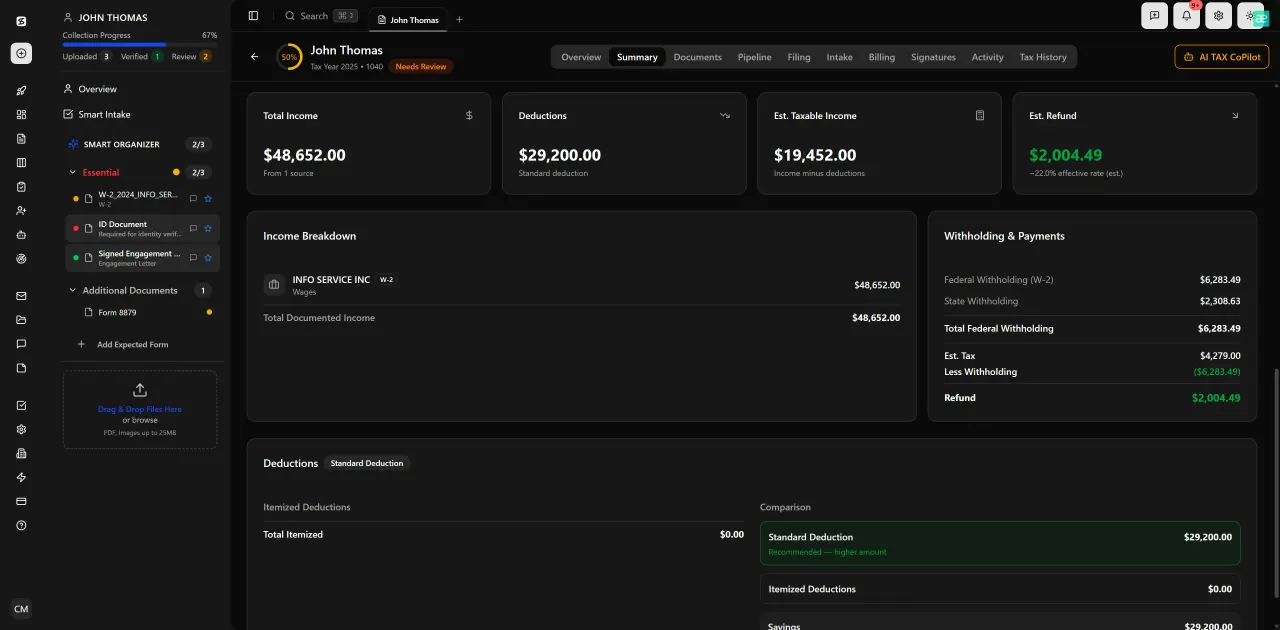
Review with AI assist — 9 agents answer questions with full client context

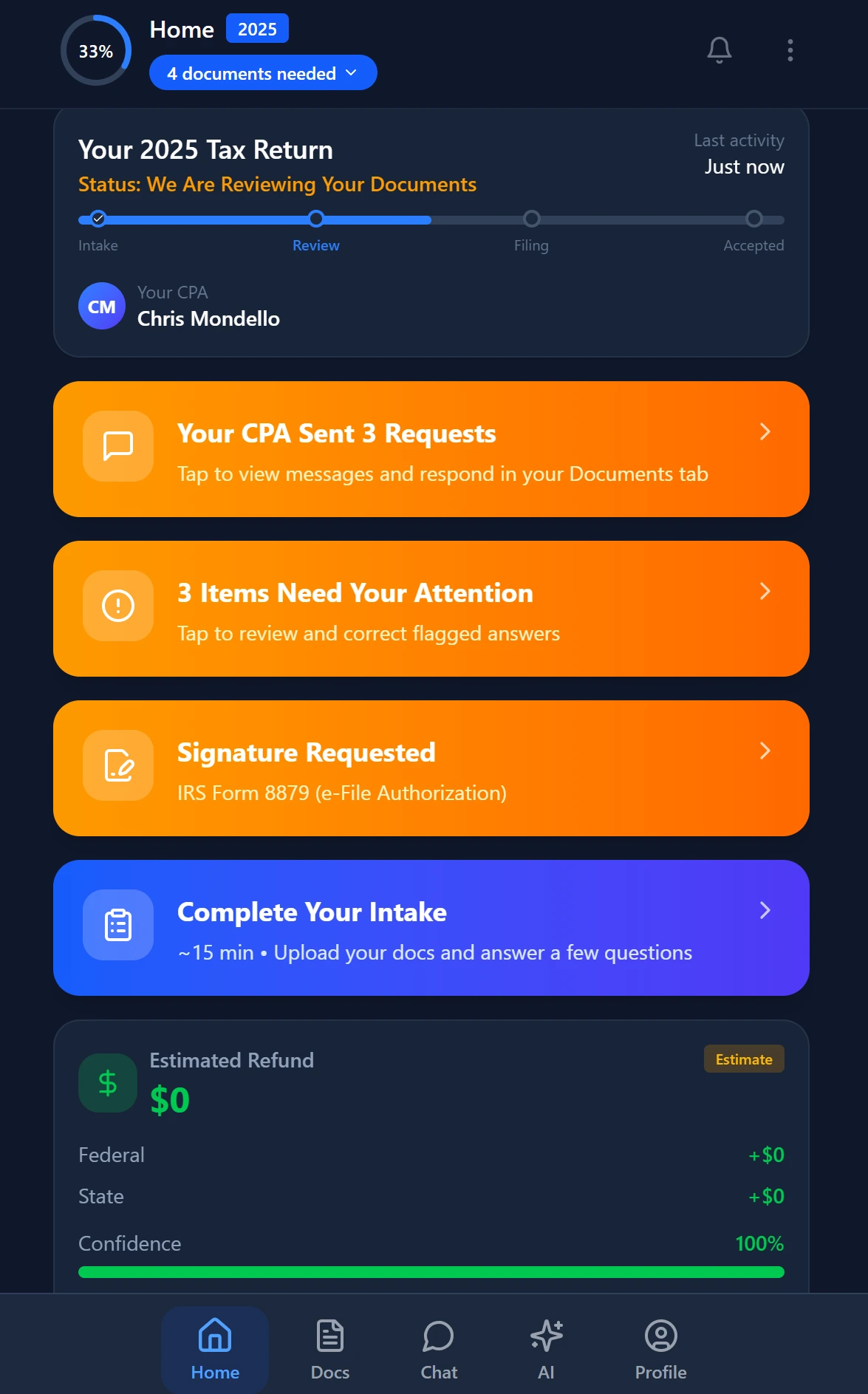
Your clients see your brand — OTP login, document upload, and real-time status
Reducing Your Dependence on PPS Through Better Firm Systems
The practitioners who struggle most with IRS PPS hold times are often those whose internal systems create the conditions for notices in the first place: incomplete intake, mismatched numbers, missing forms, and manual data entry errors that generate CP2000 discrepancies. Investing in upstream accuracy pays dividends in downstream notice volume.
A structured client intake process that captures every income document before preparation begins — rather than chasing them mid-review — dramatically reduces the gap between what a return reports and what the IRS receives on 1099s and W-2s. When AI document extraction flags a potential discrepancy at the extraction stage, you can resolve it before the return is filed rather than responding to a CP2000 six months later.
Similarly, a well-designed client portal that gives clients visibility into what documents have been received and what is still outstanding reduces the back-and-forth that delays filing and increases the chance that a form gets missed. Firms that have moved to a structured document-first workflow consistently report fewer post-filing notices — and for more resources on overhauling your firm's operations, browse other blog resources covering practice management, automation, and tax season workflows.
The AI research agents in TaxScout.ai can also reduce certain PPS calls by answering procedural questions in real time — things like penalty abatement eligibility thresholds, specific notice response requirements, or installment agreement qualification rules — without requiring you to wait on hold to ask a representative. Nine specialized agents pull from live IRS, Treasury, Cornell Law, and SSA sources, so the answers are current rather than drawn from a static knowledge base.
IRS PPS Call vs. Self-Service Alternative: Which Channel Fits Which Task
| Task | Best Channel | Why |
|---|---|---|
| Pull wage and income transcript | e-Services TDS | Available 24/7, instant, no hold time |
| Request account transcript | e-Services TDS | Faster than PPS and creates no queue demand |
| Respond to CP2000 notice | Fax or Taxpayer Digital Communications | Written record; no need for live agent |
| Set up installment agreement under $50k | IRS Online Payment Agreement | Self-service; no POA required for some actions |
| Penalty abatement request | PPS or written correspondence | Live agent can process FTA abatements same-call |
| Examination or audit coordination | PPS (no alternative) | Requires live agent access to examination module |
| Levy or lien release | PPS (no alternative) | Time-sensitive; requires immediate agent action |
| CAF or POA update | e-Services upload | Eliminates the 'POA not processed' dead end |
When to Escalate Beyond PPS
The Practitioner Priority Service is not the only escalation channel available to tax professionals. When PPS cannot resolve a matter — or when you have called three or more times without resolution — the Taxpayer Advocate Service (TAS) is designed exactly for that scenario. TAS intervention is appropriate when a client is experiencing economic harm, when the IRS has missed its own response deadlines, or when normal channels have demonstrably failed.
Opening a TAS case does not require exhausting every IRS channel first — if a levy is imminent or a refund has been held beyond statute, you can go directly to TAS. Each state has a local TAS office, and the case intake line (877-777-4778) typically connects faster than PPS. Practitioners who are familiar with the IRS Taxpayer Bill of Rights can cite specific provisions when making TAS referrals, which often accelerates the intake decision.
For examination-related matters that have stalled, the IRS Office of Appeals accepts requests via Form 12203 or a formal protest letter after a 30-day letter is issued. Appeals offers a faster resolution path than examination for many disputes, and the practitioners who use it effectively are those who have clean documentation and a well-organized case file — another reason that document management systems and structured client records pay off far beyond filing season. For related compliance guidance, see our post on IRS Tax Deadlines 2026 to make sure no response window slips by.
What if fewer client notices meant fewer PPS calls to begin with?
TaxScout.ai's 5-layer document validation and AI intake engine catch discrepancies before filing — reducing CP2000s, notice volume, and the hours you spend on hold resolving them.
Smart intake auto-fills from uploaded documents and prior-year data
Frequently Asked Questions
The most reliable window is exactly 7:00 AM Eastern on a Tuesday, Wednesday, or Thursday. The queue is emptiest in the first 15 minutes after the line opens, and mid-week days avoid the Monday backlog and Friday staffing drops. The hour before the 7:00 PM Eastern close is a secondary option that many practitioners underuse.
Keep reading
Backdoor Roth IRA: How CPAs Execute the Strategy Without Triggering Pro-Rata Tax
Oct 12, 2026 · 1 min read
Amended FBAR Procedures: How CPAs Correct Foreign Account Errors Without Triggering Penalties
Oct 12, 2026 · 1 min read
Transparency in Coverage Final Rules: What CPA Firms Must Do Now
Oct 12, 2026 · 1 min read
Stay up to date
Get the latest tax tech insights delivered to your inbox.