Government Accounting Software for CPA Firms: What to Use When You Serve Public Sector Clients
CPA firms that serve municipalities, school districts, and federally funded nonprofits operate in a fundamentally different compliance environment than firms focused on private-sector SMBs. This guide breaks down which government accounting software tools your clients actually use, how to manage…
When a CPA firm picks up a municipal government client or a school district, the engagement looks nothing like a standard S-corp or individual return. The client runs on government accounting software built around fund accounting, GASB standards, and single-audit compliance — not the QuickBooks general ledger you navigate every day. Yet your firm still needs to collect documents, manage deadlines, route work through staff, obtain signatures, and bill the client. None of that changes just because the underlying accounting system is Tyler Munis or MIP Fund Accounting.
The CPA firms growing fastest in the public sector space have figured out a two-layer approach: let the government-specific accounting platform do what it does well (fund tracking, grant management, CAFR production), and layer a modern AI-native practice management system on top to handle everything the legacy platform ignores — document intake, workflow pipelines, client communication, and compliance research. Understanding which government accounting software your client uses is the essential first step before any of this two-layer approach can work effectively.
This guide covers the government accounting software landscape CPAs actually encounter, the compliance demands unique to public sector engagements, and how TaxScout.ai functions as the practice management backbone that makes serving government clients scalable rather than chaotic.
What Is Government Accounting Software and Why It Differs from Commercial Platforms
Government accounting software is purpose-built around fund accounting — a method that tracks resources in separate self-balancing funds rather than a single profit-and-loss ledger. The Governmental Accounting Standards Board (GASB) sets the authoritative standards that govern how state and local governments report finances, including the comprehensive annual financial report (CAFR) and the newer ACFR format. Commercial accounting platforms like QuickBooks or Xero are not designed to meet GASB requirements and cannot produce the fund-level financial statements governments are legally required to publish.
CPA firms that perform audits, agreed-upon procedures, or advisory work for municipalities, counties, school districts, water authorities, or federally funded nonprofits must understand how these platforms work — even if the firm never directly operates them. Your client's finance director lives inside one of these systems, and your audit evidence, trial balances, and supporting schedules will all flow out of it. Familiarity with government accounting software is no longer optional — it has become a baseline competency that clients increasingly expect from their external advisors.
The major categories include enterprise resource planning (ERP) systems for larger governments (Tyler Munis, Oracle Financials for Government, SAP Public Sector), mid-market fund accounting platforms (MIP Fund Accounting by Community Brands, Sage Intacct Governmental), and budget-focused tools used by smaller entities (OpenGov, Questica). Each exports data differently, maintains chart-of-account structures organized by fund and function, and requires CPAs to reframe their document requests accordingly. Each of these categories represents a distinct tier of government accounting software, and knowing which tier your client operates in shapes everything from your audit approach to your advisory recommendations.
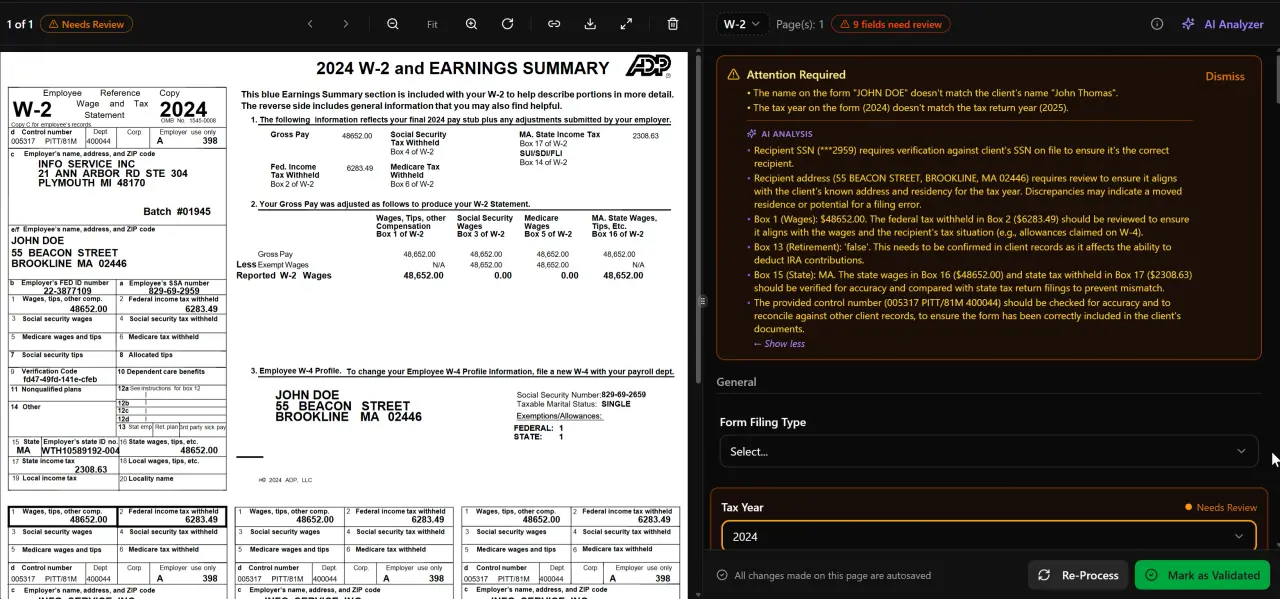
AI classifies, extracts, and validates every document automatically
The Major Government Accounting Software Platforms CPAs Encounter
Understanding the tools your public sector clients run helps you ask the right questions, structure document requests correctly, and set engagement timelines that account for system-specific export limitations. For firms evaluating their government accounting software approach, this trade-off compounds over time.
MIP Fund Accounting (Community Brands) remains one of the most widely deployed platforms among nonprofits with federal funding, small municipalities, and school districts. It handles encumbrance accounting, grant tracking, and multi-fund reporting. CPAs performing single audits under OMB Uniform Guidance (2 CFR Part 200) will frequently pull trial balances, grant expenditure reports, and budget-versus-actual schedules directly from MIP exports. Each of these factors directly shapes how government accounting software plays out in practice.
Tyler Munis is the dominant ERP for mid-to-large municipalities and school systems. It integrates financials, HR, payroll, utility billing, and permitting into a single platform. Audit evidence requests from Tyler Munis clients typically involve journal entry exports, purchase order registers, and fund-level balance sheets — all of which require coordination with the client's IT or finance team to produce in a usable format. Understanding government accounting software in this context is what separates firms that scale from those that stall.
Sage Intacct Governmental has grown rapidly as a cloud-based alternative, particularly among governments that want real-time dashboards and API-accessible data. Its dimensional reporting makes fund-level analysis more flexible than older platforms, and CPAs often find Sage Intacct exports easier to work with during fieldwork. This is precisely where a deliberate government accounting software strategy pays off.
OpenGov targets transparency and budgeting for smaller municipalities and is frequently used alongside a separate accounting system. If your client uses OpenGov for budget publishing but runs a legacy platform for actual accounting, you will need to reconcile data from both systems.
Nonprofit and Federal Grantee Platforms
Many nonprofits that receive federal awards above the single-audit threshold (currently $1,000,000 in expenditures) are technically not governmental entities but are subject to the same OMB Uniform Guidance audit requirements. These organizations often run Sage Intacct (non-governmental), Blackbaud Financial Edge NXT, or even QuickBooks with heavy supplemental tracking. CPA firms that specialize in single audits frequently serve a mixed portfolio of true government entities and nonprofit federal grantees, making workflow standardization across both client types critical.
Tired of managing government client document requests through email threads and shared drives?
TaxScout.ai gives CPA firms an AI-native practice management layer that handles document intake, e-signatures, client portals, and pipeline tracking — so you can serve public sector clients at scale without adding headcount.
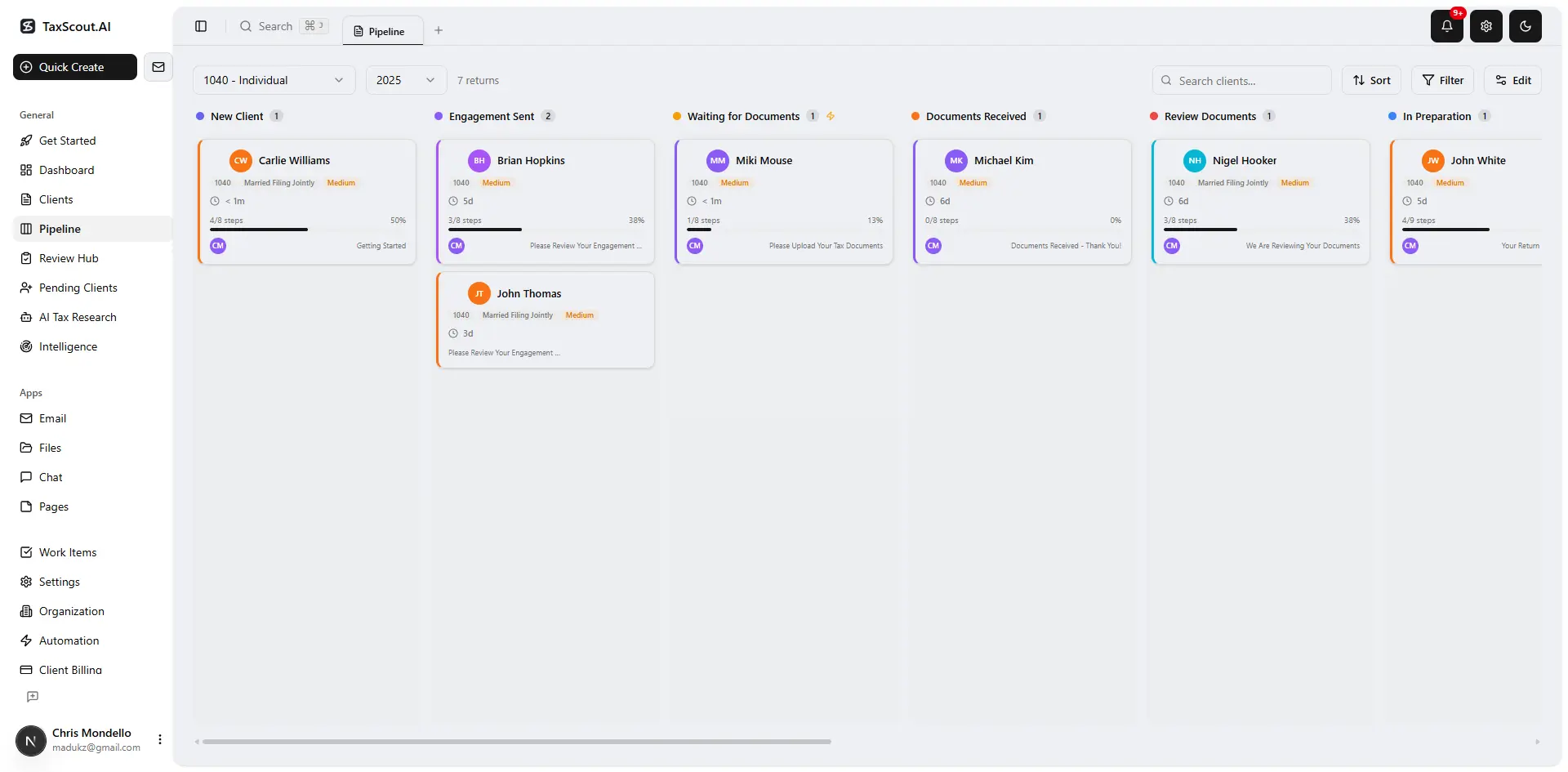
Track every return from intake to filed with drag-and-drop pipeline management

Click any extracted field to see its source highlighted on the original PDF
Public Sector Compliance Demands That Shape CPA Firm Workflows
Government and public-sector-adjacent engagements carry compliance layers that private-sector work simply does not. Understanding these requirements shapes every workflow decision your firm makes.
Single audits under OMB Uniform Guidance are the most complex recurring engagement in the public sector CPA space. An entity that expends $1,000,000 or more in federal awards in a fiscal year must have a single audit conducted in accordance with Government Auditing Standards (the Yellow Book) and OMB Uniform Guidance. The audit covers both financial statements and federal program compliance, requiring testing of major programs, internal controls, and compliance requirements across potentially dozens of federal award clusters. Firm workflows for single audits need distinct stages for risk assessment, major program determination, compliance testing, and report issuance — not just the standard tax-return pipeline.
GASB standards require governments to prepare government-wide financial statements alongside fund-level statements, report infrastructure assets under modified approach rules, and comply with pension and OPEB standards that have dramatically increased reporting complexity over the past decade. CPAs who provide consulting or compilation services to government clients need to track GASB pronouncements, particularly implementation guidance from the GASB technical agenda.
Engagement letter specificity matters more in government engagements than almost anywhere else. The scope of a Yellow Book audit differs materially from a financial-statement-only audit, and the firm's independence requirements under Yellow Book (which layer on top of AICPA independence rules) must be documented carefully. Using a practice management system that templates engagement letters by engagement type — and routes them through e-signature workflows — eliminates a common source of scope creep and documentation gaps.
For a broader look at how document intake and workflow automation apply across all your client types, explore our complete resource library covering practice management topics from onboarding to AI research.
Why Legacy Government Accounting Software Leaves CPA Firms Underserved
The platforms your government clients use — Tyler Munis, MIP, Sage Intacct Governmental — are designed for the government entity's internal operations, not for the CPA firm serving that entity. They produce the accounting records; they do not manage your firm's workflow, document requests, staff assignments, deadline tracking, or client communication. This creates a gap that legacy practice management tools have never adequately filled — in part because those tools were built for private-sector tax and accounting workflows and have no understanding of public sector engagement structures.
No major practice management competitor — not TaxDome, not Canopy, not Karbon — has published guidance on managing government client workflows, GASB-related research, single-audit scheduling, or fund accounting document requests. Firms serving this client segment have been left to cobble together solutions from generic project management software, shared drives, and email. That patchwork creates real risk: missed reporting deadlines, disorganized audit evidence files, and insufficient documentation of independence and scope.
The solution is not to find a government accounting software platform that also manages your firm. It is to deploy a modern AI-native practice management layer that integrates with whatever accounting system your client runs, while giving your firm the AI extraction, pipeline management, research agents, and client portal infrastructure that legacy tools lack entirely.
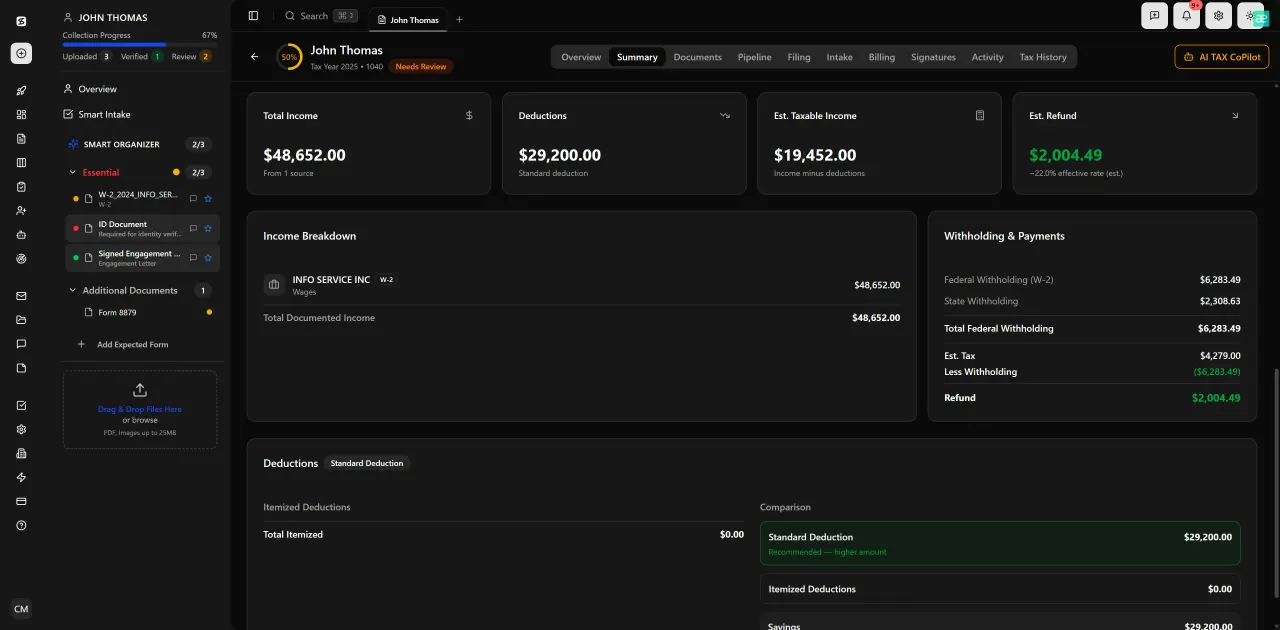
Review with AI assist — 9 agents answer questions with full client context

Your clients see your brand — OTP login, document upload, and real-time status
How TaxScout.ai Functions as the Practice Management Layer for Government CPA Work
TaxScout.ai is not a government accounting software replacement — it is the practice management infrastructure your CPA firm needs to manage government client engagements professionally. It works alongside Drake, CCH Axcess, UltraTax CS, Lacerte, and ProConnect for tax preparation, and it sits above whatever accounting system your client runs for their internal finances.
AI document extraction and validation handles the document-heavy nature of government engagements. When a school district sends a 400-page trial balance export, grant expenditure schedule, and board minutes bundle, TaxScout's AI document extraction engine — which supports 180+ form types including all 1099 variants, K-1s, and supporting schedules — classifies, extracts, and validates the contents through a 5-layer pipeline. The split-screen PDF viewer with click-to-source field highlighting lets staff verify extracted data against source documents without toggling between windows. For a technical breakdown of how this works, see our guide on AI document extraction for CPAs.
Pipeline management with 12 customizable stages gives firms a kanban-style board where government engagements — single audits, GASB compilations, agreed-upon procedures, annual tax filings for government-adjacent nonprofits — each move through defined stages with assigned owners and deadline visibility. Unlike generic project tools, the pipeline management system is built for accounting firm work, not software sprints.
AI Research Agents are particularly valuable for government and public sector work, where compliance standards span multiple authoritative sources. TaxScout's 9 specialized AI research agents conduct real-time searches across IRS, Treasury, Cornell Law, SSA, and Congress — enabling staff to research questions about OMB Uniform Guidance compliance requirements, Yellow Book independence standards, or GASB implementation without leaving the platform. See the AI Research Agents feature for a full breakdown of what each agent covers.
Client portal with OTP login replaces insecure email document exchange. Government finance directors and grants managers can upload trial balance exports, board-approved budgets, and grant award documents directly to a branded portal without creating passwords. The client portal uses one-time passcode authentication, which aligns with the security standards that government entities increasingly require of their outside service providers. This is especially relevant given the cybersecurity risk environment that CPA firms now operate in.
E-signatures for engagement letters and authorization forms via Documenso ensure that Yellow Book and Uniform Guidance engagements are properly scoped and signed before work begins. Government procurement offices routinely require documented engagement authorization, and the e-signatures feature supports Form 8879, engagement letters, and custom authorization documents with a full audit trail.
TaxScout.ai vs. Legacy Practice Management Tools for Government Client Engagements
| Capability | TaxScout.ai | TaxDome | Canopy | Karbon |
|---|---|---|---|---|
| AI document extraction (180+ form types) | Yes — 5-layer validation | No | No | No |
| Government/GASB research agents | Yes — 9 AI agents, real-time | No | No | No |
| Single audit / OMB Uniform Guidance workflow templates | Customizable 12-stage pipeline | Generic templates only | Generic templates only | Generic templates only |
| Client portal with OTP login (no passwords) | Yes | Password-based | Password-based | No portal |
| SSN / sensitive data vault (AES-256-GCM) | Yes | No dedicated vault | No | No |
| Flat pricing (no per-user fees) | Yes — $149/mo for 10 seats | ~$500/mo for 10 users | ~$660/mo for 10 users | ~$590/mo for 10 users |
| Works with Drake / CCH / UltraTax / Lacerte | Yes | Partial | Partial | No |
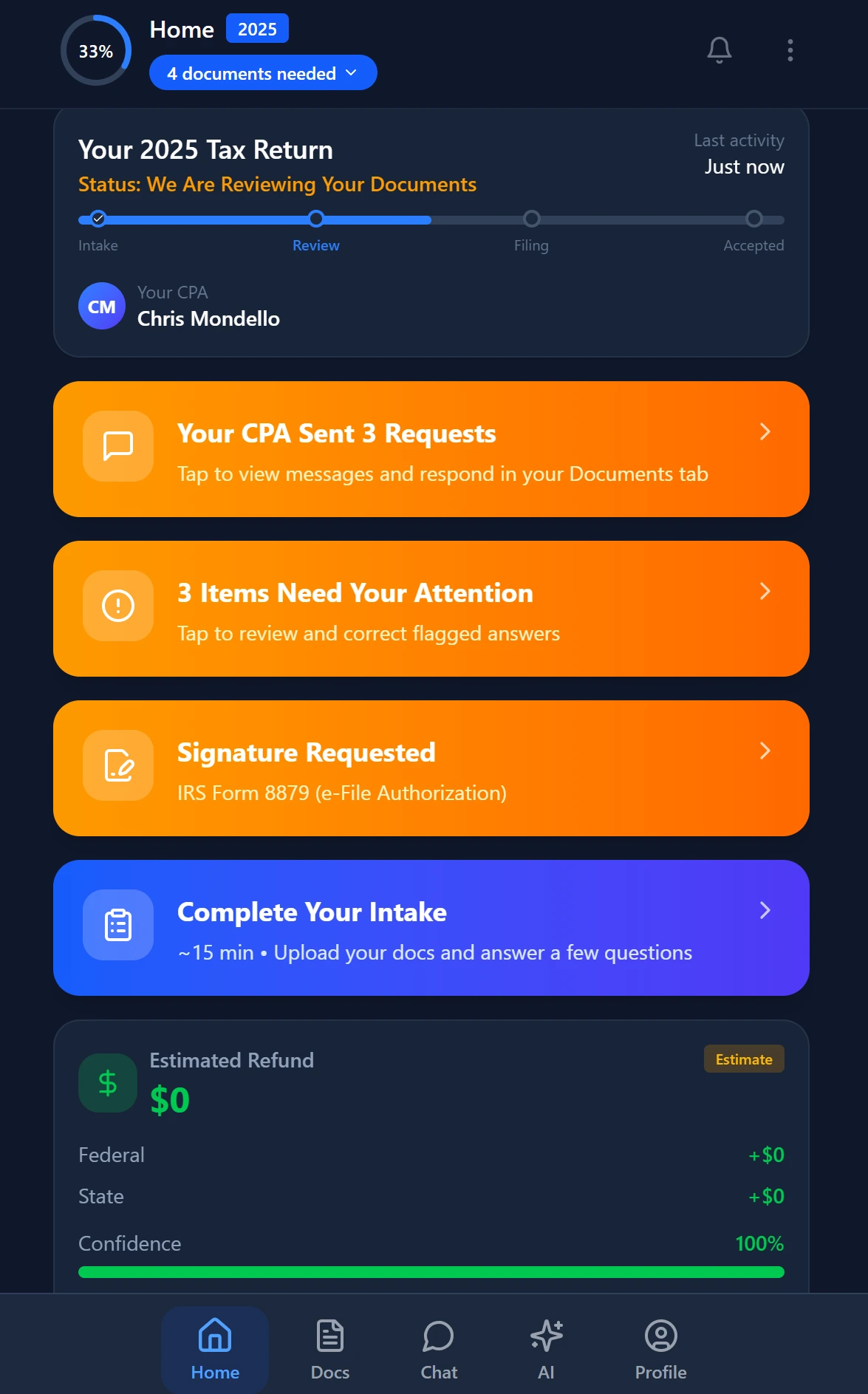
Smart intake auto-fills from uploaded documents and prior-year data
Building a Government Client Workflow Inside TaxScout.ai
Translating the compliance requirements of public sector engagements into repeatable firm workflows is the practical challenge. Here is how a CPA firm would structure a single-audit engagement inside TaxScout.ai.
Stage 1 — Engagement Setup: Issue and collect a signed engagement letter through the e-signatures workflow, specifying Yellow Book and Uniform Guidance scope. Document independence assessments in the client record. The client onboarding checklist feature ensures no required step is skipped before fieldwork begins.
Stage 2 — Document Request and Intake: Send the government client a portal link for document upload. Request trial balance exports, grant award letters, federal expenditure schedules, board minutes, and prior-year audit reports. As documents arrive, TaxScout's AI extraction pipeline classifies and indexes them automatically, and the file management system organizes them by engagement phase.
Stage 3 — Risk Assessment and Major Program Determination: Use the AI Research Agents to look up current OMB Compliance Supplement requirements for the programs under audit. Research agents search Treasury, Cornell Law, and federal register sources in real time, surfacing relevant compliance requirements without manual database searches.
Stage 4 — Fieldwork and Evidence Management: Use the split-screen PDF viewer to review audit evidence against extracted data. The PDF tools suite — including OCR, merge, split, Bates numbering, and PII masking — handles the voluminous workpapers that single audits generate. Bates numbering is particularly useful for organizing audit evidence files submitted to oversight agencies.
Stage 5 — Report Issuance and Billing: Route draft reports through the review pipeline, collect management responses via the client portal, and issue final reports. Bill the engagement through Stripe Connect Express invoicing directly from the platform. The client onboarding checklist guide covers how to structure these touchpoints for maximum efficiency.
Pricing Advantage for Firms Serving Multiple Government Clients
Government engagements are often recurring annual contracts — a municipality that retains your firm for its annual audit and tax filing is a multi-year revenue relationship. Managing that relationship efficiently directly affects your realization rate. Per-user pricing models from legacy competitors punish firm growth: at 10 staff members, TaxDome runs approximately $500/month, Canopy approximately $660/month, and Karbon approximately $590/month — compared to TaxScout's Prep Pro plan at a flat $149/month for 10 seats with unlimited clients.
For a firm running 15-20 government and public sector engagements annually, the cost differential compounds quickly. More importantly, flat unlimited-client pricing means you can take on new government clients without triggering a per-seat or per-client surcharge. See the full TaxScout pricing comparison or explore how TaxScout stacks up against TaxDome specifically.
The Prep Pro plan also includes all 9 AI Research Agents — a capability that has no equivalent in competing platforms and is especially valuable for the compliance research demands of public sector work, where standards span GASB, OMB, GAO Yellow Book, and IRS guidance for tax-exempt governmental entities.
Ready to stop managing government client engagements through email and generic project tools?
TaxScout.ai gives CPA firms serving public sector clients a complete AI-native practice management platform — flat pricing, unlimited clients, 9 AI Research Agents, and a client portal your government contacts will actually use.
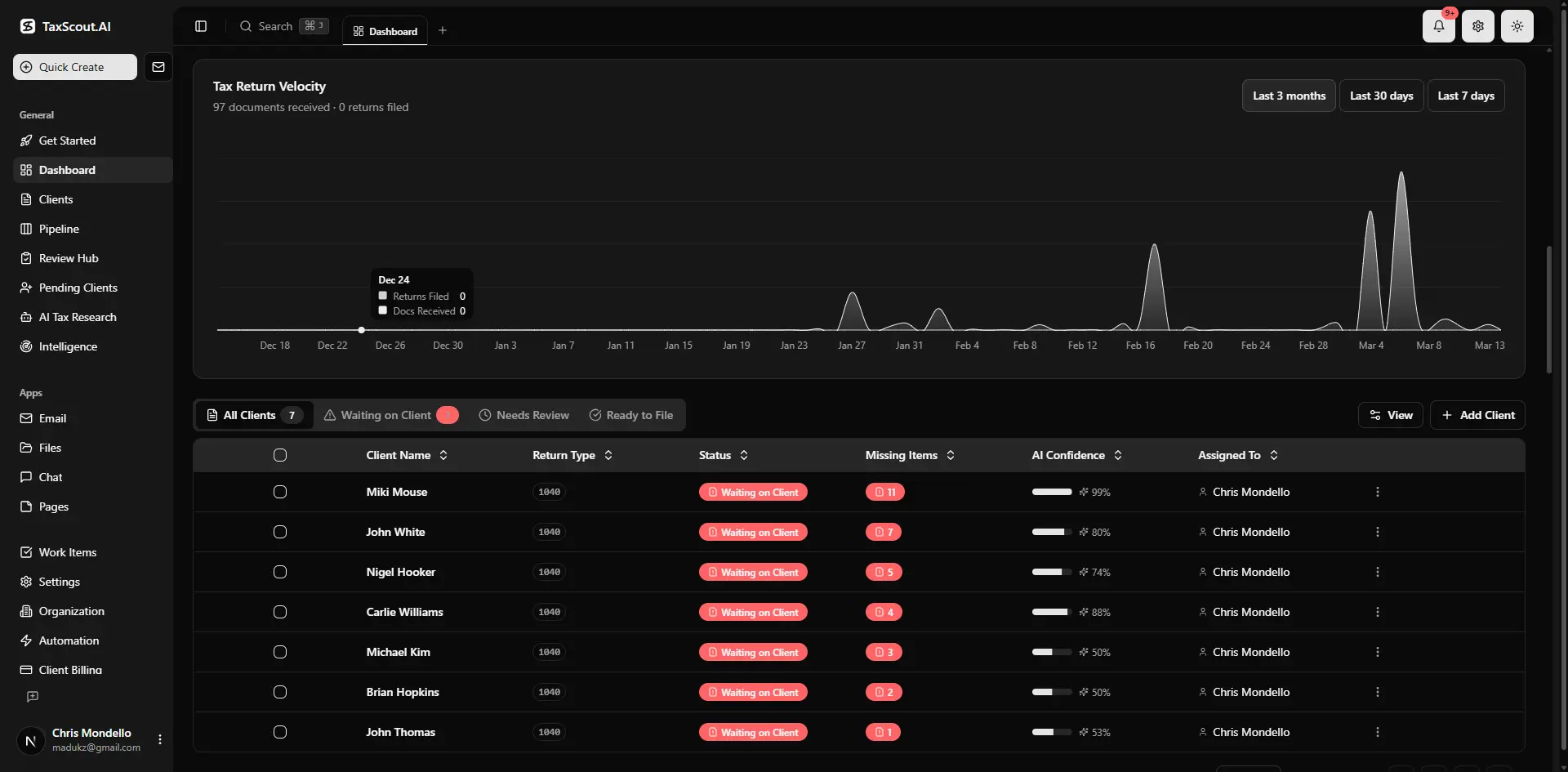
Real-time dashboard showing returns in progress, revenue, and upcoming deadlines
Frequently Asked Questions
Government accounting software refers to fund-accounting platforms like Tyler Munis, MIP Fund Accounting, and Sage Intacct Governmental that public entities use to manage finances under GASB standards. CPA firms serving municipalities, school districts, or federally funded nonprofits need to understand these platforms because all audit evidence, trial balances, and compliance schedules flow out of them — even though the firm never directly operates the software.
Keep reading
Tangible Property Regulations: How CPAs Apply Capitalization vs Expensing Rules
Oct 15, 2026 · 1 min read
Amended FBAR Procedures: How CPAs Correct Foreign Account Errors Without Triggering Penalties
Oct 12, 2026 · 1 min read
Transparency in Coverage Final Rules: What CPA Firms Must Do Now
Oct 12, 2026 · 1 min read
Stay up to date
Get the latest tax tech insights delivered to your inbox.