Top Accounting Firm Collaboration Tools Powered by AI
General-purpose messaging tools were never built for compliance-sensitive workflows — and every tax season, accounting firms pay the price in lost time and avoidable errors. The right AI-powered collaboration tools change the equation entirely, keeping remote and in-office teams aligned without…
Every April 16th, the same pattern plays out in accounting firms across the country. A senior preparer sends a Slack message asking whether a client's K-1 has been reviewed. Three people reply. Two of them are wrong. The partner checks email instead, finds a thread from two weeks ago, and manually forwards it to the right person — losing another 20 minutes. This is the hidden cost of using general-purpose messaging tools to run compliance-sensitive workflows, and it compounds silently across every tax season. The firms that solve it don't just move faster — they make fewer errors, retain better staff, and stop hemorrhaging billable time into coordination overhead. The right accounting firm collaboration tools are the difference between a firm that scales and one that just survives.
Why Generic Collaboration Tools Fail Accounting Teams
Slack and Microsoft Teams were built for software companies. Their core design assumption is that all conversations are roughly equal in urgency, context, and consequence. For an accounting firm, that assumption breaks down immediately. Most accounting firm collaboration tools on the market today were designed with this same flawed assumption baked in.
A Slack channel called #tax-season doesn't know whether a W-2 was reviewed, whether a client responded to an intake request, or whether a partner signed off on a return before it was filed. Those status signals live in someone's head, in a shared Google Sheet, or in a 47-message email thread with subject line "RE: RE: RE: Client Organizer Follow-Up." Every team member has to manually track their slice of the workflow and hope everyone else is doing the same. This is precisely the gap that purpose-built accounting firm collaboration tools are designed to close, by tying conversations directly to workflow status and client records.
The Bureau of Labor Statistics workforce data consistently shows accountants and auditors among the most time-pressured white-collar occupations during peak season — and a disproportionate share of that time disappears into coordination, not billable work. Research cited by the Journal of Accountancy has tracked average CPA administrative overhead at 15–20% of total working hours, a number that maps almost exactly to the cost of unstructured team communication in firms that haven't standardized their internal workflows. For firms evaluating their accounting firm collaboration tools approach, this trade-off compounds over time.
The async-versus-real-time question also matters here. General tools like Slack encourage real-time responsiveness, which creates constant context-switching for preparers who need 90-minute focus blocks to work through a complex Schedule C. Email, by contrast, is fully async but has no structure — every reply buries the prior context, attachments get lost, and there's no programmatic way to detect when a conversation has stalled and a deadline is approaching. Each of these factors directly shapes how accounting firm collaboration tools plays out in practice.
Accounting firms need collaboration tools that understand the shape of accounting work: deadline-driven, document-centric, client-specific, and compliance-sensitive. Understanding accounting firm collaboration tools in this context is what separates firms that scale from those that stall.
The Real Cost of Misaligned Internal Communication
Put concrete numbers on this for a moment. A five-person CPA firm with $600,000 in annual billings and an average billing rate of $150/hour generates approximately 4,000 billable hours per year. If 15% of total working time disappears into coordination overhead — tracking down document status, chasing internal approvals, manually following up on open items — that's roughly 600 hours per year, or $90,000 in potential billings that never appear on an invoice. This is precisely where a deliberate accounting firm collaboration tools strategy pays off.
That figure doesn't count the compounding effect on staff morale. As we covered in the CPA burnout analysis for tax season, mid-season collapse isn't primarily a volume problem — it's a friction problem. Every unnecessary check-in email, every "did you get my message?" Slack ping, every status meeting that could have been a dashboard view adds cognitive load that burns out staff faster than the actual tax work does. Accounting firm collaboration tools sits at the center of this decision — get it wrong and the rest unravels.
Remote and hybrid teams have made this worse. When a preparer in Dallas and a reviewer in Chicago are working the same client file, there's no physical cue that someone is blocked. There's no walking to a colleague's desk. There's only the invisible accumulation of pending items that nobody has flagged as urgent — until a deadline surfaces and the whole team scrambles. When firms revisit their accounting firm collaboration tools priorities, the gaps usually surface here.
Tired of coordination overhead eating your billable hours? See how TaxScout replaces manual check-ins, email threads, and disconnected tools with a single AI-native platform built for accounting workflows. → Book a 15-Min Demo — See It Live

Click any extracted field to see its source highlighted on the original PDF
What Accounting Firm Collaboration Tools Actually Need to Do
Before evaluating any platform, CPA firm owners need a clear framework for what internal accounting team communication software must accomplish. Generic tools fail because they're evaluated on the wrong criteria — integrations, notification settings, emoji reactions. Accounting teams need tools that deliver four specific capabilities.
Document-aware status tracking. The system should know whether a client's W-2 has been received, extracted, reviewed, and approved — without anyone manually updating a spreadsheet. When a document arrives, status should change automatically. When a review is complete, the next stage should trigger without a Slack message.
Deadline propagation. Internal task assignments should carry the client's filing deadline as a first-class property. A staff preparer should see that the Nguyen return is due April 15 and that three open items are blocking review — not because a manager told them, but because the system surfaces it automatically.
Role-based visibility. Not every team member needs access to every client file. A preparer assigned to individual returns shouldn't see the partner's notes on a high-net-worth client's estate planning. Access should follow the engagement, not the org chart of a general-purpose chat tool.
Compliance-grade audit trails. Every internal action — who reviewed which document, when a partner approved a return, when an engagement letter was sent — needs a timestamped, non-editable record. This isn't optional for accounting firms facing IRS record-keeping requirements and potential malpractice exposure. Choosing accounting firm collaboration tools that meet all four of these criteria is the foundation of a scalable practice.
How AI-Native Platforms Differ From Workflow-Bolted Tools
The current market for CPA team collaboration splits roughly into three categories: general-purpose tools (Slack, Teams, email), workflow-bolted practice management platforms (TaxDome, Canopy, Karbon), and AI-native platforms that treat intelligence as infrastructure rather than a feature layer.
TaxDome has strong client portal and pipeline features, but internal collaboration is built around manual task assignment. A manager creates a task, assigns it to a preparer, and sets a due date. The system doesn't know whether the underlying documents are ready, whether a prior-year return has been reviewed, or whether a client's intake is incomplete. That intelligence gap means managers still spend time manually verifying status before they can meaningfully assign work. At roughly $100/user/month, a 10-person firm pays approximately $1,000/month for that manual coordination layer.
Karbon is genuinely strong on email-centric workflow — it's the right tool for advisory and accounting firms where client communication happens primarily over email and work items need to be linked to email threads. For pure tax practices with document-heavy workflows, Karbon's weakness is document management: it doesn't do AI extraction, doesn't have a client portal built for document collection, and doesn't surface document-level status in its internal workflows. The collaboration layer is sophisticated, but it's orchestrating work without knowing what the documents say.
Canopy offers an Internal Collaboration product page but has no long-form operational guide explaining how to actually implement a collaboration system for distributed accounting teams. Its modular pricing model means you add features incrementally — but Smart Intake alone costs $11 per client, and the AI document capabilities don't include the multi-layer validation that prevents hallucinated field values from flowing into a return. Firms comparing accounting firm collaboration tools across these three platforms consistently find the same gap: sophistication in workflow management without intelligence in document handling.
The AI-native difference is that the system doesn't just track tasks — it reads the documents, surfaces gaps, routes exceptions, and propagates status automatically. That's not a marginal improvement. It changes the fundamental model of how internal collaboration works.

Track every return from intake to filed with drag-and-drop pipeline management
How TaxScout Handles Accounting Firm Internal Collaboration
!TaxScout pipeline kanban view showing 12-stage workflow with document status indicators for distributed CPA team collaboration
TaxScout's approach to CPA team collaboration starts with the pipeline management engine, which runs 12 customizable stages from New Client through Filed. Unlike generic task boards, each stage is aware of the conditions required to advance: documents extracted, intake completed, review approved, e-signature returned. The system auto-advances returns when conditions are met and flags stalls when they aren't — without a manager having to check manually.
The built-in team chat keeps all internal messaging attached to the client record. There's no separate Slack workspace to context-switch into — conversations happen in the same interface where the return lives, with full access to the extracted document data, the filing timeline, and the client's profile. A preparer asking a question about a K-1 discrepancy does so inside the engagement, with the relevant document already in view. This is what accounting firm collaboration tools should look like in practice: communication and work happening in the same system, not across disconnected platforms.
The AI research agents extend this further. When a team member encounters an ambiguous passive activity loss question on a client's rental property, they don't open a new browser tab and search IRS.gov manually. They query the agent inside the platform, and it searches IRS.gov, law.cornell.edu, and treasury.gov live — not a cached database — and returns a sourced answer with the client's filing context already loaded. That research is then logged against the client record, so the reviewing partner can see what was checked and why a position was taken.
For remote accounting firm teams, the client portal handles the external collaboration layer — clients upload documents via OTP-authenticated portal, no account creation required — freeing internal staff from document-chase emails entirely. AI gap analysis runs in the background and generates prioritized questions when intake data is incomplete, so preparers start work on complete files rather than assembling them piecemeal.
The 7-role RBAC system (Owner, Admin, Manager, Preparer, Staff, Viewer, Custom) enforces access at the database level using PostgreSQL row-level security, not just UI-level permission toggles. A staff preparer assigned to individual returns has no visibility into partner-level notes or entity structures they're not assigned to. That's not a Slack channel setting — it's a compliance control.
Async vs. Real-Time: Choosing the Right Mode for Accounting Workflows
This is the framework gap no competitor has addressed directly. Accounting work requires both modes — but they need to serve different purposes.
Real-time collaboration is appropriate for:
- Partner review calls on complex returns
- Cross-functional status reviews (15 minutes, not 60)
- Urgent client escalations flagged by the system
Async collaboration is appropriate for:
- Preparer questions on open items (logged against the client record)
- Reviewer notes on extraction results
- Internal approval chains for e-signatures and billing
- Status visibility (pipeline view replaces the morning standup)
The mistake most firms make is defaulting to real-time for everything — a 9 AM standup that covers 40 clients in 30 minutes, producing surface-level status updates that nobody has time to act on. An AI-native platform surfaces the information the standup was meant to surface, automatically, so the meeting time can be redirected to the three clients that actually need a human decision. This is where well-designed accounting firm collaboration tools change the daily rhythm of a practice: less time coordinating, more time working.
The accounting firm capacity planning guide makes the case that workload visibility — knowing who has bandwidth and who is overloaded — is one of the highest-leverage ops improvements a firm can make post-tax-season. That visibility is only possible if the system tracks work at the task level, not just at the client level. TaxScout's pipeline view provides exactly that: each return moves through stages, each stage has an owner, and the dashboard shows real-time distribution of open items across the team.

Your clients see your brand — OTP login, document upload, and real-time status
Feature Comparison: AI-Native vs. Legacy Collaboration Tools
| Feature | TaxScout | TaxDome | Canopy | Slack / Teams |
|---|---|---|---|---|
| Document-aware task routing | Automatic (AI-triggered) | Manual assignment | Manual assignment | Not available |
| Internal messaging tied to client record | Yes | Limited | Yes | No |
| AI research agents (live IRS search) | Yes (9 agents) | No | No | No |
| Role-based access (database-level) | Yes (7 roles, RLS) | UI-level only | UI-level only | Workspace-level only |
| Deadline propagation to internal tasks | Automatic | Manual | Manual | Not available |
| Pipeline auto-advance on conditions | Yes | No | No | Not available |
| AI document extraction (180+ forms) | Yes (5-layer validation) | No | Basic rename only | No |
| Audit trail on all internal actions | Full timestamped log | Partial | Partial | Export only |
| Pricing (10-person firm) | $149/mo flat | ~$1,000/mo | ~$660/mo | ~$125/mo + no tax features |
A Real-World Scenario: Distributed Team, 300 Returns, Zero Status Meetings
A 10-person firm with preparers split between two offices uses TaxScout to run the full tax season without a single daily standup. Here's how the workflow operates.
When a client uploads their documents through the branded portal, TaxScout's AI document extraction processes 180+ form types with a 5-layer validation pipeline — including per-field confidence scoring and OCR cross-verification — and automatically advances the return to the Review stage. The assigned preparer receives an in-platform notification, not a Slack ping, and opens the split-screen PDF viewer to verify extracted fields against the original documents.
If the extraction flags an anomaly — say, a discrepancy between a 1099-B aggregate and individual transactions — it routes to the preparer's exception queue with the specific fields highlighted. The preparer queries the AI research agent for guidance on IRS wash sale rules directly inside the platform, logs the research note against the return, and moves the item to partner review. The partner reviews the note, approves the position, and the return auto-advances to the Preparation stage.
!TaxScout split-screen PDF viewer showing AI-extracted fields highlighted for remote team review during accounting firm collaboration workflow
No status email. No Slack thread. No morning standup to cover this client. The entire coordination loop — document receipt, extraction, exception flagging, research, review, approval — happened inside the system, with a full audit trail attached to the client record. This is the operational promise of accounting firm collaboration tools built specifically for tax workflows rather than adapted from general business software.
At billing, the invoicing workflow generates a Stripe-connected invoice via the client portal, sends an automated reminder if unpaid after the due date, and logs the payment against the engagement. The partner's dashboard shows revenue in real time, by preparer, by return type — without a separate reporting tool.
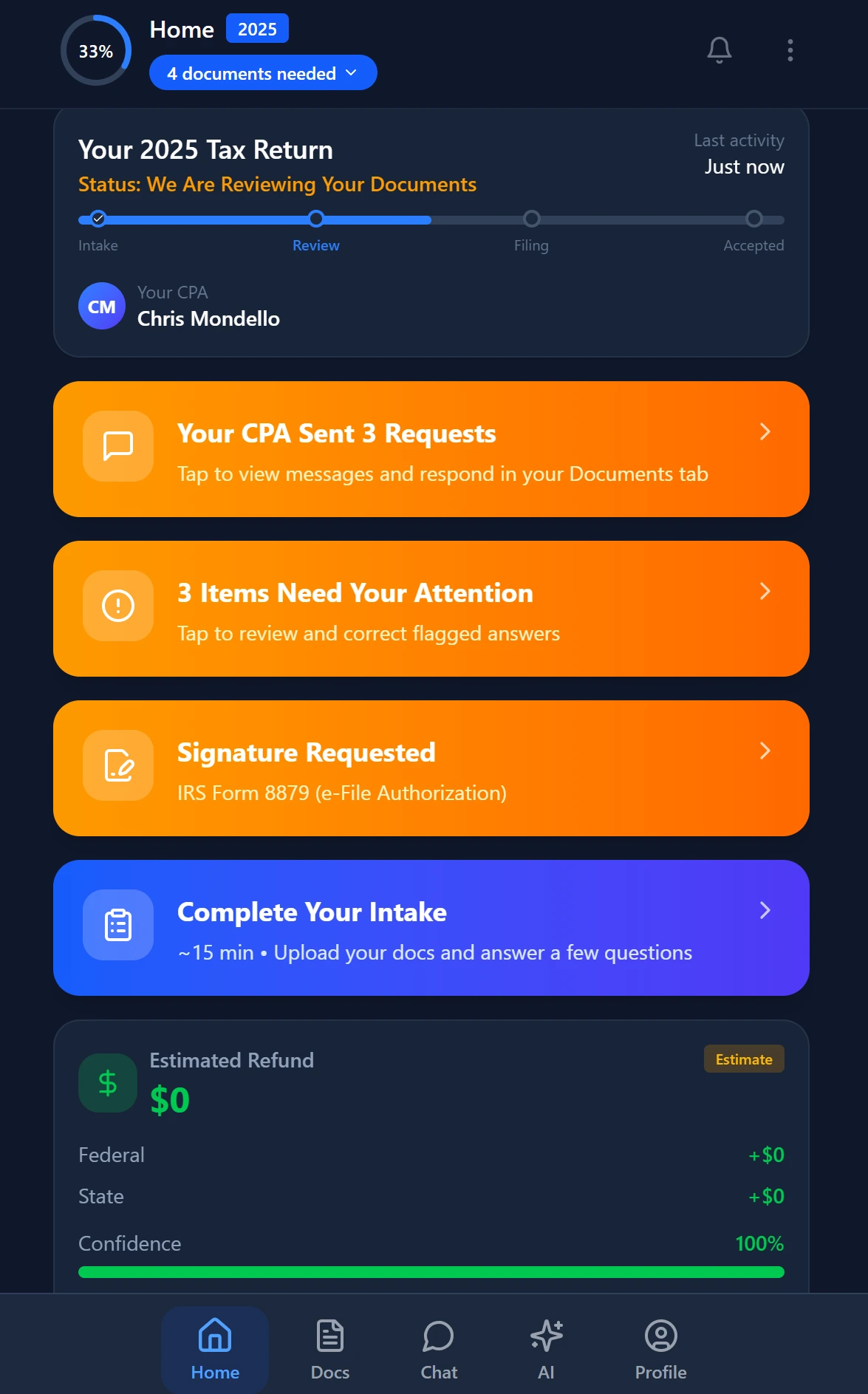
Smart intake auto-fills from uploaded documents and prior-year data
Evaluating Accounting Firm Collaboration Tools: A Practical Checklist
Before your firm commits to a platform, run through these questions:
- Does the system track document status automatically, or does someone have to manually update a task when a file arrives?
- Are internal conversations attached to the client record, or do they live in a separate tool that requires context-switching?
- Does the platform enforce role-based access at the data layer, not just the UI layer?
- Can you see real-time team workload distribution without running a report?
- Does the system surface filing deadlines to internal assignees automatically?
- Is there a full audit trail on every internal action — reviews, approvals, notes, status changes?
- What is the total cost for your team size at full adoption — including modules, per-user fees, and add-ons?
Question seven is where the math gets uncomfortable for per-user platforms. TaxScout pricing is flat at $149/month for the Pro plan regardless of team size, covering up to 10 seats and 500 tax returns per year. For a 10-person firm, that's $14.90 per seat per month — compared to ~$100/user for TaxDome or ~$59/user for Karbon. The per-user model is a structural tax on firm growth: every hire becomes a software cost increase, which creates a perverse incentive to keep teams small.
The real cost of per-user pricing in accounting software compounds further when you account for the modules you add as the firm scales. Canopy's modular structure means Smart Intake, time tracking, and reporting each carry separate line items. The base collaboration and workflow features are rarely sufficient on their own.
Ready to replace disconnected tools with a unified accounting workflow platform? TaxScout gives your entire team — in-office or remote — AI-native collaboration, document-aware pipelines, and real-time IRS research for $149/mo flat. → Book a 15-Min Demo
The Post-Season Window Is the Right Time to Switch
Collaboration infrastructure is harder to change mid-season than it is to change in May. Teams are in learning mode now, not execution mode. Processes that felt tolerable under the deadline pressure of April are suddenly visible for what they are: inefficient, fragile, and dependent on individual heroics rather than system design.
The firms that use the post-season window to evaluate and implement better accounting firm collaboration tools — ones that understand the shape of accounting work rather than general business communication — consistently report two benefits in the following season: fewer escalations (because the system surfaces problems before they become emergencies) and faster throughput (because preparers spend more time on billable work and less time on coordination).
That's not a marginal efficiency gain. At 300 returns and a $250 average fee, recapturing even 10% of coordination overhead translates to a meaningful improvement in net margin — without adding a single new client.
The IRS compliance requirements under Circular 230 also create a compelling compliance case: firms with documented review processes, timestamped approval chains, and audit-ready records are in a structurally different risk position than firms running on email threads and verbal approvals. That's a practice management argument as much as a collaboration argument — and it's one the right platform makes automatically, just by logging what happens.
Ready to see the difference? TaxScout gives your firm AI extraction, 5-layer validation, and complete practice management — for $49/mo flat. → Book a 15-Min Demo — See It Live
Frequently Asked Questions
Unlike Slack or Microsoft Teams — built for software teams where all messages carry equal weight — accounting-specific collaboration tools like TaxScout are designed around compliance-sensitive workflows. TaxScout ties every conversation directly to a client file, tax return status, or review milestone, so context is never lost. When a senior preparer flags a K-1 question, that thread is attached to the exact return, visible to the right reviewer, and logged automatically — eliminating the manual forwarding and 20-minute coordination delays that plague firms using generic messaging tools during tax season.
Keep reading
Amended FBAR Procedures: How CPAs Correct Foreign Account Errors Without Triggering Penalties
Oct 12, 2026 · 1 min read
Transparency in Coverage Final Rules: What CPA Firms Must Do Now
Oct 12, 2026 · 1 min read
Backdoor Roth IRA: How CPAs Execute the Strategy for High-Income Clients
Oct 12, 2026 · 1 min read
Stay up to date
Get the latest tax tech insights delivered to your inbox.