Mango Alternatives for CPA Firms: An Honest Comparison
Mango Practice covers client portal, e-signatures, and billing for accounting firms, but firms scaling past a few hundred returns often find its AI depth and pipeline tooling limited. This honest comparison breaks down Mango against TaxScout, TaxDome, Canopy, and Karbon on the criteria that…
If you are searching for mango alternatives, you are probably not dissatisfied with Mango Practice overall — you are asking whether the platform will keep up as your firm grows. Mango covers the fundamentals well: a client portal, document requests, e-signatures, and invoicing in one place. What drives the search is usually a gap in AI-assisted document processing, a pricing model that scales uncomfortably as team size grows, or a workflow board that feels too thin for a 300-return busy season.
This comparison is written for CPA firm owners and EAs who have used or demoed Mango and want an honest look at the realistic alternatives. We cover TaxScout, TaxDome, Canopy, and Karbon — four platforms that compete in the same practice-management category. We also say clearly when Mango is likely the right answer and when it is not. Whether you're frustrated by pricing opacity or simply outgrowing your current setup, exploring mango alternatives is a practical step before committing to a multi-year contract.
One housekeeping note: Mango Practice does not publish a detailed per-seat or per-return pricing page at the time of writing, so we cannot quote their figures. All TaxScout numbers come from the TaxScout pricing page. Competitor figures are quoted from the competitor registry with their check dates as noted throughout. This pricing gap is one of the top reasons CPA firms start researching mango alternatives in the first place.
What Mango Practice Actually Does Well
Before evaluating mango alternatives, it is worth being direct about where Mango is genuinely strong. Mango Practice is purpose-built for small accounting and tax firms that want a clean, integrated client experience without stitching together five separate tools. The portal lets clients upload documents, e-sign engagement letters, pay invoices, and message their preparer — all from a single URL. For a solo practitioner or a two-person firm onboarding 100 to 200 clients per year, that simplicity is real value.
Mango also has a readable UI that does not require a lengthy onboarding process. Staff turnover is a real cost in small firms, and software that a new hire can learn in a day or two reduces training friction. Its e-signature module handles Form 8879 and engagement letters, and its billing integration accepts credit card payments from the portal. These are table-stakes features that Mango executes without complexity. Still, even firms that appreciate these strengths often evaluate mango alternatives when they hit workflow bottlenecks that a simpler tool cannot solve at scale.
Where Mango shows limits is in AI depth (there is no meaningful document extraction pipeline, confidence scoring, or AI research layer), pipeline visibility beyond a basic task list, and pricing transparency. Firms with 300-plus returns, multi-preparer review queues, and clients who send in disorganized PDF packets typically outgrow these capabilities within one or two busy seasons. That is the audience this article is for. For firms evaluating their mango alternatives approach, this trade-off compounds over time.

Click any extracted field to see its source highlighted on the original PDF
The Five Criteria That Drive Platform Decisions
When firm owners evaluate mango alternatives in practice, five criteria consistently drive the final call. Understanding these upfront makes the per-platform sections below much easier to read.
Pricing model — does cost scale with team size, client count, return volume, or some flat rate? A firm adding a part-time seasonal employee should not trigger a material price increase. Each of these factors directly shapes how mango alternatives plays out in practice.
AI depth — can the platform extract data from W-2s, 1099 series, K-1s, and 1040 schedules automatically, with confidence scoring and human-review flags? Or does "AI" mean a chatbot wrapper? Understanding mango alternatives in this context is what separates firms that scale from those that stall.
Review workflow — does the platform support a multi-stage pipeline with preparer and reviewer roles, comment threads tied to specific fields, and deadline tracking across the full return queue? This is precisely where a deliberate mango alternatives strategy pays off.
Client portal quality — is the portal branded, mobile-friendly, and does it support passwordless login so clients actually use it? Mango alternatives sits at the center of this decision — get it wrong and the rest unravels.
Migration effort — how hard is it to bring over prior-year client records, documents, and return history without a manual re-keying project? When firms revisit their mango alternatives priorities, the gaps usually surface here.
Tired of rebuilding your document workflow from scratch every busy season?
TaxScout gives CPA and EA firms unlimited team members, a 5-layer AI extraction pipeline, and a branded client portal — all at a flat monthly rate with no per-seat fees.
Mango Alternatives at a Glance — Key Differentiators
| Platform | Pricing Model | AI Document Extraction | Team Member Cost | Client Portal |
|---|---|---|---|---|
| Mango Practice | Not publicly listed | Limited / not published | Per seat (not disclosed) | Yes — integrated |
| TaxScout Solo | $49/month for the whole firm or $470/yr — 150 return credits | 5-layer pipeline, confidence scoring | Unlimited, no extra charge | Branded, OTP login |
| TaxScout Firm | $149/month for the whole firm or $1,430/yr — 500 return credits | Same 5-layer pipeline as Solo | Unlimited, no extra charge | Branded, OTP login |
| TaxDome | $800–$1,200/seat/yr (1-yr term, as of 2026-07-31) | Built-in, feature-limited | Per seat — costs compound | Yes — templated |
| Canopy | $74/user/mo billed annually (as of 2026-08-01) | Limited | Per seat — costs compound | Yes — standard |
| Karbon | $59/user/mo billed annually (as of 2026-08-01) | None — work management focus | Per seat — costs compound | No native portal |
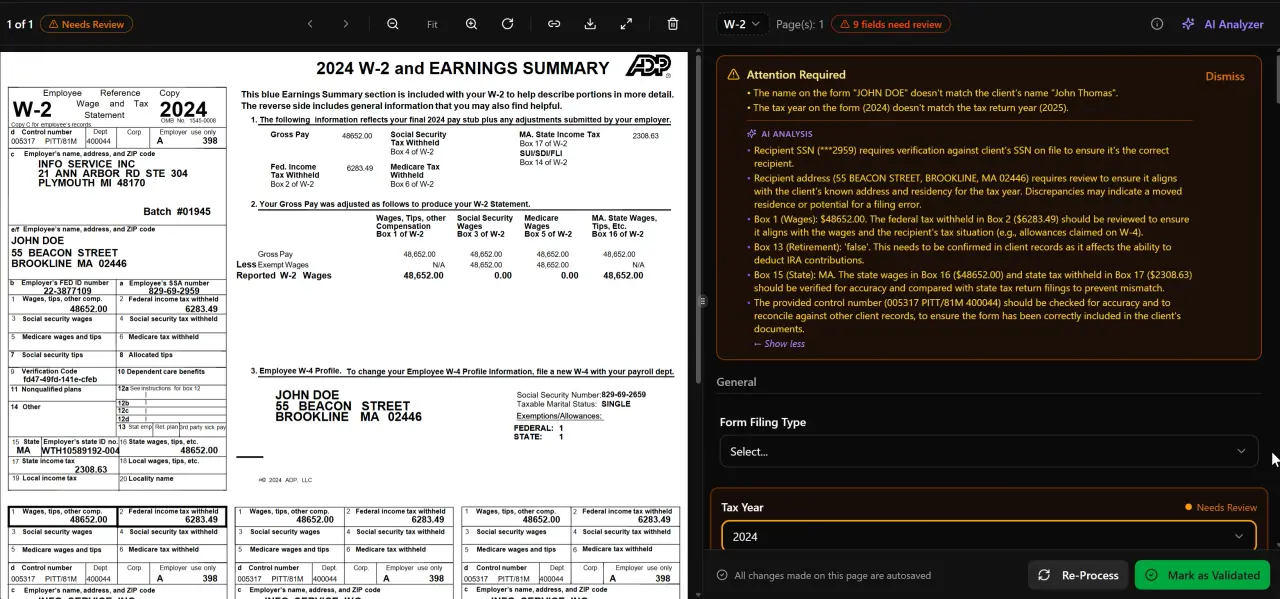
AI classifies, extracts, and validates every document automatically

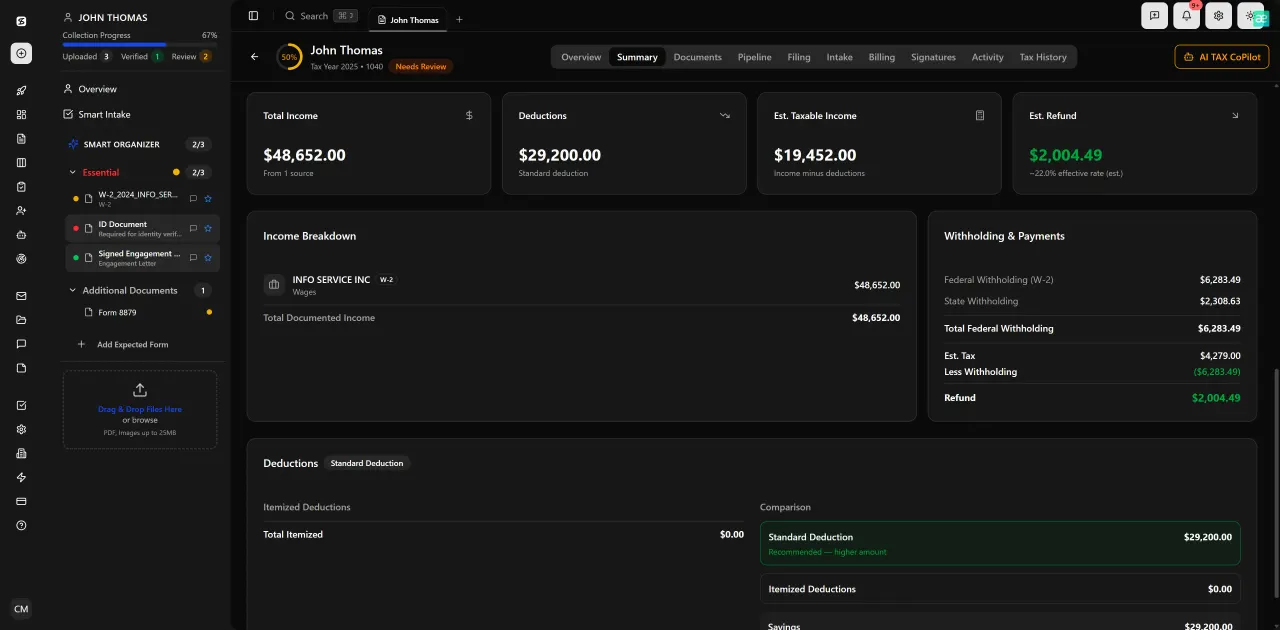
Every client gets organized documents, status tracking, and a complete history
TaxScout: The AI-Native Option for Growing Tax Firms
TaxScout was built from the ground up around AI document processing, rather than adding AI features to an existing workflow tool. Its AI document extraction pipeline has five layers: document quality routing, AI extraction with confidence scoring, OCR cross-verification, 15 deterministic math rules plus 18 post-extraction rules, and cross-document validation. That means a client who uploads a disorganized PDF packet containing a W-2, three 1099 series forms, a K-1, and a 1095-C gets each document classified, extracted, and validated before a preparer touches the return.
The split-screen PDF viewer lets preparers click any extracted field to jump directly to its source location in the original document — a workflow that eliminates the manual flip-between-tabs process that burns time during review. The review hub connects to a 12-stage pipeline management board with drag-and-drop kanban, so reviewers and preparers can see the full return queue at a glance rather than hunting through email threads.
On pricing, TaxScout Solo costs $49/month for the whole firm with no commitment or $470/year prepaid and includes 150 return credits per term with unlimited team members. TaxScout Firm costs $149/month for the whole firm or $1,430/year prepaid with 500 return credits per term, also with unlimited team members. Extra returns are $4 each on both plans. The Solo and Firm plans differ only in return credits, storage, and support level — never in features. That flat-rate model matters for firms adding seasonal staff: a firm bringing on two part-time reviewers for February through April pays nothing extra.
TaxScout also integrates with Drake, CCH Axcess, UltraTax CS, Lacerte, ProConnect, and ProSeries rather than replacing them, which significantly reduces migration risk. Preparers keep their existing tax software and use TaxScout for intake, document processing, pipeline management, and client communication. The branded client portal uses OTP login so clients never need to remember a password, and e-signatures via Documenso cover Form 8879, 4868, FBAR, engagement letters, W-9, and state forms. Invoicing runs through Stripe Connect Express directly from the portal.
The AI research agents layer is worth noting separately. These agents search IRS.gov, Treasury, Cornell Law, SSA, and Congress in real time and return results in client context — meaning the agent knows the entity structure, filing history, and prior returns for the client being researched. For a firm advising on self-employment tax planning or IRC 163(j) interest limitations, that context-aware research layer is a meaningful time saver.
Who should choose TaxScout: firms processing 100 or more returns per season who want AI document extraction, an integrated pipeline, and a flat per-seat-free pricing model. The platform is also a strong fit for firms already using established tax software who want to add a modern front-end without replacing their core preparation tool.
TaxDome: Full-Featured but Per-Seat Costs Compound
TaxDome is the most feature-complete platform in this comparison and has the largest installed base among CPA practice management tools. It covers client portal, pipeline, e-signatures, billing, document management, and a built-in tax organizer in one product. For a firm that wants a single-vendor answer and is willing to pay for it, TaxDome is a credible option.
The pricing model is the main friction point for growing firms. When last read on 2026-07-31, TaxDome listed $800–$1,200 per seat per year on a one-year term (source: https://help.taxdome.com/article/1800-taxdome-pricing-plans-us-ca). Critically, its entry plan, Essentials, was limited to a single team member when last read on 2026-07-31. That means a three-person firm is looking at $2,400 to $3,600 per year at minimum before add-ons, and a ten-person firm compounds that further. Those figures have not been independently re-verified as of this writing, so confirm current pricing directly with TaxDome before budgeting.
TaxDome's AI extraction is built in but does not match a dedicated 5-layer pipeline in depth or confidence scoring granularity. For a comparison of TaxDome against TaxScout in more detail, see our TaxDome alternative page.
Who should choose TaxDome: established firms with stable team sizes where the per-seat cost is predictable and who want the broadest feature set without integrating multiple tools.
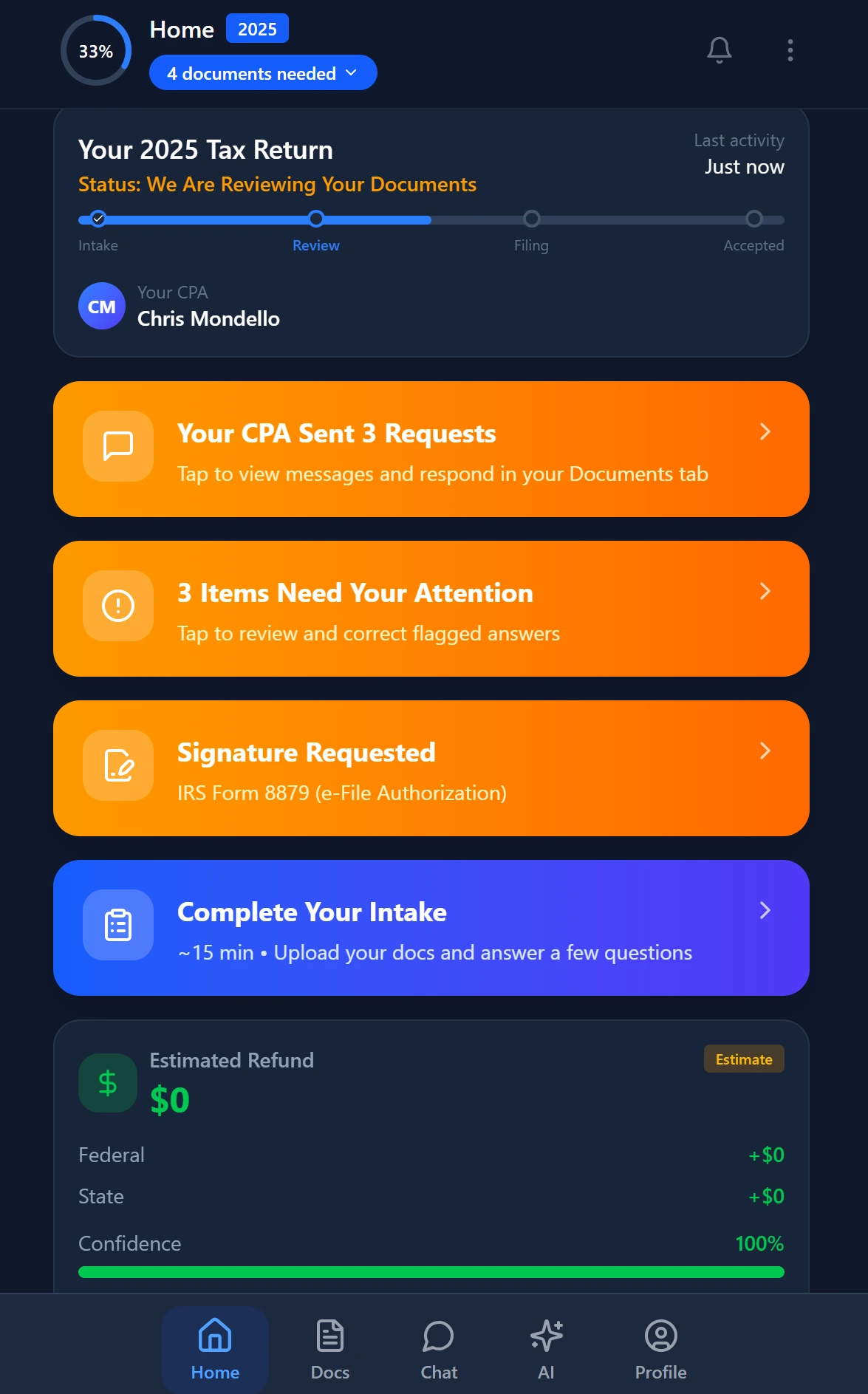
Smart intake auto-fills from uploaded documents and prior-year data
Canopy: Strong Client Management, Expensive at Scale
Canopy positions itself as a full practice management suite with strong client relationship management, a clean client portal, and solid document management. Its workflow tools are mature, and its UI is widely regarded as polished. For a firm whose primary pain point is client communication rather than document processing volume, Canopy is worth evaluating.
Canopy lists $74 per user per month billed annually, as of 2026-08-01 (source: https://www.getcanopy.com/pricing). Tax workflow automation costs an additional $34 per client per year, and knowledge-based authentication (KBA) is $1.25 per use. A five-person firm using tax workflow automation for 200 clients would add $6,800 in annual client fees on top of the per-seat base — a material line item that is easy to miss in initial demos.
Canopy does not have a document extraction pipeline comparable to TaxScout's 5-layer system. AI features in Canopy are oriented toward client communication and task management rather than structured data extraction from tax documents. For firms processing high volumes of W-2s, 1099 series, and K-1s, that gap means preparers are still doing manual data entry after documents arrive.
See our Canopy alternative page for a more detailed side-by-side. Who should choose Canopy: mid-size firms that prioritize CRM, client communications, and a polished portal over deep AI document processing, and whose team size is stable enough to make per-seat budgeting manageable.
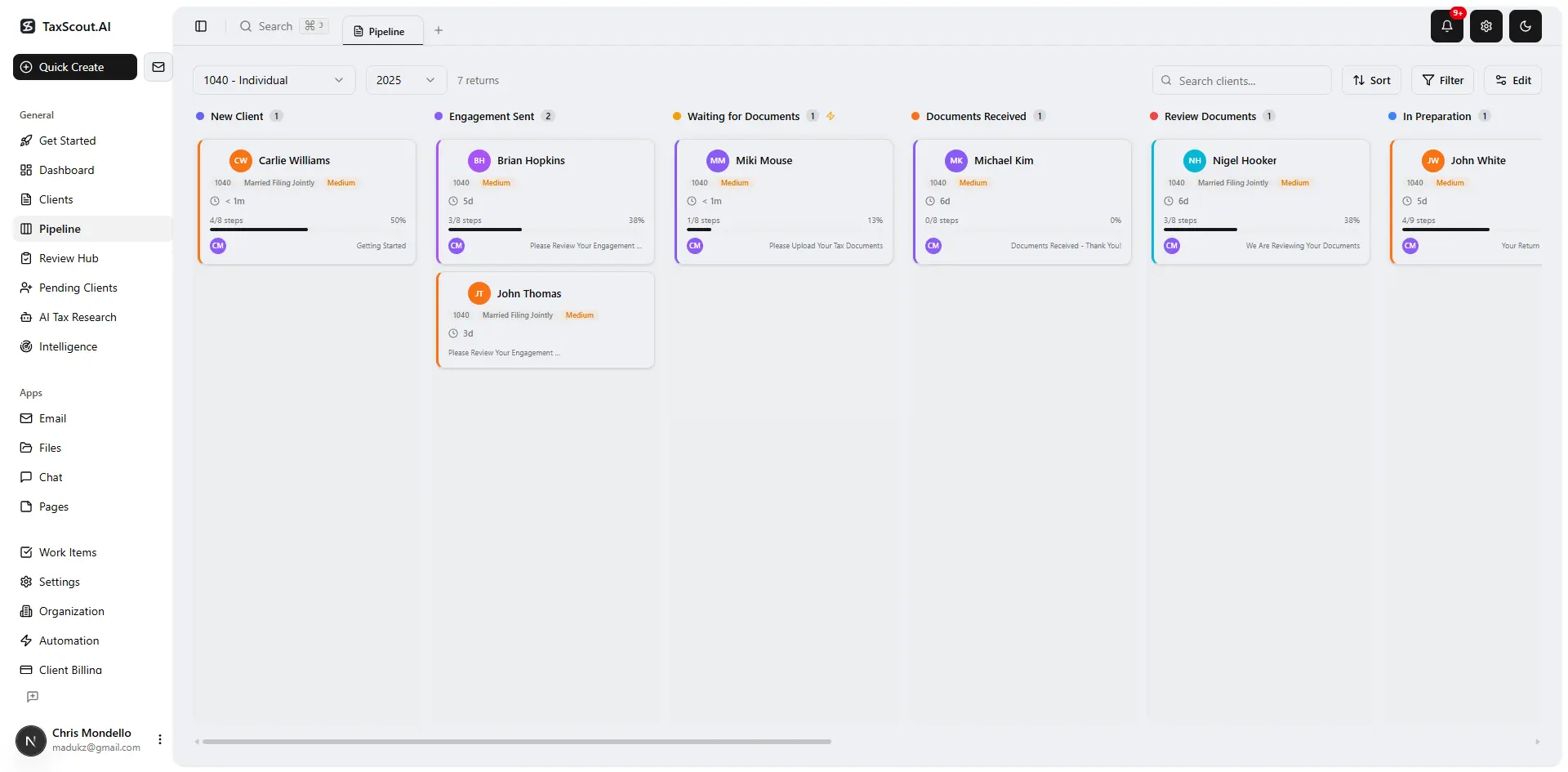
Track every return from intake to filed with drag-and-drop pipeline management
Karbon: Excellent for Work Management, Not Built for Tax-Specific Workflows
Karbon is a work management platform for accounting firms that excels at task tracking, team collaboration, and email management. It has a strong reputation for multi-step workflow templates and is widely used by firms that do a mix of advisory, bookkeeping, and tax work. If the core problem is team coordination and email triage rather than document processing, Karbon is worth a look.
Karbon lists $59 per user per month billed annually, as of 2026-08-01 (source: https://karbonhq.com/pricing/). There is no native client portal, no e-signature module for Form 8879, and no document extraction pipeline. Firms using Karbon typically pair it with separate tools for client document collection and e-signatures, which adds both cost and integration complexity.
For tax-focused firms, the absence of a client portal and e-signature capability is a significant gap. Karbon is better described as a team workflow and project management tool that happens to serve accounting firms well, rather than a tax practice management platform. See our Karbon alternative page for more context.
Who should choose Karbon: multi-service accounting firms where advisory and bookkeeping work is the core business, team collaboration is the primary pain point, and the firm is willing to run separate tools for client intake and e-signatures.
Review with AI assist — AI agents answer questions with full client context
Migration Effort: What Moving Off Mango Actually Takes
Migration concerns are legitimate and often underweighted in comparison articles. Moving client records, prior-year documents, and engagement history from one platform to another takes real time, and that time competes with billable work. Here is a realistic assessment by platform.
Moving to TaxScout from Mango involves exporting client contact data (typically a CSV), uploading prior-year documents to the TaxScout file management layer, and configuring your pipeline stages. Because TaxScout works alongside your existing tax software (Drake, Lacerte, etc.) rather than replacing it, you are not re-entering return data — you are adding a front-end intake and workflow layer. Most firms complete the initial setup in a weekend before busy season. TaxScout's smart intake engine, modeled on IRS Form 13614-C, handles the client-facing prefill so you are not rebuilding organizers from scratch.
Moving to TaxDome involves a more structured migration because TaxDome's client portal, pipeline, and billing are more tightly coupled. TaxDome offers migration guides, but firms with large document archives report the process taking several weeks. Moving to Canopy or Karbon is similarly manual if your document archive is in Mango's proprietary storage.
The switching costs in any platform migration are real. The question is whether the annual cost of staying on a platform that does not solve your core problem exceeds the one-time migration cost. For firms whose primary issue is AI document processing or flat-rate pricing, the math usually favors moving before the next busy season rather than after it. Our accounting project management guide covers how to structure the transition without disrupting client relationships.

Your clients see your brand — OTP login, document upload, and real-time status
Who Should Stay with Mango Practice
Not every firm evaluating mango alternatives should switch. Mango is a reasonable answer for a solo practitioner or a two-person firm processing under 150 returns per year whose primary need is a clean client portal, e-signatures, and invoicing without deep AI tooling. If your document intake is manageable manually, your team is small and stable, and you are not running a multi-preparer review queue, Mango's simplicity is a feature, not a limitation.
Mango is also worth keeping if you have invested significant time in its portal customization, your clients are well-trained on the interface, and switching would create client-facing friction during a period when you cannot afford disruption. Client experience continuity has real value — the Journal of Accountancy has noted that client-facing friction during platform transitions is one of the most common causes of client attrition in small firms.
The honest trigger for evaluating alternatives is when one or more of these conditions appears: document processing volume is outpacing manual review capacity, your pricing model penalizes seasonal team expansion, you need AI-assisted extraction with confidence scoring, or you want pipeline visibility across a 300-plus return queue. If none of those apply, the migration cost likely exceeds the benefit.

Track firm performance with real-time analytics and client activity monitoring
How to Choose the Right Mango Alternative for Your Firm
Start with the pricing model. If your team grows seasonally, any per-seat platform will compound costs in ways that flat-rate platforms will not. A firm bringing on two seasonal reviewers on TaxScout Solo pays $49 per month regardless. The same expansion on a $59 to $74 per-user platform adds $118 to $148 per month per additional seat.
Next, audit your document processing bottleneck. If preparers are spending 20 to 30 minutes per return manually entering W-2 and 1099 data that arrived as PDFs, that is an AI extraction problem — and only TaxScout in this comparison has a full 5-layer extraction pipeline with confidence scoring and cross-document validation. According to the TaxScout directory, 69,085 US tax preparers are listed against the IRS federal preparer directory, of whom 32,237 are CPAs and 11,111 are enrolled agents. The majority of those professionals are running tax practices where document processing volume is a real operational constraint, not a theoretical one.
Finally, consider integration compatibility. If you are on Drake, Lacerte, or CCH Axcess and have years of institutional knowledge in that software, a platform that works alongside your tax engine is lower risk than one that asks you to change how returns are actually prepared. TaxScout's integration with all major preparation platforms is a meaningful risk reducer for mid-migration hesitation.
For other platform comparisons in the same category, browse our full comparison resource library. You may also find the SurePrep alternatives guide useful if document processing cost is your primary driver. The IRS preparer directory is the authoritative source for credential verification if you are evaluating platforms that claim to integrate with preparer records. Additional IRS guidance on e-file procedures is relevant if your alternative platform choice affects your e-file provider authorization setup.
Ready to see what a 5-layer AI extraction pipeline looks like on your actual documents?
TaxScout offers unlimited team members, flat-rate pricing starting at $49/month for the whole firm, and a full demo with no sales pressure — built specifically for CPA and EA firms.
Ready to try TaxScout.ai?
Free migration assistance. White-glove onboarding included.
Request Early Access