Instead Alternatives for CPA Firms: An Honest Comparison
Firm owners searching for Instead alternatives want a straight answer: which platform handles pricing, AI, review workflow, and client experience better for a CPA or EA practice? This guide compares Instead against TaxScout, TaxDome, Canopy, and Karbon with verified facts and honest verdicts on…
The search for instead alternatives usually starts the same way: a firm owner opens their monthly statement, notices a per-seat fee that scales uncomfortably with headcount, and wonders whether the platform they chose a few years ago still makes sense. Instead has genuine strengths — a clean interface, solid client messaging, and a loyal user base among solo practitioners and small bookkeeping-adjacent firms. But as firms grow, add staff, or push deeper into tax preparation, the platform's gaps become harder to ignore.
This comparison is built for CPA and EA firm owners who have already decided to evaluate alternatives and want a single reference that covers the variables that actually matter: pricing model and total cost, depth of AI, document processing and review workflow, client portal quality, e-signature and e-file support, and the realistic effort required to migrate. We include TaxScout, TaxDome, Canopy, and Karbon alongside Instead so you have a complete picture. Before diving in, it helps to understand why so many firm owners are searching for instead alternatives in the first place: the platform simply wasn't built with professional tax practices in mind.
One ground rule: we cite only verifiable, publicly available pricing and features as of early 2026. Where Instead's published specifications are thin on a feature, we say so rather than guess. That same standard applies to every platform in this article, including TaxScout. This same level of scrutiny is what separates a genuinely useful guide to instead alternatives from the vague listicles that dominate most search results.
What Instead Does Well and Where It Falls Short
Instead is positioned primarily as a financial platform for freelancers and small business owners, with light practice-management features bolted on. Its strengths are a polished consumer-grade interface, integrated banking, and straightforward expense categorization. Firms with a bookkeeping-heavy client base and minimal tax work often find the onboarding friction low and the early value obvious. This positioning is precisely why instead alternatives tend to attract firm owners who need deeper workflow automation, multi-client management, and compliance-grade document handling.
The gaps emerge in a tax-season context. Instead was not built around tax intake, IRS document classes, or the review-and-sign workflow that defines a busy CPA season. There is no publicly documented 5-layer document validation pipeline, no AI extraction across W-2s, 1099 series, K-1s, or 1040 schedules, and no dedicated e-file or Form 8879 workflow. Firms handling more than a few dozen returns quickly find themselves bridging Instead with a separate tax preparation application — and that dual-system friction is precisely why many owners begin searching for instead alternatives.
Instead also lacks the kind of depth described in the IRS Form 13614-C intake process that enterprise tax platforms model their organizers on. For advisory-heavy or high-volume return practices, that absence creates meaningful workflow gaps. For firms evaluating their instead alternatives approach, this trade-off compounds over time.
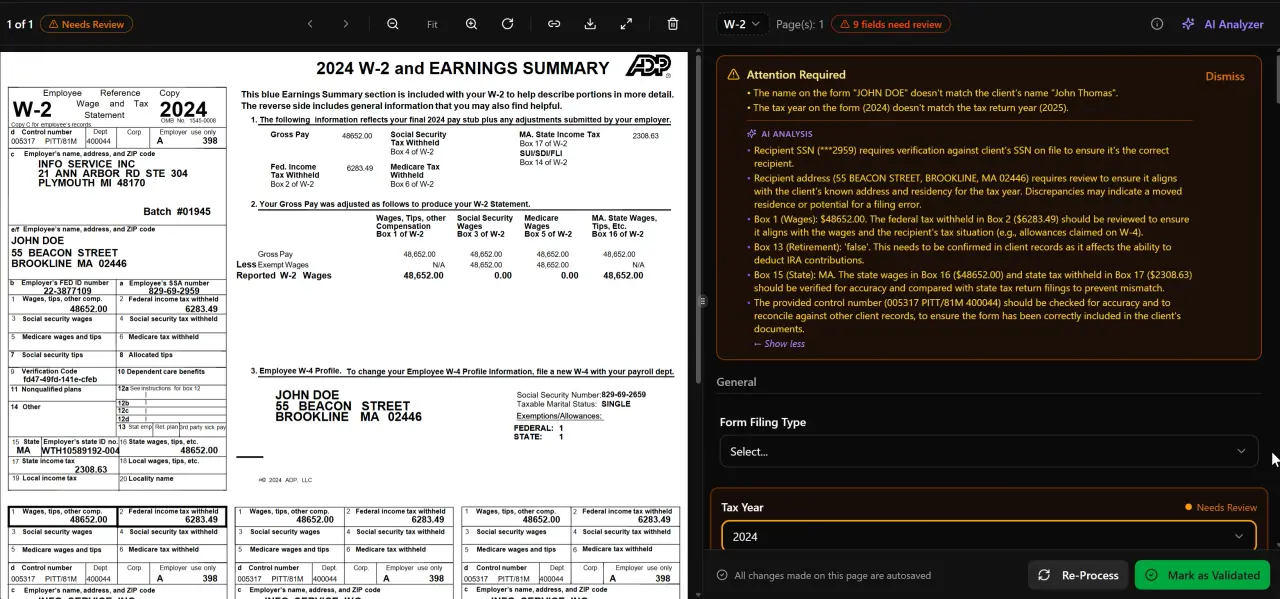
AI classifies, extracts, and validates every document automatically
Pricing Model Comparison Across Instead Alternatives
Pricing model is often the first filter when evaluating instead alternatives, and the differences here are stark. Instead uses a subscription model with tiered per-user pricing; the exact current figure should be confirmed on Instead's website, but it follows the per-seat pattern common to the category. TaxDome lists $800–$1,200 per seat per year on a one-year term (checked 2026-07-31). Canopy lists $74 per user per month billed annually, with tax workflow automation from $34 per client per year (checked 2026-08-01). Karbon lists $59 per user per month billed annually (checked 2026-08-01).
TaxScout takes a different approach entirely: flat monthly pricing with no per-seat fees and unlimited team members. TaxScout Solo is $49 per month (or $470 per year) and covers 150 return credits per term. TaxScout Firm is $149 per month (or $1,430 per year) and covers 500 return credits with the full feature set including all 9 AI Research Agents. Extra returns on either plan are $4 each. A firm that adds three staff members pays exactly the same TaxScout subscription as a solo practitioner — the per-seat model simply does not exist. Each of these factors directly shapes how instead alternatives plays out in practice.
For context on how switching costs accumulate under per-seat pricing, consider that per-seat platforms bill for every person you add, while TaxScout Firm is $1,430 per year prepaid whatever the team size. Understanding instead alternatives in this context is what separates firms that scale from those that stall.
Instead Alternatives: Feature and Pricing Snapshot (early 2026, verified public sources)
| Platform | Pricing Model | AI Document Extraction | Client Portal | E-Signatures |
|---|---|---|---|---|
| Instead | Per-user subscription (confirm current rate on Instead.com) | Not publicly documented | Yes (messaging-focused) | Limited / not documented for Form 8879 |
| TaxScout Solo | $49/mo or $470/yr — unlimited users, 150 return credits | Yes — 5-layer validation across W-2, 1099s, K-1s, 1040 schedules, and more | Yes — branded portal, OTP login | Yes — Form 8879, 4868, FBAR, engagement letters, W-9, state forms |
| TaxScout Firm | $149/mo or $1,430/yr — unlimited users, 500 return credits | Yes — full pipeline plus 9 AI Research Agents | Yes — branded portal, OTP login | Yes — full e-signature suite via Documenso |
| TaxDome | $800–$1,200/seat/yr (1-year term) | Not documented | Yes | Yes |
| Canopy | $74/user/mo (billed annually); workflow automation from $34/client/yr | Not documented at extraction depth | Yes | Yes |
| Karbon | $59/user/mo (billed annually) | Not documented | Limited | Limited |

Click any extracted field to see its source highlighted on the original PDF
Tired of paying more every time you hire a staff member?
TaxScout charges a flat rate — unlimited team members, all the AI, no per-seat math. This is precisely where a deliberate instead alternatives strategy pays off.
AI Depth: Document Extraction and Research Agents
The AI conversation in practice management has moved well past marketing claims. Firms evaluating instead alternatives now ask specific questions: Does the platform extract data from uploaded documents or just store them? Does extraction carry confidence scores? What happens when a W-2 is blurry or a 1099-NEC is cut off at the margin?
TaxScout's AI document extraction processes recognized individual document classes — W-2s, the full 1099 series, K-1s, 1098 and 1095 series, 1040 schedules, and supporting records — through a 5-layer validation pipeline: document quality routing, AI extraction with confidence scoring, OCR cross-verification, 15 deterministic math rules, 18 post-extraction rules, and cross-document validation. The split-screen PDF viewer lets reviewers click any extracted field to highlight its source in the original document, which is the kind of audit trail that matters when a client disputes a number. Instead alternatives sits at the center of this decision — get it wrong and the rest unravels.
Beyond document processing, TaxScout Firm includes 9 specialized AI Research Agents that query IRS, Treasury, Cornell Law School's Legal Information Institute, SSA, and Congressional sources in real time. The Cornell LII tax code database and IRS publications are searched live, not summarized from a static training snapshot. For firms doing complex planning work — IRC 163(j) interest limitation analysis, partnership guaranteed payments, or 754 step-up basis calculations — that real-time sourcing meaningfully reduces the risk of citing outdated guidance.
None of the other platforms reviewed here publicly document an equivalent extraction pipeline or a structured set of research agents tied to live authoritative databases. That does not mean they have none — it means the capability is not verifiable from public sources, which is itself a signal when evaluating enterprise software.

Your clients see your brand — OTP login, document upload, and real-time status

Every client gets organized documents, status tracking, and a complete history
Review Workflow and Pipeline Management
A return review workflow is where practice management software earns its keep during busy season. Firms need to know, at a glance, which returns are waiting on documents, which are in review, which are pending client signature, and which are filed. Drag-and-drop kanban boards for this workflow are table stakes; the question is how much depth sits underneath.
TaxScout's pipeline management supports 12 customizable stages with a drag-and-drop kanban interface. The client-context AI memory retains entity structures, filing history, and prior return data — so when a return moves into review, the reviewer can see relevant history without hunting through folders. The review hub pairs with the split-screen viewer so comments and source references live in the same interface.
TaxDome offers a mature pipeline builder that many firms praise for its flexibility, and it is a reasonable choice for firms that need deep workflow customization and can absorb the per-user cost. Canopy's workflow module is competent but its modular pricing means you pay separately for document management, tasks, and intake — the Canopy alternative comparison breaks this out in more detail. Karbon is strongest on email-centric task management but thinner on document-layer features, as covered in the Karbon alternative comparison.
TaxScout works alongside existing tax preparation software — Drake, CCH Axcess, UltraTax CS, Lacerte, ProConnect, and ProSeries — rather than replacing it. That co-existence model matters for firms mid-migration: you can run TaxScout for intake, document processing, client portal, and e-signatures while continuing to prepare returns in the software your team already knows.
Client Portal and Intake Experience
A client portal that requires clients to remember a password is a client portal that generates support tickets. TaxScout's branded client portal uses OTP (one-time passcode) login — clients receive a code by email or SMS, authenticate, and land directly in their portal without a stored credential. The portal supports document upload, intake completion, status visibility, and e-signature without any app download.
The smart intake engine is modeled on IRS Form 13614-C — the same interview structure the IRS uses for volunteer preparer programs — and applies a 4-layer prefill: document-first (data already extracted from uploaded files), prior-year (pulled from filing history), profile (client record), and AI gap analysis (flags missing items before the client submits). The result is an intake form that arrives largely complete rather than blank, which reduces the back-and-forth cycle that consumes staff time in tax season.
Canopy's Smart Intake is a separately priced add-on at approximately $11 per client. For a firm with 300 active clients, that adds roughly $3,300 per year on top of the base per-seat subscription. TaxScout includes smart intake in both the Solo and Firm tiers at no incremental per-client charge.
Instead's portal is messaging-oriented and works well for the bookkeeping use case it was designed for. For structured tax intake with prefill and gap analysis, it is not the right tool — and that is not a criticism, it is simply a scope mismatch.
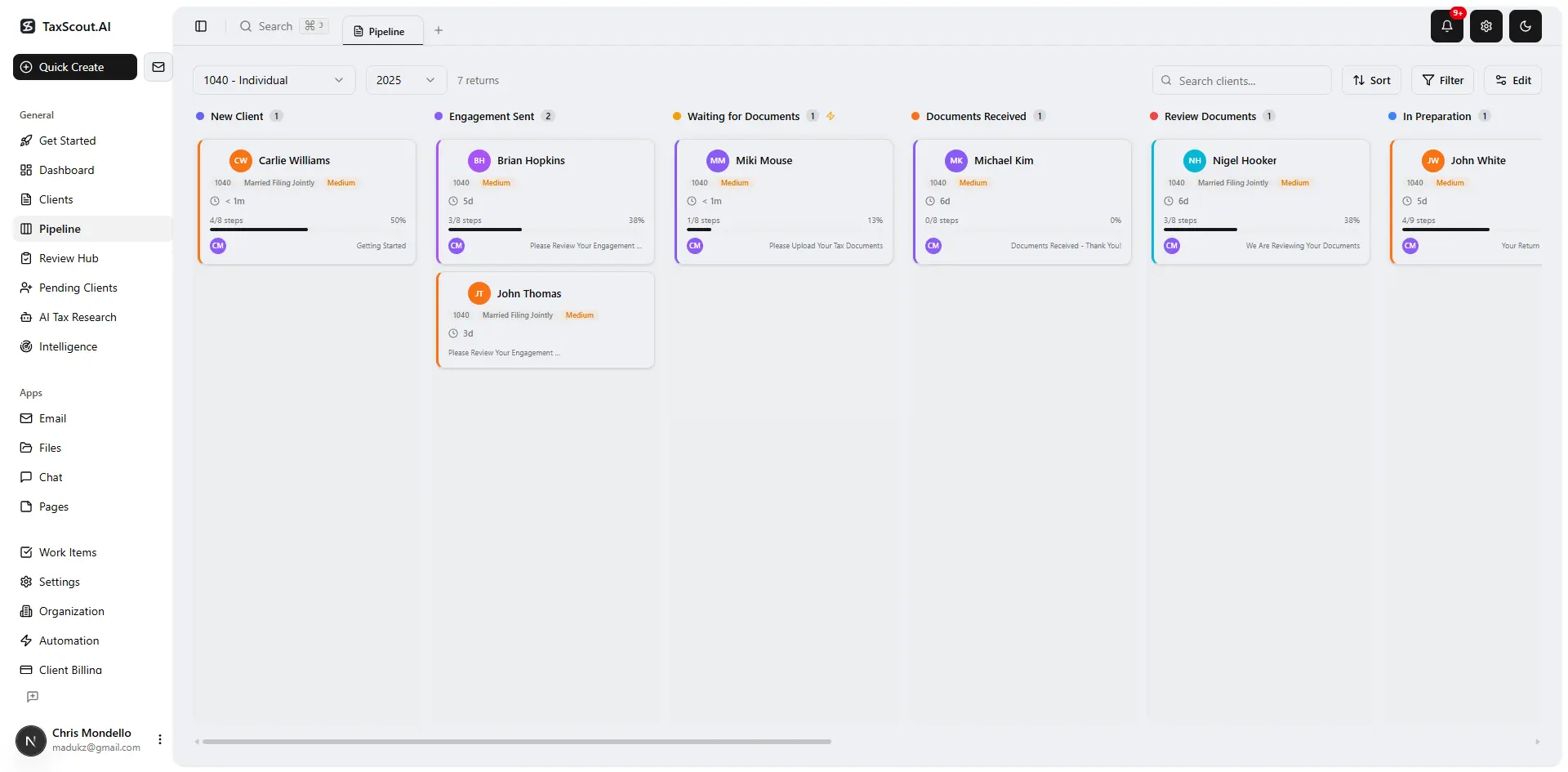
Track every return from intake to filed with drag-and-drop pipeline management
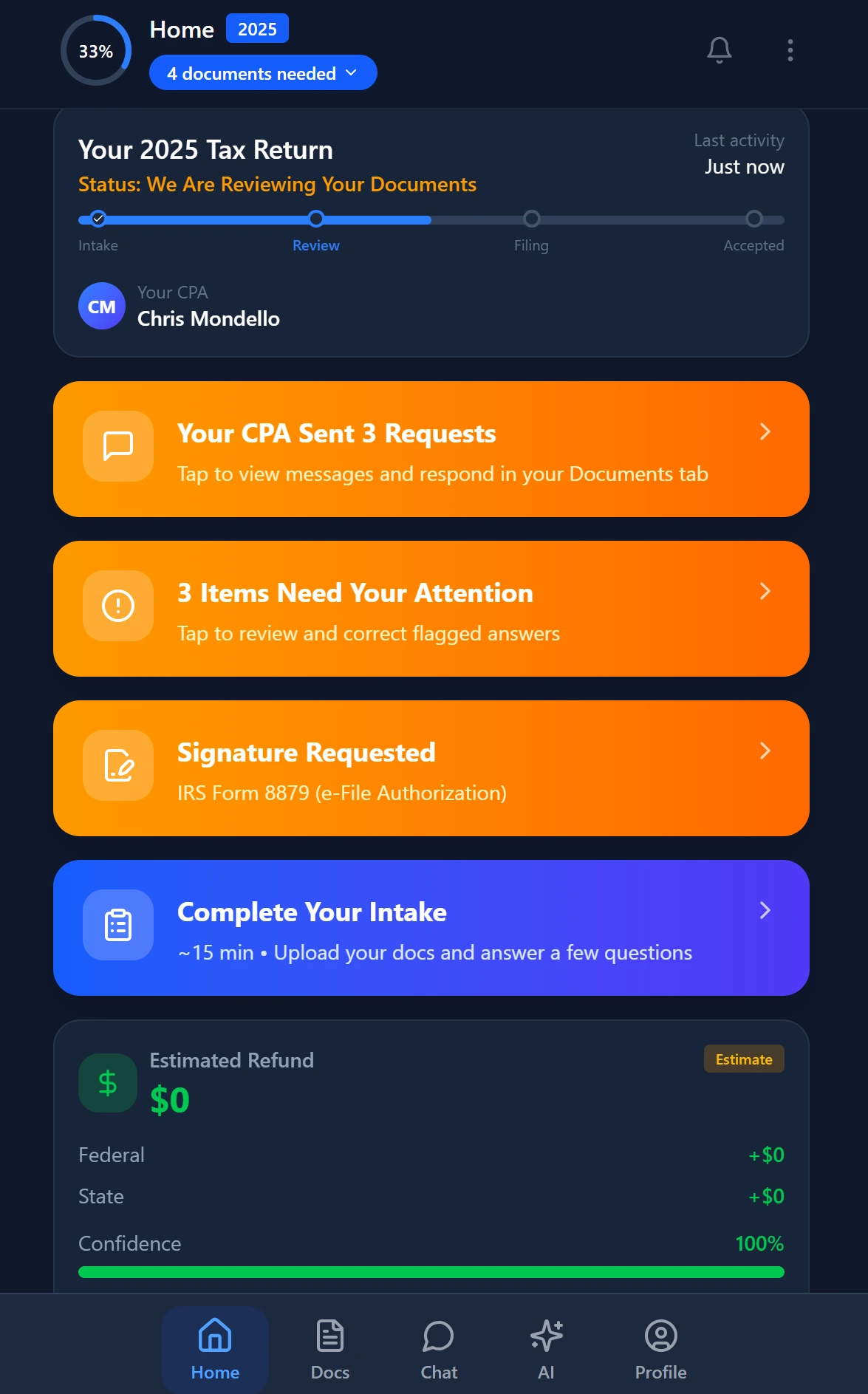
Smart intake auto-fills from uploaded documents and prior-year data
E-Signatures, Invoicing, and Compliance Infrastructure
E-signatures for tax work have a specific compliance surface that generic e-sign tools do not cover. Form 8879 (IRS e-file authorization) requires a specific workflow under IRS Publication 1345. FBAR signatures carry their own requirements under FinCEN guidance. Engagement letters, state-specific forms, and W-9s add to the matrix.
TaxScout e-signatures are handled via Documenso and cover Form 8879, 4868, FBAR, engagement letters, W-9, and state forms. Invoicing runs through Stripe Connect Express, which handles ACH and card payments without the firm needing a separate merchant account. Both are included in the base subscription.
Security infrastructure across all of these touchpoints matters to the written information security plan every tax firm is required to maintain under the FTC Safeguards Rule. TaxScout encrypts data in transit and at rest, supports data-subject deletion, and enforces role-based access with MFA. The security documentation page covers this in detail for firms that need to produce a WISP audit trail.
For other comparison resources across the practice management category, see our complete guide to comparison articles — it covers TaxDome, Canopy, Karbon, and others in depth.
Migration Effort: What It Actually Takes to Switch
Migration effort is the most underweighted variable in software evaluation. Firms that have been on Instead for two or three years have client records, historical documents, engagement letters, and workflow habits embedded in the platform. A realistic migration plan needs to account for data export formats, client communication about the new portal, and a parallel-run period during which both systems are active.
TaxScout's client management structure supports importing client records and prior-year data. The branded portal launch is a configuration step, not a development project. Because TaxScout integrates with the tax preparation software the firm already uses, the migration scope is limited to practice management layer — client communications, document storage, intake, pipeline, and billing — rather than a full rip-and-replace. Most firms can run a pilot cohort through TaxScout in four to six weeks before committing to full migration.
The TaxDome alternative comparison covers the migration path from TaxDome specifically, including what to export before canceling. For firms coming from Instead, the process is somewhat simpler because Instead's feature surface is narrower — there is less to untangle.
The SBA's guide to evaluating business software recommends treating migration cost as a line item in the total cost of ownership calculation, not an afterthought. That framing is worth applying here: a platform that saves $3,000 per year in per-seat fees but costs 80 hours of migration work has a roughly 3-month payback period at a $30/hour opportunity cost — after which the savings compound.
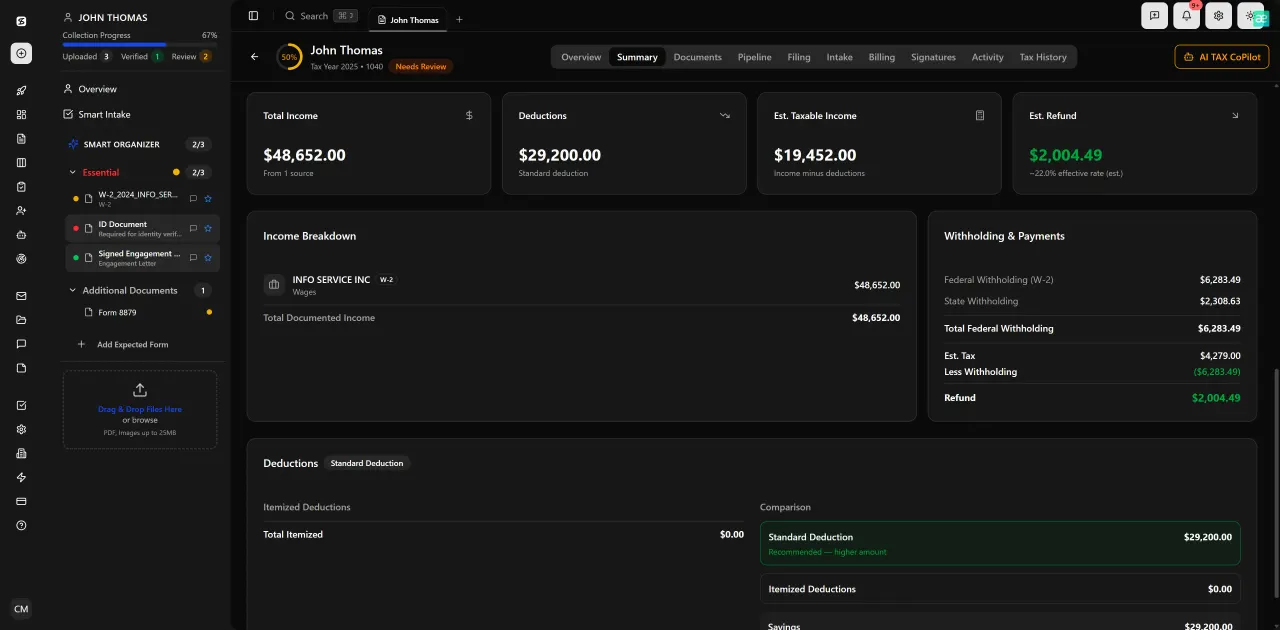
Review with AI assist — 9 agents answer questions with full client context
Who Should Stay With Instead
Fairness requires an honest answer to this question. Instead is a reasonable choice for a solo bookkeeper or a very small firm whose primary deliverable is bookkeeping and financial reporting rather than tax preparation. If your client base does not generate large volumes of W-2s, 1099s, and K-1s for processing, if you do not need Form 8879 workflows, and if your team headcount is stable, the incremental cost of switching may not be justified by the gains.
Instead also has a consumer-grade interface that some clients genuinely prefer for banking and expense tracking integrations. If those integrations are core to your service offering, evaluate whether TaxScout or any tax-centric alternative replicates them before committing to a switch.
The clearest signal that it is time to move: your staff is manually re-entering data that should have been extracted from uploaded documents, your clients are sending documents by email because the portal login is too friction-heavy, or your pipeline visibility is limited to a spreadsheet someone maintains by hand. Those are workflow problems that a purpose-built tax practice management platform addresses directly, and they compound under volume.
Ready to see whether TaxScout fits your firm before you commit?
Flat pricing, unlimited team members, and a full AI extraction pipeline — explore the platform with a live demo.
Ready to try TaxScout.ai?
Free migration assistance. White-glove onboarding included.
Request Early Access