Filed Alternatives for CPA Firms: An Honest Comparison
Firm owners searching for Filed alternatives are asking a practical question: which platform actually reduces review time, fits a flat pricing model, and won't require six months to migrate? This comparison covers Filed, TaxScout, TaxDome, Canopy, and Karbon across the dimensions CPAs and EAs…
Filed alternatives worth considering for CPA and EA firms include TaxScout, TaxDome, Canopy, and Karbon. Each platform differs on pricing model, AI extraction depth, review workflow, and client portal maturity. Filed suits solo practitioners who want a lightweight, low-cost starting point; firms that need deeper AI document processing, unlimited team members at a flat rate, or native e-signature and invoicing will find stronger options among the filed alternatives reviewed here.
When a CPA or EA firm starts searching for filed alternatives, the trigger is almost always the same: a capability gap that showed up during tax season, a pricing structure that punishes growth, or a workflow that requires too many manual handoffs. Filed carved out a niche as an approachable entry point for small practices, but as firms add staff, take on more complex returns, or move toward subscription billing, its limitations become concrete.
This comparison is written for firm owners who are past the awareness stage and are actively evaluating. We cover Filed alongside TaxScout, TaxDome, Canopy, and Karbon on the six dimensions that actually drive a switching decision: pricing model, AI document processing depth, review workflow, client portal, e-signature and invoicing, and migration effort. Where public pricing is available, we cite it with a check date. Where it isn't, we say so. Before diving in, it's worth noting that filed alternatives vary significantly in how they balance automation depth with workflow flexibility, so this comparison is written for firm owners who are past the awareness stage and are actively evaluating.
According to the TaxScout directory, 69,074 US tax preparers are currently listed, matched against the IRS federal preparer directory — including 32,228 CPAs and 11,109 enrolled agents. That population spans solo practitioners who may be well-served by Filed today and multi-preparer firms where per-seat pricing becomes a real cost. The right choice depends on where your firm sits on that spectrum and where it's headed. Understanding the scale of that population helps contextualize why filed alternatives like TaxDome and Karbon target different segments so deliberately — a solo practitioner and a 20-person firm have almost nothing in common when it comes to software needs.
What Filed Does Well and Where It Falls Short
Filed positions itself as a modern alternative to legacy practice management tools, with a relatively clean interface and a lower initial price point. For a solo practitioner handling a few hundred straightforward 1040s, it provides adequate document collection and task tracking without demanding a steep learning curve. Filed positions itself as a modern alternative to legacy practice management tools, though firms that outgrow its feature set often begin researching filed alternatives once client volume or complexity pushes against its current limitations.
The limitations become visible when firms scale. Filed does not publish a detailed AI extraction architecture, and its document processing does not appear to include cross-document validation or deterministic math rule checking. That matters in a review workflow: if the platform cannot flag a W-2 box 12 mismatch against a Schedule A entry, the reviewer catches it manually rather than the software catching it first. For firms evaluating their filed alternatives approach, this trade-off compounds over time.
Filed also uses a per-user pricing model, which means that adding a seasonal preparer or an administrative staff member triggers an additional monthly cost. For firms experimenting with subscription pricing models, where margin depends on predictable overhead, per-seat fees work against that goal. These structural constraints explain why Filed alternatives attract serious evaluation from growing practices.
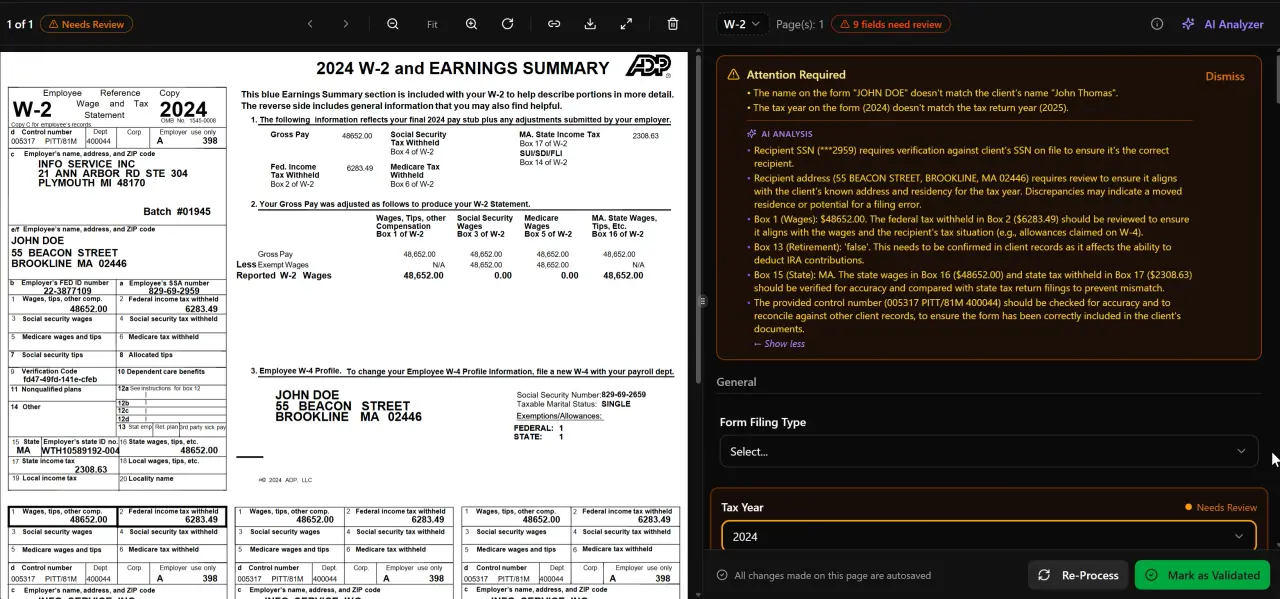
AI classifies, extracts, and validates every document automatically
Tired of paying more every time you add a team member?
TaxScout is flat-fee for unlimited team members — 150 returns on the Solo plan, 500 on Firm, with AI extraction and research agents included. Each of these factors directly shapes how filed alternatives plays out in practice.
Pricing Model Comparison Across Filed Alternatives
Pricing structure is the first filter most firm owners apply, because it determines whether software costs scale with revenue or with headcount. Here is what the registry shows for each platform as of the dates noted.
TaxScout charges a flat rate per firm with unlimited team members: $49/month (no commitment) or $470/year prepaid on the Solo plan (150 return credits per term, $4 per extra return), and $149/month or $1,430/year prepaid on the Firm plan (500 return credits per term, $4 per extra return). Solo and Firm plans are identical in features; they differ only in return credits, storage, and support level.
TaxDome was not independently verified; when last read on 2026-07-31, its pricing was listed at $800–$1,200 per seat per year on a one-year term, and its entry plan (Essentials) was limited to a single team member. Canopy lists $74/user/mo billed annually, as of 2026-11-22, with tax workflow automation (Smart Intake and Delivery) adding a separate fee of $34 per client per year beyond the five included. Karbon lists $59/user/mo billed annually, as of 2026-11-22. SurePrep is quote-based and billed per return per product; the last published list from May 2024 showed $13 per return for 1040SCAN ORGANIZE and $40 per return for PRO, plus a CCH Axcess API fee of $0.33–$3.95 per return.
For a firm with five preparers, Canopy and Karbon both carry a meaningful per-seat multiple that TaxScout's flat structure avoids entirely. For other comparison resources across the practice management category, including TaxDome, Mango, and Practice CS, the same pricing analysis applies.

Click any extracted field to see its source highlighted on the original PDF
Filed alternatives: pricing and team structure at a glance (all figures from public sources with check dates as noted)
| Platform | Pricing Model | Team Members | AI Extraction |
|---|---|---|---|
| TaxScout Solo | $49/mo or $470/yr — 150 returns | Unlimited | 5-layer pipeline, all major doc classes |
| TaxScout Firm | $149/mo or $1,430/yr — 500 returns | Unlimited | 5-layer pipeline, all major doc classes |
| TaxDome | $800–$1,200/seat/yr (last read 2026-07-31; not independently verified) | Per seat; Essentials: 1 member only | AI extraction included; depth not published |
| Canopy | $74/user/mo billed annually (checked 2026-11-22) | Per seat | AI assistant (Coworker) in beta; intake automation add-on |
| Karbon | $59/user/mo billed annually (checked 2026-11-22) | Per seat | AI features present; extraction depth not published |
| Filed | Per user (public list price not independently verified) | Per seat | Document collection; extraction architecture not published |
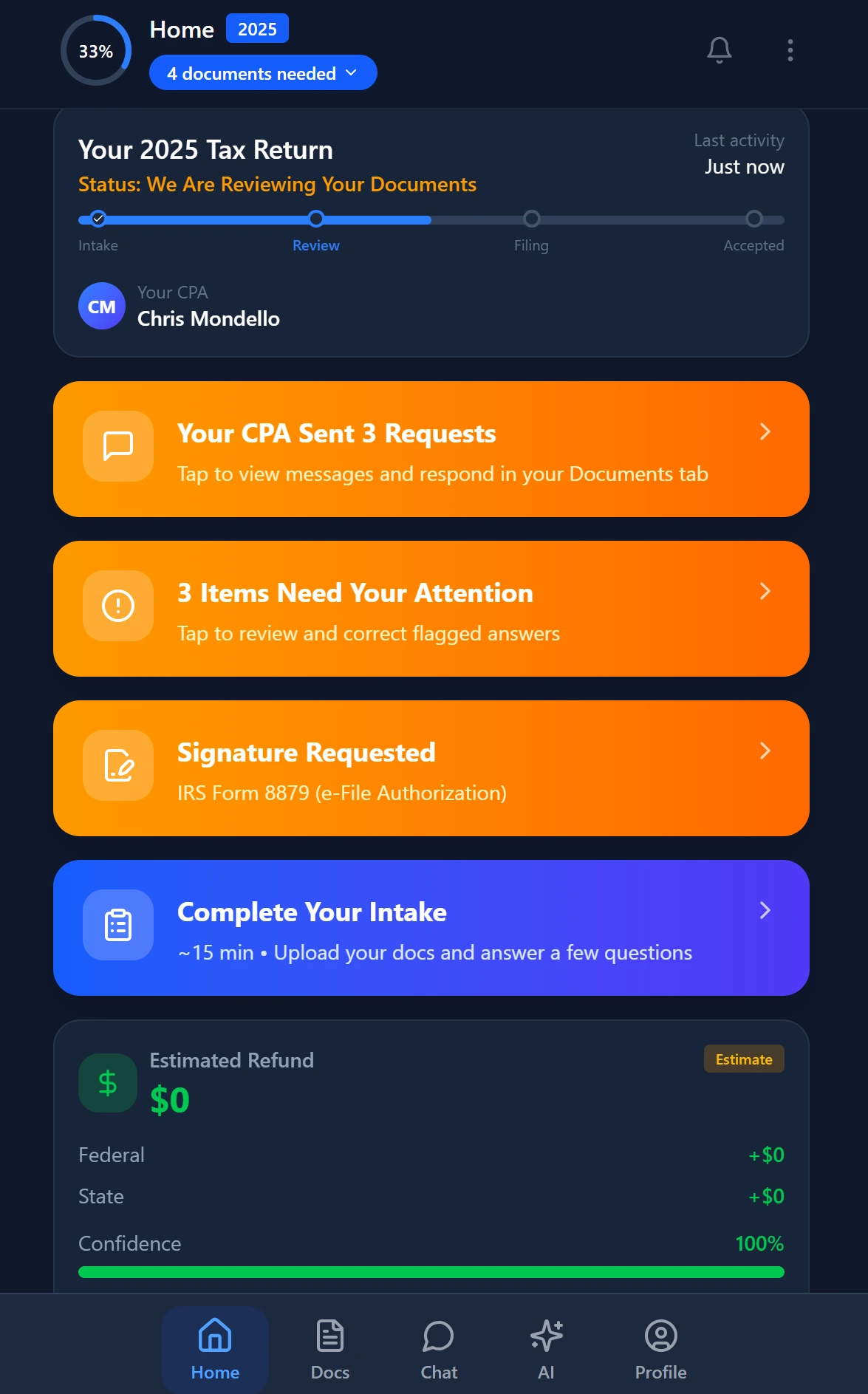
Smart intake auto-fills from uploaded documents and prior-year data
AI Document Processing Depth
AI extraction is where the filed alternatives diverge most sharply, and also where marketing language is least reliable. The meaningful test is not whether a platform uses AI — most now do — but how many validation layers stand between raw document ingestion and a reviewable field in the return.
TaxScout's AI document extraction runs a documented 5-layer validation pipeline: document quality routing, AI extraction with confidence scoring, OCR cross-verification, 15 deterministic math rules, 18 post-extraction rules, and cross-document validation. It processes recognized individual document classes including W-2s, the full 1099 series, K-1s, 1098 and 1095 series, 1040 schedules, and supporting records. The split-screen PDF viewer with click-to-source field highlighting lets a reviewer trace any extracted value back to the exact page and field in the source document — critical for professional liability.
Canopy launched its AI assistant (Coworker) in beta during 2026 and introduced Tax Workflow Automation, but has not published a comparable validation architecture. Karbon offers AI features focused primarily on workflow classification and email triage rather than deep return-level document extraction. TaxDome includes AI extraction in its platform but does not publish granular detail on validation layers.
For firms where document extraction errors create downstream liability — particularly those handling 1099 preparation or complex K-1 stacks — the depth of validation matters more than the presence of an AI badge on a marketing page.
AI Research Agents and Tax Intelligence
Beyond document extraction, TaxScout includes AI research agents that perform real-time searches across IRS.gov, Treasury, Cornell Law, SSA, and Congress. This is distinct from a static knowledge base: the agent retrieves current guidance rather than relying on training data that may predate recent IRS regulatory changes. The platform also maintains client-context AI memory — entity structures, filing history, and prior returns — so research answers are scoped to the actual client situation rather than a generic query.
Filed does not publish a comparable research agent capability. Canopy's Coworker assistant is in beta and focuses on workflow automation tasks. Karbon's AI features are oriented toward practice management operations rather than tax-law research.
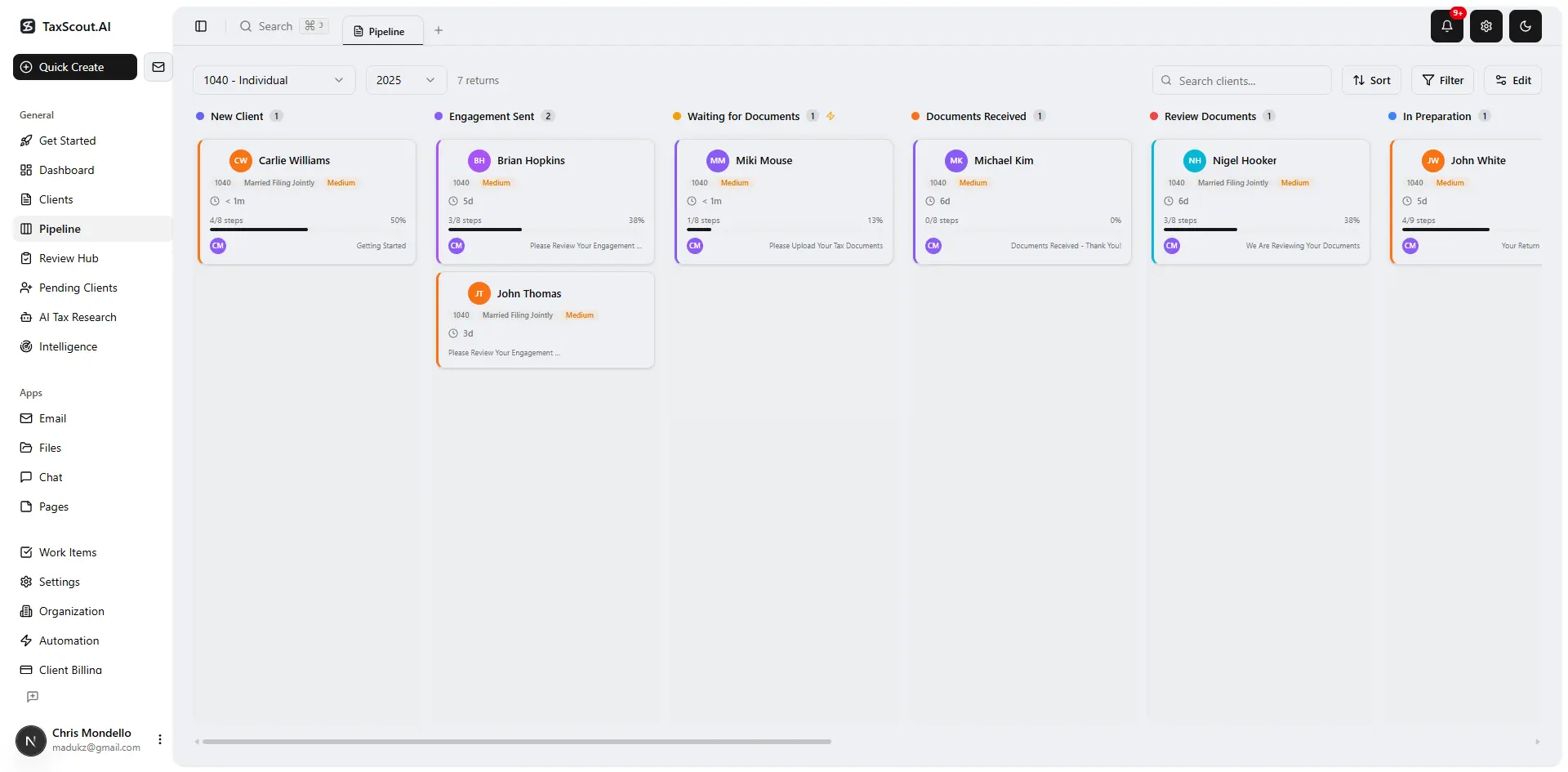
Track every return from intake to filed with drag-and-drop pipeline management
Review Workflow and Pipeline Management
A review workflow is only as useful as the pipeline stage system behind it. TaxScout's pipeline management offers 12 customizable stages with drag-and-drop kanban, a production funnel, and a deadline tracker. The review hub surfaces confidence scores from the extraction pipeline, so reviewers can prioritize fields flagged for low confidence rather than re-reading every line.
Karbon's workflow management is widely regarded as one of its strengths, with templates, automated reminders, and a clean visual pipeline. It is built for accounting practices broadly, not specifically for tax return production, so the connection between a document extraction event and a pipeline stage update is less direct. Canopy's Tax Workflow Automation, introduced in 2026, moves closer to a document-triggered pipeline — but it is priced as an add-on above the base per-seat fee.
TaxDome's workflow tools are mature and include automations that trigger on portal activity. The constraint is the per-seat pricing and, for Essentials subscribers, the single-member limit. Filed's workflow is task-based but does not appear to include AI-driven stage progression or extraction-linked review queues.
For a deeper look at how AI-native firms structure their production pipelines, see accounting project management practices for a framework that applies regardless of which platform you choose.
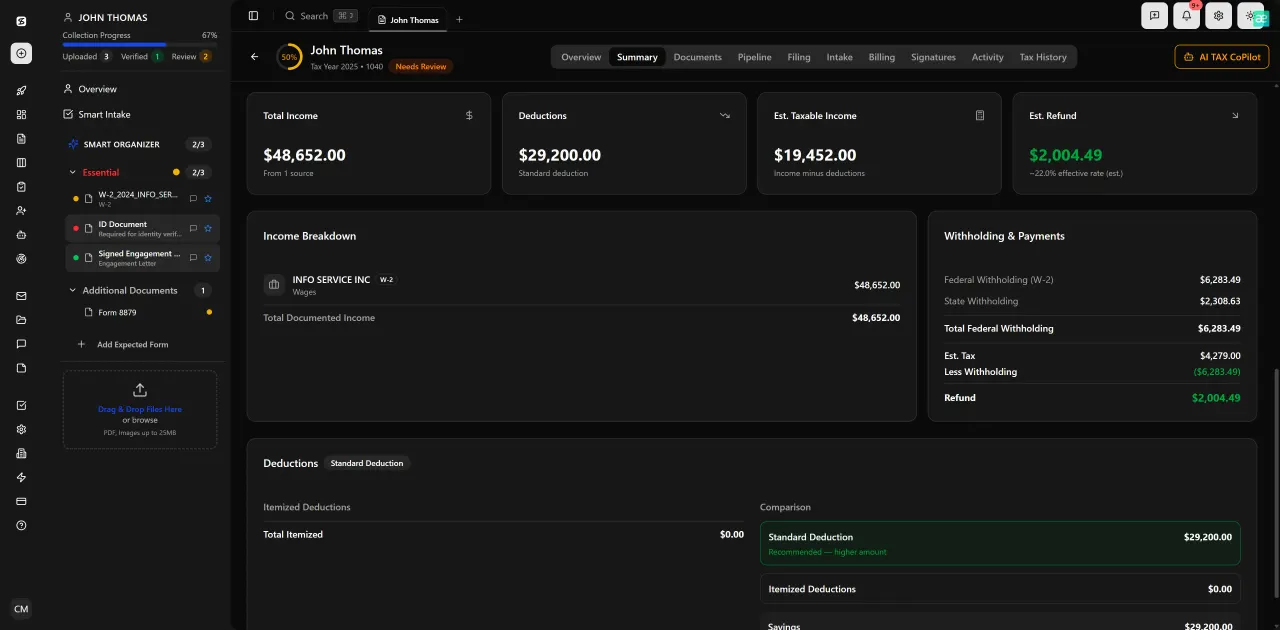
Review with AI assist — AI agents answer questions with full client context
Client Portal, Intake, and E-Signatures
Client-facing features are increasingly a differentiator because they affect not just operational efficiency but client perception of the firm's professionalism. TaxScout's client portal is branded per firm and uses OTP login (no passwords for clients), which eliminates the password-reset friction that generates support tickets at the start of every tax season.
The AI intake engine is modeled on IRS Form 13614-C and uses a 4-layer prefill sequence: document-first, prior-year data, profile data, and AI gap analysis. That means a returning client's intake form arrives largely prefilled, and the AI flags only the fields where data is missing or inconsistent with prior-year patterns. This reduces client burden and reduces the number of back-and-forth messages before a return can be opened.
E-signatures on TaxScout are delivered via Documenso and cover Form 8879, Form 4868, FBAR, engagement letters, W-9s, and state-level signature documents. Invoicing runs through Stripe Connect Express. Both are native to the platform — no third-party subscription required. For firms evaluating e-signature workflows specifically, the breadth of supported document types is worth confirming against your current mix.
Canopy and TaxDome both offer client portals with e-signature capability; TaxDome's portal is a recognized strength of the platform. Karbon's portal functionality is less developed relative to its workflow tools. Filed offers document collection but its e-signature coverage is limited compared to the alternatives reviewed here.

Your clients see your brand — OTP login, document upload, and real-time status
Migration Effort and Integration With Existing Tax Software
Migration cost is frequently the reason firms delay a switch even after they've identified a better platform. The key variables are: how many client records and prior-year PDFs need to move, whether your e-sign provider exports completed documents in a portable format, and whether your tax preparation software is natively supported by the new platform.
TaxScout is designed to work alongside Drake, CCH Axcess, UltraTax CS, Lacerte, ProConnect, and ProSeries rather than replace them. That scope boundary is significant: the firm keeps its existing tax prep investment and replaces only the practice management layer. The migration surface is therefore limited to client records, documents, and engagement history — not return data.
TaxDome, Canopy, and Karbon take a similar approach of integrating with existing tax prep software rather than replacing it. The migration question for all these platforms is primarily about document and contact data portability from Filed. Filed does not publish an open export API, so firms should confirm before switching what export formats are available for client records and completed documents.
The switching cost is real but manageable for most practices. The new accounting client checklist guide covers the data hygiene steps that make a migration faster regardless of which platform you're moving to, and the SurePrep alternatives guide addresses firms that are also evaluating their document processing layer separately.

Every client gets organized documents, status tracking, and a complete history
Who Should Stay With Filed
A fair comparison requires saying who the incumbent serves well. Filed is a reasonable fit for a solo practitioner — the IRS defines this as a one-person practice — who handles a moderate volume of individual returns, doesn't need deep AI extraction validation, and wants a low-friction entry point without committing to an annual contract or learning a more complex platform.
If your client base is primarily straightforward W-2 filers, your team is one or two people, and you are not yet offering advisory services or subscription billing, Filed's simplicity may outweigh its capability gaps. The calculus changes when you add your third preparer, take on your first complex partnership return, or start losing clients to firms with branded portals and instant e-sign capability.
For practices already operating at that inflection point — or planning to reach it within 12 months — the filed alternatives evaluated here offer materially stronger foundations for the next stage of growth.
Ready to see how TaxScout stacks up against Filed for your specific firm size?
Flat pricing, unlimited team members, 5-layer AI extraction, and a branded client portal — available on a free trial with no commitment required.
Sources
- IRS Federal Tax Return Preparer Directory

Track firm performance with real-time analytics and client activity monitoring
Ready to try TaxScout.ai?
Free migration assistance. White-glove onboarding included.
Request Early Access