Payroll Services CPA Firm: How to Build a Profitable Service Line
Payroll is one of the highest-retention, recurring-revenue service lines a CPA firm can offer — yet most firms undercharge, underprotect, and underautomate it. This playbook covers how to price managed payroll services, build a compliant workflow, and eliminate deadline-miss risk by consolidating…
Building a payroll services CPA firm practice sounds straightforward until the first penalty notice arrives. Payroll is deadline-dense — federal 941 deposits, state withholding remittances, quarterly filings, W-2 production — and one missed due date can trigger IRS Failure to Deposit penalties that immediately erode the profitability of an engagement you spent months winning. Despite this, payroll services represent one of the most reliable recurring-revenue opportunities in public accounting, with median monthly retainers that compound year over year as client headcount grows.
For firms already offering tax preparation and advisory work, managed payroll is a natural adjacency. Your clients need it, they trust you, and — critically — payroll data feeds directly into year-end tax planning, estimated payment calculations, and entity strategy work. The challenge is not whether to offer payroll services at your CPA firm, but how to structure the service so that it is profitable, scalable, and protected from the compliance liability that causes most firms to either underprice it or walk away from it entirely. A payroll services CPA firm is uniquely positioned to capture this adjacency because the same client relationship and financial data already exist within the engagement.
This guide covers the full build: how to price accounting firm payroll services using margin-aware models, how to construct a payroll workflow automation stack that runs without manual chasing, what engagement letter clauses actually protect you, and why consolidating payroll deadlines inside your practice management platform — rather than toggling between a payroll processor and a disconnected project tool — is the operational move that separates high-margin payroll practices from break-even ones. Whether you are building from scratch or refining an existing offering, structuring your practice as a true payroll services CPA firm means aligning your pricing, technology, and compliance safeguards into one cohesive service model.
Why Payroll Is the Stickiest Service Line in Public Accounting
Attrition in payroll engagements is structurally lower than in tax-only relationships. A client who trusts you with payroll processing is far less likely to respond to a competitor's price pitch — switching payroll providers mid-year creates IRS reconciliation complexity, mid-year state account transitions, and employee disruption that most business owners are not willing to absorb. According to Bureau of Labor Statistics data on small employer turnover, payroll errors and untimely payment rank among the top causes of employee dissatisfaction — a fact clients understand intuitively. Clients who consolidate their payroll and tax work with a single payroll services CPA firm develop a dependency that is genuinely difficult for a transactional payroll vendor to displace.
From a revenue-per-client standpoint, managed payroll accounting firm engagements typically carry a monthly retainer structure. A 10-employee client running bi-weekly payroll might generate $250–$450 per month at market rates, plus setup fees, W-2 production fees at year-end, and incremental charges for off-cycle runs. At 30 payroll clients, that translates to $90,000–$162,000 in recurring annual revenue — before any upsells into HR advisory, benefits administration coordination, or fractional CFO services that payroll data naturally supports. For firms evaluating their payroll services CPA firm approach, this trade-off compounds over time.
The cross-sell value is equally compelling. Payroll data informs reasonable compensation analysis for S-corporation shareholders, self-employment tax optimization for sole proprietors converting to S-corps, and payroll tax credit identification — particularly Section 45B tip credits, WOTC, and R&D payroll tax offset elections under IRC §41(h). Firms that treat payroll as an isolated data-entry service leave this advisory revenue on the table. Firms that integrate payroll into their broader advisory services offering extract significantly more lifetime value per client. Each of these factors directly shapes how a payroll services CPA firm structures its engagements and long-term client relationships.

Track every return from intake to filed with drag-and-drop pipeline management
Payroll Service Pricing Models for CPA Firms
Most accounting firms default to cost-plus pricing for payroll — they estimate hours, apply a billing rate, and land on a number that undervalues the liability they are absorbing. A more defensible approach uses value-based pricing anchored to the compliance risk the firm manages, not the time it takes to process a paycheck. Understanding how a payroll services CPA firm should price its services is what separates firms that scale from those that stall.
The three models that work at scale for accounting firm payroll services are as follows. First, tiered flat-fee retainers segmented by employee count — for example, $150/month for 1–5 employees, $250/month for 6–15, $400/month for 16–30, with custom pricing above 30. This structure is easy to communicate, easy to invoice, and reduces scope creep arguments. Second, base-plus-variable pricing: a base monthly fee covering standard bi-weekly or semi-monthly runs, plus per-employee or per-run charges for off-cycle payrolls and contractor 1099 runs. This model protects margin as client complexity increases. Third, bundled advisory pricing that folds payroll into a broader monthly retainer covering bookkeeping, payroll, quarterly estimated taxes, and strategic review calls — the model increasingly favored by firms scaling from solo to multi-partner practices. Any payroll services CPA firm pursuing this bundled approach benefits from presenting a unified service menu that clients can evaluate holistically rather than line by line.
Regardless of model, add-on fees should be itemized in your engagement letter and quoted upfront: W-2/W-3 production ($75–$150 flat), year-end 940 reconciliation, new hire reporting, garnishment processing, multi-state payroll surcharges, and amended return preparation if an error occurs. Transparency on add-ons is not just good service design — it is a key element of the liability containment framework discussed in the next section. You can automate recurring payroll invoices directly through TaxScout's invoicing tools powered by Stripe Connect Express, so retainer billing runs without manual intervention every month. For a payroll services CPA firm billing dozens of clients on recurring schedules, that automation alone recovers meaningful hours each billing cycle.
Tired of payroll deadlines scattered across Gusto, your calendar, and a disconnected project tool? When firms revisit their payroll services CPA firm priorities, the gaps usually surface here.
TaxScout unifies payroll workflow, client approvals, e-signatures, and billing in one AI-native platform — no per-user fees, unlimited clients.
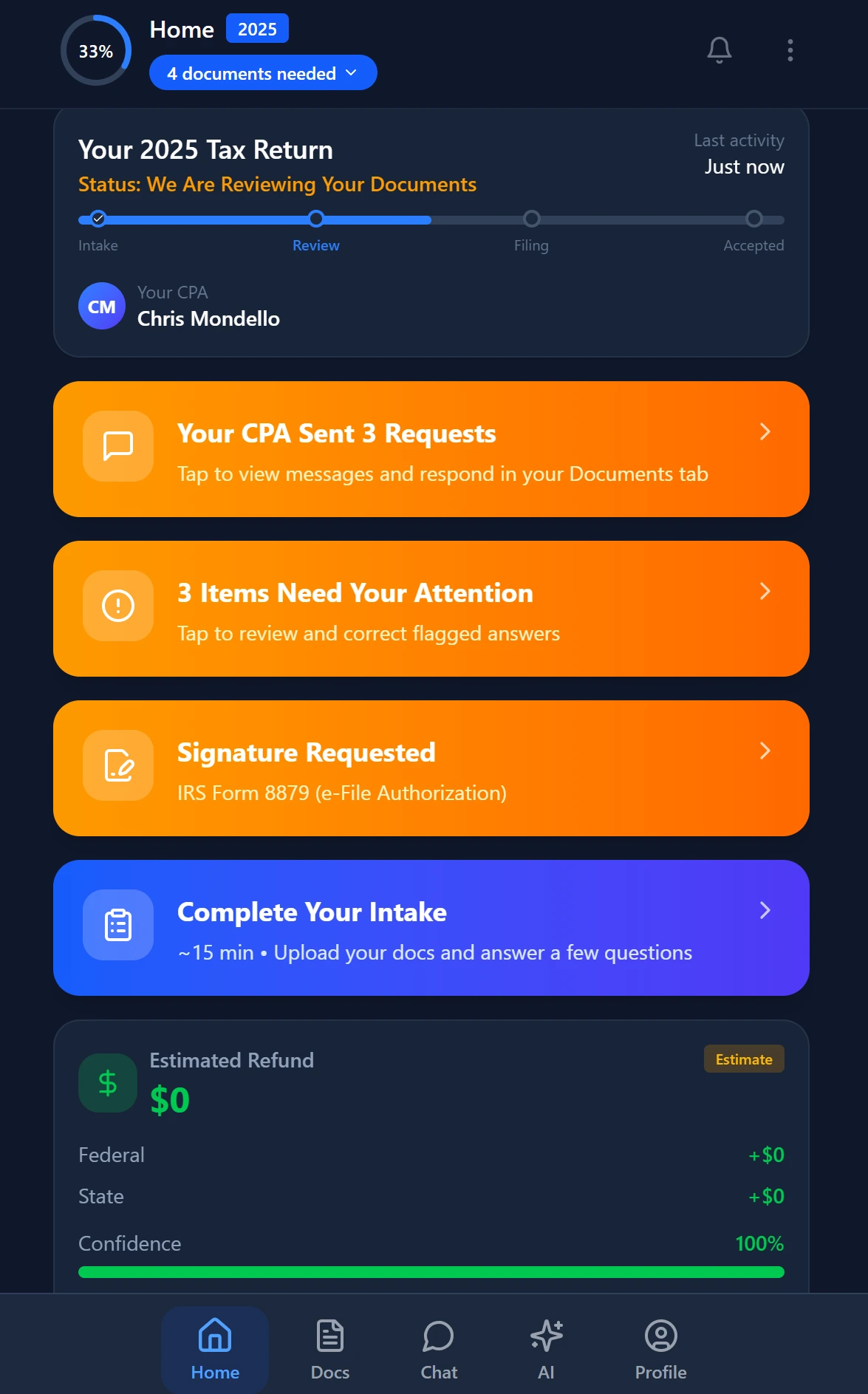
Smart intake auto-fills from uploaded documents and prior-year data

Your clients see your brand — OTP login, document upload, and real-time status
Compliance Risk Management and Engagement Letter Clauses
The single largest reason CPA firms either refuse to offer payroll services or chronically underprice them is unquantified liability exposure. When a payroll services CPA firm processes payroll for a client, the division of responsibility for accuracy, timeliness, and funding must be spelled out in writing before the first paycheck runs. Vague or absent engagement letter language is how firms absorb penalties that should belong to the client.
Your payroll engagement letter should explicitly state: (1) which party is responsible for funding the payroll account and on what timeline before each run; (2) that the firm's processing obligation is contingent on receiving approved payroll data by a specified cutoff (typically 2–3 business days before the pay date); (3) that the firm bears no responsibility for penalties arising from the client's failure to fund, late data submission, or unreported changes in employee status; and (4) the firm's error resolution procedure, including whether the firm carries professional liability insurance covering payroll processing errors and the limit of indemnification. The Journal of Accountancy regularly publishes guidance on engagement letter best practices for expanded service lines — firms should review those resources annually as IRS enforcement priorities shift.
On the technology side, compliance risk management in payroll workflow automation requires deadline visibility at the pipeline level, not just the payroll processor level. When a payroll run deadline is only visible inside Gusto, it is invisible to everyone managing firm capacity in your project tool. That invisible deadline is where errors happen. The architectural solution — integrating payroll deadlines into your pipeline management system — is covered in the next section. For e-signature enforcement on engagement letters and approval forms, TaxScout's e-signatures feature covers payroll engagement letters alongside Form 8879s and FBAR authorizations so nothing moves forward without a documented approval trail.
Building a Payroll Workflow Automation Stack
Payroll workflow automation for a CPA firm is not about replacing the payroll processor — Gusto, ADP, Paychex, and similar platforms handle the actual computation, tax table maintenance, and direct deposit rails. What you are automating is the firm-side orchestration: data collection from clients, internal review and approval, payroll submission, client confirmation, and post-run reconciliation. That orchestration layer is where most firms bleed time and incur deadline risk.
A well-structured payroll workflow has five recurring stages per pay period: (1) data request — automated outreach to the client collecting hours, salaries, changes, and one-time items; (2) client submission — the client uploads or enters data through a secure channel; (3) internal review — a staff-level preparer verifies completeness against the prior run and flags exceptions; (4) approval — the responsible partner or manager reviews and approves the run; (5) submission and confirmation — the payroll is submitted to the processor and a confirmation is logged and stored. Each stage needs a deadline, an owner, and an automated escalation path if it stalls.
The tools that deliver this without per-user pricing penalties matter enormously for profitability. Karbon's recently announced Gusto integration auto-creates work items with synced due dates — a step forward, but it still runs on Karbon's per-user pricing model of approximately $59 per user per month. For a 10-person firm running payroll for 40 clients, that cost structure erodes the margin that payroll services are supposed to generate. TaxScout's pipeline management with 12 customizable stages and drag-and-drop kanban handles the same orchestration on a flat fee: $149 per month for up to 10 seats and 500 returns, with no per-user increment as your team grows. For deeper context on how to eliminate workflow bottlenecks firm-wide, the CPA firm workflow automation guide walks through the full methodology.
Integrating Payroll Deadlines With Tax and Advisory Deadlines
The biggest operational failure mode in accounting firm payroll services is deadline fragmentation. Tax deadlines live in one system, payroll run dates in another, quarterly 941 filing deadlines in a third, and state withholding remittance dates in a spreadsheet someone maintains manually. The result is that no single team member — and no manager — has a complete picture of what is due this week across all service lines.
An AI-native practice management platform addresses this by treating payroll milestones as first-class pipeline items alongside tax and advisory work. In TaxScout, a payroll engagement can occupy its own pipeline stage column — with recurring tasks auto-generated at the cadence of the client's pay schedule, deadline alerts surfaced in the production funnel, and capacity load visible to whoever manages staffing. When a quarterly IRS deadline and a semi-monthly payroll run fall in the same week, the system shows the collision rather than hiding it until someone misses something. For a payroll services CPA firm managing multiple clients with overlapping pay schedules, this unified visibility is the difference between proactive staffing and reactive scrambling.
Client Data Collection and the Intake Advantage
The most time-consuming part of each payroll cycle for most firms is chasing clients for hours, changes, and approvals. TaxScout's AI intake engine, modeled on IRS Form 13614-C with four-layer prefill, can be configured for payroll data collection — pre-populating recurring items from the prior period and surfacing only exceptions and changes for client input. Combined with the branded client portal with OTP login (no passwords for clients to manage), the data collection step becomes a two-minute client task rather than a back-and-forth email thread.
For firms concerned about document security during payroll data exchange — particularly when handling pay stubs, employee SSNs, and bank account information — TaxScout's AES-256-GCM encrypted SSN vault and 7-role RBAC ensure that payroll documents are accessible only to authorized staff. This is a material compliance advantage over email-based payroll data collection, which remains surprisingly common even in 2026.
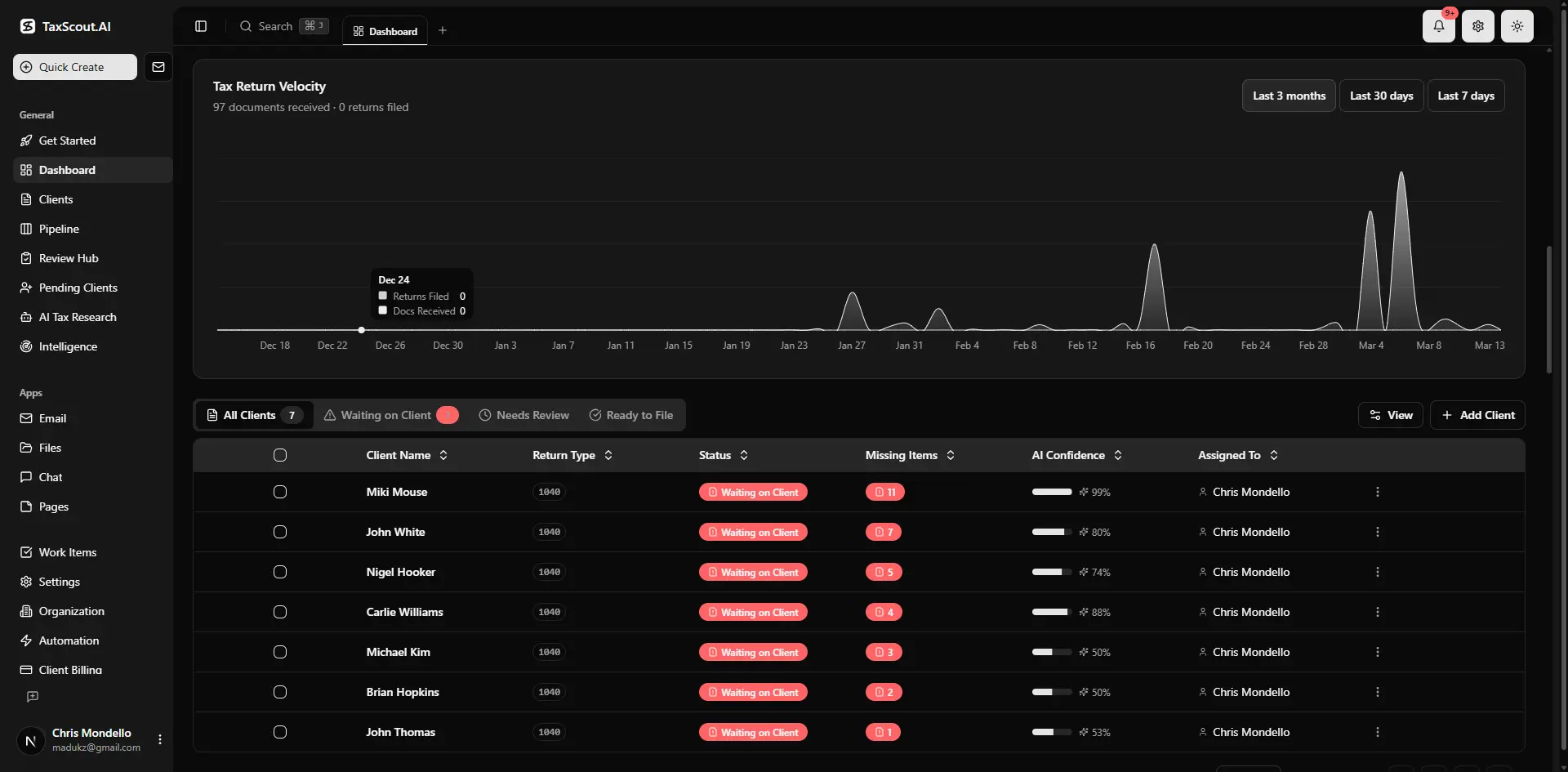
Real-time dashboard showing returns in progress, revenue, and upcoming deadlines
Payroll workflow management capability comparison for a 10-person CPA firm
| Capability | TaxScout Prep Pro ($149/mo) | Karbon ($590/mo) | Canopy (~$660/mo) |
|---|---|---|---|
| Flat pricing, no per-user fees | Yes | No — ~$59/user/mo | No — ~$45/user/mo per module |
| Payroll deadline in unified pipeline | Yes — 12 customizable stages | Partial — Gusto beta integration | No native payroll workflow |
| AI document extraction for payroll docs | Yes — 180+ form types | No | No |
| Branded client portal (OTP login) | Yes | No | Yes (add-on cost) |
| E-signatures for payroll engagement letters | Yes — via Documenso | No | Yes |
| Automated recurring invoicing | Yes — Stripe Connect Express | No | Yes |
| 9 AI research agents for payroll tax research | Yes | No | No |
| SSN vault and RBAC for payroll data | Yes — AES-256-GCM | No | No |
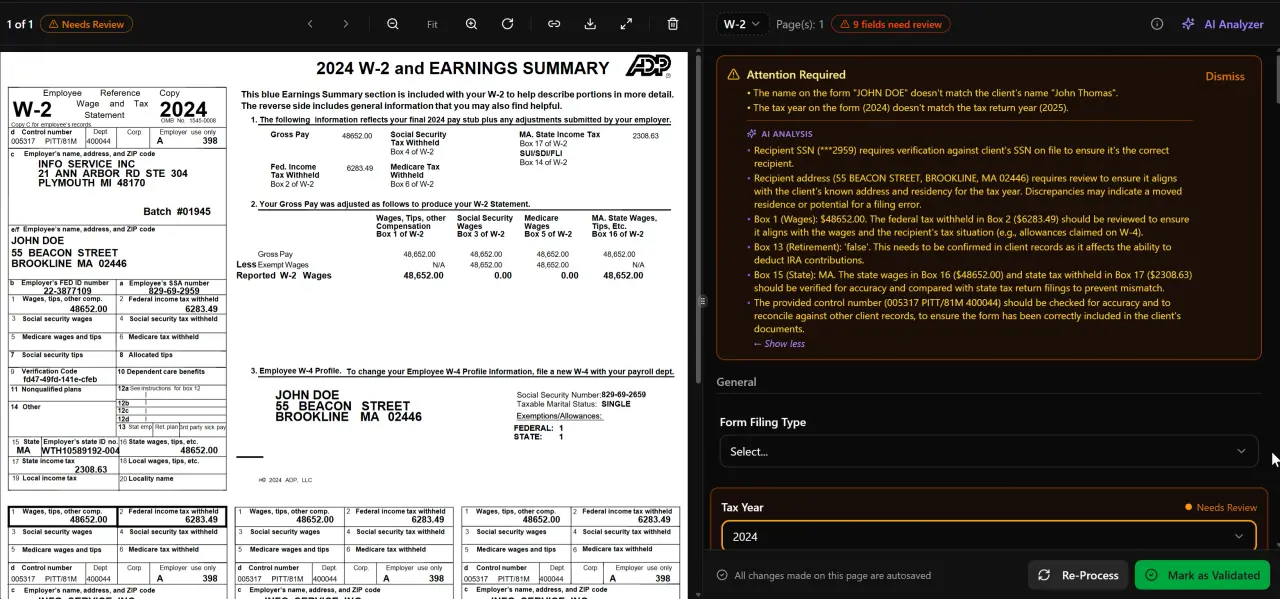
AI classifies, extracts, and validates every document automatically
How AI Research Agents Support Payroll Tax Compliance
Payroll tax questions are not simple. State withholding nexus for remote employees, withholding reciprocity agreements between states, unemployment tax account registration timelines, tip credit mechanics, and qualified sick and family leave credit calculations under the American Rescue Plan all require real research — not a quick Google search. For a payroll services CPA firm managing payroll across 30 clients with varying industry mixes and employee footprints, these questions arise multiple times per quarter.
TaxScout's 9 specialized AI research agents perform real-time searches across IRS, Treasury, Cornell Law, SSA, and congressional sources to answer payroll tax questions with cited authority. Rather than spending 45 minutes on IRS.gov tracing a withholding ruling, a staff member can query the agent, receive a cited answer, and document the research in the client file. This is particularly valuable for state-level payroll tax questions — for example, California's unique SDI treatment or New York's paid family leave premium calculations — where state-specific compliance changes frequently and the consequences of an error are immediate.
The regulatory intelligence feature also monitors IRS and Treasury publications for payroll-relevant updates — employment tax deposit rule changes, penalty relief announcements, and new Form 941 instructions — so your firm is alerted to compliance changes before they affect a client filing rather than after. This is the kind of proactive risk management that justifies premium pricing for managed payroll accounting firm engagements and differentiates a payroll services CPA firm from payroll-only processors who have no advisory relationship with the client.
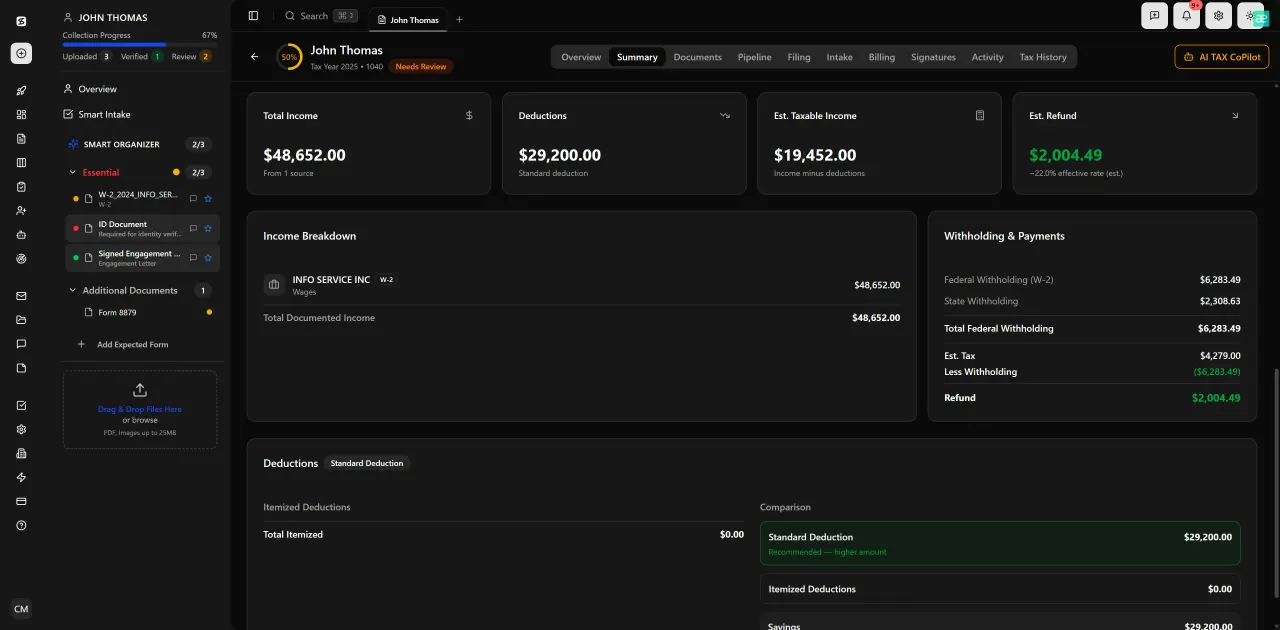
Review with AI assist — 9 agents answer questions with full client context
Scaling Payroll Services Without Adding Headcount
The constraint most firms hit at 20–30 payroll clients is not technical — it is human. Each new client adds recurring touchpoints, data chase cycles, and deadline obligations that, without automation, translate directly into staff hours. The firms that scale payroll services past 50 clients without proportional headcount growth do so by systematizing the repeatable steps and reserving human attention for exceptions.
In practice, this means: automated client data requests generated by the pipeline on a recurring schedule keyed to each client's pay frequency; AI-assisted exception flagging that highlights payroll changes above a threshold (a sudden 40% salary increase, a new employee with a missing SSN, a garnishment not reflected in the prior setup); and auto-generated invoices that bill the retainer on the first of the month without manual intervention. For recurring billing automation, the approach described in the recurring invoicing guide applies directly to payroll retainer billing.
Capacity planning becomes quantifiable when payroll deadlines are in the same pipeline as tax work. If you can see that three payroll clients have biweekly runs due the same week as a batch of amended returns, you can staff or defer proactively rather than reactively. TaxScout's dashboard surfaces production funnel data and deadline tracking across all service lines simultaneously, giving managing partners the visibility to make those calls before a deadline is in jeopardy. Capacity planning for accounting firms is one of the highest-leverage operational investments a growing firm can make — and for a payroll services CPA firm, it is one of the clearest use cases for why unified deadline visibility pays for itself.

Click any extracted field to see its source highlighted on the original PDF
What Karbon's Gusto Integration Gets Right and What It Misses
Karbon's April 2026 announcement of a Gusto partnership is a genuine improvement for firms already on both platforms. Auto-creating payroll work items in Karbon with synced Gusto due dates reduces the manual entry burden and surfaces payroll alongside other work in a firm's task view. That is a real problem being partially solved.
What the integration does not address is the cost structure. Karbon's per-user pricing model means a 10-person firm pays approximately $590 per month — nearly four times TaxScout Prep Pro's flat $149 — before accounting for the cost of Gusto itself. For a 5-person firm, the math is still unfavorable: approximately $295 per month for Karbon alone versus $49–$149 for TaxScout depending on volume tier. When payroll services are supposed to add margin to a practice, paying nearly $600 per month for the practice management layer alone is a structural drag on that goal.
More substantively, Karbon's integration does not include AI document extraction, an SSN vault, AI research agents for payroll tax questions, or a client portal with OTP authentication for payroll data collection. It brings Gusto deadlines into a project view — which is useful — but it does not unify the payroll client relationship the way a platform built around the full client lifecycle does. For firms evaluating their payroll software CPA stack holistically, the question is not just 'does my PM tool show payroll deadlines?' but 'does my PM tool handle client intake, document security, compliance research, e-signatures, and billing for payroll clients without requiring five additional subscriptions?' A payroll services CPA firm asking that question honestly will find the answer points toward a more integrated platform than Karbon's current offering provides.
Ready to launch or scale payroll services without adding per-user software costs for every new hire?
TaxScout Prep Pro gives you unlimited clients, 10 seats, AI-powered payroll workflow automation, and a branded client portal — all for $149 per month flat.
Frequently Asked Questions
Most CPA firms price managed payroll services using tiered flat-fee retainers based on employee count — typically $150–$450 per month depending on headcount and payroll frequency — plus setup fees and add-ons for W-2 production, off-cycle runs, and multi-state surcharges. Value-based pricing that reflects the compliance liability the firm absorbs tends to be more profitable than cost-plus hour-based models. Bundling payroll into a broader monthly retainer with bookkeeping and quarterly advisory services is increasingly common for firms focused on recurring-revenue growth.
Keep reading
Stay up to date
Get the latest tax tech insights delivered to your inbox.