Automate Tax Client Intake Without Missing Key Details
Most tax organizers fail before a client ever opens them — too long, too generic, and asking questions the preparer already knows. This guide covers what intake must capture before work can begin, why prefill from prior-year returns is powerful but limited, and where automation reliably breaks…
Every attempt to automate tax client intake runs into the same wall: the organizer that was supposed to save time becomes a 14-page PDF nobody finishes, and the preparer still ends up calling the client to ask about the rental property they sold in March. The goal of automation is not to replace judgment — it is to handle every question whose answer already exists or can be inferred, so that your team's attention lands only where it is genuinely needed.
The structure practitioners already recognise is IRS Form 13614-C, the Intake/Interview and Quality Review Sheet used across Volunteer Income Tax Assistance and Tax Counseling for the Elderly sites. It organises the conversation into logical blocks — filing status, income sources, deductions, credits, life events — and its sequencing is not accidental. It mirrors the way a skilled preparer thinks through a return before touching the software. Automating intake well means encoding that same logic into questions that appear only when relevant and answers that carry forward when they have not changed. Many firms looking to automate tax client intake use Form 13614-C as the blueprint for their digital questionnaires, since its logical structure translates well into conditional workflows.
This guide walks through what intake genuinely must capture, why the standard organizer format drives abandonment rates, how prefill from prior-year data shortens the form dramatically, and where even the best automation falls short — so your firm can place manual checkpoints in exactly the right spots. Whether you are just starting to automate tax client intake or refining an existing system, understanding where automation helps and where it falls short is essential to building a process clients will actually complete.
What Intake Must Capture Before a Preparer Can Start
Before a return can be opened in Drake, Lacerte, or any other tax software, the preparer needs answers to four categories of questions. First, identity and filing status: legal name, SSN or ITIN, date of birth, address, and the marital and dependency picture for the year. Second, income sources: every Form W-2, 1099 variant, K-1, and Schedule C revenue stream that touched the client during the tax year. Third, deductions and credits: mortgage interest, property tax, charitable contributions, education expenses, retirement contributions, healthcare coverage under the 1095 series, and any estimated payments made. Fourth, life events: marriage, divorce, birth or adoption, sale of a home, death of a dependent, starting or closing a business, or moving between states. To successfully automate tax client intake, your digital form must reliably capture all four of these question categories before the preparer ever opens the return.
That fourth category is where intake automation earns its keep or earns a malpractice claim. The IRS Publication 17 makes clear that filing status, dependency rules, and credit eligibility can shift entirely on the basis of a single life event during the year. A client who got married in November does not file the same return as the one your software predicted from last year's data. Intake must ask about changes, not just confirm continuations. For firms evaluating their automate tax client intake approach, this trade-off compounds over time.
The glossary entry for tax intake on this site covers the minimum data set in more detail, but the practical takeaway is this: a preparer who starts work before all four categories are resolved will hit a wall mid-return and generate a client phone call that costs more time than the organizer was supposed to save. Complete intake is not a nicety — it is the gate that controls whether preparation can proceed at all. Each of these factors directly shapes how automate tax client intake plays out in practice.
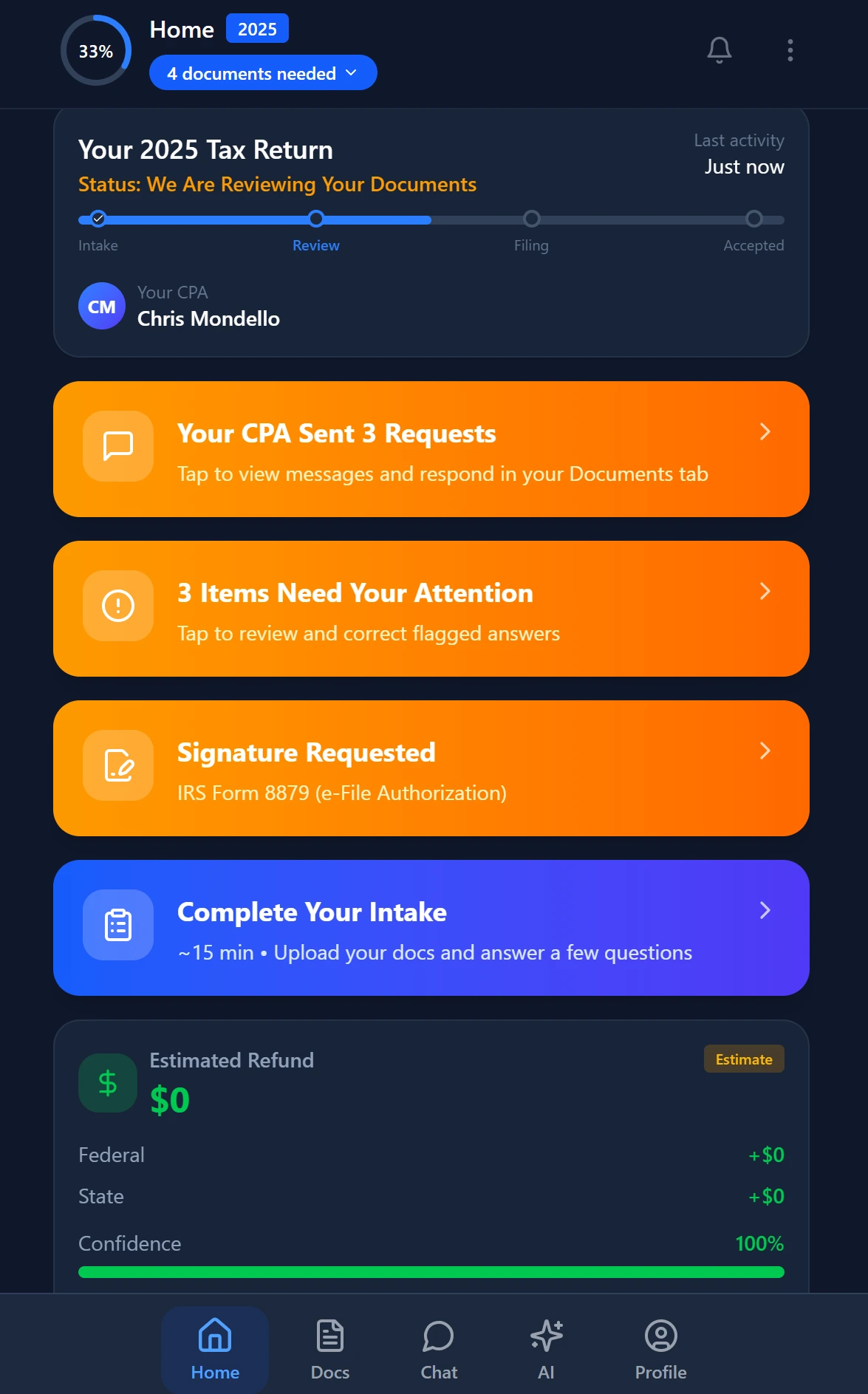
Smart intake auto-fills from uploaded documents and prior-year data
Why Tax Organizers Get Abandoned Before Completion
Tired of manual workflows slowing your firm down? See how TaxScout handles this with AI-powered automation. → Book a 15-Min Demo Understanding automate tax client intake in this context is what separates firms that scale from those that stall.
The abandonment problem is structural, not motivational. Traditional organizers are generated by tax software from prior-year data and sent as a static PDF or a flat web form. The client sees every question regardless of relevance: a single filer with no dependents, no real estate, and one W-2 still scrolls past pages about Schedule F farm income and passive activity losses. Length signals complexity, and complexity triggers avoidance. This is precisely where a deliberate automate tax client intake strategy pays off — firms that design their intake around conditional logic and prior-year prefill see dramatically higher completion rates than those relying on static organizers.
Research on form completion behaviour by Nielsen Norman Group and others consistently shows that form length is the single strongest predictor of abandonment in digital intake flows. A 40-question organizer that a CPA considers short still looks imposing to a client who just wants to get their taxes done. Every irrelevant question is a trust tax — the client starts to wonder whether the firm actually knows anything about their situation. Automate tax client intake sits at the center of this decision — get it wrong and the rest unravels.
The second structural problem is authentication friction. Sending a PDF by email requires the client to download it, fill it out, sign it, and send it back — a five-step process that breaks on mobile. Password-protected client portal logins add a password-reset cycle on top. Neither design respects how clients interact with digital services in 2025. The TaxScout client portal addresses this with OTP login — no passwords, no friction beyond entering a code the client already receives on their phone. When firms revisit their automate tax client intake priorities, the gaps usually surface here.
The third problem is that static organizers cannot respond to what the client reveals. If a client answers yes to selling a home, the next logical questions are about acquisition date, basis, improvements, and whether it qualifies for the Section 121 exclusion — not a question about foreign bank accounts. A flat form asks everything or nothing. Conditional logic that mirrors the IRS Form 13614-C structure routes clients through only the branches that apply to them, which can cut a 60-question organizer to 18 questions for a simple return.
Still chasing clients who abandoned their organizer halfway through?
TaxScout's smart intake engine is modeled on IRS Form 13614-C with 4-layer prefill, so clients answer only what has changed — and preparers start work with complete data.
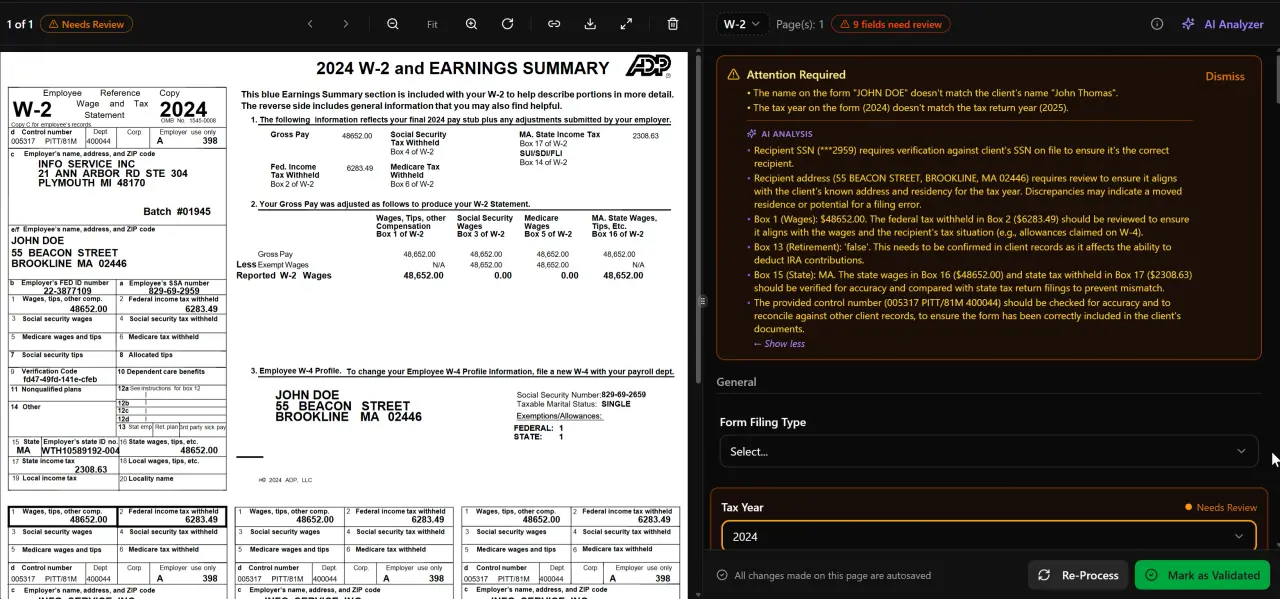
AI classifies, extracts, and validates every document automatically
Prefill from Prior-Year Returns and Its Real Limits
The most powerful lever in automating tax client intake is prior-year prefill. If the client had a W-2 from the same employer last year, the employer name, EIN, and state withholding fields can be pre-populated. If they claimed a home mortgage deduction, the lender and property address carry forward. If their filing status was Married Filing Jointly and no life-event flag fires, that status is the default proposal for this year. Done well, prefill can eliminate 60–70% of questions for a returning client. Firms that automate tax client intake with a prefill-first approach consistently report shorter completion times and fewer preparer follow-up calls.
TaxScout's smart intake engine implements a 4-layer prefill stack: document-first extraction from uploaded documents, prior-year return data, client profile fields, and an AI gap analysis that surfaces questions the first three layers cannot answer. The sequencing matters — document data takes precedence over prior-year assumptions because a new W-2 is more reliable than last year's W-2.
But prefill has hard limits that practitioners must understand before relying on it. First, it only knows what it has seen. A first-year client, a client who switches preparers, or a client whose prior returns were not uploaded has no baseline to draw from. Second, prefill cannot detect a change the client has not disclosed. If a client's employer changed its EIN due to an acquisition, the prefilled EIN is wrong and the client may not notice. Third — and most critically — prefill from prior-year returns creates a confirmation bias risk. Clients who see a pre-populated form tend to scan rather than read, which means a changed circumstance can slip through unchallenged. The solution is to flag prefilled fields visually and require the client to explicitly confirm or update each one, rather than treating silence as confirmation. Any firm seeking to automate tax client intake responsibly must build this confirmation step into the workflow from the start.
For a deeper look at how AI handles the document side of this problem, the AI document extraction guide covers the technical pipeline in detail. For other guide resources across TaxScout's content library, the full guide index is a useful starting point.

Your clients see your brand — OTP login, document upload, and real-time status
IRS Form 13614-C as the Structural Model
Form 13614-C is not a form most clients ever see, but it is the checklist every good preparer runs through mentally before starting a return. The IRS publishes it openly at irs.gov and updates it annually to reflect current law. Its value as a model for intake automation is that it organises the interview into logical dependency chains: you cannot answer the child tax credit question meaningfully until you have established that a qualifying child exists, and you cannot establish a qualifying child without confirming the dependency tests under IRC Section 152.
A smart intake engine that mirrors this structure asks questions in the same dependency order. Filing status comes before any credit questions. Income type comes before deduction type. Life events come early, because a single yes-answer to 'did your marital status change?' branches the entire remainder of the interview. This is not just UX design — it is how the underlying tax law is structured, and intake that ignores that structure will miss things that matter.
Practitioners who want to audit their current intake workflow against the 13614-C model should compare their question set against the form's four pages section by section. Common gaps include: Section 3 (income questions) that omit gambling winnings or jury duty pay; Section 4 (deductions) that skip educator expenses and student loan interest; and Section 5 (life events) that list only marriage and divorce but omit identity theft, disaster losses, and changes in health coverage. Each of those gaps is a potential missed deduction or unreported income item that surfaces during review rather than intake — at a point in the workflow where it costs far more to address. Firms that automate tax client intake using the 13614-C as their structural template close most of these gaps before a preparer ever touches the return.
Where Automated Intake Reliably Fails
Honest automation design means knowing where the system should hand off to a human. There are four categories where automated intake produces unreliable results often enough that a manual checkpoint is warranted.
Life events are the most consequential failure mode. A client who got divorced, lost a spouse, adopted a child, or received an inheritance during the year presents a materially different return than their prior-year data suggests. Automated systems can ask a yes/no life-event question, but they cannot probe the tax consequences of the event with the follow-up depth that a preparer would. A divorce that closed December 15 versus December 31 changes the filing status for the entire year. Adoption that finalized before year-end creates a dependency and potentially an adoption credit. These edge cases require practitioner judgment, not form logic.
Ambiguous residency is the second failure mode. A client who moved from California to Texas in April, or who maintains a domicile in one state while working in another, or who is a part-year resident of a state with unusual sourcing rules, cannot be handled by a dropdown that asks for current state. Multi-state returns require the preparer to understand domicile intent, days-in-state counts, and the specific rules of each state involved. The state tax nexus guide covers the complexity in detail — it is not something a client questionnaire can fully surface. The Social Security Administration's residency guidance adds another layer for clients receiving benefits across state lines.
First-year entities are the third failure mode. A client who formed an LLC or S-corporation during the year has no prior-year entity data to draw from, elections to consider (Section 475 mark-to-market, S-election timing, accounting method choices), and potentially a short-year return to file. Automated intake built on prior-year prefill has nothing to prefill for this client, and the generic entity questions that exist in most organizers are too shallow to capture the decisions that need to be made before the first return is prepared.
Cryptocurrency and digital asset transactions are the fourth. The IRS has required disclosure of digital asset activity on Form 1040 since 2019 and the reporting complexity — cost basis tracking, staking rewards, hard forks, DeFi transactions — exceeds what a checkbox can capture. Clients routinely underestimate how many taxable events occurred or cannot produce complete transaction history from exchanges. Intake can flag that digital asset activity occurred, but a preparer must follow up manually with a document request and a substantive conversation.
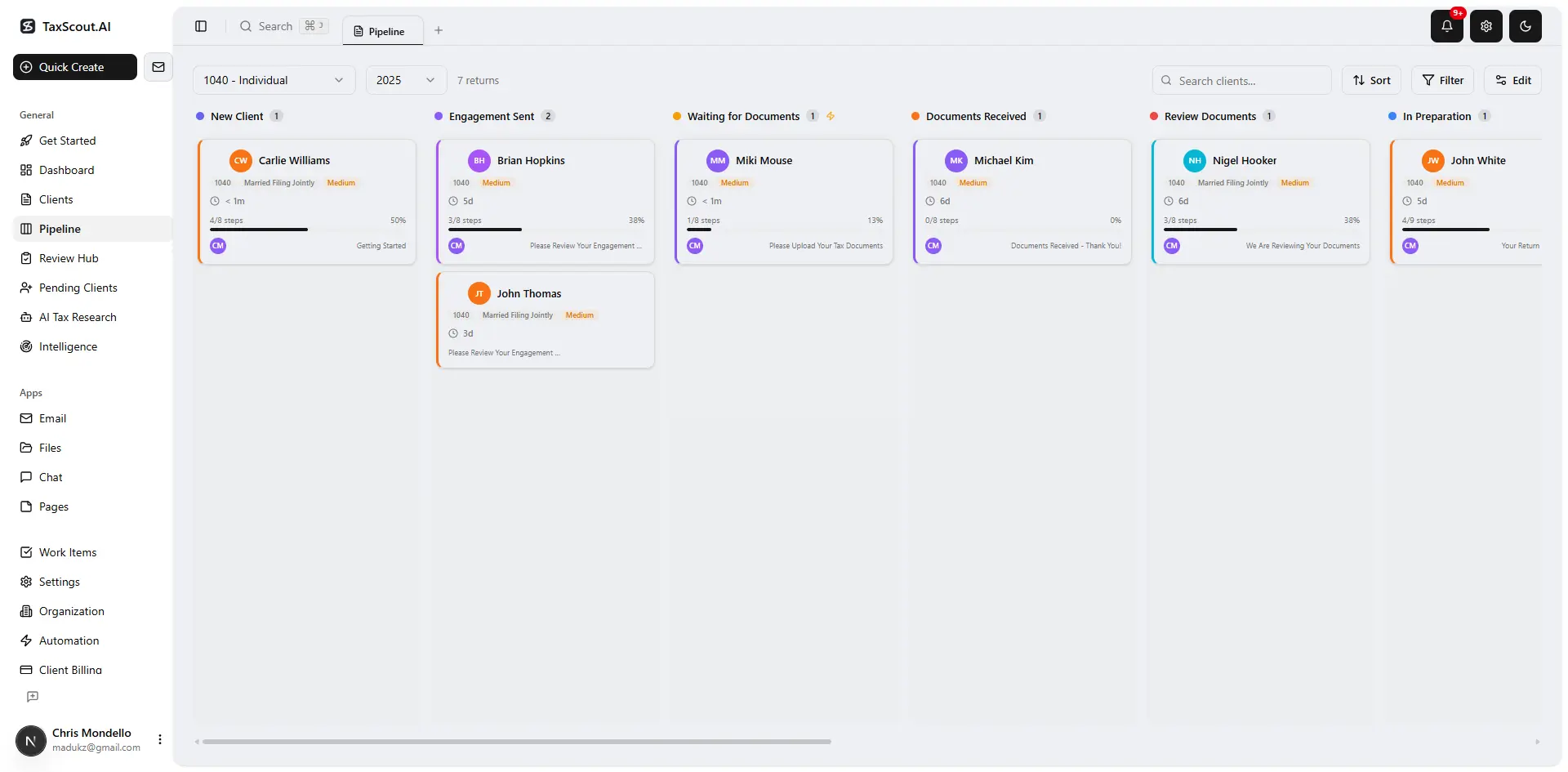
Track every return from intake to filed with drag-and-drop pipeline management

Click any extracted field to see its source highlighted on the original PDF
Building Safeguards Around Automation Gaps
Knowing where automation fails is only useful if it changes how the workflow is designed. The practical response is to add three types of safeguards at the intake stage rather than catching problems in review.
First, trigger-based follow-up questions. When a client answers yes to any life-event question, the system should not just note the yes — it should present a secondary question set specific to that event. Marriage triggers questions about the spouse's SSN, prior-year filing status, and whether either party has outstanding tax liabilities. Home sale triggers questions about holding period, primary residence use test, and basis documentation. These secondary sets are not complex to build, but they require a practitioner to author them rather than defaulting to a generic organizer template.
Second, mandatory document flags for high-risk returns. If the intake engine detects indicators of multi-state activity, a new entity, or digital asset transactions, it should automatically add those document requests to the client's checklist rather than waiting for the preparer to discover the gap. TaxScout's AI document extraction pipeline works across the recognized document classes — W-2, the 1099 series, K-1s, 1098 and 1095 series — and the file management tools support document-level status tracking so nothing slips through.
Third, a preparer review step before the return enters active preparation. Even a 60-second scan of completed intake data against the prior-year return summary catches the obvious mismatches: a W-2 employer that disappeared, a Schedule C that was not mentioned, a dependent who aged out. The pipeline management feature supports a dedicated intake-review stage that can be held until this step is complete. Making this a named stage rather than an informal check creates accountability and a paper trail. Firms that automate tax client intake and pair it with a structured preparer review step consistently catch more issues before preparation begins — and spend less time on mid-return corrections as a result.
For a complementary view of how a paperless intake workflow fits into broader firm operations, the paperless accounting firm guide covers the document and communication infrastructure that makes automated intake sustainable at scale.
How intake approaches compare across common practice management platforms
| Capability | TaxScout | TaxDome | Canopy |
|---|---|---|---|
| IRS 13614-C modeled question logic | Yes — 4-layer prefill, conditional branching | Static organizer templates | Static organizer templates |
| Prior-year prefill from documents | Yes — document-first, then profile, then AI gap | No AI prefill | No AI prefill |
| OTP login (no passwords) | Yes — branded portal, OTP only | Password-based portal | Password-based portal |
| AI gap analysis on incomplete intake | Yes — flags missing data before prep begins | Not available | Available as $11/client add-on |
| Life-event triggered follow-up questions | Yes — branching logic by event type | Not available | Not available |
| Pricing model | Flat — unlimited team members from $49/month | ~$100/user/month (verified March 2026) | ~$45/user/month per module (verified March 2026) |
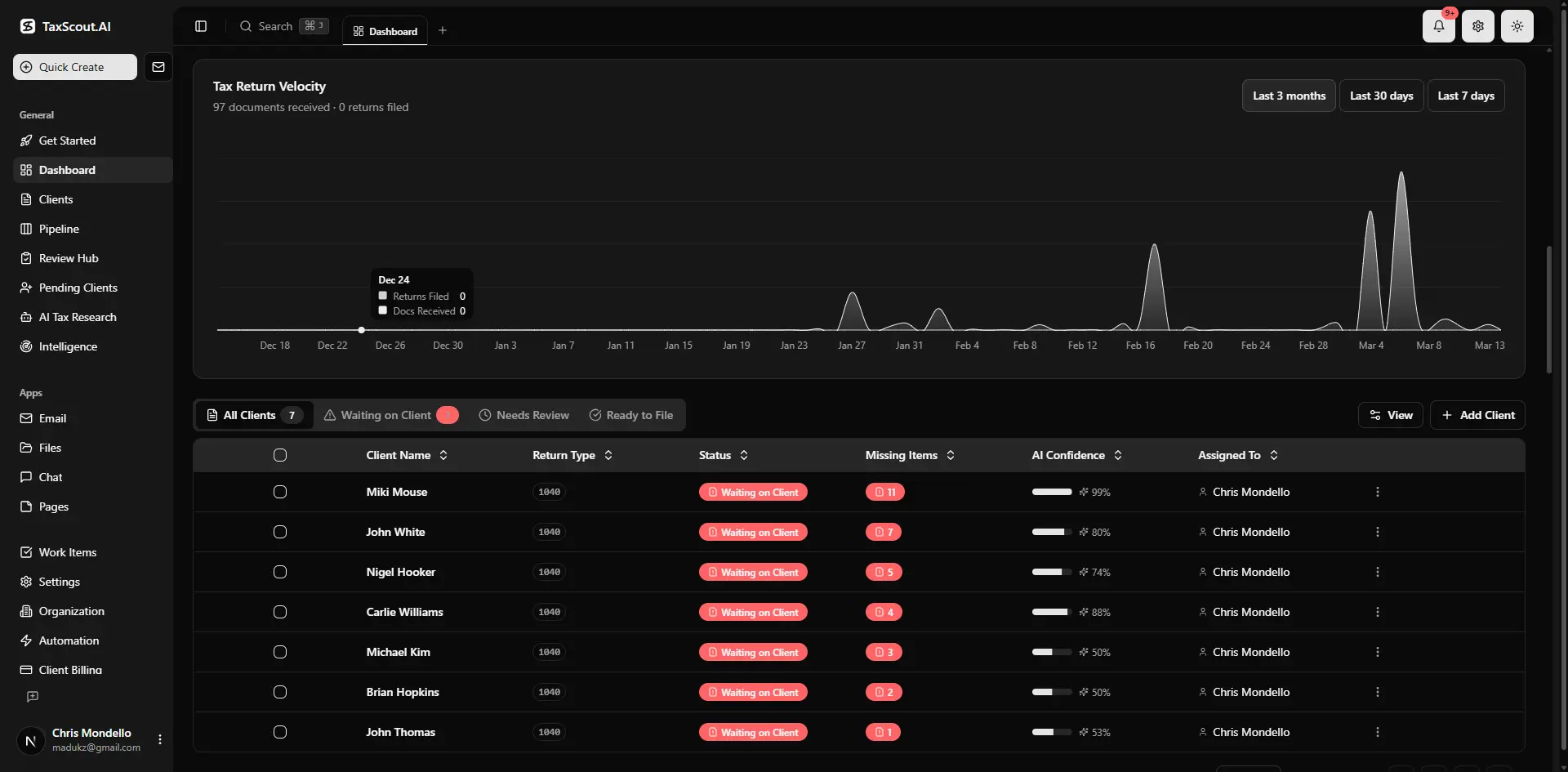
Real-time dashboard showing returns in progress, revenue, and upcoming deadlines
Connecting Intake to the Rest of the Preparation Workflow
Intake that ends at a completed questionnaire has not delivered its full value. The data captured during intake should flow forward without re-keying into every downstream step: the engagement letter that references the services agreed to, the document checklist that reflects the income sources disclosed, the invoice that maps to the return complexity indicated, and the pipeline stage that reflects whether the return is ready to open.
TaxScout connects intake completion directly to e-signature workflows for Form 8879 and engagement letters via Documenso, and to invoicing via Stripe Connect Express so clients can pay before or at the time of document submission. The client management layer holds the entity structure, filing history, and prior-return context that the AI uses to personalise the intake experience for each client, reducing the questions a five-year returning client has to answer versus a first-year client.
Firms evaluating how TaxScout compares to alternatives on the full workflow — not just intake — can review the TaxDome alternative comparison and the Canopy alternative comparison for a feature-by-feature breakdown. The pricing page shows the flat-rate structure that keeps costs predictable regardless of how many team members use the intake tools.
The goal of all of this is not to automate the relationship with the client — it is to automate the parts of intake that do not require a practitioner's judgment, so that when judgment is required, it gets the full attention it deserves. That is the difference between an organizer that gets ignored and a process that actually works. Firms that successfully automate tax client intake understand this distinction and design their systems accordingly — capturing everything a preparer needs without burdening clients with questions that do not apply to them.
Want to see how 4-layer prefill and conditional branching cut intake time for real firms?
TaxScout's smart intake engine captures everything a preparer needs before work begins — without burying clients in irrelevant questions.
Frequently Asked Questions
IRS Form 13614-C is the Intake/Interview and Quality Review Sheet used by VITA and TCE sites. It organises the client interview into logical dependency chains — filing status before credits, income type before deductions, life events early in the flow. It is the structural model that well-designed intake automation should mirror, because its sequencing reflects how the underlying tax law is organised, not just how questions happen to appear on a form.
Keep reading
CPA Firm Website That Wins Clients: What to Build Before You Hand Out Business Cards
Sep 18, 2026 · 1 min read
Managing Client Tax Extensions: How CPA Firms Tell New Clients They're Extension-Only
Jul 12, 2026 · 1 min read
Buying a CPA Firm: Due Diligence Checklist Before You Sign
Jun 30, 2026 · 1 min read
Stay up to date
Get the latest tax tech insights delivered to your inbox.