AI ROI for Accounting Firms: How to Measure What AI Actually Saves You
Karbon's own research shows AI saves accounting professionals roughly one hour per day — yet burnout rates haven't dropped. The problem isn't the technology; it's the lack of a framework to measure and redeploy those gains. This guide gives you a concrete 5-step ROI calculator you can use to build…
Here is the paradox at the center of every AI conversation happening in accounting right now: firms that adopt AI report saving roughly one hour per day per staff member, yet the majority of CPAs still describe themselves as burned out heading into each tax season. If AI ROI for accounting firms were as automatic as vendors promise, that contradiction wouldn't exist. Time savings would translate into lighter workloads, healthier margins, and partners who finally feel like the investment paid off. Something is clearly getting lost in translation. Understanding AI ROI accounting firms actually generate requires looking beyond surface-level time savings to the deeper operational picture.
The gap isn't in the technology. It's in measurement. Most firms adopt an AI tool, notice that document prep feels faster, and call it a win — without ever quantifying what faster actually means in dollars, capacity, or client outcomes. When the bill comes due for renewal, partners ask the obvious question: 'What did we actually get for that?' and the answer is usually a shrug and a vague appeal to 'efficiency.' That's not a business case. That's a hope. Calculating AI ROI accounting firms can stand behind means building a measurement system before the tool is ever deployed, not after renewal season arrives.
This guide gives you a repeatable 5-step framework to calculate your firm's real accounting firm AI savings — from baseline labor cost all the way to 12-month payback period. We'll also explain why time savings don't automatically fix burnout, and what that means for how you implement and measure AI going forward. Whether you're evaluating your first AI platform or trying to justify an existing subscription to skeptical partners, these steps will give you numbers you can defend in a room. The AI ROI accounting firms consistently overlook lives not in task speed but in the compounding capacity gains that free partners to pursue higher-value work.
The Karbon Paradox: Why AI Time Savings Don't Equal Wellbeing
Karbon's 2026 State of AI in Accounting report is one of the most cited data points in the industry right now, and for good reason: 83% of accounting professionals say they're excited or intrigued by AI, but the wellbeing needle has barely moved. The explanation is straightforward once you look at how saved time actually gets reallocated inside most firms. For firms evaluating their AI ROI accounting firms approach, this trade-off compounds over time.
When AI shaves 45 minutes off document extraction per return, that time doesn't automatically become a long lunch or an early Friday. In the absence of deliberate capacity planning, it becomes more clients, more reviews, more email, and more meetings — often without any corresponding increase in billing. The Bureau of Labor Statistics data on accountant and auditor employment consistently shows demand for accounting services rising faster than the supply of qualified staff, which means most firms immediately fill any recaptured capacity with new work rather than rest. Each of these factors directly shapes how AI ROI accounting firms plays out in practice.
This is not an argument against AI. It's an argument for measurement. When you can quantify exactly how much time AI recaptures, you can make an intentional choice: do we expand capacity to serve more clients, or do we hold headcount steady and improve margins? Both are valid strategies. Neither is possible without a number to anchor the conversation. Check out our accounting productivity guide for a deeper look at how firms are structuring this tradeoff. Understanding AI ROI accounting firms in this context is what separates firms that scale from those that stall.

Track firm performance with real-time analytics and client activity monitoring
Step 1: Establish Your Baseline Labor Cost Per Task
Before you can calculate what AI saves, you need to know what each task costs today. This step is the one most firms skip, which is exactly why they can't answer the partners' question at renewal time. This is precisely where a deliberate AI ROI accounting firms strategy pays off — firms that skip this baseline consistently underestimate the returns they're already generating.
Start with your fully loaded hourly rate per role. Take total annual compensation (salary plus benefits plus employer payroll taxes) and divide by 2,080 working hours. For a staff accountant earning $75,000 with 25% benefits load, that's roughly $45/hour. For a senior at $110,000 with the same benefits load, you're closer to $66/hour. Document these numbers for every role that touches tax preparation or client management. AI ROI accounting firms sits at the center of this decision — get it wrong and the rest unravels.
Next, time-track the five highest-volume repetitive tasks in your workflow: document collection and classification, data entry from source documents into your tax software, intake questionnaire follow-up, status update emails to clients, and review-level error checking. You don't need weeks of data — have staff log actual minutes for 20-30 returns and average the results. The IRS Taxpayer Advocate's workload benchmarking guidance is a useful external reference point for what reasonable per-return time estimates look like across firm sizes. When firms revisit their AI ROI accounting firms priorities midseason, the gaps in baseline documentation are usually what derail the analysis.
The output of Step 1 is a simple table: task name, average minutes per occurrence, occurrences per return, and labor cost per return at your blended rate. This becomes your baseline. Every ROI claim you make later will reference it.
Tired of justifying AI costs without actual numbers?
TaxScout's pipeline analytics give you per-return time data, extraction confidence scores, and staff utilization visibility — so your ROI calculation is built on real firm data, not industry averages.
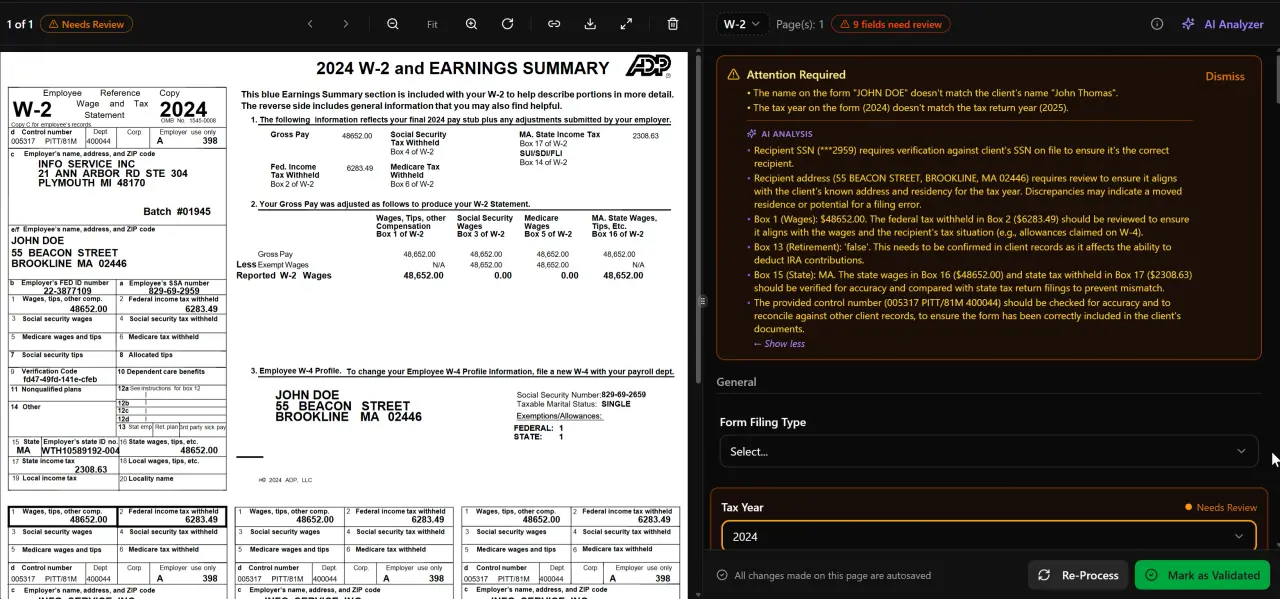
AI classifies, extracts, and validates every document automatically

Click any extracted field to see its source highlighted on the original PDF
Step 2: Measure Time Recaptured by AI
Once you have baseline numbers, you need a fair accounting of what AI actually eliminates versus what it merely accelerates. These are meaningfully different categories when building your ROI case.
AI document extraction — the kind that processes W-2s, 1099 variants, K-1s, and 1098 forms without manual data entry — typically eliminates 70-85% of the keystroke time associated with source document handling. If your baseline showed 22 minutes per return on document entry at $45/hour, eliminating 80% of that recovers about 17 minutes and $12.75 per return. Across 300 returns, that's 85 hours and $3,825 in labor cost recovered from one task alone. Our post on AI document extraction for CPAs explains the technical process behind these time savings in detail. Tracking these granular gains is exactly how AI ROI accounting firms should be measured — task by task, not as a lump estimate at the end of the season.
AI-assisted intake — smart questionnaires that prefill from prior-year data and flag gaps automatically — typically reduces the follow-up email cycle from three or four touchpoints per client to one or zero. If each follow-up round costs 8 minutes of staff time and you're running 400 clients, eliminating two rounds saves 107 hours per season. Multiply by your blended rate.
AI tax research agents reduce the time a senior or partner spends answering one-off client questions or verifying obscure IRS positions. What once took 20-40 minutes of manual research — checking IRS publications, cross-referencing Cornell's Legal Information Institute, and drafting a memo — compresses to a few minutes when the AI surfaces the relevant authority automatically. Track this category separately; it's where your highest-cost labor is being recaptured.
The output of Step 2 is a revised table showing hours recovered per task per season, weighted by the hourly rate of the role performing that task. This is your gross AI time savings CPA figure — before you account for what you do with it.
Step 3: Calculate Redeployment Value Versus Capacity Expansion
The hours you recover from AI are worth very different amounts depending on what they're used for. This is the step that separates a meaningful ROI analysis from a vanity metric.
Scenario A — Capacity expansion: You use recaptured hours to serve more clients without adding headcount. If your firm recaptures 200 hours per season across three staff members and your average return fee is $850, adding 20-25 returns to the pipeline at existing staffing levels generates $17,000-$21,250 in incremental revenue. Net that against your AI platform subscription cost and you have a clean return-on-investment figure. This is precisely why AI ROI accounting firms struggle to communicate to partners — the value shows up in capacity, not on a single line item.
Scenario B — Margin improvement: You hold client count flat and reduce overtime or contractor spend. If your firm paid $18,000 in overtime during the last tax season and AI recaptures enough capacity to eliminate half of that, the savings are $9,000 — and your staff arrive at April 15 with noticeably less stress. This is the scenario most directly connected to the burnout paradox described above. The Journal of Accountancy's practice management research repeatedly identifies staff retention as one of the highest-cost line items for growing firms; reducing overtime is a direct retention investment.
Scenario C — Advisory redeployment: Partners and seniors use recaptured research and prep time to deliver advisory services that bill at $200-$400/hour instead of $65-$100/hour compliance work. Even moving 10 hours per month per senior toward advisory adds $1,400-$3,000/month in billings at a 2-hour-per-week shift. For a 5-person firm, that arithmetic becomes material very quickly.
Document which scenario applies to your firm — or what combination — and assign a dollar value. That becomes your redeployment value in the ROI model. You can also use the accounting firm capacity planning guide to structure how you allocate recaptured time across these three categories.

Your clients see your brand — OTP login, document upload, and real-time status
Step 4: Quantify Client Retention Impact
Client retention is the ROI variable most firms forget to model, and it's often the largest single number in the spreadsheet.
The SBA's research on small business service retention consistently shows that response time and communication quality are the top two drivers of professional service loyalty. AI-powered client portals with OTP login, automated status updates, and same-day document acknowledgment directly move these metrics. A client who uploads documents and receives an automated, branded confirmation within minutes experiences a materially different service quality than one who emails a PDF and waits two days for a reply.
To quantify this, calculate your average annual revenue per client (total revenue divided by active client count). Estimate your historical churn rate — most tax-only firms lose 8-12% of clients annually to competitors or attrition. Then model what a 2-percentage-point improvement in retention is worth. For a firm with 300 clients averaging $1,200/year, reducing churn from 10% to 8% retains 6 additional clients worth $7,200 per year in recurring revenue. That's before considering the client acquisition cost you avoid by not having to replace them. When firms benchmark AI ROI accounting firms against industry peers, retention gains like these are routinely the most underestimated line in the model.
AI-driven intake also reduces the 'silent churn' problem: clients who don't return because onboarding felt clunky and the document collection process was painful. The client onboarding checklist guide maps out exactly where friction accumulates in traditional onboarding workflows — and where AI eliminates it. Assign conservative retention improvement estimates to your model; even a 1-2% annual retention lift typically exceeds the annual cost of a mid-tier AI platform subscription.
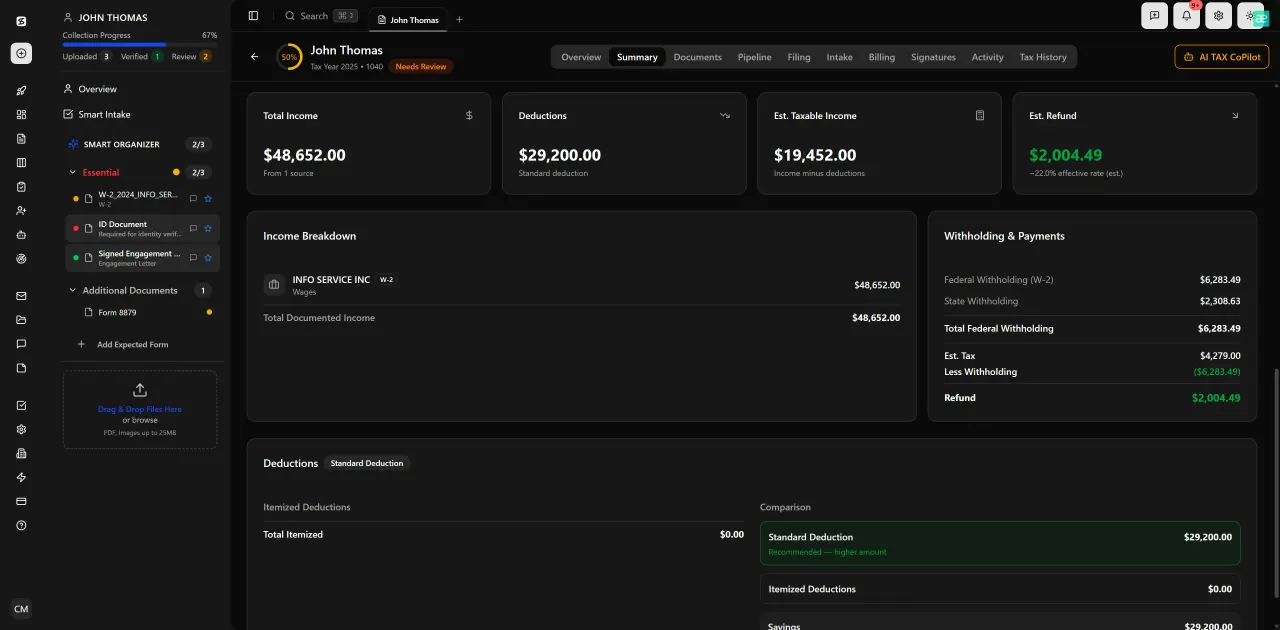
Review with AI assist — 9 agents answer questions with full client context
Step 5: Calculate the 12-Month Payback Period
With Steps 1-4 complete, you now have all the inputs for a defensible payback calculation. The formula is straightforward:
Total AI Investment Cost = annual platform subscription + implementation time (hours × blended rate) + training time (hours × blended rate). For a platform like TaxScout at $149/month ($1,430/year on the annual plan) with 10 seats and unlimited clients, implementation typically runs 4-8 hours of admin time for a firm already using Drake, CCH Axcess, UltraTax, Lacerte, or ProSeries — so total first-year cost rarely exceeds $2,000 all-in for a 10-person firm.
Total Annual AI Value = labor cost recovered (Step 2, expressed in dollars) + redeployment value (Step 3) + retention value (Step 4). Using conservative estimates from the examples above — $3,825 from document extraction alone, $9,000 from overtime reduction, $7,200 from a 2-point retention improvement — a single-season total exceeds $20,000 for a mid-size firm. Payback period = Total Investment / Monthly Value, which in this case is measured in weeks, not quarters. This is the kind of structured analysis that transforms how AI ROI accounting firms communicate value internally — moving the conversation from gut feel to a number partners can scrutinize and approve.
Present this model to partners with three scenarios: conservative (labor savings only), base (labor plus retention), and optimistic (full redeployment to advisory). Show the payback period for each. This is the internal business case that converts a skeptical managing partner from 'we'll revisit this next year' to 'let's get this set up before busy season.' For more on the KPIs that anchor this kind of analysis, see the CPA firm KPIs to track with AI automation guide.
You can also browse other blog resources covering firm growth strategy, software comparisons, and tax season operations — many of which feed directly into the ROI model described here.
Annual AI Platform Cost for a 10-Person CPA Firm (2026 pricing)
| Platform | Annual Cost (10 staff) | AI Extraction | Research Agents | Unlimited Clients |
|---|---|---|---|---|
| TaxScout Prep Pro | $1,788 ($149/mo) | Yes — 180+ form types | Yes — 9 agents | Yes |
| TaxDome | No | No | Yes | |
| Canopy | No | No | No — $11/client for Smart Intake | |
| Karbon | No | No | Yes |
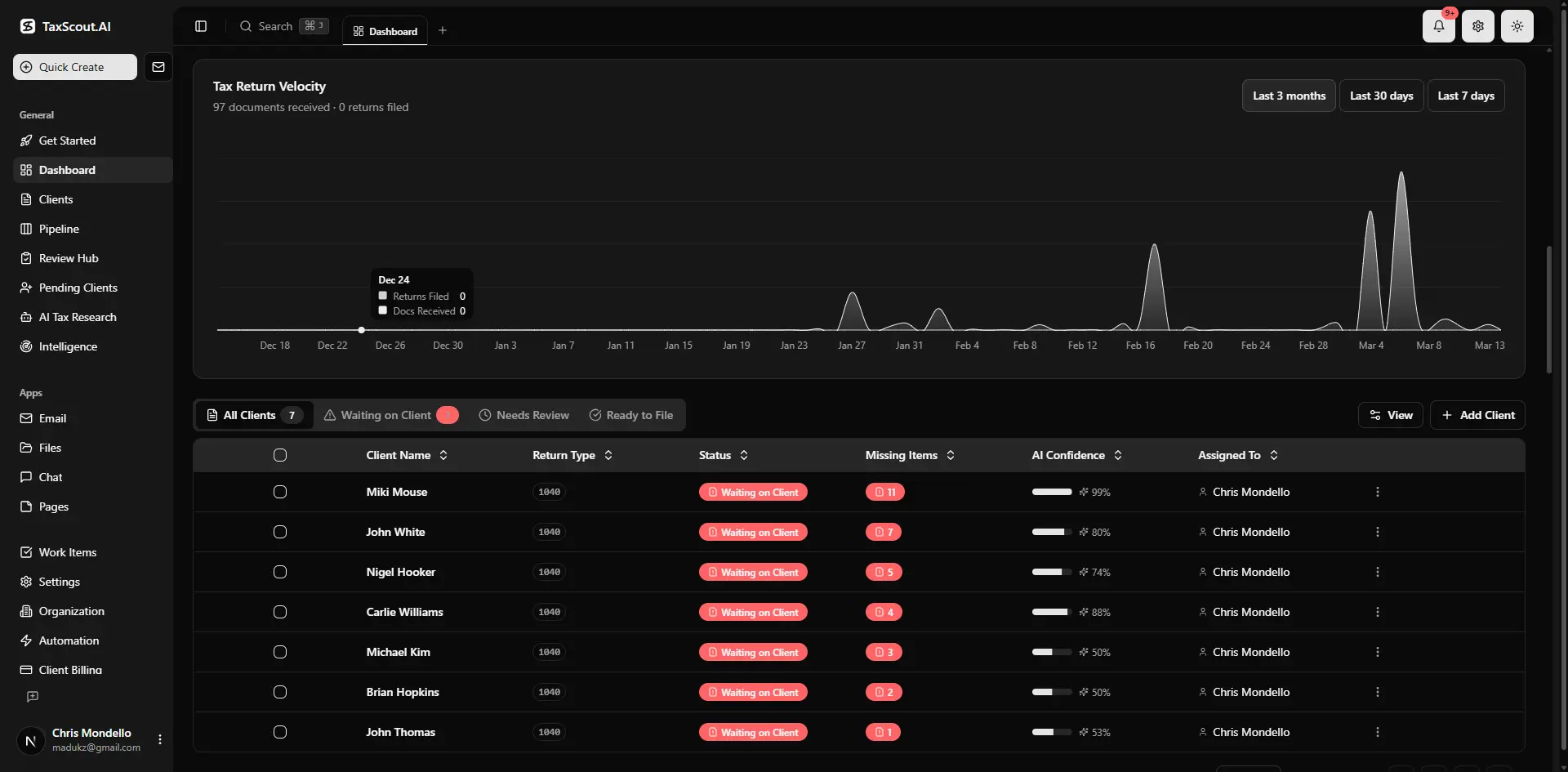
Real-time dashboard showing returns in progress, revenue, and upcoming deadlines
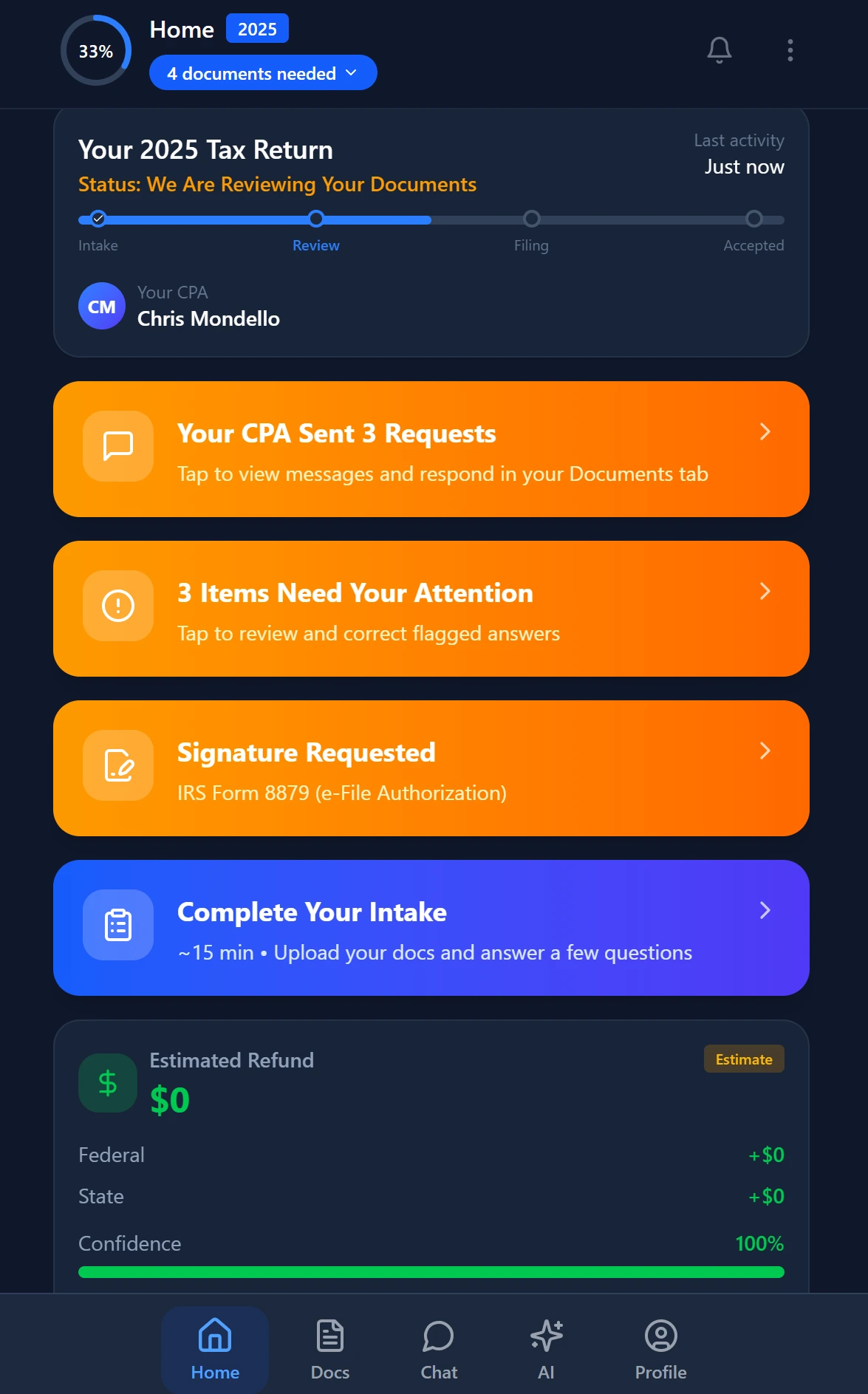
Smart intake auto-fills from uploaded documents and prior-year data
Why TaxScout Makes AI ROI Accounting Firms Can Actually Measure
Most AI platforms for accounting firms make the time savings theoretical. TaxScout makes them visible. The pipeline management dashboard shows per-client stage timing, so you can see exactly how long each return spends in document collection, review, and signature — before and after AI adoption. That's the baseline and post-adoption measurement living in the same interface.
The AI document extraction engine processes 180+ tax form types through a 5-layer validation pipeline with confidence scoring on every field. When you can see that 94% of fields extracted on a W-2 batch hit the confidence threshold without human review, you can calculate — not estimate — how many minutes of review time were eliminated. The split-screen PDF viewer with click-to-source field highlighting makes the AI's work auditable, which matters for the partners who want to trust but verify before signing off on new workflows.
The AI research agents provide a similar measurability advantage. When a research query that previously took 25 minutes resolves in 3 minutes with a sourced, citable answer drawn from real-time IRS, Treasury, Cornell LII, and SSA databases, that delta shows up in your time-tracking data. Unlike platforms that bury AI inside a generic chat interface, TaxScout's research agents are purpose-built for tax questions — which means the time savings are consistent and repeatable, not dependent on prompt engineering skill.
And unlike the per-user pricing models from competitors like TaxDome ($100/user/month) or Canopy ($45/user/month plus module add-ons), TaxScout's flat pricing means your ROI calculation doesn't erode as you add staff. At $149/month for up to 10 seats and unlimited clients on Prep Pro, the denominator in your cost-per-return calculation only gets better as volume increases. See how TaxScout compares to Karbon and Canopy on a full feature-by-feature basis.
Ready to run this ROI framework against your firm's actual numbers?
Book a 30-minute demo and we'll walk through the 5-step payback model using your firm's return volume, staff count, and current hourly rates — no spreadsheet required.
Frequently Asked Questions
Start by establishing your baseline labor cost per task (salary plus benefits divided by 2,080 hours), then measure the time AI eliminates from each task. Multiply recovered hours by your blended hourly rate to get gross savings. Add redeployment value — either incremental revenue from new capacity or margin improvement from reduced overtime — and estimate client retention impact at your average annual revenue per client. Divide total annual value by total investment cost (subscription plus setup time) to get your payback period.
Keep reading
IRS Power of Attorney: How CPAs File Form 2848 Without Delays
Sep 22, 2026 · 1 min read
Accountant Shortage Solutions: How CPA Firms Survive the Talent Crisis Without Overpaying
Sep 18, 2026 · 1 min read
Accounting Firm Communication: How AI Eliminates the Gaps That Cost You Clients
Sep 18, 2026 · 1 min read
Stay up to date
Get the latest tax tech insights delivered to your inbox.