The Best CPA Firm Software Stack
Most CPA firms don't have a software problem — they have a software sprawl problem. Seven subscriptions, zero integration, and more manual work than ever before. This guide breaks down how to build a connected CPA firm software stack designed to actually work together.
Building the best CPA firm software stack wasn't supposed to feel like this — but your firm just added a seventh software subscription. The invoice hits your card — another $89/month for a tool that does one thing your previous stack couldn't. The problem is, it still doesn't talk to the other six. Your document management platform doesn't know a client signed their engagement letter. Your tax prep software doesn't pull from your intake form. Your billing tool is completely unaware a return was filed last Tuesday. You have more software than ever and more manual data transfers than the year you started.
This is tech sprawl — and it's the defining infrastructure problem for CPA firms in 2026. The solution isn't fewer tools. It's the right tools, connected by design. Building the best CPA firm software stack means designing those connections intentionally, not accumulating tools reactively.
Building the best CPA firm software stack isn't about finding one platform that does everything adequately. It's about assembling an interoperable ecosystem where data flows forward automatically, each layer feeds the next, and your team spends time on professional judgment — not copy-pasting numbers between tabs.
Why the Best CPA Firm Software Stack Is Now an Ecosystem, Not a Suite
The profession's leading voices have reached a clear consensus. The Journal of Accountancy's 2024 technology trends analysis documents the shift from monolithic suites toward cloud-native, integrated ecosystems where AI, automation, and security components work in concert. The emphasis is not which single platform wins — it's which combination of specialized tools creates the tightest data flow. Understanding what constitutes the best CPA firm software stack starts with recognizing this shift away from monolithic suites toward integrated, cloud-native ecosystems.
Accounting Today similarly frames the evaluation not as "which software is best" but "which combination creates the most connected workflow." That framing changes how you evaluate every purchase decision. In other words, the best CPA firm software stack isn't a single product — it's the combination of tools that creates the most connected, efficient workflow for your practice.
The implication for your firm: every tool you adopt should be assessed first on interoperability — does it expose APIs, accept standard data formats, and integrate with the tools you already use? Feature richness is secondary to connectivity. A beautifully designed invoicing tool that cannot read your pipeline stage is less valuable than a simpler one that auto-triggers when a return moves to "Filed." For firms evaluating their best CPA firm software stack approach, this trade-off compounds over time.
This is the architecture principle behind the connected firm.
The Four Layers of a Modern CPA Firm Software Stack
Think of your tech stack not as a list of products but as four functional layers, each feeding the next: Each of these factors directly shapes how best CPA firm software stack plays out in practice.
Layer 1 — Tax Preparation Engine: The computational core where returns are actually built. Drake Tax, CCH Axcess, UltraTax CS, Lacerte, ProConnect, and ProSeries are the dominant options here. This layer rarely needs replacing — it's deeply embedded in how CPAs work and files directly with the IRS. What it lacks is upstream intelligence: it can't pull data from your intake process, track client pipeline status, or send documents to clients for review. Understanding best CPA firm software stack in this context is what separates firms that scale from those that stall.
Layer 2 — Practice Management and Intake: This is where client relationships, workflow, document collection, and team coordination live. The best platforms at this layer act as the connective tissue of your entire operation — receiving documents from clients, routing work through your team, tracking pipeline stages, and syncing data into your tax prep engine. This is also the layer where AI is creating the widest capability gaps between firms. This is precisely where a deliberate best CPA firm software stack strategy pays off.
Layer 3 — Client-Facing Collaboration: Secure document exchange, e-signatures, payment collection, and status communication. Historically this was bolted onto practice management as an afterthought. In a connected stack, it's deeply integrated — client actions automatically advance pipeline stages, trigger reminders, and log to the client record. Best CPA firm software stack sits at the center of this decision — get it wrong and the rest unravels.
Layer 4 — Security and Compliance Infrastructure: Encryption, access controls, audit logging, and data residency. The AICPA's digital transformation resources emphasize that this layer must be embedded throughout the stack, not purchased as a point solution. A CPA firm's cybersecurity posture is only as strong as its weakest tool's access controls.
The data silos in your current stack are costing you more than you think. See how TaxScout connects all four layers of your firm's workflow in a single platform. → Book a 15-Min Demo — See It Live

Click any extracted field to see its source highlighted on the original PDF
Where Data Silos Form — and What They Actually Cost
Most stack failures aren't caused by bad software. They're caused by the gaps between good software. A client uploads their W-2 to a file-sharing service. A staff member downloads it, renames it manually, uploads it to the document management system, opens the tax prep software, and enters the data by hand. Three tools, three manual steps, zero data intelligence passed between them.
The Bureau of Labor Statistics reports that accountants and auditors face growing demand for advisory and analytical work — yet most CPA firm staff still spend the majority of intake season on exactly this kind of mechanical data transfer. That's not a staffing problem. It's an architecture problem.
The direct cost: at $75/hour blended staff cost and 20 clients per week requiring manual data entry averaging 15 minutes each, your firm burns $375/week — roughly $6,000 per tax season — just moving data between tools that refuse to talk to each other. The indirect cost is harder to measure: errors introduced during re-keying, signature follow-up delays because your portal doesn't notify your pipeline, and clients who churn because their experience felt like a 2010 workflow.
As we covered in our CPA firm tech stack integrations guide, the firms closing this gap fastest share one architectural decision: they selected a practice management layer that was designed to be the integration hub, not just another siloed tool.
What AI-Native Practice Management Actually Changes
The shift from traditional practice management to AI-native platforms is not cosmetic. Consider what happens when a client submits documents in a connected stack.
With AI document extraction handling 180+ tax form types — W-2s, all 1099 variants, K-1s for partnerships, S-corps and trusts, the full 1098 and 1095 series — the document does not sit waiting to be processed. The system extracts every field with per-field confidence scoring (0.0–1.0), runs it through a 5-layer validation pipeline that catches math errors, cross-field inconsistencies, duplicate payer detection, and even phantom income hallucinations. It then pre-fills the intake form automatically, flags what's missing, and advances the client's pipeline stage.
That is not automation as commonly understood. That is intelligence propagating forward through your stack.
The 5-layer validation pipeline TaxScout employs is worth understanding specifically because CPAs are right to be skeptical of "AI magic" claims. Layer 0 routes documents by quality and type. Layer 1 extracts with confidence scoring. Layer 1.5 cross-verifies against OCR using four matching strategies including fuzzy name matching via Levenshtein distance. Layer 2 runs 15 deterministic math rules including tax equation chain validation and FTC carryover checks. Layer 3 applies 18 post-extraction validation rules covering foreign activity, cross-field logic, and tax math. The AI is constrained by explicit rules — it doesn't guess, it flags and explains.
This level of intelligence at the document processing layer is what separates an AI-native stack from a traditional one with AI bolted on. Our comparison of AI-native vs. AI-bolted platforms covers this architecture distinction in detail — the difference matters significantly when you're making a multi-year platform commitment.

Your clients see your brand — OTP login, document upload, and real-time status
The Interoperability Test: Six Questions to Ask Every Tool Vendor
Before adding any tool to your stack, run it through this framework:
1. Does it expose APIs or native integrations with your existing tools? If the answer is "we have a Zapier integration," that is a yellow flag. Zapier-dependent connections break silently and lack error handling appropriate for financial data.
2. Does client action automatically propagate to your pipeline? If a client signs their engagement letter or pays their invoice, does your workflow system know — without anyone manually updating a status field?
3. Is data isolated at the database level or just at the application level? Application-level access controls can be misconfigured. Row-level security enforced at the database layer (as TaxScout implements via PostgreSQL RLS on all business tables) cannot be bypassed by application bugs.
4. Where does your data physically reside? For CPA firms handling Social Security numbers and financial records, this is a compliance question. All TaxScout client data resides on US-based AWS and Azure infrastructure — it never leaves the country.
5. Does it work alongside your existing tax preparation software? TaxScout is explicit about this: it is practice management, not a Drake or Lacerte replacement. The stack model means the practice management layer handles intake through preparation, while Drake/UltraTax/Lacerte handles the computational filing. As our Drake Tax Software integration guide details, these tools are complementary — not competitive.
6. What is the total cost at your actual team size? Per-user pricing compounds fast. TaxDome runs approximately $100/user/month — roughly $500/month for a five-person firm. Canopy charges approximately $45/user/month per module with smart intake costing $11 per client extra. Karbon is approximately $59/user/month. TaxScout is $49/month flat for your entire team at the Starter tier, or $149/month flat at Pro — unlimited clients, no per-user fees.
Feature Comparison: Connected Stack Capabilities
| Capability | TaxScout | TaxDome | Canopy | Karbon |
|---|---|---|---|---|
| AI document extraction (180+ forms) | ✓ | ✗ | Partial (basic rename) | ✗ |
| 5-layer validation pipeline | ✓ | ✗ | ✗ | ✗ |
| Real-time IRS research (live search) | ✓ | ✗ | ✗ | ✗ |
| Client-context AI memory | ✓ | ✗ | ✗ | ✗ |
| AI research agents (9 specialized) | ✓ | ✗ | ✗ | ✗ |
| Click-to-source PDF viewer | ✓ | ✗ | ✗ | ✗ |
| SSN vault (AES-256-GCM, rate-limited) | ✓ | ✗ | ✗ | ✗ |
| Branded client portal | ✓ | ✓ | ✓ | Basic |
| E-signatures (8879, FBAR, etc.) | ✓ | ✓ | ✓ | Rolling out |
| Works with Drake/Lacerte/UltraTax | ✓ | Partial | Partial | ✗ |
| Flat pricing (no per-user fees) | ✓ | ✗ | ✗ | ✗ |
| Monthly cost (5-person firm) | $49–$149 | ~$500 | ~$330+ | ~$295 |
See the full breakdown in our TaxScout vs TaxDome comparison or TaxScout vs Canopy comparison.

Track every return from intake to filed with drag-and-drop pipeline management
A Real-World Connected Stack Workflow
Here is what the best CPA firm software stack looks like in operation for a straightforward individual return:
A new client completes the branded intake form linked from your website. Because the form is modeled on IRS Form 13614-C and backed by a 4-layer prefill system, returning clients see their prior-year data pre-populated. The AI gap analysis runs in the background and immediately flags that no 1099-B was uploaded despite the client indicating investment account activity.
The client uploads their W-2 and 1099-DIV through the client portal. Within seconds, both documents are extracted: employer name, wages, federal and state withholding, and all dividend amounts auto-populate the intake record. The pipeline advances automatically from "Documents Requested" to "Documents Received."
Your preparer opens the split-screen PDF viewer, clicks any extracted field, and sees it highlighted at pixel-precise coordinates on the original document — no toggling between applications. The 5-layer validation has already flagged that the W-2's federal income tax withheld doesn't balance against the reported wages given the apparent filing status.
The return moves to "In Preparation." The preparer exports structured data to Drake or UltraTax, completes the return, and uploads the final PDF. The pipeline auto-advances to "Client Review." Form 8879 is sent for e-signature through Documenso. When signed, the invoice is triggered automatically, the client pays through the portal via ACH, and the pipeline moves to "Ready to File."
That entire sequence — from document upload to payment — involved zero manual status updates, zero copy-paste data entry, and zero separate login sessions for the client.
Security as a Stack Requirement, Not an Add-On
Any discussion of the best CPA firm software stack is incomplete without addressing the security layer directly. According to IRS Publication 4557, tax professionals are required to have a Written Information Security Plan (WISP) covering all systems that handle taxpayer data. That obligation extends to every tool in your stack.
The weakest security link in your ecosystem defines your exposure. A platform with strong document management but weak access controls can expose your entire client list. TaxScout's security and compliance infrastructure addresses this at multiple levels: AES-256-GCM encrypted SSN vault with a dedicated encryption key and rate-limited reveal, 7-role RBAC with 50+ granular permission types, row-level security enforced at the PostgreSQL database layer, and a 13-step DSAR anonymization process covering 28 tables for GDPR/CCPA compliance. All data is hosted on US-based AWS and Azure infrastructure.
When evaluating any practice management platform, ask specifically where SSNs are encrypted and at what layer access controls are enforced. Application-layer controls with database-level vulnerability are insufficient for a federally regulated professional obligation.
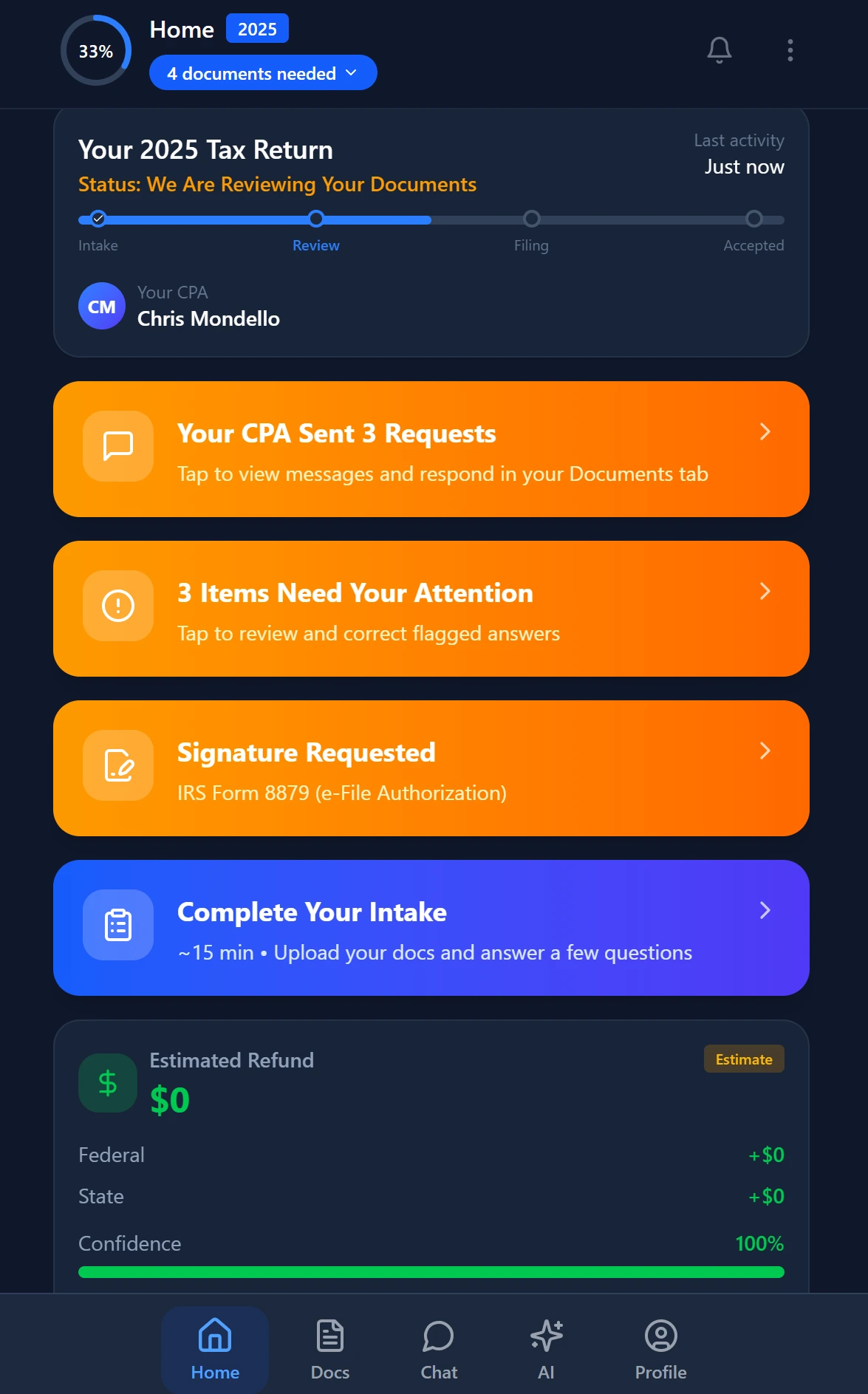
Smart intake auto-fills from uploaded documents and prior-year data
Building Your Stack for 2026 and Beyond
The firms that future-proof their tech stack share a common decision framework: they prioritize interoperability over feature richness, AI-native design over AI-bolted additions, and flat pricing models over per-user structures that penalize growth.
The connected firm is not a distant aspiration. The Cornell Law School's IRC resources document the regulatory complexity your clients navigate — complexity that makes the AI research capability of your practice management layer increasingly consequential as advisory services expand.
Start with the practice management layer. That is where intake, pipeline, document intelligence, client communication, e-signatures, and billing converge. Get that layer right, and the rest of the stack has a clean integration surface to connect to. Get it wrong, and every other tool you add becomes another source of manual reconciliation.
The best CPA firm software stack in 2026 is the one where a document uploaded at 8 PM on a Monday moves intelligently through your system overnight — so your team arrives Tuesday morning to a prepared workspace, not a data entry queue.
Ready to eliminate data silos from your firm's workflow? TaxScout gives your firm AI-native practice management with connected intake, extraction, pipeline, e-signatures, and billing — for $49/month flat. → Book a 15-Min Demo
Frequently Asked Questions
For a mid-sized CPA firm, the best software stack combines a tax preparation engine (like UltraTax or Drake), a practice management layer, a document management system, and an AI-powered client intelligence tool like TaxScout.ai. TaxScout specifically addresses the integration gap by connecting your client intake data, engagement status, and filing milestones into a single dashboard — eliminating the manual data transfers that cost the average 5-person firm 11+ hours per week. The key is choosing tools that share data by design, not by workaround.
Keep reading
Amended FBAR Procedures: How CPAs Correct Foreign Account Errors Without Triggering Penalties
Oct 12, 2026 · 1 min read
Transparency in Coverage Final Rules: What CPA Firms Must Do Now
Oct 12, 2026 · 1 min read
Backdoor Roth IRA: How CPAs Execute the Strategy for High-Income Clients
Oct 12, 2026 · 1 min read
Stay up to date
Get the latest tax tech insights delivered to your inbox.