Accounting Automation for CPA Firms: What AI Actually Changes (And What It Doesn't)
Most guides treat accounting automation as a single category — it isn't. Rule-based triggers and AI inference solve different problems, and conflating them leads firms to over-invest in one and neglect the other. This guide draws that line clearly, anchors the decision in IRS PTIN data and real…
Accounting automation is one of the most searched terms in CPA practice management — and also one of the most poorly defined. Ask three vendors what it means and you'll get three different answers: recurring task reminders, AI-powered document extraction, and intelligent workflow routing. All three are real. None of them is the same thing. Firms that treat automation as a monolith end up buying the wrong tier, automating the wrong processes, and wondering why their utilization rate didn't move.
The gap in competitor coverage isn't feature lists — Canopy, Karbon, and Financial Cents all publish those. The gap is a decision framework grounded in actual market data: what does the shrinking supply of credentialed tax preparers mean for a firm that hasn't automated yet? Which firm sizes genuinely benefit from AI-layer automation versus rule-based workflow triggers? And where does automation actually break down, requiring human judgment no model can replace? Understanding what accounting automation actually delivers — versus what vendors promise — requires a decision framework grounded in real market data.
This guide answers those questions using three concrete data sources: the TaxScout preparer directory, which tracks 69,088 active US tax preparers, IRS PTIN data on credential holder trends, and fee benchmarks that reveal the revenue ceiling a non-automated firm hits per preparer. The result is not a feature comparison — it's a strategic map. Together, these sources paint a clear picture of why accounting automation has shifted from a competitive advantage to an operational necessity for firms of nearly every size.
The Two Layers of Accounting Automation Most Firms Conflate
Every accounting automation product sits on one of two layers, and the distinction matters enormously for buying decisions. Layer 1 is rule-based automation: if a client uploads a document, send a confirmation email; when a return moves to 'review,' assign it to the senior preparer; if an invoice is 30 days past due, trigger a reminder. These are deterministic triggers — the system executes a predefined action when a predefined condition is met. Tools like Zapier, and the workflow engines built into most practice management platforms, operate at this layer.
Layer 2 is AI inference: extracting field-level data from an unstructured PDF W-2 that wasn't OCR'd, flagging a 1099-B where the cost basis looks anomalous relative to prior-year holdings, or drafting a client-ready summary of an IRS notice based on the notice's actual text. These tasks require a model to interpret content it has never seen before — not just match a condition to an action. Rule-based systems cannot do this. Many vendors blur the two layers in their marketing, which leads firms to purchase a workflow tool expecting AI and get disappointed, or to dismiss AI tools as expensive automation they already have. This is where accounting automation moves beyond simple rule-based workflows and begins to genuinely augment the judgment that credentialed preparers bring to complex returns.
Understanding CPA workflow automation at this layer-level granularity is the starting point for any honest ROI conversation. The question isn't 'should we automate?' — it's 'which layer solves the specific bottleneck costing us the most time right now?' For a 2-person firm drowning in document intake, Layer 2 AI extraction is the highest-leverage investment. For a 15-person firm with inconsistent client follow-up, Layer 1 workflow triggers may close the gap faster at lower cost. For firms evaluating their accounting automation approach, this trade-off compounds over time.
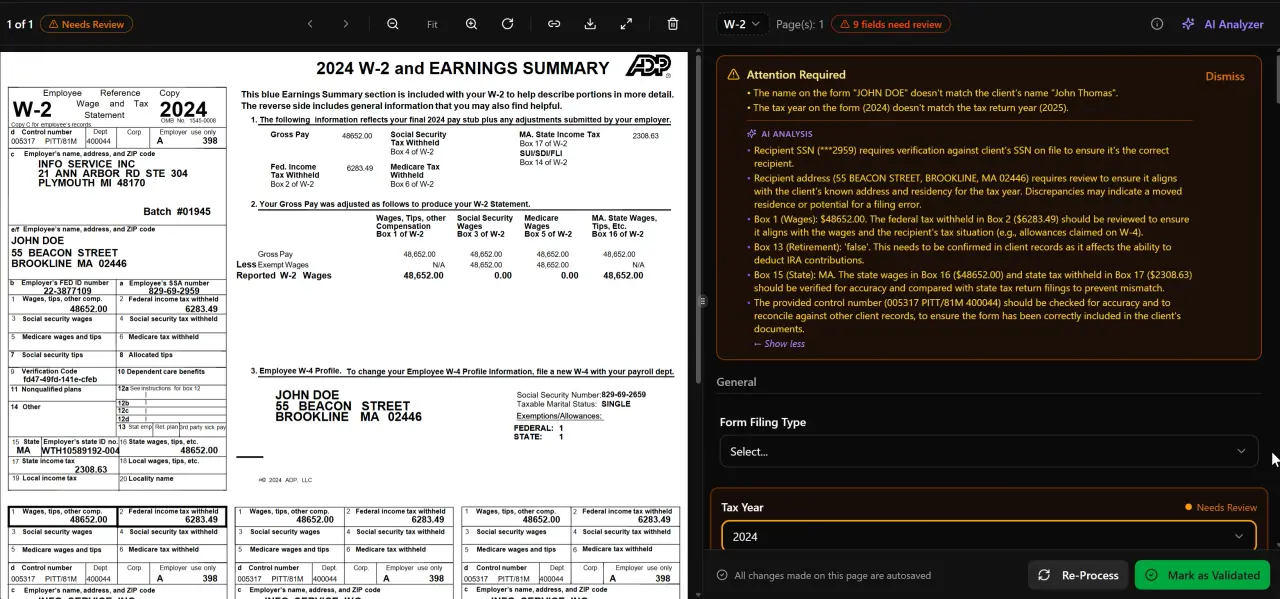
AI classifies, extracts, and validates every document automatically
What IRS PTIN Data Reveals About Preparer Supply
The strategic case for accounting automation extends beyond operational convenience — it's a hedge against a tightening labor market for credentialed preparers. The IRS publishes annual PTIN statistics showing the total number of active preparer tax identification number holders. The trend over the past several years has been flat to declining relative to the growth in tax return volume, meaning each active preparer is effectively responsible for more returns than a decade ago.
The TaxScout directory, matched against the IRS federal preparer directory as of November 14, 2026, lists 69,088 active US tax preparers. Of those, only 32,239 are CPAs and 11,112 are enrolled agents — meaning the majority hold a PTIN only or another credential. As covered in depth in Will AI Replace Accountants? What 70,000+ Tax Preparer Profiles Reveal, the credentialed-preparer supply is geographically uneven: some states have preparer-to-taxpayer ratios that make finding experienced staff nearly impossible during peak season. Each of these factors directly shapes how accounting automation plays out in practice.
This supply constraint reframes automation from a 'nice to have' operational upgrade into a talent-scarcity hedge. A firm that relies entirely on human bandwidth to process document intake, run checklists, and send client reminders is competing for the same shrinking pool of preparers as every other firm. A firm with strong AI document extraction and automated intake can process more returns per preparer-hour — which either grows revenue at the same headcount or maintains throughput when a staff member leaves. The Bureau of Labor Statistics projects moderate employment growth for accountants and auditors through 2032, but that figure masks the uneven geographic and credential-level distribution that creates acute shortages in many markets. Understanding accounting automation in this context is what separates firms that scale from those that stall.
Tired of losing preparer hours to document intake and manual data entry?
TaxScout's AI extraction pipeline processes W-2s, 1099s, K-1s, and 20+ other document classes with a 5-layer validation engine — so your team reviews exceptions, not every field. This is precisely where a deliberate accounting automation strategy pays off.

Click any extracted field to see its source highlighted on the original PDF
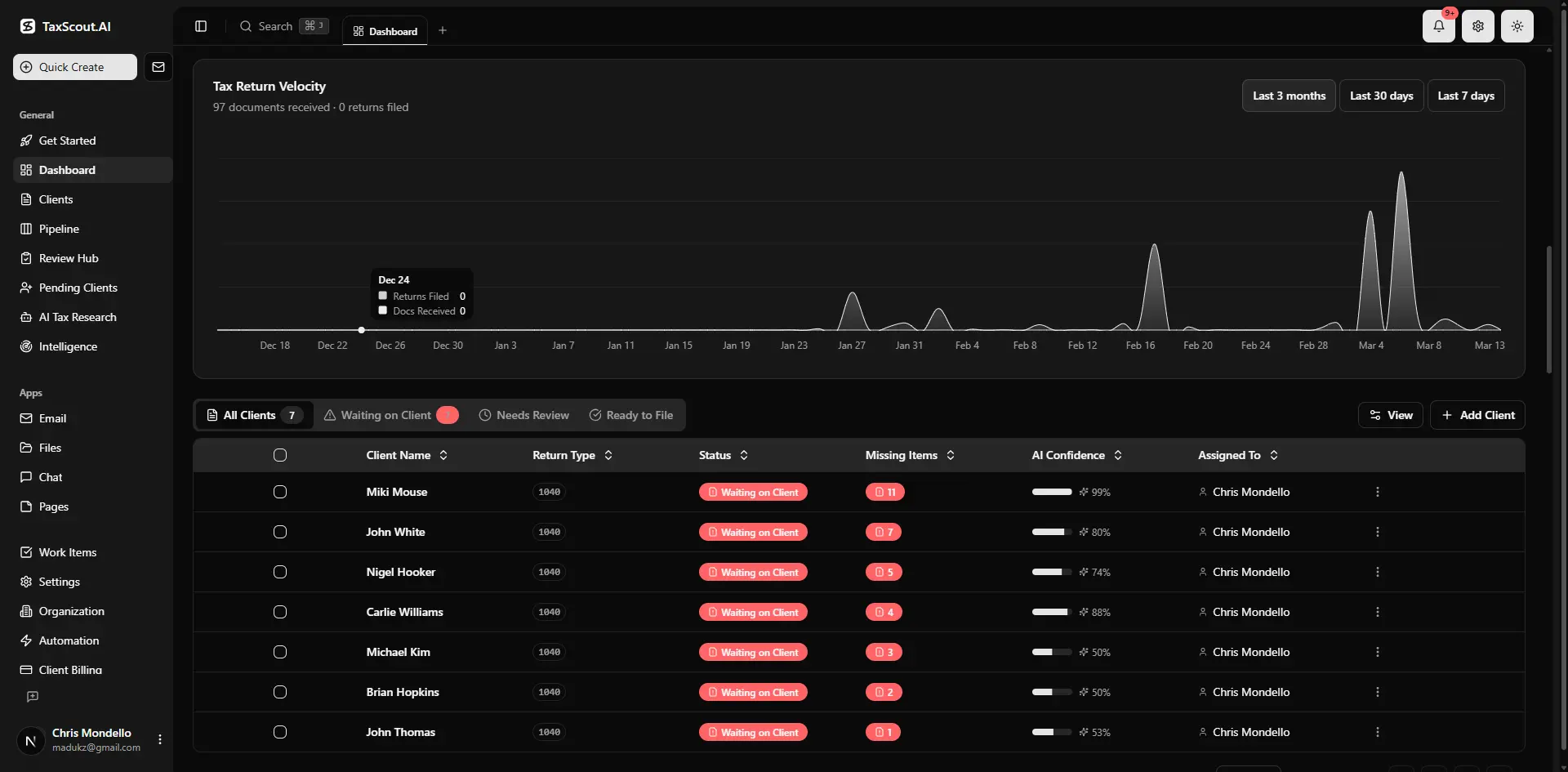
Real-time dashboard showing returns in progress, revenue, and upcoming deadlines
The Revenue Ceiling a Non-Automated Firm Hits Per Preparer
Fee benchmarks published by the National Society of Accountants and by state CPA societies consistently show that average individual return preparation fees cluster between $275 and $450, with complexity-adjusted averages higher for business returns. The limiting factor for a solo or small-firm preparer isn't willingness to charge more — it's throughput. A preparer spending 45–60 minutes per return on document intake, data entry, and client follow-up can process roughly 200–300 returns in a standard tax season without automation. At $350 average revenue per return, that's a ceiling of roughly $70,000–$105,000 in seasonal revenue per preparer-equivalent. Accounting automation sits at the center of this decision — get it wrong and the rest unravels.
Firms that have deployed AI-layer automation — where document classification, field extraction, and intake prefill happen without preparer involvement — consistently report reducing per-return intake time by 30–50%. That compresses a 60-minute workflow to 30–40 minutes, which shifts the revenue ceiling for the same preparer from roughly $105,000 to $140,000–$160,000 in a single season, without adding staff. The math is straightforward; the execution is not, because the efficiency gain only materializes if the automation is accurate enough to trust. This is why the distinction between rule-based automation and AI inference matters: a rule-based tool that moves a document into a folder doesn't compress intake time — an AI that extracts, validates, and prefills the organizer does.
For firms planning their accounting busy season strategy, the per-preparer revenue ceiling is the clearest ROI anchor. It converts the abstract value proposition of AI into a concrete number tied to your current fee schedule and staffing model.
Which Automation Tier Fits Which Firm Size
Not every firm needs every automation layer, and the wrong-tier investment wastes money without moving the metrics that matter. Here's a practical framework based on firm size and the bottlenecks that dominate at each scale.
Solo practitioners and two-person firms (under 300 returns/year) have one dominant constraint: preparer time. Every hour spent on document intake, follow-up emails, and status updates is an hour not spent on billable review. For this segment, AI document extraction and automated intake prefill — the AI intake engine modeled on IRS Form 13614-C — deliver the highest immediate return. Rule-based workflow automation matters less because the 'workflow' is usually one person's mental checklist.
Firms with 3–10 staff (300–2,000 returns/year) have both a throughput problem and a coordination problem. AI extraction still matters, but inconsistent client follow-up, missed deadlines, and work falling through the cracks between staff members become equally costly. This is the tier where Layer 1 workflow automation — pipeline stages, automated reminders, task assignment rules — earns its cost alongside AI tools. The pipeline management feature with 12 customizable stages directly addresses the coordination failure that emerges when a team grows past 3 people.
Larger firms (10+ staff, 2,000+ returns/year) face a third layer of complexity: research bottlenecks and regulatory currency. At scale, the question isn't just 'did we capture the right data?' but 'did we apply the right treatment to an edge case on return 847?' This is where AI research agents — tools that run real-time queries against IRS, Treasury, and Cornell's Legal Information Institute — pay for themselves by cutting research time per complex return from 45 minutes to under 10. See other guide resources for deeper dives into each of these firm-size scenarios.
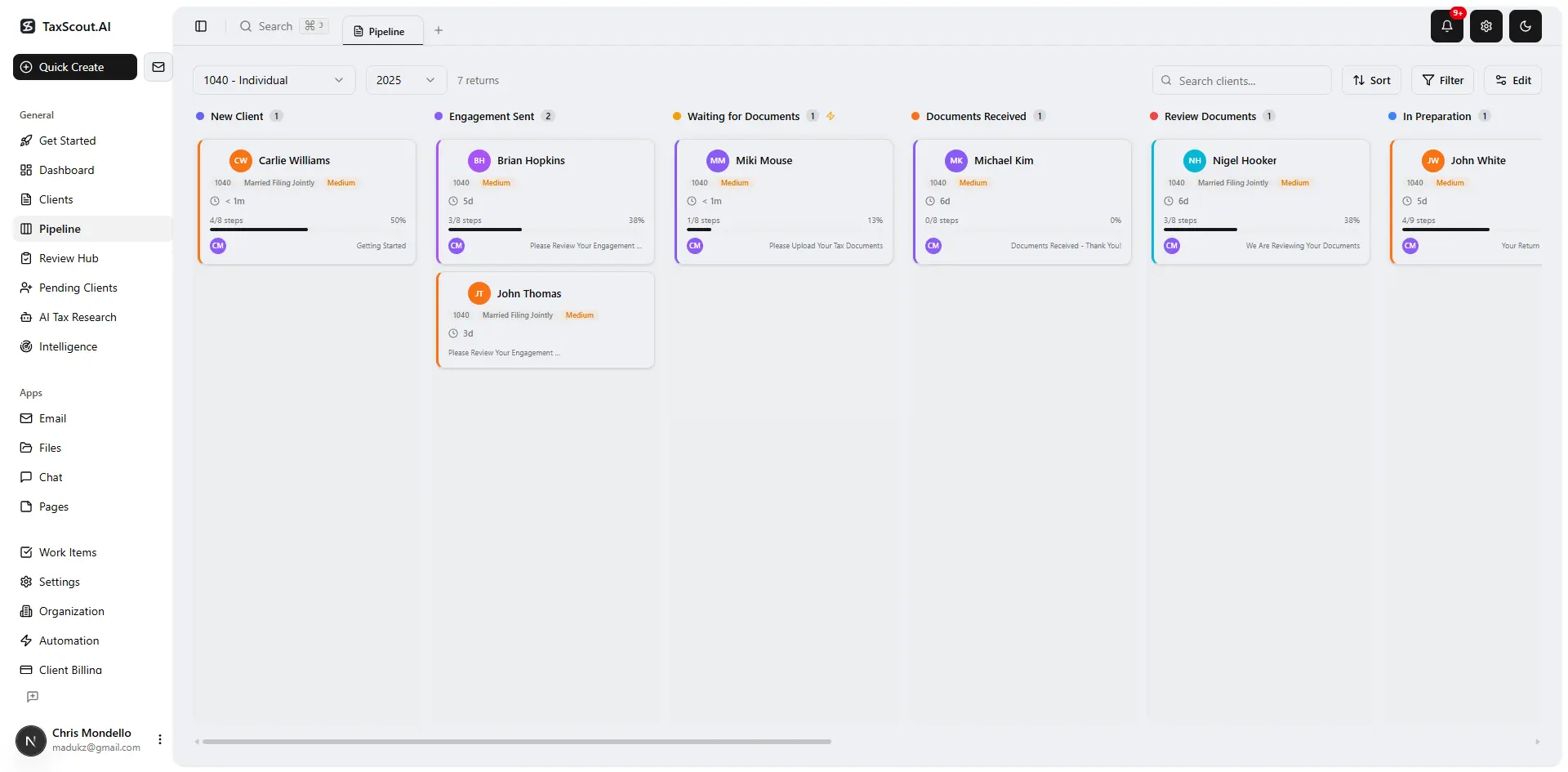
Track every return from intake to filed with drag-and-drop pipeline management
Automation tier fit by firm size — where each layer delivers the strongest ROI
| Firm Size | Primary Bottleneck | Highest-ROI Automation Layer | Secondary Layer |
|---|---|---|---|
| Solo / 1–2 staff | Preparer time on intake and data entry | AI document extraction and intake prefill | Client portal with OTP document collection |
| Small / 3–10 staff | Throughput + coordination gaps between team members | Layer 1 workflow triggers + AI extraction | Automated client reminders and pipeline stages |
| Mid-size / 10–30 staff | Research time on complex returns, review consistency | AI research agents + anomaly flagging | Full workflow automation with role-based routing |
| Large / 30+ staff | Regulatory currency and cross-office consistency | AI research agents + regulatory intelligence | Analytics dashboards and staff utilization tracking |

Your clients see your brand — OTP login, document upload, and real-time status
What Accounting Automation Cannot Do — Where Human Judgment Is Non-Negotiable
Karbon's automation guide asks the right question — 'What shouldn't you automate?' — but stops short of a principled answer. Here's one: automate any task where the correct output can be verified against a known rule or prior data. Do not automate any task where the correct output requires interpreting ambiguous facts, assessing client intent, or exercising professional judgment under Circular 230.
In practice this means: automate document classification, field extraction, math verification, deadline reminders, invoice generation, and status updates. Do not automate the decision to claim a deduction that requires a facts-and-circumstances analysis, the advice given to a client weighing an S-election versus a partnership structure, or the response to an IRS examination that turns on substantiation the AI has never seen. These are not failure modes of current AI — they are definitional limits of what any AI tool can responsibly do in a licensed professional context.
The Journal of Accountancy has consistently noted that the most effective AI deployments in accounting amplify preparer judgment rather than replace it — surfacing the right information faster so the licensed professional can make a better decision in less time. That framing is more accurate and more durable than 'AI does the work and you review.' The review is the work. Automation just removes the friction before and after it.
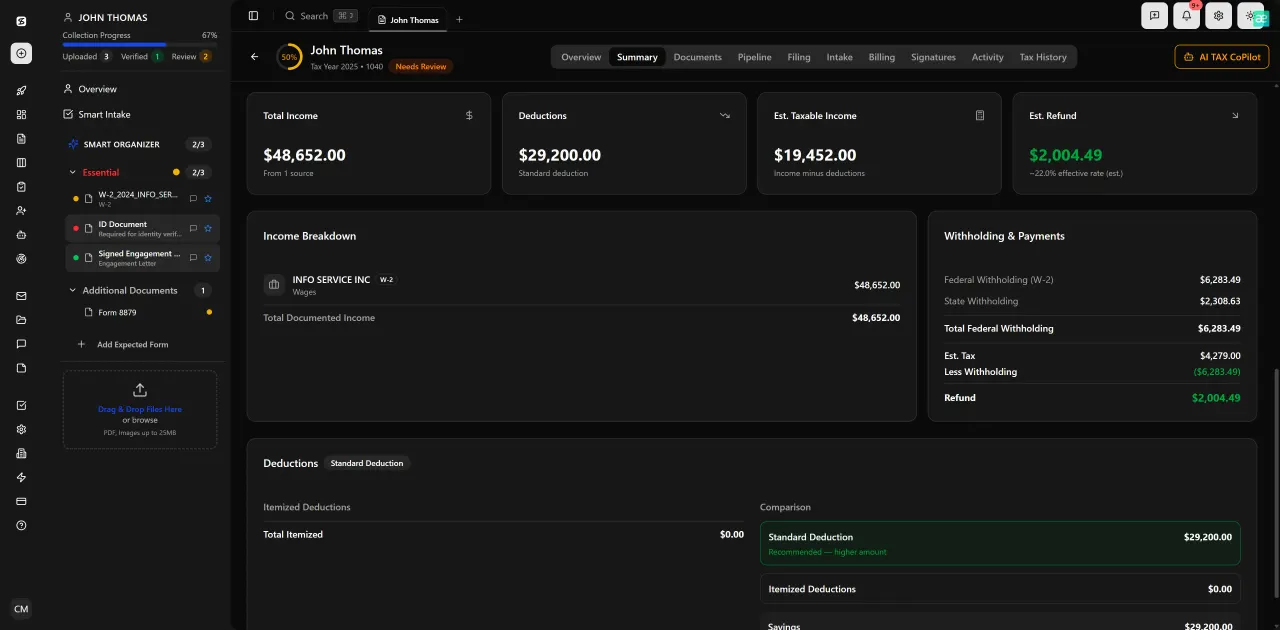
Review with AI assist — 9 agents answer questions with full client context
How TaxScout Implements Accounting Automation Across Both Layers
TaxScout is designed around the two-layer architecture described above, with neither layer treated as optional. On the AI inference side, the platform runs a 5-layer validation pipeline on every uploaded document: document quality routing, AI extraction with confidence scoring, OCR cross-verification, 15 deterministic math rules, 18 post-extraction rules, and cross-document validation. This pipeline covers W-2s, the full 1099 series, K-1s, 1098 and 1095 series, 1040 schedules, and supporting records. The split-screen PDF viewer with click-to-source field highlighting lets preparers verify any extracted value against the original document in one click — which is what makes the AI output trustworthy rather than a black box.
On the rule-based layer, TaxScout's pipeline management gives firms 12 customizable stages with drag-and-drop kanban, automated stage-transition triggers, and deadline tracking. The AI intake engine, modeled on IRS Form 13614-C, uses a 4-layer prefill cascade — document-first, prior-year, profile, and AI gap analysis — that reduces the client burden on organizer completion while flagging missing items before the preparer ever opens the return.
For research-intensive work, the platform's 9 specialized AI research agents run real-time queries against IRS, Treasury, Cornell LII, SSA, and Congress, returning sourced answers with citations rather than hallucinated summaries. The research layer integrates with client-context AI memory — entity structures, filing history, prior returns — so the agent's answers are specific to the client, not generic. This is a meaningful difference from general-purpose AI assistants that have no knowledge of the client's situation.
Pricing is flat with no per-user fees. TaxScout Solo is $49/month (or $470/year prepaid) for 150 return credits per term with unlimited team members. TaxScout Firm is $149/month (or $1,430/year prepaid) for 500 return credits and all 9 AI Research Agents. See the full pricing page for details. Both tiers work alongside Drake, CCH Axcess, UltraTax CS, Lacerte, ProConnect, and ProSeries — the platform augments your existing tax software rather than replacing it.
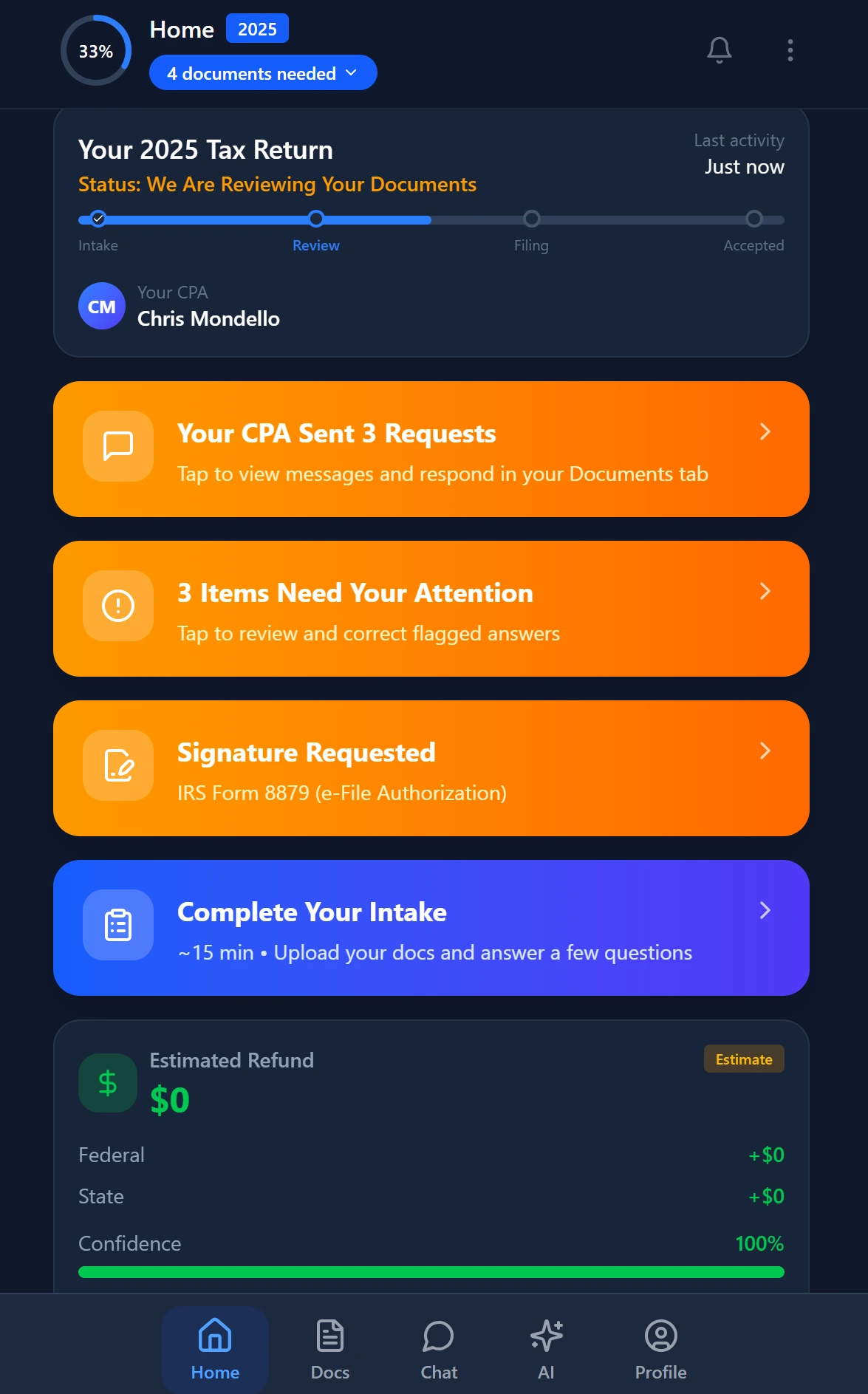
Smart intake auto-fills from uploaded documents and prior-year data
Getting Started: A Four-Step Framework for Implementing Accounting Automation
Financial Cents' implementation guide offers a reasonable five-step checklist, but it starts with 'identify manual processes' — which is too broad to act on. A sharper starting point: identify the three tasks your preparers perform most often that require no professional judgment. Those are your highest-value automation targets.
Step 1: Audit intake and document collection. For most firms, this is the single largest source of unbillable preparer time. Document collection, follow-up reminders, and organizer completion consume 15–20% of total season hours in firms without an automated intake layer. Measure your current per-return intake time before investing in anything else — it's your baseline.
Step 2: Separate rule-based from AI-eligible tasks. Use the framework above: tasks with deterministic correct answers are rule-based candidates; tasks requiring content interpretation are AI candidates. Build a short list of 5–10 specific tasks in each category. This prevents buying a workflow tool for an AI problem and vice versa.
Step 3: Implement one layer at a time. Attempting to roll out AI extraction, automated reminders, client portal adoption, and e-signatures simultaneously produces adoption failure. Start with the layer that addresses your largest bottleneck — usually AI document extraction for small firms, workflow automation for mid-size firms — and add the second layer once utilization is above 80%. Our SurePrep alternatives guide covers the AI extraction landscape in more detail if that's your first priority.
Step 4: Measure return throughput per preparer-hour, not just 'time saved.' Time-saved metrics are notoriously unreliable because they depend on self-reporting and don't capture whether the saved time is reinvested in billable work. Return throughput per preparer-hour — returns completed divided by total preparer hours in the period — is an objective measure that connects automation investment to revenue capacity.
Common Implementation Mistakes to Avoid
The most common mistake is deploying automation without changing the underlying workflow it was meant to accelerate. Automating document reminders into a process where the preparer still manually checks a shared drive for uploads every morning doesn't compress intake time — it just adds an email layer on top of the same bottleneck. Automation requires redesigning the workflow around the automation, not bolting automation onto the existing one.
The second most common mistake is measuring automation ROI in the first two weeks of a tax season rollout. Adoption curves for new intake and document tools typically run 4–6 weeks before client behavior shifts. Firms that evaluate automation mid-season, before clients have adapted to the new portal and intake process, consistently underestimate long-run throughput gains.
Ready to see how both automation layers work together in a single platform built for CPA firms?
TaxScout combines AI document extraction, automated workflows, 9 research agents, and a branded client portal — flat pricing, unlimited team members, no per-user fees.
Frequently Asked Questions
Rule-based automation executes predefined actions when predefined conditions are met — sending a reminder when a deadline approaches, moving a task when a stage changes. AI automation interprets unstructured content: extracting fields from a PDF document the system has never seen before, flagging anomalies in financial data, or drafting a response to an IRS notice based on the notice's actual text. Both are valuable, but they solve different problems and should not be conflated when evaluating software.
Stay up to date
Get the latest tax tech insights delivered to your inbox.