Tax Documentation with AI: What CPA and EA Firms Actually Need to Know
AI is transforming tax documentation for CPA and EA firms — but the operational and compliance realities are more nuanced than most vendor guides admit. This article cuts through the surface-level coverage to address which document types AI handles poorly, what IRS Circular 230 says about…
Tax documentation with AI refers to using machine learning extraction, validation pipelines, and AI-assisted intake to convert client-uploaded PDFs into structured, verified data that preparers review rather than re-key. For CPA and EA firms, the operational reality involves three layers: identifying which document classes AI handles reliably versus poorly, maintaining IRS Circular 230 due diligence through traceable audit trails, and sizing the investment to firm volume and complexity mix.
Most guides on the topic explain what AI document processing is at a surface level, then skip past the questions practitioners actually care about: which document classes trip up even the best extraction models, what your professional liability looks like when AI touches a client file, and whether the math actually works for a three-person EA shop versus a 20-preparer regional firm.
According to the TaxScout directory, which is matched against the IRS federal preparer directory, there are 69,074 US tax preparers currently listed — 32,228 CPAs and 11,109 enrolled agents, with the balance holding a PTIN only or another credential. That is a large and varied market, and the ROI calculation for AI document tooling differs meaningfully across it. A solo EA with 200 annual returns has a completely different threshold for adoption than a firm billing 2,000 returns a season.
This guide is built for the firm owner who already understands tax documentation with AI and needs the operational and compliance layer: a document-type risk map, a Circular 230 compliance checklist, a firm-size decision framework, and a clear picture of what AI handles confidently versus what still requires a trained human eye. If you want other guide resources on CPA practice technology, that library covers adjacent topics in the same depth.
How to Deploy Tax Documentation with AI in a Small CPA or EA Firm
- Audit your current document mix by class — identify the share of W-2 and 1099 returns versus returns with K-1s, foreign income, or complex depreciation schedules.
- Configure AI extraction for standardized income documents first (W-2, 1099-NEC, 1099-INT, 1099-DIV, 1098, 1095) and set confidence score thresholds that route low-confidence fields to human review.
- Build a mandatory human-review queue for amended K-1s, foreign income schedules (Forms 1116, 2555, 8938), and mixed-use depreciation supporting records.
- Implement a secure, OTP-authenticated client portal so documents upload directly into the extraction pipeline without email attachment handling.
- Enable AI-assisted intake with prior-year prefill and gap analysis to reduce missing-document follow-up cycles before the extraction stage.
- Document your AI workflow in the working paper file for each return: source document receipt timestamp, extraction output with confidence scores, preparer overrides, and final sign-off.
- Review your process against IRS Circular 230 §10.22 and consult your professional liability carrier before the first full season on the new workflow.
What AI Tax Document Processing Actually Does
AI tax document processing operates across a defined set of recognized individual document classes. In a mature platform, the pipeline includes document quality routing (is the file readable?), AI extraction with confidence scoring, OCR cross-verification, deterministic math rule checks, post-extraction logic rules, and cross-document validation. The goal is not to replace a preparer's judgment — it is to transform raw PDFs into structured, verified data that a preparer can review rather than re-key.
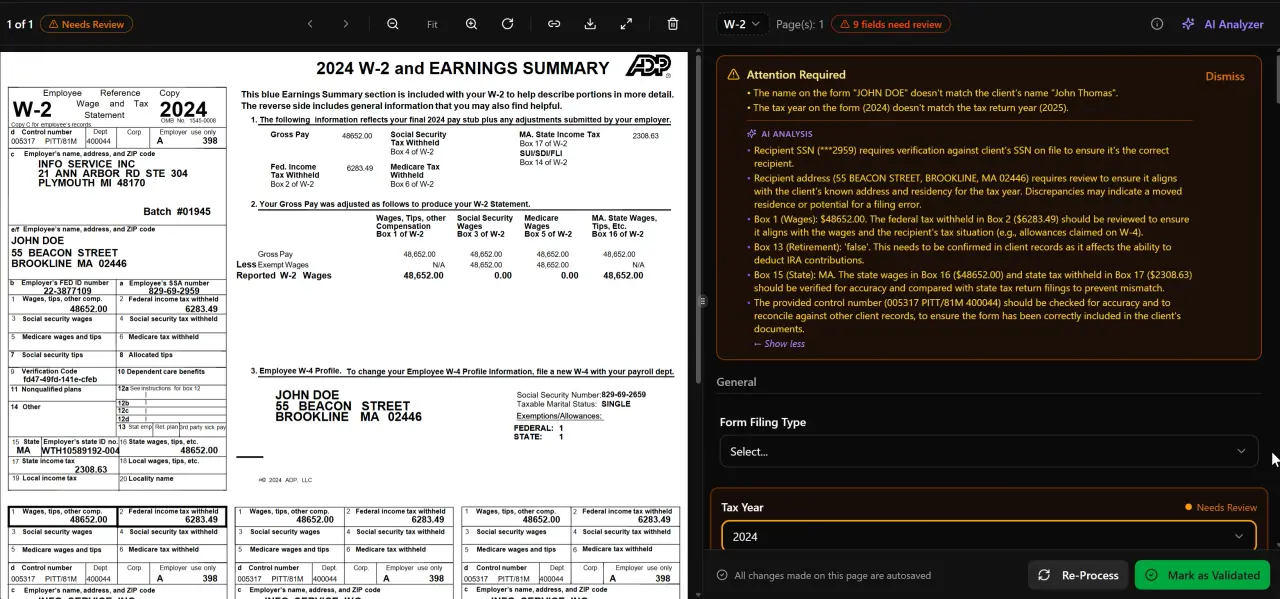
TaxScout's AI document extraction pipeline, for example, processes W-2s, the full 1099 series, K-1s, 1098 and 1095 series, 1040 schedules, and supporting records through five discrete validation layers before surfacing results to the preparer. A split-screen PDF viewer with click-to-source field highlighting lets the reviewer trace every extracted value back to the source document page — a workflow that eliminates the manual side-by-side comparison that consumes hours during review season.
The IRS PTIN statistics confirm that the professional preparer market is large and distributed. The practical implication is that AI document tooling must work reliably at a wide range of firm sizes and document volumes — not just at enterprise scale. Understanding the document-type risk map is the first step toward deploying it responsibly.
Document Types AI Handles Well Versus Poorly
Not all tax documents are created equal from an AI extraction standpoint. The document classes that AI handles most reliably share a common trait: they follow a fixed IRS-defined layout that changes infrequently. W-2s, 1099-NEC, 1099-INT, 1099-DIV, and 1098 forms fall into this category. The field positions are consistent across issuers, the numeric data is discrete, and the math relationships are verifiable. Confidence scores on these document classes are consistently high in well-engineered pipelines.
The document classes that create operational risk are those with structural variability or high preparer-judgment requirements. Three categories deserve explicit attention for CPA and EA firms.
Amended and superseded K-1s are a persistent extraction challenge. A Schedule K-1 from a large partnership or S corporation may be amended one, two, or three times in a single filing season. Each amendment may arrive as a new PDF with different formatting from the same issuer, or as a corrected page attached to a different cover letter. Without document-version tracking and cross-filing-year comparison, an AI system may extract the original K-1 values and miss the amendment, or treat two versions of the same K-1 as separate income sources. This is a document class where human review of the amendment chain is non-negotiable.
Foreign income schedules and FBAR-adjacent documents — including Forms 1116, 2555, 8938, and foreign pension or government benefit statements — combine structural variability with high stakes. A foreign pension statement may arrive in a non-English language, follow no IRS-prescribed layout, and contain currency conversion requirements that are outside the extraction model's native scope. AI can assist with organizing and flagging these documents, but the preparer must own the substance. The IRS foreign tax credit guidance makes clear that the computational complexity here is not trivial.
Mixed-use asset depreciation supporting records — receipts, prior-year depreciation schedules, asset lists from prior software — often arrive as free-form attachments with no standardized field layout. Bonus depreciation rules under IRC §168(k) as amended by P.L. 119-21 mean that property acquired after January 19, 2025 is eligible for 100% bonus depreciation, while earlier acquisitions under a binding contract before January 20, 2025 keep the TCJA phase-down schedule (40% in 2025, 20% in 2026). An AI extraction layer that treats all depreciation schedules as equivalent will produce errors that propagate into the return. See our guide on accounting automation for a broader discussion of where automation boundaries matter.
The practical takeaway: deploy AI extraction confidently on standardized income documents, and design a mandatory human-review gate for amended pass-through forms, foreign income documents, and depreciation supporting records.
IRS Circular 230 and Practitioner Responsibility When AI Touches a Client File
IRS Circular 230 governs the conduct of practitioners — attorneys, CPAs, enrolled agents, enrolled actuaries, and enrolled retirement plan agents — who practice before the IRS. The core obligation that AI documentation raises is the standard of competence and due diligence under Circular 230 §10.22, which requires practitioners to exercise due diligence in preparing returns and documents and in determining the correctness of representations made to the IRS.
The critical compliance point is that delegating data extraction to an AI model does not transfer the practitioner's responsibility for the accuracy of that data. The preparer who signs the return is responsible for the values on that return, regardless of how those values were sourced. This is not a theoretical concern: if an AI extraction error produces an understated income figure and the firm relies on that figure without review, the practitioner signed a return they were obligated to verify.
Three Circular 230 compliance controls are essential when AI is part of the documentation workflow. First, every AI-extracted value that flows into a tax return must be traceable to a source document — the click-to-source capability in a split-screen PDF viewer is not a convenience feature, it is an audit trail. Second, confidence scoring is a workflow routing tool, not a sign-off mechanism: low-confidence extractions must go to a human reviewer before the value enters the return. Third, the engagement file should document that AI-assisted extraction was used and that the preparer reviewed and approved the final values. The IRS Circular 230 PDF is the authoritative source; firms should review it with their professional liability carrier as AI tools become part of standard workflow.
EA firms carry a specific consideration: enrolled agents are licensed by the IRS directly, and IRS oversight of EA practice is more direct than state CPA board oversight. The IRS Office of Professional Responsibility has the authority to sanction EAs for Circular 230 violations, making compliance documentation in AI-assisted workflows a first-order concern for EA practices of any size. For a broader discussion of e-file authorization and practitioner responsibility, see Form 8879-TA: What CPAs Need to Know.
How Firm Size Changes the ROI Calculation for AI Document Tools
The ROI math for tax documentation with AI is not uniform across firm sizes, and the articles that treat it as universal are missing a critical variable. The relevant inputs are return volume, document complexity mix, current staff cost per return, and the marginal cost of the AI tooling itself.
For a solo EA or two-person CPA practice billing 150 to 300 returns per season, the primary ROI driver is not throughput — it is error reduction and time reclaimed during peak season. At TaxScout's Solo tier ($49/month or $470/year for 150 return credits), the per-return economics are favorable even at low volume, particularly when the alternative is a per-seat platform charging $800–$1,200 per seat per year (TaxDome's pricing, as last read on 2026-07-31; note that when last read on that date, its entry plan, Essentials, was limited to a single team member). The TaxScout pricing page details the flat, per-firm model — unlimited team members regardless of tier.
For a 5–15 person firm, the ROI calculation shifts toward throughput and capacity planning. At this scale, AI document extraction reduces the per-return staff-hours on intake and data entry meaningfully. The AI ROI guide for accounting firms provides a framework for quantifying that savings. The key variables to model are: average document pages per return (a 1040 with two K-1s, a 1099-B, and a rental property schedule is a materially different workload than a pure W-2 return), and the number of returns that require amendment or reprocessing under the current manual process.
For a 20-plus preparer firm, the ROI case is usually about scalability and capacity: can the firm take on more clients in the same season without adding proportional headcount? The TaxScout directory data shows 69,074 US preparers listed, with 32,228 CPAs and 11,109 EAs. In high-preparer-density markets — particularly large metro areas — competition for clients is high and technology differentiation has measurable acquisition and retention value. See our accounting firm marketing guide for how to position AI-assisted service delivery as a client benefit.
One pricing comparison worth making concrete: Canopy lists $74/user/mo billed annually, as of 2026-11-22. For a firm with five licensed staff, that is $4,440 per year before add-ons — and Canopy's smart intake and delivery feature carries an additional charge per client per year beyond five clients, as of 2026-11-22. Karbon lists $59/user/mo billed annually, as of 2026-11-22. At five users that is $3,540 per year. TaxScout's Firm plan at $1,430/year prepaid covers unlimited team members and all features. The comparison is most stark for firms that are growing headcount — TaxScout's price does not increase as you add staff.
AI Document Tool Cost Comparison by Firm Size (5-person firm, annual billing)
| Platform | Annual Cost (5 users) | Per-Return AI Extraction | Unlimited Team Members |
|---|---|---|---|
| TaxScout Firm | $1,430/yr (flat) | Included in credits | Yes |
| Canopy | $4,440/yr + intake add-ons | Not stated per-return | No — per seat |
| Karbon | $3,540/yr | Not included | No — per seat |
| SurePrep | Quote-based per-return | Quote-based per-return | N/A — per-return model |
A Decision Framework: What to Automate First in a Small EA or CPA Firm
For a firm with three to five practitioners, the right sequencing of AI documentation automation matters more than the right platform choice. Deploying AI everywhere at once creates review paralysis; deploying it too narrowly leaves the highest-ROI use cases untouched. The framework below is organized by impact and risk, starting with high-impact, low-risk automation and ending with use cases that require more infrastructure before they are safe to automate.
Start with standardized income document extraction. W-2s, 1099-NEC, 1099-INT, 1099-DIV, 1098-E, and 1095 series documents are the highest-volume, lowest-risk document classes to automate. The extraction confidence is high, the math is verifiable, and the preparer review time is minimal once the AI pipeline surfaces clean values. This alone eliminates the bulk of manual data entry for a typical individual return mix.
Add AI-assisted intake second. A smart intake engine modeled on IRS Form 13614-C with four-layer prefill — document-first, prior-year data, profile data, and AI gap analysis — reduces the back-and-forth with clients on missing documents. This is where TaxScout's AI intake operates: the system identifies what documents the client has provided, what is missing based on prior-year filings, and what questions remain unanswered. For a small EA firm, this is often the highest-ROI automation after income document extraction because it directly reduces the administrative drag of onboarding each client. See how to automate tax client intake for a step-by-step breakdown.
Add AI research agents third, once intake is stable. Once the documentation pipeline is running cleanly, AI research agents that query IRS, Treasury, Cornell Law, and SSA in real time become a force multiplier for the analysis and advisory work that earns higher fees. For the specific use cases and prompt strategies, see AI tax research agents for CPAs.
Keep human-in-the-loop for amended pass-through documents, foreign income, and mixed-use depreciation. As the document-type risk section above establishes, these classes are not safe to automate at the extraction stage without a mandatory human review gate. Build the workflow so that the system flags these document types automatically and routes them to the most experienced preparer on the team.
Last: integrate e-signatures and invoicing once documentation workflow is stable. E-signatures via a compliant integration (Form 8879, engagement letters, 4868 extensions) and Stripe-based invoicing close the client lifecycle loop, but they add the most value after the core documentation pipeline is running reliably. For a comparison of e-signature options, see the CPA firm e-signature software guide.
AI-Powered Working Papers and Audit Trail Requirements
Working paper documentation is where AI documentation tools either earn their compliance credibility or expose a firm to risk. The law.cornell.edu overview of practitioner obligations under 31 CFR §10.22 establishes that due diligence is an affirmative obligation — it is not satisfied by the absence of errors, but by the presence of a process that would have caught errors.
An AI-assisted working paper package should document: (1) the source document received, with a hash or timestamp confirming it has not been modified post-receipt; (2) the AI extraction output, including confidence scores for each field; (3) any fields that were overridden by the preparer and the reason for the override; (4) cross-document validation results (e.g., does the Box 1 wages on the W-2 match the withholding on the 1040?); and (5) the preparer sign-off with date.
The TaxScout tax workpaper package glossary entry describes the standard components. TaxScout's validation pipeline applies multiple layers of deterministic math rules and post-extraction logic rules, generating a structured audit log that can be incorporated directly into the working paper file. This is materially different from a system that surfaces a number with no traceable lineage.
For firms subject to state CPA board oversight, working paper retention requirements vary by state. The Journal of Accountancy's coverage of documentation standards provides a practitioner-friendly overview of the AICPA's position, and state societies should be consulted for jurisdiction-specific requirements. The SSA wage data confirmation process is also relevant for W-2 reconciliation workflows — AI-extracted Box 1 wages should be verifiable against SSA records when discrepancies arise.
Client Portal and Secure Document Collection
The document collection side of tax documentation with AI is as important as the extraction side. A secure, branded client portal with OTP login eliminates the email-attachment security risk that persists at a surprising number of small firms. When clients upload documents directly to a portal, the intake pipeline can begin AI classification and extraction immediately — without a staff member manually downloading attachments, renaming files, and moving them to a folder structure.
TaxScout's client portal uses OTP authentication (no passwords to manage or reset), branded with the firm's identity, and connected directly to the intake engine. Documents uploaded by the client trigger automatic classification and routing through the extraction pipeline. The document management guide for CPA firms covers the broader considerations for secure document collection, including encryption requirements and data-subject deletion rights.
For EA firms handling sensitive foreign income clients or high-net-worth individuals, the security architecture matters: encryption in transit and at rest, role-based access with MFA, and data-subject deletion support are baseline requirements, not differentiators. The TaxScout security page documents the platform's specific controls.
Sources
Frequently Asked Questions
AI extraction is most reliable on fixed-layout IRS forms: W-2s, 1099-NEC, 1099-INT, 1099-DIV, 1098 series, and 1095 series. These documents follow consistent field positions across issuers, making confidence scores high and math verification straightforward. Amended K-1s, foreign income schedules, and mixed-use depreciation records require mandatory human review regardless of platform.
Keep reading
Accounting Automation for CPA Firms: What AI Actually Changes (And What It Doesn't)
Nov 14, 2026 · 11 min read
SurePrep vs Alternatives: What CPAs Should Know Before Buying AI Tax Prep Software
Jul 7, 2026 · 11 min read
New Accounting Client Checklist: What AI-Ready Firms Do Differently
Nov 21, 2026 · 11 min read
Stay up to date
Get the latest tax tech insights delivered to your inbox.