Tax Deadline Reminders: Automate Client Alerts Before the IRS Does
Most CPA content lists deadlines. This guide covers something more valuable: how to build an automated client alert system that sends tiered reminders by entity type, eliminates manual calendar-watching, and protects your firm from malpractice exposure. Learn which deadlines to trigger, how to…
Tax deadline reminders are one of the most consequential — and most neglected — operational systems in a CPA firm. Every missed estimated payment, late extension request, or overlooked W-2 distribution deadline carries real consequences: IRS penalties for clients, malpractice exposure for the firm, and the kind of client relationship damage that referral networks never forget.
The problem is not that CPAs don't know what the deadlines are. The problem is that manually tracking which of your 200+ clients needs a reminder, for which deadline, in which entity category, and at what point in the countdown requires the kind of persistent attention that tax season simply does not allow. Most firms rely on sticky notes, shared spreadsheets, or whoever happens to remember — none of which scale. This is precisely why automated tax deadline reminders have become an operational necessity rather than a nice-to-have for growing CPA firms.
This guide covers the operational architecture of a proactive tax deadline notification system: which deadlines to automate, how to structure tiered reminder cadences by entity type, and how an AI-native platform eliminates the staff hours and exposure that manual calendar-watching creates. Whether you serve ten clients or a thousand, building a reliable system for tax deadline reminders is the foundation of a scalable, penalty-free practice.
Why Manual Deadline Tracking Is a Malpractice Liability
The IRS assesses billions in penalties annually for late filings and underpayments. When a client faces a penalty that a timely reminder could have prevented, the question often lands on the CPA's desk — especially if an engagement letter implied deadline monitoring as a service. State CPA licensing boards and professional liability insurers are increasingly asking firms to document their deadline communication procedures as a condition of coverage. For firms evaluating their tax deadline reminders approach, this trade-off compounds over time.
A firm with 300 active clients managing even five recurring deadlines per client per year has 1,500 individual reminder events to track. When that tracking lives in a spreadsheet, someone's inbox, or a generic calendar, gaps are not just likely — they are statistically inevitable. A single missed partnership extension or a Q3 estimated payment that slipped through can cost a client thousands in penalties and cost your firm a relationship worth far more. Each of these factors directly shapes how tax deadline reminders plays out in practice.
Systematized, automated client alert workflows are no longer a convenience feature. They are a risk management tool. Firms that document a consistent, timestamped reminder process have a clear record demonstrating diligence — which is exactly the paper trail that protects against malpractice claims. The shift from reactive to proactive client communication is also one of the clearest signals to clients that they are working with a well-run firm. Understanding tax deadline reminders in this context is what separates firms that scale from those that stall.
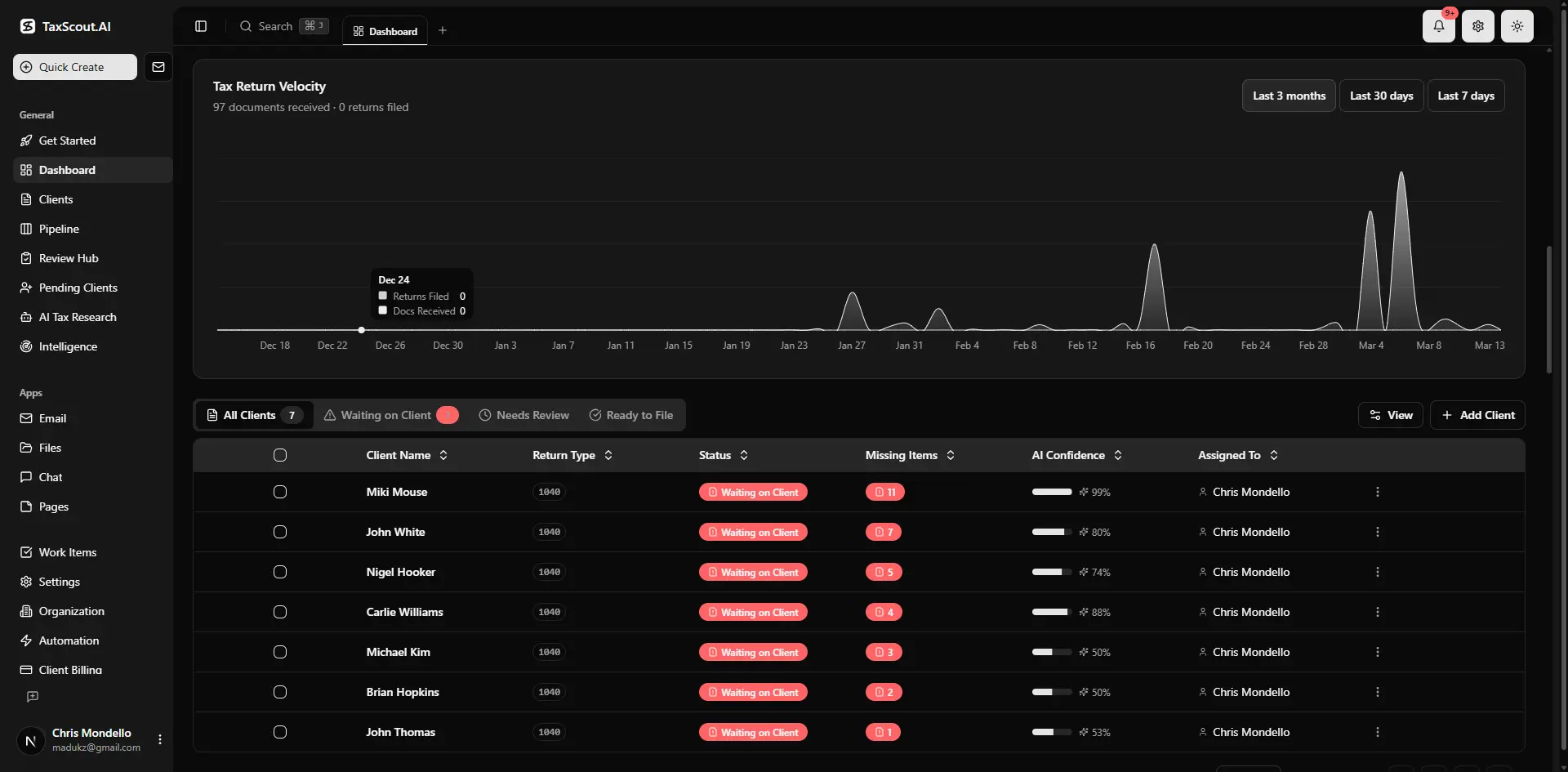
Real-time dashboard showing returns in progress, revenue, and upcoming deadlines
Which Deadlines Belong in an Automated Reminder System
Not every deadline warrants the same alert structure, but a comprehensive tax calendar automation system should cover at minimum four categories of recurring events. This is precisely where a deliberate tax deadline reminders strategy pays off.
First, entity filing deadlines: S-corp and partnership returns (Form 1120-S and 1065) are due March 15; individual and C-corp returns are due April 15. Extension deadlines follow six months out. These are high-stakes, high-visibility events — clients notice when they are caught off guard, and consistent tax deadline reminders are what keep those surprises from happening. Our companion post on IRS tax deadlines every CPA must know maps the full 2026 calendar. Tax deadline reminders sits at the center of this decision — get it wrong and the rest unravels.
Second, estimated quarterly tax payments — April 15, June 16, September 15, and January 15 — are among the most frequently missed and penalized items for self-employed clients and pass-through entity owners. See the guide on how to avoid penalties with estimated quarterly payments for the math behind underpayment thresholds. These estimated tax payment obligations are easy for clients to underestimate mid-year. When firms revisit their tax deadline reminders priorities, the gaps usually surface here.
Third, payroll and information return deadlines: W-2s and most 1099s must be distributed to recipients by January 31 under IRS Publication 15. Employers who miss this date face per-form penalties that compound quickly for firms managing multiple business clients. Fourth, state-level deadlines — which often differ from federal dates and carry separate penalty structures — require per-client tracking, particularly for clients with multi-state obligations. Incorporating tax deadline reminders into your state-level workflow is just as critical as federal coverage.
Still watching a shared spreadsheet for deadline conflicts across 200 clients?
TaxScout's automation engine sends tiered deadline reminders by entity type — no manual setup per client, no alerts slipping through.

Your clients see your brand — OTP login, document upload, and real-time status
Tiered Reminder Cadences by Entity Type
A one-size alert sent the day before a deadline is not a reminder system — it is a last-ditch notification. Effective automated client reminders for CPAs are structured in tiers, spaced to give clients time to act, and calibrated to the complexity and consequence of each deadline.
The 30-14-48 framework works well as a baseline: a 30-day alert creates awareness and surfaces any document gathering the client needs to do; a 14-day alert adds urgency and confirms the firm has everything needed to file or pay; a 48-hour alert is a final prompt before the window closes. For high-consequence deadlines like extension requests, a 7-day tier can be inserted between the 14-day and 48-hour alerts. Structuring tax deadline reminders this way ensures clients have enough runway to act at every stage.
Entity type should drive cadence variation. S-corps and partnerships carry earlier filing deadlines and require K-1 distributions to flow downstream to individual returns, so lead times should be longer — consider starting the cadence at 45 days for March 15 filers. Individual filers on extension can follow a shorter three-touch sequence since the primary awareness has already been established. Business clients with quarterly estimated payment obligations benefit from a recurring four-times-a-year sequence triggered automatically off their entity record rather than requiring per-cycle manual setup.
For firms managing clients with pass-through entity elections or state PTE tax payments — which have grown significantly since the SALT cap introduced in Treasury guidance — state deadline tiers should be appended to the federal cadence with state-specific language in the alert body.
S-Corp and Partnership Alert Sequence
Trigger at 45 days: inform the client that the March 15 filing deadline applies to their entity, and request any outstanding K-1 items or late bookkeeping. Trigger at 21 days: confirm receipt of all required documents and notify the client if anything is missing. Trigger at 7 days: confirm whether the return will be filed on time or an automatic extension will be requested. This sequence prevents the March 15 crunch from cascading into a delayed individual return season — a problem that frustrates clients and compresses firm capacity simultaneously. Sending tax deadline reminders at each of these intervals gives clients and staff the visibility they need to stay ahead.
Individual Client Quarterly Estimated Payment Sequence
Set recurring triggers 21 days before each payment due date. The first alert should include the estimated payment amount if the firm calculated it, along with a payment link or instructions. A 7-day reminder follows, and a 48-hour final alert closes the sequence. If the client uses EFTPS, the alerts should remind them that same-day enrollment is not available — scheduling requires advance setup.

Track every return from intake to filed with drag-and-drop pipeline management
Building the Workflow: From Client Record to Sent Alert
The operational anatomy of a tax deadline notification system has three components: a deadline calendar tied to client entity types, a trigger engine that calculates alert dates relative to each deadline, and a delivery mechanism that sends the alert through the client's preferred channel.
In a modern CPA practice management platform, this starts at the client record level. When a new client is onboarded and their entity type — individual, S-corp, partnership, C-corp, trust — is recorded, the system should automatically assign the relevant deadline calendar and prefill the trigger dates. Manual calendar setup per client is a design failure; if a staff member has to build a reminder sequence from scratch for each new engagement, the system will not scale and will accumulate gaps as staff turns over. Firms that embed tax deadline reminders directly into their onboarding workflow eliminate this risk from day one.
TaxScout's pipeline management system supports 12 customizable stages with automated status transitions. Combined with the automation engine, deadline trigger events can fire alerts, advance pipeline stages, or generate internal tasks when a deadline window opens. This creates a closed-loop workflow where the client gets an external notification and the assigned staff member gets an internal alert simultaneously — no separate calendar app required.
The delivery layer matters as much as the trigger logic. Alerts sent to a client's personal email are easily lost in spam or ignored. Alerts delivered through a branded client portal — with OTP login, no password friction, and a clear action button — see significantly higher engagement. When a client can click directly from the reminder into their portal to upload a document or confirm a payment, the alert becomes a workflow accelerator rather than just a notification.
Deadline Automation Features: TaxScout vs. Competitors
| Feature | TaxScout | TaxDome | Canopy |
|---|---|---|---|
| Automated multi-tier reminder sequences | Yes — pipeline automation engine | Manual task reminders only | Add-on Smart Intake at $11/client extra |
| Entity-type deadline calendar | Built-in, auto-assigned at onboarding | Not included | Not included |
| Branded client portal delivery | Yes — OTP login, no password | Yes | Yes |
| Internal staff alert on same trigger | Yes — simultaneous pipeline task | Partial | Partial |
| AI-driven document gap analysis | Yes — 4-layer prefill with gap detection | No | No |
| Per-seat pricing impact at 10 staff | $149/month total | ~$500/month | ~$660/month |
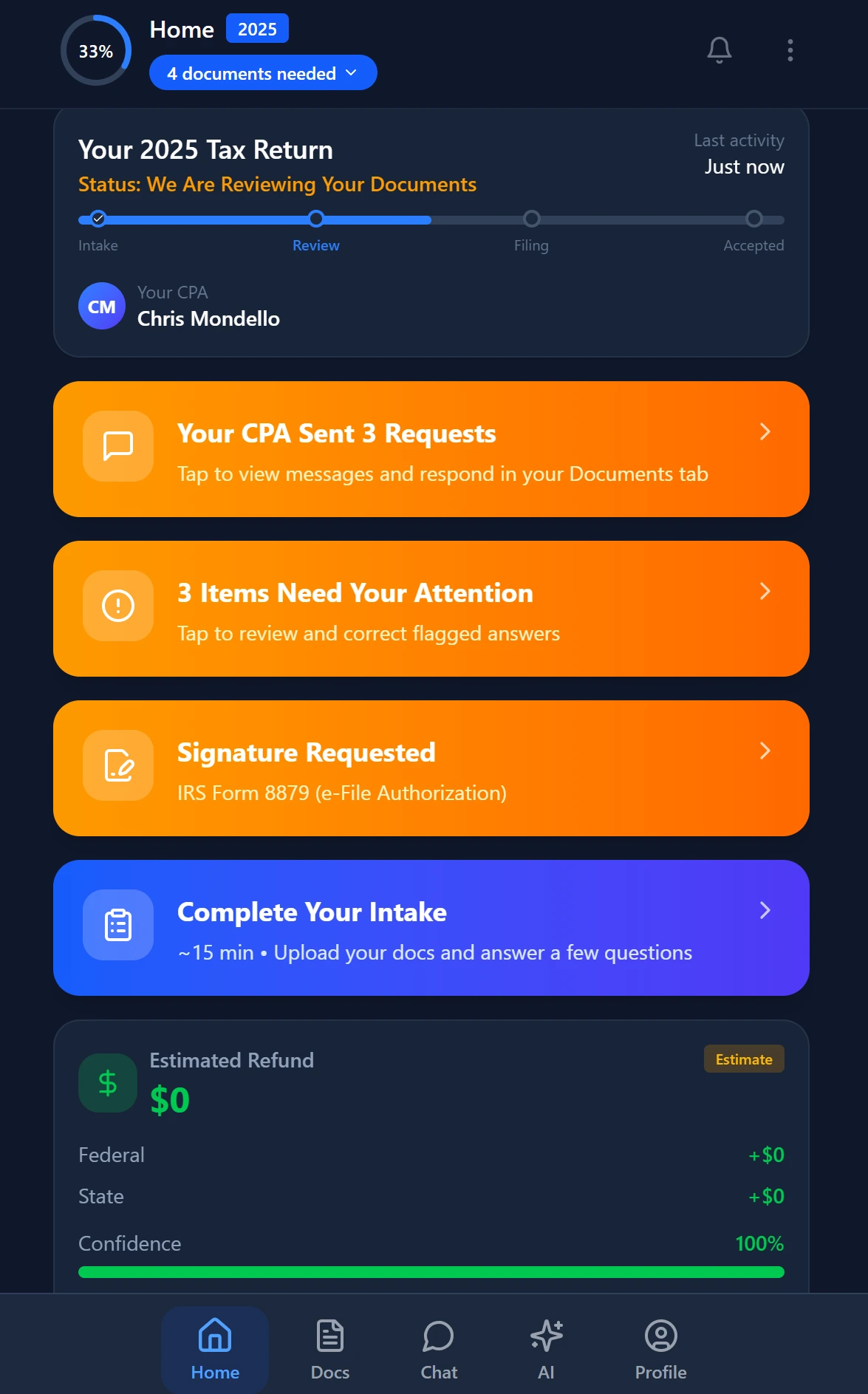
Smart intake auto-fills from uploaded documents and prior-year data

Click any extracted field to see its source highlighted on the original PDF
How AI Eliminates the Calendar-Watching Burden at Scale
Manual deadline tracking scales linearly with headcount — which means it does not scale at all. Every new client adds more events to watch. Every staff departure creates a gap in who knows which clients are on which reminder cadences. AI-native practice management removes the human memory dependency from the system entirely.
TaxScout's AI intake engine — modeled on IRS Form 13614-C with four-layer prefill — captures entity type, filing status, and prior-year extension history at onboarding. That data feeds directly into the deadline trigger logic so that the correct cadence is assigned without any manual configuration by staff. When a client's situation changes — a new S-corp election, a first year with quarterly obligation, a state PTE election — updating the entity record propagates automatically to the reminder calendar, keeping tax deadline reminders accurate without any manual intervention.
The platform's AI research agents also monitor IRS and Treasury sources for deadline changes, relief announcements, and disaster postponements. When the IRS issues disaster relief postponing a filing deadline for clients in a specific state — as it has done for California, Florida, and other states in recent years — the system can flag affected clients before you have to manually identify them. Our post on California tax changes CPAs must know details how frequently these state-level deadline shifts occur.
For document-dependent deadlines — particularly K-1 distributions and information return filings — TaxScout's AI document extraction covers 180+ tax form types with a 5-layer validation pipeline including OCR cross-verification and 15 deterministic math rules. When a partnership return is complete and K-1s are ready, the system knows. When a W-2 has been uploaded to a client's record, the 1099 or information return workflow can advance automatically. This eliminates the manual status check that otherwise requires a staff member to open each client file to see where things stand.
Proactive Client Communication as a Competitive Differentiator
Proactive client communication in accounting is increasingly a retention and acquisition factor, not just a service standard. Bureau of Labor Statistics data on accounting services shows continued firm consolidation — smaller firms that do not systematize client communication lose clients to firms that make proactive outreach a visible service attribute.
Clients consistently cite 'proactive communication' as a top reason they stay with or leave an accountant, according to surveys published in the Journal of Accountancy. A tiered deadline reminder system delivers that proactivity automatically — the client receives thoughtful, timely tax deadline reminders before they ever think to ask about an upcoming obligation, which reinforces the perception that the firm is on top of their situation year-round, not just during tax season.
When clients refer their contacts to your firm, the story they tell is often about an experience: 'my accountant reminded me about the September estimated payment and it saved me $800 in penalties.' That story is not possible without a systematic CPA deadline automation workflow behind it. See our guide on building a client portal clients actually use for how the delivery experience shapes that perception.
Firms that operate at this level also find that deadline automation reduces inbound client inquiry volume. When clients know tax deadline reminders are coming on a predictable schedule, they do not call to ask whether they owe a quarterly payment or whether an extension was filed. That reduction in reactive communication frees staff for higher-value work — a capacity benefit that compounds across a full 12-month calendar.
How many client deadlines fell through the cracks last tax season?
TaxScout automates tiered deadline reminders by entity type, connects them to your pipeline, and delivers them through a branded portal — flat pricing, no per-seat fees.

Every client gets organized documents, status tracking, and a complete history
Frequently Asked Questions
Start with the four highest-impact categories: entity filing deadlines (March 15 for S-corps and partnerships, April 15 for individuals and C-corps), estimated quarterly tax payments (due April, June, September, and January), information return distribution deadlines (W-2s and 1099s by January 31), and automatic extension request dates. These cover the majority of penalty exposure for most firm client bases and deliver the highest malpractice risk reduction per hour of setup time.
Keep reading
Stay up to date
Get the latest tax tech insights delivered to your inbox.