Jetpack Workflow Alternative: Why CPA Firms Are Switching to AI-Native Tools
Jetpack Workflow works fine for simple task lists, but CPA firms scaling past 100 returns hit a wall fast. This guide compares the top Jetpack Workflow alternatives — including Karbon and TaxScout — on the metrics that actually matter: document automation depth, client onboarding speed, and…
If you're searching for a Jetpack Workflow alternative, you're likely not alone. Jetpack has built a loyal following among solo practitioners and small CPA firms because it does one thing reasonably well: it keeps recurring task lists organized. But as firms grow — more clients, more staff, more document volume — the gaps become impossible to ignore. There's no AI-assisted document extraction, no intelligent client intake, and no research automation. You're still doing the heavy lifting manually.
The comparison content that exists online mostly pits Jetpack against Karbon, positioning Karbon as the natural upgrade. That framing misses a critical dimension: neither Jetpack nor Karbon was designed from the ground up as an AI-native platform. Karbon added AI features onto an email-centric workflow tool. That's a meaningful difference when you're trying to cut per-return preparation time during tax season. Most firms searching for a jetpack workflow alternative land on Karbon first, but that comparison overlooks whether either tool was actually built with AI at its core.
This article is for CPAs who want more than a feature checklist upgrade. We'll walk through where Jetpack breaks down at scale, why bolted-on AI isn't the same as purpose-built AI, and how TaxScout compares across the three metrics that actually move the needle for growing firms: document automation, client onboarding speed, and per-return time savings. If you're evaluating a jetpack workflow alternative because your firm has outgrown basic checklists, the distinction between bolted-on AI and purpose-built AI is the most important factor to understand.
Where Jetpack Workflow Falls Short for Growing CPA Firms
Jetpack Workflow was built around a simple premise: give accountants a checklist-based system for recurring work. For a firm handling fewer than 75 returns with one or two staff members, it delivers reasonable value. Tasks get assigned, deadlines get tracked, and nothing obvious falls through the cracks. For smaller firms, this simplicity works well enough, but it's precisely why many practices begin researching a jetpack workflow alternative once their client volume and staff complexity start to grow.
The breakdown happens when document volume grows. Jetpack has no native document management layer — clients can't upload files into an organized portal tied to a return, and there's no AI engine to classify or extract data from what arrives. Every W-2, 1099, or K-1 still needs a human to open, read, and manually transfer data into your tax software. At 200 or 300 returns, that manual touchpoint compounds into dozens of lost preparer hours per season. For firms evaluating their jetpack workflow alternative approach, this trade-off compounds over time.
Client onboarding is equally manual. Jetpack doesn't offer a smart intake questionnaire that prefills from prior-year data or document analysis. The IRS Form 13614-C interview process — the gold standard for gathering client filing information — is something your staff has to replicate by hand in Jetpack's templates. There's no mechanism to detect missing information before a return enters the preparation queue. Each of these factors directly shapes how jetpack workflow alternative plays out in practice.
Pricing transparency is another pain point. Jetpack charges per user, which means cost scales linearly with headcount. For a firm adding seasonal staff or part-time reviewers, every seat added hits the budget. This is worth understanding before evaluating any alternative — the per-user billing model is a structural cost that compounds as you grow, regardless of whether those additional users are generating meaningful revenue. Understanding jetpack workflow alternative in this context is what separates firms that scale from those that stall.
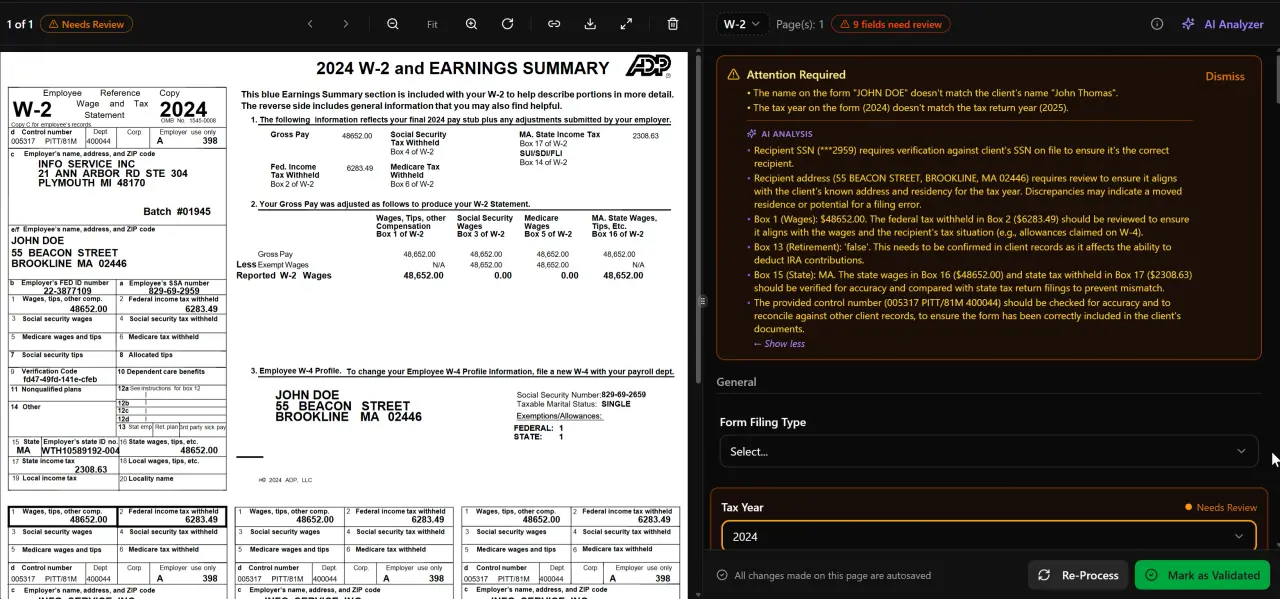
AI classifies, extracts, and validates every document automatically
Jetpack Workflow vs Karbon: The Email-Workflow Upgrade Path
Karbon is the most commonly recommended Jetpack Workflow alternative in accounting circles, and it does offer a genuine upgrade on collaboration depth. Its email integration — connecting Gmail and Outlook directly into a shared workspace — solves a real problem that Jetpack ignores. Karbon's practice management platform is built around email triage and client relationship context, which suits firms where communication management is the primary bottleneck.
But Karbon is, at its core, an email-centric workflow tool. It charges approximately $59 per user per month (verified March 2026), and AI features are layered on top of that foundation rather than woven into the core document processing pipeline. There is no 5-layer document validation engine, no AI extraction confidence scoring, and no cross-document math verification. When a client uploads a brokerage statement alongside three 1099-B forms, Karbon won't automatically reconcile those figures or flag discrepancies — a human still has to. This is precisely where a deliberate jetpack workflow alternative strategy pays off.
For firms whose primary bottleneck is email volume and internal task visibility, Karbon is a reasonable choice. For firms whose primary bottleneck is document processing speed and intake accuracy, the gap between Karbon's bolted-on AI and a purpose-built AI extraction system becomes very real during the February-April crunch. Our full Karbon alternative comparison walks through those differences in more detail. Jetpack workflow alternative sits at the center of this decision — get it wrong and the rest unravels.
It's also worth noting that Karbon's pricing compounds fast. At $59/user/month for a five-person firm, you're looking at $295/month before factoring in any additional modules. The per-user model never changes regardless of how many returns you process — you pay for seats, not outcomes.
Tired of paying per seat for tools that still require manual document work?
TaxScout gives your entire firm — unlimited team members — AI-native document extraction, smart intake, and 9 research agents starting at $49/month flat.

Click any extracted field to see its source highlighted on the original PDF

Your clients see your brand — OTP login, document upload, and real-time status
What AI-Native Actually Means in Practice Management
The phrase 'AI-powered' has become nearly meaningless in accounting software marketing. Almost every platform now claims some form of AI capability. The meaningful distinction is whether AI is the core processing layer or a cosmetic addition to an existing workflow tool.
An AI-native platform means the document processing pipeline itself is built on machine learning from the ground up. TaxScout's AI document extraction runs every uploaded file through a 5-layer validation pipeline: document quality routing, AI extraction with confidence scoring, OCR cross-verification, 15 deterministic math rules, and 18 post-extraction rules, followed by cross-document validation. When a client uploads a K-1 alongside Schedule E, the system checks that figures flow correctly between documents and flags inconsistencies before a preparer ever opens the file.
Compare that to a workflow tool with a chatbot assistant bolted on. The chatbot might help draft a client email or summarize a document description, but it doesn't validate that the Box 1 figure on a W-2 matches the withholding calculation on a draft 1040. That validation — which prevents errors that reach the review stage — is what actually reduces per-return time.
The Journal of Accountancy has documented the growing expectation that AI in tax preparation move beyond simple automation into structured validation and error detection. Firms that adopt tools with genuine validation depth are better positioned as client volumes and complexity grow. For a deeper look at the technical architecture behind AI extraction, see our post on what AI document extraction means for CPAs.
Client Onboarding Speed: Smart Intake vs Manual Templates
Client onboarding is where Jetpack Workflow alternatives diverge most sharply. Jetpack offers customizable templates, but the intelligence behind them is zero — every question is static, every field must be filled manually, and there's no system to detect what's missing before a return moves to preparation.
TaxScout's AI intake engine is modeled on IRS Form 13614-C and applies a 4-layer prefill hierarchy: document-first (pulling data directly from uploaded documents), prior-year (autofilling from last year's return), profile (applying known client entity and filing data), and AI gap analysis (identifying what's still missing and prompting accordingly). A client who uploads their W-2 and 1099-INT before completing the intake questionnaire will see those fields already populated when they open the form.
The practical impact: intake completeness goes up, and the back-and-forth email cycle asking clients for missing documents goes down. The IRS Taxpayer Advocate Service has consistently flagged incomplete information submission as a leading cause of return delays. A smarter intake process directly attacks that problem at the source.
Client experience also matters for retention. TaxScout's branded client portal uses OTP login — no passwords for clients to forget or reset — and provides a clean interface for document upload, e-signatures via Documenso, and invoice payment via Stripe Connect Express. Karbon offers a client portal as well, but the intake intelligence layer is not comparable. You can read about the full client portal feature set for more context on what the branded experience includes.
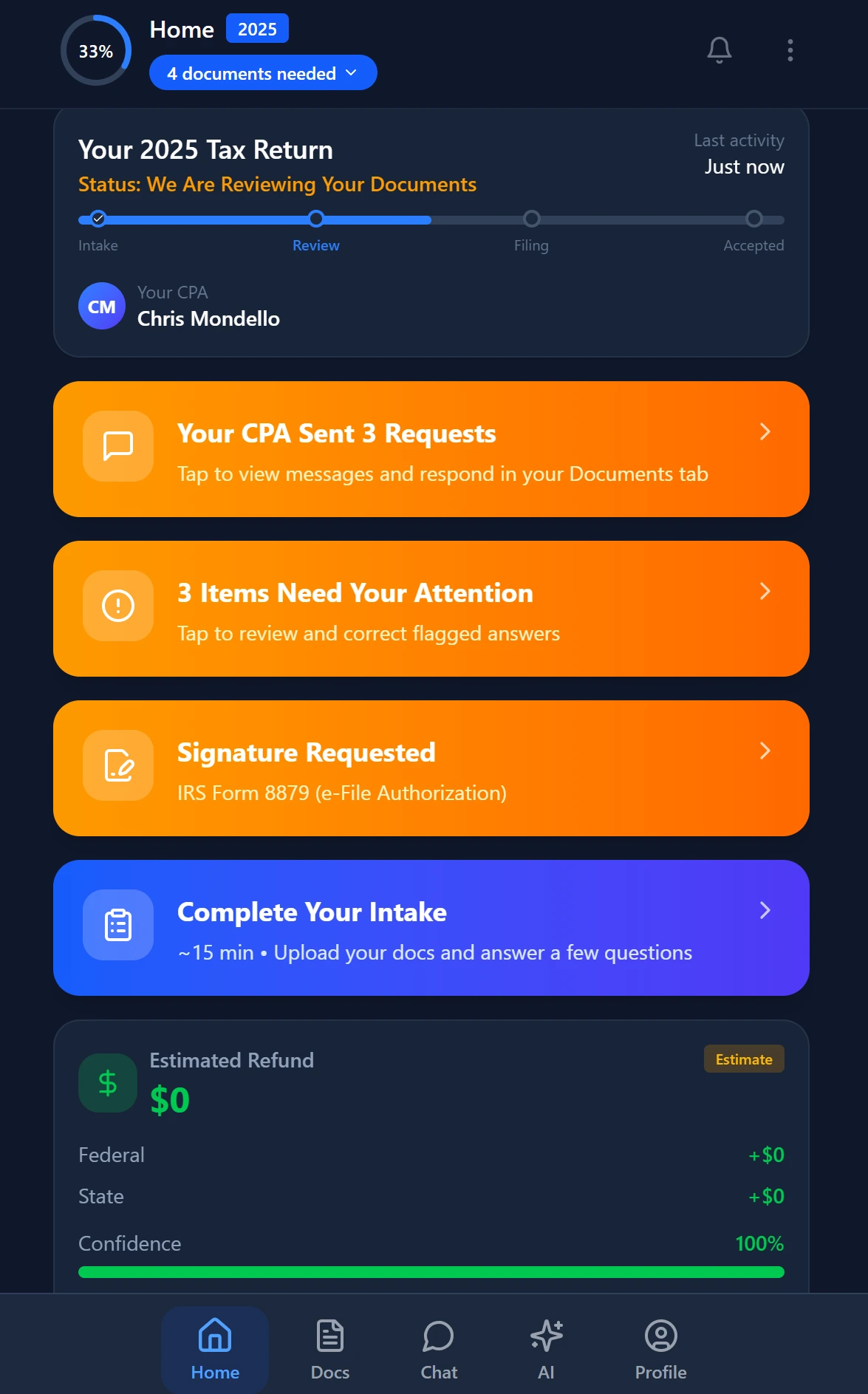
Smart intake auto-fills from uploaded documents and prior-year data
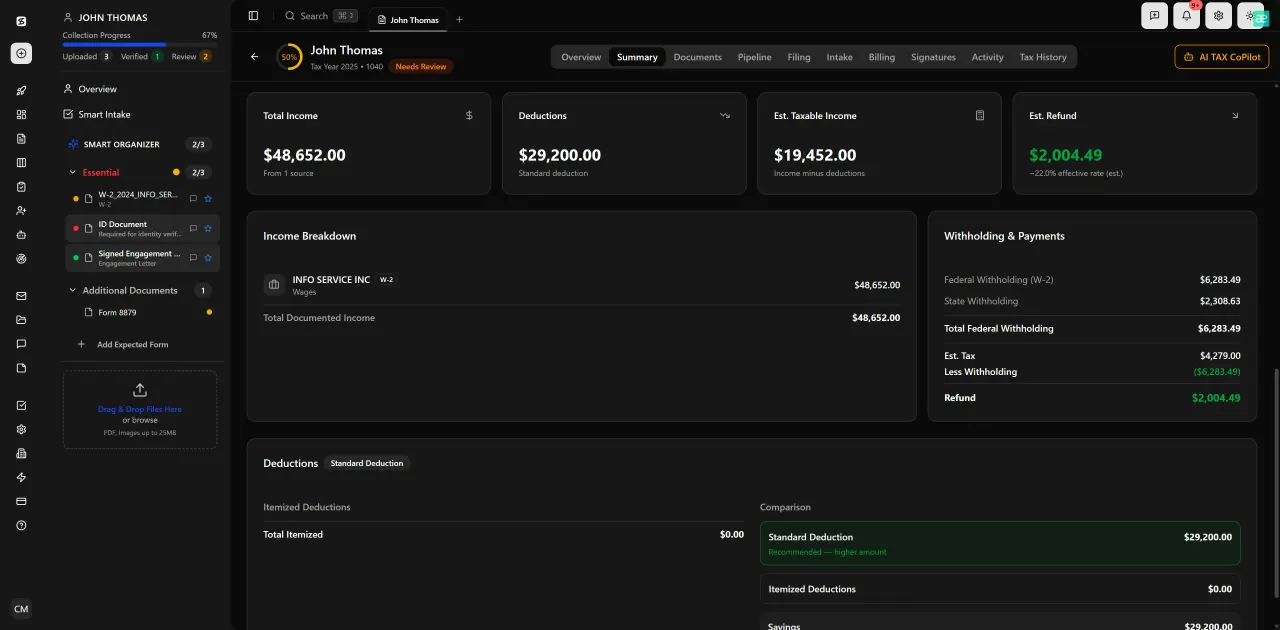
Review with AI assist — 9 agents answer questions with full client context
Per-Return Time Savings: Where the Numbers Actually Come From
When CPA firm owners evaluate practice management software, per-return time savings is the metric that justifies the investment — but it's rarely broken down honestly in competitor comparisons. Let's look at where the time actually goes.
According to Bureau of Labor Statistics occupational data, tax preparers spend a significant portion of their working hours on document handling, client communication, and data entry rather than actual analysis and review. Workflow tools like Jetpack address task tracking but do nothing about the document handling and data entry portion — the most time-intensive part of a typical return.
TaxScout's split-screen PDF viewer with click-to-source field highlighting means a reviewer can see exactly which line of which uploaded document produced each extracted figure — no switching between tabs, no manual cross-referencing. Combined with the 5-layer validation pipeline, errors that would normally surface during review are caught before the file ever reaches the reviewer's queue. For a firm doing 300 returns, eliminating even 15 minutes of back-and-forth per return saves 75 hours over a tax season.
The 9 specialized AI research agents with real-time search across IRS publications, Treasury regulations, Cornell Law, and SSA guidance mean that when a preparer hits a technical question — passive activity loss rules on a K-1, QBI deduction eligibility for an SSTB — the answer comes from the platform rather than a separate browser session. That embedded research capability is not available in Karbon or Jetpack.
For firms already using Drake, CCH Axcess, UltraTax CS, Lacerte, ProConnect, or ProSeries, TaxScout integrates as a front-end intake, processing, and management layer rather than replacing your existing tax preparation software. The time savings compound on top of whatever your current prep workflow looks like. See also our guide on AI accounting productivity for a broader framework on where automation returns the most time per dollar invested.
Jetpack Workflow vs Karbon vs TaxScout: Key Metrics for CPA Firms (March 2026)
| Capability | Jetpack Workflow | Karbon | TaxScout |
|---|---|---|---|
| AI document extraction | None | Limited/bolted-on | 5-layer validation pipeline |
| Smart intake with prefill | Static templates | Basic client requests | 4-layer prefill (document, prior-year, profile, AI gap) |
| AI research agents | None | None | 9 specialized agents (IRS, Treasury, Cornell, SSA, Congress) |
| Client portal with OTP login | None | Yes | Yes, branded with OTP |
| E-signatures | None | Yes | Yes, via Documenso |
| Per-user pricing | Yes | ~$59/user/month | No — unlimited team members |
| Flat monthly price (smallest plan) | ~$45/month | ~$59/user/month | $49/month (TaxScout Solo) |
| Works with existing tax software | No | No | Yes (Drake, CCH, UltraTax, Lacerte, ProConnect, ProSeries) |
| PDF toolbox (OCR, merge, PII masking) | None | Limited | 14+ tools |
| Excel 1040 calculator | None | None | 66 sheets, ~36,000 formulas |
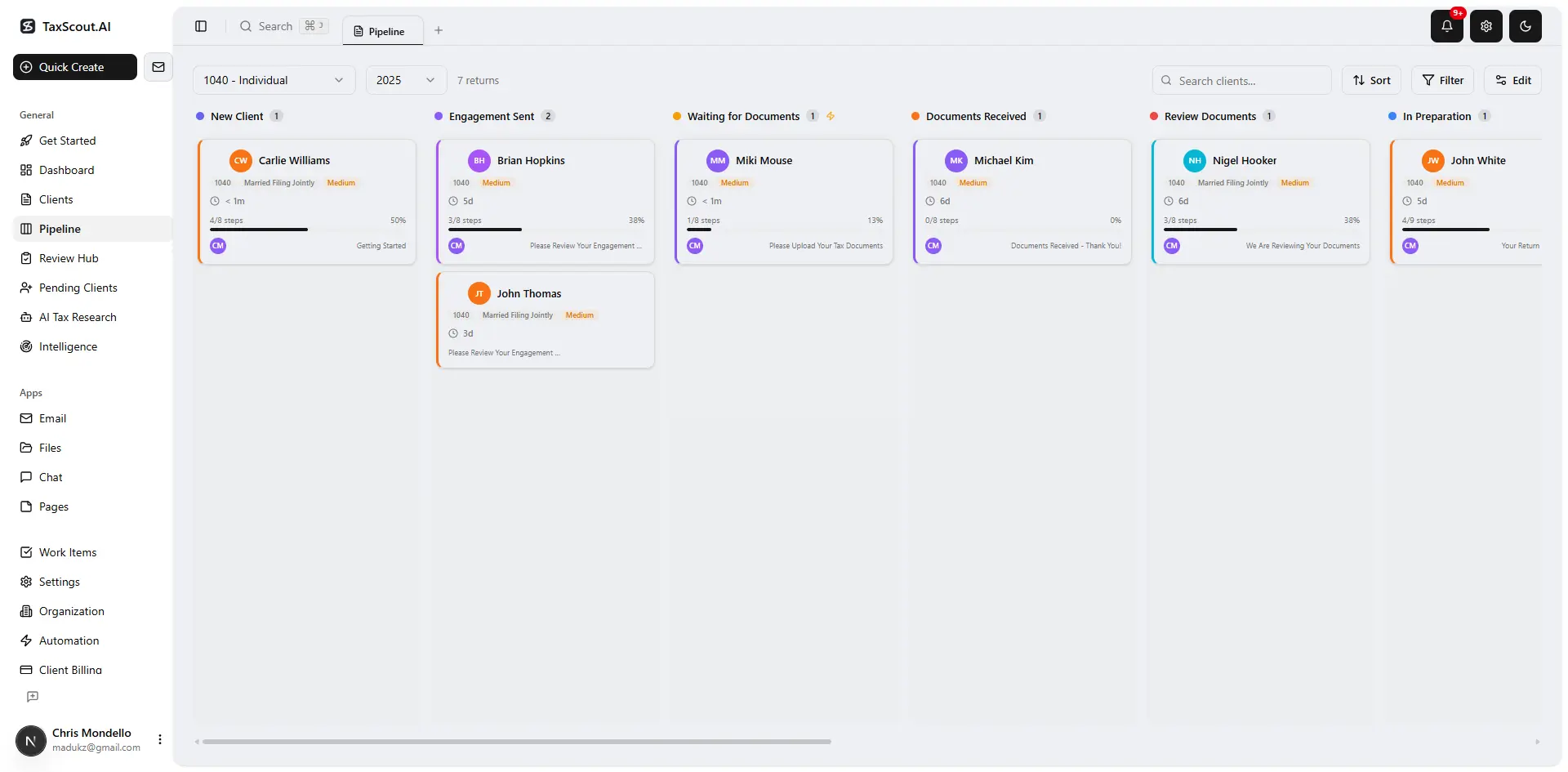
Track every return from intake to filed with drag-and-drop pipeline management
Jetpack Workflow Alternative Pricing: What the Per-User Model Actually Costs
Pricing transparency is a notable gap in most Jetpack Workflow alternative content online. Most comparison articles quote headline per-seat figures without showing how those costs accumulate as firms hire seasonal staff, part-time bookkeepers, or administrative assistants.
Karbon charges approximately $59 per user per month (verified March 2026). Every team member you add — including seasonal staff brought on for February through April — adds to that figure. Canopy operates at approximately $45 per user per month per module, with smart intake costing an additional $11 per client. Jetpack's per-user pricing follows the same structural pattern. At the margins, per-user billing is a tax on growth.
TaxScout's pricing model is structurally different. The TaxScout Solo plan is $49/month with no commitment, or $470/year prepaid, and includes unlimited team members with 150 return credits per term. The TaxScout Firm plan is $149/month with no commitment, or $1,430/year prepaid, with 500 return credits and full access to all 9 AI research agents. Additional returns beyond your credit allotment are $4 each regardless of plan.
For a firm with five staff members, TaxScout Solo at $49/month versus Karbon at $59/user/month represents a substantial gap — and that gap widens with every additional hire. The workflow management and switching cost dynamics of practice management software mean the right time to evaluate alternatives is before you're locked into per-seat billing at scale. Browse other blog resources on firm operations for more context on structuring your tech stack for growth.

Every client gets organized documents, status tracking, and a complete history
How to Evaluate Any Jetpack Workflow Alternative for Your Firm
Before committing to any accounting workflow software upgrade, it's worth building an evaluation framework around your firm's actual bottlenecks rather than a generic feature checklist. The questions that matter most vary by firm size and service mix.
If document volume is your primary pain point — clients sending disorganized PDF bundles, staff spending hours on manual data entry — then AI extraction depth should be your primary evaluation criterion. Ask vendors specifically about validation layers, confidence scoring, and cross-document reconciliation. A demo that only shows document upload and display is not the same as a demo that shows extraction accuracy across mixed document types.
If client communication is your primary pain point — chasing missing documents, managing intake questions, handling client emails — then intake intelligence and portal UX should lead your evaluation. Ask how the system handles returning clients with prior-year data, and whether the intake questionnaire adapts based on what documents have already been uploaded.
If per-user billing is straining your budget or limiting your ability to hire flexibly, pricing structure should be a first-filter criterion rather than an afterthought. The software-as-a-service pricing model in accounting software has evolved significantly, and flat-rate alternatives now exist that remove headcount as a cost variable. You may also want to review our SurePrep alternatives guide for a parallel analysis of AI-native versus retrofitted approaches in the tax prep software category.
Finally, consider integration compatibility with your existing tax preparation software. A practice management platform that requires you to abandon Drake or Lacerte introduces a switching cost far larger than the software itself. TaxScout is explicitly designed to work alongside your existing prep tools, not replace them — a distinction that significantly lowers adoption risk for established firms.
Ready to see what AI-native practice management looks like in a live firm workflow?
TaxScout combines AI document extraction, smart client intake, 9 research agents, and flat-rate unlimited-user pricing — starting at $49/month.
Frequently Asked Questions
TaxScout covers everything Jetpack Workflow does — task management, pipeline tracking, client communication — and adds AI document extraction, smart intake, e-signatures, and 9 AI research agents. It works alongside your existing tax software (Drake, Lacerte, UltraTax, etc.) rather than replacing it, so the transition risk is low for established firms.
Keep reading
Amended FBAR Procedures: How CPAs Correct Foreign Account Errors Without Triggering Penalties
Oct 12, 2026 · 1 min read
Transparency in Coverage Final Rules: What CPA Firms Must Do Now
Oct 12, 2026 · 1 min read
Backdoor Roth IRA: How CPAs Execute the Strategy for High-Income Clients
Oct 12, 2026 · 1 min read
Stay up to date
Get the latest tax tech insights delivered to your inbox.