How to Automate Tax Workpaper Preparation in a CPA Firm
Assembling a tax workpaper package by hand consumes hours that should go to review and advisory work. This guide maps exactly which workpaper steps — classification, extraction, cross-referencing, lead-sheet mapping — are mechanically automatable today, which still require professional judgment…
Most CPA firms that want to automate tax workpaper preparation run into the same wall: they know they spend too much time sorting documents, transcribing numbers, and chasing cross-references, but they can't tell which parts of that process are safe to hand off to software and which demand a trained eye. The result is either over-automation that introduces errors into reviewer-facing packages, or under-automation where staff still staple PDFs together by hand in March.
A well-structured workpaper package serves a precise purpose: it gives a reviewing CPA every source document, every computed figure, and every cross-reference needed to sign off on a return in a single sitting. When assembly is manual, that structure depends entirely on whoever happened to work the file. When assembly is automated, the structure is enforced by rules — and the reviewer's attention shifts from hunting for a missing 1099 to actually evaluating whether the income position is supportable. Firms that automate tax workpaper preparation eliminate that dependency, ensuring consistent structure regardless of who handles the engagement.
This guide breaks the workpaper lifecycle into its component steps, identifies which are deterministically automatable today, flags where judgment stays with the preparer, and shows how to layer automation into an existing workflow without retraining your entire team at once. If you're comparing platforms to support this move, the SurePrep vs Alternatives guide covers the broader vendor landscape worth reading alongside this piece. Whether you're just beginning to automate tax workpaper preparation or looking to refine an existing process, the steps ahead apply to firms of any size.
What a Complete Tax Workpaper Package Must Contain
Before automating anything, it helps to define the target state. A reviewer-ready workpaper package for an individual return typically includes: all source documents (W-2s, the full 1099 series, K-1s, 1098s, 1095s, and any brokerage or cost-basis schedules), a lead sheet that ties each line of the 1040 to a source document or a supporting schedule, tickmarks documenting who reviewed which figure and when, a cross-reference index linking Schedule D entries back to 1099-B detail, a prior-year comparison for material income or deduction changes, and any research memos supporting positions the firm has taken. Knowing exactly what a finished package looks like is a prerequisite if you want to automate tax workpaper preparation without creating gaps a reviewer will have to chase down later.
For business returns the same skeleton applies but expands: trial balance tie-outs, depreciation schedules, entity-level K-1 workpapers, payroll reconciliations, and book-to-tax adjustment memos all belong in the package. The IRS Publication 4557 on safeguarding taxpayer data doesn't prescribe a workpaper format, but it does remind firms that workpapers are part of the records that must be secured — which matters when you're choosing where to store assembled packages. For firms evaluating their automate tax workpaper preparation approach, this trade-off compounds over time.
The key insight for automation planning is this: every element of the package that is mechanical — meaning it involves moving a number from a source document to a specific destination field — is a candidate for automation. Every element that involves interpretation — is this Schedule C activity a hobby loss risk, does this K-1 reflect the right basis — stays with the preparer. Each of these factors directly shapes how automate tax workpaper preparation plays out in practice.

Click any extracted field to see its source highlighted on the original PDF
The Four Steps That Are Mechanically Automatable
Once you decompose workpaper assembly into discrete operations, four stand out as amenable to software-driven handling. Understanding automate tax workpaper preparation in this context is what separates firms that scale from those that stall.
Document Classification and Routing
The first bottleneck is simply knowing what you have. A client uploads a ZIP file or emails a batch of scans, and someone on your team opens each PDF to determine whether it's a W-2, a 1099-INT, a brokerage consolidated statement, or a vehicle log. AI document classification — the kind built into TaxScout's AI extraction engine — reads each page on arrival, assigns it a document class, flags low-quality scans for re-upload, and routes each file to the right slot in the workpaper structure. This step alone can eliminate 20–40 minutes of manual sorting per return during peak season. This is precisely where a deliberate automate tax workpaper preparation strategy pays off most visibly, since every document that gets misrouted manually becomes a reviewer problem later.
The technical approach matters here. A single-pass OCR classifier can misfire on handwritten logs or blurry mobile-camera scans. A quality-routing layer that detects image resolution and orientation before classification is more reliable in practice. The guide on AI document extraction for CPAs explains in detail how multi-layer classification pipelines differ from single-pass systems. Automate tax workpaper preparation sits at the center of this decision — get it wrong and the rest unravels.
Data Extraction and Confidence Scoring
After classification, the next step is pulling the numbers out. For standardized IRS forms — W-2 boxes 1 through 20, 1099-INT boxes 1, 3, and 8, 1098 box 1 — extraction is highly reliable because the field positions are defined by the form itself. For consolidated brokerage statements, K-1s from complex partnerships, and state-specific schedules, layout variation increases the error rate, which is why confidence scoring matters. A system that extracts every field but marks low-confidence values for human review is safer than one that silently fills fields with guesses. When firms revisit their automate tax workpaper preparation priorities, the gaps usually surface here, often in the form of unvalidated K-1 figures that sailed through without a confidence flag.
Cross-verification against OCR output — running a second read of the document independently and reconciling the two passes — catches transposition errors that a single extraction pass misses. Once numbers are extracted with a confidence score attached, the preparer's review task changes: instead of transcribing, they're verifying flagged values, which is both faster and less error-prone.
Deterministic Math Checks and Cross-Document Reconciliation
A subset of workpaper review is arithmetic: does the sum of W-2 wages across all employers match the total on Line 1a of the 1040? Does the Schedule D net match the carryforward from the prior year plus current-year activity? Does the QBI deduction calculation respect the W-2 wage limitation described under 26 U.S.C. § 199A? These are deterministic rules — there is a correct answer, and software can compute it without judgment.
Automated math validation — running a defined set of rules against extracted data before a human touches the file — moves these checks out of the review layer and into the preparation layer. When the reviewer opens the package, they see a cleared validation status rather than a list of arithmetic tasks to perform. Our workflow automation features support configurable rule sets that flag discrepancies for preparer resolution before the file advances to the review queue.
Lead-Sheet Mapping and Tickmark Stamping
Lead sheets exist to give a reviewer a traceable path from every return line to its source. In a manual process, building that map means opening source documents, reading a figure, typing it into a spreadsheet, and adding a cell reference. Automated lead-sheet mapping inverts the process: the system extracts figures and slots them into a pre-built lead sheet template, linking each cell to the page and field in the source PDF where the figure originated. The reviewer can click a figure and jump directly to the source — a capability that, when combined with a split-screen document viewer, can cut review time per return significantly. Firms that consistently automate tax workpaper preparation at this stage report that reviewers spend more time on substantive questions and less time tracing numbers back to paper.
Tickmarks — symbols indicating that a figure has been traced, footed, or agreed to a prior year — can be auto-applied to any cell whose source document has cleared the extraction and validation pipeline, reserving manual tickmarks for cells the system flagged as requiring human judgment. This is the same logic audit software has used for years; it's now available for tax workpapers through platforms designed for the tax preparation workflow.
Tired of watching your preparers spend half a day assembling a package that takes a reviewer thirty minutes to approve?
TaxScout's 5-layer validation pipeline classifies, extracts, validates, and routes workpaper documents automatically — so your team reviews, not assembles.
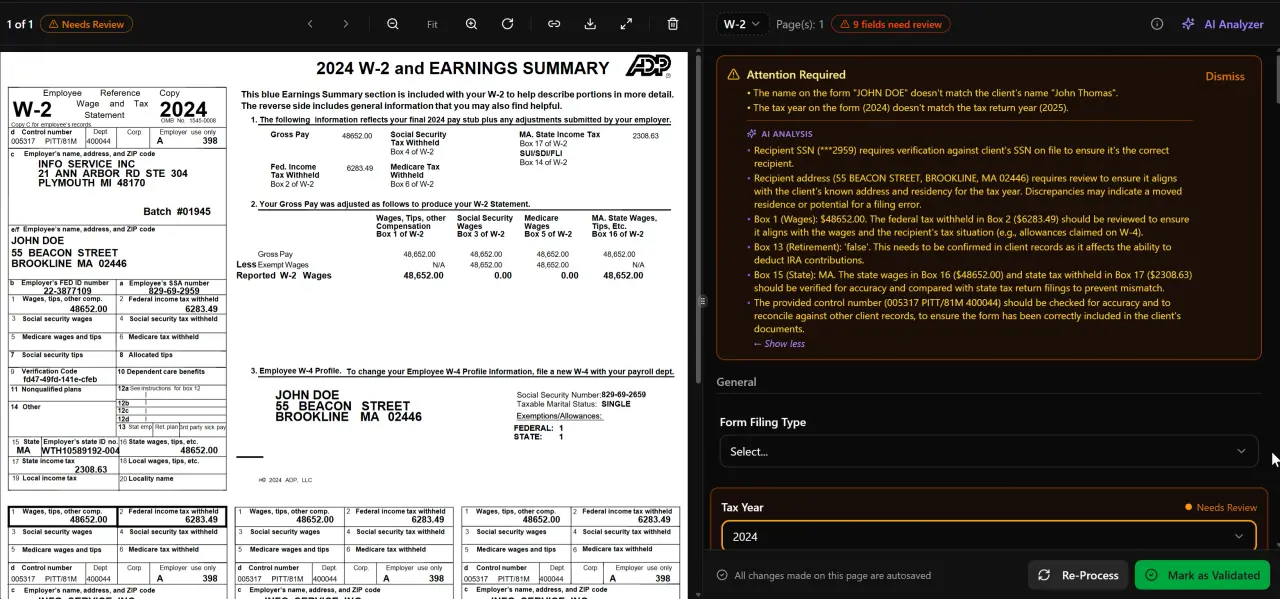
AI classifies, extracts, and validates every document automatically

Your clients see your brand — OTP login, document upload, and real-time status
What Still Requires Preparer Judgment
Automation handles the mechanical. It does not handle the interpretive, and conflating the two is the primary way firms introduce risk when they adopt new tooling. Several workpaper elements must stay with a qualified preparer regardless of how sophisticated the platform is.
Position documentation is the clearest example. When a client's Schedule C shows a home-office deduction, the preparer must determine whether the space qualifies under the IRS home-office rules, evaluate whether the client's use is exclusive and regular, and document the rationale. No extraction engine makes that call. The workpaper memo supporting the position — the one that would defend the return in an audit — is a judgment product.
Basis tracking for inherited or gifted property, passive activity loss carryforward decisions, treaty position analysis for internationally mobile clients, and any situation where the client's records are incomplete or inconsistent all require preparer reasoning rather than rule execution. The automation layer should hand these situations to the preparer clearly flagged — 'extraction confidence below threshold' or 'no matching prior-year document found' — rather than silently proceeding.
The dividing line is this: if a properly trained preparer would reach the same conclusion every time given the same inputs, automation can handle it. If the answer depends on facts not in the document set, or on professional judgment about how a rule applies to a specific set of circumstances, it stays human. Firms that internalize this boundary deploy automation aggressively within it and build safeguards at its edges.
How to Sequence Automation Adoption Without Breaking Your Review Process
The fastest way to lose a review team's trust in automation is to roll it out on a live return in the middle of busy season. The sequencing below is designed to let you introduce each automated step with a validation period before the next one goes live.
Step 1: Instrument Your Current Process
Before changing anything, measure how long each step takes. Pick ten returns from last season representing your firm's typical complexity range — simple W-2 filers, a Schedule C, a multi-state individual, a small S-corp. For each, time document sorting, data entry, lead-sheet build, math checks, and reviewer open-to-sign-off. These baselines tell you where automation delivers the most time savings and give you a benchmark to compare against after rollout.
Pair this with a quick audit of your current workpaper structure. If your packages aren't consistently organized today, automation will expose the inconsistency rather than fix it. Standardizing your lead-sheet template and tickmark conventions before introducing automation means the automated output slots into a format your reviewers already know. Firms that automate tax workpaper preparation without first standardizing their templates often find that the tooling enforces a structure nobody agreed on. See also the workflow management glossary entry for terminology that helps frame this conversation with your team.
Step 2: Automate Classification First, in Parallel
Run automated document classification alongside your existing manual sort for the first 30 days. When the system classifies a document, have the staff member who would normally do the sort verify the label before the file advances. Track disagreements. A well-built classifier should agree with your staff on standard forms — W-2s, 1099-INTs, 1098s — at a high rate from day one. Disagreements cluster on unusual documents: multi-page consolidated statements, state-only forms, handwritten schedules. Log the disagreements; they tell you where to configure exceptions.
After 30 days, if the classifier agreement rate on standard forms is high, remove the parallel verification step for those document classes. Verification stays on for the exception categories until agreement rates improve. This staged approach means you're not betting your entire busy season on a cold-start system.
Step 3: Layer in Extraction and Validation
Once classification is running cleanly, activate extraction and the deterministic math-check layer. For the first two weeks, have preparers compare extracted values to source documents on a sample of ten percent of returns. Again, track disagreements by document class. High-confidence extractions on standard forms rarely need this check after the burn-in period; lower-confidence extractions on complex documents warrant continued verification.
The math-check layer should run silently at first — logging issues but not blocking the file's progress to the reviewer. After you've seen the types of flags it generates, calibrate which ones should block advancement versus which should surface as advisory notes. Blocking too aggressively frustrates preparers; surfacing too passively defeats the purpose. The goal is a reviewer opening a package where every blockable issue has already been resolved.
Step 4: Activate Lead-Sheet Mapping and Pipeline Progression
With extraction and validation stable, activate automated lead-sheet population and source-link generation. Walk your review team through the split-screen viewer before the first live package arrives — show them how clicking a figure jumps to the source PDF page. Reviewer adoption of source-linked lead sheets is typically fast once they see how much time it saves on a return with twenty 1099s.
Finally, configure your pipeline so that a return cannot advance to the review stage until the automated checks have cleared. This is the structural change that converts automation from a convenience into a quality gate. Firms running pipeline management with configurable stage logic can enforce this without building custom workflows. The guide on running a paperless accounting firm covers the broader document-handling discipline that supports this final step.
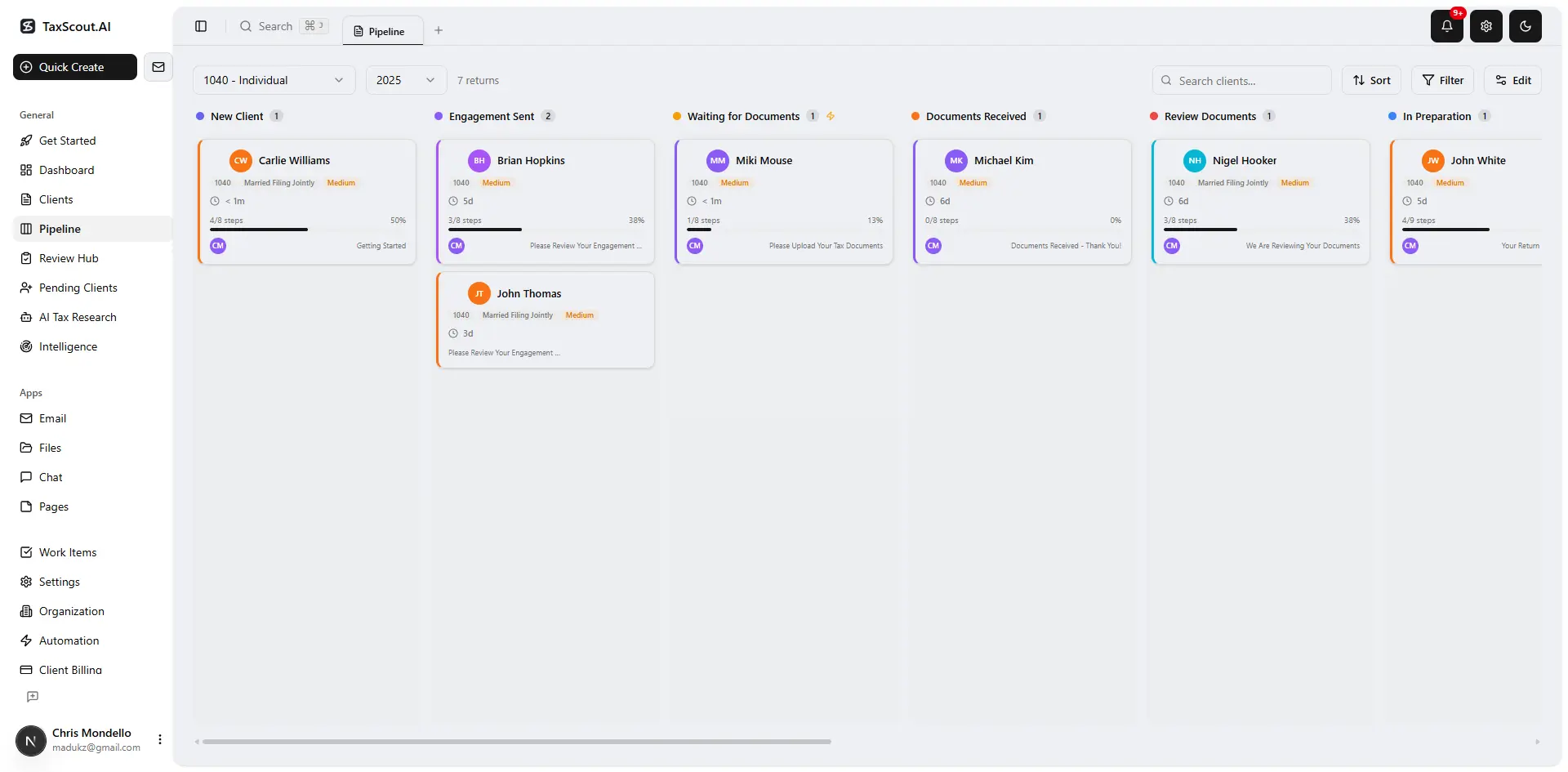
Track every return from intake to filed with drag-and-drop pipeline management
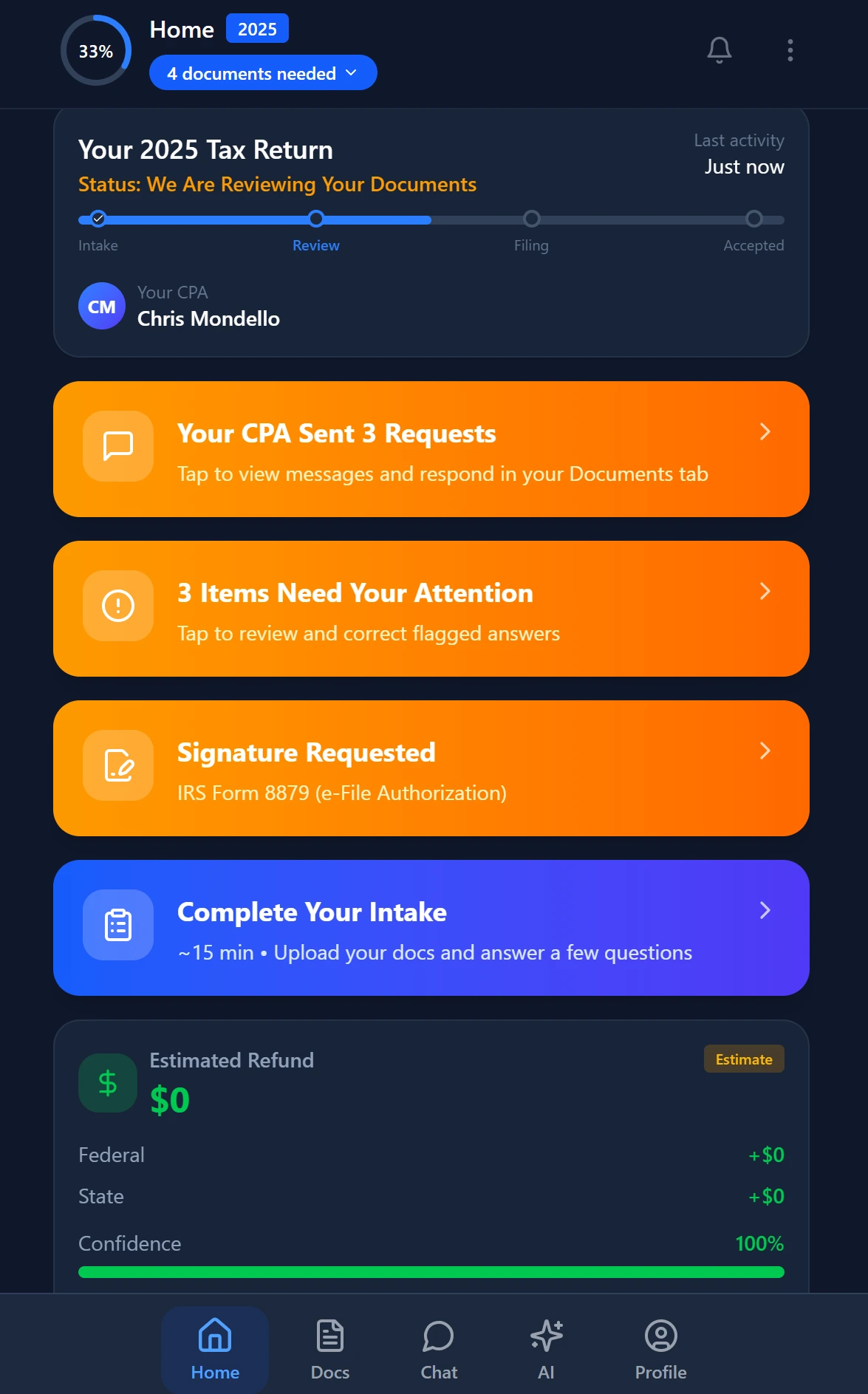
Smart intake auto-fills from uploaded documents and prior-year data
Integrating Automation With Your Existing Tax Software
A practical concern for any firm considering workpaper automation is how new tooling fits alongside Drake, CCH Axcess, UltraTax CS, Lacerte, or ProConnect. Most firms are not going to replace their tax preparation software — nor should they. The workpaper assembly layer sits upstream of the tax software, not inside it.
The integration model is straightforward: documents arrive through a client portal or email, get classified and extracted by the workpaper platform, and the preparer moves validated figures into the tax software manually or via an export. The workpaper package — with its source links, lead sheets, and cleared validation flags — lives in the practice management platform and travels alongside the return file rather than inside the tax software's proprietary format.
This separation also benefits firms from a liability standpoint. The Treasury Department's Circular 230 standards for practice before the IRS require practitioners to exercise due diligence on return positions. A documented, timestamped workpaper trail showing that extracted figures were validated against source documents and that flagged items were resolved by a preparer is a stronger due-diligence record than a folder of PDFs with no audit trail. Firms that automate tax workpaper preparation with this documentation layer in place are better positioned if a return is ever questioned, because the trail shows exactly which figures were system-validated and which were preparer-reviewed. Firms exploring other guide resources on tax technology adoption will find this documentation angle recurring across topics from e-signatures to AI research agents.
For firms evaluating whether their current platform supports this integration model, the AI document extraction feature page describes the technical handoff points, and how TaxScout works with Drake Tax Software walks through a specific integration scenario.
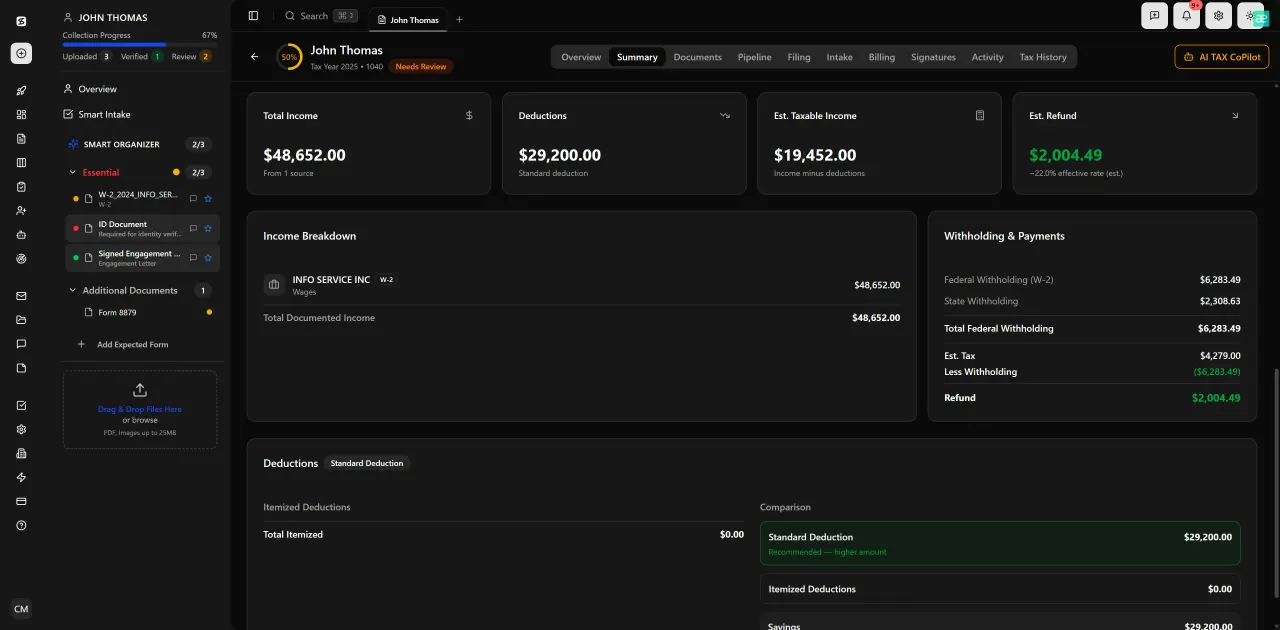
Review with AI assist — 9 agents answer questions with full client context
Measuring Whether Automation Is Actually Working
After one full busy season with automated workpaper assembly running, you should be able to answer four questions with data: Did average assembly time per return decrease? Did reviewer open-to-sign-off time decrease? Did the volume of reviewer-identified errors (figures that had to be traced back and corrected after the file reached review) decrease? And did preparer time shift toward judgment tasks and away from clerical ones?
If assembly time decreased but reviewer errors held steady, your extraction and validation configuration likely needs refinement — the system may be routing files to review before all issues are resolved. If assembly time held steady but reviewer time decreased, the lead-sheet and source-link layer is working but the classification or extraction step is still manual in practice. Tracking these metrics separately lets you isolate which layer to tune.
Firms that also track CPA firm KPIs alongside workpaper metrics can connect assembly efficiency to broader utilization and realization numbers. A preparer spending four fewer hours per week on mechanical assembly is either completing more returns at the same billing rate or has capacity for the advisory services work that commands higher fees. The SSA's occupational outlook data for accountants documents steady demand growth for advisory-focused accounting roles — firms that automate tax workpaper preparation and redirect that recovered time toward client advisory work are moving in the direction the market is already going.
Want to see what an automated workpaper pipeline looks like inside a real practice management platform?
TaxScout combines AI document extraction, 5-layer validation, split-screen source linking, and configurable pipeline stages — with flat pricing and no per-seat fees.

Every client gets organized documents, status tracking, and a complete history
Frequently Asked Questions
Document classification, data extraction from standard IRS forms (W-2s, 1099 series, 1098s, K-1s), deterministic math checks, cross-document reconciliation, and lead-sheet population with source links are all mechanically automatable. These steps involve moving numbers from defined source fields to defined destination fields, which software handles reliably when combined with confidence scoring and a validation layer that flags low-certainty extractions for preparer review.
Keep reading
Stay up to date
Get the latest tax tech insights delivered to your inbox.