Tax Workflow Management: Designing Stages a Firm Will Actually Follow
Tax workflow management breaks down not because firms lack software, but because their pipeline stages encode the wrong things. This guide explains why stage design fails, what a workable stage set looks like for 1040 and entity work, and how to distinguish a stalled return from one that is simply…
Tax workflow management is one of those problems that looks solved the moment a firm configures a kanban board. You have columns, you have cards, you have someone responsible for moving them. And then February arrives, partners are pulling status from memory, and the board still shows half the returns sitting in 'In Progress' from three weeks ago. Effective tax workflow management is one of those problems that looks solved the moment a firm configures a kanban board.
The failure is almost never a technology problem. It is a stage design problem. Firms build pipelines that mirror the software they use — 'Uploaded to Drake,' 'Reviewed in Drake,' 'E-filed in Drake' — rather than stages that represent the actual state of a client engagement. When stages encode tool actions instead of engagement milestones, two things happen: staff stop trusting the board, and managers lose the ability to distinguish a return that is moving from one that is stuck. The failure is almost never a technology problem, yet most firms treat tax workflow management as a software configuration exercise rather than a stage design challenge.
This guide is for practitioners who have tried a pipeline and found it abandoned by April, or who are setting one up and want to avoid the most common structural mistakes. We will cover why stage design fails, what a workable stage set looks like for 1040 versus entity work, and how to build in the signals that separate slow from stalled. This guide is for practitioners who have tried tax workflow management and found it abandoned by April, or who are setting one up and want to avoid the most common structural mistakes.
Why Tax Workflow Management Stage Design Fails
The most common failure mode is too many stages. A firm that builds 20 stages into its pipeline quickly discovers that staff spend more energy deciding where a return belongs than actually working on it. When the correct column is ambiguous, cards stop moving. After a few weeks of this friction, the board becomes a graveyard of stale cards that nobody trusts. For firms evaluating their tax workflow management approach, this trade-off compounds over time.
The second failure mode is stages that encode software actions rather than engagement milestones. 'Uploaded to software,' 'In review in software,' and 'E-filed in software' are not pipeline stages — they are checklist items inside a single stage. A pipeline stage should answer the question: whose court is the ball in, and what needs to happen before it can move forward? Software steps happen within a single owner's responsibility window, not between handoffs. Each of these factors directly shapes how tax workflow management plays out in practice.
The third failure is the absence of explicit billing gates. When a return can move from 'Review Complete' to 'Filed' without passing through an invoicing checkpoint, billing becomes a cleanup task that happens after the engagement is emotionally closed. Clients who have already received their refund are harder to collect from. Embedding a billing stage — or at minimum a billing trigger — between preparation and filing is not a nicety. It is a cash flow control. Understanding tax workflow management in this context is what separates firms that scale from those that stall.
A fourth and underappreciated failure is treating 1040 and entity returns as the same workflow. A 1040 with a W-2 and a brokerage account moves through fundamentally different handoffs than an S-corp return that requires a balance sheet tie-out, officer compensation review, and shareholder agreement cross-check. Forcing them into the same pipeline produces stages generic enough to fit everything, which means they provide signal about nothing. See our complete guide to practice management resources for context on how workflow design fits into broader firm operations. This is precisely where a deliberate tax workflow management strategy pays off.
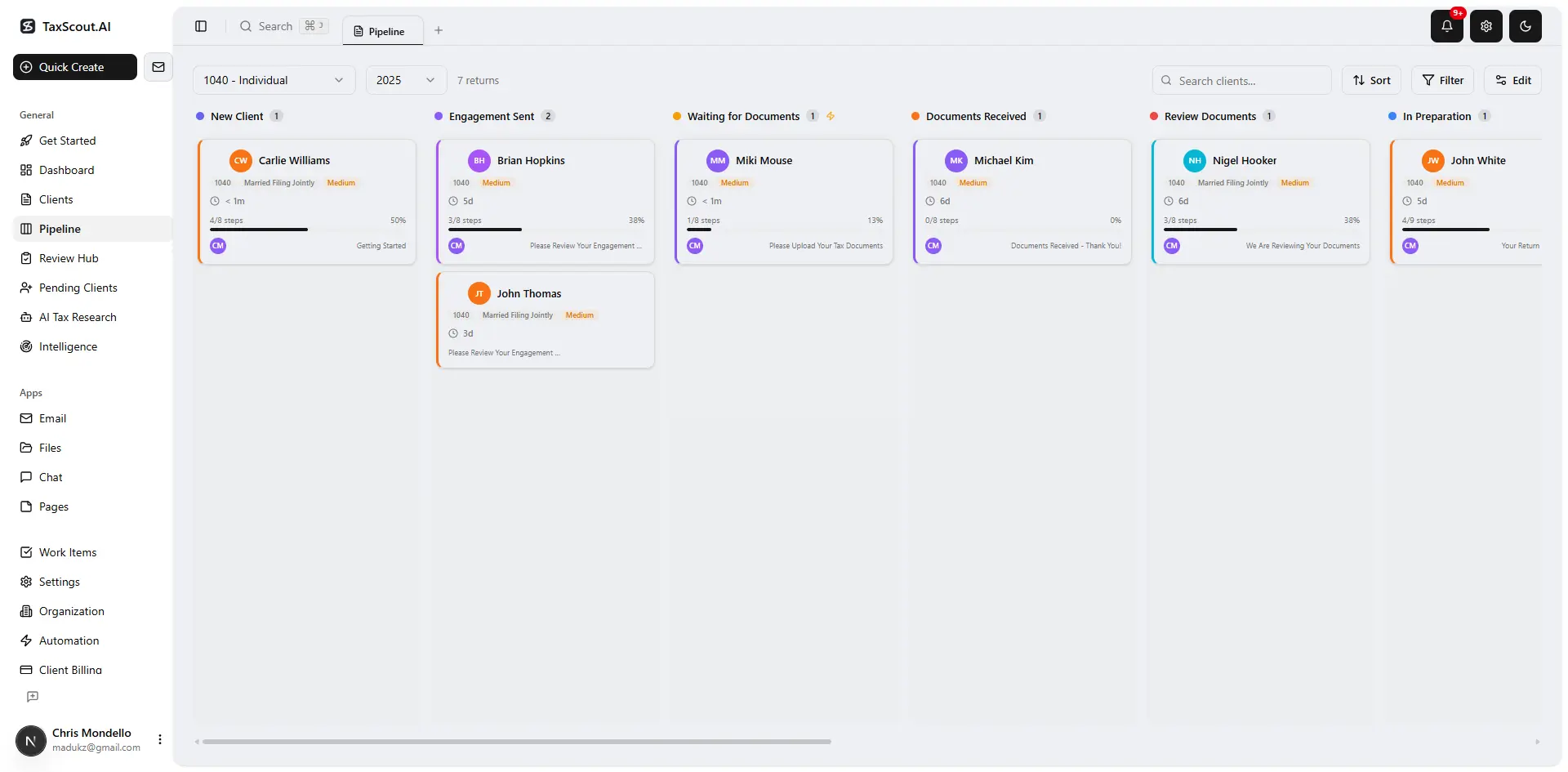
Track every return from intake to filed with drag-and-drop pipeline management
What a Workable 1040 Stage Set Looks Like
A functional 1040 pipeline can usually be reduced to seven or eight stages without losing meaningful resolution. A reasonable sequence looks like this: Engagement Signed, Intake Open, Documents Complete, Preparation In Progress, Internal Review, Client Review and Approval, Invoice Sent, Filed and Closed. Each stage has exactly one owner and one exit condition. Tax workflow management sits at the center of this decision — get it wrong and the rest unravels.
'Engagement Signed' exists because no work should start without a signed engagement letter and a documented scope. Firms that skip this stage discover it missing only when a dispute arises. 'Documents Complete' is a genuine handoff: it signals that the preparer can now start without interruption, which is critical for batching work efficiently. Without this stage, preparers constantly context-switch to chase missing documents. When firms revisit their tax workflow management priorities, the gaps usually surface here.
The 'Client Review and Approval' stage matters more than most firms acknowledge. IRS Form 8879 requires a taxpayer to review the return before signing, and that review is also your best protection against a client who later claims they never saw a number. Treating this as a real pipeline stop — not a checkbox — also creates the natural moment to surface advisory observations. It is the highest-leverage touch point in the engagement.
The 'Invoice Sent' stage before 'Filed' is the billing gate described above. Some firms prefer to invoice at 'Client Review and Approval,' tying the signature to payment. Either approach works; the important thing is that invoicing is a named stage, not an afterthought. Invoicing features integrated with Stripe Connect can trigger automatically when a card enters this stage, removing the manual step entirely.
Tired of cards stuck in 'In Progress' for weeks with no way to know why?
TaxScout's 12-stage pipeline gives you drag-and-drop kanban, automated billing gates, and visibility across every return — without per-user pricing that scales against you.
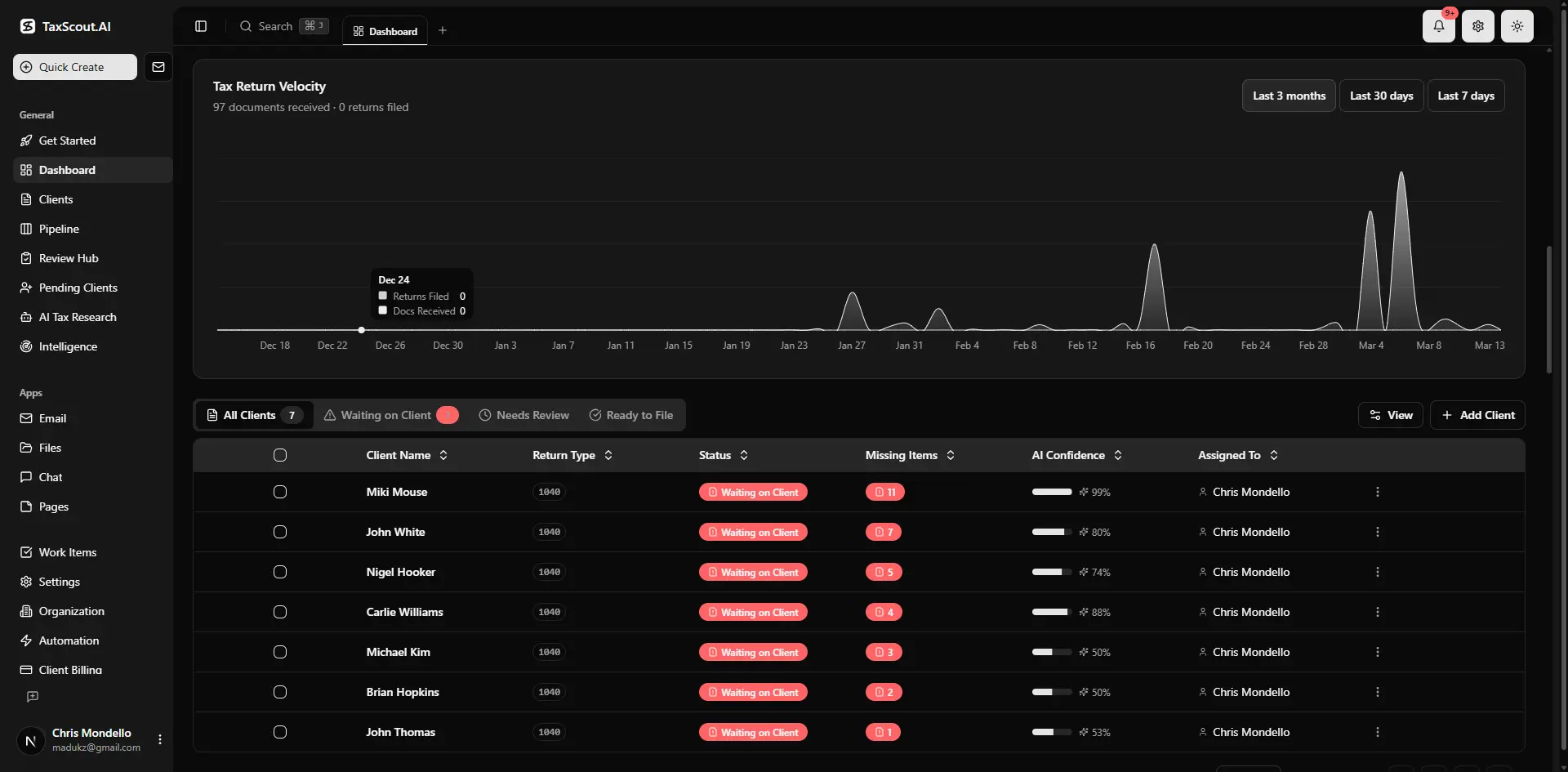
Real-time dashboard showing returns in progress, revenue, and upcoming deadlines

Click any extracted field to see its source highlighted on the original PDF
What a Workable Entity Return Stage Set Looks Like
Entity returns — S-corps, partnerships, C-corps, and trusts — require more handoffs and more intermediate verification than individual returns. A stage set that works for 1040s will create false confidence on an S-corp return, because the preparation phase itself contains several sequential sub-tasks that can each stall independently.
A workable entity pipeline might run: Engagement Signed, Bookkeeping Complete or Confirmed, Source Documents Received, Preparation In Progress, Balance Sheet and Income Statement Tie-Out, Officer or Partner Review, CPA Sign-Off, Invoice Sent, E-File Authorized, Filed and Closed. That is ten stages, which is on the high end, but each one corresponds to a real handoff between distinct responsible parties.
The 'Bookkeeping Complete or Confirmed' stage is one that many firms omit and regret. Entity preparation cannot begin in earnest until the books are closed. When this is not a named stage, preparers start on returns before the underlying data is reliable, then get interrupted when the bookkeeper pushes a correction. Making bookkeeping completion an explicit gate — especially for clients whose books the firm also maintains — prevents this entirely.
The 'Balance Sheet and Income Statement Tie-Out' stage exists because this is the single most common error source on entity returns. Treasury Regulation §1.6011-4 and related provisions assume accurate underlying financial statements; a return prepared on unreconciled books creates exposure the preparer and the client both share. A named stage forces an explicit confirmation that the tie-out is done before the return advances.
For firms handling multi-state entity clients, it is worth adding a 'State Apportionment Review' stage or at minimum a checklist item at the CPA sign-off stage. The state tax nexus implications for growing businesses are complex enough that a missed state filing is a realistic outcome when apportionment is not explicitly verified.
How to Tell a Stalled Return from a Slow One
The most underserved capability in most tax workflow management setups is not stage design — it is age-in-stage visibility. A return that has been in 'Documents Complete' for two days is fine. A return that has been there for twelve days in mid-February is a problem. Most pipeline tools show you where cards are; very few surface how long they have been there relative to a normal cycle time.
A practical approach is to define expected cycle times per stage per return type, and flag cards that exceed them. For a simple 1040, 'Preparation In Progress' might have a normal cycle of two to three business days. For an S-corp with a fiscal year-end, the same stage might normally run five to seven days. When a card exceeds its expected window, it gets a visual signal — a color change, a label, a dashboard alert — that promotes it from 'normal queue' to 'needs attention.'
This distinction matters because the correct intervention differs. A slow return that is on track just needs time. A stalled return needs a specific action: a client follow-up, a preparer reassignment, or an escalation to the partner. Treating every aging return the same way produces either unnecessary interruptions for staff or missed deadlines for genuinely stuck files. The KPI dashboard approach detailed here covers how to operationalize these age-in-stage metrics at the firm level.
The other signal that separates stalled from slow is ownership clarity. If a card sits in a stage with no assigned owner, it will age regardless of how reasonable the stage design is. Every stage transition should reassign ownership explicitly. When the return moves from 'Preparation In Progress' to 'Internal Review,' the reviewer becomes the owner. When it moves to 'Client Review,' the client contact on the engagement becomes responsible for the next action. Ambiguous ownership is the single most reliable predictor of a stalled return.

Every client gets organized documents, status tracking, and a complete history
A 12-Stage Pipeline as One Worked Example
TaxScout's pipeline management feature ships with 12 customizable stages as a starting point — not a prescription. The default set covers the major handoffs described above: intake, document collection, preparation, review, client approval, billing, and filing, with enough granularity to distinguish return types without requiring firms to maintain separate pipelines for each.
The value of starting from a working example rather than a blank canvas is that the inter-stage logic is already validated. The billing gate exists. Ownership transfers are explicit. The stages are named for engagement milestones, not software actions. Firms can collapse stages that do not match their practice model or add intermediate stages for specialized workflows like cost segregation or trust returns without breaking the underlying logic.
What the 12-stage default is not is the right answer for every firm. A solo practitioner handling 200 straightforward 1040s may operate effectively with five stages. A firm with a mix of individual, entity, and advisory engagements may need separate pipelines for each service line. The solo vs. firm pricing model on TaxScout supports both use cases without charging per team member, which means adding a pipeline variant for a new service line does not trigger a cost review.
The worked example also illustrates something that is hard to appreciate in the abstract: a well-designed pipeline creates data. When every return moves through the same named stages, you accumulate cycle time data by stage, by preparer, and by return type. After one season, you can answer questions like 'Where do our entity returns actually spend the most time?' and 'Which stage has the highest variance?' Those answers drive the next round of stage design improvements in a way that gut instinct cannot.

Your clients see your brand — OTP login, document upload, and real-time status
Connecting Pipeline Stages to Document Collection and AI Intake
Stage design does not exist in isolation. The move from 'Intake Open' to 'Documents Complete' — the stage that unlocks preparation — is only reliable if document collection itself is reliable. Firms that rely on email to chase documents will have a high-variance 'Documents Complete' gate because the arrival of documents is unpredictable and easy to miss.
A structured intake process changes this. When clients complete a smart intake questionnaire through a branded portal, the system can cross-reference what they have submitted against what the prior year required and prompt for specific missing items. AI intake tools modeled on IRS Form 13614-C can identify gaps before the return enters the preparer's queue, which means the 'Documents Complete' transition becomes a factual determination rather than a judgment call.
Similarly, AI document extraction can validate incoming documents as they arrive — confirming that a W-2 is legible, that the EIN matches the prior year, that all pages of a K-1 are present — before a human has to open the file. This moves quality control upstream, so the preparer who picks up a return in 'Preparation In Progress' is working with verified source data. The complete technical guide to AI document extraction for CPAs covers the validation layer in detail.
The connection between document quality and stage reliability is direct: when documents are verified before the preparation gate opens, preparers are interrupted less, cycle times become more predictable, and the age-in-stage metrics described above become more meaningful. A return that exceeds its expected preparation time is genuinely anomalous, not simply waiting on a missing 1099.
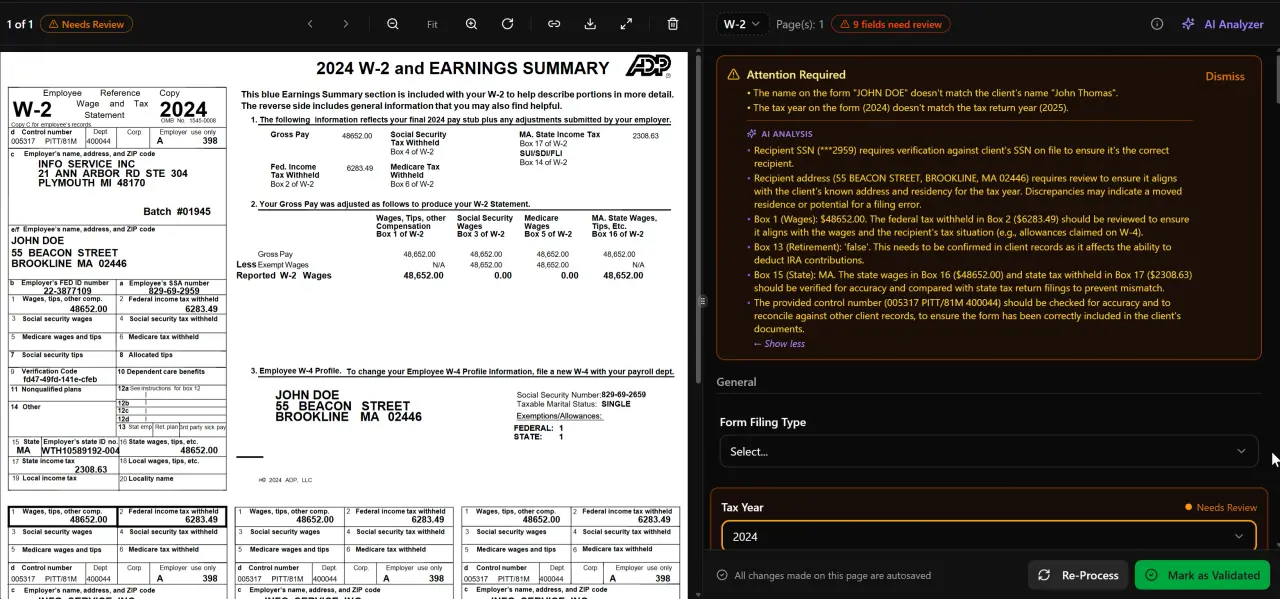
AI classifies, extracts, and validates every document automatically
For regulatory and industry references, see Treasury Department guidance.
Applying These Principles When You Already Use Drake, CCH, or Lacerte
Most CPA firms already have a tax preparation software they are not replacing. The pipeline design principles above apply regardless of whether your preparation happens in Drake, CCH Axcess, UltraTax CS, Lacerte, or ProConnect. The pipeline is not a replacement for tax software — it is the engagement layer that sits around it.
The practical implication is that your stage set should not reference your tax software by name. 'Preparation In Progress' is a better stage name than 'In Drake' because it remains accurate if you switch software, and because it describes the engagement state that your firm and client care about, not the tool you happen to use. The TaxScout integration with Drake Tax Software follows exactly this principle: the pipeline tracks the engagement, and the preparation software handles the calculations.
Firms evaluating practice management options often compare capabilities on per-user cost, particularly against platforms like TaxDome or Canopy that price by seat. When the team grows, per-user pricing creates a direct disincentive to add pipeline users — which means associates and admins who should be updating the board stop doing so because access is rationed. Flat pricing removes this friction and keeps the pipeline data current.
Ready to stop rebuilding your pipeline from scratch every January?
TaxScout gives you a 12-stage starting point, AI-verified document intake, automated billing gates, and unlimited team members — all on one flat monthly fee.
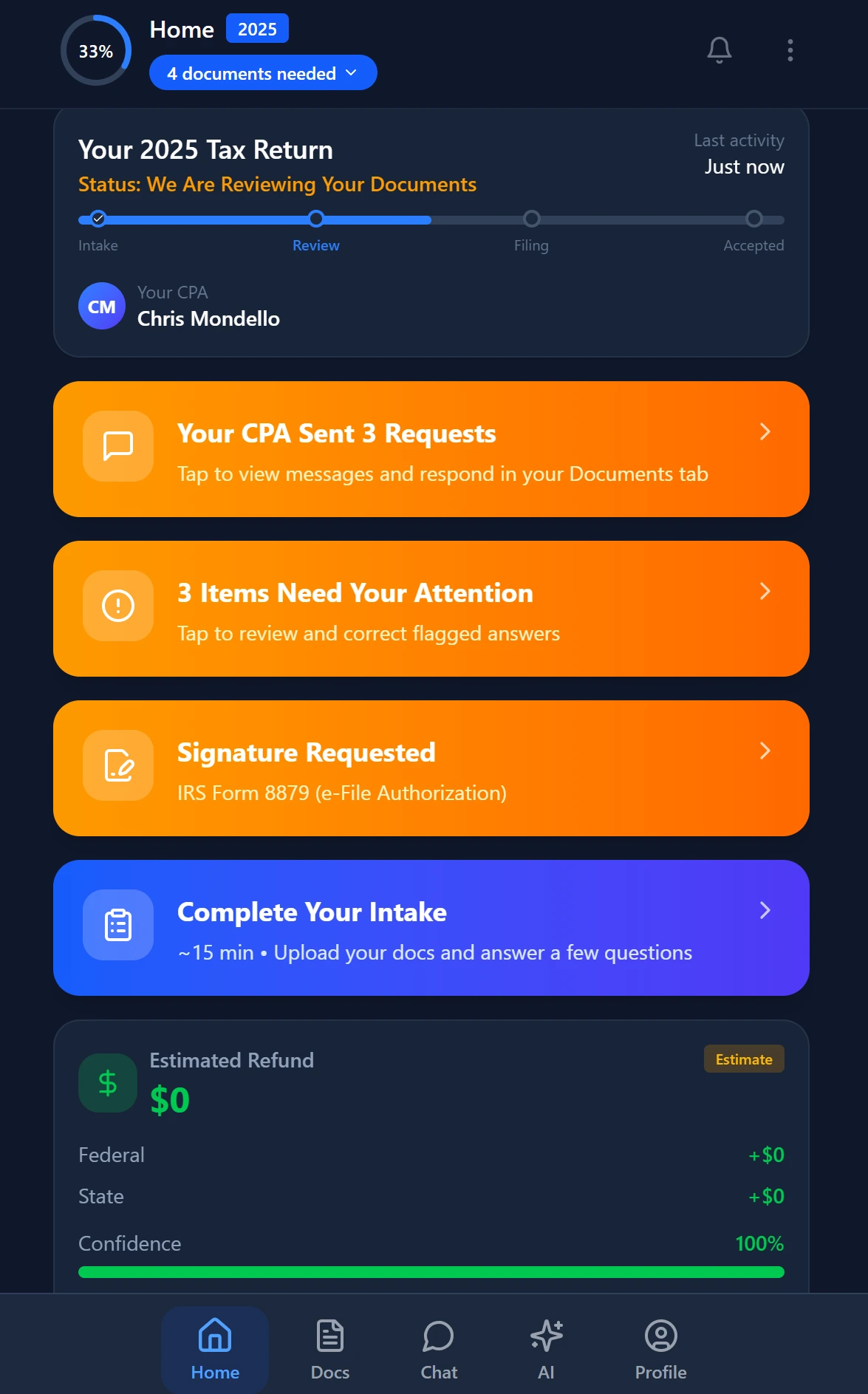
Smart intake auto-fills from uploaded documents and prior-year data
Frequently Asked Questions
Seven to eight stages is usually the right range for individual returns. More than that creates friction deciding where a return belongs; fewer loses the handoff clarity you need to track ownership and detect stalls. Core stages should cover: engagement signed, intake open, documents complete, preparation in progress, internal review, client review and approval, invoice sent, and filed and closed.
Keep reading
Energy Tax Credits for CPAs: How to Claim IRA Incentives for Business Clients
Oct 23, 2026 · 1 min read
Partnership Guaranteed Payments: How CPAs Handle SE Tax and Deductibility
Oct 22, 2026 · 1 min read
Guidance Under Section 355 Concerning Device and Active Trade or Business Partial Withdrawal
Oct 22, 2026 · 1 min read
Stay up to date
Get the latest tax tech insights delivered to your inbox.