AI Training for Accountants: How to Get Your CPA Firm Actually Using AI
Most CPA firms buy AI software and then watch it sit unused after tax season. This 90-day playbook walks firm owners through the exact sequence — which tools to introduce first, how to build internal champions, and how to measure ROI — so AI adoption actually sticks.
AI training for accountants is not a technology problem. It is a change management problem dressed in technology clothing. Firms invest in AI-powered practice management software, run a demo for the team, and then discover six months later that staff are still printing documents and manually keying numbers into spreadsheets. The software subscription is running, but the behavior hasn't changed.
The root cause is almost never the software. It's the rollout. Most accounting firm owners hand their team a login and a YouTube tutorial and expect transformation. What they get instead is passive resistance, workarounds, and a quiet return to the old way. According to the Bureau of Labor Statistics, productivity gains from new technology only materialize when workers receive structured training and clear performance expectations — a finding that applies directly to AI adoption in accounting. Effective AI training for accountants addresses the human side of adoption, not just the technical setup.
This guide is a firm-owner's playbook. It covers the exact 90-day sequence for rolling out AI in a CPA practice: which tools to start with and why, how to run an internal pilot without disrupting tax season, how to neutralize staff skepticism, what liability guardrails to establish before client data touches any AI system, and how to measure whether your investment is actually paying off. TaxScout is referenced throughout because it is the only platform built AI-native for CPA workflows from day one — not a general-purpose tool retrofitted with an AI badge. Think of it as the AI training for accountants that most software vendors never bother to provide.
Why Most CPA Firm AI Rollouts Fail in the First 30 Days
The single most common failure mode is tool overload. Firm owners discover that AI can automate document extraction, client intake, tax research, email triage, e-signatures, and pipeline management — and they try to introduce all of it at once. Staff experience this as chaos, not improvement. Within two weeks, the loudest skeptic has convinced the group that "the AI keeps making mistakes" and adoption stalls. Structured AI training for accountants prevents this by introducing tools one at a time, with clear use cases tied to work staff already do.
The second failure mode is skipping the liability conversation. Before any staff member uses AI to process client documents or draft client-facing communications, the firm needs written policies governing what AI can and cannot do. The IRS Circular 230 places the practitioner — not the software — responsible for any advice or return position. That means staff need to understand that AI output is a draft requiring human review, not a final answer. Firms that skip this step expose themselves to malpractice claims and client trust erosion. For firms evaluating their AI training for accountants approach, this trade-off compounds over time.
The third failure mode is choosing the wrong first tool. Introducing AI for email drafting or meeting summaries feels low-stakes but produces low-visibility wins. Staff do not connect those wins to their core workload, so buy-in stays shallow. The highest-leverage first tool is AI document extraction — the task that consumes the most manual time during tax season and produces the most immediately visible time savings. Research from the Journal of Accountancy consistently identifies document handling and data entry as the top time drains in tax preparation. Solve that first, and you earn the credibility to roll out everything else. Each of these factors directly shapes how AI training for accountants plays out in practice.
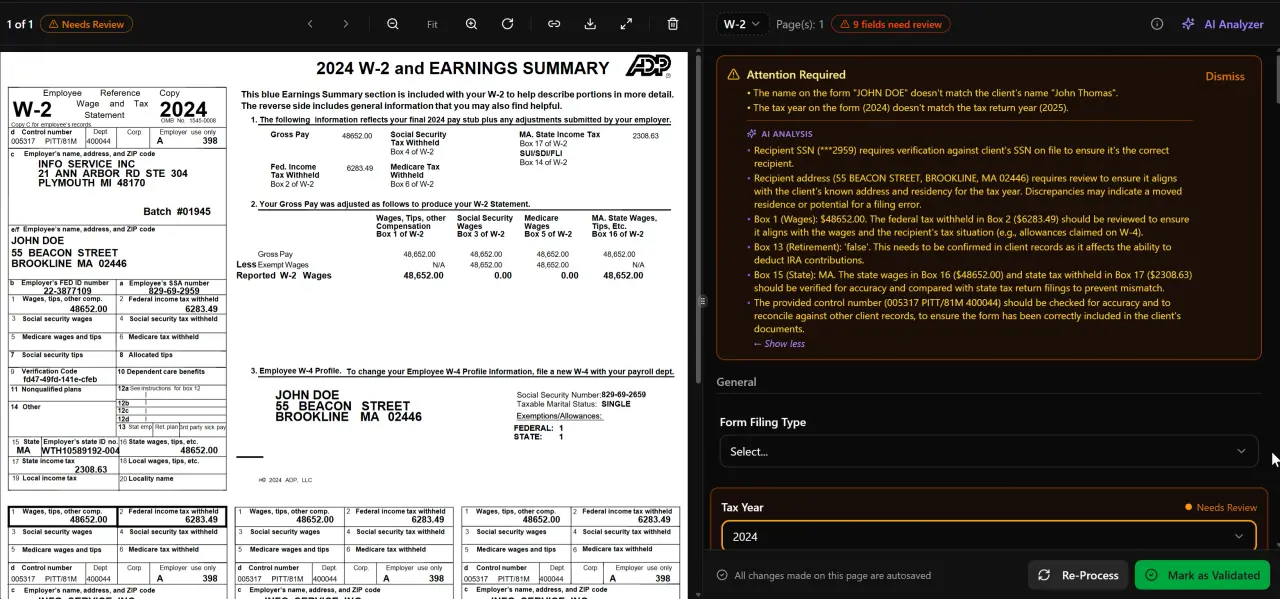
AI classifies, extracts, and validates every document automatically
Establishing Liability and Ethics Guardrails Before You Deploy AI
Every CPA firm rolling out AI with client data needs three written policies in place before the first staff member processes a real return: a data handling policy, an AI review policy, and a client disclosure policy. Understanding AI training for accountants in this context is what separates firms that scale from those that stall.
The data handling policy specifies which AI tools are authorized to receive client PII, how data is encrypted in transit and at rest, and who has access to what. TaxScout's AES-256-GCM encrypted SSN vault and seven-role RBAC system satisfy most of these requirements out of the box, but you still need a written policy that staff sign. For more on securing client data in a modern practice, see our guide on cybersecurity for CPA firms. This is precisely where a deliberate AI training for accountants strategy pays off.
The AI review policy establishes that every AI-generated output — extracted form values, research summaries, drafted client emails — must be reviewed and approved by a licensed practitioner before it is acted upon or sent. This is not optional: the Treasury Department's guidance on tax practitioner standards makes clear that the preparer of record bears responsibility for return accuracy regardless of the tools used. Document this in your engagement workflow so reviewers cannot accidentally skip it. AI training for accountants sits at the center of this decision — get it wrong and the rest unravels.
The client disclosure policy addresses whether and how you tell clients that AI assists in preparing their returns. Some firms include a brief disclosure in the engagement letter; others treat AI as an internal process tool no different from tax preparation software. Either approach is defensible, but the choice should be deliberate and documented. See the Cornell Legal Information Institute's overview of professional responsibility standards for additional context on disclosure obligations. When firms revisit their AI training for accountants priorities, the gaps usually surface here.
Tired of paying for AI software your team refuses to use?
TaxScout is built for CPA workflows from day one — AI document extraction, guided intake, and research agents that staff actually adopt because they solve real daily problems.

Click any extracted field to see its source highlighted on the original PDF
The 90-Day AI Training Sequence for CPA Firms
A phased rollout dramatically outperforms a big-bang deployment. The goal of the first 30 days is not to use all the AI features — it is to produce one undeniable win that converts a skeptic into a champion.
Structure your rollout in three distinct phases, each with a defined scope and measurable exit criteria.
Days 1-30: AI Document Extraction Pilot
Select five to ten active client files that represent your typical complexity mix. Run every incoming document through TaxScout's AI document extraction workflow for 30 days. Track two numbers: time spent on document processing per return, and error rates on extracted values versus your prior manual process. TaxScout's 5-layer validation pipeline — covering document quality routing, AI extraction with confidence scoring, OCR cross-verification, deterministic math rules, and cross-document validation — means staff are reviewing a nearly complete data set rather than keying from scratch. Most pilot firms record a 60-to-90-minute reduction in processing time per return during this phase. This focused approach is what makes AI training for accountants stick during the critical first month.
Assign one staff member as the AI pilot lead for this cohort. Their job is to document every friction point — anything that required manual correction, any extracted field that was wrong, any workflow step that felt clunky. This is not a complaint log; it is your customization roadmap and your evidence base for the all-staff rollout conversation in Day 31.
Days 31-60: Expand to Intake and Pipeline Management
With document extraction wins documented, introduce two more modules: the smart intake engine and pipeline management. The intake engine — modeled on IRS Form 13614-C with four-layer prefill from documents, prior-year data, client profile, and AI gap analysis — eliminates the back-and-forth that consumes preparer time before a return even starts. Pipeline management's 12-stage kanban board gives every team member visibility into where every return stands, which alone reduces the 'what's the status on this?' interruptions that fragment preparer focus.
Run a 30-minute team training session at the start of this phase. Keep it scenario-based: walk through a real client's intake record in the system, show how the AI pre-populated the organizer, demonstrate how a stage transition triggers the next task. Do not do a feature tour. Feature tours produce glazed eyes. Real client scenarios produce questions — which means engagement. Effective AI training for accountants at this stage is built around workflows your staff already recognize, not abstract feature demonstrations.
Days 61-90: AI Research Agents and Full Workflow Integration
By day 61, your team has two months of hands-on experience with AI extraction and intake. They trust the system on routine work. Now introduce the AI research agents — TaxScout's nine specialized agents that search IRS, Treasury, Cornell LII, SSA, and Congress in real time to answer tax law questions in the context of a specific client's situation. This is the feature that converts the remaining skeptics: experienced preparers who thought AI couldn't touch their judgment work discover that it can surface the IRC citation, the revenue ruling, and the comparable fact pattern in under 90 seconds.
Use this phase to also establish your KPI baseline. Track the metrics you set in the pilot — processing time per return, review cycle length, client intake completion rates — and compare to your pre-AI baseline. This data becomes the ROI case you present to any remaining hold-outs and the foundation for annual planning. Our guide on CPA firm KPIs to track with AI covers exactly which metrics matter most for this analysis.
Click any extracted field to see its source highlighted on the original PDF
How to Build Internal AI Champions and Neutralize Resistance
Staff resistance to AI in accounting falls into three predictable categories: fear of job displacement, skepticism about accuracy, and workflow disruption anxiety. Each requires a different response.
Fear of job displacement is best addressed with data and reframing. The Bureau of Labor Statistics Occupational Outlook Handbook projects steady demand for accountants through the decade — AI is automating the commodity tasks (data entry, document sorting) that no preparer actually wants to spend time on, and freeing capacity for advisory work that commands higher fees. Frame AI adoption as a capacity expansion, not a headcount reduction. Firms that staff up to advisory services after automating compliance work see revenue per employee rise, not fall. The article on reducing CPA burnout with AI makes this case in detail.
Skepticism about accuracy is addressed with the pilot data you collected in days 1 through 30. When your AI champion can show a colleague the documented error rate from real returns — and explain how TaxScout's confidence scoring flags anything below threshold for human review — the abstract fear of 'AI making mistakes' collides with concrete evidence. The split-screen PDF viewer with click-to-source field highlighting makes this tangible: staff can click any extracted value and see exactly which line of which document it came from. That transparency is what converts skeptics. Ongoing AI training for accountants reinforces this confidence over time, turning one-time pilots into permanent practice habits.
Workflow disruption anxiety is addressed by involving resistant staff in the rollout, not by working around them. Assign your most skeptical senior preparer as a reviewer for the pilot cohort. They become the person who catches the edge cases, documents the exceptions, and shapes the firm's AI usage policies. When the all-team rollout happens, they are a contributor to the process, not a passive recipient of a mandate. That psychological shift is the difference between grudging compliance and genuine adoption.
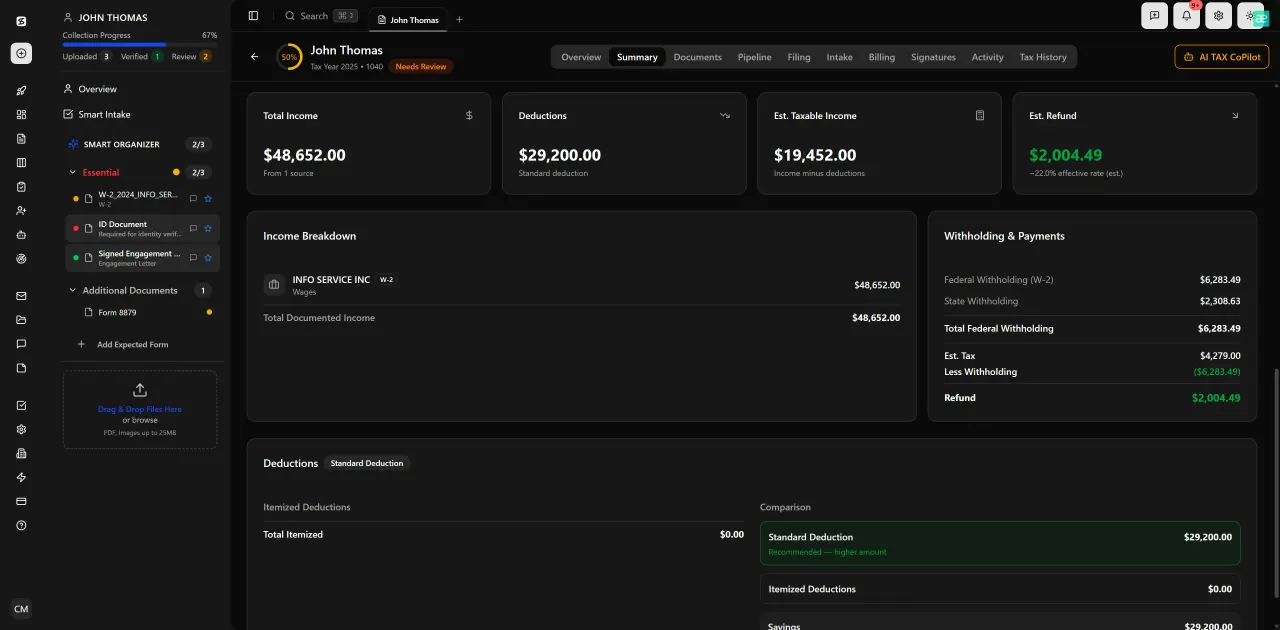
Review with AI assist — 9 agents answer questions with full client context
What to Measure: AI Training ROI for Accounting Firms
AI training for accountants produces two categories of return: time savings and error reduction. Both are measurable with data you already track.
For time savings, measure average time-per-return from document receipt to review-ready status. Track this weekly during the 90-day rollout. Firms using TaxScout's AI document extraction and smart intake consistently report reducing this interval by 40-70% for standard W-2/1099 returns. For complex returns with K-1s and multi-state schedules, the savings are smaller in percentage terms but larger in absolute hours because the baseline is higher.
For error reduction, track the number of review-cycle corrections per return — the items your reviewer had to send back to the preparer. This number should drop as AI extraction handles the mechanical data accuracy and preparers spend their time on judgment calls rather than transposition. A secondary metric is client query volume during tax season: clients who complete the AI-prefilled intake organizer ask fewer follow-up questions because the organizer already captured their situation accurately.
For cost comparison, run a simple per-seat calculation. TaxScout's Prep Pro plan is $149 per month for up to 10 seats and 500 returns annually — no per-user fees, no per-client charges. A comparable TaxDome setup runs approximately $500 per month for 10 users, and Canopy runs approximately $660 per month at similar team size, with smart intake costing an additional $11 per client. The pricing page breaks down the full comparison. The cost differential alone funds the training time investment within the first month.
Review with AI assist — 9 agents answer questions with full client context
AI Training Readiness: TaxScout vs. Competitors for a 10-Person CPA Firm
| Capability | TaxScout Prep Pro | TaxDome | Canopy | Karbon |
|---|---|---|---|---|
| Monthly cost (10 users) | $149 flat | ~$500 | ~$660 | ~$590 |
| AI document extraction (180+ form types) | Yes — 5-layer validation | No | No | No |
| AI research agents (9 specialized) | Yes — real-time IRS/Treasury/Cornell search | No | No | No |
| Smart intake with AI prefill | Yes — IRS 13614-C modeled, 4-layer prefill | No | Add-on $11/client | No |
| Built for CPA workflows from day one | Yes | No — general PM tool | Partial | No — email-centric |
| SSN vault with AES-256-GCM encryption | Yes | No | No | No |
| Works with Drake/CCH/Lacerte/UltraTax | Yes | Limited | Limited | No |
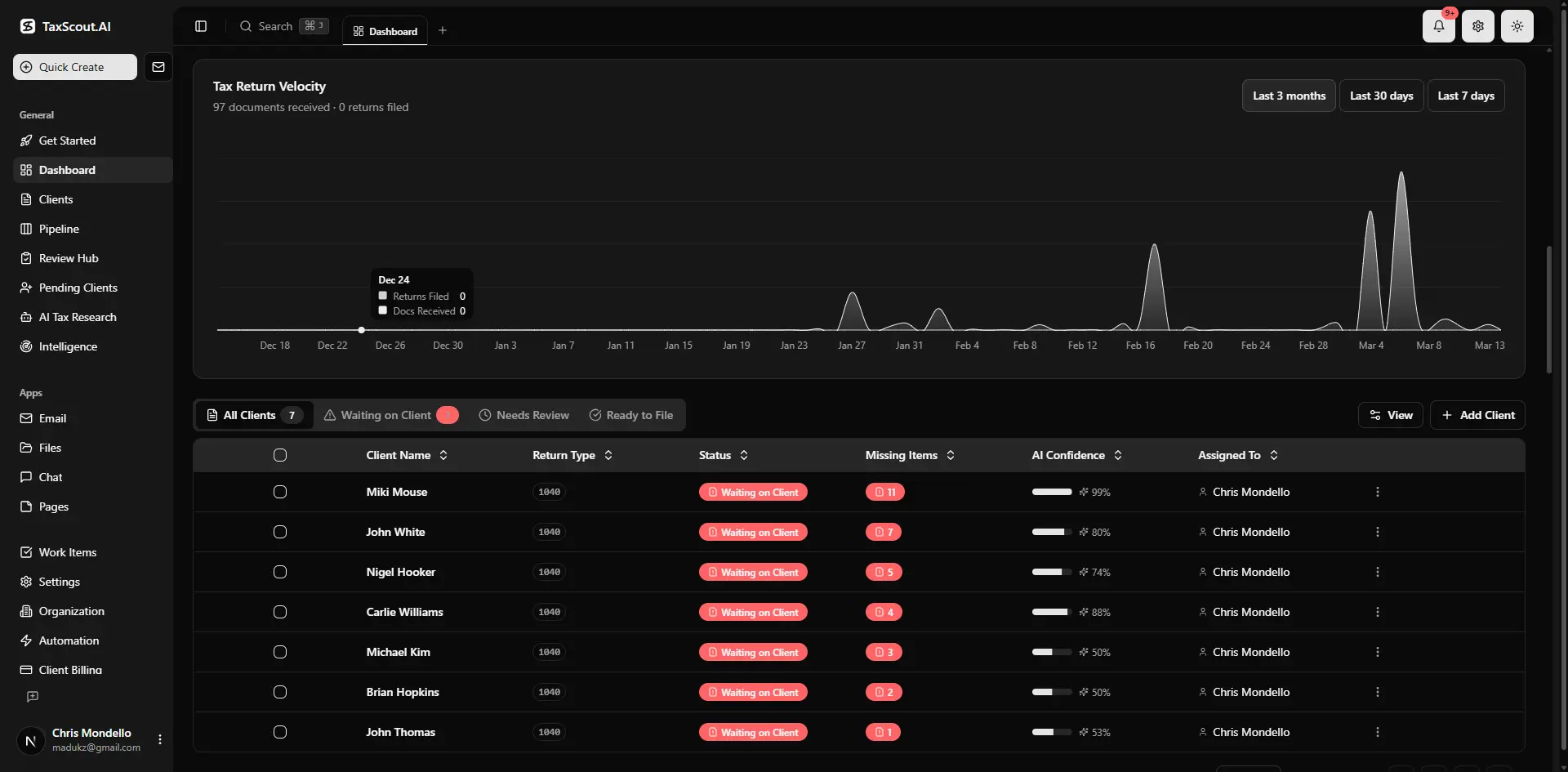
Real-time dashboard showing returns in progress, revenue, and upcoming deadlines
Why TaxScout Makes AI Onboarding Faster Than Retrofitted Tools
The fundamental difference between AI-native software and retrofitted practice management tools is the depth at which AI is integrated into the workflow. Retrofitted tools add an AI button to an existing interface — you can ask it to summarize a document or draft an email, but the core workflow is unchanged. AI-native software like TaxScout builds AI into every step: documents are auto-classified and extracted on upload, intake organizers are prefilled from extracted data before a preparer opens them, research agents are launched from within a client's return context with their entity structure and filing history already loaded.
That depth matters for AI training for accountants because staff learn faster when AI reduces friction on tasks they are already doing, rather than adding a new task they have to remember to do. When a preparer uploads a client's documents and the extraction happens automatically — with confidence scores, source highlights, and validation flags already surfaced — they experience the value immediately. They do not need to learn a separate AI workflow; the AI is the workflow. For more on how this works technically, see what AI document extraction means for CPAs.
TaxScout also integrates with the tax preparation software your team already uses — Drake, CCH Axcess, UltraTax CS, Lacerte, ProConnect, and ProSeries — so accounting AI implementation does not require replacing your existing stack. Staff keep the prep software they know; TaxScout handles everything that happens before and after the return is prepared: intake, document management, research, communication, e-signatures via Documenso, and invoicing via Stripe Connect Express. That bounded scope makes the change management problem tractable. You are asking staff to adopt new tools for the parts of the workflow they already hate, not to abandon the tools they trust for the parts they know.
Ready to run an AI pilot your team will actually finish?
TaxScout gives CPA firms AI extraction, research agents, and smart intake in one flat-fee platform — so your 90-day rollout starts with tools designed for tax, not adapted from somewhere else.

Track every return from intake to filed with drag-and-drop pipeline management
Frequently Asked Questions
A structured 90-day phased rollout is the most effective approach. The first 30 days focus on AI document extraction with a small pilot cohort, producing measurable time savings that build credibility. Days 31-60 expand to intake and pipeline management with a focused scenario-based training session. Days 61-90 introduce AI research agents and lock in KPI measurement. Firms that follow this sequence typically see full adoption — meaning staff are using AI features as their default workflow, not working around them — by the end of the third month.
Keep reading
IRS Power of Attorney: How CPAs File Form 2848 Without Delays
Sep 22, 2026 · 1 min read
Accountant Shortage Solutions: How CPA Firms Survive the Talent Crisis Without Overpaying
Sep 18, 2026 · 1 min read
Accounting Firm Communication: How AI Eliminates the Gaps That Cost You Clients
Sep 18, 2026 · 1 min read
Stay up to date
Get the latest tax tech insights delivered to your inbox.