ClickUp for Accounting Firms: Why Purpose-Built Wins Over General Tools
ClickUp is a powerful general-purpose project management tool — but CPA firms that try to bend it into a practice management platform quickly discover its limits. From missing IRS deadline automation to zero document extraction, here is a precise breakdown of what ClickUp requires you to build…
If you are mid-evaluation and asking whether ClickUp for accounting firms is a viable path, the honest answer is: it depends on how much configuration time your team can afford to burn — and how many critical CPA workflows you are willing to rebuild from scratch. ClickUp is genuinely excellent at what it was designed to do: manage tasks, sprints, and projects for software teams, marketing agencies, and operations groups. CPA firms are none of those things.
Tax practice management is a distinct discipline. It involves IRS-regulated filing deadlines, client document collection across 180+ form types, multi-party e-signatures, AML-compliant SSN storage, and automated regulatory monitoring. ClickUp has no native capability in any of those areas. What it has are building blocks — custom fields, automations, and views — that a determined administrator can assemble into something that approximates a practice management tool, at a cost in setup hours that vendors rarely advertise. When evaluating ClickUp for accounting firms, it becomes clear that tax practice management is a distinct discipline requiring far more than standard project tracking.
This article gives you a fair but specific verdict. We will map the exact gaps between a generic project management tool and a purpose-built accounting workflow platform, so you can make a clear-eyed decision before you spend six weeks customizing a workspace that still will not send Form 8879 for e-signature or flag a client who just received an IRS CP2000 notice. This article gives you a fair but specific verdict on ClickUp for accounting firms, mapping the exact gaps between a generic project management tool and a purpose-built accounting workflow platform.
What ClickUp Does Well — and Why That Is Not Enough for CPAs
ClickUp's genuine strengths are task hierarchy (spaces, folders, lists, tasks, subtasks), flexible views (Gantt, board, calendar, list), and a robust automation rule builder. For a firm managing internal projects — marketing campaigns, IT migrations, onboarding checklists for new staff — these features work well. The pricing is also attractive: ClickUp Business runs roughly $12 per user per month, which looks compelling until you count the integrations and add-ons a CPA firm needs to make it functional. To be fair, ClickUp for accounting firms does offer genuine strengths in task hierarchy, flexible views, and a robust automation rule builder that can support internal operations.
The problem is the gap between 'project management' and 'practice management.' Project management tracks who does what by when. Practice management for a CPA firm tracks whether the right documents arrived, whether the data was extracted correctly, whether the return passed a 15-point math validation, whether the client signed the engagement letter, whether the invoice was collected, and whether the IRS has sent any new notices on that client's account — all in a single audit trail. ClickUp manages the first category. It has no architecture for the second. For firms evaluating their ClickUp for accounting firms approach, this trade-off compounds over time.
Firms that evaluate ClickUp seriously often reach the same conclusion: they can get 60–70% of the way to a functional workflow, then hit a wall when they need client-facing portals, document extraction, or deadline automation tied to actual IRS tax deadlines. At that point, the choice is between expensive third-party integrations or accepting permanent workflow gaps. Each of these factors directly shapes how ClickUp for accounting firms plays out in practice.
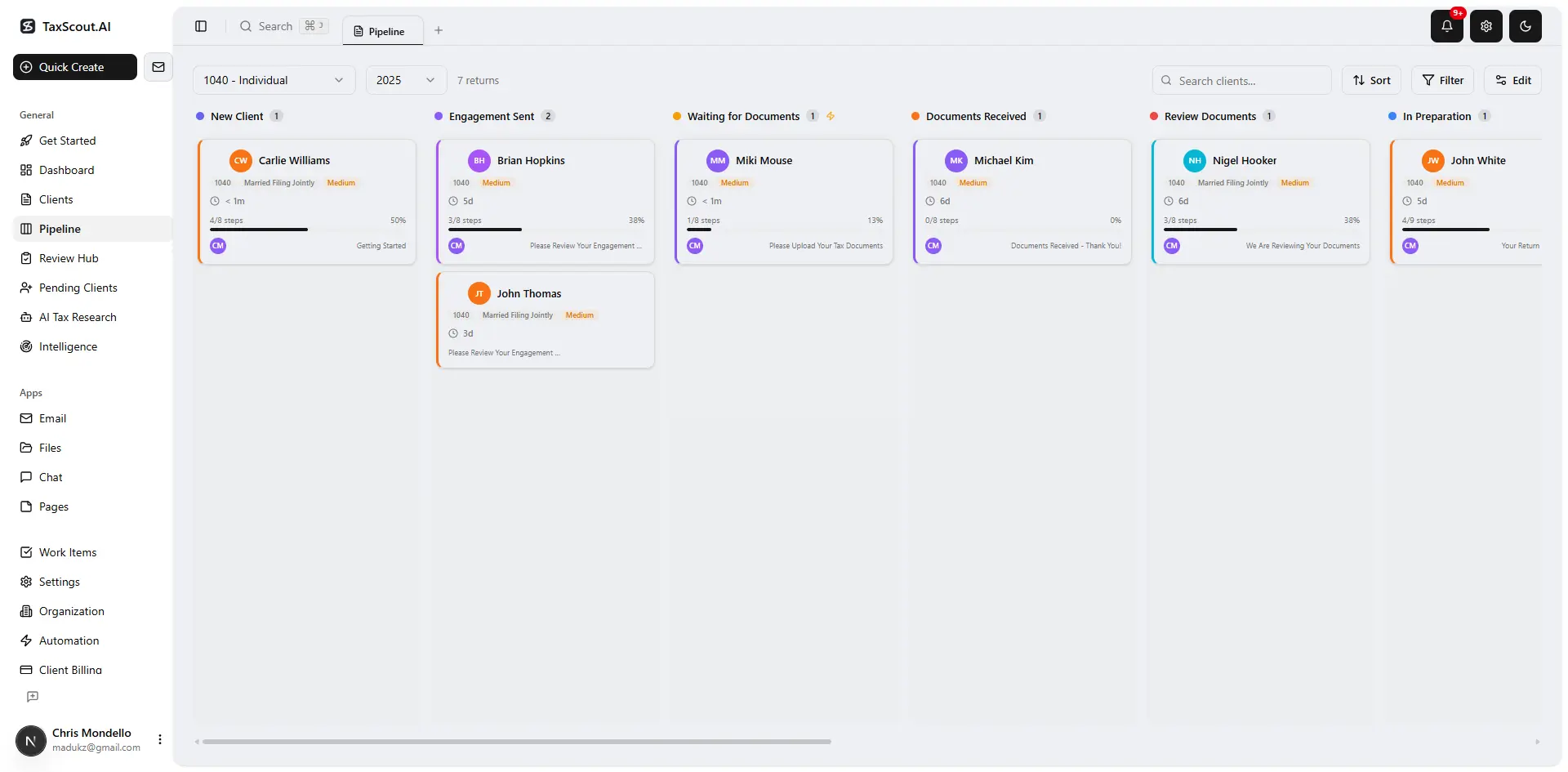
Track every return from intake to filed with drag-and-drop pipeline management
The Hidden Configuration Cost of Bending ClickUp to CPA Work
Every ClickUp feature that a CPA firm needs — deadline tracking, client status boards, document request lists — has to be manually architected. That means creating custom fields for return type, entity classification, due dates, extension status, and preparer assignment. It means building automation rules that approximate status changes. It means training staff on a non-intuitive taxonomy that has nothing to do with the vocabulary of tax practice. Understanding ClickUp for accounting firms in this context is what separates firms that scale from those that stall.
According to Bureau of Labor Statistics data on accountants and auditors, the median CPA firm staff member earns approximately $40+ per hour fully loaded. A conservative estimate of 80–120 hours to build a functional ClickUp workspace for a 10-person tax firm — custom fields, automations, templates, intake forms, and training — represents $3,200–$4,800 in internal labor before a single return is processed. And that workspace still will not do AI document extraction, SSN vault encryption, or Form 8879 e-signature. This is precisely where a deliberate ClickUp for accounting firms strategy pays off.
Compare that to a purpose-built platform like TaxScout, which ships with a 12-stage customizable pipeline pre-mapped to tax season workflows, a branded client portal with OTP login, and AI document extraction across 180+ form types — all active on day one. The configuration cost is not zero, but it is measured in hours, not weeks. ClickUp for accounting firms sits at the center of this decision — get it wrong and the rest unravels.
For more on what a modern document management stack looks like for CPA firms, see our guide on document management solutions accounting firms need. When firms revisit their ClickUp for accounting firms priorities, the gaps usually surface here.
Tired of stitching together workarounds just to manage a standard tax return workflow?
TaxScout ships with every CPA workflow pre-built: AI extraction, deadline tracking, e-signatures, and a client portal — no configuration required.

Click any extracted field to see its source highlighted on the original PDF
ClickUp vs. TaxScout: What You Build Manually vs. What Ships Out of the Box
| Capability | ClickUp (CPA use case) | TaxScout (purpose-built) |
|---|---|---|
| IRS deadline tracking | Manual custom fields; no IRS calendar sync | Pre-built deadline engine tied to real filing dates |
| AI document extraction | Not available; requires Zapier + third-party OCR | 180+ form types, 5-layer validation pipeline, confidence scoring |
| Client portal | No native portal; requires external tool or embed | Branded portal with OTP login, document upload, intake forms |
| E-signatures | Not native; requires DocuSign or HelloSign integration | Built-in via Documenso: Form 8879, 4868, engagement letters |
| IRS research agents | Not available | 9 specialized AI agents with real-time IRS/Treasury/Cornell search |
| SSN / PII security vault | No native SSN vault; standard data fields only | AES-256-GCM encrypted SSN vault, 13-step DSAR anonymization |
| Smart tax intake | Manual form builder; no IRS 13614-C logic | Modeled on IRS Form 13614-C with 4-layer prefill and AI gap analysis |
| Pricing (10-person firm) | ~$120/mo (Business tier, $12/user) | $149/mo flat — no per-user fees, unlimited clients |
| Works with Drake / Lacerte / UltraTax | No native integration | Direct workflow compatibility confirmed |
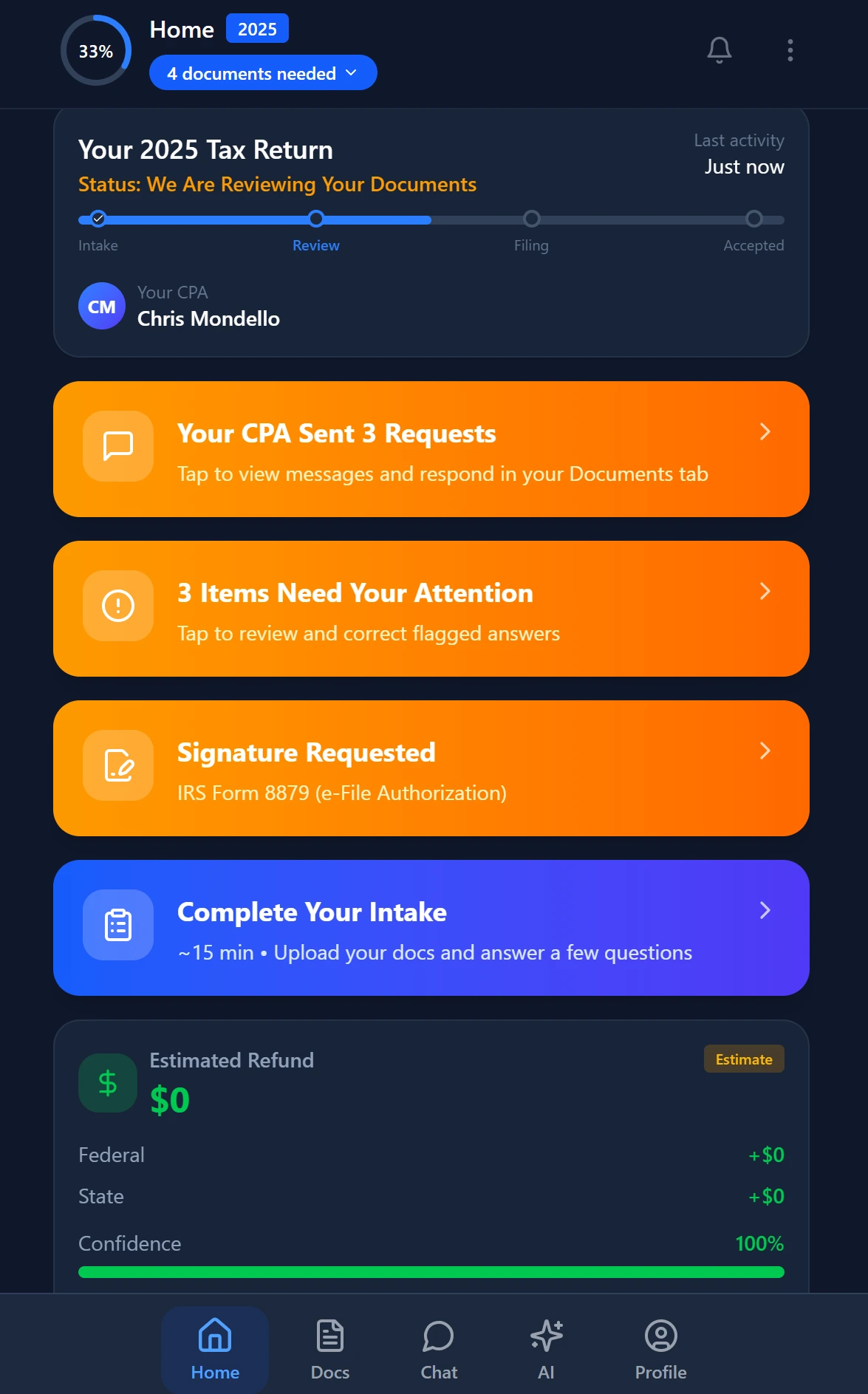
Smart intake auto-fills from uploaded documents and prior-year data
Practice Management vs Project Management: A Structural Difference
The distinction between practice management and project management is not marketing language — it reflects a genuine architectural difference. Cornell Law's overview of professional responsibility standards underscores that licensed professionals like CPAs operate under duties of competence and confidentiality that general-purpose software was never designed to support. A task management tool that stores client SSNs in a plain custom field, for example, may expose a firm to IRS Publication 4557 safeguarding requirements it did not know it was violating.
Purpose-built accounting workflow software is designed around the CPA firm lifecycle: engagement initiation, document collection, preparation, review, signature, filing, and post-filing monitoring. Each stage has specific compliance touchpoints. TaxScout's pipeline, for instance, maps all 12 stages to that lifecycle and automates status transitions based on document receipt, extraction completion, and e-signature events — not generic task completion.
ClickUp's automation model is built around task status changes and due date triggers. That works for sprint planning. It does not work when the trigger needs to be 'AI extraction confidence score fell below threshold on this W-2, route to manual review.' Those are fundamentally different event models, and no amount of ClickUp configuration bridges that gap.
Specific Workflows ClickUp Cannot Replicate for CPA Firms
Let's be concrete about the workflows that break when a CPA firm uses a generic project management tool.
Document extraction and validation. When a client uploads a PDF of their brokerage statement, a purpose-built platform runs it through AI extraction, cross-verifies against OCR output, applies 15 deterministic math rules, and flags discrepancies — all before a preparer touches the file. ClickUp has no extraction layer. The preparer still manually keys every figure. For a firm processing 300+ returns, that is thousands of hours of preventable data entry. See our technical breakdown of AI document extraction for CPAs for a full explanation of the validation pipeline.
IRS transcript and notice monitoring. When a client receives a CP2000 notice or an account transcript updates, a firm needs to know immediately. TaxScout's regulatory intelligence features and IRS transcript monitoring keep preparers ahead of client notices automatically. ClickUp has no IRS data connection whatsoever — a firm would need a separate service, a manual check process, and another integration to approximate this.
E-signature on tax-specific forms. Collecting Form 8879 authorization is a Treasury-mandated requirement for electronically filed returns. ClickUp cannot collect legally compliant e-signatures on tax forms. TaxScout's e-signature workflow handles Form 8879, 4868, FBAR, engagement letters, W-9, and state forms natively — with a full audit trail. Firms evaluating ClickUp often discover this gap only after they have already committed to the platform.
Smart client intake. The IRS Form 13614-C organizer framework exists for a reason: it surfaces the questions that reduce preparer errors and catch life-change events. TaxScout's AI intake engine is modeled on that framework with four-layer prefill — pulling from prior-year returns, uploaded documents, client profile, and AI gap analysis. ClickUp's form builder is generic; it has no concept of tax-year continuity or document-driven prefill.

Your clients see your brand — OTP login, document upload, and real-time status
Total Cost of Ownership: ClickUp Plus Integrations vs a Flat-Rate Platform
When CPAs compare ClickUp to practice management software, they typically look at the line-item subscription price. That comparison is misleading. A functional ClickUp stack for a CPA firm requires integrations that quickly erode the apparent savings.
A realistic ClickUp integration stack for a 10-person tax firm might include: an e-signature tool ($30–$60/mo), a client portal or document collection tool ($50–$150/mo), an OCR or document extraction service ($100–$300/mo depending on volume), a separate email integration or shared inbox tool, and potentially an IRS monitoring service. Before you account for setup time, that stack already approaches $230–$510 per month — plus the $120 ClickUp Business tier — for a total of $350–$630 per month, with no AI research agents, no SSN vault, and no native tax-form logic.
TaxScout Prep Pro is $149 per month flat, with no per-user fees, unlimited clients, and all of the above capabilities included. For a firm that also compares against other dedicated platforms, the TaxScout pricing page shows exactly what is included at each tier. The comparison with TaxDome and comparison with Canopy further illustrate how dedicated platforms differ on both features and total cost.
For additional context on how other firms have navigated this evaluation, browse other practice management resources on our blog — including direct comparisons against tools like Mango and Karbon.
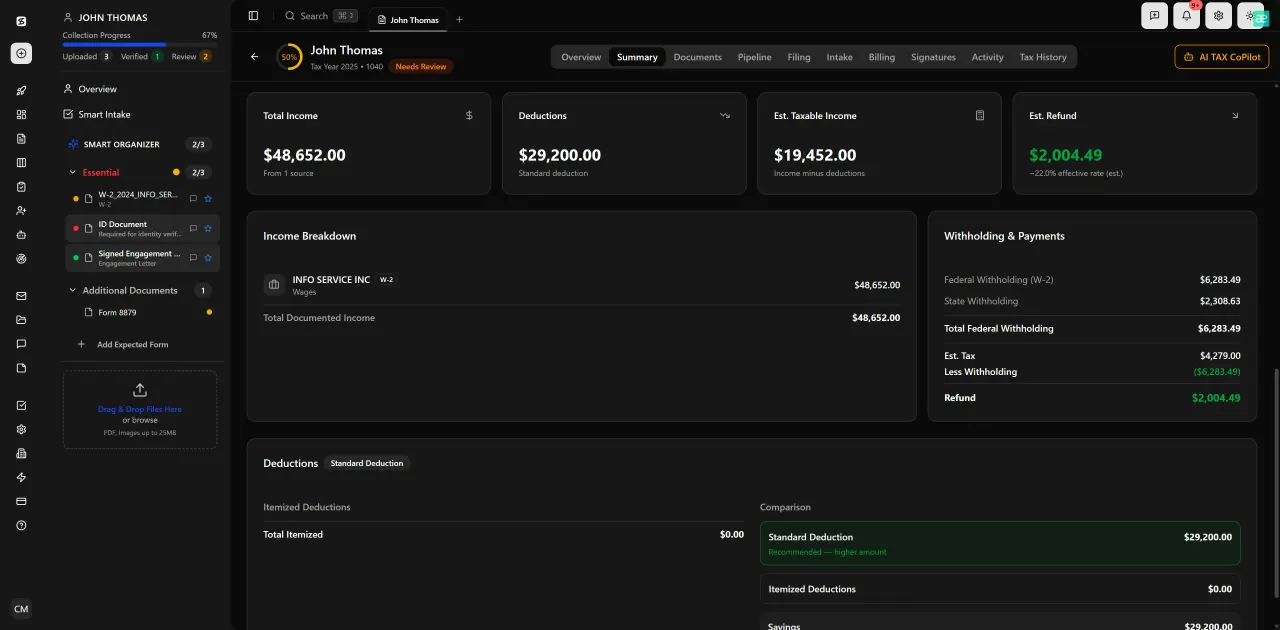
Review with AI assist — 9 agents answer questions with full client context
When ClickUp Might Actually Make Sense for an Accounting Firm
A fair verdict requires acknowledging where ClickUp does add value, even for accounting firms. If your firm's primary need is internal project tracking — managing a website redesign, a technology migration, a marketing calendar, or staff onboarding — ClickUp is a strong tool and you probably already have separate practice management software for client work.
ClickUp also makes sense as a supplemental tool for non-client-facing operational projects where its flexibility is an asset rather than a liability. Some larger firms run ClickUp alongside a dedicated practice management platform: ClickUp for internal ops, a purpose-built system for client-facing tax work. That hybrid model is rational, though it adds software spend and requires clear process documentation to prevent confusion about which system owns which workflow.
What does not work is using ClickUp as a CPA firm's primary practice management platform. The client onboarding gaps alone — no smart intake, no document extraction, no branded portal — create friction for clients and preparers alike from day one. For firms evaluating whether to standardize on a single platform, the guide to choosing CPA practice management software provides a seven-question framework that surfaces these tradeoffs quickly.
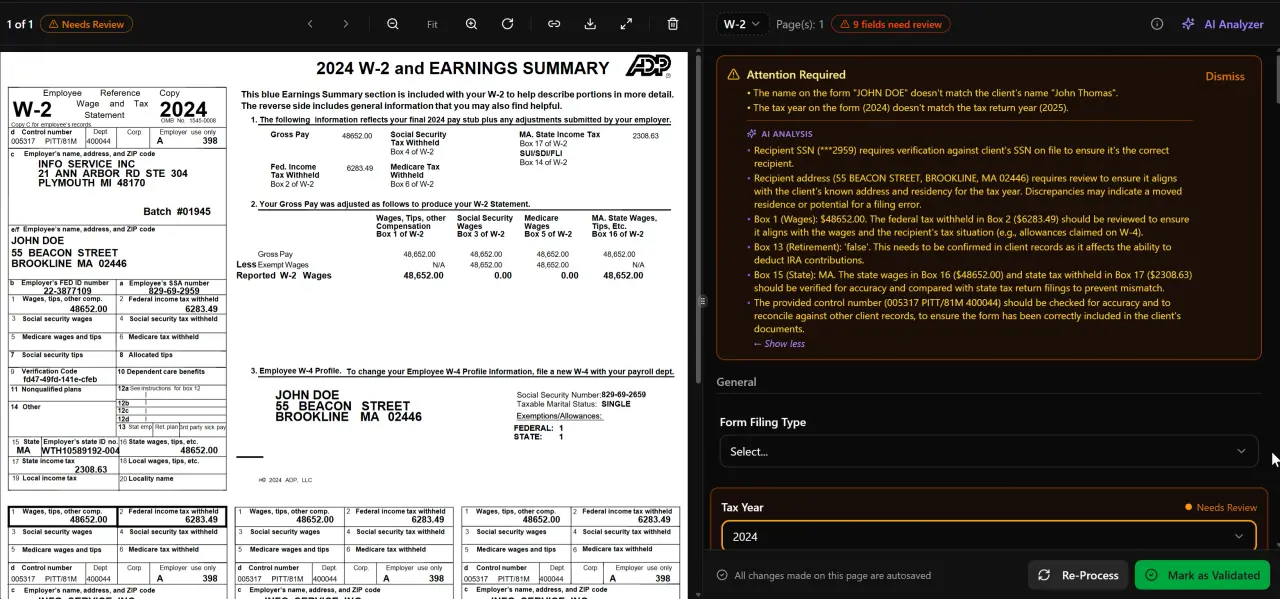
AI classifies, extracts, and validates every document automatically
How TaxScout Replaces the Entire ClickUp-Plus-Integrations Stack
TaxScout was built specifically for CPA firms processing individual and business tax returns. Every feature in the platform maps to a real workflow that preparers and firm administrators execute during tax season and throughout the year.
The AI document extraction engine processes W-2s, all 1099 variants, K-1s, 1098 series, 1095 series, and the full 1040 with schedules — running each document through a 5-layer validation pipeline that includes confidence scoring, OCR cross-verification, 15 deterministic math rules, and cross-document validation. The split-screen PDF viewer lets preparers click any extracted field to see its source location in the original document. That is not a feature you build in ClickUp; it is an architectural capability that requires purpose-built engineering.
The client portal ships branded with your firm's identity and uses OTP login — no passwords for clients to forget or reset. The e-signature workflow covers every tax-specific form. The pipeline management board gives every preparer a real-time view of where each return stands across 12 customizable stages. And the AI research agents provide real-time answers to tax questions by searching IRS, Treasury, Cornell Law, SSA, and Congress sources — something no project management tool has ever attempted.
TaxScout also works with the tax preparation software your firm already uses: Drake, CCH Axcess, UltraTax CS, Lacerte, ProConnect, and ProSeries. It does not replace your tax engine; it replaces the duct-tape layer of project management tools, shared inboxes, e-sign services, and document portals that currently sit around it. Read more about the Drake Tax Software integration if your firm runs Drake.
Still evaluating whether ClickUp can be configured to handle your firm's tax workflows?
TaxScout delivers AI document extraction, IRS deadline tracking, e-signatures, and a client portal in one flat-rate platform — built for CPA firms from day one.

Every client gets organized documents, status tracking, and a complete history
Frequently Asked Questions
ClickUp can handle internal project tracking for accounting firms, but it lacks the core capabilities that CPA practice management requires: AI document extraction, IRS deadline automation, a branded client portal, native e-signatures for Form 8879, and SSN vault encryption. Firms that try to use ClickUp as their primary practice management platform typically spend 80–120 hours on configuration and still need multiple paid integrations to approximate basic tax workflow functionality.
Keep reading
Amended FBAR Procedures: How CPAs Correct Foreign Account Errors Without Triggering Penalties
Oct 12, 2026 · 1 min read
Transparency in Coverage Final Rules: What CPA Firms Must Do Now
Oct 12, 2026 · 1 min read
Backdoor Roth IRA: How CPAs Execute the Strategy for High-Income Clients
Oct 12, 2026 · 1 min read
Stay up to date
Get the latest tax tech insights delivered to your inbox.