CPA Tax Intake Forms: Collect Client Data with AI
Static PDF organizers and email chains have broken the tax intake process for CPA firms — and patching them with better PDFs won't fix the underlying problem. AI-powered tax intake forms ask the right follow-up questions automatically, flag missing documents, and hand off clean data directly to…
Every tax season, the same scene plays out in CPA firms across the country: a preparer opens a client file and finds a half-completed PDF organizer, three unrelated documents attached to a reply email, and a sticky note asking about the W-2 from a second job. The intake process hasn't started — it's just the first fire to put out. For firms evaluating their tax intake forms CPA approach, this trade-off compounds over time.
Tax intake forms for CPA firms are broken at the foundation. Not because practitioners haven't tried to fix them, but because the tools most firms use — static PDF organizers, email chains, or generic portal upload screens — were designed for a world where the CPA does all the thinking. They collect data passively, generate no follow-up, and hand off nothing to the actual prep workflow. The result is a manual relay race that wastes hours before a single line of a return gets prepared. Each of these factors directly shapes how tax intake forms CPA plays out in practice.
This guide explains how AI-native intake replaces that broken relay with a connected workflow: smart form delivery, automated gap detection, AI document extraction, and a direct handoff to tax prep — with no manual rekeying in between. Before diving into the solution, it helps to understand exactly why the tax intake forms CPA practices have used for decades create so much friction in the first place.
Why Static Tax Organizers Fail Modern CPA Firms
The PDF tax organizer has been a staple of CPA practice for decades. It's a checklist masquerading as a data-collection tool. A client receives a 12-page PDF, fills in what they remember, attaches whatever they can find, and emails it back. What arrives is almost never complete. Understanding tax intake forms CPA in this context is what separates firms that scale from those that stall.
The cost of that incompleteness lands entirely on your staff. A preparer reviews the organizer, identifies what's missing, drafts a follow-up email, waits for a response, and repeats the cycle until the file is ready to open in Drake, UltraTax, or Lacerte. According to research from the Bureau of Labor Statistics, accountants and auditors spend a significant portion of their working hours on administrative coordination — and in tax practices, manual intake follow-up is one of the most predictable sources of that overhead. This is precisely where a deliberate tax intake forms CPA strategy pays off.
The average CPA firm sends 3–5 follow-up communications per client before intake is complete. For a 300-return practice, that's potentially 900–1,500 individual emails or calls just to collect data — before any prep work begins. That's not a client problem. It's a system design problem. Tax intake forms CPA sits at the center of this decision — get it wrong and the rest unravels.
Portal-based uploads improve document collection slightly, but they don't solve the underlying issue. Clients still don't know what to upload. They drag in a folder of PDFs, some of which are duplicates, some of which are unreadable scans, and some of which are the wrong year entirely. The portal has no intelligence — it can't tell a client they forgot their Schedule K-1 or that their 1099-R is missing the state withholding section. When firms revisit their tax intake forms CPA priorities, the gaps usually surface here.
Tired of chasing clients for missing documents before you can open a single return? See how TaxScout's AI-native intake eliminates the follow-up cycle from the first touchpoint. → Book a 15-Min Demo — See It Live
How AI-Powered Tax Intake Forms Actually Work
Replacing a static organizer with an AI-powered equivalent isn't just a cosmetic upgrade. It changes the logic of the entire intake workflow. Here's how a well-designed AI intake system operates compared to the traditional approach.
TaxScout's smart intake engine is modeled on IRS Form 13614-C — the same structure the IRS uses for comprehensive intake interviews — and adds four layers of intelligence on top of it. For any firm rethinking how tax intake forms CPA workflows should function, this architecture represents a meaningful departure from the static organizer model.
Layer 1: Document-first prefill. When a client uploads a W-2 before touching the intake form, the system reads it immediately. The employer name, EIN, wages, federal withholding, and state data auto-populate the corresponding intake fields. The client doesn't re-type information that already exists in a document they just provided.
Layer 2: Prior-year prefill. For returning clients, last year's filed return data pre-populates baseline fields — address, filing status, dependents, employer history. Clients confirm, update, or flag changes rather than rebuilding their profile from scratch.
Layer 3: Profile prefill. Entity-level data already stored in the system (business structure, ownership percentages, state registrations) auto-fills relevant sections for business returns, eliminating redundant questions for clients with multiple entities.
Layer 4: AI gap analysis. This is where static organizers have no equivalent. A background workflow analyzes everything collected — uploaded documents, intake responses, prior-year data — and generates a prioritized list of missing or inconsistent items. If a client has a Schedule E from last year but hasn't uploaded a K-1 this year, the system flags it. If a W-2 shows a retirement plan contribution code but no 1099-R has arrived, the system queues a targeted follow-up question. Clients receive specific, contextualized requests instead of generic "please provide all tax documents" messages.
The result is a client intake form for accounting that functions like an AI-assisted preparer interview — progressive, contextual, and self-completing.

Click any extracted field to see its source highlighted on the original PDF
The End-to-End Workflow: Intake to Tax Prep Handoff
What makes AI intake genuinely different from a smarter form is what happens after the client submits. The workflow below shows how TaxScout connects intake to preparation without a manual handoff.
Step 1: Client receives a branded intake link via the client portal. No account creation, no password. Authentication happens via a one-time code sent to their email. The form is mobile-responsive and loads with prior-year and profile data already filled in.
Step 2: Client completes the intake and uploads documents. The AI gap analysis runs in the background as uploads arrive. Document-first prefill populates form fields in real time. The client sees what's still outstanding before they close the browser.
Step 3: AI document extraction processes every uploaded file. TaxScout's AI document extraction handles 180+ tax form types — W-2s, all 1099 variants, K-1s for partnerships, S-corps and trusts, 1098 series, 1095 series, and 30+ supporting categories. Every extracted field carries a per-field confidence score (0.0–1.0). A 5-layer validation pipeline runs automatically: document quality routing, AI extraction with confidence scoring, OCR cross-verification using four matching strategies, 15 deterministic math rules covering tax equation chains and hallucination detection, and 18 post-extraction rules covering cross-field checks and foreign activity flags.
Step 4: A structured data package lands in the preparer's queue. Instead of opening an email with attachments, the preparer opens a reviewed file with extracted data already mapped, confidence flags highlighted, and a split-screen PDF viewer where clicking any field highlights its exact location on the source document. The Excel 1040 calculator — 66 sheets, approximately 36,000 formulas — can be auto-populated directly from the extracted data. This is the handoff that well-designed tax intake forms CPA systems are built to deliver — structured, validated, and prep-ready without any manual rekeying.
Step 5: Pipeline advances automatically. When intake is marked complete and documents pass validation, the client file moves forward in the pipeline management system. The 12-stage workflow from New Client to Filed auto-advances based on completion conditions, so no one has to manually move a card.
As we covered in the complete guide to CPA workflow automation, the intake stage is where most automation efforts stall — firms invest in filing and billing automation but leave the front door manual. Connecting intake to the rest of the pipeline closes that gap.
AI Intake vs Static Forms vs Portal Uploads: Side-by-Side Comparison
| Feature | AI-Native Intake (TaxScout) | Static PDF Organizer | Generic Portal Upload |
|---|---|---|---|
| Prior-year data prefill | Automatic (4-layer prefill) | Manual recopy | Not available |
| Document-first prefill | Yes — upload triggers field population | No | No |
| AI gap detection | Yes — background workflow, prioritized | No | No |
| Missing document alerts | Yes — specific and contextual | No | Generic reminders only |
| OCR + data extraction | Yes — 180+ form types, 5-layer validation | No | Varies (basic at best) |
| Handoff to prep workflow | Direct — structured data to preparer queue | Manual rekeying | Manual rekeying |
| Client experience | Passwordless portal, mobile-friendly | Email attachment | Requires account/login |
| Follow-up emails needed | Near zero (AI handles gaps) | 3–5 per client average | 2–4 per client average |
| Prep software compatibility | Works with Drake, CCH, UltraTax, Lacerte | Manual export | Manual export |
| Pricing model | Flat — included in all TaxScout plans | Free (but labor-intensive) | Varies |
The pricing difference is material when you account for staff time. Canopy charges $11 per client extra for its Smart Intake feature — meaning a 300-client firm pays $3,300/year just for intake, before paying for any other module. TaxScout includes AI intake in every plan with no per-client fees. For firms comparing options, the true cost of tax intake forms CPA solutions only becomes clear when per-client fees are factored in alongside staff time.

Your clients see your brand — OTP login, document upload, and real-time status
What AI Intake Means for Staffing and Seasonal Capacity
The ROI of digital tax organizer automation isn't abstract. Consider a firm preparing 300 returns per season with an average of four follow-up touches per client before intake is complete. If each touch takes 8 minutes (drafting, sending, logging a response), that's 32 minutes per client — 160 hours across the season just on intake follow-up. At a billing rate of $75/hour for staff time, that's $12,000 in cost attributable to a broken intake process.
AI gap analysis and document-first prefill don't eliminate follow-up entirely, but they shift it from generic "what's missing?" emails to specific, automated, contextual requests that clients can respond to in the portal without involving a preparer. The client portal handles the communication layer, including OTP login, so clients get targeted requests and respond in one place.
That capacity recovery matters most during the weeks before April 15. The correlation between intake bottlenecks and CPA burnout is direct — as we noted when examining how AI reduces seasonal burnout for CPAs, the intake grind in January and February is one of the primary drivers of mid-season exhaustion. Automating intake doesn't just save hours — it changes the texture of the season.
The Journal of Accountancy has consistently reported that client service quality — not technical skill — is the primary driver of client retention in CPA practices. A client who receives a smart, pre-filled intake form instead of a 12-page PDF and hears back with specific (not generic) document requests has a materially different experience. That experience translates into retention and referrals. Firms that treat tax intake forms CPA as a client-facing product — not just a back-office checklist — tend to see measurably better retention numbers as a result.
!TaxScout smart intake form showing AI gap detection and document-first prefill for tax intake forms CPA firms use to eliminate manual client follow-up
Security and Compliance Considerations for AI Client Intake
Digital tax organizer workflows handle sensitive client data — SSNs, EINs, income figures, account numbers. The intake system must meet the same security standards as the rest of the practice management stack.
TaxScout's intake process runs within the same security architecture that covers the full platform: AES-256-GCM encryption for the SSN vault with a dedicated encryption key, rate-limited reveal with full audit logging, and PostgreSQL row-level security on all business tables. The IRS Publication 4557 guidelines for safeguarding taxpayer data apply to every layer of the intake workflow, including document transmission, storage, and access controls. US-based AWS and Azure infrastructure ensures client data never leaves the country.
The 7-role RBAC system (Owner, Admin, Manager, Preparer, Staff, Viewer, Custom) controls who can view intake data, access extracted documents, or move a file through the pipeline — with 50+ granular permission types. A staff member entering intake responses doesn't need access to billing records; a preparer reviewing extracted data doesn't need admin-level permissions.
For firms subject to GDPR or CCPA obligations, TaxScout's 13-step DSAR anonymization covers 28 tables — meaning a client's right-to-erasure request can be executed completely without manual data hunting.
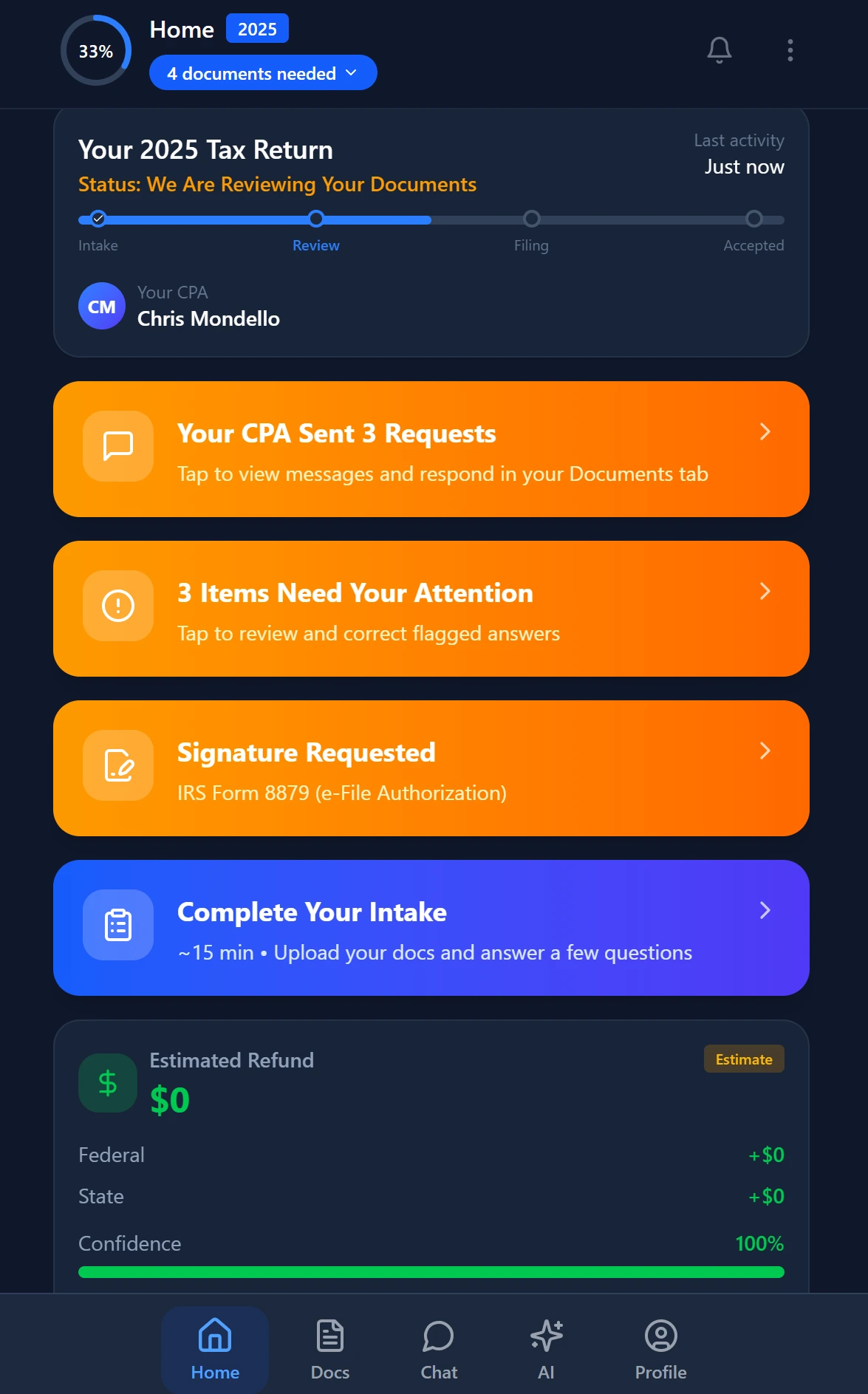
Smart intake auto-fills from uploaded documents and prior-year data
Practical Comparison: TaxScout vs Canopy Smart Intake
Canopy markets its Smart Intake feature prominently but prices it separately from its core platform at $11 per client. For a 300-client firm, that adds $3,300/year on top of the per-user module pricing — which already runs approximately $45/user/month per module. A 10-person firm using Canopy's workflow, portal, and intake modules could easily exceed $660/month in platform fees before accounting for Smart Intake costs.
TaxScout's AI intake is included in the Prep Starter plan at $49/month (up to 150 returns) and the Prep Pro plan at $149/month (up to 500 returns) — flat pricing with no per-user fees, no per-client charges, and no module unlocks. The TaxScout vs Canopy comparison breaks down the full pricing and feature differential in detail.
!TaxScout pipeline kanban view showing auto-advance from intake complete to preparation stage, demonstrating tax intake forms CPA workflow automation
Building the Intake-to-Prep Connection in Your Firm
If your firm is evaluating whether to replace your existing PDF organizer or generic portal with an AI intake workflow, start with the measurement problem. Before committing to any platform, count the actual follow-up touches your team logs per client in a typical season. Most firms that do this count discover the problem is twice as large as they estimated.
The architectural question is whether your intake tool connects to your document extraction, your pipeline, and your prep software — or whether it's an island that dumps a PDF somewhere and stops. True tax intake form automation for CPA firms means the data flows forward: from the client's responses, through AI extraction, into structured prep-ready data, and into the workflow stage that triggers prep work. When evaluating tax intake forms CPA solutions, the firms that ask this architectural question upfront avoid the costly mistake of automating only one step while leaving the rest manual.
That connection is what the PDF organizer was never designed to make. It's also what generic portal uploads can't replicate. AI-native intake isn't a better form — it's the first step in a connected workflow that compounds its value at every subsequent stage.
Ready to replace your PDF organizer with an intake workflow that actually feeds your prep process? TaxScout gives your firm AI-native intake, document extraction across 180+ form types, and a connected pipeline — all for $49/mo flat. → Book a 15-Min Demo

Track every return from intake to filed with drag-and-drop pipeline management
Frequently Asked Questions
AI-native intake forms like TaxScout's smart organizers analyze client responses in real time and automatically detect gaps — for example, flagging a missing W-2 when a client mentions a second job but uploads no corresponding document. TaxScout sends automated follow-up requests targeting only the missing items, eliminating the manual back-and-forth that costs preparers an average of 2–3 hours per complex return. The result is a complete, prep-ready file before a single line of the return is touched.
Keep reading
Stay up to date
Get the latest tax tech insights delivered to your inbox.