AI Tax Validation Software for CPAs: 5-Layer Error Detection
Most CPA firms catch filing errors the hard way — after submission. TaxScout's 5-layer AI validation pipeline runs a structured gauntlet of math checks, OCR cross-verification, cross-form logic, and anomaly detection before a single return leaves your desk. Here's exactly how each layer works and…
Your client's return looks clean. The W-2 wages tie to the 1040. The federal withholding matches. You've reviewed the PDF twice. You click submit — and three weeks later, an IRS notice lands because a 1099-B cost basis was blank, a phantom 1099-INT got hallucinated during scanning, or a foreign tax credit carryover from last year wasn't applied. This is precisely the problem that ai tax validation software for CPAs is built to solve — and why TaxScout's 5-layer validation pipeline exists. None of those errors would have shown up in a standard visual review. They require a structured, multi-step validation logic that most practice management tools — and most human reviewers under deadline pressure — simply don't run.
Not general automation. Not document renaming or workflow reminders. A deterministic, layered validation pipeline that treats every return as a structured data object and checks it against known error patterns before filing.
TaxScout's 5-layer validation architecture was built specifically for this gap. Below, we'll walk through what each layer actually does, what category of error it catches, and why the sequence matters.
Why Filing Error Rates Are Higher Than CPAs Think
The IRS rejects approximately 10–15 million returns annually for math errors alone — and that figure only counts errors the IRS's own systems flag automatically. It doesn't count undetected mismatches that pass initial processing but trigger downstream notices, penalties, or amended returns.
For individual CPA firms, the stakes are more personal. A single amended return costs your staff 2–4 hours of rework. An IRS notice to a high-net-worth client costs you the relationship. Repeated errors create E&O exposure and — increasingly — are cited in malpractice claims against tax preparers.
The uncomfortable reality: traditional review workflows weren't designed to catch structured data errors. They were designed to catch obvious visual anomalies — a missing signature, a blank field, a number that looks wrong to an experienced eye. They are not designed to verify that the sum of W-2 box 4 across six employers doesn't exceed the Social Security wage cap, or that a phantom 1099-INT wasn't generated by an OCR misread of a scanning artifact.
Generic automation tools make this worse, not better. When a platform like Canopy's basic document processing renames and routes your files but applies no extraction validation, you've added speed without adding accuracy. You've moved the error downstream faster.
As we explored in What Is AI Document Extraction for CPAs: The Complete Technical Guide, extraction quality is only as good as the validation that follows it. Extraction without validation is a faster way to ingest errors. That's the core argument for dedicated ai tax validation software for CPAs — it's not about extracting data faster, it's about verifying it before it reaches the return.
Tired of catching errors after the fact? See how TaxScout's structured validation pipeline changes that. → Request Early Access — Limited Beta Spots
TaxScout's AI Tax Validation Software for CPAs: Each Layer, Each Error Category
TaxScout's ai tax validation software for CPAs doesn't run a single pass over your documents. It runs five discrete validation layers in sequence, each targeting a specific failure mode. Here's what each one does.
Layer 0: Document Quality Routing — Catching Junk Before It Becomes Data
Before any extraction runs, every uploaded document goes through confidence triage. Layer 0 classifies each file as recognized, unrecognized, or junk — and routes accordingly.
This matters because a significant percentage of client-submitted documents are unusable: photos taken at an angle, faxed copies with degraded resolution, screenshots that clip key fields. If these files enter the extraction pipeline without routing, the AI extracts partial data with high confidence scores, and those partial extractions end up on the return.
Layer 0 stops that. Documents below the confidence threshold are flagged for human review before extraction begins. The error is caught at the intake door, not after the return is assembled.
Layer 1: AI Extraction with Per-Field Confidence Scoring — Quantifying Uncertainty
For documents that pass routing, Layer 1 runs AI extraction across 180+ tax form types — W-2s, all 1099 variants (A through SA), K-1s for partnerships, S-corps, and trusts, the full 1098 and 1095 series, 1040 with all schedules, plus identity documents and business forms.
Every extracted field receives a confidence score between 0.0 and 1.0. This is the foundational principle of any serious ai tax validation software for CPAs: rather than treating extracted data as binary (correct or incorrect), the system maintains a probabilistic confidence model for every single field across every document.
Fields below the confidence threshold are flagged for preparer review before they populate the return. High-confidence extractions pass through. This alone prevents the most common category of AI error detection in tax filing: misread numeric characters (8 vs 3, 0 vs 6) that pass visual review but fail downstream math checks.
Layer 1.5: OCR Cross-Verification — Four Matching Strategies
Layer 1.5 is where TaxScout's automated tax review for CPAs gets technically specific. After AI extraction, the system runs OCR cross-verification using four distinct matching strategies:
- Exact substring matching: The extracted value must appear verbatim in the raw OCR text of the document
- Currency variant matching: Handles formatting differences ($1,234.00 vs 1234 vs 1,234)
- Identifier partial matching: For EINs, SSNs, and account numbers where partial masking is standard
- Fuzzy name matching via Levenshtein distance: Catches OCR character substitutions in employer names and payer names
This cross-verification step is specifically designed to catch what we call hallucination risk — cases where an AI extraction model generates a plausible-looking value that doesn't actually appear in the source document. Every extracted field that can be verified against raw OCR output is verified. It's what separates genuine ai tax validation software for CPAs from simple scan-to-populate tools.
Layer 2: 15 Deterministic Math Rules — Tax Equation Chain Validation
This is the layer that catches the errors that get CPAs in trouble with the IRS. Layer 2 runs 15 deterministic mathematical validation rules against the extracted data. These aren't heuristics or pattern-matching guesses — they're hard rules derived from the tax code.
Key checks include:
- Tax equation chain validation: AGI → taxable income → tax liability must chain correctly across lines
- FTC carryover checks: Foreign tax credit carryover from prior years must reconcile against current-year utilization
- Phantom 1099-INT hallucination detection: Specifically flags generated interest income that doesn't correspond to a verified payer in the document set
- W-2 component explosion detection: Catches cases where W-2 box breakdowns (boxes 12, 14) don't reconcile with total wage figures
These 15 rules represent the most common mathematical error patterns in individual and business returns. Running them deterministically — not as AI suggestions but as hard pass/fail checks — is what makes this layer of ai tax validation software for CPAs defensible to clients and auditors.
Layer 3: 18 Post-Extraction Validation Rules — Cross-Field and Cross-Form Logic
If Layer 2 catches math errors within a single document or return section, Layer 3 catches logical inconsistencies across the entire return. This includes 18 post-extraction validation rules covering:
- Cross-field checks: Schedule E rental income must reconcile with reported mortgage interest on the 1098 for the same property
- Foreign activity flags: Presence of foreign financial accounts triggers FinCEN 114 and Form 8938 requirement checks
- Tax math validation: AMT exposure triggers based on preference items, passive activity loss limitations, and capital loss carryover caps
This is where ai tax validation software for CPAs moves beyond simple data extraction into genuine return logic. It's checking not just whether numbers were read correctly, but whether the return is internally consistent as a tax document.
Cross-Document Validation: Duplicate Detection and Aggregate Checks
Beyond the five primary layers, TaxScout also runs cross-document validation across the entire client document set. This catches duplicate 1099s from the same payer (common with amended statements), aggregate W-2 wage inconsistencies when a client has multiple employers, and payer consistency checks that flag when the same EIN appears under different entity names across documents.
This layer specifically addresses the multi-document error pattern that manual review almost never catches under deadline pressure: two slightly different versions of the same document, both uploaded by the client, with different values.

Click any extracted field to see its source highlighted on the original PDF
Why No Competitor Offers This Level of Validation
The competitive gap here is specific and worth naming directly. TaxDome — used by 10,000+ firms — has no AI document extraction, no confidence scoring, no math validation rules, and no cross-document logic. It's excellent practice management software that moves documents through a workflow. It does not validate them.
Canopy's basic AI document processing renames files and does some data organization. It does not run a 5-layer validation pipeline. Its Smart Intake module charges $11/client extra and focuses on data collection, not accuracy verification.
GruntWorx handles scan-to-populate for roughly 20 form types with PDF organization. There's no structured validation layer, no confidence scoring, no cross-form logic.
None of these platforms address the specific question CPAs should be asking: what happens between document ingestion and IRS submission to verify the data is correct? The answer, for firms that want genuine ai tax validation software for CPAs, is TaxScout's 5-layer pipeline.
For a detailed look at how this compares in practice, see How AI Helps CPAs File Taxes More Accurately, which walks through the full AI-assisted filing workflow.
Real-World Workflow: What This Looks Like for a 1040 with Multiple Income Sources
A client uploads 14 documents: two W-2s, a 1099-DIV, a 1099-B with 23 transactions, a 1098 mortgage interest statement, a K-1 from a partnership, and a state estimated tax payment summary.
Layer 0 routes all 14 documents. One — a photo of the K-1 taken on a phone — is flagged as low confidence and queued for preparer review before extraction.
Layer 1 extracts all fields from the 13 remaining documents with per-field confidence scores. Three fields on the 1099-B come back at 0.71 confidence (below threshold) and are flagged — all three are cost basis fields on older transactions.
Layer 1.5 runs OCR cross-verification on all extracted values. The employer name on W-2 #2 has a one-character substitution ("lnc" instead of "Inc") that fuzzy matching catches and corrects.
Layer 2 runs 15 math rules. It detects that the aggregate Social Security withholding across both W-2s exceeds the annual cap — a classic excess withholding situation that entitles the client to a credit. Without this check, that credit would be missed.
Layer 3 runs 18 cross-field rules. The partnership K-1 shows foreign income, triggering an automatic flag for potential Form 1116 and FBAR requirements. The preparer is notified before the return is assembled.
Cross-document validation flags that two versions of the 1099-DIV were uploaded — an original and a corrected statement with different qualified dividend figures. The corrected version is flagged for preparer confirmation.
Total issues surfaced: 7. Time to surface them automatically: seconds. Time a manual review might have caught all 7 under deadline pressure: not guaranteed.
This is the difference between automated tax review for CPAs that moves work faster and ai tax validation software for CPAs that makes work correct.
The E&O implications are real. As we noted in How to Reduce CPA Burnout During Tax Season with AI, the psychological cost of catching errors after filing — or not catching them at all — is one of the primary drivers of preparer burnout and professional risk.
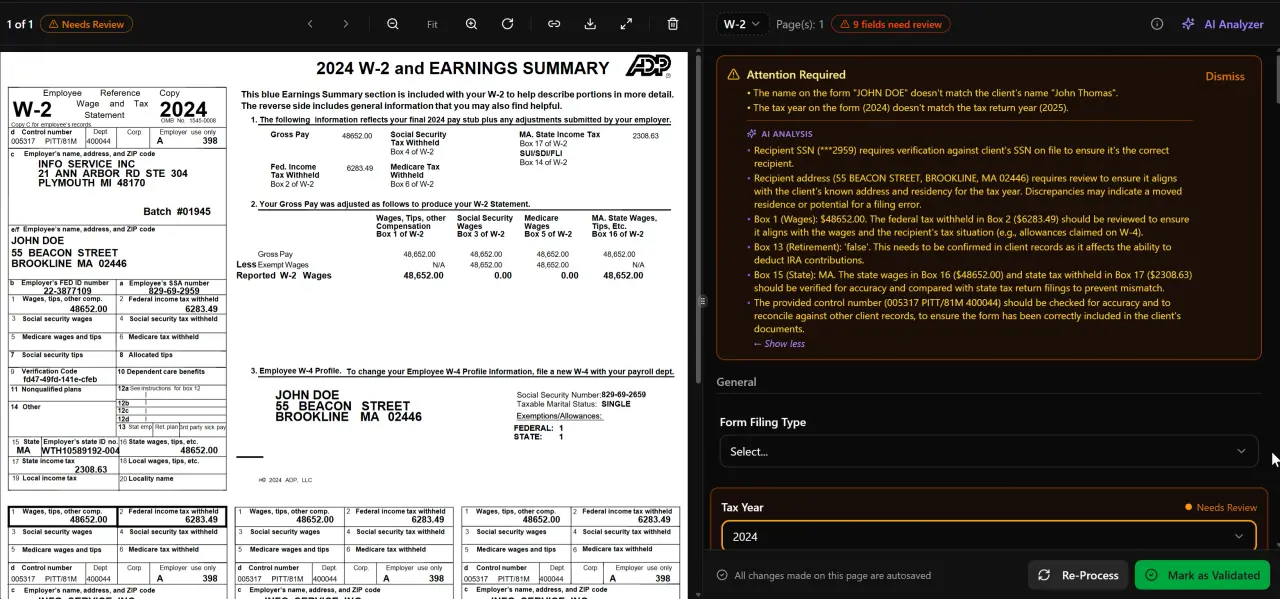
AI classifies, extracts, and validates every document automatically
Pricing: What This Validation Infrastructure Costs
TaxScout's full 5-layer validation pipeline — including all 15 math rules, 18 post-extraction rules, OCR cross-verification, and cross-document validation — is included in every plan, starting at $49/month flat for your entire firm (up to 10 team members, 20 clients/month).
There are no per-user fees. A 10-person firm pays $49/month total. The comparable cost at TaxDome is approximately $1,000/month. Canopy with comparable features runs approximately $660/month for the same team — and still doesn't include structured validation logic.
For firms evaluating ai tax validation software for CPAs, the pricing difference is significant: $49/month versus $660–$1,000/month, with TaxScout being the only platform in that comparison that actually runs deterministic pre-filing validation.
See TaxScout pricing for a full plan comparison.
Ready to scale your firm?
TaxScout gives your firm AI document extraction and 5-layer pre-filing validation for $49/mo flat. → Request Early Access — White-Glove Onboarding Included
FAQ
Q: How is TaxScout's 5-layer validation different from what my existing tax prep software does? A: Tax preparation software like Drake, CCH Axcess, or Lacerte runs error checks on return data you've already entered. TaxScout validates the source documents before that data ever gets entered, catching extraction errors, math inconsistencies, and cross-form mismatches at the intake stage. The two systems work together — TaxScout handles pre-filing validation, your prep software handles the actual return filing.
Q: What happens when a validation layer flags an issue? Does it block the workflow? A: Flagged issues surface in the preparer's review queue with specific details: which document, which field, which rule triggered the flag, and why. The preparer reviews and resolves or overrides. Nothing is blocked automatically — the system surfaces issues for human decision, it doesn't make filing decisions.
Q: Does the 5-layer validation work for business returns, not just individual 1040s? A: Yes. The validation pipeline covers 180+ form types including K-1s for partnerships, S-corps, and trusts, business income forms, and supporting schedules. Cross-document validation is particularly valuable for business clients with complex entity structures and multiple K-1s.
Q: Can TaxScout's AI validation replace a second-preparer review? A: It's designed to augment human review, not replace it. What it does is ensure that by the time a second reviewer looks at a return, the mechanical and mathematical error categories have already been cleared. Reviewers can focus on judgment calls and planning opportunities rather than checking whether box 4 on six W-2s adds up correctly.
Q: What if a document type isn't in TaxScout's recognized form library? A: Layer 0 (document quality routing) flags unrecognized documents before extraction begins and routes them to a human review queue. Unrecognized documents are never silently processed with low-confidence extractions — the system surfaces them explicitly so the preparer can handle them manually.
Frequently Asked Questions
Tax preparation software like Drake, CCH Axcess, or Lacerte runs error checks on return data you've already entered. TaxScout validates the source documents before that data ever gets entered, catching extraction errors, math inconsistencies, and cross-form mismatches at the intake stage. The two systems work together — TaxScout handles pre-filing validation, your prep software handles the actual return filing.
Stay up to date
Get the latest tax tech insights delivered to your inbox.